Table of Contents
Signal-based prospecting helps agencies and sales teams identify businesses worth reviewing based on their ideal customer profile (ICP) and relevant business data. The challenge is turning that information into a prospect list with clear reasons for prioritizing each business.
For teams working with large prospect lists, finding businesses is only the first step. Reviewing company details, checking customer feedback, and documenting useful signals can take time, especially when the information is spread across multiple records.
With Outscraper, teams can use Business Catalog’s predefined Business Signals filters to find potential prospects or collect business records through Google Maps Scraper. They can then examine customer reviews when needed, document supporting evidence, and organize qualified prospects in a spreadsheet or CRM.
Quick Answer: How to Build a Signal-Based Prospecting Workflow
- Define your target businesses and the data needed to qualify them.
- Set the signal criteria relevant to your services and ICP.
- Use Outscraper Business Catalog’s signal filters or Google Maps Scraper to find matching businesses.
- Review business details and customer feedback for relevant evidence.
- Document your findings and assign prospect priorities in a spreadsheet or CRM.
- Prepare the reviewed prospect list for outreach.
Use Outscraper’s Google Maps Scraper to collect business details and contact information for prospect research and qualification.
What You Need Before Building a Signal-Based Prospecting Workflow
Before collecting business data, decide what your prospect list needs to accomplish. Your target businesses, the services you offer, and the information available for review will determine how you organize the workflow.
If you need help understanding which business activities and changes can indicate prospecting opportunities, see our article on B2B buying signals for prospecting.
For example, a reputation management agency might research dental clinics in a specific city. Rather than contacting every clinic, the agency wants to identify businesses with customer feedback that deserves closer examination.
Define the Purpose of Your Prospect List
Start with the service your agency plans to offer and the businesses most likely to need it.
A local SEO agency might look for businesses with incomplete online information, while a reputation management agency might review ratings and customer feedback.
The purpose should be specific enough to guide your research. In the dental clinic example, the agency wants a list of clinics that match its target market, along with evidence that helps determine which businesses require further qualification.
Identify the Business Information You Need
Once you know the purpose, determine which business details are necessary for your research.
Outscraper’s Google Maps Scraper can provide business information such as categories, locations, ratings, review counts, and websites. For campaigns requiring individual customer feedback, Google Maps Reviews Scraper can be used to collect additional review information.
Separate the collected information from your agency’s own observations. Business ratings and review counts are source data, while notes about recurring complaints, prospect suitability, and research priority are decisions made during qualification.
This distinction makes it easier to build a prospect list that explains why each business was selected.
Set Up Your ICP and Signal Criteria for Data Collection
The business data you need depends on the companies you target and the services you offer. A reputation management agency may focus on ratings and customer feedback, while a web design agency may look for businesses without websites.
Before starting a search in Outscraper, define the target market, identify the information you need, and decide how you will review the collected records.
Define Your Target Business Category and Location
Start with a specific business category and geographic area.
For example, a reputation management agency might target dental clinics in Chicago, Illinois. This gives the agency a defined group of businesses to research instead of collecting unrelated companies across different industries.
Consider the characteristics that determine whether a business belongs in your prospect list, such as its category, location, and relevance to your services.
These criteria form the starting point for your Google Maps Scraper search.
Choose the Business Data You Need to Review
Select the data fields that will help you evaluate the businesses in your target market. For a reputation management campaign, the initial dataset might include business names, categories, locations, ratings, review counts, and websites.
Ratings and review counts can help identify businesses for further research. However, understanding what customers are saying requires examining individual reviews.
If your campaign depends on recent complaints or repeated service issues, plan to use Google Maps Reviews Scraper as an additional research step.
Alternatively, Outscraper’s Business Catalog lets you narrow your search using predefined Business Signals filters, including Low rating, No website, and Unclaimed business. These filters help identify businesses for further qualification without manually checking every record in the initial dataset.

The following example shows how an agency might prepare its campaign before selecting and collecting business records.
| Campaign Setting | Example |
|---|---|
| Agency service | Reputation management |
| Target businesses | Dental clinics |
| Target location | Chicago, Illinois |
| Initial business data | Category, location, rating, review count, website |
| Additional review research | Review dates, ratings, and complaint themes |
| Expected result | A reviewed prospect list with supporting evidence and qualification notes |

Use Outscraper Business Catalog to search for businesses by category and location, then narrow your results with predefined Business Signals filters such as Low rating, No website, and Unclaimed business.
Set Initial Prospect Qualification Rules
Decide how you will determine which collected businesses deserve further research.
For a reputation management agency, useful questions might include:
- Does the business match the selected category and location?
- Is its rating below the agency’s chosen review threshold?
- Are negative reviews recent or part of a recurring pattern?
- Is there enough supporting evidence to justify further qualification?
Keep the initial rules simple. For example, the agency might flag businesses below a selected rating threshold for closer examination, then review their recent customer feedback before assigning a priority.
These criteria help organize the research process, but they do not confirm that a business needs the agency’s services or intends to purchase them.
For another example of using business ratings, review counts, and market fit, see how to qualify local business leads using Google Maps data.
By the end of this stage, the agency should have a defined target market, a list of data fields to collect, and basic rules for reviewing the results.
Build a Signal-Based Prospecting Workflow in Outscraper
Once your target market, required business information, and qualification rules are defined, you can start collecting and reviewing business records.
This workflow primarily uses Outscraper’s Google Maps Scraper to collect business data, with Google Maps Reviews Scraper providing additional customer feedback when needed. Alternatively, you can use Business Catalog’s predefined Business Signals filters, such as Low rating, No website, and Unclaimed business, to narrow your initial prospect list.
The following six steps use a reputation management agency targeting dental clinics in Chicago, Illinois, as an example.
Step 1: Collect Target Businesses With Google Maps Scraper
Use Outscraper’s Google Maps Scraper to collect businesses that match your target category and location. For this campaign, search for dental clinics in Chicago, Illinois.
For densely populated areas, the Use ZIP codes option helps organize searches into smaller geographic areas. Enable Delete duplicates to remove repeated business records within the same task, especially when ZIP-code searches overlap. See the ZIP-code scraping guide for additional guidance.
Export the available business details, including names, addresses, ratings, review counts, websites, and phone numbers, for further qualification.
Alternative: Find Prospects Using Business Catalog Signals
You can also use Outscraper Business Catalog to find prospects using predefined Business Signals filters. Select your business category and location, then choose a filter such as Low rating under Advanced Filters.
For the Chicago dental clinic campaign, the agency can use this filter to narrow its prospect list before downloading the matching records for further qualification.
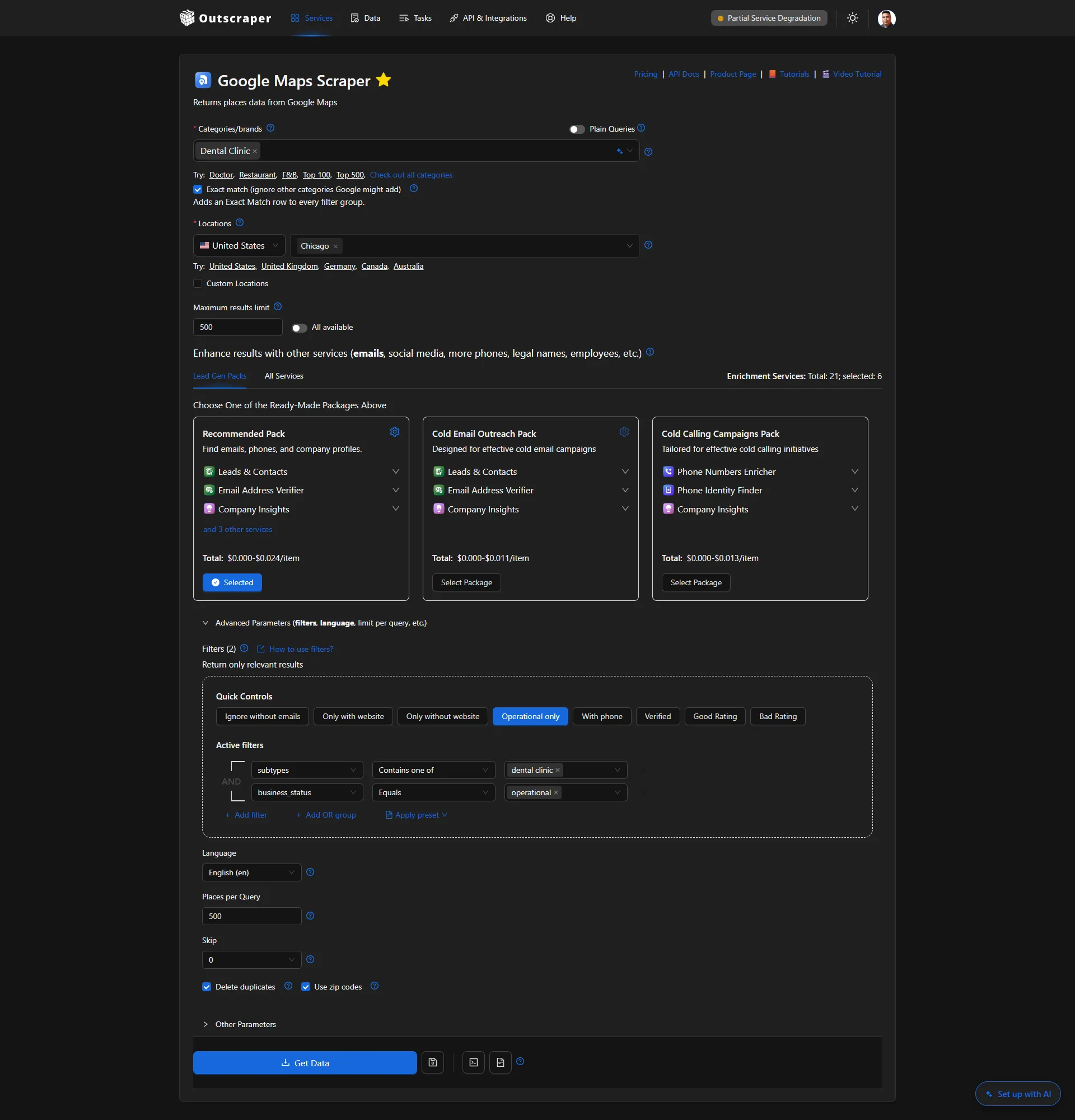
Example Google Maps Scraper setup for collecting dental clinic records across Chicago.
Step 2: Check and Prepare the Business Records
Once the extraction is complete, review the collected business records before evaluating individual signals.
Check whether the businesses match your target category and location. For the dental clinic campaign in Chicago, Illinois, this means excluding unrelated businesses and records outside the selected geographic area.
Look for missing ratings, incomplete business details, or other information that may require additional research. If you combine files from separate extraction tasks, check for duplicates across those files as well.
Keep available business identifiers, such as Google Place IDs, so you can match each business with additional review data during the next step.
Step 3: Examine Customer Reviews Where Needed
Business ratings and review counts can help identify dental clinics worth reviewing, but they do not explain what customers experienced or whether complaints are recent.
For businesses that need closer examination, use Outscraper’s Google Maps Reviews Scraper to collect individual reviews, including available review text, ratings, and dates.
If you’re new to extracting individual customer reviews, follow our step-by-step guide to scraping Google Maps reviews for detailed instructions on setting up and running a review extraction.
For example, a reputation management agency researching dental clinics in Chicago might examine reviews mentioning appointment delays, communication problems, or billing concerns. Comparing the review dates and recurring issues can help the agency decide which businesses need further qualification.
Focus on evidence related to the services your agency offers. A negative review alone does not confirm that a clinic needs reputation management support or is interested in purchasing it.
Record useful observations for the next step, where you will organize the supporting evidence for each prospect.

Use Outscraper’s Google Maps Reviews Scraper to collect customer reviews, identify recurring complaints, and gather supporting evidence for prospect qualification.
Step 4: Record Signal Evidence for Each Business
After reviewing the business data and customer feedback, record the observations that may affect each prospect’s qualification.
For the dental clinic campaign in Chicago, Illinois, a reputation management agency might identify repeated complaints about appointment scheduling, communication, or billing. Instead of relying only on the overall business rating, the team can document the specific issues mentioned in customer reviews.
Organize the findings in a spreadsheet or CRM. Alongside the business details collected through Outscraper, add fields such as:
- Signal observed: The issue or business characteristic identified during research.
- Supporting evidence: A short description of the relevant review findings or business information.
- Evidence date: The date associated with the review or observation.
- Qualification notes: Why the finding may be relevant to the agency’s services.
- Research status: Whether the business needs further investigation before prioritization.
| Business | Signal Observed | Supporting Evidence | Research Status |
|---|---|---|---|
| Dental Clinic A | Appointment delays | Multiple recent reviews mention long wait times | Review further |
| Dental Clinic B | Communication concerns | Several reviews mention unanswered inquiries | Review further |
| Dental Clinic C | No clear issue identified | Limited recent customer feedback | Review further |
Example only: Fictional dental clinics and agency-recorded observations. Research statuses are not automatically assigned by Outscraper.
For example, if several recent reviews mention long appointment wait times at a dental clinic, record the complaint pattern and the dates of the supporting reviews.
Keep these observations separate from the original data collected through Outscraper. The agency is responsible for interpreting the evidence and documenting its qualification decisions.
The completed records will provide the information needed to assign prospect priorities in the next step.
Step 5: Assign Initial Prospect Priorities
Use the evidence recorded in Step 4 to decide which businesses deserve attention first. At this stage, focus on whether each dental clinic matches your target market and has enough relevant information to justify further research.
For the Chicago dental clinic campaign, a reputation management agency can group businesses into three categories:
- Research first: The clinic matches the ICP and has relevant customer feedback that warrants closer examination.
- Review further: The clinic matches the ICP, but the available evidence is limited or needs verification.
- Exclude: The clinic falls outside the campaign criteria or is not relevant to the services offered.
Add the initial priority or research decision to your working spreadsheet or CRM. Include a short explanation so other team members understand why the business was placed in that category.
These decisions are made by your team based on the collected information. Outscraper provides the underlying business and review data; it does not automatically assign these research priorities.
The next section explains how to apply the same criteria consistently across the prospect list.
Step 6: Prepare the Prospect List for Outreach
Once the initial priorities are assigned, organize the reviewed business records into a list your team can use for outreach preparation.
For the dental clinic campaign in Chicago, Illinois, retain the relevant business information collected through Outscraper, such as business names, addresses, websites, phone numbers, and available contact details.
In your working spreadsheet or CRM, keep the supporting evidence, qualification notes, and research priorities added during Steps 4 and 5. These additional fields help your team understand why each business was shortlisted and what information still needs verification.
Before moving a prospect into outreach, check that the business still matches your campaign criteria and that the proposed service relates to the findings. Recent customer complaints may justify further research, but they do not necessarily indicate that a business is looking to hire an agency.
For teams planning to connect prospect data with other tools, see how to build a lead generation workflow with Outscraper and n8n.
The final list should contain businesses that match your target market, documented evidence supporting further qualification, and a clear next action for each prospect.
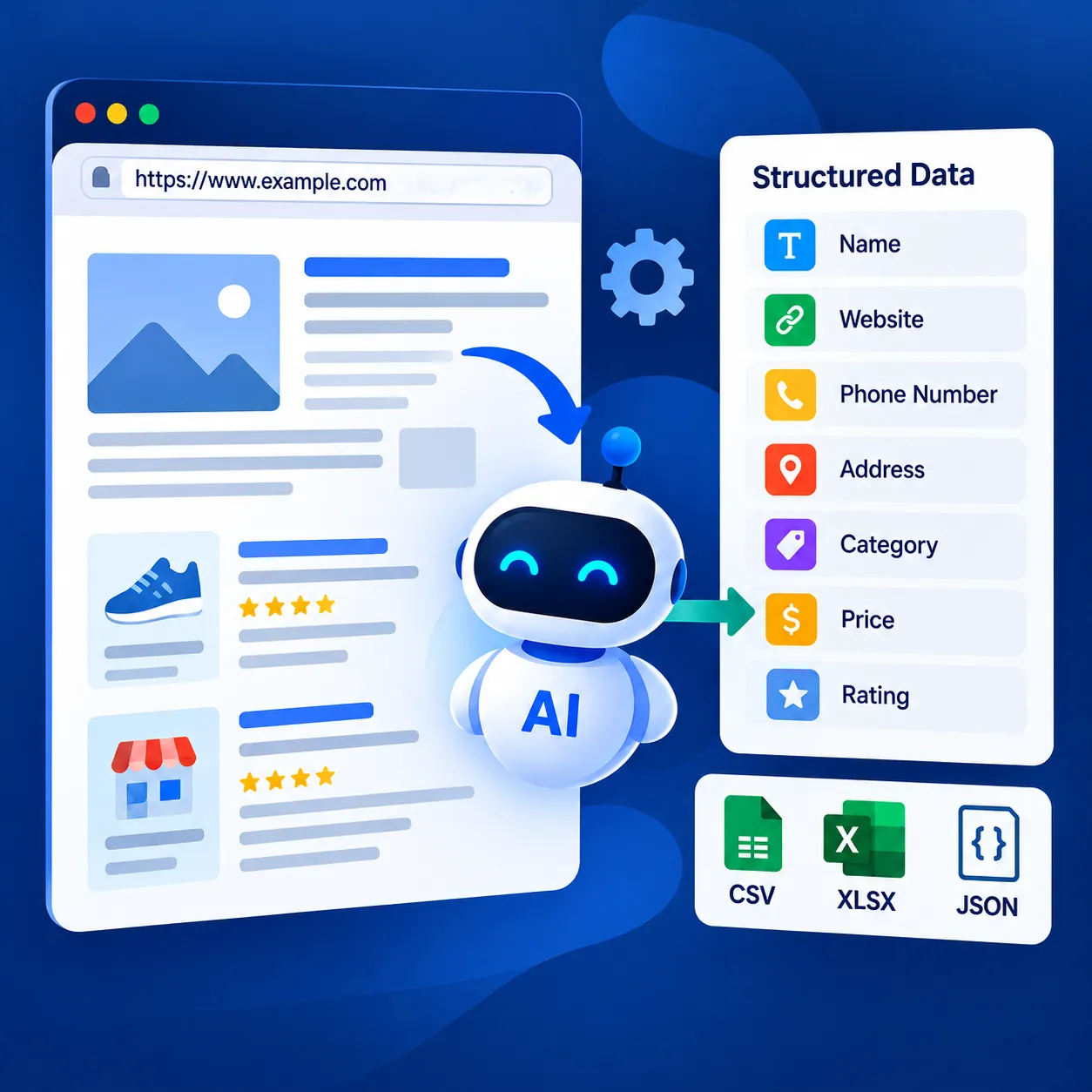
Use Outscraper’s Universal AI-Powered Web Scraper to collect the fields you need from website pages and return them as structured data.
Check and Apply Prospect Qualification Decisions
Once the prospect list has been prepared, review the qualification decisions before using it for outreach. The purpose is to make sure similar businesses are evaluated consistently and that each shortlisted prospect has supporting evidence.
For the Chicago dental clinic campaign, the agency can compare the recorded customer feedback, available business details, and research notes before finalizing its shortlist.
Compare the Evidence Across Business Records
Start with the observations recorded during the six-step workflow. Check whether the supporting evidence is specific enough to explain why each business was selected.
For example, two dental clinics might both have ratings below the agency’s preferred threshold. However, one may have several recent complaints about appointment delays, while the other has only a small number of older reviews.
Rather than treating both clinics as equally relevant, compare the available evidence and note which findings need further verification.
Also check that the businesses still match your selected category, location, and service requirements.
Check Whether Each Research Priority Is Supported
Review the initial research decisions made in Step 5 and confirm that they follow the same qualification rules.
A business marked Research first should have supporting evidence that relates to the agency’s services. A business marked Review further may need more information before the team can make a decision.
Use the following questions to check each record:
- Does the business match the campaign’s target category and location?
- Is the observed issue supported by actual business information or customer reviews?
- Is the evidence recent enough to be relevant?
- Are any important details missing or unclear?
- Does the assigned research priority match the available evidence?
If the information does not support the assigned priority, update the record or mark it for additional research.
Document the Next Action for Each Prospect
After checking the research priorities, assign a clear next action.
For example, a reputation management agency could use the following approach:
| Research Decision | Next Action |
|---|---|
| Research first | Verify recent customer feedback and prepare for outreach research |
| Review further | Check missing information or examine additional reviews |
| Exclude | Remove the business from the active campaign list |
Record the action alongside the supporting evidence in the spreadsheet or CRM.
The next action should follow from the research findings. A clinic with repeated complaints may deserve closer examination, but the agency should not assume those complaints mean the business is actively seeking a service provider.
Resolve Common Qualification Issues
Before using the shortlist, check for problems that may affect prospect quality.
Missing business information: A record without a rating or website may still be relevant. Mark the missing information rather than automatically excluding the business.
Outdated review evidence: Older customer feedback may not reflect the business’s current situation. Check the available dates before treating an issue as recent.
Conflicting observations: A business may have a low overall rating but more positive recent reviews. Record both findings rather than relying on one indicator.
Unsupported priority decisions: If the evidence does not explain why a business was selected, return the record for further review.
Repeated business records: If records were collected through multiple extraction tasks, check the combined list for duplicates before finalizing it.
Addressing these issues helps the team maintain a prospect list with clearer evidence, consistent qualification decisions, and fewer unnecessary research tasks.
From business data extraction to contact enrichment and customer review collection, Outscraper provides tools to support your prospect research and lead generation tasks.
Review and Improve Your Signal-Based Prospecting Workflow
Completing a prospect list is only one part of the process. Agencies also need to know whether their targeting criteria are producing useful business records without requiring too much manual research.
For the dental clinic campaign in Chicago, Illinois, the team can review the results of each prospecting batch and use those findings to improve its next search
Track Which Signals Produce Qualified Prospects
Start by reviewing how many collected businesses meet the campaign’s ICP and qualification requirements.
For example, a reputation management agency might compare dental clinics identified through low ratings with those shortlisted after examining recent negative reviews. The agency can then determine which criteria produce more relevant prospects.
Three useful measurements are:
- ICP match rate: The percentage of collected business records that meet the campaign’s target category, location, and other ICP requirements.
- Qualified prospect rate: The percentage of reviewed businesses assigned a Research first status after qualification.
- Manual review time: The amount of time spent examining business records and documenting supporting evidence.
Track these measurements in your spreadsheet or reporting system so you can compare the results of different prospecting batches.
A smaller list with well-documented prospects may be more useful than a larger list that requires extensive manual checking.
Compare Results Across Prospecting Batches
Once you have reviewed multiple batches, compare their results using the same qualification rules.
For example, a reputation management agency might collect dental clinic records from different Chicago ZIP codes. Some areas may produce more businesses that meet the agency’s criteria, while others may require additional review or provide fewer relevant prospects.
Look for differences in qualified prospect rates, the amount of missing information, and the time required to complete the review.
If one batch produces fewer qualified businesses, examine whether the difference comes from the target market, the available data, or the signal criteria being used.
Keep a record of the search location, collection date, and qualification rules for each batch. This will help your team understand why the results differ.
Adjust Your Signal Selection Based on Results
Use findings from previous campaigns to refine your qualification criteria.
If low ratings alone produce a broad list, a reputation management agency could examine recent reviews and repeated customer complaints to identify businesses that warrant closer attention.
When outreach results are available from your CRM or sales system, compare the responses and qualified conversations associated with different research criteria.
These results can help determine which criteria deserve further testing. However, responses should not be treated as proof that a particular signal caused a business to become interested.
Make one or two changes at a time and document them. This makes it easier to compare prospect quality between campaigns.
Final Checklist: Improving Your Signal-Based Prospecting Workflow
Use this checklist to review your results before starting the next prospecting batch.
- Check that collected businesses match your ICP and target location.
- Count how many prospects received a Research first decision.
- Verify that each finding is supported by business data or customer reviews.
- Identify research tasks that require too much manual work.
- Confirm that qualification rules are applied consistently across batches.
- Keep useful signal criteria and adjust those that need improvement.
Use Outscraper to collect business data, review relevant signals, and prioritize prospects that match your ICP. Build a more focused signal-based prospecting workflow using business information to support your outreach decisions.
FAQ
Most frequent questions and answers
Google Maps Scraper provides business details such as categories, locations, ratings, review counts, websites, and available contact information. Business Catalog also lets you filter businesses using predefined Business Signals, including Low rating, No website, and Unclaimed business.
Yes. Business Catalog offers an alternative starting point when you want to find businesses using predefined Business Signals filters. Google Maps Scraper is useful for collecting business records by category and location for further research. Both methods can feed into the same prospect qualification workflow.
Business Catalog provides predefined Business Signals filters, but it does not automatically determine whether a business is ready to buy your services. Your team still needs to examine the evidence, check whether the business matches your ICP, and assign research priorities.
You can compare business records collected on different dates using a spreadsheet or database. Keep the collection dates and matching business identifiers so you can review differences. Outscraper does not automatically compare records or track changes across separate extraction tasks.
Enable the Delete duplicates option in Google Maps Scraper to remove repeated records within a task. When combining results from separate tasks or datasets, check for duplicates using available business identifiers, such as Google Place IDs.