جدول المحتويات
التنقيب القائم على الإشارات يساعد الوكالات وفرق المبيعات على تحديد الشركات التي تستحق الدراسة استنادًا إلى الملف التعريفي للعميل المثالي (ICP) والبيانات التجارية ذات الصلة. ويكمن التحدي في تحويل تلك المعلومات إلى قائمة عملاء محتملين تتضمن أسبابًا واضحة لتحديد أولوية كل شركة.
بالنسبة للفرق التي تعمل مع قوائم كبيرة من العملاء المحتملين، فإن العثور على الشركات ليس سوى الخطوة الأولى. فقد يستغرق مراجعة تفاصيل الشركات، والتحقق من تعليقات العملاء، وتوثيق المؤشرات المفيدة بعض الوقت، خاصةً عندما تكون المعلومات موزعة على سجلات متعددة.
مع Outscraper, ، يمكن للفرق استخدام كتالوجات الأعمال محددة مسبقًا إشارات الأعمال استخدام المرشحات للعثور على العملاء المحتملين أو جمع السجلات التجارية من خلال أداة «Google Maps Scraper». ويمكنهم بعد ذلك الاطلاع على تقييمات العملاء عند الحاجة، وتوثيق الأدلة الداعمة، وتنظيم العملاء المحتملين المؤهلين في جدول بيانات أو نظام إدارة علاقات العملاء (CRM).
إجابة سريعة: كيفية إنشاء مسار عمل للتنقيب عن العملاء المحتملين استنادًا إلى الإشارات
- حدد الشركات المستهدفة والبيانات اللازمة لتقييم مدى ملاءمتها.
- حدد معايير الإشارة ذات الصلة بخدماتك وبرنامج ICP.
- استخدم مرشحات الإشارات في «Outscraper Business Catalog» أو أداة «Google Maps Scraper» للعثور على الشركات المطابقة.
- راجع تفاصيل الأعمال وتعليقات العملاء بحثًا عن أدلة ذات صلة.
- قم بتوثيق النتائج التي توصلت إليها وتحديد أولويات العملاء المحتملين في جدول بيانات أو نظام إدارة علاقات العملاء (CRM).
- قم بإعداد قائمة العملاء المحتملين التي تمت مراجعتها من أجل التواصل معهم.
استخدم أداة استخراج البيانات من خرائط جوجل (Google Maps Scraper) من Outscraper لجمع تفاصيل الشركات ومعلومات الاتصال بها، وذلك لأغراض البحث عن العملاء المحتملين وتقييم مدى ملاءمتهم.
ما تحتاجه قبل إنشاء مسار عمل للتنقيب عن العملاء المحتملين يعتمد على الإشارات
قبل جمع البيانات التجارية، حدد الأهداف التي يجب أن تحققها قائمة العملاء المحتملين. ستحدد الشركات المستهدفة، والخدمات التي تقدمها، والمعلومات المتاحة للمراجعة، الطريقة التي ستنظم بها سير العمل.
إذا كنت بحاجة إلى مساعدة في فهم الأنشطة التجارية والتغييرات التي قد تشير إلى فرص جديدة، فراجع مقالتنا حول إشارات الشراء بين الشركات (B2B) لأغراض البحث عن عملاء محتملين.
على سبيل المثال، قد تقوم إحدى وكالات إدارة السمعة بالبحث عن عيادات طب الأسنان في مدينة معينة. وبدلاً من الاتصال بكل عيادة على حدة، ترغب الوكالة في تحديد المؤسسات التي تتضمن تعليقات العملاء التي تستحق دراسة أكثر تعمقاً.
حدد الغرض من قائمة العملاء المحتملين الخاصة بك
ابدأ بالخدمة التي تخطط وكالتك لتقديمها، والشركات التي من المرجح أن تكون في حاجة إليها.
A وكالة محلية متخصصة في تحسين محركات البحث (SEO) قد يبحثون عن الشركات التي لا تتوفر عنها معلومات كاملة على الإنترنت، في حين قد تقوم وكالة إدارة السمعة بمراجعة التقييمات وتعليقات العملاء.
يجب أن يكون الهدف محددًا بدرجة كافية لتوجيه بحثك. في مثال عيادة طب الأسنان، تريد الوكالة قائمة بالعيادات التي تتوافق مع سوقها المستهدف، إلى جانب أدلة تساعد في تحديد الشركات التي تتطلب مزيدًا من التقييم.
تحديد المعلومات التجارية التي تحتاجها
بمجرد أن تعرف الغرض، حدد التفاصيل التجارية الضرورية لبحثك.
Outscraper’s مكشطة خرائط Google Maps يمكنه توفير معلومات تجارية مثل الفئات والمواقع والتقييمات وعدد التعليقات والمواقع الإلكترونية. وبالنسبة للحملات التي تتطلب تعليقات فردية من العملاء، يمكن استخدام أداة «Google Maps Reviews Scraper» لجمع معلومات إضافية عن التعليقات.
افصل المعلومات التي تم جمعها عن الملاحظات الخاصة بوكالتك. فالتقييمات التجارية وعدد التقييمات تُعدّ بيانات مصدرية، في حين أن الملاحظات المتعلقة بالشكاوى المتكررة ومدى ملاءمة العملاء المحتملين وأولوية البحث هي قرارات يتم اتخاذها خلال مرحلة التأهيل.
هذا التمييز يسهل عملية إنشاء قائمة بالعملاء المحتملين توضح أسباب اختيار كل شركة.
قم بإعداد معايير ICP وSignal الخاصة بك لجمع البيانات
تعتمد البيانات التجارية التي تحتاجها على الشركات التي تستهدفها والخدمات التي تقدمها. فقد تركز وكالة إدارة السمعة على التقييمات وتعليقات العملاء، في حين قد تبحث وكالة تصميم المواقع الإلكترونية عن الشركات التي لا تمتلك مواقع إلكترونية.
قبل البدء في البحث في Outscraper، حدد السوق المستهدف، وحدد المعلومات التي تحتاجها، وقرر كيف ستقوم بمراجعة السجلات التي تم جمعها.
حدد فئة نشاطك التجاري المستهدف وموقعه
ابدأ بتحديد فئة تجارية معينة ومنطقة جغرافية معينة.
على سبيل المثال، قد تستهدف إحدى وكالات إدارة السمعة عيادات طب الأسنان في شيكاغو، إلينوي. وهذا يوفر للوكالة مجموعة محددة من الشركات لتقوم بالبحث عنها، بدلاً من جمع شركات غير ذات صلة من مختلف القطاعات.
ضع في اعتبارك الخصائص التي تحدد ما إذا كان نشاط تجاري ما ينتمي إلى قائمة العملاء المحتملين لديك، مثل فئته وموقعه ومدى صلته بخدماتك.
تشكل هذه المعايير نقطة الانطلاق لبحثك باستخدام أداة «Google Maps Scraper».
اختر البيانات التجارية التي تحتاج إلى مراجعتها
حدد حقول البيانات التي ستساعدك في تقييم الشركات في السوق المستهدفة. فيما يتعلق بحملة إدارة السمعة، قد تتضمن مجموعة البيانات الأولية أسماء الشركات، والفئات، والمواقع، والتقييمات، وعدد التعليقات، والمواقع الإلكترونية.
يمكن أن تساعد التقييمات وعدد التعليقات في تحديد الشركات التي تستحق مزيدًا من البحث. ومع ذلك، فإن فهم ما يقوله العملاء يتطلب الاطلاع على التعليقات الفردية.
إذا كانت حملتك تعتمد على الشكاوى الحديثة أو المشكلات المتكررة في الخدمة، فخطط لاستخدام أداة «Google Maps Reviews Scraper» كخطوة بحثية إضافية.
أو بدلاً من ذلك، Outscraper’s كتالوج الأعمال يتيح لك تضييق نطاق البحث باستخدام عوامل تصفية «إشارات الأعمال» المحددة مسبقًا، بما في ذلك «التقييم المنخفض» و«عدم وجود موقع إلكتروني» و«الشركات غير المُطالبة بها». تساعد عوامل التصفية هذه في تحديد الشركات التي تستحق مزيدًا من التقييم دون الحاجة إلى فحص كل سجل يدويًّا في مجموعة البيانات الأولية.

يوضح المثال التالي كيف يمكن لإحدى الوكالات أن تُعد حملتها قبل اختيار السجلات التجارية وجمعها.
| إعدادات الحملة | مثال |
|---|---|
| خدمات الوكالة | إدارة السمعة |
| الشركات المستهدفة | عيادات طب الأسنان |
| الموقع المستهدف | شيكاغو، إلينوي |
| البيانات الأولية المتعلقة بالأعمال | الفئة، الموقع، التقييم، عدد التعليقات، الموقع الإلكتروني |
| أبحاث مراجعة إضافية | مراجعة التواريخ والتقييمات وموضوعات الشكاوى |
| النتيجة المتوقعة | قائمة العملاء المحتملين التي خضعت للمراجعة، مصحوبة بالأدلة الداعمة وملاحظات التأهيل |

استخدم «Outscraper Business Catalog» للبحث عن الشركات حسب الفئة والموقع، ثم قم بتضييق نطاق النتائج باستخدام عوامل التصفية المحددة مسبقًا في «Business Signals»، مثل «تقييم منخفض» و«لا يوجد موقع إلكتروني» و«شركة لم يتم تسجيلها».
تعيين قواعد التأهيل الأولي للعملاء المحتملين
حدد الطريقة التي ستتبعها لتحديد الشركات التي تم جمع معلومات عنها والتي تستحق إجراء مزيد من البحث بشأنها.
بالنسبة لوكالة إدارة السمعة، قد تشمل الأسئلة المفيدة ما يلي:
- هل يتوافق النشاط التجاري مع الفئة والموقع المحددين؟
- هل تصنيفها أقل من عتبة المراجعة التي حددتها الوكالة؟
- هل التعليقات السلبية حديثة أم أنها جزء من نمط متكرر؟
- هل توجد أدلة داعمة كافية تبرر الحصول على مؤهلات إضافية؟
اجعل القواعد الأولية بسيطة. على سبيل المثال، قد تقوم الوكالة بتمييز الشركات التي تقل تقييماتها عن عتبة معينة لإخضاعها لفحص دقيق، ثم تراجع تعليقات العملاء الأخيرة عليها قبل تحديد أولويتها.
تساعد هذه المعايير في تنظيم عملية البحث، لكنها لا تؤكد أن الشركة بحاجة إلى خدمات الوكالة أو تنوي شراءها.
للاطلاع على مثال آخر لاستخدام تقييمات الشركات وعدد التقييمات ومدى ملاءمة السوق، انظر كيفية تحديد العملاء المحتملين من الشركات المحلية باستخدام بيانات خرائط Google.
بحلول نهاية هذه المرحلة، ينبغي أن يكون لدى الوكالة سوق مستهدف محدد، وقائمة بحقول البيانات المطلوب جمعها، وقواعد أساسية لمراجعة النتائج.
إنشاء مسار عمل للتنقيب عن العملاء المحتملين استنادًا إلى الإشارات في Outscraper
بمجرد تحديد السوق المستهدف والمعلومات التجارية المطلوبة وقواعد التأهيل، يمكنك البدء في جمع السجلات التجارية ومراجعتها.
يستخدم مسار العمل هذا بشكل أساسي أداة «Google Maps Scraper» من Outscraper لجمع بيانات الشركات، مع استخدام أداة «Google Maps Reviews Scraper» لتوفير ملاحظات إضافية من العملاء عند الحاجة. وبدلاً من ذلك، يمكنك استخدام مرشحات «Business Signals» المحددة مسبقًا في «Business Catalog»، مثل «تقييم منخفض» و«لا يوجد موقع إلكتروني» و«شركة لم يتم المطالبة بها»، لتضييق نطاق قائمة العملاء المحتملين الأولية.
تستند الخطوات الست التالية إلى مثال وكالة لإدارة السمعة تستهدف عيادات طب الأسنان في شيكاغو، إلينوي.
الخطوة 1: جمع الشركات المستهدفة باستخدام أداة استخراج البيانات من خرائط جوجل
استخدم Outscraper مكشطة خرائط Google Maps لتجميع الشركات التي تتطابق مع الفئة والموقع المستهدفين. في هذه الحملة، ابحث عن عيادات طب الأسنان في شيكاغو، إلينوي.
بالنسبة للمناطق ذات الكثافة السكانية العالية، فإن استخدم الرموز البريدية تساعد هذه الخيار في تنظيم عمليات البحث ضمن مناطق جغرافية أصغر. تمكين حذف التكرارات لإزالة السجلات التجارية المكررة ضمن المهمة نفسها، لا سيما عندما تتداخل عمليات البحث باستخدام الرمز البريدي. انظر دليل استخراج الرموز البريدية للحصول على إرشادات إضافية.
قم بتصدير تفاصيل الشركات المتاحة، بما في ذلك الأسماء والعناوين والتقييمات وعدد التقييمات والمواقع الإلكترونية وأرقام الهواتف، من أجل إجراء مزيد من التقييم.
خيار بديل: العثور على العملاء المحتملين باستخدام إشارات كتالوجات الأعمال
يمكنك أيضًا استخدام كتالوج أعمال Outscraper للعثور على العملاء المحتملين باستخدام عوامل تصفية «إشارات الأعمال» المحددة مسبقًا. حدد فئة نشاطك التجاري وموقعك، ثم اختر عامل تصفية مثل تقييم منخفض تحت عنوان «المعايير المتقدمة».
For the Chicago dental clinic campaign, the agency can use this filter to narrow its prospect list before downloading the matching records for further qualification.
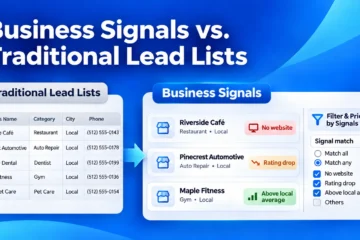
For a comparison of Business Signals with traditional lead-list criteria, read Business Signals vs. Traditional Lead Lists.
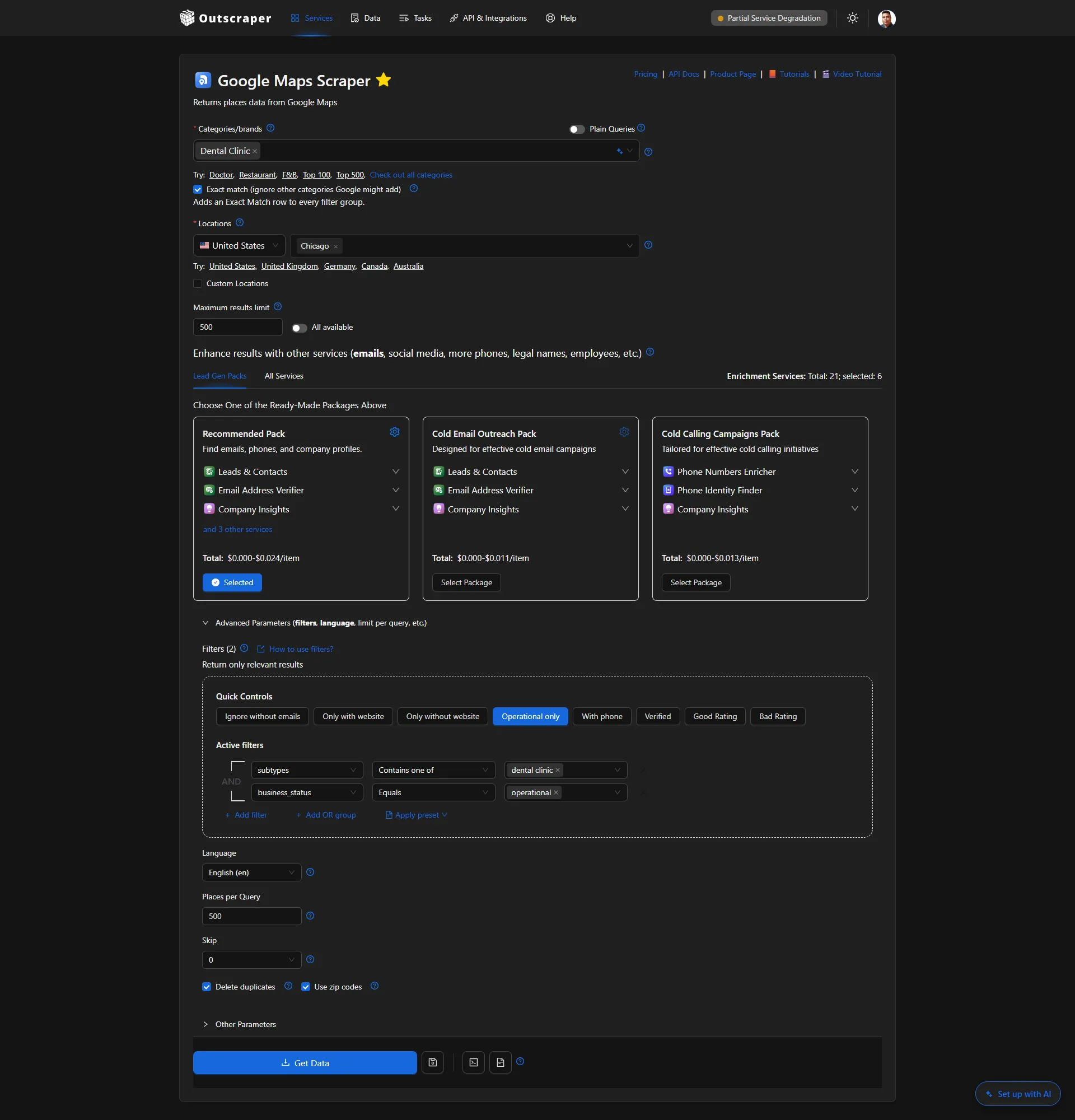
Example Google Maps Scraper setup for collecting dental clinic records across Chicago.
Step 2: Check and Prepare the Business Records
Once the extraction is complete, review the collected business records before evaluating individual signals.
Check whether the businesses match your target category and location. For the dental clinic campaign in Chicago, Illinois, this means excluding unrelated businesses and records outside the selected geographic area.
Look for missing ratings, incomplete business details, or other information that may require additional research. If you combine files from separate extraction tasks, check for duplicates across those files as well.
Keep available business identifiers, such as Google Place IDs, so you can match each business with additional review data during the next step.
Step 3: Examine Customer Reviews Where Needed
Business ratings and review counts can help identify dental clinics worth reviewing, but they do not explain what customers experienced or whether complaints are recent.
For businesses that need closer examination, use Outscraper’s مكشطة مراجعات خرائط Google to collect individual reviews, including available review text, ratings, and dates.
If you’re new to extracting individual customer reviews, follow our step-by-step guide to scraping Google Maps reviews for detailed instructions on setting up and running a review extraction.
For example, a reputation management agency researching dental clinics in Chicago might examine reviews mentioning appointment delays, communication problems, or billing concerns. Comparing the review dates and recurring issues can help the agency decide which businesses need further qualification.
Focus on evidence related to the services your agency offers. A negative review alone does not confirm that a clinic needs reputation management support or is interested in purchasing it.
Record useful observations for the next step, where you will organize the supporting evidence for each prospect.

Use Outscraper’s Google Maps Reviews Scraper to collect customer reviews, identify recurring complaints, and gather supporting evidence for prospect qualification.
Step 4: Record Signal Evidence for Each Business
After reviewing the business data and customer feedback, record the observations that may affect each prospect’s qualification.
For the dental clinic campaign in Chicago, Illinois, a reputation management agency might identify repeated complaints about appointment scheduling, communication, or billing. Instead of relying only on the overall business rating, the team can document the specific issues mentioned in customer reviews.
Organize the findings in a spreadsheet or CRM. Alongside the business details collected through Outscraper, add fields such as:
- Signal observed: The issue or business characteristic identified during research.
- Supporting evidence: A short description of the relevant review findings or business information.
- Evidence date: The date associated with the review or observation.
- Qualification notes: Why the finding may be relevant to the agency’s services.
- Research status: Whether the business needs further investigation before prioritization.
| عمل | Signal Observed | Supporting Evidence | Research Status |
|---|---|---|---|
| Dental Clinic A | Appointment delays | Multiple recent reviews mention long wait times | Review further |
| Dental Clinic B | Communication concerns | Several reviews mention unanswered inquiries | Review further |
| Dental Clinic C | No clear issue identified | Limited recent customer feedback | Review further |
Example only: Fictional dental clinics and agency-recorded observations. Research statuses are not automatically assigned by Outscraper.
For example, if several recent reviews mention long appointment wait times at a dental clinic, record the complaint pattern and the dates of the supporting reviews.
Keep these observations separate from the original data collected through Outscraper. The agency is responsible for interpreting the evidence and documenting its qualification decisions.
The completed records will provide the information needed to assign prospect priorities in the next step.
Step 5: Assign Initial Prospect Priorities
Use the evidence recorded in Step 4 to decide which businesses deserve attention first. At this stage, focus on whether each dental clinic matches your target market and has enough relevant information to justify further research.
For the Chicago dental clinic campaign, a reputation management agency can group businesses into three categories:
- Research first: The clinic matches the ICP and has relevant customer feedback that warrants closer examination.
- Review further: The clinic matches the ICP, but the available evidence is limited or needs verification.
- Exclude: The clinic falls outside the campaign criteria or is not relevant to the services offered.
Add the initial priority or research decision to your working spreadsheet or CRM. Include a short explanation so other team members understand why the business was placed in that category.
These decisions are made by your team based on the collected information. Outscraper provides the underlying business and review data; it does not automatically assign these research priorities.
The next section explains how to apply the same criteria consistently across the prospect list.
Step 6: Prepare the Prospect List for Outreach
Once the initial priorities are assigned, organize the reviewed business records into a list your team can use for outreach preparation.
For the dental clinic campaign in Chicago, Illinois, retain the relevant business information collected through Outscraper, such as business names, addresses, websites, phone numbers, and available contact details.
In your working spreadsheet or CRM, keep the supporting evidence, qualification notes, and research priorities added during Steps 4 and 5. These additional fields help your team understand why each business was shortlisted and what information still needs verification.
Before moving a prospect into outreach, check that the business still matches your campaign criteria and that the proposed service relates to the findings. Recent customer complaints may justify further research, but they do not necessarily indicate that a business is looking to hire an agency.
For teams planning to connect prospect data with other tools, see how to build a lead generation workflow with Outscraper and n8n.
The final list should contain businesses that match your target market, documented evidence supporting further qualification, and a clear next action for each prospect.
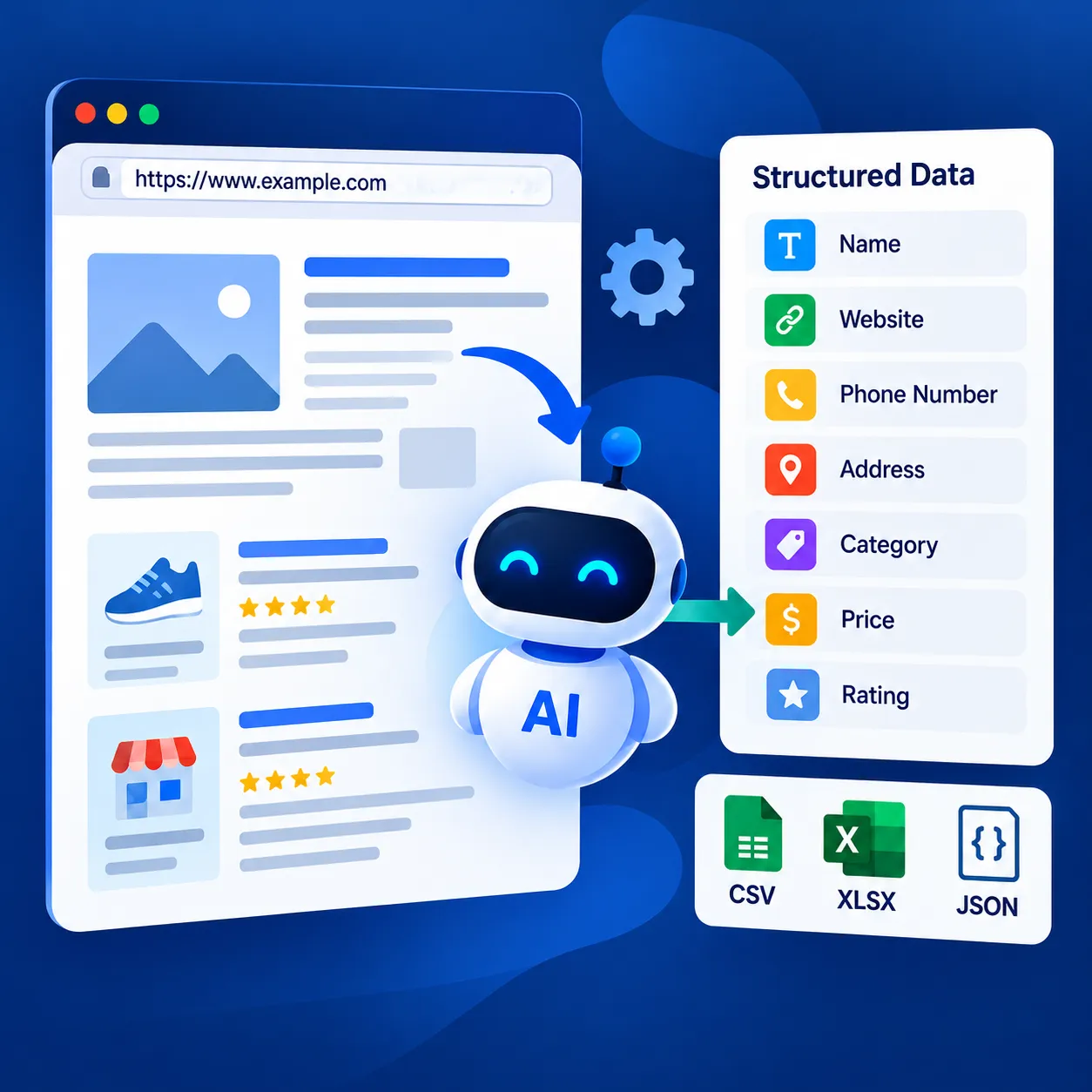
Use Outscraper’s مكشطة ويب عالمية مدعومة بالذكاء الاصطناعي to collect the fields you need from website pages and return them as structured data.
Check and Apply Prospect Qualification Decisions
Once the prospect list has been prepared, review the qualification decisions before using it for outreach. The purpose is to make sure similar businesses are evaluated consistently and that each shortlisted prospect has supporting evidence.
For the Chicago dental clinic campaign, the agency can compare the recorded customer feedback, available business details, and research notes before finalizing its shortlist.
Compare the Evidence Across Business Records
Start with the observations recorded during the six-step workflow. Check whether the supporting evidence is specific enough to explain why each business was selected.
For example, two dental clinics might both have ratings below the agency’s preferred threshold. However, one may have several recent complaints about appointment delays, while the other has only a small number of older reviews.
Rather than treating both clinics as equally relevant, compare the available evidence and note which findings need further verification.
Also check that the businesses still match your selected category, location, and service requirements.
Check Whether Each Research Priority Is Supported
Review the initial research decisions made in Step 5 and confirm that they follow the same qualification rules.
A business marked Research first should have supporting evidence that relates to the agency’s services. A business marked Review further may need more information before the team can make a decision.
Use the following questions to check each record:
- Does the business match the campaign’s target category and location?
- Is the observed issue supported by actual business information or customer reviews?
- Is the evidence recent enough to be relevant?
- Are any important details missing or unclear?
- Does the assigned research priority match the available evidence?
If the information does not support the assigned priority, update the record or mark it for additional research.
Document the Next Action for Each Prospect
After checking the research priorities, assign a clear next action.
For example, a reputation management agency could use the following approach:
| Research Decision | Next Action |
|---|---|
| Research first | Verify recent customer feedback and prepare for outreach research |
| Review further | Check missing information or examine additional reviews |
| Exclude | Remove the business from the active campaign list |
Record the action alongside the supporting evidence in the spreadsheet or CRM.
The next action should follow from the research findings. A clinic with repeated complaints may deserve closer examination, but the agency should not assume those complaints mean the business is actively seeking a service provider.
Resolve Common Qualification Issues
Before using the shortlist, check for problems that may affect prospect quality.
Missing business information: A record without a rating or website may still be relevant. Mark the missing information rather than automatically excluding the business.
Outdated review evidence: Older customer feedback may not reflect the business’s current situation. Check the available dates before treating an issue as recent.
Conflicting observations: A business may have a low overall rating but more positive recent reviews. Record both findings rather than relying on one indicator.
Unsupported priority decisions: If the evidence does not explain why a business was selected, return the record for further review.
Repeated business records: If records were collected through multiple extraction tasks, check the combined list for duplicates before finalizing it.
Addressing these issues helps the team maintain a prospect list with clearer evidence, consistent qualification decisions, and fewer unnecessary research tasks.
From business data extraction to contact enrichment and customer review collection, Outscraper provides tools to support your prospect research and lead generation tasks.
Review and Improve Your Signal-Based Prospecting Workflow
Completing a prospect list is only one part of the process. Agencies also need to know whether their targeting criteria are producing useful business records without requiring too much manual research.
For the dental clinic campaign in Chicago, Illinois, the team can review the results of each prospecting batch and use those findings to improve its next search
Track Which Signals Produce Qualified Prospects
Start by reviewing how many collected businesses meet the campaign’s ICP and qualification requirements.
For example, a reputation management agency might compare dental clinics identified through low ratings with those shortlisted after examining recent negative reviews. The agency can then determine which criteria produce more relevant prospects.
Three useful measurements are:
- ICP match rate: The percentage of collected business records that meet the campaign’s target category, location, and other ICP requirements.
- Qualified prospect rate: The percentage of reviewed businesses assigned a Research first status after qualification.
- Manual review time: The amount of time spent examining business records and documenting supporting evidence.
Track these measurements in your spreadsheet or reporting system so you can compare the results of different prospecting batches.
A smaller list with well-documented prospects may be more useful than a larger list that requires extensive manual checking.
Compare Results Across Prospecting Batches
Once you have reviewed multiple batches, compare their results using the same qualification rules.
For example, a reputation management agency might collect dental clinic records from different Chicago ZIP codes. Some areas may produce more businesses that meet the agency’s criteria, while others may require additional review or provide fewer relevant prospects.
Look for differences in qualified prospect rates, the amount of missing information, and the time required to complete the review.
If one batch produces fewer qualified businesses, examine whether the difference comes from the target market, the available data, or the signal criteria being used.
Keep a record of the search location, collection date, and qualification rules for each batch. This will help your team understand why the results differ.
Adjust Your Signal Selection Based on Results
Use findings from previous campaigns to refine your qualification criteria.
If low ratings alone produce a broad list, a reputation management agency could examine recent reviews and repeated customer complaints to identify businesses that warrant closer attention.
When outreach results are available from your CRM or sales system, compare the responses and qualified conversations associated with different research criteria.
These results can help determine which criteria deserve further testing. However, responses should not be treated as proof that a particular signal caused a business to become interested.
Make one or two changes at a time and document them. This makes it easier to compare prospect quality between campaigns.
Final Checklist: Improving Your Signal-Based Prospecting Workflow
Use this checklist to review your results before starting the next prospecting batch.
- Check that collected businesses match your ICP and target location.
- Count how many prospects received a Research first decision.
- Verify that each finding is supported by business data or customer reviews.
- Identify research tasks that require too much manual work.
- Confirm that qualification rules are applied consistently across batches.
- Keep useful signal criteria and adjust those that need improvement.
الاستخدام Outscraper to collect business data, review relevant signals, and prioritize prospects that match your ICP. Build a more focused signal-based prospecting workflow using business information to support your outreach decisions.
التعليمات
الأسئلة والأجوبة الأكثر شيوعًا
يوفر «Google Maps Scraper» تفاصيل عن الشركات مثل الفئات والمواقع والتقييمات وعدد التقييمات والمواقع الإلكترونية ومعلومات الاتصال المتاحة. كما يتيح لك «Business Catalog» تصفية الشركات باستخدام «إشارات الأعمال» المحددة مسبقًا، بما في ذلك «التقييم المنخفض» و«عدم وجود موقع إلكتروني» و«الشركة غير المطالب بها».
نعم. يوفر «Business Catalog» نقطة انطلاق بديلة عندما ترغب في العثور على الشركات باستخدام مرشحات «Business Signals» المحددة مسبقًا. أما «Google Maps Scraper» فهو مفيد في جمع سجلات الشركات حسب الفئة والموقع لإجراء مزيد من البحث. ويمكن استخدام كلتا الطريقتين في نفس سير عمل تقييم العملاء المحتملين.
يوفر «Business Catalog» مرشحات محددة مسبقًا لـ«Business Signals»، لكنه لا يحدد تلقائيًّا ما إذا كانت الشركة مستعدة لشراء خدماتك أم لا. ولا يزال يتعين على فريقك فحص الأدلة، والتحقق مما إذا كانت الشركة تتوافق مع «ICP» الخاص بك، وتحديد أولويات البحث.
يمكنك مقارنة السجلات التجارية التي تم جمعها في تواريخ مختلفة باستخدام جدول بيانات أو قاعدة بيانات. احتفظ بتواريخ الجمع ومعرّفات الأعمال المطابقة حتى تتمكن من مراجعة الاختلافات. لا يقوم برنامج Outscraper تلقائيًا بمقارنة السجلات أو تتبع التغييرات عبر مهام الاستخراج المنفصلة.
قم بتفعيل خيار «حذف التكرارات» في أداة «Google Maps Scraper» لإزالة السجلات المكررة داخل المهمة. وعند دمج النتائج من مهام أو مجموعات بيانات منفصلة، تحقق من وجود التكرارات باستخدام معرّفات الأعمال المتاحة، مثل معرّفات Google Place.