Table of Contents
How to Extract Every Business in a City Using ZIP Code Scraping
Extracting every business in a city, especially a densely populated one, like Chicago, the #1 metropolitan area in the U.S. for transportation, distribution, and logistics (TD&L), is challenging. The latest data shows that more than 17,000 companies are operating in the area. Reaching the full market is almost impossible with standard searches.
If you aren’t using ZIP code scraping, you are likely missing 90% of the active companies in the city. Google’s limits on broad queries trap you.

Why Your Lead List is Failing
Standard searches only show you a tiny slice of the market. You might scape some 200 popular companies as your competitors, while you ignore thousands of high-value businesses in the suburbs and industrial parks.
This gap forces your sales teams to fight for over-saturated leads while leaving the best prospects untouched. You are effectively locked out of 90% of the Chicago market.
This kind of problem already exists like our previous experience with Brooklyn data gathering, but you can easily scrape densely populated area using Zip codes.
Targeted ZIP Code Scraping
The only way to achieve 100% saturation is to break the city down by ZIP code. Instead of one broad search, you run micro-searches for every specific area. This method bypasses Google’s search limits and forces the scraper to reveal every business in the region. It is the most reliable way to build a detailed list that your competitors cannot match.
To help you cover the challenges of full market extraction, we will look at:
- The Workflow: A step-by-step guide to mapping Chicago ZIP codes.
- Data Enrichment: How to find direct contacts for the 17,000+ businesses you find.
- Market Segmentation: Sorting your leads to ensure your outreach actually converts.
Why Chicago Logistics Searches Hit a 500-Result Wall
Most users assume that if they search for a category, Google shows them everything. That is a mistake. Google Maps generally returns a maximum of 300 to 500 results for any single query. If you search for “logistics companies in Chicago,” you are only seeing the surface, which is why you need zip code scraping to go beyond what a single query reveals and move toward complete city coverage.
In the market with over 17,000 targets, a search captures less than 3% of the actual industry. You are just seeing a preview of all the businesses that you need to extract, and not the whole data from a densely populated area.
The geographic density of the Chicago market, which we use as an example, makes broad searches even less effective. TD&L is not spread out evenly. They are tightly clustered in specific industrial zones or near O’Hare International Airport.
A single city-wide pin-drop cannot distinguish between the hundreds of businesses packed into a two-mile radius in Elk Grove Village. Because the search results are capped, the density of these industrial parks causes most of the businesses to stay hidden.
Data Proof: Perception vs. Reality of Chicago Data
The gap between a standard search and reality is massive in any large city. A standard Google Maps search in Chicago for logistics usually tops out roughly 300 to 500 visible results. The actual market contains more than 17,000 verified TD&L businesses operating in Chicago in 2026.
This means that more than 16,000 potential leads stay invisible to the average scraper that relies on one broad query. While we use Chicago as the primary example because of its scale, this result ceiling exists everywhere.
Whether you are targeting logistics in Rotterdam, manufacturing in Shenzhen, or tech in San Francisco, the 300-result wall will stop you short of full coverage unless you switch to zip code scraping. A zip code scraping approach works in a highly urbanized or densely populated area and reveals businesses that standard search always misses.
The Chicago ZIP Code Plan: Mapping the TD&L Sector
To capture 17,000+ businesses, you cannot treat Chicago as one entity. you must identify the specific ZIP codes where the industrial density is highest. For example, focusing on 060666 gives you direct access to the air freight hub at O-Hare. Moving to 60609 targets the Stockyards industrial corridor.
By listing these codes individually, you create a search grid that covers every industrial pocket in the region. This grid gives you complete city coverage instead of a partial slice from a single search.
Using Localized Queries
Once you have your codes, the process is simple but highly effective. Instead of searching for a broad industry term, you combine your keyword with a specific ZIP code. For example, search for “Freight Forwarder 60607” forces Google to ignore the rest of the city and only rank businesses within those few square miles.
Note that this level of details reveals the smaller, niche operators that usually stay hidden behind the corporate giants. This localized approach resets the 500-result limit for every code you use. If you run 150 searches across 150 ZIP codes, you are giving the scraper 150 chances to find data rather than just one.
In dense area scraping, ZIP codes act as precise slices that expose businesses hidden behind the 500-result cap.
Sourcing Your ZIP Codes
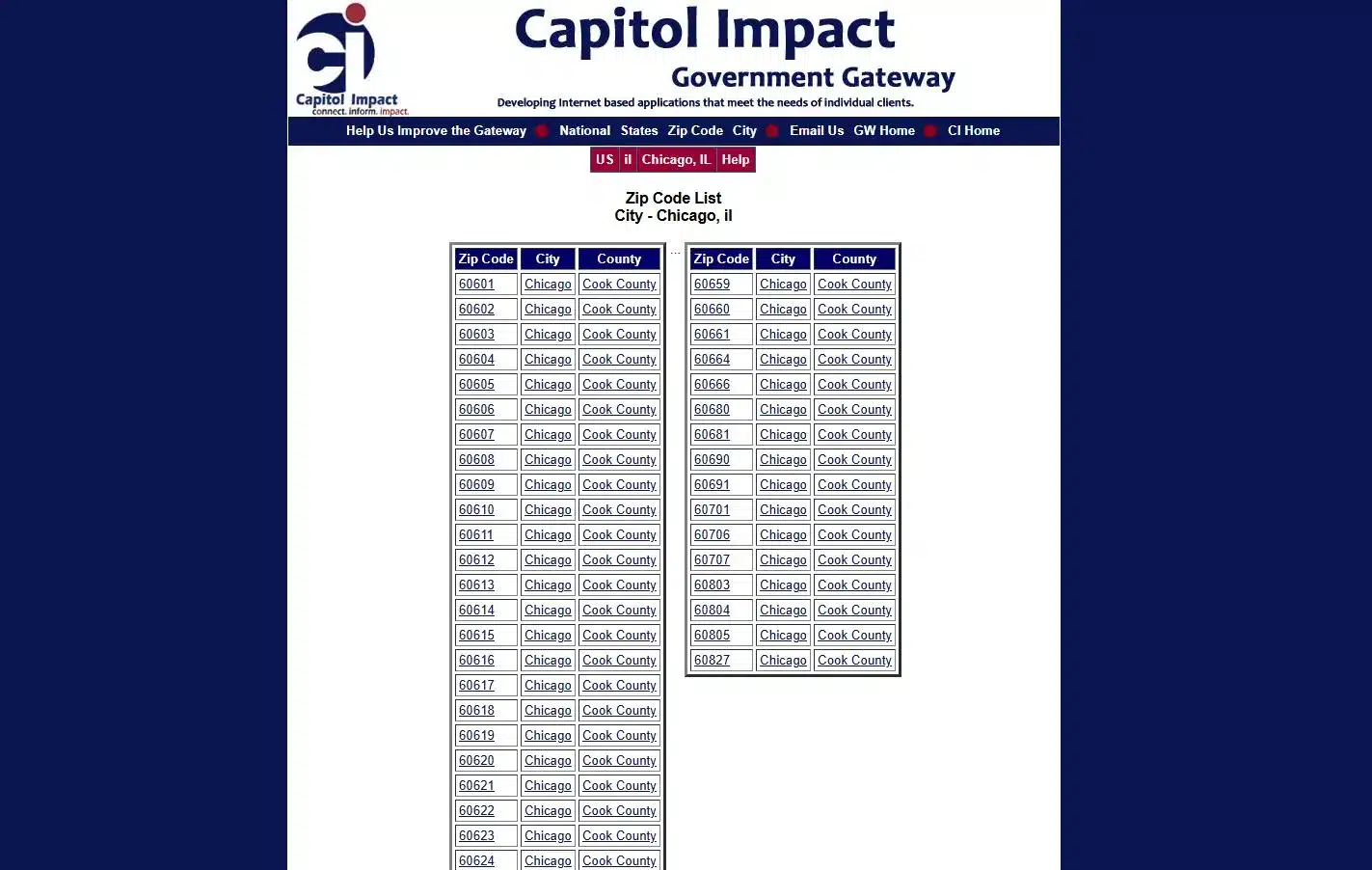
The success of this plan depends on having a clean, accurate list of codes. You do not want to guess which areas are industrial. We recommend using tools from World Business Chicago or the Capitol Impact Government Gateway to get a full list of all the codes in the metropolitan area.
This makes sure your data set includes the heavy industrial suburbs that a city-only search would miss. Using these official sources helps you manage the challenge of geographic planning and ensures your search grid is complete.
How to Extract Business Data Using ZIP Codes Scraping With Outscraper
Extracting business data using ZIP codes inside Ouscraper is straightforward and easy to implement. If you are already familiar with the process on how to scrape Google Maps data, it will be much easier for you.
Here’s the Step-by-Step Process on how to scrape every business within a city using ZIP Codes:
Step 1: Setting Up Your Account
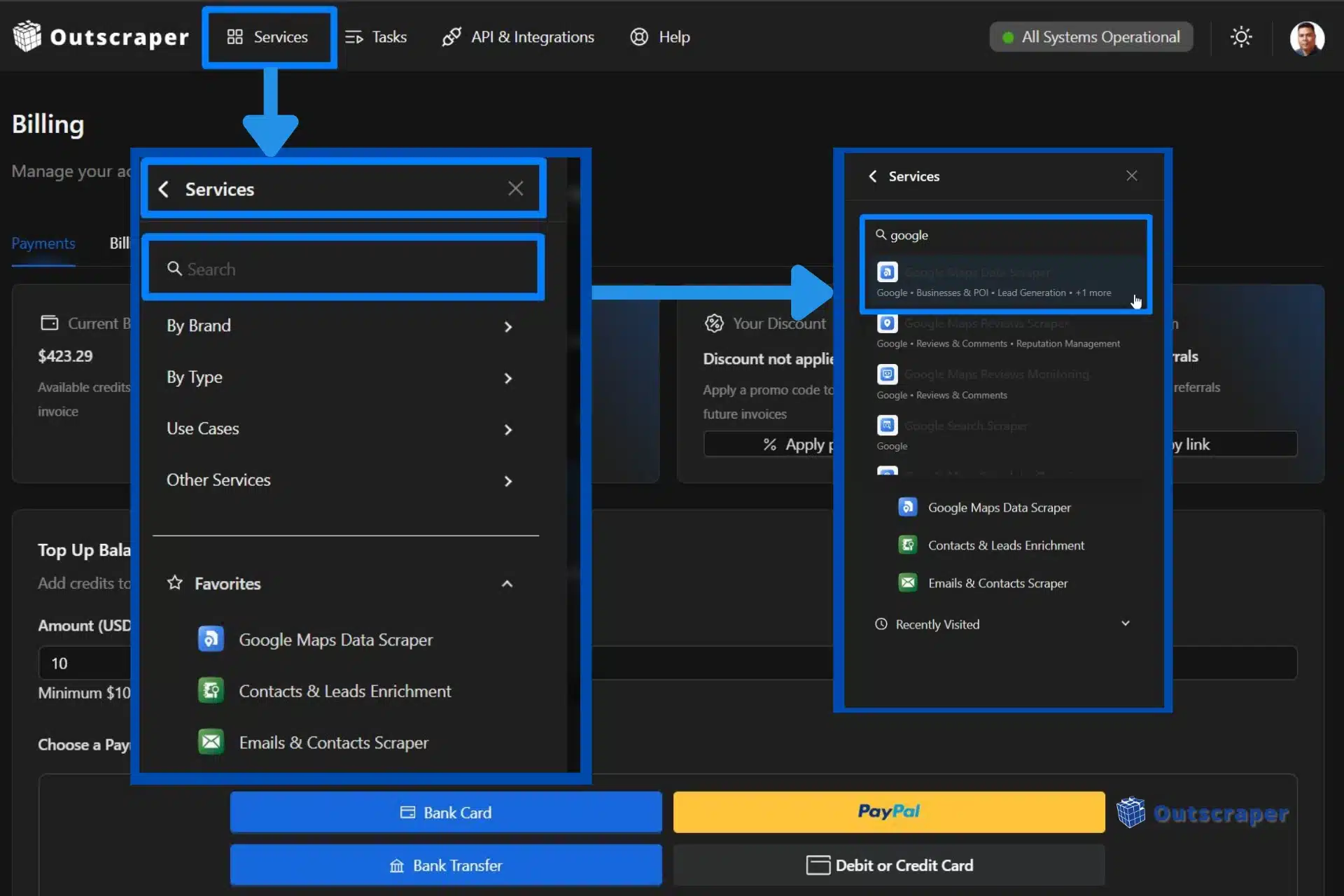
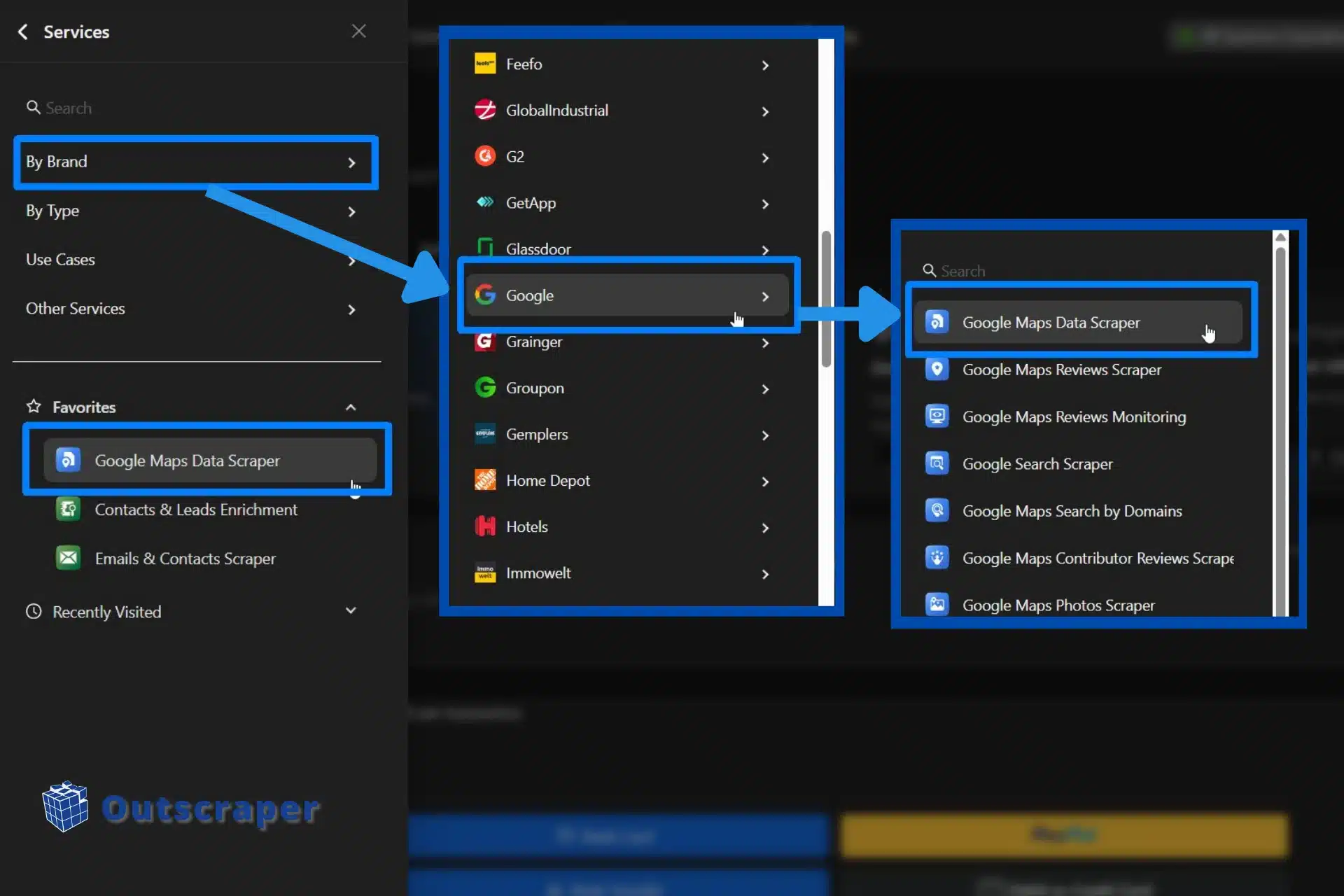
Login with your Outscraper account or sign up if you don’t have an account yet. Once inside the Outscraper app dashboard, select Google Maps Data scraper.
Step 2: Selecting Categories
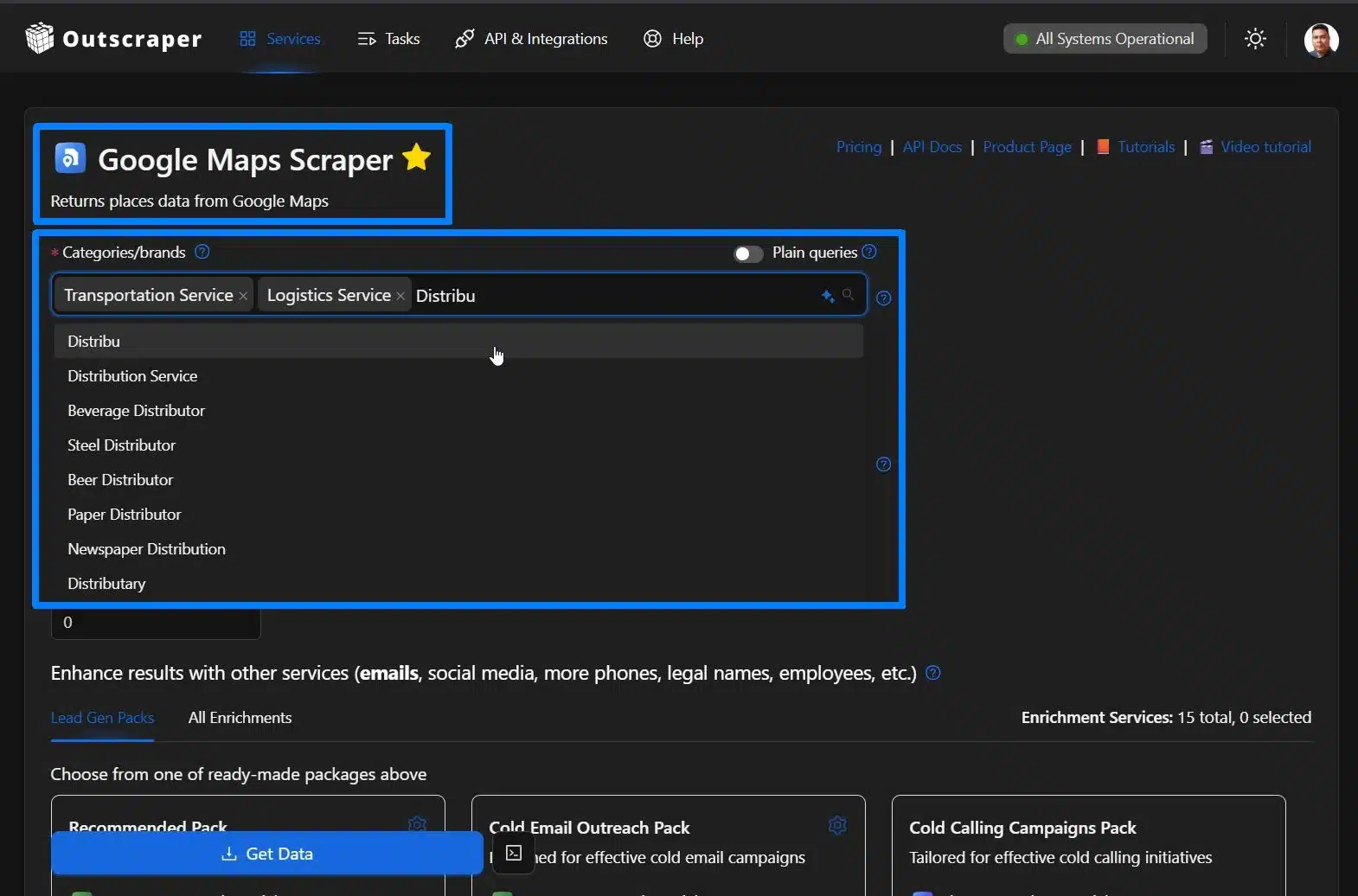
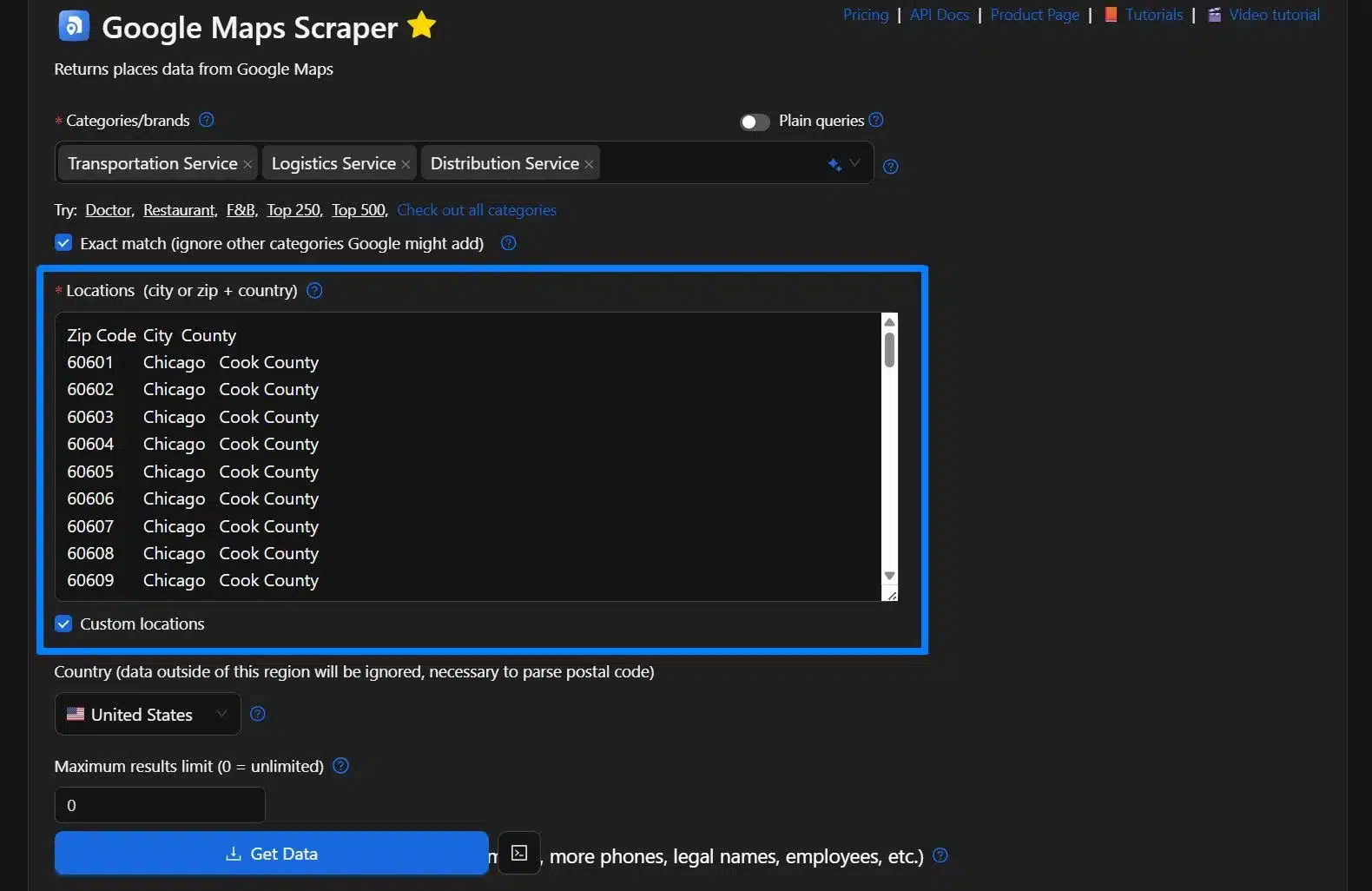
In this example, we will be using “Transportation Service, Logistics Service, and Distribution Service as our category.
Step 3: Adding Location
There are two ways to add a location when using ZIP code scraping. First is using a pre-defined zip code, and the second one is using Custom Locations.
Utilizing Pre-Defined Zip Codes
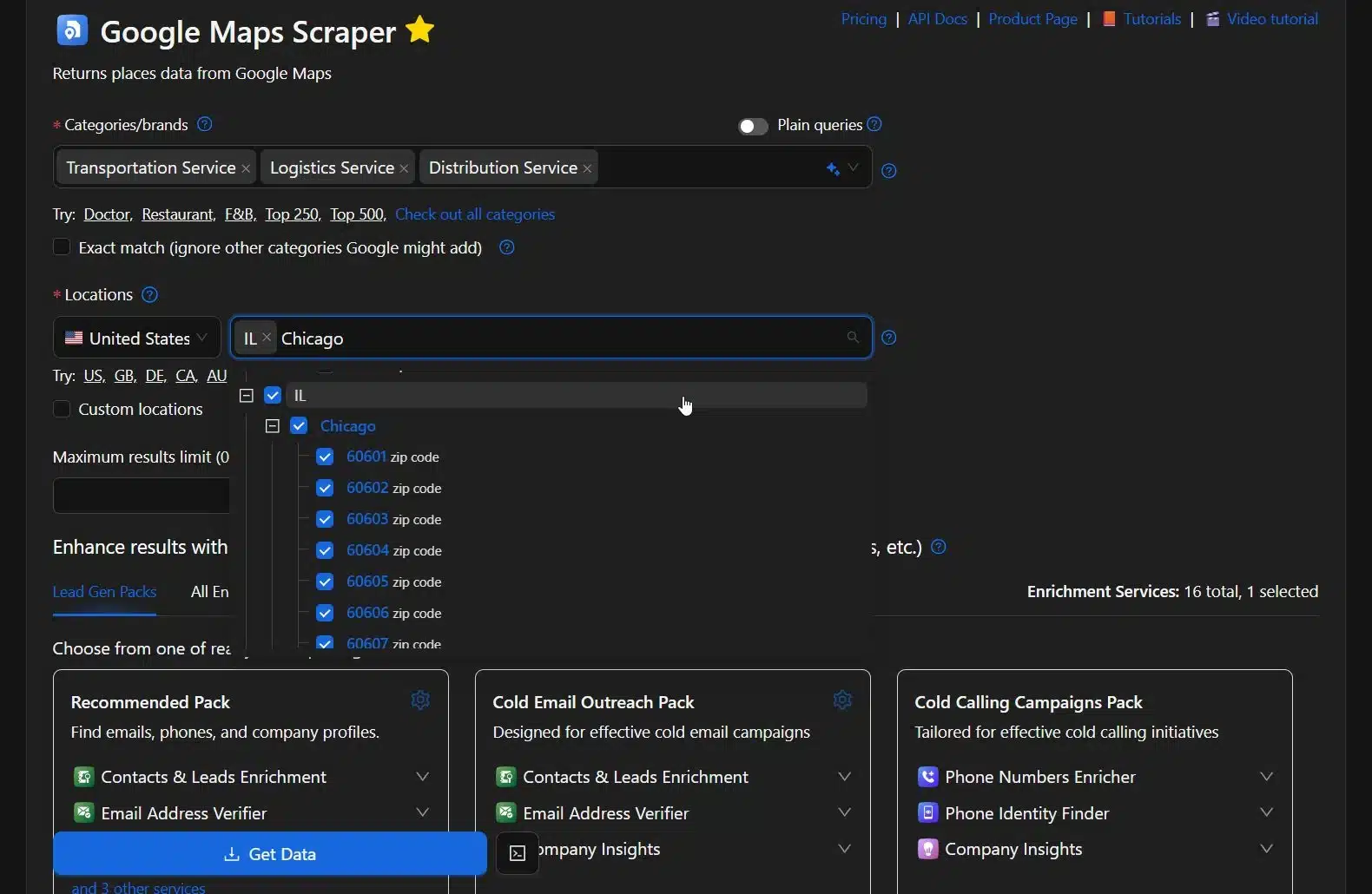
We will be searching for Chicago, Illinois, USA as our preferred location. Type in Chicago and select IL, and all the accompanying ZIP codes within Chicago will appear in the dashboard.
Using the Custom Locations options
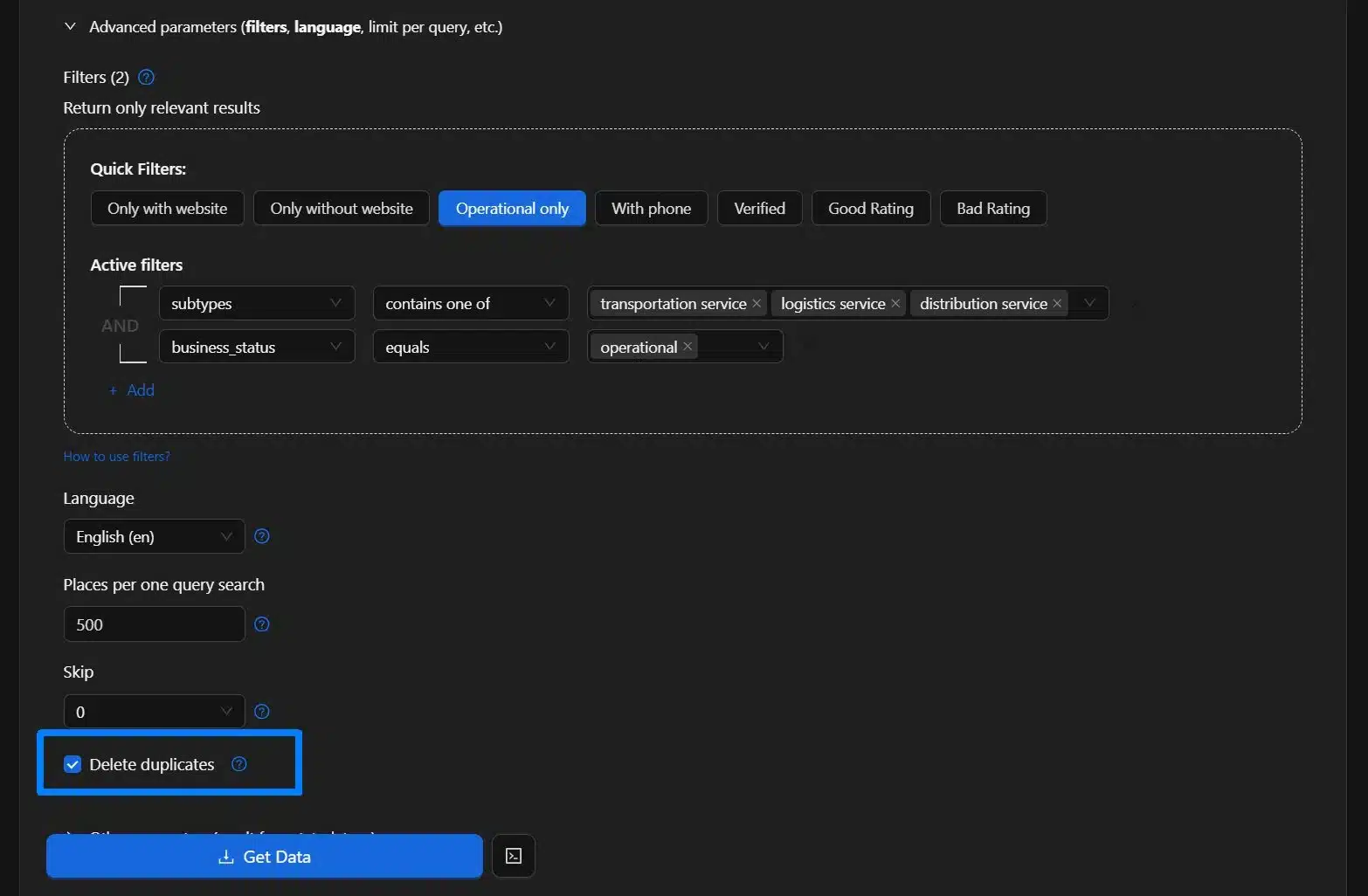
The second one is to copy and paste all the ZIP codes in the correct format. Once you manually add all the ZIP codes you selected, the Use ZIP codes checklist will not be available. Just make sure you check the Delete duplicates option. Don’t forget also to check the Exact match so that scraper will ignore other categories Google might add.
Step 4: Adding Enrichment
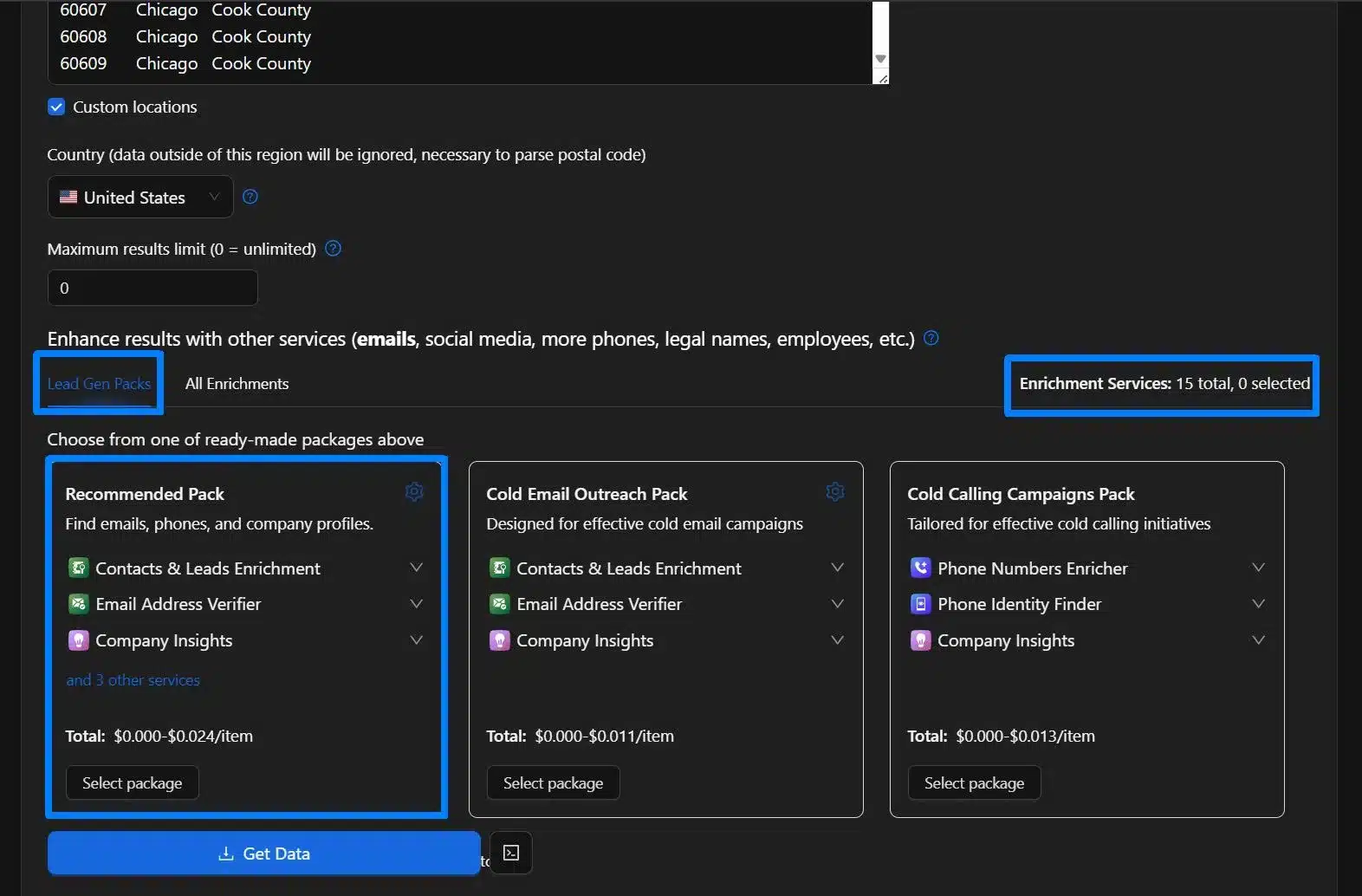
If you want more specific data, especially for lead generation, we recommend adding some enrichment, like the lead gen packs, which will give you emails, phones, and company profiles. You can also choose a specific enrichment based on our list of 15 enrichment tools.
Step 5: Selecting Advanced Parameters
To add more relevant and specific data, you should apply some advanced parameter options, such as selecting businesses that are operational only. Make sure to check the Delete Duplicates options and Use ZIP codes options.
Step 6: Checking, Reviewing, and Downloading Data
Check all the parameters, review them thoroughly, and download the data. You can also select an option for the format you need and even have an option to select only columns to return, but if you want to download all the data, just leave it blank.
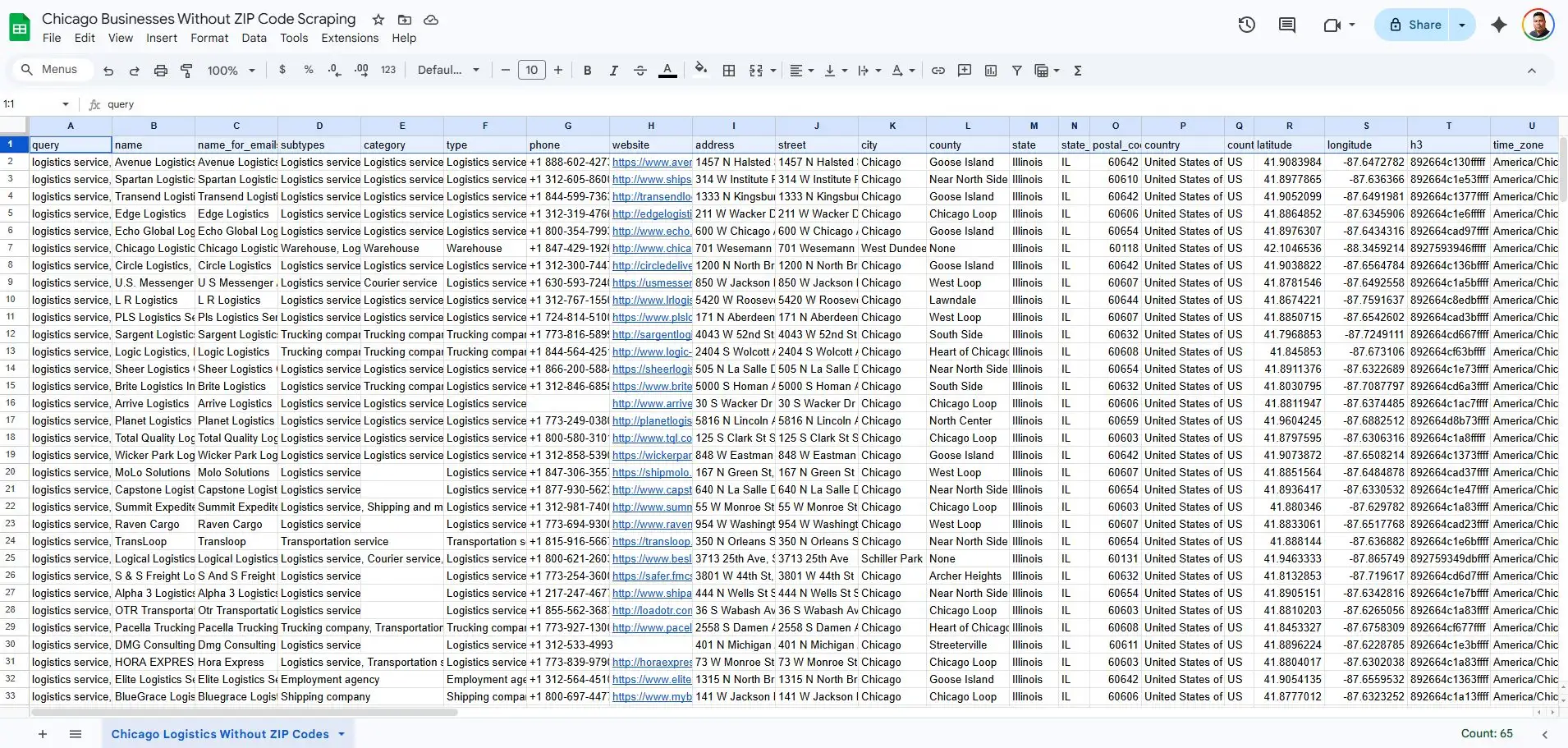
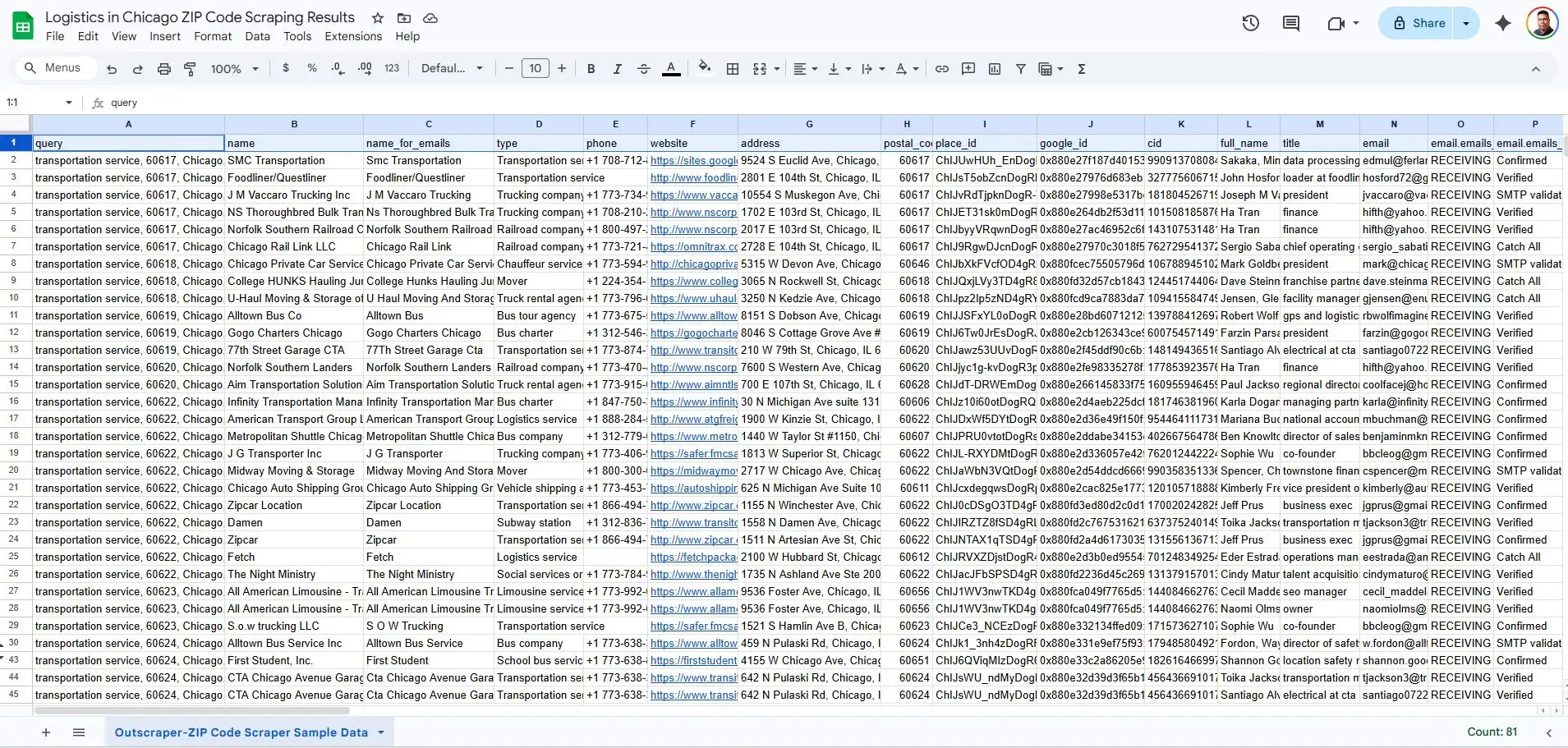
Upon checking the downloaded data, we were able to generate just 267 rows of data when not using ZIP code scraping. This is way smaller compared to the 6869 rows generated from Outscraper using ZIP code scraping.
When compared to the actual data from the entire TD&L industry, the more than 6800 results is still small, because we only focused on three main sub-categories and not the entire industry.
Try Outscraper for free with a monthly renewable Free Tier.
Recommended Methods & Tools When Using ZIP Code Scraping
When you are dealing with thousands of businesses, you cannot rely on manual searches. You need a tool that can manage high-volume zip code scraping and data extraction without overwhelming your own machine. Outscraper’s business data and enrichment platform is a strong choice here because it runs Google Maps scraping tasks in the cloud and is built specifically for large-scale business data pulls.
One key feature to look for is the “Drop Duplicates” or duplicate-filtering setting. Many ZIP codes in Chicago overlap, or share boundary areas, so the same business might appear in three different searches. Without this filter, your lists fill up with repeats, and your enrichment costs go up.
A cloud-based approach also lets you schedule ZIP-based scrapes during off-peak hours, which improves speed and reliability while keeping your local resource free. Outscraper process each ZIP query and merges the results into a comprehensive business list you can send straight to your CRM.
Developer Options for Specialized Directories
For those with technical skills, using Python with libraries like Playwright or Selenium offers even more control. While Google Maps is the primary source, some specialized logistics directories use a JavaScript-heavy interface that standard scrapers struggle to read.
Building a custom script allows you to scrape these niche industry sites. This is helpful if you want to cross-reference your Google Maps data with specific carrier certifications or fleet size details found on private industry boards.
Enrichment Services: Beyond the Business Name
Building a list is just the first step. Once you have your thousands of data, in this example we have 17,00 logistic firms, you need to know who to call. You can use a separate enrichment service, but you can also use Outscraper’s built-in enrichment as part of your configuration. This keeps everything in one place and removes the need to pay for multiple tools.
If you still prefer a separate enrichment provider, you can export your scraped business data from Outscraper, match it with contact and firmographic data, and then re-import it into your CRM. These extra steps turn a cold, ZIP-based lead list into a warm outreach campaign, so your sales team calls direct decision-makers instead of generic front desks.
Managing the Data: Cleaning and Ethical Extraction
High-volume zip code scraping generates a large amount of raw data that can quickly become unmanageable. If you export a list of 17,000 logistics firms without a plan, you will likely find a messy spreadsheet filled with duplicates and irrelevant leads.
To make sure your data is actually useful for sales, you need a process to clean, filter, and refine it. You must also prioritize ethical extraction methods to stay safe from legal issues and technical blocks.
With any large-scale geographic data extraction project, you need clear rules for cleaning, enrichment, and compliance.
The Deduplication Rule
In a dense market like Chicago, many logistics companies sit right on the border of multiple ZIP codes. Because of this, a carrier might appear in your results for three or four different neighboring searches. If you do not clean your list, your sales team will waste time calling the same business multiple times.
The most reliable way is to filter your final CSV file by “Place ID.” Since every listing on Google Maps has a unique Place ID, that identifies that specific place in Google’s database. Finding Place ID is very easy, and using it as your primary key strips out repeats and keeps your final list as close to 100 percent unique as possible.
Filtering for Quality
A list of 17,000 businesses is impressive, but it likely contains a mix of global 3PL providers and one-truck, home-based operations. If your goal is to find mid-to-large-scale distribution centers, you need to filter your data. Look at attributes like “business type” or the presence of a commercial loading dock address.
Also, checking for a high volume of reviews can help you distinguish established firms from smaller operators. This step keeps your outreach focused on high-value targets rather than small-scale freelancers.
Compliance and Safety
As you handle the challenges of large-scale data extraction, you must stay within legal and technical boundaries. Always follow GDPR and CCPA guidelines regarding how you store and use business data.
To avoid technical issues, do not use high-speed scraping that hits business directories too fast. This could trigger IP blocks and stop your progress. Make sure to use residential proxies and natural scraping speeds to keep your account safe and your data flow steady.
FAQ
Most frequent questions and answers
Google Maps usually limits visible results per query, so a single city-wide search only shows a small percentage of all active businesses in that area.
ZIP code scraping breaks one broad search into many localized searches, which lets you uncover businesses that stay hidden when you use only a single city-wide query.
Chicago’s dense logistics clusters and large number of TD&L companies make it a clear example of how much data you miss without ZIP code–level targeting.
You need a cloud-based Google Maps scraper like Outscraper that supports ZIP code input, de-duplication, and exporting large business lists in formats like CSV.
Use duplicate filters such as a unique Place ID field so that businesses appearing in multiple ZIP code searches are only kept once in your final file.
Scraping public business data is generally allowed when you respect website terms, avoid abusive request rates, and follow data protection rules like GDPR and CCPA in how you store and use the data.