Table of Contents
When deciding between Google Maps API vs. Web Scraping for building a prospect list, the choice usually comes down to whether you prioritize official stability or raw data volume. These two map data extraction methods serve different purposes: the Google Maps API is a tool built for developers to integrate maps into apps, whereas web scraping is a specialized method for extracting large-scale business directories.
Using the wrong one for lead generation often results in paying for “empty” data that lacks the email addresses and social links required for an effective lead generation strategy.
Recent benchmarks from March 2026 show a massive gap in how much you pay per lead depending on your technical route:
- Google Places API (Official): Costs roughly $32.00 per 1,000 requests for “Pro” data like phone numbers and open hours. For a campaign of 10,000 leads, your bill could easily exceed $300 once you move past the initial free monthly usage caps.
- Web Scraping (Managed Services): A dedicated scraping platform like Outscraper delivers the same 10,000 leads for $30.00. Unlike the official API, these services allow you to extract “bonus” data like social media profiles and emails in the same workflow.

Note: While many professionals use the term “Google Maps API” as a catch-all, there is a technical distinction. The Google Maps API primarily handles visual map rendering and pins. For lead generation, you are using Google Places API, which is the specific engine that retrieves business data like names, phone numbers, and ratings.
If you’re comparing a Google Maps API vs. a Google Maps scraper, the main difference is how the data is accessed and what you need it for.
Quick answer: The Google Maps API provides official access to Maps and Places features through structured requests, while a Google Maps scraper collects business information shown on Google Maps and turns it into structured data. The API is commonly used for app and location features, while scraping is often used to collect larger business datasets for research, lead generation, and analysis.
The Core Difference: Official Access vs. Data Extraction
While both methods aim to put business data into your CRM, they work in fundamentally different ways. One is a formal partnership with Google; the other is a high-speed observation of what Google shows the public.
What is the Google Maps (Places) API?
The Google Maps API is the specific component of the Google Maps Platform designed for data retrieval. While the broader Maps API focuses on visual navigation, the Places API is the gateway to Google’s database of over 200 million businesses and points of interest. When you use it, your software asks Google’s servers for specific information. Google then sends back a structured data file like JSON.
This is the “official” channel. It is built for live apps, like a food delivery service that needs to find a restaurant’s exact location or a website that suggests addresses as you type. Because it is a direct link, the information is live and official. However, it only gives you what Google chooses to share, which usually leaves out the deep contact info needed for sales outreach.
What is Google Maps Web Scraping?
Google Maps Scraping is the automated extraction of public business data. It does not use a back-end connection. Instead, it reads the actual code of the Google Maps website. A scraper acts like a person sitting at a desk, searches for specific terms, scrolls through the list, and clicks on each business to see the details.
The software then copies the text visible on the screen, such as names, ratings, and website URLs, and saves it into a file. By looking at the public website, a scraper can grab data that the official API often hides, such as the full text of reviews or a business’s social media links found on their website.
Is an API the same as web scraping?
No. While both move data from point A to point B, the relationship with the source is different.
- The API is a guest: You have a digital key, you follow Google’s rules, and you pay for every piece of data you access. It is stable but limited.
- Web scraping is an observer: The scraper looks at the public “storefront” of Google Maps and takes notes on what is visible. It is a way to gather public information at a much higher scale and lower cost.
API offered by Web Scraping Apps: You will often see services like Outscraper offering an API. This is the best of both worlds; it gives you the technical automation of an API but uses web scraping in the background to pull the detailed data (like emails) that the official Google API refuses to provide.
Also, since scrapers can follow the links to a business’s own website, they can build a detailed profile that includes owner names and email addresses. The official API cannot do this.
Google Maps (Places) API: The Reliable, Standard Way
For many, the official Google Maps API is the “safe” choice. It is the path sanctioned by Google, so you never worry about being blocked. If your priority is official compliance and technical stability, this is where you start.
Why it Works: Stability and Speed
The biggest plus is that Google handles the technical issue. You don’t have to worry about website updates breaking your code. Instead of raw HTML, data arrives in a clean, structured JSON format.
Using the official API provides several key advantages:
- Official Data Streams: By using the Places API, you access Google’s official “Place ID” system. This ensures your CRM data matches Google’s internal records.
- Zero Maintenance: Once the connection is set up, it just works. You don’t need to monitor for UI changes or CSS selector updates.
- High Speed: A single request pulls a profile in milliseconds. For apps needing real-time location, this reliability is essential.
The Hidden Costs: Scalability and the "API Tax"
While the API is stable, the usage-based billing can lead to a massive bill. Google’s model changes for every single request, meaning every search and every business detail lookup adds to your monthly total.
If you need to refresh your data regularly or search across multiple cities, this “API tax” accumulates quickly. While Google provides a monthly credit, it is designed for app developers with low-volume lookups, not for marketers exporting thousands of rows. I have provided a full API cost comparison table in the breakdown below to show how these fees spike at scale.
Google Maps API Limitations
Price isn’t the only challenge. The official API is built for maps, not sales intelligence. Google intentionally holds back data that matters for lead generation by splitting information into different tiers.
The limitation exists because Google separates “Basic” data from “Atmosphere” and “Contact” data within the Places API. While the basic tier is affordable, it rarely provides enough detail for a campaign. To get the data points that actually drive sales, you face several hurdles:
- The “Contact Gap”: To get phone numbers or open hours, you must move into the “Pro” pricing tier. Even then, the API never provides social media links or direct email addresses. Those data points simply don’t exist in the official feed.
- Review Thinning: If you want a detailed look at every review a business has received for sentiment analysis, the API data is often too thin. Google typically limits the number of reviews returned per request.
- No Direct Outreach: The API tells you where a business is, but it rarely gives you a way to contact the owner directly.

Web Scraping: The Flexible Alternative for High-Volume Leads
Web scraping is the custom choice for power users. If you need a massive sales database with every possible data point, scraping provides the flexibility that Google’s official tools often block.
The automated technique for extracting large amounts of data from public websites, commonly known as web scraping, converts unstructured web content into structured content. One of the most popular platform being scraped for high-volume leads is Google Maps, and Google Maps scraper is often the starting point of any lead generation companies looking for leads.
Getting the Data Google Hides
The main reason lead generation pros choose scraping is data depth. A scraper doesn’t just pull from a database; it “reads” everything on the screen.
This means you can grab various social media links and the full text of customer reviews. Most professional scrapers also visit the business’s website automatically. This allows them to find email addresses and social media profiles that are missing from the official Google feed, giving you a detailed prospect profile.
Web scraping also allows you to bypass the “60-result wall.” While the official API caps every search at 60 businesses, scrapers can “grid” an entire city to confirm you capture every single lead in the area.
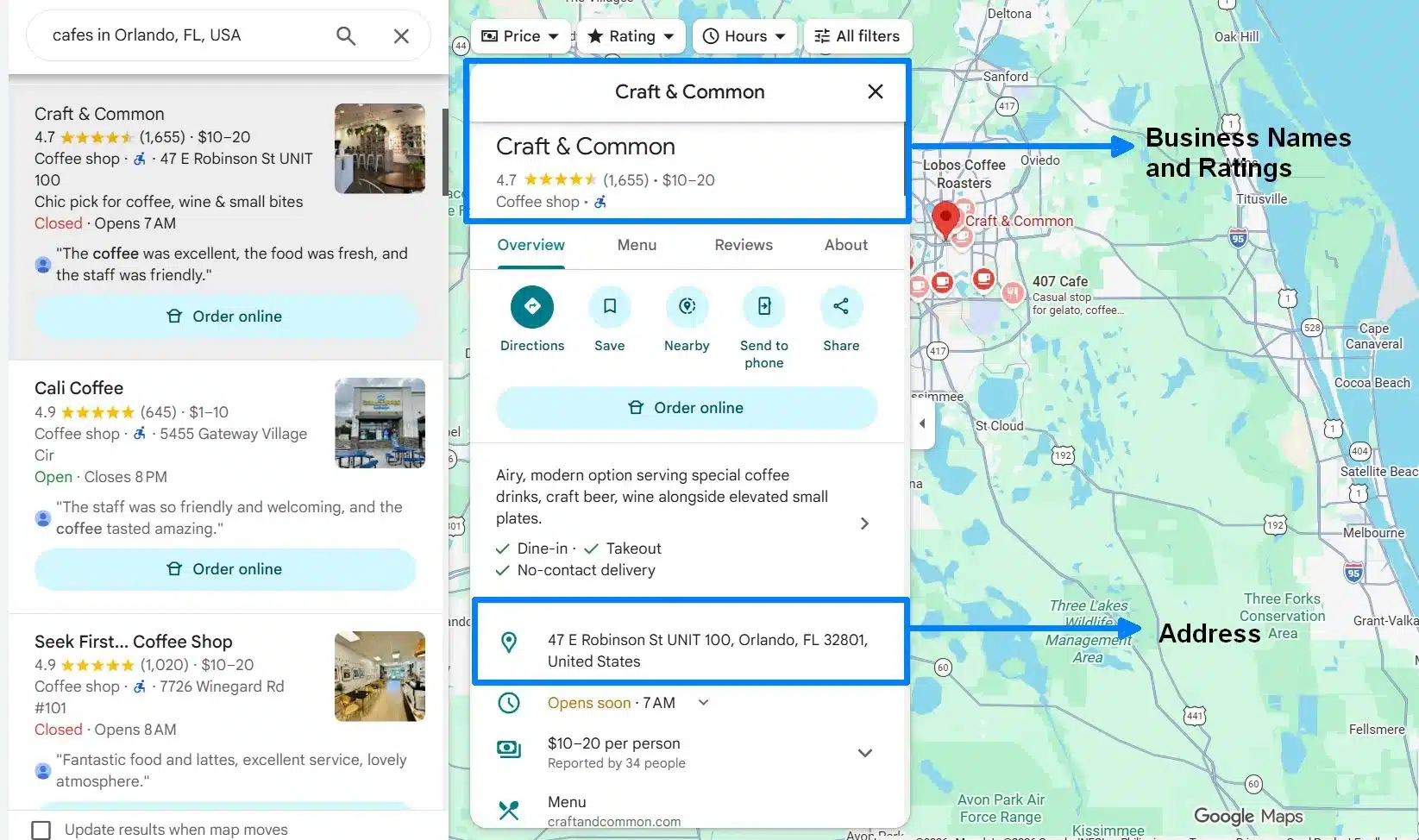
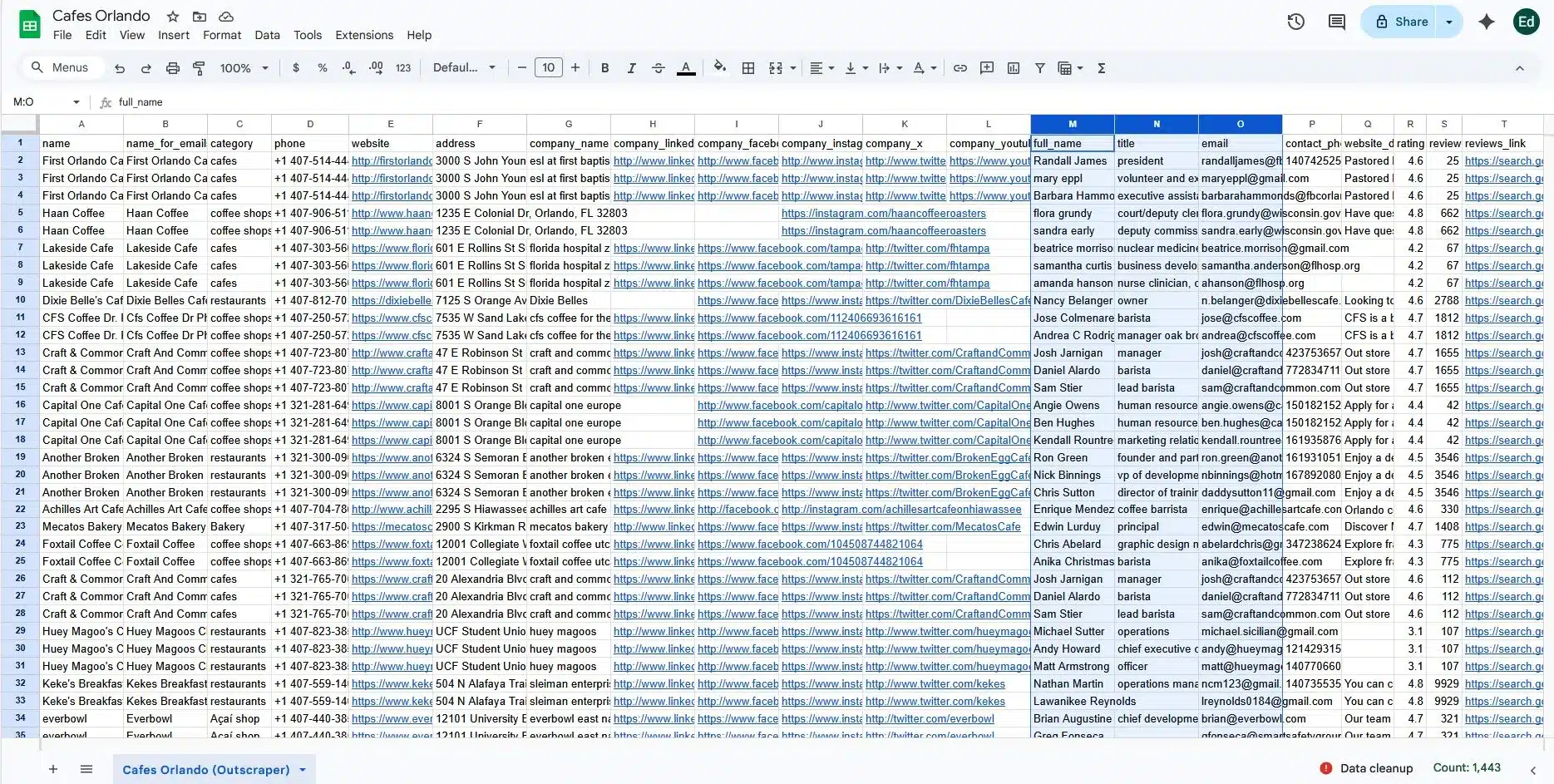
While Google Maps (left) shows you where a business is, managed scraper (right) visits the business’s website to extract the direct contact data you need for outreach.
| Data Field | Google Places API | Outscraper (Scraped) |
|---|---|---|
| Business Name | ✅ Included | ✅ Included |
| Physical Address | ✅ Included | ✅ Included |
| Star Rating | ✅ Included | ✅ Included |
| Email Address | ❌ Missing | ✅ Extracted |
| Social Media Links | ❌ Missing | ✅ Extracted |
Python vs. PHP: Choosing the Right Stack
If you decide to build your own scraper, the language you choose matters. While PHP is great for web development, Python is the expert choice for data extraction.
Python’s ecosystem includes powerful libraries like BeautifulSoup for parsing HTML and Selenium or Playwright for browser automation. These tools enable you to handle complex tasks, such as clicking buttons or scrolling through infinite lists, with minimal code.
PHP can do this, but it often requires more work and lacks the specialized community support that makes Python the standard for data science and automation.
Will AI Replace Web Scraping?
With the rise of Large Language Models (LLMs), many wonder if AI will make scraping obsolete. The reality is that AI is a partner, not a replacement. Some notable business data platforms already offered AI-powered web scrapers to their customer to adapt the growing needs of advanced scraping.
AI is incredible at “cleaning” data. It can take a messy pile of HTML and instantly extract the CEO’s name or summarize 500 reviews. However, the AI still needs a scraper to “fetch” that raw HTML from the web first. The scraper is the hand that grabs the information, while the AI is the brain that understands it.
The Cost Breakdown: API Fees vs. Scraper Maintenance
Budget is often the deciding factor in the Google Maps API vs. Web Scraping debate. One has high direct costs; the other has high indirect costs. Understanding where your money goes is key to picking a sustainable path.
How much will this actually cost you?
| Feature | Google Places API (Official) | Managed Web Scraping |
|---|---|---|
| Cost per 10k Leads | ~$320.00 (Usage-based) | ~$30.00 (Flat/PAYG) |
| Data Depth | Basic: Name, Rating, Address | Deep: Emails, Socials, Full Reviews |
| Lead Volume Cap | 60 results per search | Unlimited (via Gridding) |
| Maintenance | None (Official Connection) | Handled by Service Provider |
| Legal / Compliance | Must follow Google's API terms | Depends on the specific scraping workflow and applicable rules |
Google Places API Costs
Google uses a “pay-as-you-go” model that can lead to significant “bill shock” for lead generation teams. While you get a $200 monthly credit, it disappears quickly when pulling large datasets.

Web Scraping Costs
Web scraping looks more affordable, but it has operational costs. You must pay for proxies, which can cost $50.00 to $100.00 for a 50k crawl. Most scrapers offer a monthly recurring payment, while some notable scrapers like Outscraper offer a PAYG model, meaning you only pay for the data results that you scraped.
The Maintenance Challenge
Web scrapers are also “fragile.” If Google moves a data field in their HTML, the scraper breaks, but with the advancement in AI, the scrapers also adapt to changes. Still, web scraping requires constant monitoring. Many teams prefer managed services because the provider handles these technical fixes, letting the sales team focus on outreach.
Places API Alternatives
If Google’s pricing or scraping complexity doesn’t fit your needs, there are other ways to get local business data.
- Bing Maps API: A viable alternative that sometimes offers more flexible usage terms for developers.
- B2B Data Providers: Companies like Targetron sell pre-scraped, detailed databases. You pay a premium for the data, but you save 100% of the time usually spent on technical extraction.
Legal Considerations When Scraping Google Maps
When comparing Google Maps API vs. web scraping, legality is not a simple yes-or-no question. Different rules can apply depending on Google’s terms, the type of data collected, how the data is accessed, the jurisdiction, and how the data is later used.
Google’s own terms are one part of that analysis. Privacy, copyright, database rights, contract law, and other rules may also matter depending on the workflow.
Terms of Service vs. Publicly Available Data
Google Maps Platform terms restrict scraping and exporting Google Maps Content outside Google’s services. The current terms specifically list activities such as bulk downloading Places information and copying or saving business names, addresses, or user reviews as prohibited uses of Google Maps Content.
That contractual restriction is different from the broader legal question of whether scraping publicly accessible information violates a particular law. Court decisions involving public web data can be relevant, but they do not create a general rule that all scraping of publicly visible information is permitted.
The type of information also matters. Business facts, user-generated reviews, photos, personal information, and copyrighted material can raise different issues. Teams collecting data should review the rules that apply to the source, the data being collected, their jurisdiction, and their intended use.
Can I Use the Google Maps API Commercially?
Yes. Google Maps Platform APIs can be used in commercial applications, but users must follow the applicable Google Maps Platform terms, service-specific terms, billing requirements, and attribution rules.
When Google Maps content is displayed outside a Google Map, attribution may be required. Google’s current guidance says Google Maps attribution must remain visible and should clearly identify content provided by Google Maps.
Storage rules depend on the specific API and type of data. Some Google Maps Platform content cannot be stored outside the service except under limited conditions, while certain values, such as Place IDs, have different storage rules. Some temporary caching permissions are limited to 30 days.
For teams building long-term business datasets, these restrictions are worth reviewing before choosing between an official Google Maps API and another data-collection approach.
Practical note: Before collecting Google Maps data at scale, review the current Google terms that apply to the source and product you are using. Also consider privacy, copyright, and data-use requirements that may apply in your jurisdiction. For workflows with material legal or compliance risk, seek advice based on the specific use case.
Choosing Your Method: Practical Use Cases
The choice between Google Maps API vs. Web Scraping depends on what you are building. One is a tool for developers; the other is a high-volume engine for marketers.
When to use the API
The official Google Maps API is the best choice for real-time apps. If you are building a delivery tracker or a “store locator” on your website, you need the official stability Google provides.
It is also the right move for small projects under a few hundred results per month. Since Google provides a $200 monthly credit, these small lookups are often free. If legal safety and technical stability are your top priorities, stick with the official API.
When to use Web Scraping (or a Scraping Service)
Web scraping is the practical choice for building massive B2B lead databases. If your goal is to export 50,000 prospects, spending money on the API will destroy your margins. Scraping is also necessary for deep competitor research.
If you need to see every customer review, the official API cannot help. Use a scraping service when your budget is tight and you need a detailed spreadsheet with emails from various web sources.
If you are considering the scraping route, the next decision is whether to build and maintain the scraper in-house or use a managed service. See our guide on whether to build your own Google Maps scraper or use a managed service.
The Hybrid Approach: A Balanced Plan
A good next step for most is a hybrid approach. You can use the official API for your core app functionality to confirm 100% uptime and official compliance. Also, you can use a web scraper to “enrich” that data.
For example, pull the basic business name from the API, then run it through a scraper to find “deep” details like email addresses and social media handles. This keeps your app officially supported while giving your sales team the contact info they need for lead generation and closing deals.
Frequently Asked Questions
It depends on your scale and data needs. The official Google Maps API is best for real-time app integration and small-scale lookups. However, for high-volume lead generation, web scraping is the preferred method because it provides deeper contact data (like emails and social profiles) at a lower cost.
The Google Maps API is designed for navigational and mapping services, not for sales intelligence. It only provides data points that Google officially maintains, which typically excludes direct contact information like personal or business emails and social media handles.
Scraping lives in a “gray area.” While Google’s Terms of Service (ToS) forbid it, several court rulings have suggested that extracting publicly visible data (information you can see without logging in) is generally protected. You should only collect factual business data and avoid overwhelming Google’s servers.
Google uses a pay-as-you-go model. For “Pro” data like phone numbers, it costs roughly $32.00 per 1,000 requests. While you get a $200 monthly credit, a large-scale campaign of 50,000 leads could result in a monthly bill exceeding $1,400.
The official Google Maps API caps every search query at a maximum of 60 results. This makes it difficult to map out an entire city’s business directory. Web scraping bypasses this by “gridding” an area, allowing you to capture every single lead without artificial limits.
Yes, this is known as the “Hybrid Approach.” Many pros use the official API for core app functionality to ensure compliance and stability, then use a web scraper to “enrich” that data with deep contact details like social media links and email addresses that the official API hides.