Table of Contents
Most sales teams waste 60% of their time manually copying phone numbers and addresses from Google Maps into spreadsheets. This process is slow, prone to errors, and impossible to scale when you need data for thousands of businesses across a specific region. While you spend hours on manual entry, your competitors are already reaching out to the same prospects using automated tools.
Google Maps Scraping is the process of using software to extract public business data, such as names, websites, phone numbers, and ratings, into a clean format like CSV or JSON. In 2026, over 1.5 million new business locations are added to Maps every month. Relying on manual searches means you miss out on new leads that appear in real-time.
I have spent years managing data extraction for SaaS and B2B companies, and the goal is always the same: get accurate data without getting blocked. This guide provides a look at how to build a reliable lead list, bypass technical caps, and use this data to drive actual growth.
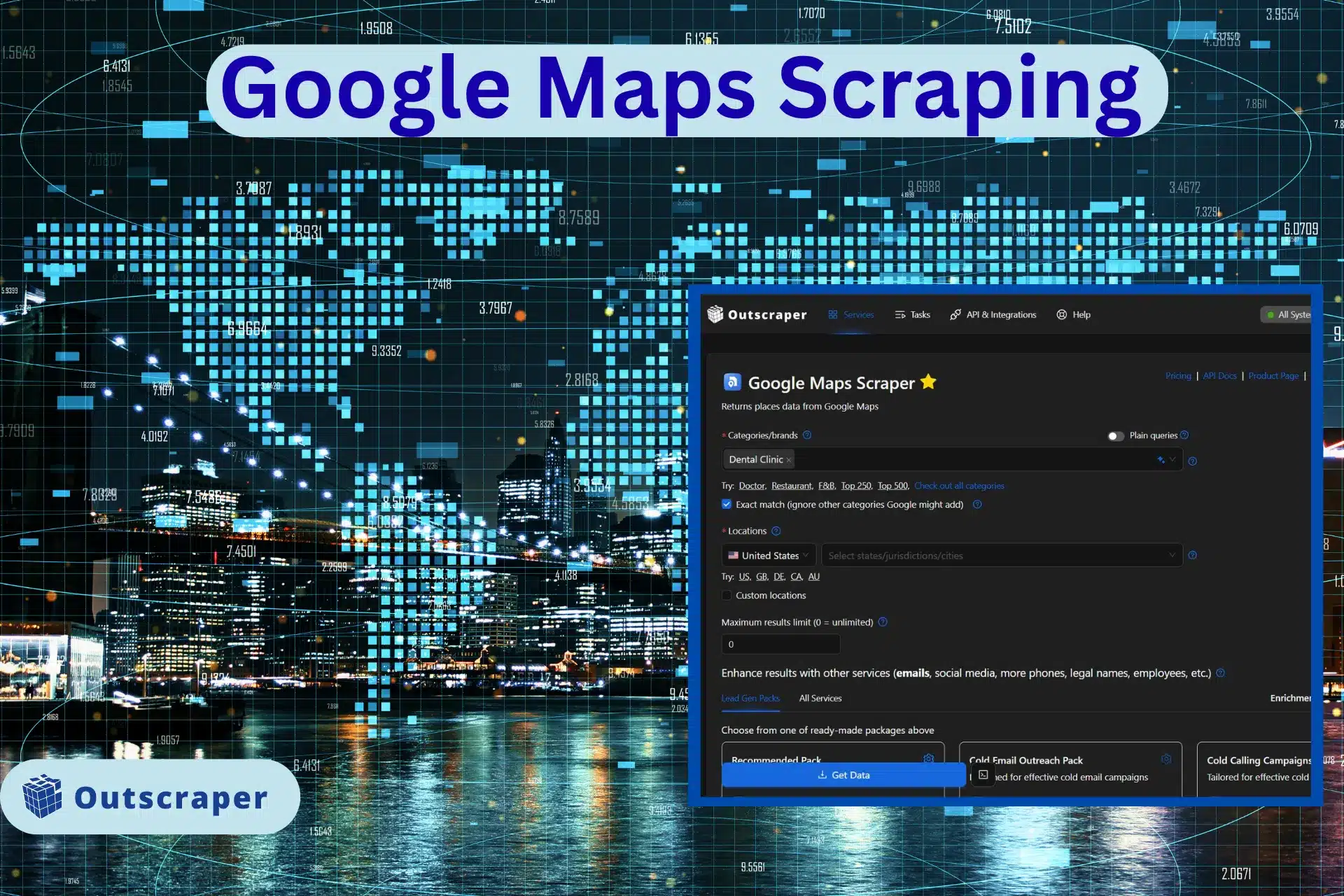
What is Google Maps Scraping and How Does it Work?
Google Maps Scraping is the automated extraction of public business data, such as names, phone numbers, and addresses, into a structured file like a CSV. For many operators, the primary challenge is not finding the data, but dealing with technical barriers that stop a search before it is finished.
From Rigid Code to AI Intent
In the past, scrapers used CSS Selectors, which are fixed coordinates in a website’s code. If Google changed its layout even slightly, these “links” would break, and the scraping would stop.
In 2026, modern tools use AI Intent. This model allows the software to “understand” a page like a human does. It recognizes phone numbers by their content, not just their location in the code. This makes the extraction process resilient to Google’s constant updates.
Bypassing the 120-Listing Cap
Google Maps typically limits search results to about 120 listings. To get thousands of leads from a single city, you must use Geographic Narrowing.
This method breaks a large area into a grid of tiny sub-sections, searching by specific coordinates or ZIP codes. AI agents now automate this entire process: they calculate the best grid size, run hundreds of micro-searches, and combine the results into one clean database.
Is Scraping Google Maps Legal? (2026 Compliance)
The legality of extracting data from Google Maps depends on a key distinction between federal crime and civil contract law. This year, the legal consensus is that while scraping public data is not “hacking,” it can still lead to a breach of contract lawsuit.
In the US, landmark cases ruling established that scraping data visible to the public does not violate the Computer Fraud and Abuse Act (CFAA). However, a 2022 settlement in a case confirmed that platforms can still sue for Breach of Contract. Another challenge is managing the technical blocks Google uses to protect its database.
The AI vs. AI Arms Race
To avoid these legal and technical traps, the industry has shifted towards a “logged-out” model. Google uses advanced AI to detect “bot-like” behavior by monitoring IP addresses. If a scraper moves with mathematical precision, it is flagged and blocked.
Modern tools now use AI-driven behavioral modeling. Instead of sending raw data requests, the software acts like a human user. It performs organic “scrolling,” pauses to “read” content, and moves the mouse in non-linear patterns.
Ethical Data Standards and PII
While scraping public business data is standard practice, how you handle that data determines your compliance with regulations like GDPR. The key is to avoid PII (Personally Identifiable Information), which is any data that can identify a specific private individual.
To keep your lead generation compliant, you should focus strictly on Business Data:
- Registered business names and office addresses
- Publicly listed business phone numbers
- Star ratings and review counts
Note that focusing on these public details ensures your lists remain within legal boundaries. Avoiding personal home addresses or private cell numbers protects your company from the “Breach of Contract” and privacy risks that modern platforms now enforce.
Popular Methods and Tools for Data Extraction
Finding the best Google Maps scraper tool depends on your technical skill and the amount of data you need. Just recently, the market has split into four main categories: simple browser extensions, AI-driven coding libraries, official Places API, and professional-grade scrapers.
No-Code Extensions for Quick Lead Capture
If you only need a few dozen leads for a local project, a Google Maps scraping extension is the easiest starting point. These tools live directly in your Chrome, Firefox, or Edge browser. You simply run a search on Google Maps, click the extension icon, and it “grabs” the visible results into a table.
Many of these tools offer a Google Maps scraper free tier, which is great for one-off tasks. However, keep in mind that extensions are limited. They can only scrape what you can see on your screen, and often the first tools to break when Google updates its layout. They also lack the “grid search” ability needed to bypass the 120-listing limit.
This is the perfect way to scrape Google Maps without coding if you only need a few dozen leads for a local project.
AI-Native Python Libraries for Developers
For those comfortable with coding, Google Maps scraping using Python has entered a new era. Traditional libraries like BeautifulSoup or Selenium are being replaced by AI-native frameworks such as ScrapeGraphAI and Crawl4AI.
These libraries use Large Language Models (LLMs) to parse page data. Instead of writing 100 lines of code to find a phone number, you simply tell the library: “Find the business name and contact info on this page.” The AI handles the logic. This makes your scripts much shorter and more resistant to website changes. Note that while powerful, these still require you to manage your own proxies to avoid IP blocks.
Official Google Places API vs. AI-Powered Scrapers
When scaling, you must choose between the official Google Maps scraping API and third-party API tools providers or AI scrapers.
The official API is stable but expensive and lacks deep lead data. Third-party tools and AI-powered scrapers are usually better for lead generation because they can find emails, social media profiles, and lead enrichment that Google does not provide.
Cloud-Based Tools: Traditional vs. AI-Powered
Cloud scrapers (like Outscraper or Apify) run on a server, so you do not need to stay online. Traditional cloud tools use “static rules” that fail whenever Google changes a button or font. This has caused a maintenance crisis for operators.
AI-powered scrapers solve this with “Self-Healing” technology. The AI “sees” the page and adapts to layout changes automatically, making it a more reliable, low-maintenance choice.
Step-by-Step: Google Maps Extraction Using Outscraper
The most popular way to use the platform is through its specialized Google Maps Scraper task. This method handles the grid search and anti-bot measures automatically. You can also visit our detailed guide on how to scrape Google maps data for lead generation.
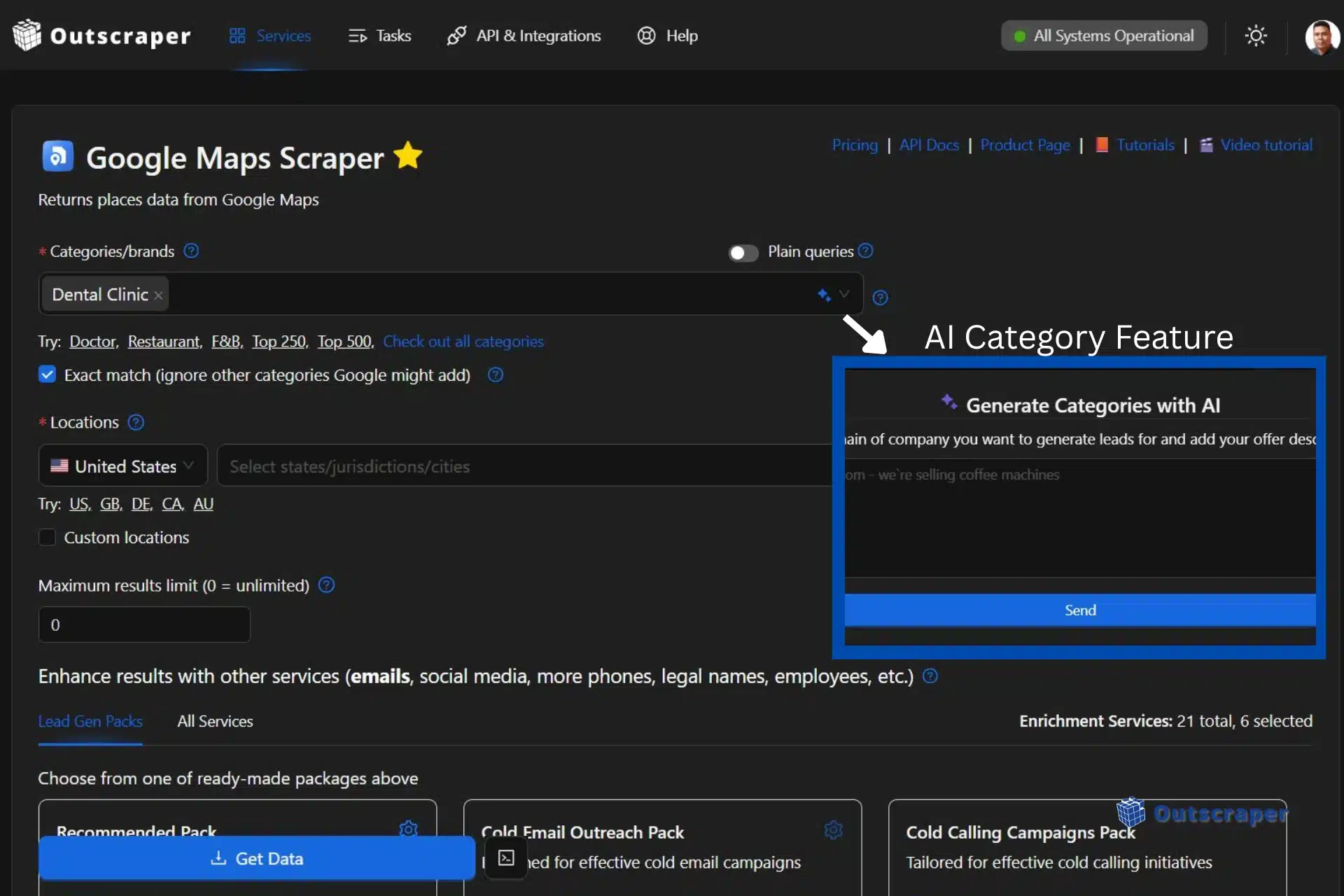
- Select Your Category: Type in your target niche (e.g., “Dental Clinics” or “HVAC Contractors”). You can enter multiple categories at once to broaden your search. You can enter multiple categories at once to broaden your search. You can also use our AI Category feature and use plain query search.

Selecting categories using dropdown or using the AI feature
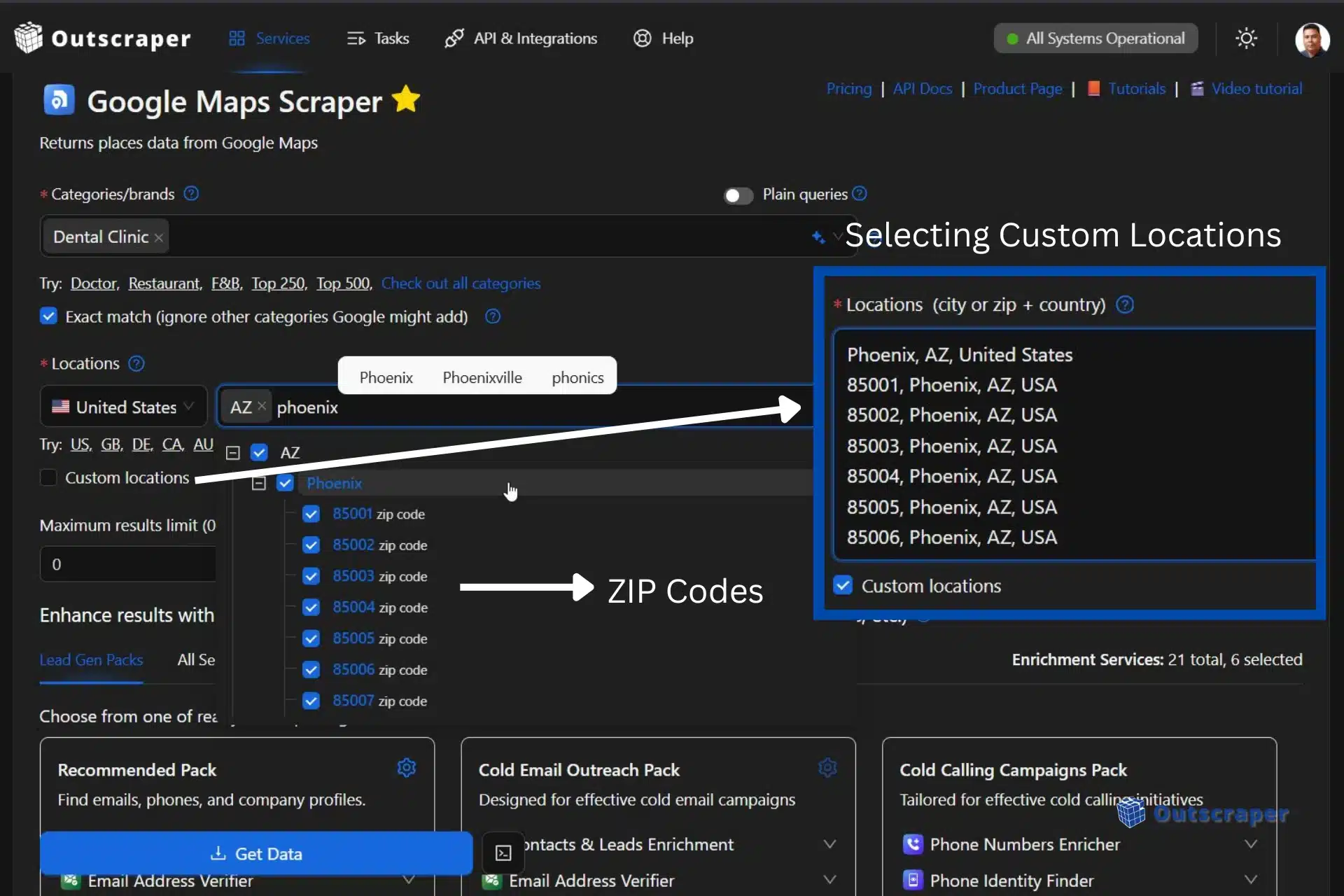
- Define the Location: Choose your target country, state, or city. For large-scale projects, you can select the ZIP codes via a dropdown or upload a list by clicking Custom locations. Using this feature will ensure the scraper visits every neighborhood.
Selecting locations via dropdown or using custom locations
- Configure Results: Set the “Total Results” limit. If you want every single business in a city, set this to 0 (unlimited). The tool will then calculate the number of micro-searches needed to bypass Google’s 120-listing cap.
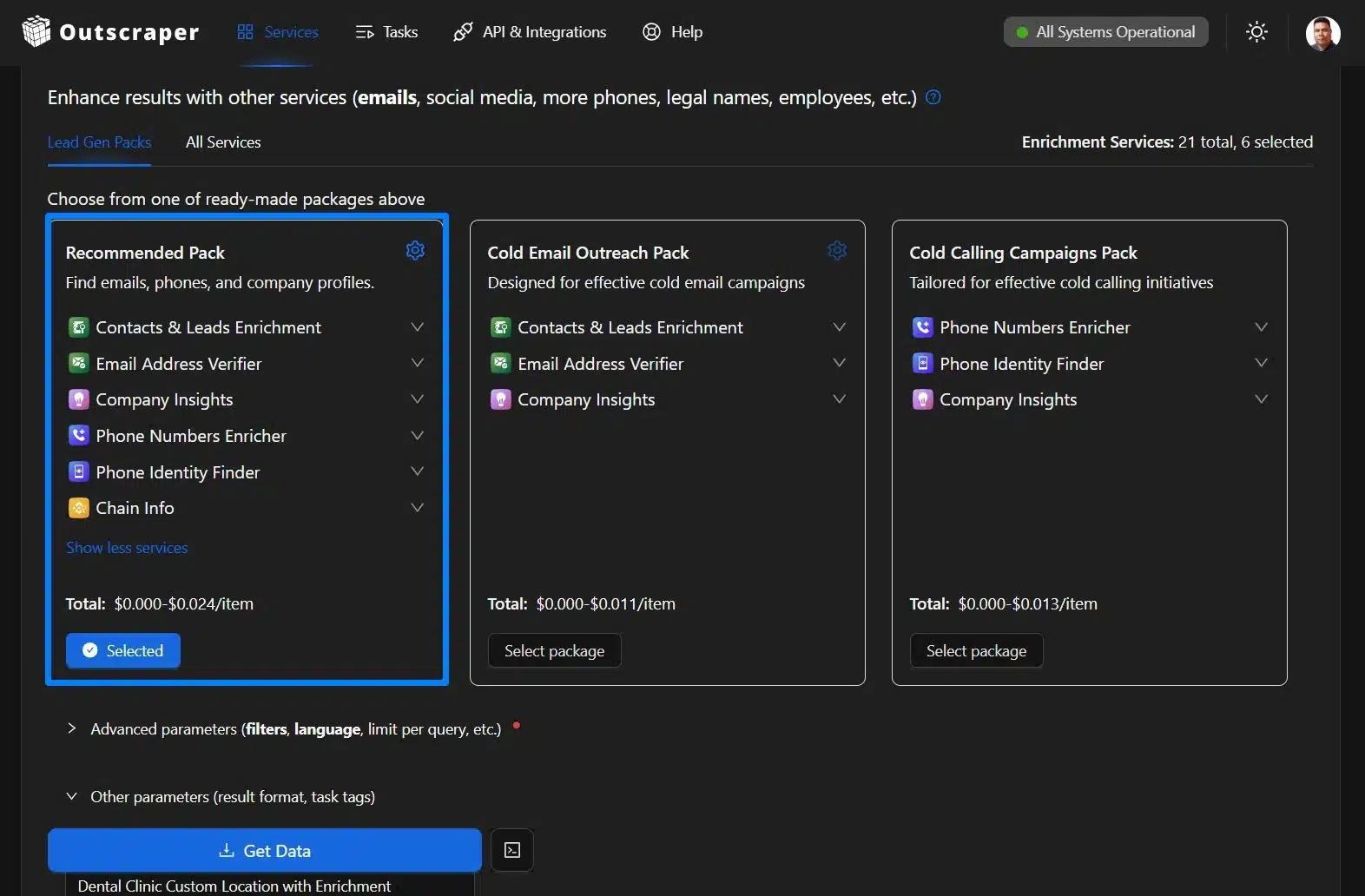
- Enrich Your Data: Check the boxes for “Lead Gen Packs,” recommended for lead generation. You can find emails, phones, and company profiles. The system will first pull the data from Maps and then visit the business websites to find contact details that Google doesn’t list.

Selecting the lead gen packs of Outscraper’s enrichment
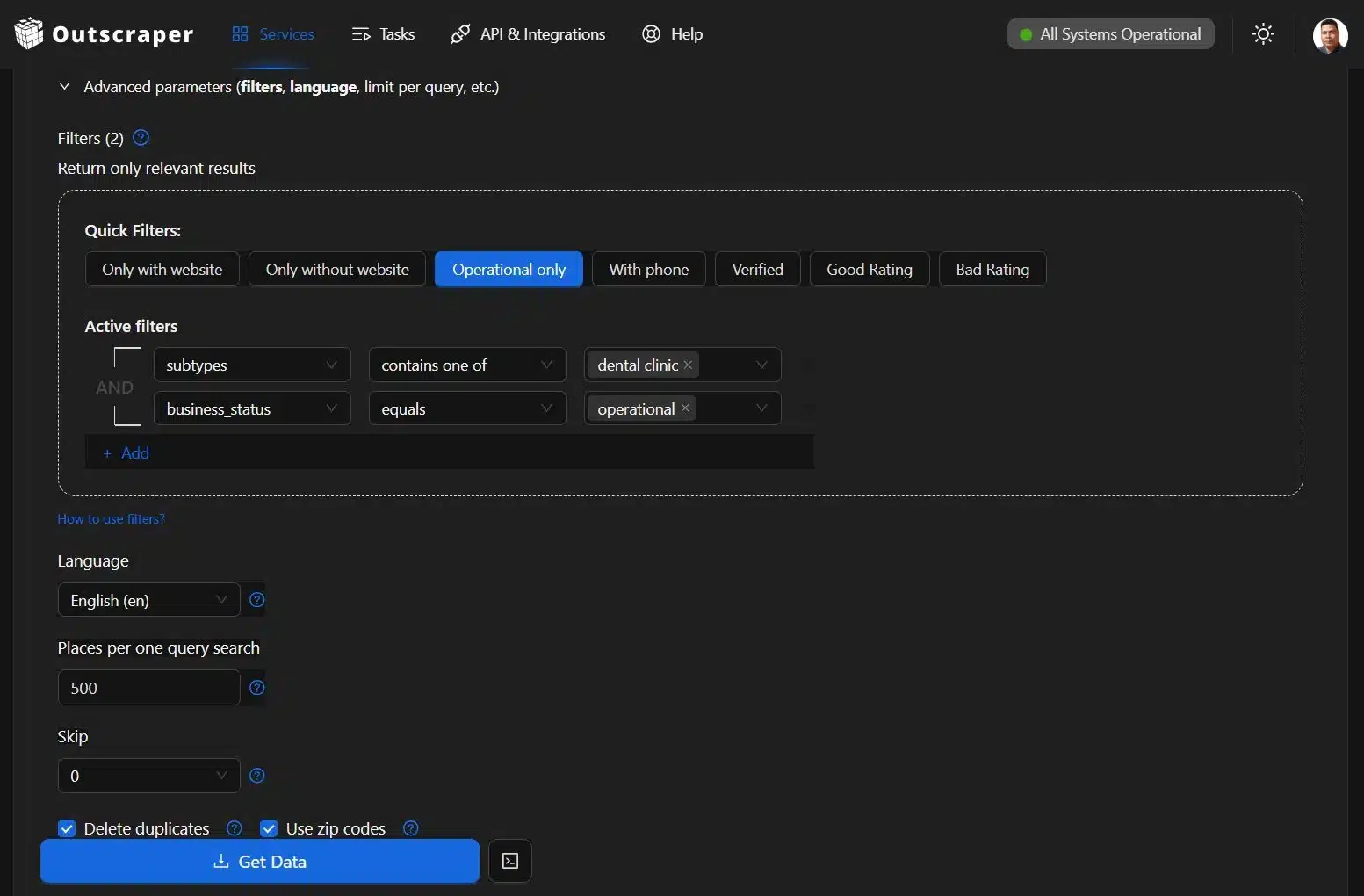
- Add Filters and Download your Leads: Check for additional filters and parameters, making sure that you delete duplicates, use ZIP codes, and select the result extension before confirming the download. Once complete, click “Get Data” and confirm download.

Adding advanced filters, deleting duplicates and using ZIP codes.

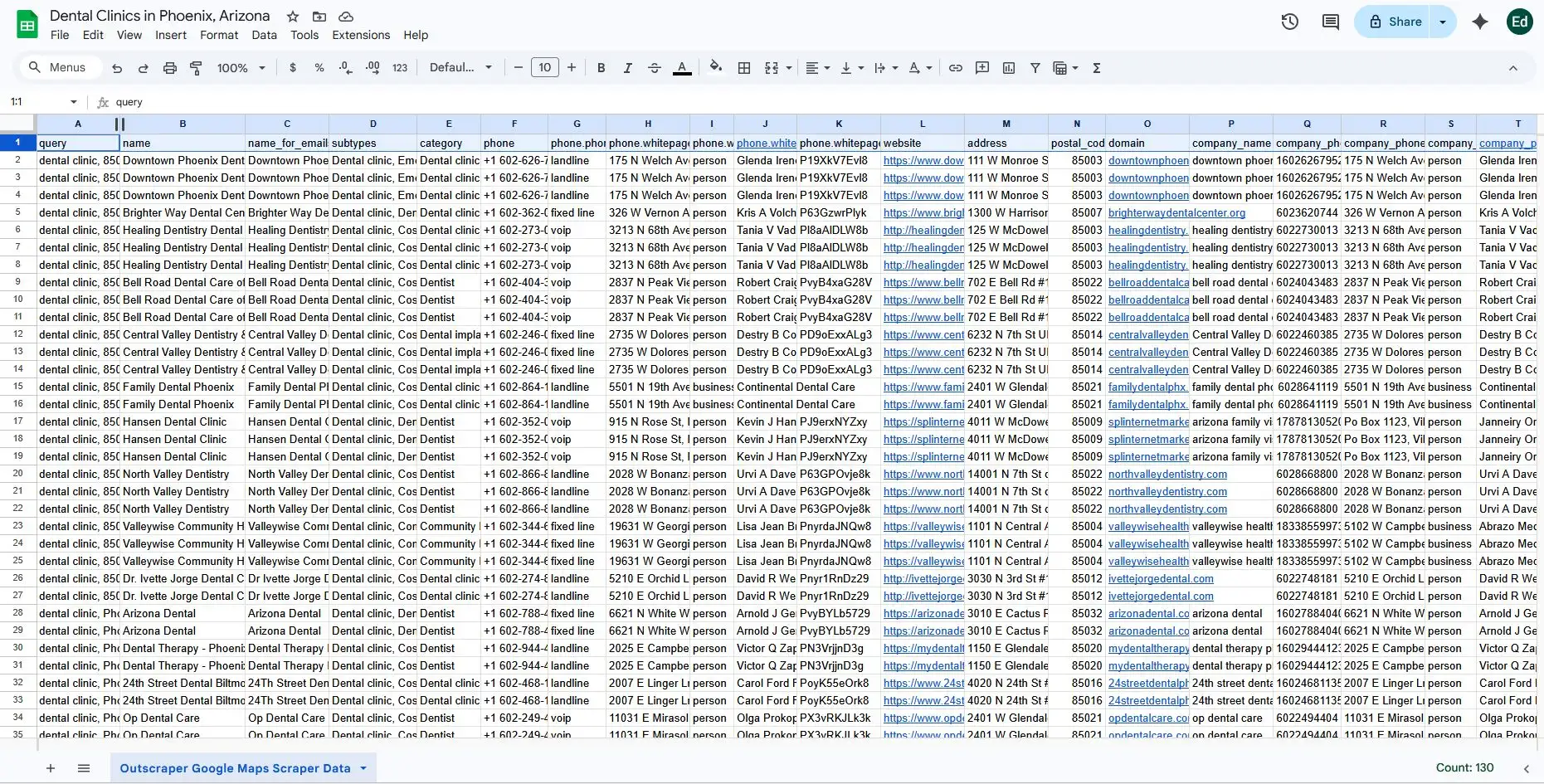
Sample Google Maps scraped data of Dental Clinics in Phoenix, Arizona
Specialized Spotlight: Outscraper’s Business Data Platform
The gap between a “tool” and a “platform” is defined by how much manual work the user has to do. Outscraper has transitioned from an ordinary scraper into a full-fledged business data and enrichment platform. This allows operators to move away from the technical maintenance of code and focus on high-level lead strategy.
The core of Outscraper’s reliability is its move away from fixed scraping rules. Traditional scrapers fail when Google Maps updates its code, but Outscraper uses GPT-based models to interpret page data in real-time.
Instead of looking for a specific HTML tag to find a phone number, the AI “reads” the page content to identify the intent. If Google moves the “Website” button or renames a field, the AI recognizes the change based on context. This “Self-Healing” technology means you don’t need a developer to fix broken code every time a website updates its layout.
Beyond Scraping: Automated Enrichment and Verification
A list of names and phone numbers is no longer enough for a modern sales pipeline. The new workflow has shifted from simple extraction to Automated Enrichment. Outscraper handles this multi-step process in one go:
- Extract: Pull business names and locations from Google Maps.
- Enrich: The tool automatically crawls the business’s own website to find social media profiles and hidden email addresses.
- Verify: Every email found is run through a verification process to check for bounces and “catch-all” addresses.
To make this even faster for everyday tasks, Outscraper provides a Chrome extension for email verification. This allows you to validate addresses directly on any webpage or CRM without switching tabs.
Web Data for AI Agents and Machine Learning
Google Maps lead generation is no longer just about cold calling. Companies are now using scraped data to feed Autonomous AI Agents and local Machine Learning models.
Outscraper has also integrated with the ChatGPT ecosystem by offering custom GPTs like the Local Leads Finder inside the generative AI chatbot. These specialized AI agents allow you to generate lead lists or analyze business data using natural language prompts.
Instead of a human reading through 1,000 listings, an AI agent can ingest the scraped data to identify specific patterns, such as “businesses with low ratings but high foot traffic.” By providing structured web data to these agents, businesses can automate their market research and lead scoring, giving them a significant advantage in speed and precision.
How to Use Scraped Data for Growth
In 2026, raw data is only the starting point. To drive revenue, you must turn information into “growth signals” for your sales and marketing teams.
Building CRM-Ready Contact Lists
The primary use for a Google Maps email scraper is creating a high-quality prospecting list. Modern growth workflows use “Waterfall Enrichment” to build a complete view of a lead. It is a process of using multiple data providers in sequence to ensure that if one tool misses a lead’s email, the next tool in the chain finds them.
This includes matching the business name to its website, identifying its tech stack (such as WordPress or Shopify), and finding the professional profiles of key decision-makers. This ensures your CRM is filled with qualified opportunities and verified emails, not just random contacts.
While a basic Google Maps contact scraper might only pull what is on the surface, modern enrichment finds hidden emails and social profiles.
Competitor Monitoring and Sentiment Analysis
What is the purpose of scraping if not to find the gaps in your market? Savvy businesses now use AI to perform Sentiment Analysis on thousands of Google Reviews.
Instead of reading every comment, an AI can summarize the data into a “Market Gap” report. This reveals common complaints about competitors or specific features customers are asking for. Tracking these trends allows you to build a strategy based on what customers actually want, giving you a clear advantage in your niche.
Using Google Maps data for local seo helps you identify exactly which keywords your competitors are ranking for in the local pack.
Frequently Asked Questions
Yes. Extracting public business data is legal and does not violate the Computer Fraud and Abuse Act (CFAA). However, you must avoid personal data (PII) to stay compliant with GDPR and be aware of a website’s specific Terms of Service.
Use Geographic Narrowing. This method divides a large area into a grid of tiny sub-sections or ZIP codes. AI-powered tools automate these micro-searches to gather thousands of leads that a single search would miss.
Yes, if the bot moves with mathematical precision. Modern tools prevent blocks by using AI-driven behavioral modeling. This mimics human patterns like organic scrolling and varied clicking to stay undetected.
The official Google Places API is stable but expensive and lacks deep lead data. AI scrapers are more cost-effective for lead generation because they can find emails and social media links that the official API does not provide.
Traditional scrapers break when a website’s code changes. Self-Healing tools use AI to “read” a page by its content. If Google moves a button, the AI recognizes it by context and continues working without manual repairs.
Never skip the Email Address Verifier step. High-quality platforms include this in the workflow to filter out “catch-all” addresses and potential bounces, keeping your CRM data clean and your sender reputation safe.
To find a Market Gap. AI can summarize thousands of reviews into a report that highlights what customers hate about your competitors. This allows you to build a sales strategy based on real customer pain points.