Table of Contents
Google Maps reviews are more than public feedback.
When you analyze 10,000 Google Maps reviews together, they can show repeated customer complaints, competitor weaknesses, service gaps, pricing concerns, and local demand patterns.
That is why Google Maps reviews for local market research are useful for agencies, consultants, SaaS teams, sales teams, and market researchers that need to understand what customers actually say about a local industry.
The goal is not to read every review one by one.
The goal is to group review themes, compare competitors, and turn repeated patterns into market signals your team can use.
Quick answer: 10,000 Google Maps reviews can reveal repeated customer complaints, competitor weaknesses, service gaps, pricing concerns, demand patterns, and local market trends. For local market research, the goal is not to read every review manually. The goal is to group reviews by theme and turn repeated patterns into business signals.
What 10,000 Google Maps Reviews Can Reveal
10,000 Google Maps reviews can reveal repeated customer complaints, service gaps, competitor weaknesses, local demand patterns, and market trends.
A single review is only one opinion.
A large review dataset can show patterns.
For example, if a few customers complain about slow service, it may not mean much. But if hundreds of reviews across one local industry mention slow service, long wait times, poor communication, or pricing issues, that becomes a signal.
Google Maps reviews for local market research can help answer questions like:
- What do customers complain about most?
- Which businesses have strong ratings but repeated complaints?
- Which competitors have weak customer experience?
- What service gaps keep appearing?
- What locations show higher demand or frustration?
- What words appear often in negative reviews?
This is why review data matters.
It shows what customers actually say after the buying experience.
A rating can tell you what happened.
A review can help explain why it happened.
Why Google Maps Reviews Matter for Local Market Research
Most local market research starts with business names, ratings, categories, websites, and locations.
That is useful, but it does not explain why customers feel the way they do.
A rating tells you if people are happy or unhappy.
A review tells you why.
If customers keep saying “slow response,” that may show an operations problem.
If they keep saying “hard to book,” that may show demand is higher than supply.
If they keep saying “expensive,” that may show pricing sensitivity.
If they keep saying “friendly staff,” that may show a competitor advantage.
This is where Google Maps reviews data becomes useful for market research.
It helps teams move from random review reading to structured review analysis.
The value is not just collecting reviews.
The value is finding patterns inside the reviews.
For example, a local clinic may have a strong rating but repeated reviews about long wait times. A restaurant may have high review volume but repeated complaints about inconsistent service. A service business may have many positive reviews but weak owner responses.
Those details are hard to find from ratings alone.
Review text gives the market context.
The Collect, Group, Analyze, Act Workflow
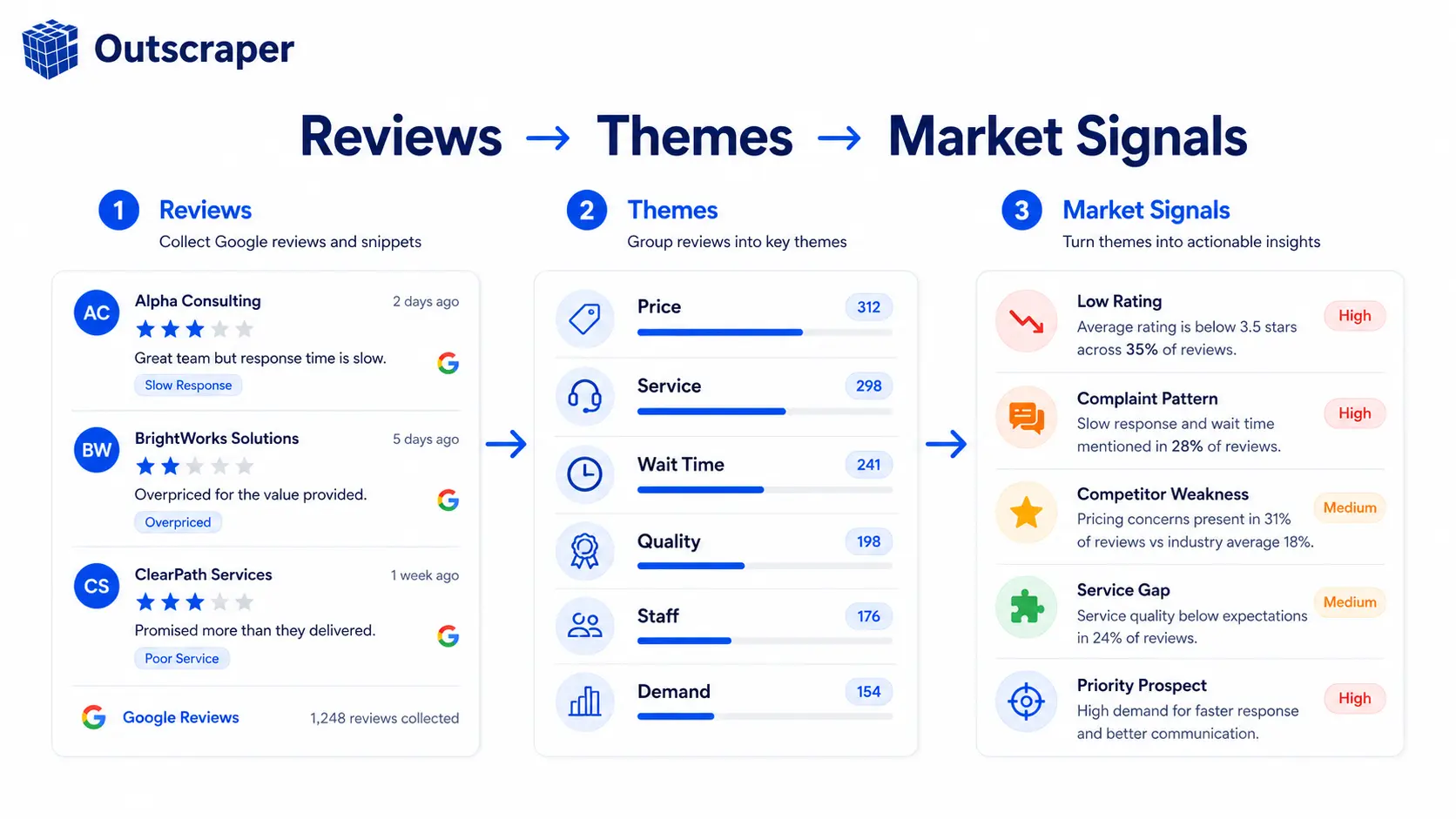
A simple workflow for Google Maps reviews analysis has four steps:
Collect the reviews from a clear niche and location.
Group the reviews by common themes.
Analyze repeated patterns across businesses and competitors.
Act on the insights that connect to your business goal.
Start with one market.
For example:
“Dental clinics in Austin”
“Coffee shops in Chicago”
“Law firms in Dallas”
“Restaurants in Miami”
Do not start with every industry at once.
One niche and one location will give cleaner insights.
After collecting reviews, group them into categories like:
- service speed
- price
- staff behavior
- booking problems
- product quality
- cleanliness
- wait time
- customer support
- location convenience
Then look for repetition.
The more a theme repeats, the stronger the signal becomes.
For example, if 10 restaurants in the same city receive repeated complaints about slow delivery, that can point to a market-wide service issue.
If many clinics receive repeated complaints about phone response time, that can show a customer experience gap.
If customers repeatedly praise one competitor for communication, that may show a standard other businesses are failing to meet.
This workflow keeps the research simple.
You are not trying to read every review like a human researcher.
You are trying to find the patterns that repeat enough to matter.
For teams that need the export process first, this guide on how to export Google Maps reviews to Excel shows how reviews can be downloaded and reviewed in spreadsheet format.
How Outscraper Helps Export and Group Reviews
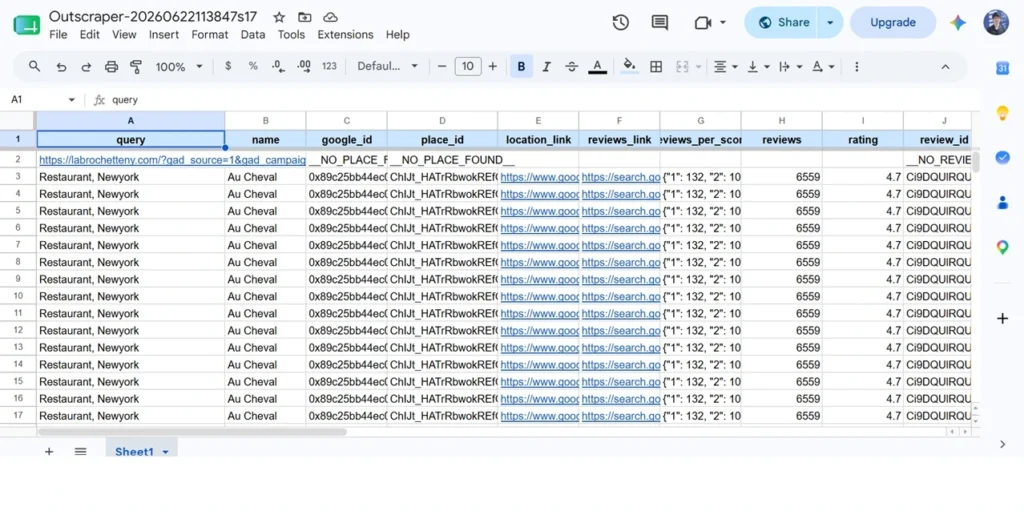
With Outscraper, Google Maps reviews can be exported into spreadsheet-ready formats such as XLSX, CSV, or JSON after the scraping task is complete.
For local market research, the exported file should not stay as raw review text only. Group the reviews by business name, category, city, rating, review date, owner response, and repeated complaint theme.
For example, clinic reviews can be grouped into themes such as long wait times, difficult scheduling, poor front desk service, unclear pricing, and hard-to-reach phone lines. Restaurant reviews can be grouped into slow delivery, inconsistent food quality, rude staff, high prices, cleanliness issues, and small portions.
This makes 10,000 reviews easier to analyze because the spreadsheet becomes a market research file, not just a raw review export.
How Reviews Reveal Customer Pain Points
The biggest value of 10,000 reviews is repetition.
If five people complain about the same thing, it may be random.
If 500 people complain about the same thing, it may be a market signal.
For example, in a clinic market, repeated complaints may include:
- long wait times
- difficult scheduling
- poor front desk service
- unclear pricing
- rushed appointments
- hard-to-reach phone lines
- confusing follow-up process
For a restaurant market, repeated complaints may include:
- slow delivery
- inconsistent food quality
- rude staff
- high prices
- long lines
- poor cleanliness
- small portions
These patterns help teams understand what customers care about.
They also help sales and marketing teams create better messaging.
A generic message says:
“We help local businesses grow.”
A stronger message says:
“We help clinics reduce missed calls and booking friction, which often appears in patient reviews.”
That is the difference between guessing and using review data.
Google Maps reviews analysis helps teams move from broad assumptions to specific pain points.
For reputation-based prospecting, this guide on how to find companies with negative reviews on Google Maps shows how negative review signals can support lead qualification.
This matters because customer complaints are often written in the customer’s own words.
Those words can help shape offers, content, outreach, product positioning, and market research reports.
How Reviews Expose Competitor Weaknesses
Google Maps reviews can also show where competitors are weak.
A competitor may have a high rating but still have repeated complaints.
For example:
A clinic may have 4.6 stars but many reviews mention long wait times.
A restaurant may have 4.5 stars but many reviews mention inconsistent service.
A law firm may have 4.7 stars but many reviews mention poor communication.
A hotel may have 4.4 stars but many reviews mention cleanliness issues.
This matters because ratings alone can hide the details.
Review text gives context.
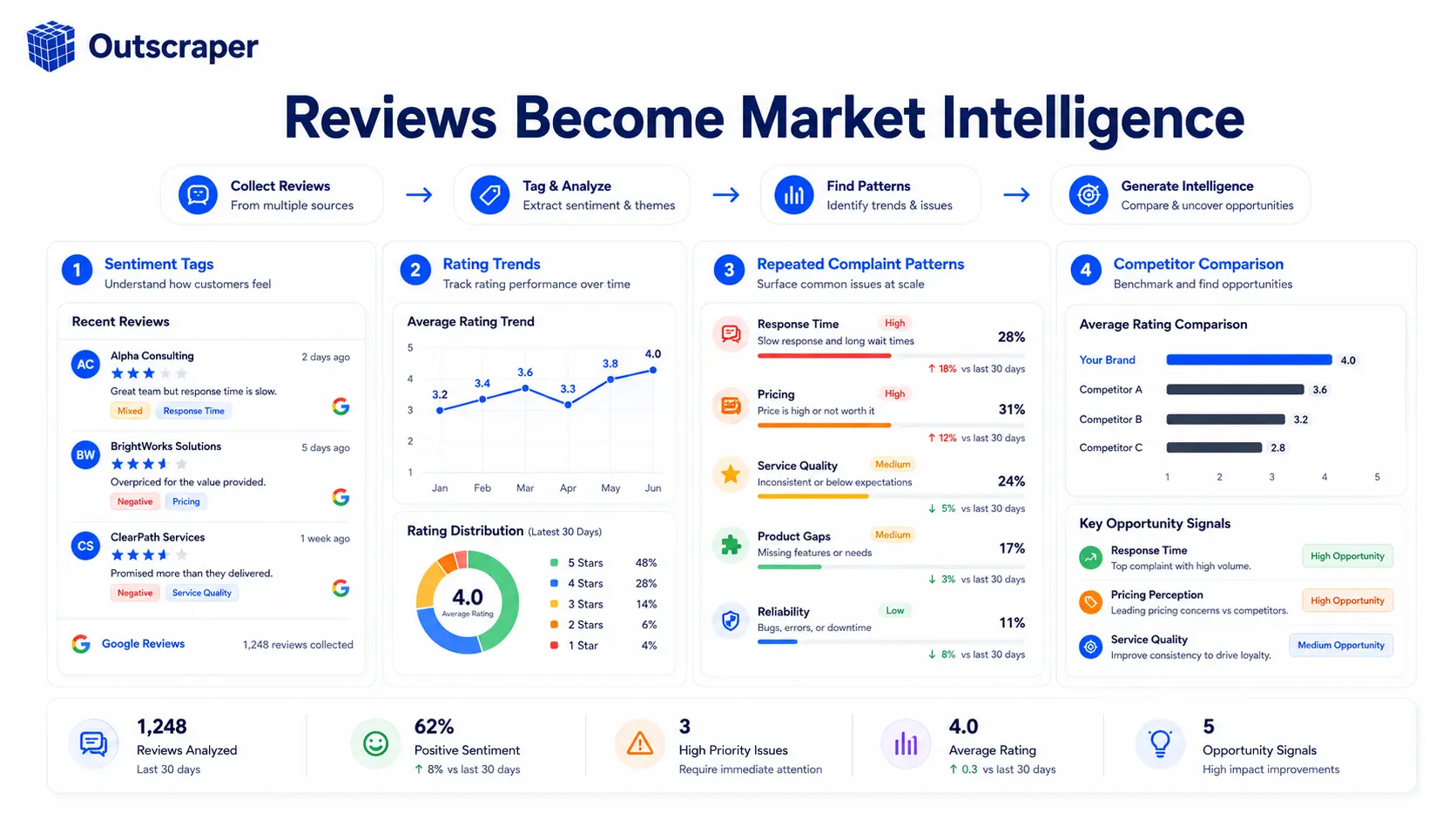
For competitor analysis, look at:
- repeated negative words
- most common complaints
- low-rating patterns
- high-review businesses with weak sentiment
- owner response quality
- changes over time
- gaps between rating and customer comments
If you also need business details like websites, phone numbers, categories, locations, and ratings, Google Maps business data can support the review analysis with business context.
Reviews show what customers feel.
Business data shows which companies those signals belong to.
Together, they make competitor analysis more useful.
A review pattern can tell you what the market is unhappy about.
Business data can tell you which companies are affected.
That is how review research becomes business intelligence.
Instead of reading reviews one by one, use Outscraper to collect Google Maps reviews, group repeated complaints, and compare patterns across businesses in the same niche and location. This helps teams move from raw review text to customer pain points, competitor gaps, and local market signals.
How Teams Can Use Google Maps Reviews Data
Different teams can use Google Maps reviews for local market research in different ways.
A reputation management agency can find businesses with many reviews, low ratings, and repeated complaints.
A local SEO agency can compare review activity across competitors and find businesses with weak review presence.
A SaaS company can use review signals inside a dashboard, scoring system, or customer intelligence product.
For teams building dashboards or automated review workflows, the Google Maps Reviews API can help connect review data to internal tools, reports, or customer intelligence products.
A sales team can prioritize outreach based on real customer complaints.
A consultant can use review trends to understand a local market before entering it.
A market researcher can compare customer sentiment across cities, categories, or competitors.
For local lead generation, review signals can help teams prioritize better-fit businesses instead of contacting every company in a category.
The goal is not to collect reviews just to have more data.
The goal is to decide where action makes sense.
A review dataset can help answer:
- Which businesses have clear pain signals?
- Which markets are underserved?
- Which competitors are winning on customer experience?
- Which businesses may need reputation support?
- Which locations show repeated demand or frustration?
This is where 10,000 reviews become useful.
The reviews are not just content.
They become a map of customer experience across a local market.
Final Check Before Using Reviews for Market Research
Before using 10,000 Google Maps reviews for local market research, check the dataset first.
Start with one niche and one location. A review export for “dental clinics in Austin” will be easier to analyze than a mixed file of restaurants, gyms, clinics, and law firms across different cities.
Next, group the reviews into clear themes such as service speed, pricing, wait time, staff behavior, booking problems, product quality, cleanliness, and customer support. Without theme groups, the review export becomes another large spreadsheet instead of a market research dataset.
Then check whether each repeated theme can lead to action. A useful review pattern should help answer:
Which competitor is weak?
Which customer complaint repeats most often?
Which businesses have review volume but poor sentiment?
Which market pain point matches our offer?
Which business or category should be reviewed first?
The goal is not to read every review manually. The goal is to turn repeated review patterns into customer pain points, competitor gaps, and local market signals.
Outscraper’s Maps Scraper exports business data in CSV, JSON, or Excel no code required
Frequently Asked Questions
Most frequent questions and answers
Google Maps reviews can show repeated customer complaints, service gaps, competitor weaknesses, and local demand patterns. Instead of relying only on ratings, teams can analyze review text to understand why customers are satisfied or frustrated.
A larger review dataset makes patterns easier to see. A few reviews may show random opinions, but thousands of reviews can reveal repeated problems, common praise, and market-wide trends.
Look for repeated complaints, common positive themes, low-rating patterns, review volume, owner responses, pricing concerns, service issues, and competitor gaps. The goal is to find patterns that can lead to business action.
Yes. Reviews can show where competitors struggle, even when their overall rating looks strong. For example, a business may have a high star rating but repeated complaints about wait times, communication, pricing, or service quality.
Start with one niche and one location. Collect reviews, group them by theme, compare businesses, and look for repeated signals. Then use those insights for outreach, market analysis, competitor research, or product planning.