Table of Contents
Manual lead research is slow. Buying contact lists is expensive, and the data is usually 6 to 18 months stale before you make the first call. Google Maps is different it is a live platform updated daily by real business owners who depend on it to get found by customers. That makes it one of the best raw sources for B2B lead generation available today.
Outscraper’s Google Maps Scraper turns that live data into structured, exportable lead lists in minutes. No manual copying. No stale records. You get phone numbers, websites, ratings, review counts, addresses, and hours of operation clean and ready for outreach. Outscraper runs entirely in the cloud with no installation and no technical setup required.
This guide covers the complete workflow: why Google Maps produces better leads than purchased lists, how to build and filter your first list with Outscraper, how to enrich contact data beyond the listing, and how to turn that data into outreach that gets real responses.
Why Google Maps Produces Better Leads Than Purchased Lists
Most B2B contact databases are built by aggregating public records, crawling websites, and licensing third-party data. That process has a built-in delay. By the time the data reaches you, it has passed through multiple hands and multiple months. Google Maps works differently it is a live platform where business owners manage their own presence in real time, because their customers depend on it being accurate.
Data freshness is the core advantage
B2B contact data decays at roughly 25–30% per year, according to HubSpot’s research on database decay. Phone numbers change. Businesses move. Companies close. A list you bought 12 months ago is already missing a quarter of its useful contacts before you dial the first number. When you pull data from Google Maps today with Outscraper, you are working with listings that reflect how businesses exist right now not how they existed when a database vendor last refreshed their records.
An active listing is already a buying signal
When a business has a complete, recently updated Google Maps listing with current hours, recent reviews, and a consistent phone number, that is meaningful. Someone is running that business, managing its presence, and keeping it visible to customers. That is a warmer starting point than a name on a static list nobody maintains. Before you ever reach out, a listing tells you whether they have a website, how active their customer base is, how long they have been operating, what services customers mention, and whether they have a reputation problem your product could help solve.
What Outscraper Exports from Google Maps
Google Maps is built for consumers finding one business at a time. When you search “accountant in Denver,” you see a handful of results. That is fine for finding someone to do your taxes. It is useless if you are trying to build a list of 500 accounting firms to pitch your payroll software to you would have to click every listing manually and copy the information into a spreadsheet. For 500 businesses, that is days of work. With Outscraper, it takes about five minutes.
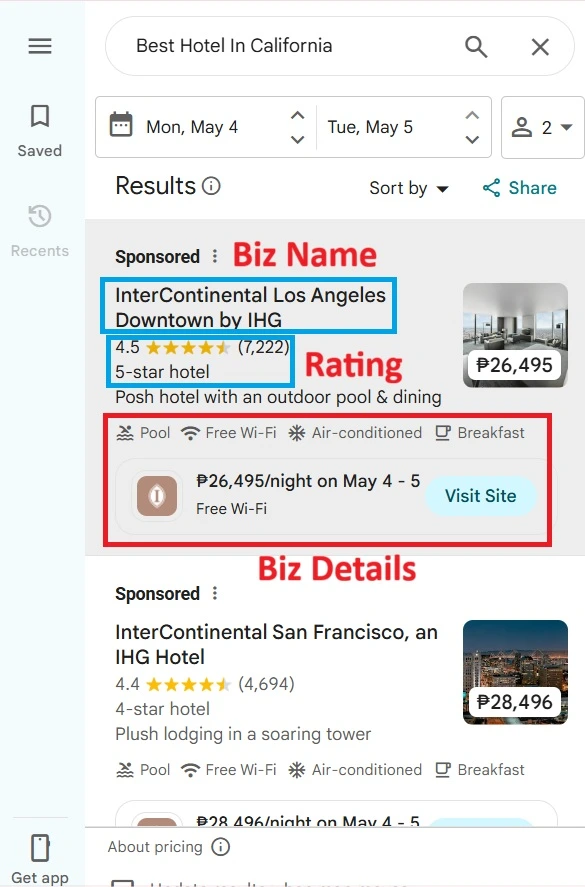
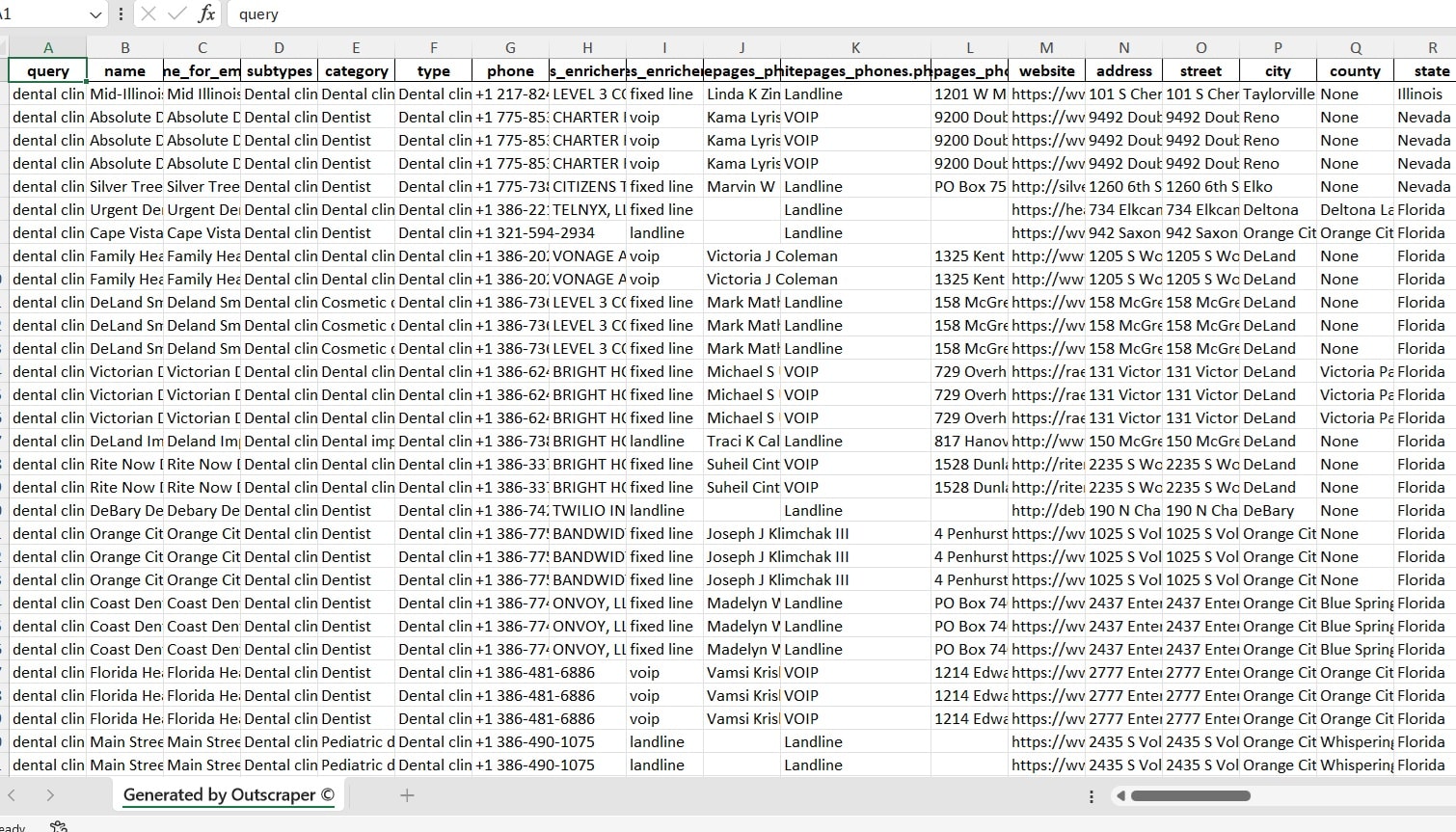
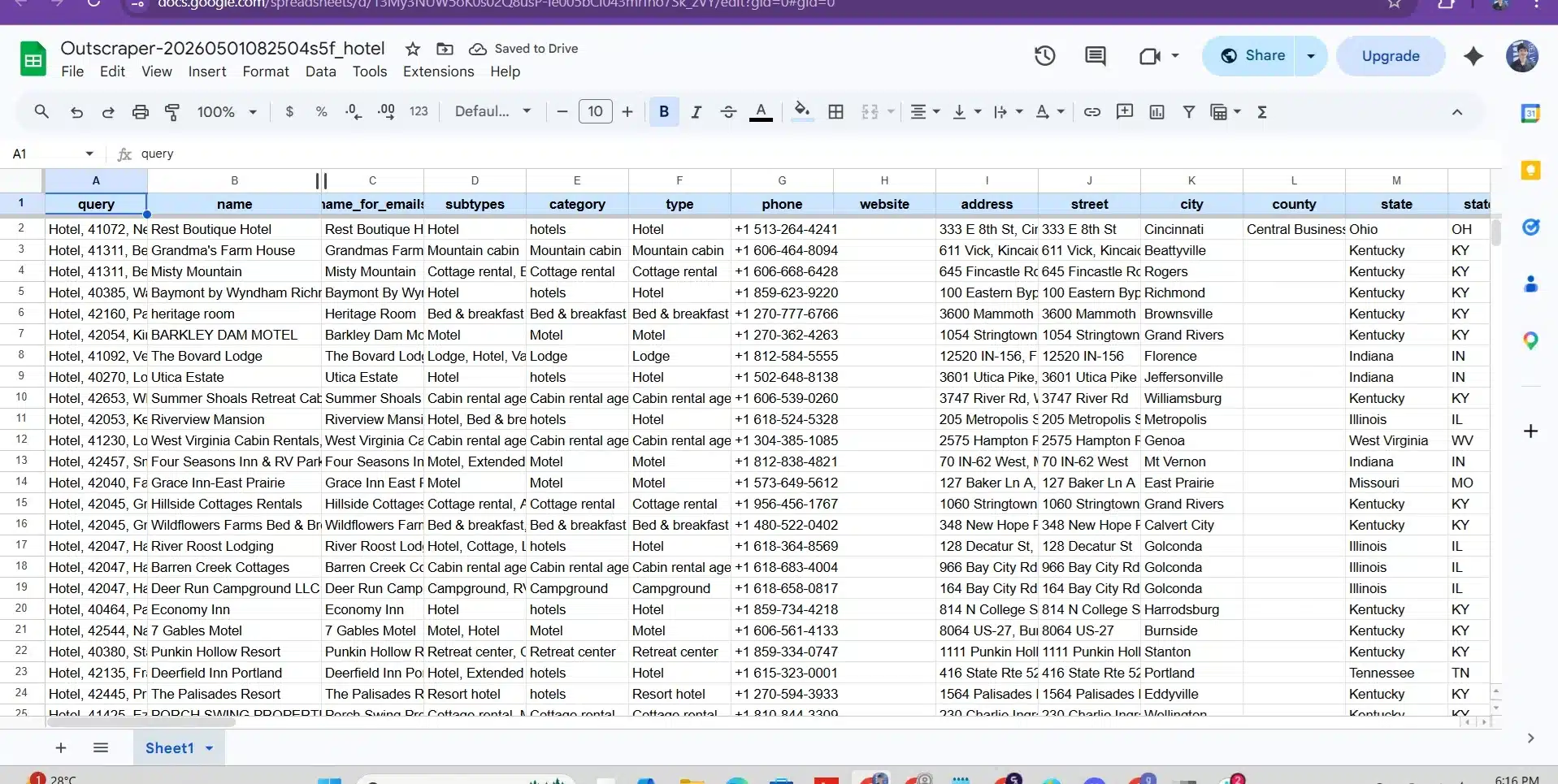
For each business record, outscraper returns the following structured fields:
Here is what a single real export row looks like:
500 free records per month. No credit card. No install. Runs entirely in your browser.
Step-by-Step: How to Build Your First Lead List with Outscraper
This is the full workflow from a blank screen to a downloaded lead list ready for outreach. Every step includes what to do and what to watch out for.
Before you start: define your target precisely
The quality of your lead list is determined before you run a single search. Precise queries return fewer records that are far more actionable. Before opening Outscraper, answer these three questions:
- What business category am I targeting? Be specific “HVAC contractor,” not “contractor.”
- What geography am I focused on? A specific city, ZIP code, metro area, or radius.
- What signals make a record a real prospect? Minimum rating, review count, website presence.
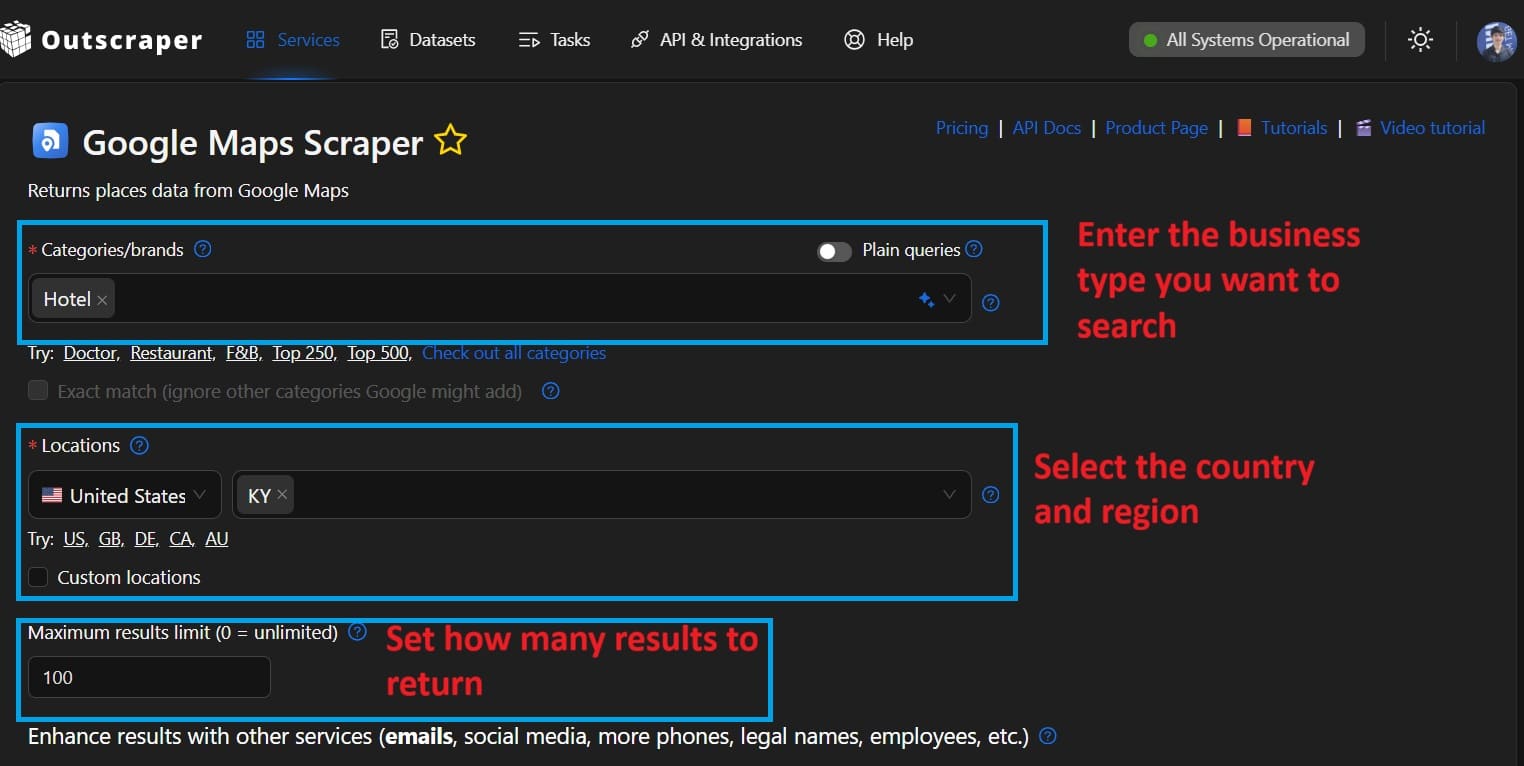
1. Set your query and record limit
Enter the business category and location exactly as a customer would search on Google Maps, for example, “plumber Austin, TX” or “dental clinic Chicago.” Then set how many records you want. Start with 200–500 for a first run, then scale after validating quality. You only pay for records actually returned ; there is no charge for empty queries.
For non-English markets, searching in the local language returns more complete results.
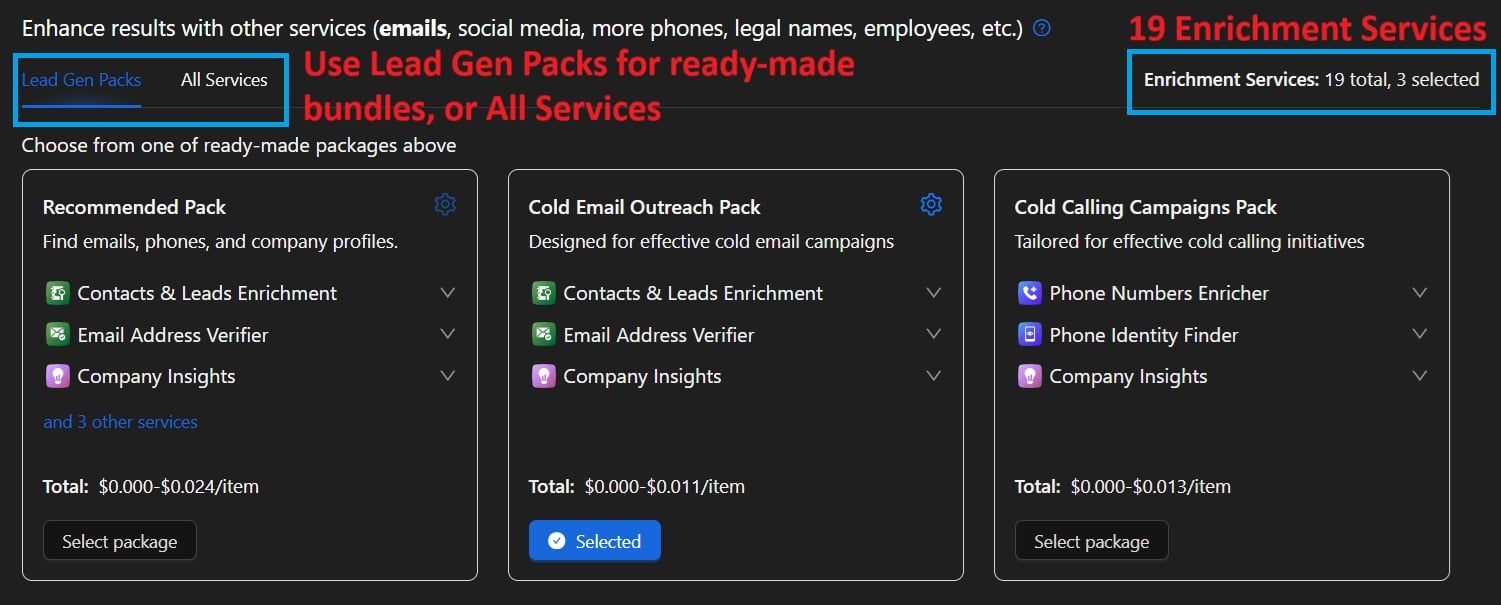
2. Choose enrichment
Basic listing data (phone, website, rating, address) is enough for phone-based outreach. For email sequences or multi-channel campaigns, add the Emails and Contacts Scraper it crawls the website URLs in your export and returns contact emails, social profiles, and additional phone numbers automatically.
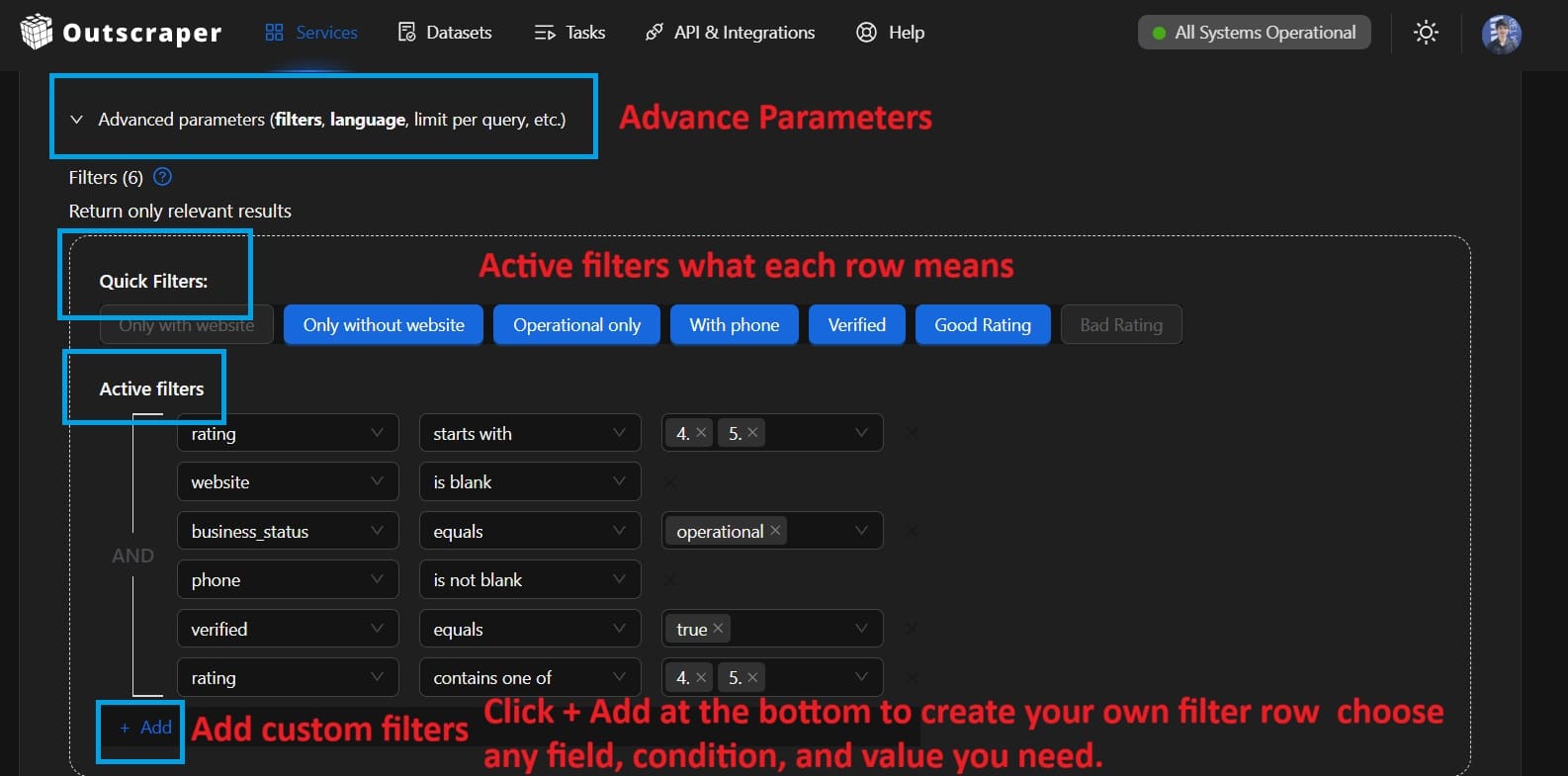
3. Apply advanced filters (recommended)
Use the advanced parameters panel to filter by minimum star rating, minimum review count, or whether a website URL is present. Filtering before export is more efficient than cleaning the spreadsheet manually afterward.
3. Run the task and download your export
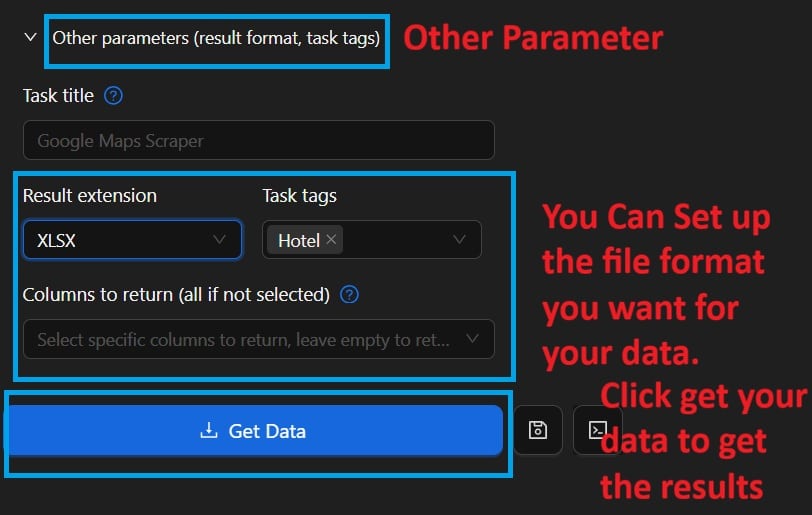
Click start. The task runs entirely in the cloud you do not need to keep your browser open. Small tasks complete in under 5 minutes. Tasks of 5,000+ records typically finish within 30–60 minutes. You will receive an email notification when results are ready. Download as CSV (best for spreadsheets), Excel, or JSON (best for automation workflows).
Filtering and Qualifying Your Export
Raw data from Google Maps is a starting point, not a finished lead list. Filtering is where you turn 2,000 records into 200 prospects actually worth contacting. This is also the step most teams skip too quickly and it is why outreach conversion rates stay low even with good data.
The three filters that do most of the work
Enriching Contact Data and Automating the Workflow
Email and contact enrichment
A Google Maps listing gives you a phone number and a website URL. For phone-based outreach, that is often enough. For email sequences and multi-channel campaigns, you need direct contact information. Outscraper’s Emails and Contacts Scraper takes the website URLs from your Maps export, crawls each site, and returns publicly listed contact emails, social media profiles, and additional phone numbers automatically, with no manual steps.
Run both tools together and you produce a complete outreach record for each prospect: business name, location data, phone number, email address, social links, and rating context. That is more pre-call intelligence than most CRMs carry for existing customers.
You can also use the Google Maps Reviews Scraper to pull full review text for any business or competitor. This is especially useful for personalizing outreach at scale if you know what a prospect’s customers are saying about them, you can open with a specific observation rather than a generic pitch.
Automating recurring lead generation with the API
If you are generating leads every week, pulling data manually is not sustainable. Outscraper’s Google Maps Places API lets you trigger searches programmatically, receive results via webhook, and route them directly into your CRM or outreach tool with no manual steps in between. Full API documentation is available at app.outscraper.com/api-docs.
Turning Google Maps Data Into Outreach That Gets Responses
Data quality is necessary but not sufficient. A perfectly qualified list still gets ignored if the outreach is generic. The real advantage of Google Maps data is that it gives you specific, verifiable context about each prospect before you contact them. Most people do not use that context. The teams that do get dramatically better response rates.
The personalization approach that actually moves the needle
You do not need to write a custom message for every prospect. You need one specific, real detail that shows you looked at their business. Review text makes this easy. If a prospect has multiple reviews mentioning “long wait times,” your opening line writes itself. If their rating has dropped recently, that is a conversation starter not a cold pitch. The Google Maps Reviews Scraper gives you that review intelligence at scale for any prospect list.
Who Gets the Most Value from This Workflow
Google Maps lead generation with Outscraper works across a wide range of industries. Some combinations of seller and target consistently produce the best results. Here is where teams are seeing the most traction in 2026, with the relevant Outscraper tools and use case pages linked for each:
One thing that surprises first-time users is the actual scale of what is addressable. A roofing software company targeting contractors in the US has access to tens of thousands of potential prospects across every metro area each with contact information, review history, and business details. That is not a one-time list. It is a live database that refreshes every time you run a new query.
500 free records per month. No credit card. No installation. Just clean, live data from Google Maps.
Frequently Asked Questions
Most frequent questions and answers
Yes. Google Maps listings contain publicly available business information that any user can view without logging in. Collecting that public data is protected under the First Amendment in the US and similar provisions in other jurisdictions. The data itself is not private. What matters is how you use it. Always follow applicable laws like GDPR in the EU, CASL in Canada, or CAN-SPAM in the US when using contact data for outreach. When in doubt, focus on phone outreach rather than email until you have verified consent or legal basis.
Purchased lists are static and age quickly. Business contact data decays at roughly 25 to 30 percent per year. A list you buy today reflects data that may have been collected 6 to 18 months ago. Google Maps data is pulled in real time from live listings. You are getting the phone number, hours, and status of a business as it exists right now, not as it existed when someone last updated a database. The practical difference is fewer dead numbers, fewer closed businesses, and higher response rates.
There is no hard limit on task size with Outscraper. You can pull hundreds or tens of thousands of records in a single task. Larger tasks run in the cloud and take longer to complete but do not require you to stay online. For most sales teams, pulling 500 to 2,000 records per campaign and filtering down from there produces a manageable and high-quality working list. You can find more details on the Google Maps Scraper page.
Google Maps listings do not typically include email addresses directly. However, most listings include a website URL. Outscraper’s Emails and Contacts Scraper takes those website URLs and crawls each site to find publicly listed contact emails, social media profiles, and additional phone numbers. Running both scrapers together gives you a complete outreach record for most businesses.
It depends entirely on what you sell. The most effective approach is to think about which business categories have the most urgent need for your product or service, then use Google Maps category filters to find them. High-performing categories for B2B outreach tend to be local service businesses (HVAC, plumbing, legal, dental, auto repair), restaurants and hospitality, real estate agencies, and retail businesses. The key is specificity: “HVAC contractor” converts better than “contractor.”
Outscraper is designed for non-technical users. The main interface works like a search engine. You type in a business category, select a location, set the number of records you want, and click to start. Results download as a spreadsheet. No code, no API setup, no proxies to manage. For teams that want to automate the workflow, Outscraper does offer an API and no-code integrations with Zapier and n8n, but these are optional. The basic tool works entirely through a browser.
Outscraper exports Google Maps data is as accurate as the listings themselves, which are maintained by business owners and continuously verified by Google. For active businesses with recent reviews, the data is highly reliable. For older listings with no recent activity, accuracy drops. One practical tip: filter your results by recent review activity to focus on businesses that are actively managing their presence. These are almost always more reachable and more accurate than dormant listings.
Yes. Outscraper integrates directly with HubSpot and connects to hundreds of other tools through Zapier. You can also use the API to push leads directly into any CRM that accepts incoming data via webhook or REST API. For teams using n8n for workflow automation, Outscraper has a dedicated node that makes it straightforward to build a recurring lead generation pipeline. See the n8n workflow guide for a step-by-step setup.