Оглавление
Ручной поиск потенциальных клиентов — это медленный процесс. Покупка списков контактов обходится дорого, а данные в них, как правило, устаревают на 6–18 месяцев к моменту первого звонка. Google Maps — это совсем другое дело: это динамичная платформа, ежедневно обновляемая реальными владельцами бизнеса, которые полагаются на неё, чтобы клиенты могли их найти. Это делает её одним из лучших первоисточников для генерации B2B-лидов, доступных на сегодняшний день.
Скребок для Google Maps от Outscraper превращает эти данные в структурированные списки потенциальных клиентов, готовые к экспорту, за считанные минуты. Никакого ручного копирования. Никаких устаревших записей. Вы получаете номера телефонов, веб-сайты, рейтинги, количество отзывов, адреса и часы работы — все данные очищены и готовы к использованию. Outscraper работает полностью в облаке: не требует ни установки, ни технической настройки.
В этом руководстве подробно описан весь рабочий процесс: почему Google Maps позволяет получать более качественные лиды, чем купленные списки; как составить и отфильтровать свой первый список с помощью Outscraper; как дополнить контактные данные, выходящие за рамки списка; и как превратить эти данные в кампанию по привлечению клиентов, которая принесет реальные отклики.
Почему Google Maps приносит более качественные лиды, чем купленные списки
Большинство баз данных контактов в сегменте B2B формируются путем агрегирования общедоступных записей, сканирования веб-сайтов и приобретения лицензий на сторонние данные. Этот процесс сопряжен с неминуемой задержкой. К моменту, когда данные доходят до вас, они уже прошли через множество рук и затянулись на несколько месяцев. Google Maps работает по-другому — это динамичная платформа, на которой владельцы компаний управляют своим присутствием в режиме реального времени, поскольку их клиенты рассчитывают на точность этой информации.
Актуальность данных — главное преимущество
Согласно данным, уровень устаревания контактных данных в сегменте B2B составляет примерно 25–30% в год, согласно Исследование HubSpot, посвященное утрате актуальности данных в базах данных. Номера телефонов меняются. Предприятия переезжают. Компании закрываются. В списке, купленном вами 12 месяцев назад, уже отсутствует четверть полезных контактов, ещё до того как вы наберёте первый номер. Когда вы сегодня извлекаете данные из Google Maps с помощью Outscraper, вы работаете со списками, которые отражают текущее состояние предприятий, а не то, какими они были в момент последнего обновления записей поставщиком базы данных.
Активная котировка уже является сигналом к покупке
Когда у компании есть полная, недавно обновленная запись в Google Maps с актуальными часами работы, свежими отзывами и постоянным номером телефона — это уже о многом говорит. Кто-то руководит этим бизнесом, управляет его присутствием в сети и поддерживает его видимость для клиентов. Это более благоприятная отправная точка, чем просто название в статичном списке, которым никто не занимается. Еще до того, как вы свяжетесь с компанией, запись в Google Maps покажет вам, есть ли у нее сайт, насколько активна ее клиентская база, как долго она работает, какие услуги упоминают клиенты и есть ли у нее проблемы с репутацией, которые ваш продукт мог бы помочь решить.
Какие данные Outscraper экспортирует из Google Maps
Google Maps создан для того, чтобы пользователи могли находить по одному предприятию за раз. Если ввести запрос “бухгалтер в Денвере”, вы увидите несколько результатов. Этого вполне достаточно, чтобы найти специалиста для подготовки налоговой декларации. Но это бесполезно, если вы пытаетесь составить список из 500 бухгалтерских фирм, чтобы предложить им свое программное обеспечение для расчета заработной платы — вам пришлось бы вручную нажимать на каждую запись и копировать информацию в таблицу. Для 500 компаний это займет несколько дней работы. С Outscraper на это уйдет около пяти минут.
Если вы сравниваете этот рабочий процесс массового сбора данных с официальным API Google, то наш Руководство по привлечению потенциальных клиентов с помощью API Google Places объясняет, как работает официальный API для поиска компаний и в каких случаях его ограничения становятся существенными.
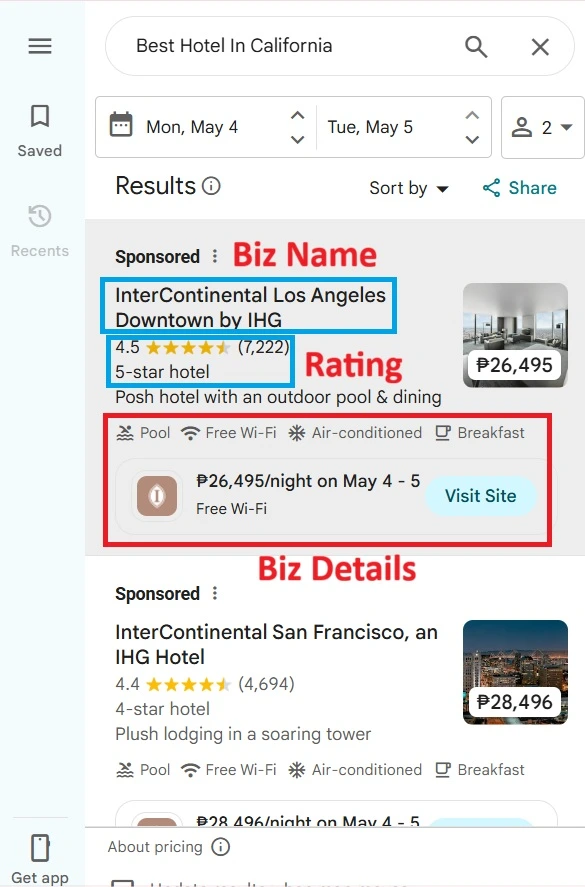
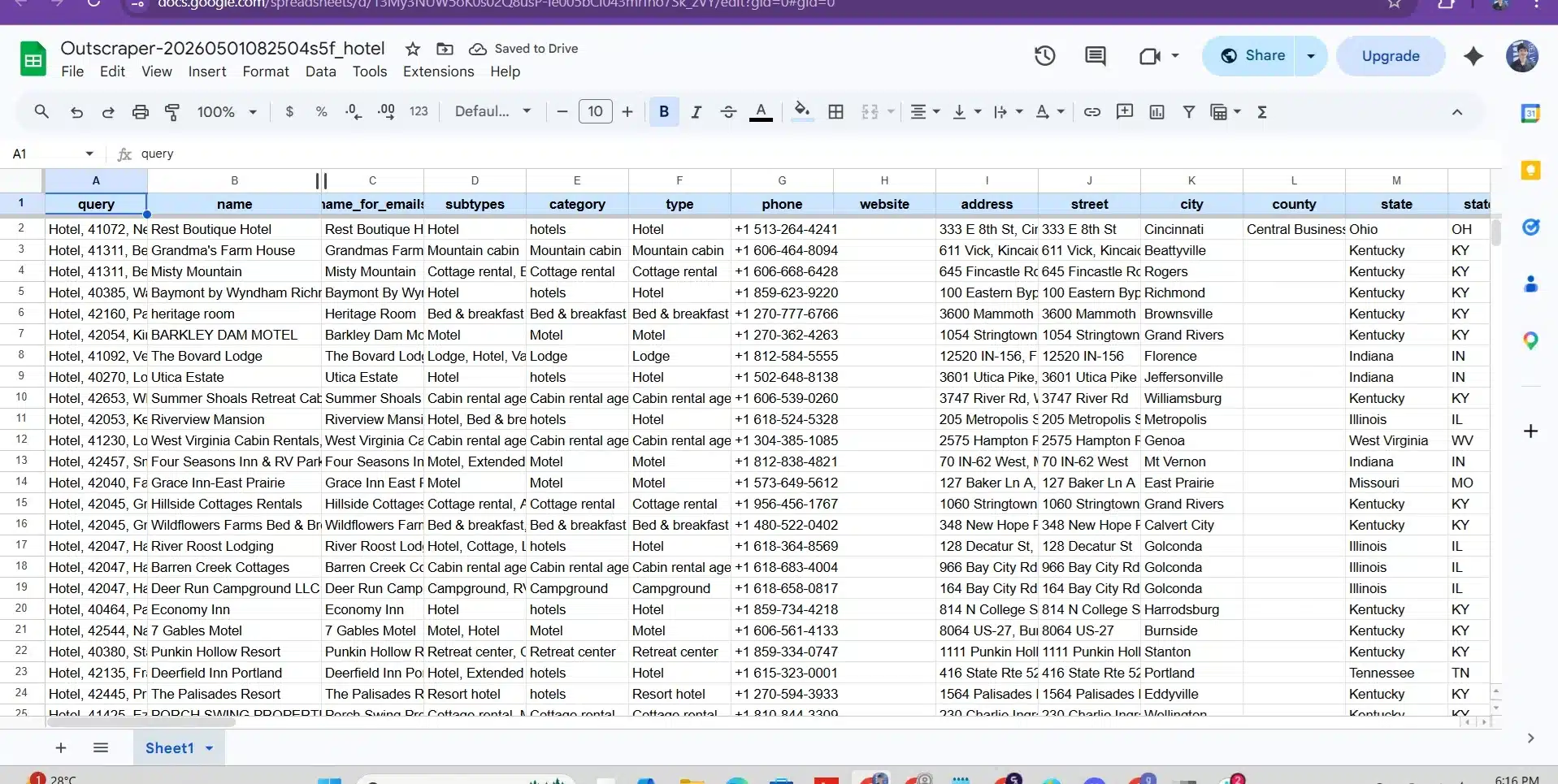
Для каждой записи о компании Outscraper возвращает следующие структурированные поля:
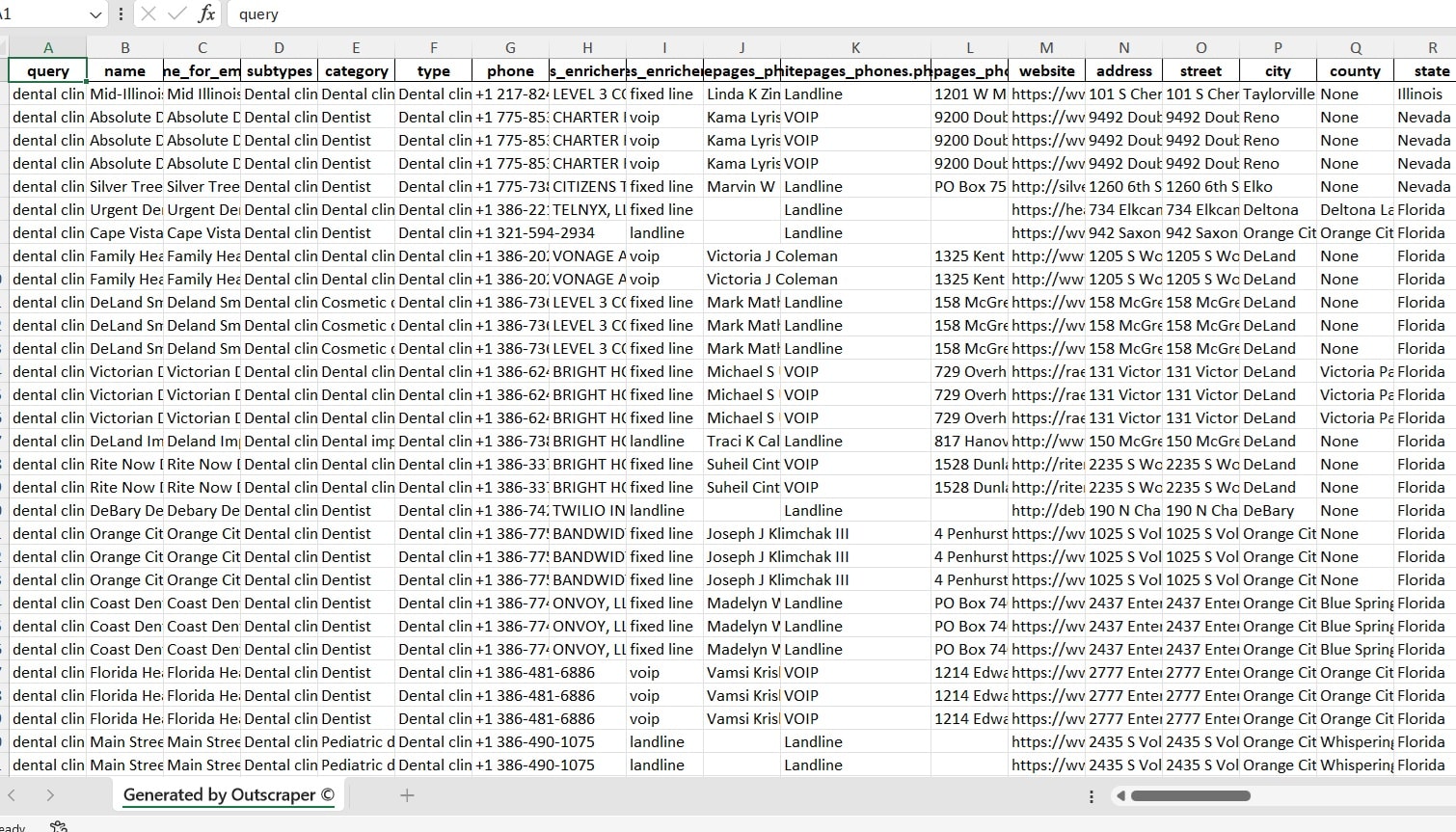
Вот как выглядит одна реальная строка экспортных данных:
500 бесплатных записей в месяц. Не требуется кредитная карта. Не нужно устанавливать. Работает полностью в браузере.
Пошаговое руководство: как составить свой первый список потенциальных клиентов с помощью Outscraper
Это полный рабочий процесс — от пустого экрана до загруженного списка потенциальных клиентов, готового к обращению. На каждом этапе указано, что нужно делать и на что следует обратить внимание.
Прежде чем начать: точно определите свою цель
Качество вашего списка потенциальных клиентов определяется ещё до того, как вы выполните первый поиск. Точные запросы возвращают меньшее количество записей, но при этом они гораздо более полезны для дальнейших действий. Прежде чем запустить Outscraper, ответьте на следующие три вопроса:
- На какую категорию бизнеса я ориентируюсь? Будьте конкретны: “подрядчик по системам отопления, вентиляции и кондиционирования”, а не просто “подрядчик”.”
- На какой области географии я сосредоточен? Конкретный город, почтовый индекс, агломерация или радиус.
- Какие признаки указывают на то, что запись имеет реальные перспективы? Минимальный рейтинг, количество отзывов, наличие сайта.
После того как вы определите эти базовые фильтры, Сигналы о намерении совершить покупку в сегменте B2B помогут вам определить приоритеты и выбрать те компании из числа подходящих, которым следует уделить внимание в первую очередь с учетом последних изменений, возможных потребностей и активизации покупательской активности.
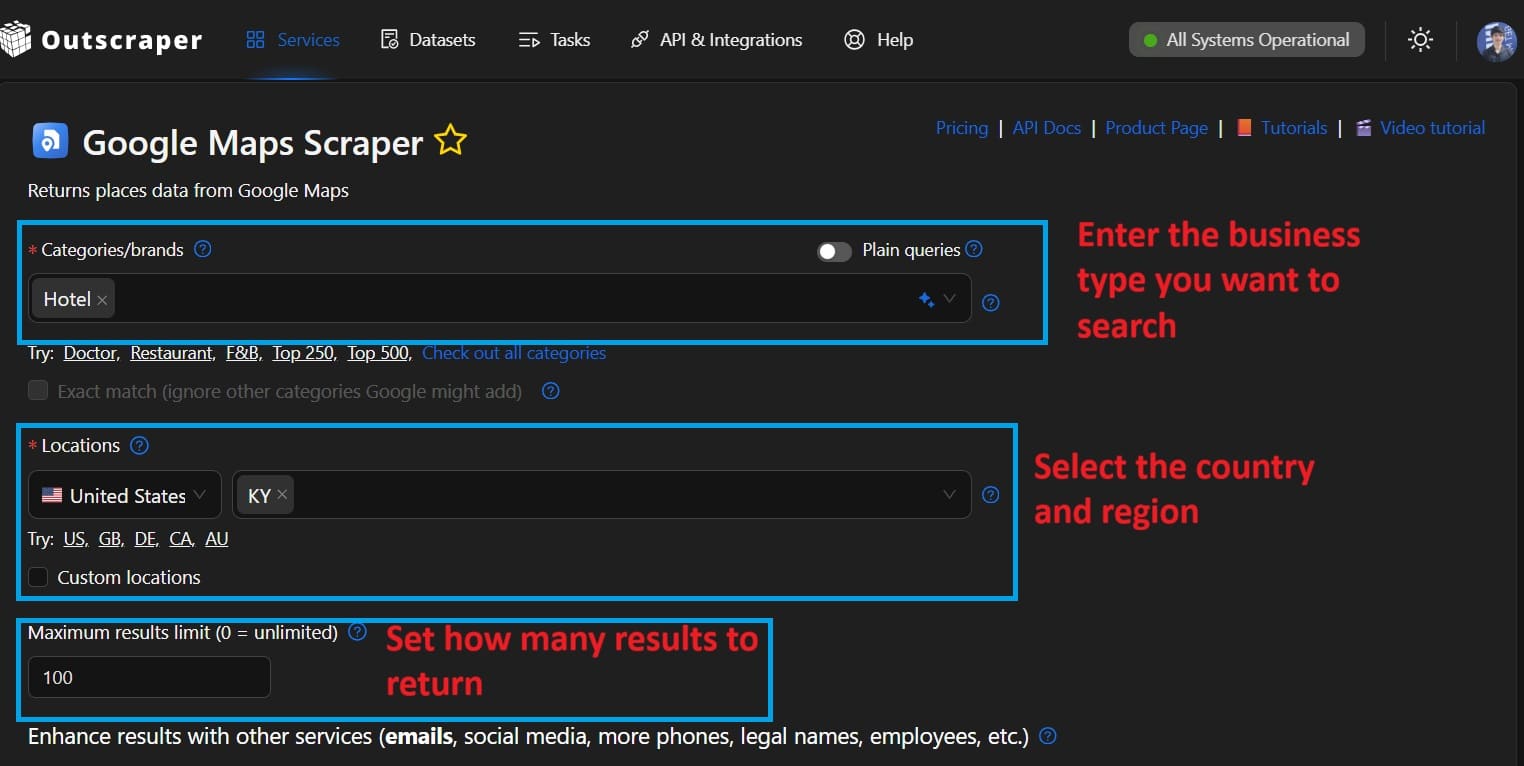
1. Укажите условия запроса и ограничение по количеству записей
Укажите категорию бизнеса и местоположение точно так, как клиент ввёл бы запрос в Google Maps, например, “сантехник, Остин, Техас” или “Стоматологическая клиника в Чикаго”.” Затем укажите желаемое количество записей. Для первого запуска начните с 200–500, а затем увеличьте количество после проверки качества. Вы платите только за фактически возвращенные записи; за пустые запросы плата не взимается.
На рынках, где английский язык не является основным, поиск на местном языке дает более полные результаты.
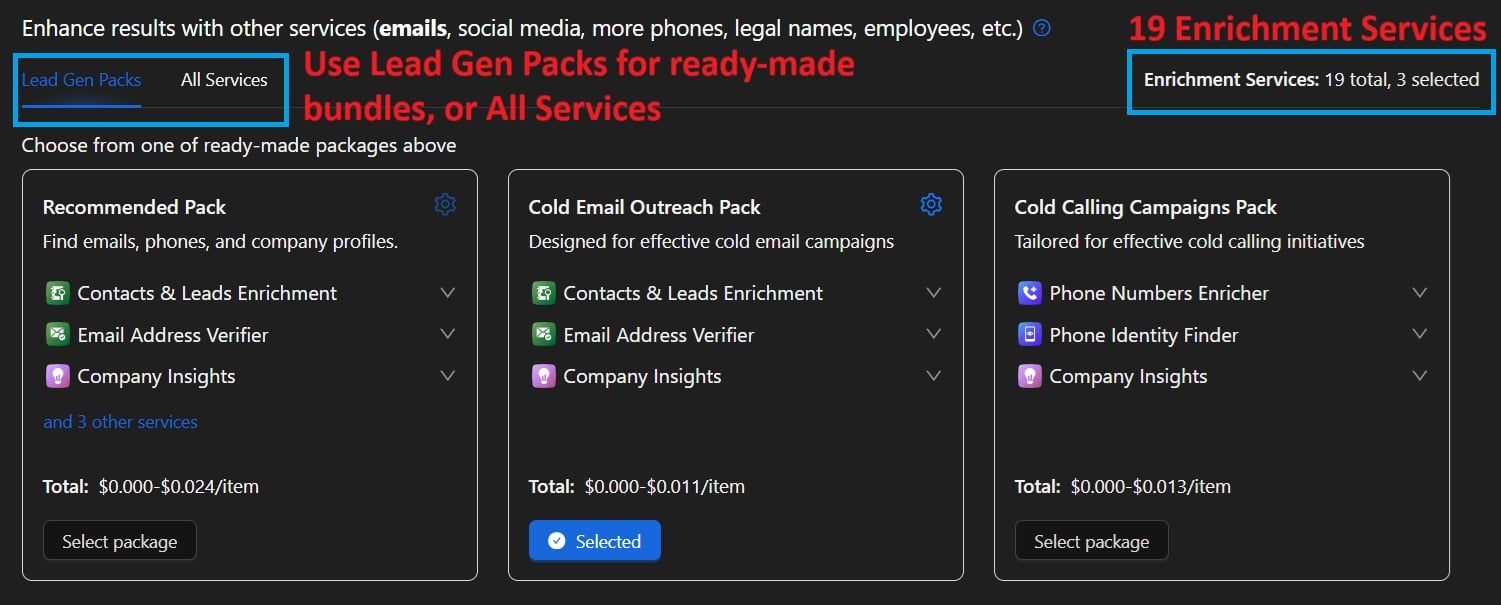
2. Выберите дополнительные занятия
Для обращения по телефону достаточно основных данных из списка (телефон, сайт, рейтинг, адрес). Для рассылок по электронной почте или многоканальных кампаний добавьте Скребок для сбора адресов электронной почты и контактов Он сканирует URL-адреса веб-сайтов из вашего экспорта и автоматически выводит адреса электронной почты контактов, профили в социальных сетях и дополнительные номера телефонов.
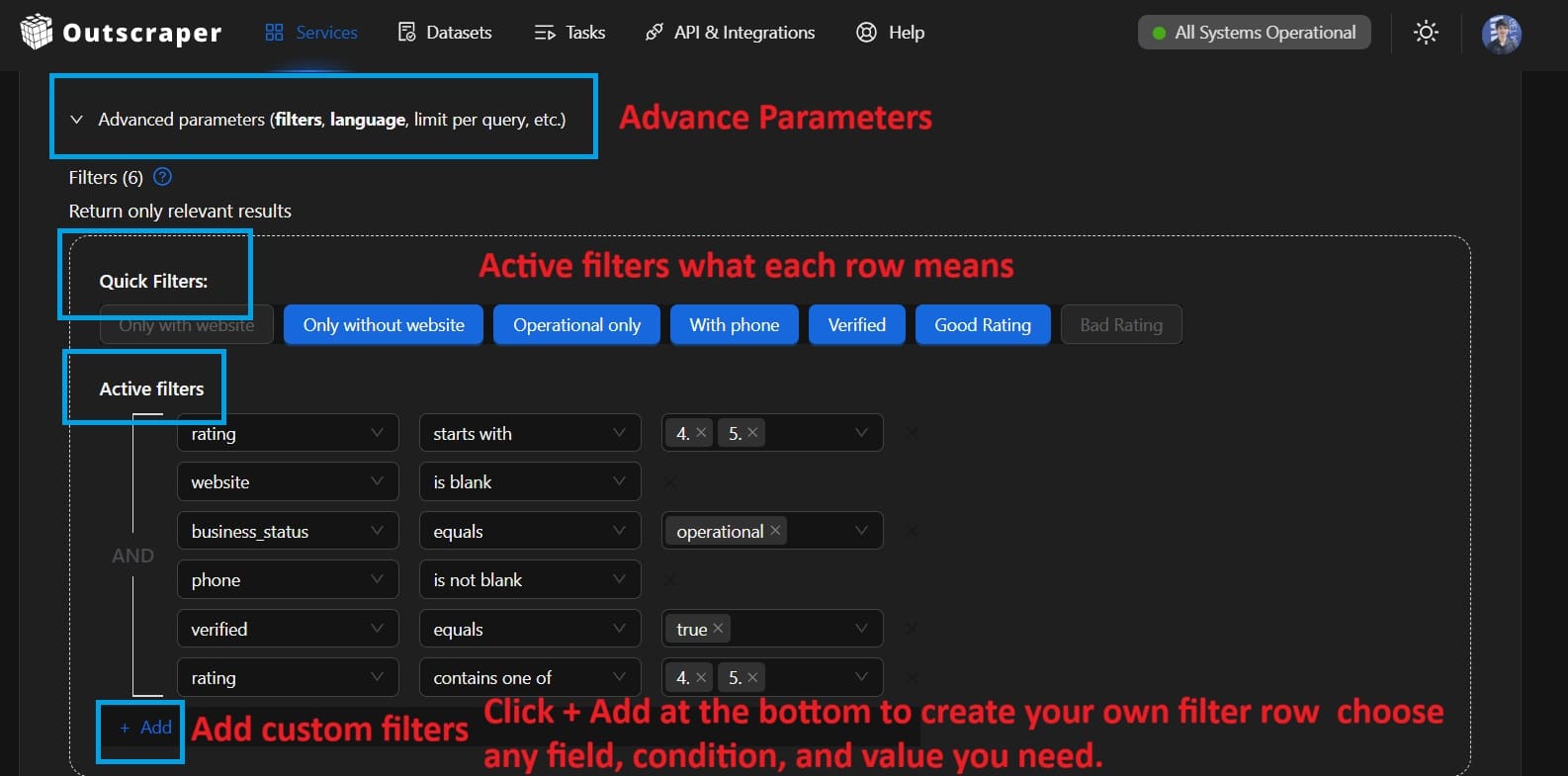
3. Применить расширенные фильтры (рекомендуется)
Используйте панель расширенных параметров, чтобы отфильтровать данные по минимальному количеству звезд, минимальному количеству отзывов или наличию URL-адреса веб-сайта. Фильтрация перед экспортом более эффективна, чем последующая ручная очистка таблицы.
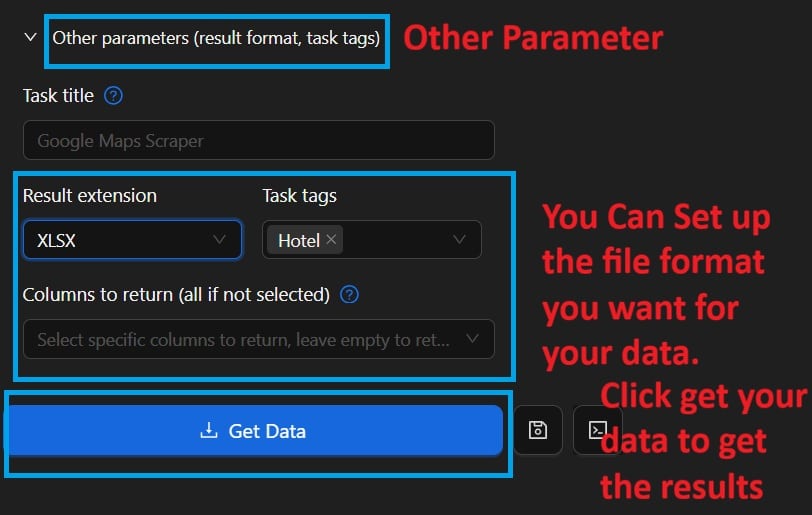
3. Запустите задачу и скачайте экспортные данные
Нажмите «Начать». Задача выполняется полностью в облаке — вам не нужно держать браузер открытым. Небольшие задачи выполняются менее чем за 5 минут. Задачи с количеством записей более 5 000 обычно завершаются в течение 30–60 минут. Вы получите уведомление по электронной почте, когда результаты будут готовы. Скачайте файл в формате CSV (оптимально для электронных таблиц), Excel или JSON (оптимально для автоматизированных рабочих процессов).
Фильтрация и отбор товаров для экспорта
Исходные данные из Google Maps — это лишь отправная точка, а не готовый список потенциальных клиентов. Именно благодаря фильтрации вы превращаете 2 000 записей в 200 потенциальных клиентов, с которыми действительно стоит связаться. Это также тот этап, который большинство команд слишком быстро пропускают, и именно поэтому коэффициент конверсии при обращении к клиентам остается низким даже при наличии качественных данных.
Filtering is only the first part of prospect qualification. Our signal-based prospecting workflow shows how to check supporting evidence, document business signals, and assign research priorities before preparing a prospect list for outreach.
Три фильтра, которые выполняют основную часть работы
Дополнение контактных данных и автоматизация рабочего процесса
Дополнение данных об электронной почте и контактных данных
В записи на Google Maps указан номер телефона и URL-адрес сайта. Для связи по телефону этого часто бывает достаточно. Для рассылок по электронной почте и многоканальных кампаний вам понадобится прямая контактная информация. Outscraper’s Скребок для сбора адресов электронной почты и контактов извлекает URL-адреса веб-сайтов из вашего экспорта из «Карт», сканирует каждый сайт и автоматически, без каких-либо ручных действий, выдает общедоступные контактные адреса электронной почты, профили в социальных сетях и дополнительные номера телефонов.
Используйте оба инструмента одновременно, и вы получите полную информацию о каждом потенциальном клиенте: название компании, данные о местоположении, номер телефона, адрес электронной почты, ссылки на социальные сети и данные об оценках. Это больше информации, необходимой для подготовки к звонку, чем содержится в большинстве CRM-систем по существующим клиентам.
Вы также можете использовать Парсер Отзывов Google Maps чтобы получить полный текст отзыва о любой компании или конкуренте. Это особенно полезно для персонализации массовых обращений: если вы знаете, что клиенты потенциального партнера говорят о нём, вы сможете начать разговор с конкретного замечания, а не с общих рекламных фраз.
Автоматизация регулярного привлечения потенциальных клиентов с помощью API
Если вы каждую неделю привлекаете потенциальных клиентов, ручной сбор данных становится нецелесообразным. Outscraper's Google Maps Places API позволяет запускать поиск программным способом, получать результаты через веб-хук и направлять их напрямую в вашу CRM-систему или инструмент для работы с клиентами без каких-либо промежуточных ручных действий. Полная документация по API доступна по адресу app.outscraper.com/api-docs.
Как превратить данные Google Maps в маркетинговую кампанию, которая приносит отклики
Качество данных — это необходимое, но недостаточное условие. Даже идеально составленный список останется без внимания, если подход к потенциальным клиентам будет общим и неориентированным. Настоящее преимущество данных Google Maps заключается в том, что они предоставляют конкретный и поддающийся проверке контекст о каждом потенциальном клиенте ещё до того, как вы с ним свяжетесь. Большинство людей не используют этот контекст. А те команды, которые это делают, получают значительно более высокий уровень отклика.
Подход к персонализации, который действительно приносит результаты
Вам не нужно сочинять индивидуальное сообщение для каждого потенциального клиента. Достаточно одной конкретной, реальной детали, которая покажет, что вы внимательно изучили его бизнес. Отзывы облегчают эту задачу. Если у потенциального клиента есть несколько отзывов, в которых упоминается “длительное время ожидания”, ваша вступительная фраза сложится сама собой. Если его рейтинг недавно снизился, это станет поводом для разговора, а не для холодного обращения. Это Парсер Отзывов Google Maps предоставляет вам аналитические данные о отзывах в большом объеме для любого списка потенциальных клиентов.
Кто получает наибольшую выгоду от этого рабочего процесса
Привлечение потенциальных клиентов через Google Maps с помощью Outscraper эффективно работает в самых разных отраслях. Некоторые комбинации продавцов и целевых аудиторий стабильно дают наилучшие результаты. Ниже приведены направления, в которых команды отмечают наибольший рост в 2026 году; для каждого из них приведены ссылки на соответствующие инструменты Outscraper и страницы с примерами использования:
Одним из моментов, который удивляет новых пользователей, является реальный масштаб доступной аудитории. Компания, разрабатывающая программное обеспечение для кровельной отрасли и ориентированная на подрядчиков в США, имеет доступ к десяткам тысяч потенциальных клиентов во всех крупных городских агломерациях, по каждому из которых имеются контактные данные, история отзывов и сведения о бизнесе. Это не разовый список. Это динамическая база данных, которая обновляется каждый раз при запуске нового запроса.
500 бесплатных записей в месяц. Не требуется кредитная карта. Не требуется установка. Только точные актуальные данные из Google Maps.
Часто задаваемые вопросы
Наиболее частые вопросы и ответы
Да. Записи в Google Maps содержат общедоступную информацию о компаниях, которую любой пользователь может просматривать без входа в систему. Сбор этих общедоступных данных защищен Первой поправкой к Конституции США и аналогичными положениями в других юрисдикциях. Сами по себе эти данные не являются конфиденциальными. Важно то, как вы их используете. При использовании контактных данных для связи с пользователями всегда соблюдайте применимые законы, такие как GDPR в ЕС, CASL в Канаде или CAN-SPAM в США. В случае сомнений отдавайте предпочтение связи по телефону, а не по электронной почте, пока не получите подтвержденное согласие или не установите правовое основание.
Приобретенные списки являются статичными и быстро устаревают. Актуальность данных о деловых контактах снижается примерно на 25–30 процентов в год. Список, приобретенный сегодня, содержит данные, которые, возможно, были собраны 6–18 месяцев назад. Данные Google Maps получаются в режиме реального времени из актуальных списков. Вы получаете номер телефона, часы работы и статус компании в том виде, в каком они существуют прямо сейчас, а не в том, в каком они были, когда кто-то в последний раз обновлял базу данных. На практике это означает меньше неработающих номеров, меньше закрытых компаний и более высокий уровень отклика.
В Outscraper нет жестких ограничений на размер задачи. В рамках одной задачи можно извлечь как сотни, так и десятки тысяч записей. Более крупные задачи выполняются в облаке и занимают больше времени, но не требуют постоянного пребывания в сети. Для большинства отделов продаж извлечение от 500 до 2 000 записей на каждую кампанию с последующей фильтрацией позволяет получить удобный в работе и высококачественный рабочий список. Более подробную информацию можно найти на Страница Google Maps Scraper.
В записях Google Maps, как правило, не указываются адреса электронной почты напрямую. Однако в большинстве записей указан URL-адрес веб-сайта. Outscraper’s Скребок для сбора адресов электронной почты и контактов проанализирует URL-адреса этих сайтов и просканирует каждый из них в поисках общедоступных контактных адресов электронной почты, профилей в социальных сетях и дополнительных телефонных номеров. Одновременный запуск обоих скрейперов позволит вам получить полную базу данных для установления контактов с большинством компаний.
Это полностью зависит от того, что вы продаете. Наиболее эффективный подход заключается в том, чтобы определить, в каких категориях бизнеса существует наиболее острая потребность в вашем продукте или услуге, а затем воспользоваться фильтрами по категориям в Google Maps, чтобы найти их. Наиболее перспективными категориями для продвижения в сегменте B2B, как правило, являются компании, предоставляющие локальные услуги (системы отопления, вентиляции и кондиционирования, сантехника, юридические услуги, стоматология, авторемонт), рестораны и гостиничный бизнес, агентства недвижимости, а также розничные предприятия. Ключевым фактором является конкретность: запрос “подрядчик по системам отопления, вентиляции и кондиционирования” приносит больше конверсий, чем просто “подрядчик”.”
Outscraper разработан для пользователей без технических знаний. Основной интерфейс работает по принципу поисковой системы. Вы вводите категорию бизнеса, выбираете местоположение, указываете количество нужных записей и нажимаете кнопку для запуска. Результаты загружаются в виде таблицы. Никакого кода, никакой настройки API, никаких прокси, которыми нужно управлять. Для команд, желающих автоматизировать рабочий процесс, Outscraper предлагает API и интеграцию с Zapier и n8n без написания кода, но все это не является обязательным. Базовый инструмент работает исключительно через браузер.
Точность данных Google Maps, экспортируемых Outscraper, зависит от точности самих записей, которые обновляются владельцами компаний и постоянно проверяются Google. Для действующих компаний с недавними отзывами эти данные являются весьма достоверными. Для старых записей без недавней активности точность снижается. Практический совет: фильтруйте результаты по недавним отзывам, чтобы сосредоточиться на компаниях, которые активно управляют своим присутствием в сети. Такие компании почти всегда доступнее и более достоверны, чем неактивные записи.
Да. Outscraper напрямую интегрируется с HubSpot и подключается к сотням других инструментов через Zapier. Вы также можете использовать API для передачи лидов напрямую в любую CRM-систему, которая принимает входящие данные через веб-хук или REST API. Для команд, использующих n8n для автоматизации рабочих процессов, в Outscraper предусмотрен специальный узел, который упрощает создание повторяющегося конвейера генерации лидов. См. Руководство по работе с n8n для пошаговой настройки.