Оглавление
If you only need a few hundred fresh leads for a campaign, paying for a large monthly database subscription can feel wasteful fast. Learning how to build a lead generation workflow using n8n and Outscraper gives you a more flexible alternative. Instead of relying on static lists, you can automate lead discovery, qualification, enrichment, and outreach around the exact campaign you want to run.
The result is a leaner system built for relevance, fresher data, tighter targeting, and less wasted spend on contacts that never had a chance to convert in the first place.
Follow this guide and you’ll learn how to connect that workflow step by step so you can move from buying stale lists to generating targeted leads when you need them. Integrate Outscraper with 1,000+ apps and services inside n8n.
The 3-Layer Data Approach Behind This Workflow
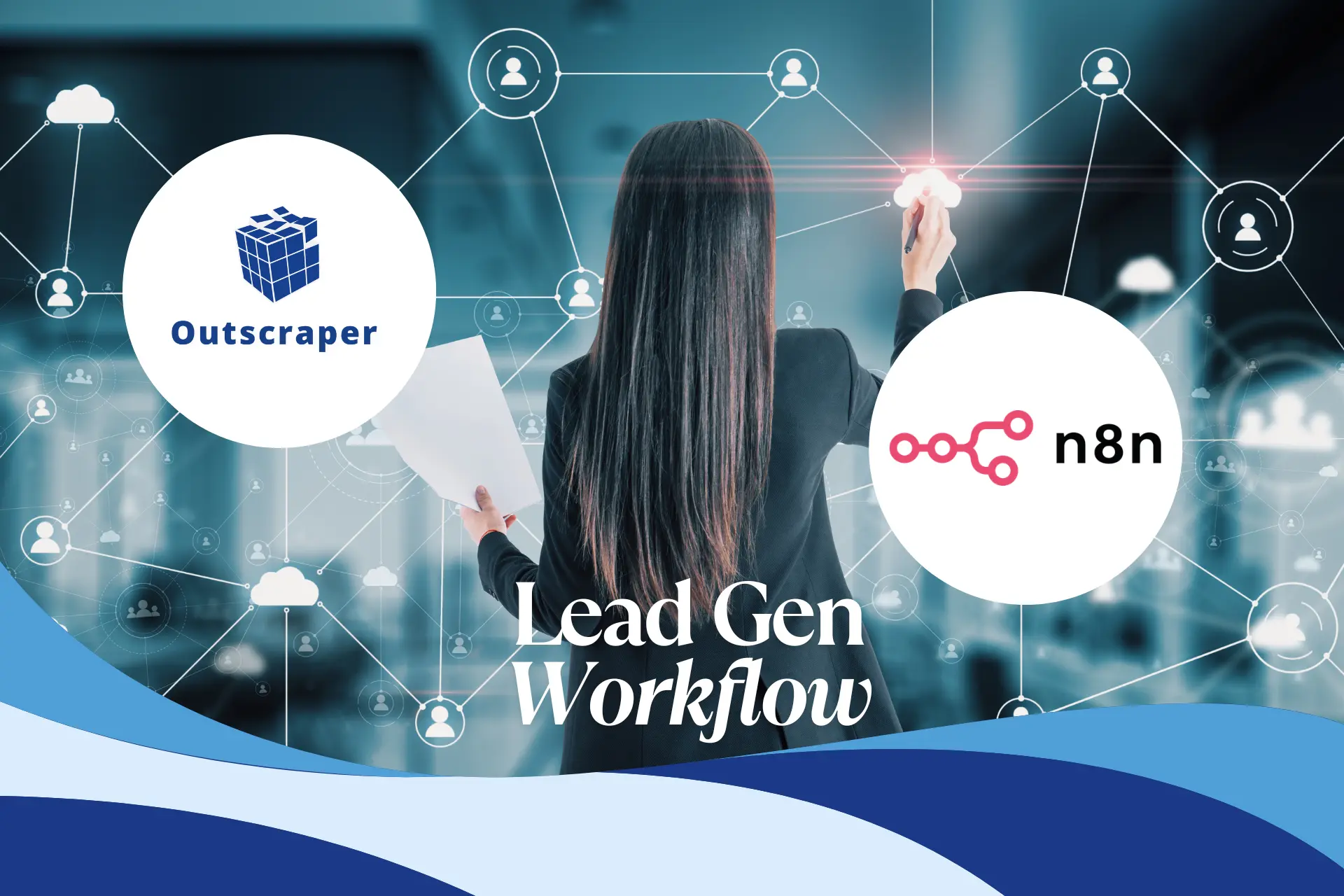
Automated lead generation works best when each step has a clear job. Instead of forcing one workflow to do everything at once, I use a three-layer system that moves from Google Maps discovery to contact enrichment to personalized outreach. This structure keeps the workflow easier to manage, helps reduce wasted credits, and prevents weak data from turning into weak outreach.
Layer 1: Raw Discovery (Outscraper)
This first layer is about gathering the basics. You use Outscraper to collect core business details from Google Maps, including NAP data, website URLs, and phone numbers. You are not looking for deep enrichment yet. You only need a clean list of businesses that fit your target category and location.
By qualifying the market first, you avoid paying for deeper enrichment too early. Instead of finding emails, decision-makers, or personalization data right away, you first confirm that there are enough relevant businesses to justify the next step.
This makes the rest of the workflow more efficient. A strong discovery layer keeps the system lean and gives your automation a cleaner list to enrich later.
Layer 2: Enrichment (Outscraper and Gemini)
Layer 2 focuses on turning a business listing into a real contact opportunity. Once you have a website, you can use Outscraper or Gemini to find better contact details, identify decision-makers, and filter out generic inboxes like info@ or support@. This step improves lead quality by moving you closer to the person who can actually reply or make a buying decision.
Layer 3: Personalization (OpenAI)
In this layer, you focus on making outreach feel relevant, not mass-produced. With OpenAI, you can use the business type and lead data from the earlier steps to shape the tone, angle, and message for each prospect. That makes the workflow more useful because the final email feels closer to a real one-to-one pitch.
Now that you’ve seen the 3-layer system, put it into action. Connect Outscraper to n8n and start pulling fresh business leads.
Step 1: Connect Outscraper to n8n
Start by connecting your Outscraper API key inside n8n, then add the Google Maps search node to your workflow. From there, use a trigger to pass in campaign inputs like Industry and Location so each run pulls fresh business data based on the search you want. This makes the workflow reusable, easier to test, and more practical than rebuilding a lead list by hand every time.
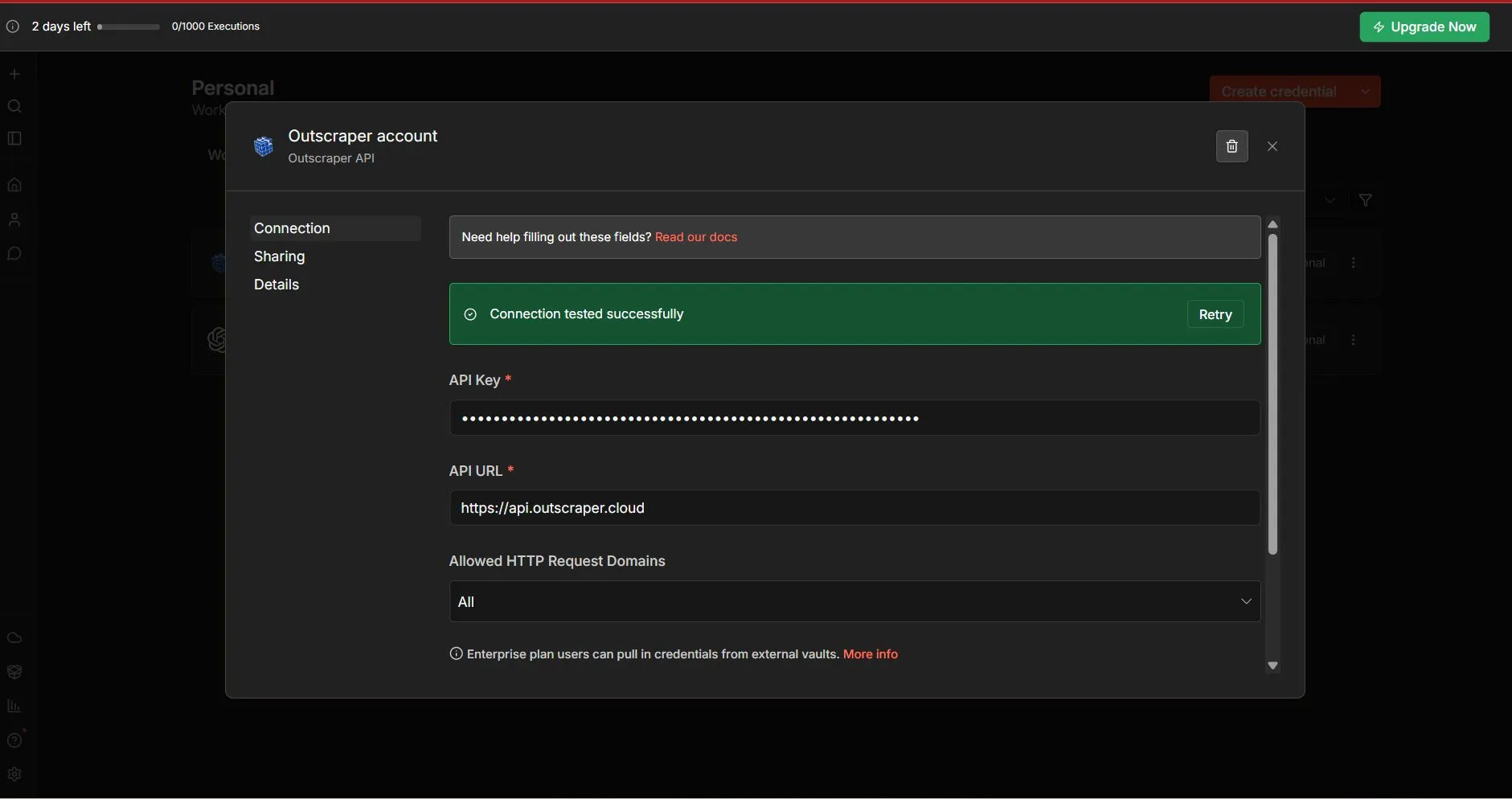
After connecting the official Outscraper n8n node, you can proceed to scrape Google Maps inside n8n. For a step-by-step process, please read our guide on how to scrape Google Maps with n8n and implement your first lead generation workflow.
Step 2: Enrich Contact Data and Find Better Emails
The next step is improving the quality of the contact data before outreach begins. Raw business listings can give you a company name, website, and phone number, but that is not always enough to reach the right person. At this stage, you use Outscraper or Gemini to find better email addresses, identify decision-makers, and reduce the chances of sending your message to a generic inbox.
This step matters because not every contact is equally useful. A workflow that sends emails to info@ or support@ will usually be less effective than one that reaches an owner, founder, partner, or manager. Расширение данных helps turn a basic business listing into a more realistic outreach opportunity.
You should also filter out weak records before moving forward. If a business does not have a website, it is a sign that the lead is harder to verify or enrich. Adding a simple “if” node filter right after the Outscraper step helps you skip those rows early, which keeps the workflow lean and avoids wasting credits on low-quality prospects.
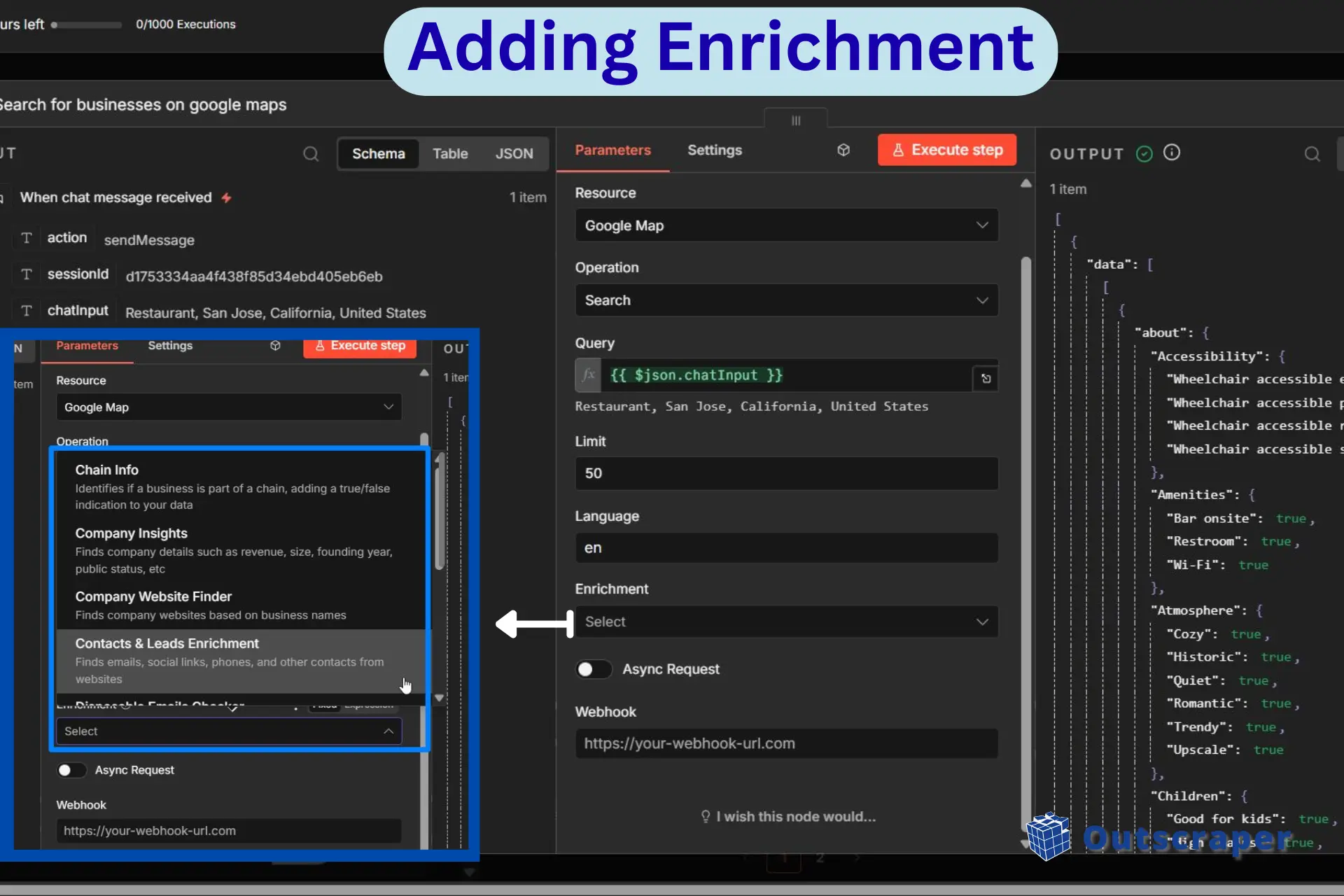
Step 3: Automate the Outreach
The final step is turning enriched lead data into outreach messages you can review and send. Using OpenAI, you can generate messages based on the business type, contact details, and campaign context so the email feels more relevant than a generic template. That helps the workflow sound less robotic and gives each lead a more tailored pitch.
Once the message is ready, n8n can pass it to Gmail and send it automatically from your account. After that, the workflow can log the data in Google Sheets so you have a record of which leads were contacted and when. This closes the loop by turning discovery and enrichment into a repeatable outreach system.
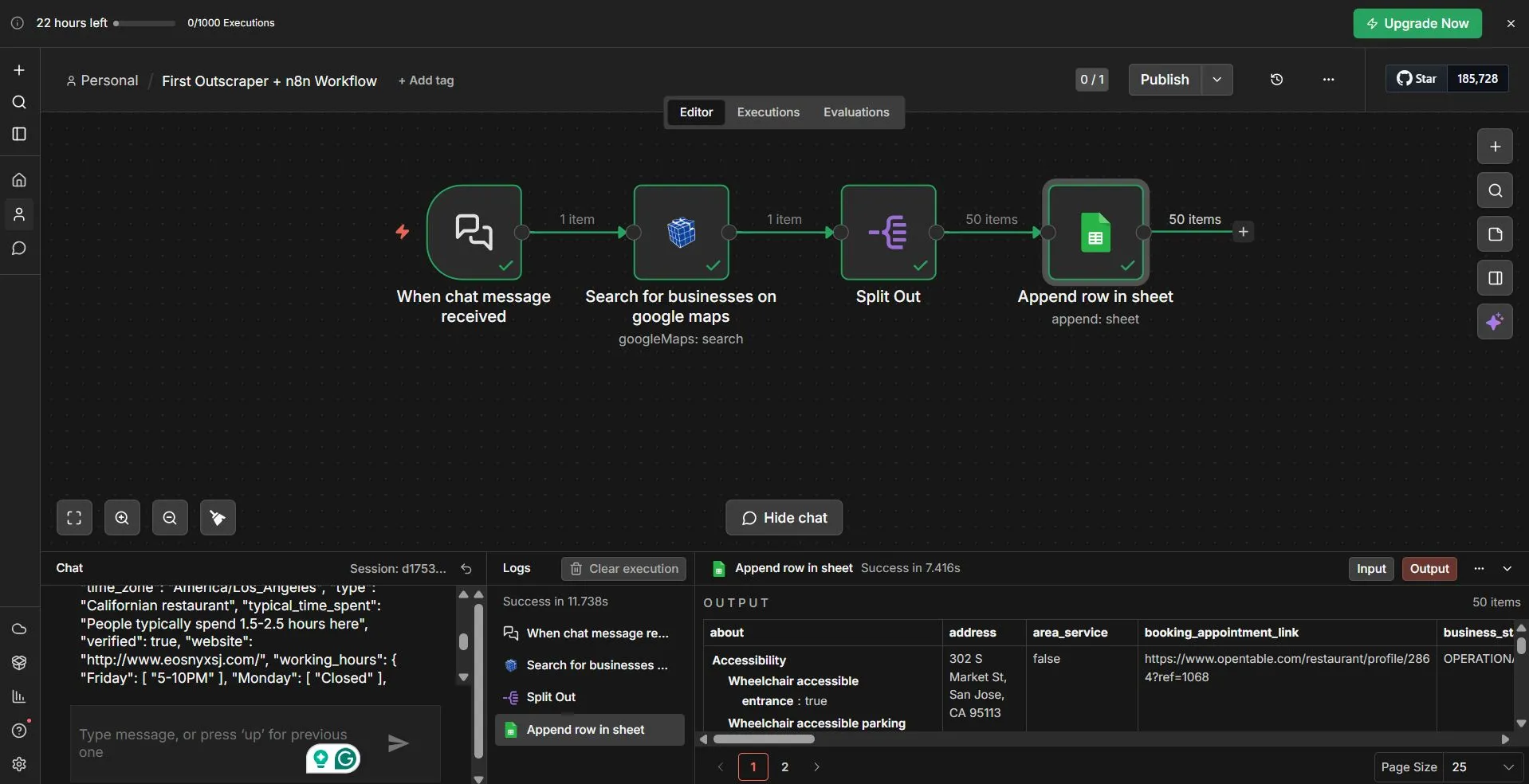
Connect your Outscraper API key in n8n and build a repeatable lead generation workflow.
Our workflow worked out smoothly as we followed the steps on how to use the official Outscraper node inside n8n. To fully understand how the system works using n8n, you can check our tutorials on building scalable leads using n8n.
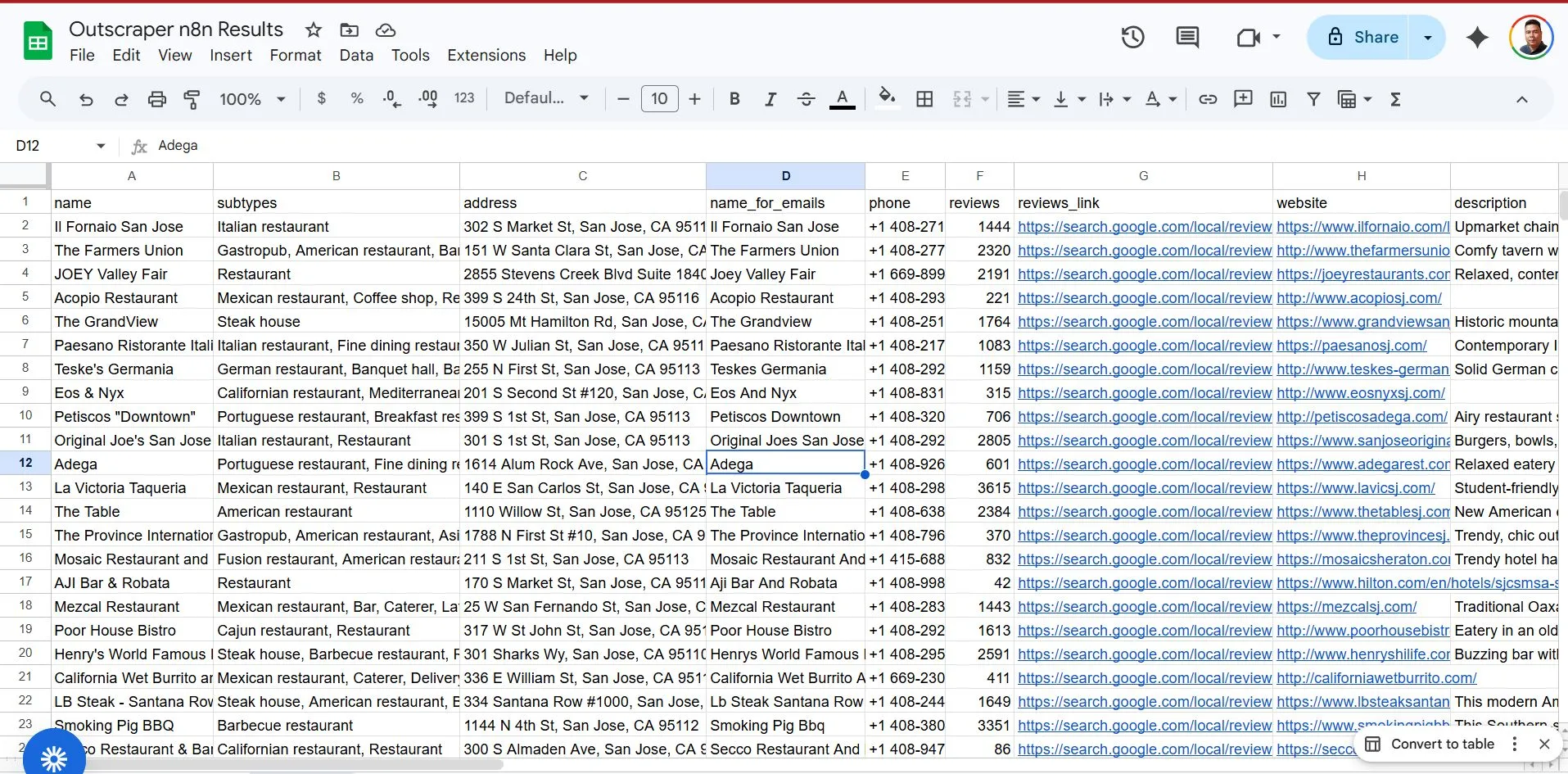
Here is a sample results table from the lead generation workflow we created above.
Common Challenges: Staying Out of the Spam Folder
Building an automated system or workflow is only part of the job. If the emails land in the spam folder, your effort is wasted and the automation stops being useful.
That is why this stage should focus on sending volume, data quality, and review rules before you scale the workflow further.
Start Slow With Sending Volume
One of the fastest ways to damage a workflow is to send too many emails too quickly. If you push large batches from a fresh account, email providers may flag the activity as suspicious. A safer approach is to start with a smaller daily volume, monitor bounce rates, and increase gradually as the account builds a healthier sending pattern.
Add a Review Step Before Sending
Even if AI writes the message, the workflow can still make mistakes. A business name might be unclear, the contact data might be incorrect, or the draft might sound slightly off. Adding a simple review step in Google Sheets helps catch those errors before the email goes out.
One practical way to do this is to save the draft and contact details first, then add a status column or checkbox for approval. n8n can wait for that review before sending. This adds a small manual step, but it helps protect sender reputation and keeps the outreach more accurate.
Next Steps: Scale the Workflow Without Losing Control
Once the workflow is working, the next step is scaling it without making the process messy or expensive. The same setup you use for one campaign can be expanded across multiple industries, locations, or business types. Instead of running one search at a time, you can use n8n to loop through a list of targets and build a larger lead pipeline automatically.
As the workflow grows, precision becomes more important. This is where structured filters and JSON-based settings help you narrow the results to the businesses that actually match your criteria. For example, you can refine the workflow around factors like rating, recency, category, or location so you are not just collecting more leads, but collecting better ones.
Optional: Extend the Workflow with the Outscraper MCP Server
Once the core workflow is running smoothly, you can extend it further with the Outscraper MCP server. This gives advanced users another way to connect lead generation workflows with AI tools, internal systems, or custom automations. It works best as a scaling option after the main n8n workflow is already in place.
The key is to scale in a controlled way. Once the workflow can reliably find, enrich, and contact leads for one niche, you can repeat the same system across new markets without rebuilding it from scratch. That is what makes this setup useful beyond a single campaign and to grow your lead generation strategy.
Once your first workflow is working, you can expand it across more industries, locations, and campaigns without rebuilding the campaigns without rebuilding the process from scratch. Outscraper helps you keep the data fresh while n8n helps you scale the workflow with more control.
Часто Задаваемые Вопросы
Наиболее частые вопросы и ответы
It is an automated workflow that helps you find businesses, enrich contact data, and send outreach from one connected system. Instead of building lead lists manually, you use n8n and Outscraper to turn lead discovery into a repeatable process.
Because it gives you more control over lead quality, targeting, and timing. Rather than paying for a large static list, you can pull fresh business data only when you need it for a specific campaign.
Outscraper handles the discovery layer by pulling business data from Google Maps, such as names, websites, phone numbers, and locations. That gives you the raw lead data you need before moving into enrichment and outreach.
Enrichment helps you improve contact quality before sending emails. Instead of relying on generic inboxes, you can identify better emails and more relevant contacts, which gives your outreach a stronger chance of reaching a decision-maker.
Start with lower sending volume, monitor bounce rates, and avoid scaling too fast. It also helps to add a manual review step so drafts are checked before they are sent.