Table of Contents
The best way to build a B2B email list in 2026 is not to buy a random database.
It is to define your ICP, collect fresh business data, enrich that data with contact details, verify the emails, segment the list, and use it in a relevant outreach workflow.
A big list is not always a good list. If the emails are outdated, unverified, badly targeted, or disconnected from your ICP, the list will create more problems than opportunities.
This is why modern B2B email list building is not only about finding emails. It is about building a clean, targeted, and usable lead list.
For many sales teams, agencies, consultants, and lead generation teams, the real pain is not “we need more data.” The pain is that manual research is slow, old lists become unreliable, and messy spreadsheets make outreach harder to scale.
What Is B2B Email List Building?
B2B email list building is the process of creating a targeted list of business contacts for sales, marketing, partnerships, recruiting, or market research.
But a strong B2B email list is not just a column of email addresses.
A useful list should include company context.
That means:
- business name
- website
- business category
- location
- phone number
- email address
- contact source
- email verification status
- segment or tag
- last updated date
For some campaigns, it can also include ratings, reviews, business status, number of reviews, website presence, and other signals that help your team understand if the business is worth contacting.
The goal is simple:
Know who you are contacting, why they fit, and whether the data is still usable.
Why Buying Random Email Lists Does Not Work Anymore
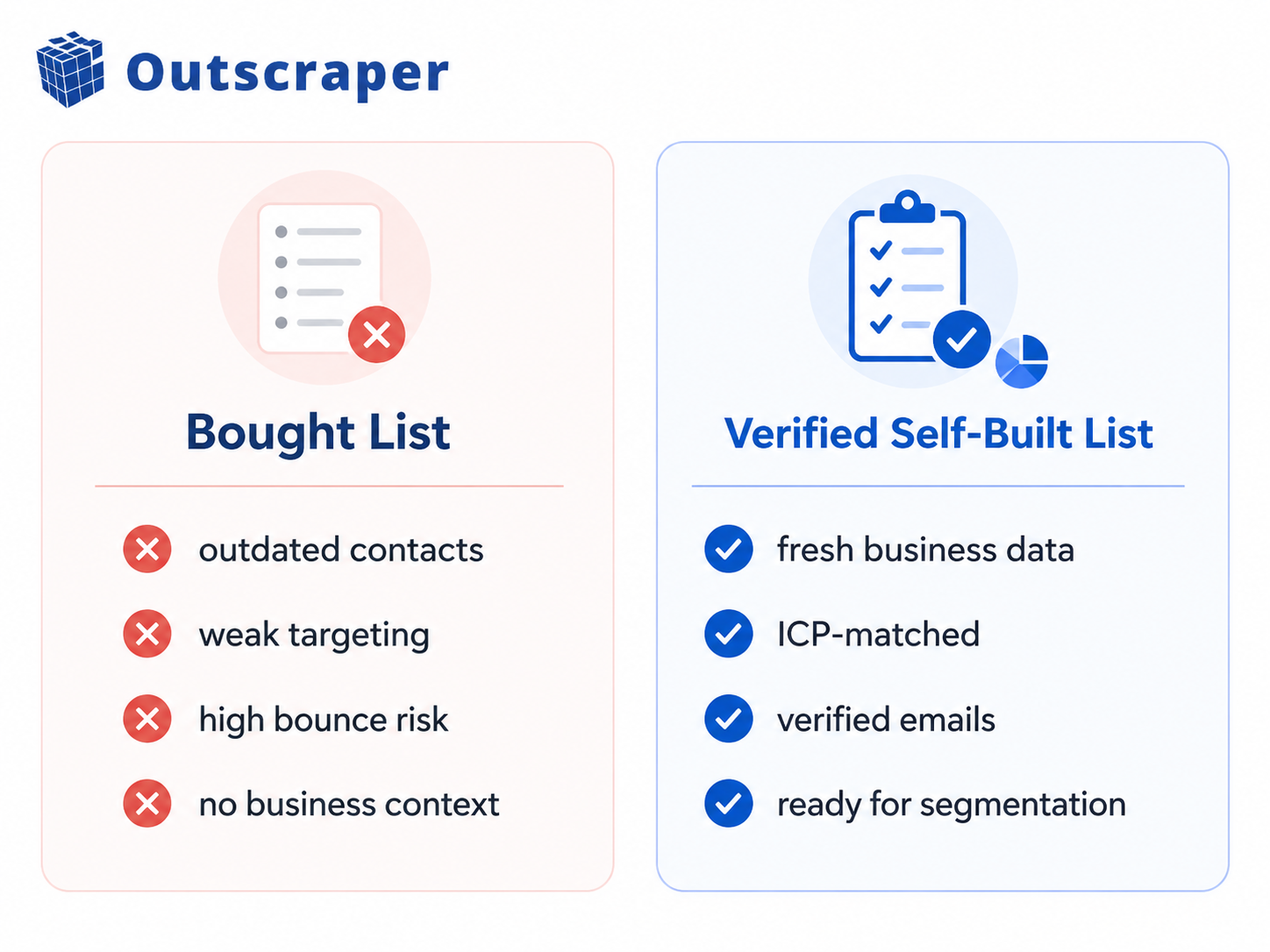
Buying a list looks easy. You pay for a file, you open the spreadsheet, you upload it into your outreach tool, you start sending. Then the problems show up: emails bounce, Contacts are outdated.
Companies do not match your ICP. The list has missing fields. The data source is unclear.
Everyone gets the same message. Your sender reputation takes the hit.
The real problem is not always your subject line or offer. Sometimes the problem is the list. A random list gives you emails. A good list gives you context. And context is what helps your team decide who is actually worth contacting.
What a Good B2B Email List Should Include
A good B2B email list should help your team understand the business, not just the inbox.
At minimum, your list should include:
- business name
- website
- category or industry
- city, state, or country
- phone number
- public email address
- contact source
- email validation status
- segment
- notes or use case
- last updated date
For local B2B campaigns, it can also help to include:
- rating
- review count
- business status
- website presence
- location coverage
- customer complaint signals
This is what turns a spreadsheet into a real outreach asset.
Without context, your team is guessing.
With context, your team can prioritize.
The 7-Step B2B Email List Building Framework for 2026
1. Define Your ICP Before Collecting Emails
Do not start with emails.
Start with the customer.
Ask:
Who are we trying to reach?
What industry are they in?
Where are they located?
What business category fits?
What problem do they likely have?
What signals show they may need help?
For example, a local SEO agency might target dental clinics in Texas with weak websites and low review ratings.
A reputation management agency might target businesses with many reviews but poor ratings.
A SaaS company might target local service businesses with strong review volume but missing structured contact data.
The tighter your ICP, the cleaner your list becomes.
If you skip this step, you may still collect emails, but the list will be harder to use.
2. Collect Fresh Company-Level Data
Before collecting emails, collect company-level data.
This gives your team the context behind each contact.
Useful company-level data includes:
- business name
- address
- website
- phone number
- category
- location
- rating
- review count
- business status
For local campaigns, Google Maps business data is useful because it helps teams collect business information by category, location, reviews, ratings, phone numbers, websites, and contact-related fields. Outscraper’s Google Maps Scraper page also mentions exporting data in formats like CSV, Excel, Parquet, and JSON.
This matters because an email address is more useful when you understand the business behind it.
A raw email tells you where to send.
Company-level data tells you why that business belongs on your list.
For a more practical workflow, read this guide on how to build a high-quality B2B lead list without buying a database.
lds like name, category, phone, website, address, rating, reviews, business status, and enrichment fields like emails and social links.
3. Enrich the List With Emails and Contacts
After collecting company-level data, the next step is enrichment.
Enrichment means adding missing contact details to each business record.
That can include:
- public email addresses
- phone numbers
- company domains
- website contact pages
- social profile links
- other contact-related business details
This step matters because most raw business lists are incomplete.
A business record may have the company name and address, but no email.
Another record may have a website but no phone number.
Another may have a phone number, but no clear contact page.
Instead of asking your team to visit every website manually, enrichment helps turn company data into a more complete outreach list.
Outscraper explains that its Emails & Contacts enrichment can use website information from Google Maps data to extract email addresses, contact details, and social media accounts from those websites.
The key idea is this:
Do not collect emails in isolation. Enrich business records so every contact has context.
4. Verify Emails Before Outreach
Never treat every email as ready to use.
Some emails are invalid.
Some are outdated.
Some may no longer accept messages.
Some may increase bounce risk.
That is why email verification should happen before outreach, not after the campaign fails.
Verification helps your team check whether an email is valid, deliverable, or risky before sending.
This step protects the quality of your list and helps reduce wasted outreach.
A cleaner list usually means fewer bounces, better deliverability, and less time spent chasing bad contacts.
Outscraper’s email validation content explains that cleaning emails before campaigns can help remove invalid and risky addresses, lower bounce rates, protect sender reputation, and improve reply rates.
The simple rule:
If you would not send to an unverified list at scale, do not build your workflow around one.

Start with fresh business data, enrich it with contact details, and verify emails before outreach.
5. Segment the List by Use Case
A good list should not be sent one generic message.
Different businesses need different outreach angles.
Segmentation helps your team group contacts based on what matters.
You can segment by:
- city
- industry
- business category
- website presence
- rating
- number of reviews
- email availability
- business status
- low review score
- missing contact data
- high-priority market
For example:
A web design agency might create one segment for businesses with no website.
A reputation agency might create one segment for businesses with low ratings.
A local SEO agency might create one segment for businesses in a specific city and category.
A sales team might create one segment for verified emails only.
Segmentation makes outreach more relevant.
And relevance is what separates useful outreach from spam.
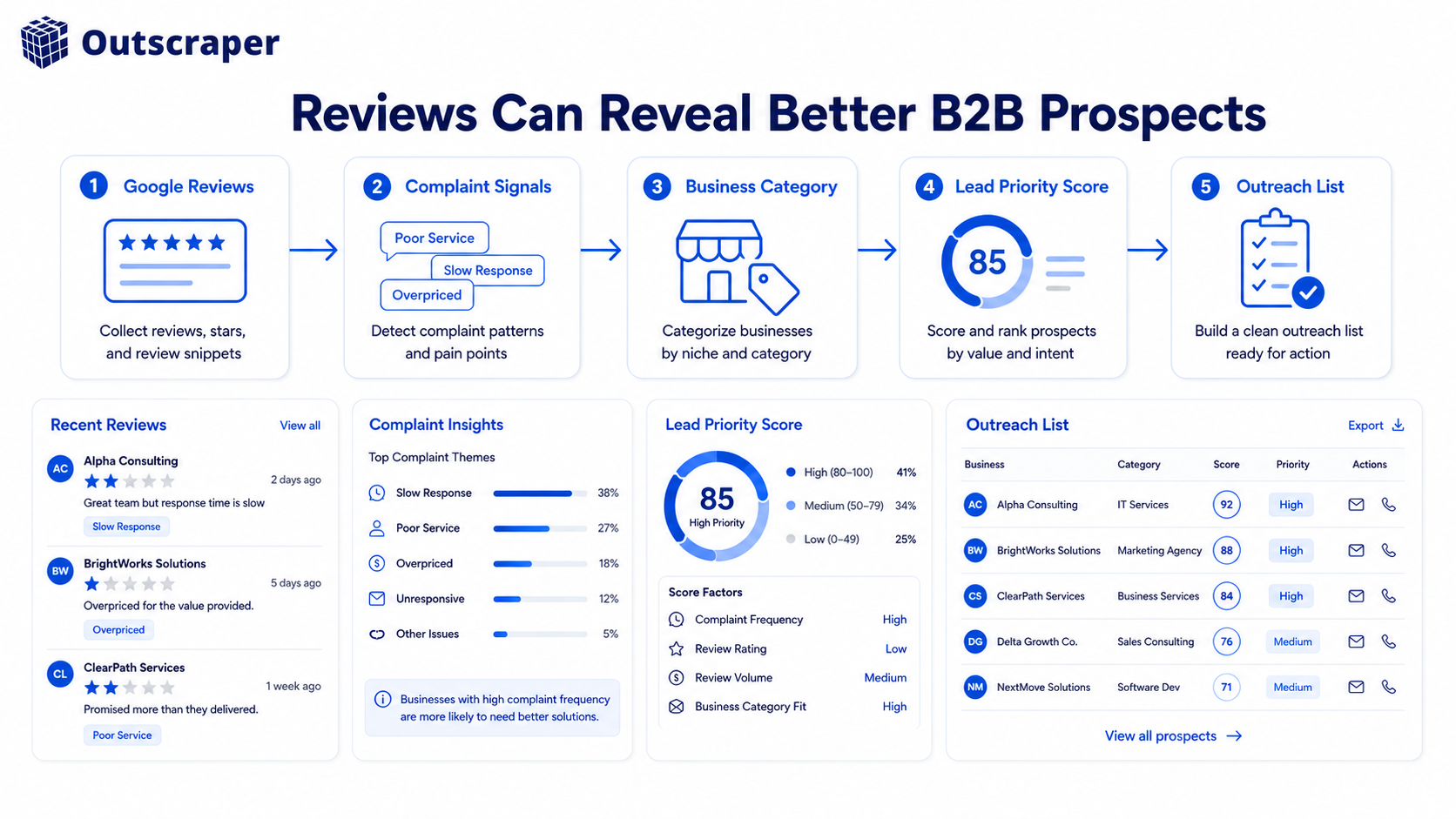
6. Use Review Signals for Better Targeting
Reviews are not just feedback.
Reviews are business signals.
They can show:
- customer complaints
- competitor weaknesses
- service gaps
- reputation problems
- poor customer experience
- possible buying signals
For example, if a business has many reviews but a low rating, that may be useful for a reputation management agency.
If customers keep complaining about slow service, that may be useful for a consultant or operations-focused provider.
If competitors in one city all have weak reviews, that may reveal a market opportunity.
This connects directly to one of Outscraper’s ICP pain points: review data can become useful business intelligence, but analyzing it manually across many businesses is difficult to scale.
The goal is not to use reviews randomly.
The goal is to use reviews as context for smarter targeting.
7. Keep the List Updated
B2B list building is not a one-time task. Business data constantly evolves: companies close, websites change, phone numbers and emails become invalid, new locations open, and even reviews and ratings are updated.
That is why every list should include a clear reference to the last updated date, ensuring users know how current the information is.
Your team should know when the data was collected, when the emails were verified, and when the list needs to be refreshed.
Old lists slowly become weaker. Updated lists stay useful longer.
The best B2B email list is not just built once. It is maintained.
Best Sources for Building a B2B Email List
A good B2B email list usually comes from multiple sources.
Common sources include:
- Google Maps business profiles
- company websites
- public directories
- review platforms
- social profiles
- CRM records
- existing customer data
The important part is not just where the data comes from.
The important part is whether the data matches your ICP and can be verified.
For local businesses, Google Maps is especially useful because it gives business category, location, website, phone number, ratings, reviews, and business status context.
Common B2B Email List Building Mistakes
Here are the mistakes that make B2B email lists weak:
- Starting with emails before defining the ICP
- Buying generic lists with no context
- Not verifying emails before outreach
- Ignoring company-level data
- Sending the same message to every contact
- Not tracking the source of each record
- Not segmenting by use case
- Not updating the list regularly
- Using review data but not turning it into targeting signals
- Treating list building as a one-time task
Most of these mistakes come from the same problem:
Teams focus on getting more emails instead of building a better list.
B2B Email Compliance Basics
This section is not legal advice. Always check the rules for the country where your recipients are located.
For the US, the FTC says commercial emails should not use false or misleading header information, should not use deceptive subject lines, should identify the message as an ad when required, should include the sender’s physical address, and should give recipients a way to opt out.
At a basic level, B2B email outreach should follow these principles:
- use accurate sender information
- avoid misleading subject lines
- include a clear opt-out
- honor unsubscribe requests
- avoid emailing irrelevant contacts
- keep suppression lists
- understand the rules in your target country
Compliance should not be treated as an afterthought.
It should be part of the list-building workflow.
Where Outscraper Fits Into B2B Email List Building
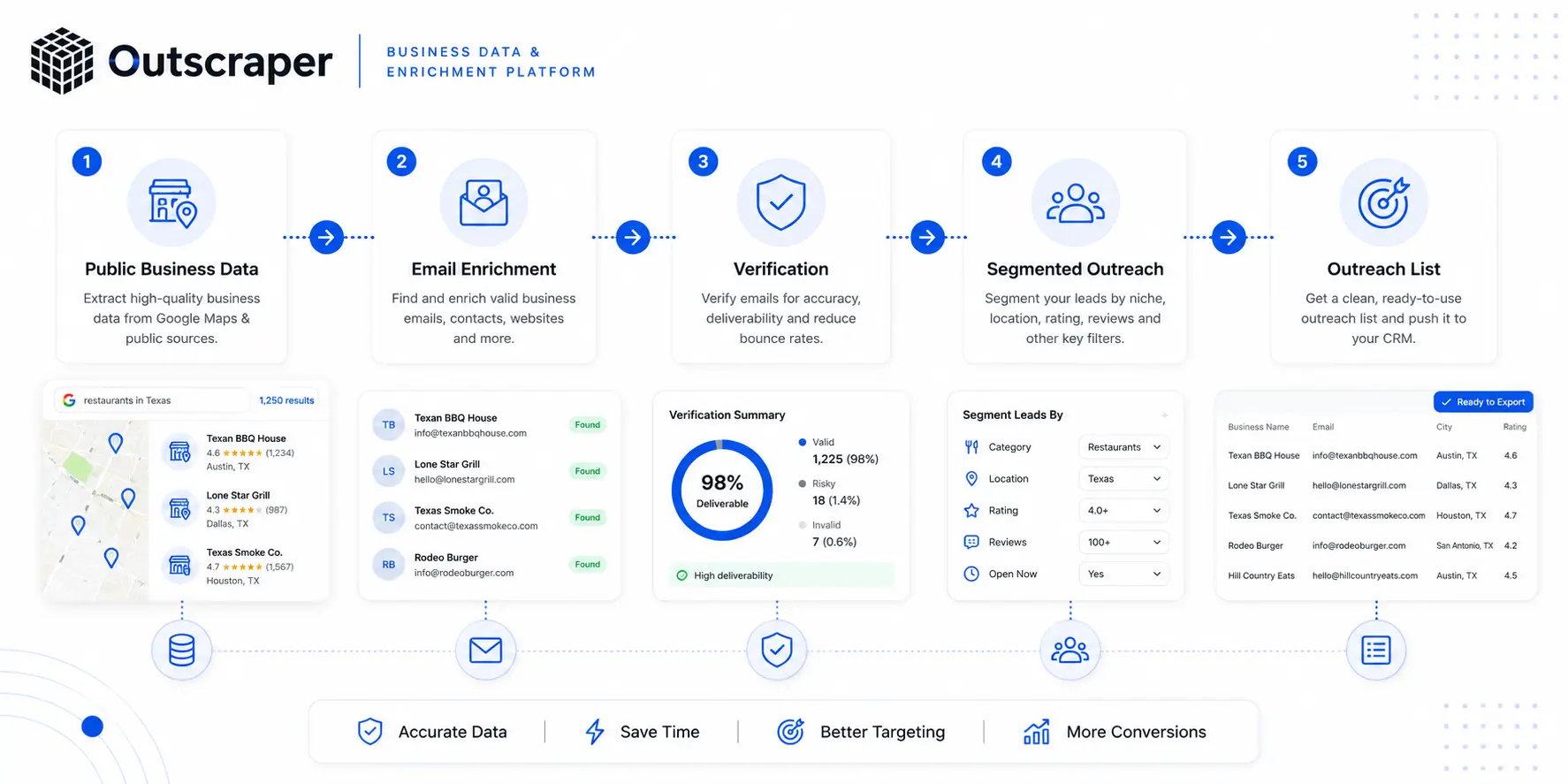
Outscraper fits into the workflow by helping teams move from manual research to structured business data.
The workflow can look like this:
- Define the ICP
- Collect business data
- Enrich records with emails and contacts
- Verify emails
- Segment the list
- Use the list for outreach, research, or CRM workflows
This is useful for:
- agencies building local lead lists
- SDR teams targeting by category and location
- SaaS teams enriching company databases
- consultants researching markets
- reputation teams using review signals
- local SEO teams finding businesses with weak online visibility
The goal is not just to collect more emails.
The goal is to build a cleaner B2B list with better context, better targeting, and less manual cleanup.
Want to build a cleaner B2B email list from fresh business data?
Start with Outscraper Google Maps Scraper to collect business data, then use Email Address Validator to check emails before outreach.
Frequently Asked Questions
Most frequent questions and answers
B2B email list building is the process of creating a targeted list of business contacts for sales, marketing, partnerships, recruiting, or market research. A useful list should go beyond just email addresses and include company context such as business name, website, business category, location, phone number, email address, contact source, email verification status, segment or tag, and last updated date.
Buying a list may seem easy at first you pay for a file, upload it into your outreach tool, and start sending. But the problems quickly surface: emails bounce, contacts are outdated, companies don’t match your ICP, and the list has missing fields with an unclear data source. The real issue is that a random list gives you emails, while a good list gives you context and context is what helps your team decide who is actually worth contacting.
The framework begins with defining your Ideal Customer Profile (ICP) before collecting any emails asking who you’re trying to reach, what industry they’re in, where they’re located, and what problem they likely have. The next step is collecting fresh company-level data (name, address, website, phone, category, rating, and business status), followed by enrichment to add missing contact details like public email addresses, social links, and company domains.
Not every email on a list is ready to use some are invalid, outdated, or may no longer accept messages, all of which increase bounce risk. Email verification should happen before outreach, not after a campaign fails. Cleaning emails beforehand helps remove invalid and risky addresses, lowers bounce rates, protects sender reputation, and improves reply rates.
Reviews are not just feedback they are business signals that can reveal customer complaints, competitor weaknesses, service gaps, reputation problems, and possible buying signals. For example, a business with many reviews but a low rating may be a strong prospect for a reputation management agency, while businesses in a city where competitors all have weak reviews may signal a market opportunity. The goal is to use review data as context for smarter, more targeted outreach rather than relying on it randomly.