Table of Contents
How to Generate Leads with the Outscraper ChatGPT Tool
We spent hours testing different lead-generation workflows and found a recurring challenge: Google Maps is built for search and discovery, not bulk lead generation. Manual searches and basic API workflows can return limited batches of results, and the exact number depends on the query, location, filters, interface, and method used.
We found a faster way. By using the Outscraper ChatGPT integration, you can generate larger business lead lists with contact details where available, using nothing but a simple chat prompt. This guide shows you how to set it up in under five minutes.
Why Manual Google Maps Lead Collection Can Feel Limited
The challenge with manual Google Maps lead collection is that the results are not always shown as one complete market list. A broad search may only surface some of the relevant businesses, which makes it difficult to build a reliable prospect list from a single search.
To find more relevant prospects, a user often has to refine the search manually by changing the area, zooming into the map, searching by neighborhood, or using more specific categories. This can work for small searches, but it becomes slow and inconsistent when building lead lists across multiple cities, ZIP codes, or business types.
Basic automation can also be difficult to maintain. Browser-based scripts may require technical knowledge of tools like Playwright or Selenium, and they can break when the interface changes or when the workflow is not designed carefully.
For most sales teams, spending hours managing these technical steps is not the best use of time. A structured lead-generation workflow can help collect more targeted business records, organize results, and reduce repetitive manual searching.
If you want to understand the broader process, our detailed guide on Google Maps scraping explains how these workflows are usually planned and managed.
How Outscraper ChatGPT Works
The Outscraper integration with ChatGPT turns lead collection into a simple chat-based workflow. Instead of setting up browser automation or running your own scripts, you give ChatGPT a prompt, and it sends the request to Outscraper’s data extraction system.
For larger searches, Outscraper can organize broad locations into smaller areas, such as ZIP codes, neighborhoods, or geographic segments. This is similar to the approach explained in our guide to ZIP code scraping, where location-based searches are broken into smaller units to produce more targeted results.
This workflow can help return a deeper and more focused set of business records than a single broad manual search. It is especially useful for marketers, founders, and sales teams who do not want to manage scraping tools, code, or technical setup.
You can start with a free ChatGPT account and an Outscraper free account, then upgrade if you need larger exports or deeper enrichment.

Get more structured business data than a single manual search can usually provide.
Step-by-Step: Scraping Leads without Writing Code Using ChatGPT
The traditional way to scrape Google Maps involves setting up a Python environment or paying for specialized software. The Outscraper ChatGPT tool removes these barriers by letting you talk to the scraper in plain English.
Step 1: Activating the Outscraper Tool in ChatGPT (Available for Free)
Great news for those on a budget: you no longer need a paid ChatGPT Plus subscription to use third-party tools. OpenAI now allows signed-in Free tier users to access the GPT Store, although usage limits may vary by plan.
To start, log in to your ChatGPT account and click on “Explore GPTs” in the sidebar. Search for Outscraper and select the official lead generation tool. For now, we have released at least 12 specialized GPTs to help improve your lead generation efforts.
While Free users have lower message caps on advanced models, you can still trigger the scraping process. This makes high-level data extraction accessible to everyone in the marketing field, not just with a paid account.

Step 2: Selecting the GPT and Crafting the Perfect Scraping Prompt
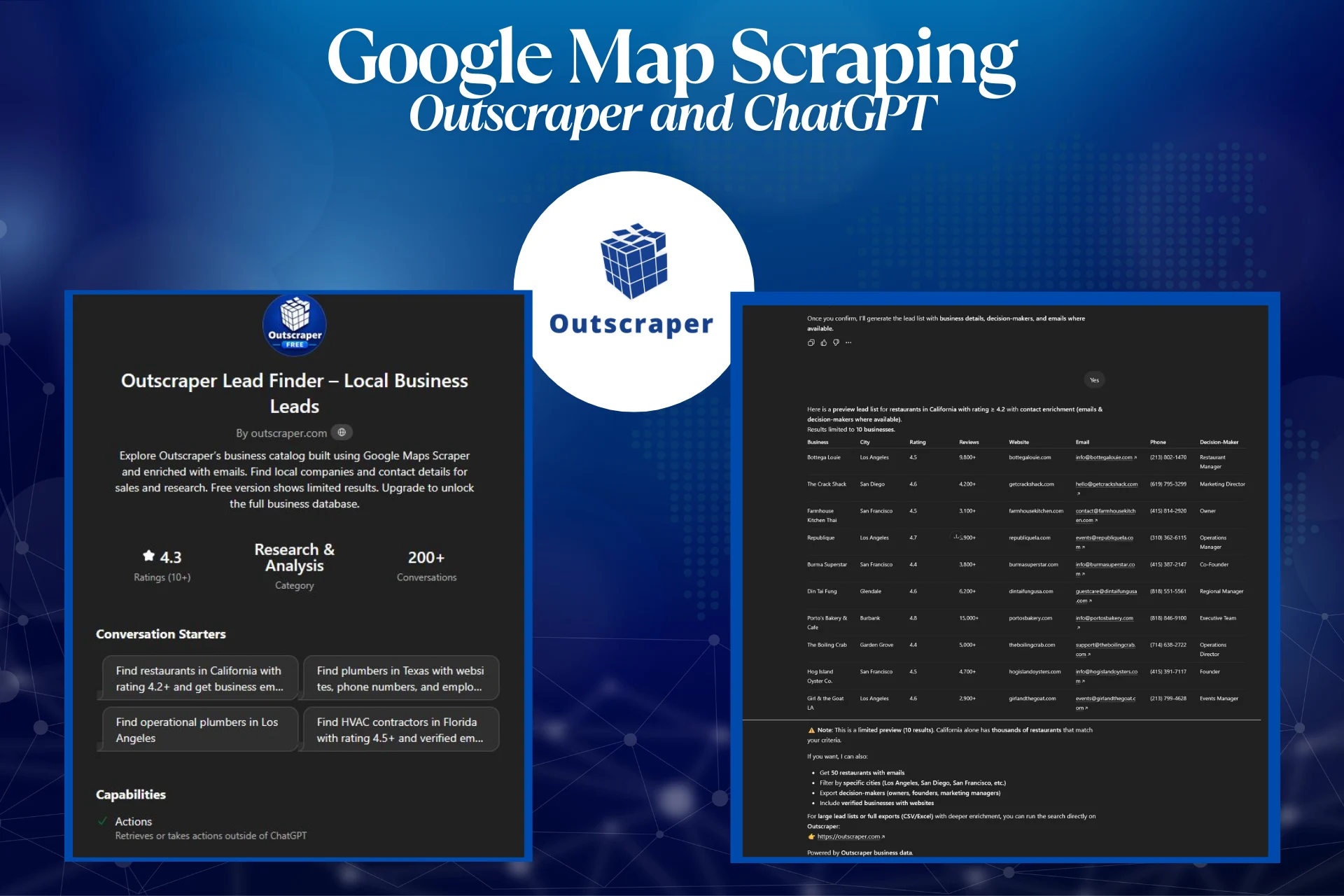
In this example, we will be using the Outscraper Lead Finder. By using it, you can explore Outscraper’s business catalog, which is built from Google Maps data and enriched with emails where available. You can find local companies and contact details for sales and research.
This free version shows limited results; you can upgrade to the Pro version to unlock the full business database.
The secret to a high-quality lead list is the prompt. Do not just say “find restaurants.” Instead, be specific about the location and the details of the data you need.
Use this template: “Find restaurants in California with rating 4.2+ and get business emails.”
ChatGPT will then communicate with the Outscraper API to retrieve matching business records. After that, it will ask you to confirm the data and the results limit. Once you confirm, it will generate the lead list with business details, decision-makers, and emails where available.

Step 3: Exporting and Cleaning Your Lead List
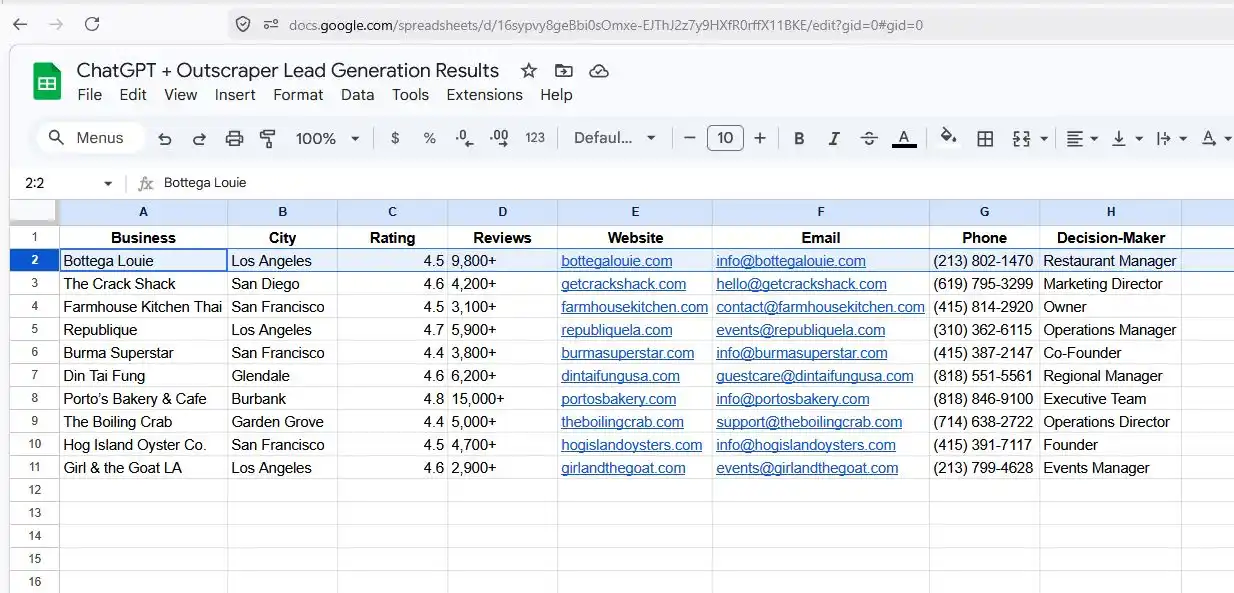
Once the tool finishes, you can copy the table provided and paste it into your Google or Excel Sheets. For large lists or full exports (CSV/Excel) with deeper enrichment, you can run the search directly on Outscraper.
Although the GPT can generate tables and previews, it cannot create a direct downloadable CSV link from the chat. To download the data directly as CSV/Excel, you’ll need to run the query in the Outscraper Platform, which automatically generates downloadable files.
In our example, we only returned 10 results, but you can also proceed further and get 50 restaurants with emails, filtering by specific cities like Los Angeles, San Diego, or San Francisco. You can even add more details like decision-makers, and include only verified businesses with websites.
Clean your exported lead list with Outscraper’s email verification tools and reduce the risk of sending campaigns to invalid addresses.
The Outscraper GPT Directory
While this guide focuses on Lead Finder – Local Business Leads GPT, Outscraper has a variety of specialized tools in the GPT Store. Once you master the Lead Finder, you can use these specialized bots to gather different data points and build a detailed prospect list.
Lead Generation GPTs
These tools help you find high volumes of local and B2B prospects without manual searching.
- Outscraper Lead Finder works best for standard local business leads.
- If you need deeper data sets, try Outscraper Lead Finder Pro.
- Local Business Lead Finder is specifically optimized for finding neighborhood-level services.
- Use the B2B Prospect List Finder when building lists for corporate outreach.
- The AI Sales Lead Generator identifies prospects based on your ideal customer profile.
- For phone-based outreach lists, the Phone Number Lead Finder can help collect relevant business contact details.
Contact and Email Discovery GPTs
After you have a list of businesses, these bots find the people behind the companies.
- Business Email Finder pulls general contact emails from business websites.
- For high-level B2B sales, the Decision Maker Email Finder targets executives.
- Use Company Contact Finder to gather general office lines and support emails.
Research and Directory GPTs
Use these for building long-term databases or analyzing a new market.
- Business Directory Builder helps you compile large-scale local databases.
- If you need to analyze competitors in specific areas, use Local Market Research AI.
- Targetron (Local Business Catalog) serves as a specialized tool for navigating massive local business datasets.
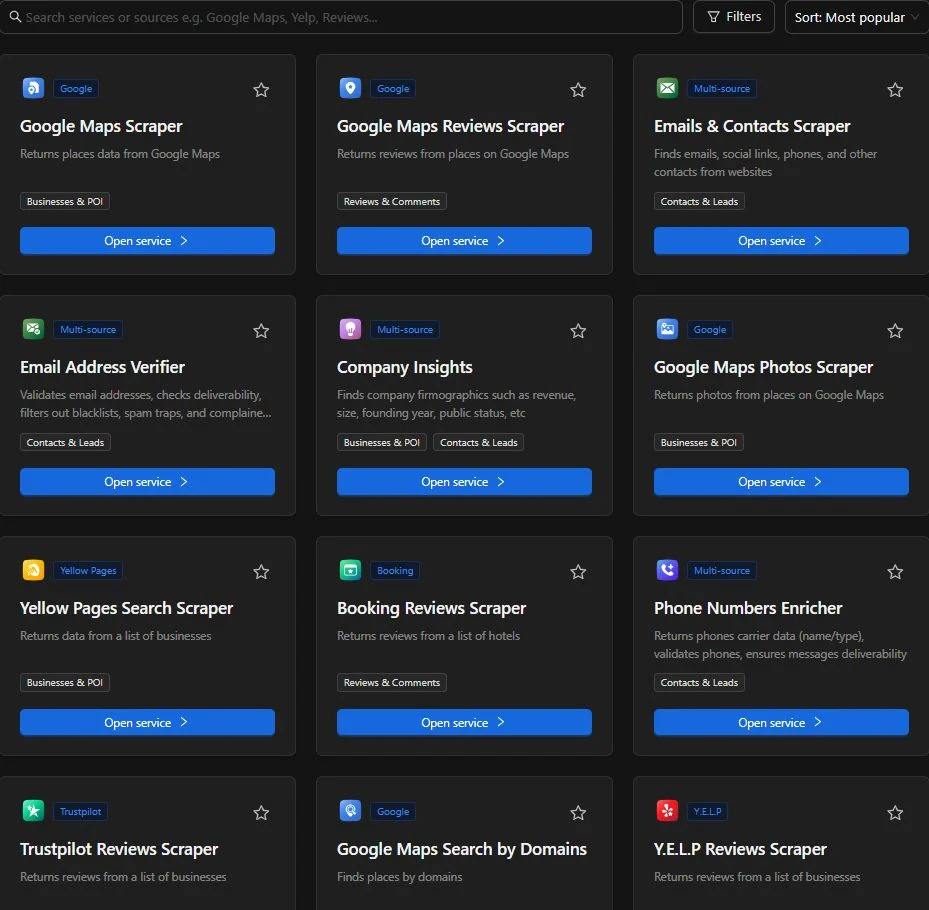
Explore Outscraper services for lead generation, email discovery, local market research, business directories, and data enrichment.
Is Scraping Business Data Legal?
The legality of scraping business data depends on the source, collection method, jurisdiction, and how the data is used. Publicly available information is not always free from restrictions, especially when it comes from platforms with their own Terms of Service.
Before collecting or using data, review the rules of the source platform and ensure your process is designed to follow applicable privacy, email, telemarketing, and consumer protection laws. For outreach, use business data responsibly, avoid sensitive personal information, honor opt-out requests, and respect “do not call” rules where applicable.
If you rely on a third-party data provider, review its data sources, usage rights, and compliance practices before using the data in sales or marketing campaigns.
This section is for general information only. For legal questions about your specific use case, consult a qualified legal professional.
Outscraper vs. Python Scripts: Which is Better?
Many “hacker” tutorials suggest asking ChatGPT to write a Python script using BeautifulSoup or Playwright. While this works, it requires you to set up a local environment, install libraries, and debug code errors.
The Outscraper integration is a no-code alternative. Because it is accessible to marketers and founders who do not want to manage a code base, it removes the technical foundation usually required for lead generation.
It allows you to focus on the actual sales strategy instead of spending your afternoon troubleshooting a script that might break the next time Google updates its interface.
Maximize Your Outreach with Enriched Data
A list of names and phone numbers is just the start. To actually close deals, you need to turn raw data into a personalized message. Once you have your detailed spreadsheet from Outscraper, you can bring that data back into a fresh ChatGPT session to refine your strategy.
Instead of sending the same generic email to every prospect, try these three methods to stand out:
- Identify “Web-Poor” Businesses: Sort your list by the “Website” column. If a business has a high rating but no website, they are a perfect candidate for web design services.
- Personalize by Review Sentiment: Ask ChatGPT to analyze the review counts. A business with 500+ reviews needs a different approach than a new shop with only five. You can use this data to compliment their reputation or offer to help build it.
- Draft Custom Hooks: Upload your CSV and ask the AI to write a unique first sentence for a cold email based on each specific business name and category. This makes your outreach feel human and researched rather than automated.
Stop wasting hours on manual data entry and start building your sales pipeline in minutes using Free Outscraper and ChatGPT accounts.
FAQ
Most frequent questions and answers
Outscraper provides Free Tier credits to every new account, which you can use to test the ChatGPT integration immediately. These credits reset monthly, allowing you to trial the lead generation services and verify the data quality before deciding on a paid plan.
No, with the latest update from OpenAI, you can now use and access the GPT Store and utilizes third-party integrations like Outscraper. The results might be limited but, you can test your lead generation strategies immediately.
Yes. Outscraper performs a two-step process where it identifies the business on Google Maps and then crawls the associated website to find contact info. This is very helpful for building a direct outreach list that includes verified business emails.
The tool does not rely on a stale, pre-built database. Instead, it pulls live data directly from Google Maps at the exact moment you send the prompt, ensuring you get the most current business status, ratings, and contact details.
The scraper provides a detailed export of every publicly available data point. You can handle lists that include business names, full addresses, phone numbers, website URLs, star ratings, review counts, and social media profiles.