गूगल मैप्स स्क्रैपर यह Outscraper द्वारा प्रदान की जाने वाली सबसे लोकप्रिय स्क्रैपिंग सेवाओं में से एक है। यह आपको बिना किसी प्रतिबंध के आसानी से Google Maps से सार्वजनिक डेटा निकालने की अनुमति देता है और इस ट्यूटोरियल में हम चर्चा करेंगे कि इसके साथ कैसे शुरुआत करें। गूगल मैप्स स्क्रैपिंग 1टीपी1टी का उपयोग करते हुए।.
यहाँ Outscraper में, हम हमेशा अपने ग्राहकों का ख्याल रखते हैं और डिज़ाइन में कुछ छोटे-मोटे बदलाव करते हैं ताकि यह अधिक उपयोगकर्ता-अनुकूल और उपयोग में आसान प्लेटफ़ॉर्म बन सके। Google Maps Data Scraper का अधिकतम लाभ उठाने के लिए, पैरामीटर और फ़िल्टर को सटीक रूप से सेट करना आवश्यक है।.
यह प्लेटफ़ॉर्म डेटा स्क्रैपिंग को अगले स्तर पर ले जाने के लिए नई समृद्धिकरण सेवाएँ भी प्रदान करता है। हम अपने उपयोगकर्ताओं को कोई कार्य बनाने से पहले इन सभी सेटिंग्स के बारे में यह “Getting Started” गाइड पढ़ने के लिए प्रोत्साहित करते हैं। हमारी सबसे लोकप्रिय स्क्रैपिंग सेवा, Google Maps Data Scraper, के अलावा, हम कुछ और भी प्रदान करते हैं। नई स्क्रैपिंग सेवाएँ तथा नए संवर्धन अपनी स्क्रैपिंग गतिविधियों में सुधार करें और अपने व्यवसाय के साथ उत्पादक बनें।.

मूल पैरामीटर
Outscraper प्लेटफ़ॉर्म में सही लक्षित व्यवसायों/स्थानों को स्क्रैप करने के लिए सबसे महत्वपूर्ण सेटिंग्स में से एक बुनियादी पैरामीटर हैं। सटीक पैरामीटर का उपयोग परिणाम फ़ाइल में अनावश्यक और डुप्लिकेट रिकॉर्ड्स को कम करता है। हमने Google Maps Scraper के डिज़ाइन में कुछ छोटे बदलाव किए हैं।.

Outscraper का डैशबोर्ड
Google Maps Scraper के पिछले संस्करण में, विवरण में लिखा था “यह Google Maps से स्थानों का डेटा स्क्रैप करने की अनुमति देता है। इसमें मूल्य निर्धारण, उत्पाद पृष्ठ और ट्यूटोरियल्स के लिंक शामिल हैं। पिछले संस्करण में, आप श्रेणियों या साधारण क्वेरीज़ का उपयोग कर सकते थे। आप ज़िप कोड का उपयोग करके किसी विशिष्ट स्थान, देश और कस्टम स्थान की भी खोज कर सकते थे।".
इस बीच, Google Maps Scraper के नवीनतम संस्करण में विवरण में लिखा है “Google Maps से स्थानों का डेटा निकालें। इसमें अभी भी प्राइसिंग, प्रोडक्ट पेज और ट्यूटोरियल्स के लिंक शामिल हैं, लेकिन API डॉक्स के लिए एक नया लिंक जोड़ा गया है।" हमने ट्यूटोरियल लिंक के लिए कुछ नए आइकन भी जोड़े हैं और एक विकल्प जोड़ा है जिसमें आप पीले सितारे के आइकन पर क्लिक करके Google Maps Scraper को Outscraper की अपनी पसंदीदा सुविधाओं में से एक के रूप में चुन सकते हैं।.

मूल पैरामीटर
मूल पैरामीटरों में श्रेणियों के अलावा स्थान, सीमाएँ और डुप्लिकेट विकल्पों को स्पष्ट रूप से निर्धारित किया जाना चाहिए।.
श्रेणियाँ
श्रेणियाँ चुननाGoogle Maps में 5,000 से अधिक श्रेणियाँ हैं। ये श्रेणियाँ डैशबोर्ड पर एक तैयार-निर्मित सूची के रूप में उपलब्ध हैं।.
आप सूची निर्देशिका से किसी भी श्रेणी का चयन कर सकते हैं या Exact Match विकल्प का उपयोग कर सकते हैं, जो Google द्वारा जोड़ी जा सकने वाली अन्य श्रेणियों को अनदेखा कर देगा। Custom श्रेणियाँ अब श्रेणियाँ अनुभाग में एक अन्य विकल्प के रूप में उपलब्ध नहीं हैं। Exact Match विकल्प Google द्वारा जोड़ी जा सकने वाली अन्य श्रेणियों को अनदेखा कर देगा।.

श्रेणियाँ
सटीक मिलान विकल्प इसका मतलब है कि यदि आप किसी भी क्षेत्र में थाई रेस्तरां खोजना चाहते हैं। यदि खोजे गए क्षेत्र में बहुत सारे “थाई रेस्तरां” नहीं हैं, तो “जापानी रेस्तरां” और “वियतनामी रेस्तरां” भी परिणामों में दिखाई देंगे। यदि आप “Exact match” विकल्प का उपयोग नहीं करते हैं, तो ये सभी श्रेणियाँ स्क्रैपिंग परिणाम फ़ाइल में मिलेंगी। यदि आप “Exact match” विकल्प को प्राथमिकता देते हैं, तो Outscraper दूसरों को हटा देता है और सूची में केवल “थाई रेस्तरां” जोड़ता है। यह केवल EN भाषा के लिए और एक तैयार श्रेणियों की सूची का उपयोग करते समय काम करेगा।.
एक और अतिरिक्त बदलाव श्रेणियों के विकल्प में ब्रांड्स का समावेश है। श्रेणियों को स्थानों से गुणा करके Google खोज क्वेरीज़ में शामिल किया जाएगा। आप “Plain Queries” का उपयोग करके स्वयं क्वेरीज़ भी बना सकते हैं, जैसे आप Google Maps साइट पर करते हैं। श्रेणियों की सूची ड्रॉपडाउन विकल्प में मिल सकती है।.

साधारण क्वेरीज़ का उपयोग
कभी-कभी Google आपकी खोजों में अन्य श्रेणियाँ जोड़ देता है, कृपया केवल सटीक श्रेणियाँ प्राप्त करने के लिए Advanced Parameters से Filters का उपयोग करें। Plain Queries विकल्प का उपयोग करते समय आप कीवर्ड, स्थान आईडी, URL आदि खोज सकते हैं। इस विकल्प का उपयोग करते समय आपको अपनी खोज क्वेरी Google में दर्ज करनी होगी और परिणामों का URL Outscraper द्वारा प्रदान की गई खाली जगह में कॉपी करना होगा।.
स्थान

स्थानों का चयन: ठीक वैसे ही जैसे Google Maps में सभी देश, शहर और क्षेत्र चुने जा सकते हैं, Outscraper ऐप में टास्क बनाते समय भी इन्हें चुना जा सकता है। चयन को आसान बनाने के लिए एक तैयार-बनाई सूची उपलब्ध है। यदि कोई स्थान सूची में नहीं है, तो आप “कस्टम स्थान” विकल्प का उपयोग कर सकते हैं।.
अनुकूलित स्थान: इस विकल्प में, आप स्थानों को “ज़िप कोड + शहर + देश” के रूप में परिभाषित कर सकते हैं। “लॉस एंजेलिस, कैलिफ़ोर्निया, संयुक्त राज्य अमेरिका के पास” का उपयोग करना भी संभव है।.

ज़िप कोड का उपयोग: पोस्टल कोड का उपयोग गहन स्कैनिंग और स्क्रैपिंग के लिए किया जाना चाहिए। उदाहरण के लिए, न्यूयॉर्क के ब्रुकलिन में सैकड़ों रेस्तरां हैं। दुर्भाग्यवश, एक ही खोज क्वेरी से Google Maps के खोज परिणामों में ये सभी रेस्तरां सूचीबद्ध नहीं होते।.
Google Maps एक खोज के परिणामों में अधिकतम 500 रेस्तरां दिखाता है। चूंकि Outscraper भी Google Maps द्वारा प्रदान किए गए खोज परिणामों को स्क्रैप करता है, इसलिए एक ही क्वेरी से इन सभी रेस्तरां को परिणाम फ़ाइल में नहीं पाया जा सकेगा।.
इस परिदृश्य के लिए ज़िप कोड का उपयोग किया जाता है। यह आपको क्षेत्र की विस्तृत खोज और स्क्रैपिंग करने की अनुमति देता है। यह ज़िप कोड और शहरों के संयोजन के साथ कई खोज क्वेरीज़ उत्पन्न करता है। उदाहरण के लिए:
“भोजनालय, 11201, एनवाई, यूएस”
“रेस्तरां, 11202, एनवाई, यूएस”
“भोजनालय, 11203, एनवाई, यूएस”
किसी भी स्थान को छोड़ने के बिना किसी क्षेत्र के हर स्थान को स्क्रैप करने के लिए इस विकल्प का उपयोग करें।.
अधिक जानकारी के लिए आगे पढ़ें: Google Maps से घनी आबादी वाले क्षेत्रों और श्रेणियों को कैसे स्क्रैप करें?
जब आप इस विकल्प का उपयोग करें तो हमेशा “डुप्लिकेट हटाएँ” विकल्प का उपयोग करें।.
सीमाएँ और विकल्प
कुल परिणाम सीमा: यह विकल्प कार्य परिणाम फ़ाइल में कुल परिणामों की संख्या निर्धारित करता है। भले ही कार्य की संभावित मात्रा बड़ी हो, जैसे ही आप सीमा 100 पर सेट करते हैं, स्क्रैपिंग प्रक्रिया 100 स्थानों तक पहुँचने पर रुक जाती है। यदि सीमा 0 पर सेट की जाती है, तो स्क्रैपिंग कार्य के अंत तक जारी रहती है। 0 पर, परिणाम फ़ाइल में कोई सीमा नहीं होगी।.
डुप्लिकेट हटाएँ: Google Maps एक ही खोज परिणामों में विभिन्न पृष्ठों पर समान स्थानों/व्यवसायों को दिखा सकता है। इससे परिणाम फ़ाइल में डुप्लिकेट रिकॉर्ड हो सकते हैं क्योंकि Outscraper वह डेटा निकालता है जो आप Google Maps पर देखते हैं।.
इसके अलावा, Google Maps विभिन्न खोज क्वेरीज़ के लिए, जिनकी श्रेणियाँ अलग-अलग लेकिन संबंधित हों, समान परिणाम दिखा सकता है। “Bars, New York” और “Restaurants, New York” के लिए खोज एक ही परिणाम दिखा सकती है। यदि किसी कार्य में दो या अधिक श्रेणियाँ चयनित हों, तो संबंधित श्रेणियों में डुप्लिकेट परिणामों की उच्च संभावना होती है।.
इस स्थिति से बचने के लिए “डुप्लिकेट हटाएँ” विकल्प लागू किया जाना चाहिए। यदि “डुप्लिकेट ड्रॉप करें” चयनित नहीं है, तो डुप्लिकेट परिणाम परिणाम फ़ाइल में सूचीबद्ध किए जाएंगे और उनका बिल किया जाएगा।.
ईमेल के बिना अनदेखा करें: यह विकल्प केवल तभी लागू होता है जब “Emails & Contacts Scraper” सेवा जोड़ी जाती है। यह परिणाम फ़ाइल से उन स्थानों को हटा देता है जिनमें कम से कम एक ईमेल नहीं होता। केवल उन स्थानों/व्यवसायों को सूचीबद्ध किया जाता है जिनके पास ईमेल होते हैं। यह उन लोगों के लिए बिल्कुल उपयुक्त है जो ईमेल मार्केटिंग के लिए Google Maps से ईमेल निकालना चाहते हैं।.
अनदेखे रिकॉर्ड्स (बिना ईमेल वाले) के लिए आपसे शुल्क नहीं लिया जाएगा।.
समृद्धिकरण सेवाएँ

Outscraper की समृद्धिकरण सेवाएँ
हमने अपनी एनरिचमेंट सेवाओं में कुछ बदलाव किए हैं, जो कोल्ड कॉलिंग, कोल्ड ईमेल और अन्य एनरिचमेंट टूल्स के लिए सबसे उपयुक्त होंगे। ये एनरिचमेंट सेवाएँ Google Maps Data Scraper के साथ काम करती हैं। इन सेवाओं को ड्रॉप-डाउन सूची से चुना जा सकता है। प्रत्येक एनरिचमेंट सेवा की क्षमताएँ और मूल्य निर्धारण संरचनाएँ अलग-अलग होती हैं।.
कोल्ड ईमेल के लिए सबसे अच्छे एनरिचमेंट टूल्स Company Insights, Emails & Contacts Scraper और Contacts Finder हैं। कोल्ड ईमेल के लिए आप Whitepages Phones Scraper, Phone Numbers Enricher और WhatsApp Checker चुन सकते हैं। अन्य एनरिचमेंट सेवाओं में Trustpilot Scraper और US Companies Data Enricher शामिल हैं।.
जब स्क्रैपिंग कार्य में एनरिचमेंट सेवाएँ जोड़ी जाती हैं, तो एनरिचमेंट सेवाओं द्वारा निकाले गए सभी डेटा एक ही परिणाम फ़ाइल में होंगे।.
Company Insights: With this enrichment, you can find company details such as revenue, size, founding year, public status, etc.
Emails & Contacts Scraper: This enrichment service allows you to extract emails and contacts through Google Maps. Google Maps Data Scraper first scrapes the general data of places/businesses. This data also includes website information. Emails & Contacts Scraper service uses this website information and extracts email addresses, contact details, and social media accounts from these websites.
Adding this enrichment service to the task activates the “Validate emails,” “Ignore without emails” and “Delete email duplicates” options. The “Validate emails,” will validate the emails while the “Ignore without emails” option ensures that only businesses with an email address are put in the results file. The “Delete email duplicate” option is used to remove businesses from the result file with the same email address.
Businesses with multiple branches have the same website and the same email address. Businesses with multiple branches have the same website, so the same email addresses extracted from branches can be the same. With this option, only 1 record remains and the other duplicates are dropped. Thus, a clean result file is obtained in this way.
ईमेल और संपर्क निकालने के बारे में अधिक जानकारी के लिए: गूगल मैप्स से ईमेल कैसे निकालें?
Learn how the “Emails & Contacts Scraper” service can find contacts and emails from different sources: Google Places के संपर्क और ईमेल ढूँढना
वीडियो ट्यूटोरियल: किसी भी वेबसाइट से ईमेल, फोन नंबर, संपर्क और सोशल मीडिया लिंक कैसे स्क्रैप करें?
Contacts Finder: With Contacts Finder, you can find company contacts such as emails, phone numbers, full name, title, etc.
Whitepages Phones Scraper: This enrichment will return insights about phone number owners such as name, address, etc.

Phone Number Enricher: It will return phone carrier data such as name and type. It also validates phones, ensuring message deliverability.
WhatsApp Checker: Checks whether a phone is connected to the service.
Trustpilot Scraper: Extract the data from a list of services.

US Companies Data Enricher: This enrichment service allows you to collect more information about companies in the United States, such as the number of employees, sales volume, NAIC code, etc.
*The location must be in the United States for this service to work.
अधिक जानकारी के लिए कृपया आगे पढ़ें: गूगल मैप्स स्क्रैपर के लिए संवर्धन सेवाएँ
Added Enrichment Options:
In the Enrichment section of the Google Maps Scraper, we added some amazing features as you can select an option to “Extract emails & socials,” “company insights,” “phone owners,” validate emails,” “ignore without emails,” and “delete emails duplicates.” When checked, additional enrichment options will be available.
When you select Extract emails & socials, the other enrichment options will appear such as email address verifier, disposable email checker, Whitepages phone scraper, phone numbers enricher, WhatsApp checker, Trustpilot scraper, Professional networking site’s companies scraper, Professional network’s profiles scraper, and US Companies data enricher.
You can also select Company Insights in the choices of enrichment, with company insights selected, you will have the option to enhance the results by adding additional enrichments such as emails & contacts scraper, contacts finder, Whitepages phone scraper, Phone number enricher, WhatsApp checker, Whitepages Addresses scraper, Fastbackground addresses scraper, Trustpilot scraper, Geocoding, and US Companies Data Enricher.
When you select Phone Owners or Whitepages Phones Scraper, you can add additional enrichments such as Company Insights, Emails & Contacts Scraper, Phone Numbers Enricher, WhatsApp Checker, Whitepages Addresses Scraper, Fastbackgroundcheck Addresses Scraper, Trustpilot Scraper, Geocoding, and US Companies Data Enricher.
उन्नत पैरामीटर

One of Outscraper’s most valuable capabilities is advanced filtering. Phone, website, subtype, and business status filters are some of them. It is simple to eliminate unwanted data with many different filtering possibilities.
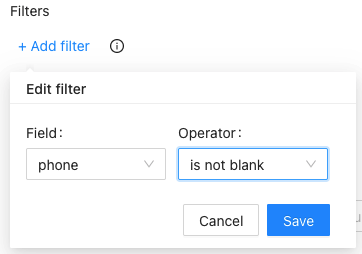
फ़िल्टर।. The main purpose of using filters is to ignore irrelevant results. Each filter decides whether to list the places/businesses in the result file or ignore them. Filters can be used for many उपयोग के मामले. Finding businesses that don’t have websites, finding businesses that aren’t verified, finding businesses with bad ratings.
अधिक जानकारी के लिए कृपया आगे पढ़ें: Google Maps Data Scraper Filters.
वीडियो ट्यूटोरियल: How to Use Google Maps Data Scraper Filters And How It Will Tune Your Scraping Into Another Level?
भाषा: Google Maps उपयोग की जाने वाली भाषा के आधार पर अलग-अलग परिणाम दिखा सकता है। इस कारण Outscraper आपको इसे सिम्युलेट करने की अनुमति देता है। आप विभिन्न भाषाओं का चयन करके कार्य बना सकते हैं।.
Places Per One Query Search: The parameter specifies the limit of organizations to take from one query search. When you are using the query to find a specific place (e.g. “Central Park, NY, USA”) you probably want to use “1” to get the first place (just in case Google will find something else). However, when you are searching for “Restaurants, NY, USA” you might want to extract all the places from your search and use “50”.
Skip: This parameter specifies the number of items to skip. Commonly used in pagination.
अन्य पैरामीटर

It is possible to download Google Maps Data Scraper result files in various file formats. You can set this in “Other parameters” before submitting the task. The Other Parameters also featured Preferred contacts for Emails & Contacts Scraper. Preferred contacts such
Result Extension: Outscraper allows you to download the task result file in CSV/XLSX/JSON/Parquet formats. However, the desired file format must be selected before starting the task. Changing the format after it is finished is not possible.
Task Tags: The “Tasks” page can contain a lot of finished and ongoing tasks. Finding a certain task that you are looking for among them can be difficult. To make this easier, you can tag your task.
Columns to Return: The result file contains all data columns by default. If you want only some of them, you can select them individually from the list here.
कार्य और परिणाम की शुरुआत

After all parameters, filters, and enrichment services are checked again, the scraping task can be started by pressing the “Get Data” button, and a pop-up will appear before submitting the task.
If the query is correct, the process can be started by pressing the “Confirm” button.

The status of the process can be tracked on the Tasks page. When the task is finished, the result file can be downloaded from there.
Outscraper Google Maps Data Scraper service extracts all publicly available data from Google Maps. A result file contains more than 45 different data. समीक्षा की संख्या और रेटिंग भी शामिल हैं।.

However, if you want to scrape the review texts in Google Maps, you should do so with the Google मानचित्र समीक्षा स्क्रैपर सेवा। Google Maps Data Scraper केवल समीक्षाओं की संख्या बताता है लेकिन समीक्षाओं के पाठ सूचीबद्ध नहीं करता। लेकिन हमारी दूसरी सेवा इसे संभव बनाती है। अधिक जानकारी के लिए: गूगल मैप्स की समीक्षाओं को कैसे स्क्रैप करें?
आप Outscraper गूगल मैप्स डेटा स्क्रैपर सेवा के बारे में और अधिक जानने के लिए वीडियो ट्यूटोरियल भी देख सकते हैं।.
वीडियो ट्यूटोरियल

0:16
0:16
0:16
गूगल मैप स्क्रैपिंग, हार्वेस्टिंग या एक्सट्रेक्टिंग, गूगल मैप्स साइट से स्थानों (नाम, पता, निर्देशांक, साइट, फोन, काम के घंटे, आदि) के बारे में सभी जानकारी प्राप्त करने की एक प्रक्रिया है। यह डेटा के मैन्युअल निर्यात को स्वचालित करता है।
- Google Maps स्क्रैपर में लॉगिन करें।.
- उन श्रेणियों का चयन करें जिन्हें आप निकालना चाहते हैं।
- ड्रॉपडाउन से स्थानों का चयन करें।
- भाषा का चयन करें और अन्य उन्नत मापदंडों की जांच करें।
- "स्क्रैप डेटा" पर क्लिक करें।
Google मानचित्र के डेटा का उपयोग कई क्षेत्रों में किया जा सकता है। सबसे आम मामला आपके व्यवसाय के लिए नए ग्राहकों की तलाश करना या एआई और मशीन लर्निंग के लिए डेटा का उपयोग करना है। Google स्थल डेटा भी आपके एप्लिकेशन के निर्माण का एक स्रोत हो सकता है।
हाँ। आप Google से डेटा को समृद्ध करने के लिए Emails & Contacts Scraper का उपयोग Google Maps scraper के साथ कर सकते हैं। ऐसा करने के लिए, Emails & Contacts Scraper को "Enrich by other services" अनुभाग में चुनें।googleMaps" target="_blank" rel="noopener">Google Maps Scraper पेज पर "अन्य सेवाओं द्वारा समृद्ध करें" अनुभाग में "Emails & Contacts Scraper" चुनें।
नहीं। सभी स्क्रैपिंग गतिविधियाँ Outscraper सर्वरों पर होती हैं, जिससे यह सुनिश्चित होता है कि आपका आईपी पता डेटा स्क्रैपिंग के लिए उपयोग नहीं किया जाता। आप अपना कंप्यूटर बंद कर सकते हैं और स्क्रैपिंग कार्य तब भी चलता रहेगा।.
सार्वजनिक डेटा को स्क्रैप करना और निकालना संयुक्त राज्य अमेरिका के संविधान के पहले संशोधन द्वारा संरक्षित है।