विषयसूची
के लिए Google Maps डेटा से CRM रिकॉर्ड समृद्ध करें सुरक्षित रूप से, आपको केवल नए व्यवसाय विवरणों की एक फ़ाइल से कहीं ज़्यादा की आवश्यकता है। असली काम है प्रत्येक CRM कंपनी या स्थान रिकॉर्ड को सही Google Maps लिस्टिंग से मिलाना, यह तय करना कि किन फ़ील्ड्स को अपडेट किया जा सकता है, और आपकी टीम के पास पहले से मौजूद बिक्री इतिहास की सुरक्षा करना। एक लापरवाह इम्पोर्ट डुप्लिकेट कंपनियाँ बना सकता है, उपयोगी मानों को खाली स्थानों से बदल सकता है, या एक शाखा का पता पूरी श्रृंखला से जोड़ सकता है। यह गाइड CRM रिकॉर्ड्स को उनकी अनूठी आईडी के साथ एक्सपोर्ट करने, उन्हें Outscraper के माध्यम से समृद्ध करने, अनिश्चित मिलानों की समीक्षा करने, और केवल उन फ़ील्ड्स को अपडेट करने के लिए एक नियंत्रित वर्कफ़्लो दिखाती है जो डेटाबेस को बेहतर बनाते हैं।.
एक छोटे संवर्धन बैच से शुरू करें।
पूरे CRM को अपडेट करने से पहले, 20–50 कंपनी या स्थान रिकॉर्ड्स का एक परीक्षण बैच उनके CRM IDs के साथ एक्सपोर्ट करें। उस नमूने का उपयोग मिलान लॉजिक, फील्ड मैपिंग और आयात नियमों की जांच के लिए करें।.
तुरंत उत्तर
Google Maps डेटा के साथ CRM को समृद्ध करना तब सबसे अच्छा काम करता है जब CRM का अपना रिकॉर्ड आईडी अपडेट कुंजी बना रहे। पहचान क्षेत्र सहित कंपनी या स्थान के रिकॉर्ड निर्यात करें, उन्हें Google Maps लिस्टिंग से मिलाएँ, केवल स्वीकृत व्यावसायिक डेटा संलग्न करें, अस्पष्ट मिलान समीक्षा के लिए भेजें, और मूल CRM आईडी का उपयोग करके परिणाम आयात करें। सुरक्षित बिक्री, सहमति या गतिविधि क्षेत्रों को स्वचालित रूप से कभी भी ओवरराइट न करें।.
गूगल मैप्स डेटा सीआरएम में क्या जोड़ सकता है और क्या नहीं जोड़ सकता
गूगल मैप्स का डेटा सबसे अधिक उपयोगी होता है कंपनी या व्यवसाय-स्थान स्तर.
यह सार्वजनिक जानकारी जोड़ सकता है कि कोई व्यवसाय Google Maps पर कैसे दिखता है, जिसमें उसका सूचीबद्ध नाम, श्रेणी, पता, फोन, वेबसाइट, संचालन स्थिति, खुलने का समय, रेटिंग, समीक्षाओं की संख्या, निर्देशांक, प्लेस आईडी और Google Maps URL शामिल हैं।.
आउटस्क्रैपर इन विवरणों को संरचित पंक्तियों और स्तंभों में व्यवस्थित कर सकता है। इसका वर्तमान Enrich File वर्कफ़्लो मौजूदा व्यवसाय या रुचि के बिंदु फ़ाइल में Google Maps डेटा जोड़ सकता है, बजाय इसके कि टीमों को पूरी तरह से नई सूची बनाने की आवश्यकता हो।.
| डेटा समूह | उदाहरण | उपयुक्त सीआरएम उपयोग |
|---|---|---|
| व्यावसायिक पहचान | गूगल मैप्स व्यवसाय का नाम, श्रेणी, उपप्रकार | समर्थन कंपनी या स्थान वर्गीकरण |
| स्थान का विवरण | सूचीबद्ध पता, शहर, डाक कोड, निर्देशांक | शाखा और सेवा-क्षेत्र के रिकॉर्ड में सुधार करें |
| सार्वजनिक संपर्क विवरण | सूचीबद्ध फोन और वेबसाइट | अनुपस्थित व्यापार-संपर्क फ़ील्ड भरें |
| प्रतिष्ठा डेटा | रेटिंग और समीक्षाओं की संख्या | सार्वजनिक प्रतिष्ठा का संदर्भ जोड़ें |
| संचालन संबंधी जानकारी | व्यवसाय की स्थिति और सूचीबद्ध घंटे | समीक्षा की आवश्यकता वाले रिकॉर्ड |
| स्रोत पहचानकर्ता | स्थान आईडी, गूगल आईडी, मानचित्र यूआरएल | स्रोत संबंध बनाए रखें |
| वैकल्पिक समृद्धिकरण | सार्वजनिक ईमेल, सोशल लिंक, अतिरिक्त फोन | केवल तब जोड़ें जब संबंधित समृद्धिकरण चयनित हो। |
शब्दावली मायने रखती है।.
क्षेत्र लेबल इस प्रकार उपयोग करें:
- Google Maps-सूचीबद्ध फ़ोन
- Google Maps में सूचीबद्ध पता
- गूगल मैप्स व्यवसाय स्थिति
- Google Maps-सूचीबद्ध वेबसाइट
- गूगल मैप्स रेटिंग
इन फ़ील्ड्स को स्वचालित रूप से कानूनी रूप से सत्यापित, निश्चित रूप से वर्तमान, या कंपनी के स्वामित्व का प्रमाण न मानें।.
Google Maps डेटा भी CRM स्वयं की जानकारी को प्रतिस्थापित नहीं करता। इसे ओवरराइट नहीं करना चाहिए:
- खाते का स्वामित्व;
- जीवनचक्र या सौदे का चरण;
- बिक्री नोट्स;
- ग्राहक गतिविधि;
- खरीद और अनुबंध का इतिहास;
- मैन्युअल रूप से सत्यापित जानकारी;
- सहमति अभिलेख;
- संपर्क न करें या दमन स्थिति।.
यदि पूरा समीक्षा पाठ आवश्यक है, तो यह रेटिंग और समीक्षा की संख्या जोड़ने से अलग एक संग्रह चरण है।.
Outscraper का मौजूदा समृद्धिकरण वर्कफ़्लो अलग करता है गूगल मानचित्र अलग Google Maps Reviews Scraper से व्यापार क्षेत्र।.
Outscraper वैकल्पिक समृद्धिकरण के माध्यम से कंपनी की वेबसाइटों पर सार्वजनिक ईमेल, सोशल लिंक और अतिरिक्त संपर्क विवरण भी खोज सकता है। ईमेल खोज और ईमेल सत्यापन को अलग-अलग अवधारणाएँ बनी रहनी चाहिए: एक खोजी गई ईमेल को केवल तभी सत्यापित कहा जाना चाहिए जब ईमेल-सत्यापन चरण भी लागू किया गया हो।.

वर्कफ़्लो के लिए आवश्यक Google Maps फ़ील्ड्स से शुरू करें। संपर्क या कंपनी एनरिचमेंट केवल तभी जोड़ें जब यह परिभाषित बिक्री, अनुसंधान, या डेटा गुणवत्ता की आवश्यकता को पूरा करता हो।.
निर्णय करें कि आपका CRM कंपनियाँ संग्रहीत करता है या व्यक्तिगत स्थान।
किसी भी चीज़ को मिलाने से पहले, यह निर्धारित करें कि प्रत्येक CRM पंक्ति क्या दर्शाती है।.
एक सीआरएम में कई अलग-अलग रिकॉर्ड प्रकार हो सकते हैं:
| सीआरएम ऑब्जेक्ट | यह क्या दर्शाता है | सही समृद्धिकरण दृष्टिकोण |
|---|---|---|
| संपर्क | एक व्यक्ति | सीधे Google Maps स्थान से मेल न करें |
| कंपनी या खाता | एक संगठन | कंपनी-स्तर के फ़ील्ड सावधानी से जोड़ें |
| शाखा या स्थान | एक भौतिक व्यावसायिक स्थान | एक प्रासंगिक Google Maps लिस्टिंग से मेल करें |
| माता-पिता का खाता | कई स्थानों वाली एक ब्रांड या कंपनी | व्यक्तिगत शाखाओं से अलग रखें |
| सेवा क्षेत्र का व्यवसाय | एक व्यवसाय जो पारंपरिक दुकान के बिना किसी क्षेत्र में सेवा प्रदान करता है। | पता और स्थान के फ़ील्डों की सावधानीपूर्वक समीक्षा करें। |
यह अंतर सबसे हानिकारक समृद्धि त्रुटियों में से एक को रोकता है: एक शाखा का सार्वजनिक पता, फोन या कार्य समय पूरी कंपनी से जोड़ देना।.
एक होटल समूह की कल्पना करें जिसके पास एक कॉर्पोरेट खाता और 40 होटल स्थान हैं।.
Google Maps सामान्यतः प्रत्येक होटल को अलग-अलग स्थान रिकॉर्ड के रूप में दर्शाता है। यदि CRM में केवल एक कॉर्पोरेट खाता संग्रहीत है, तो एक होटल लिस्टिंग का चयन करके उसे मूल खाते पर ओवरराइट करने से भ्रामक डेटा उत्पन्न होगा।.
एक स्वच्छ CRM संरचना है:
माता-संस्था या ब्रांड खाता
से जुड़ा हुआ:
व्यक्तिगत स्थान या शाखा के रिकॉर्ड
प्रत्येक शाखा तब अपनी खुद की हो सकती है:
- स्थान आईडी;
- पता;
- फ़ोन;
- रेटिंग;
- समीक्षाओं की संख्या;
- खुलने का समय;
- गूगल मैप्स यूआरएल।.
उसी सिद्धांत का पालन रेस्तरां श्रृंखलाओं, खुदरा ब्रांडों, क्लीनिकों, फ्रैंचाइज़ी प्रणालियों और बहु-स्थान सेवा कंपनियों पर भी होता है।.
जब चेन शामिल हों, तो शाखाओं को डुप्लिकेट मानकर हटाने के बजाय प्रत्येक भौतिक स्थान को संरक्षित करें। स्थान, चेन सदस्यता, ब्रांड समूहकरण और कानूनी स्वामित्व के बीच का अंतर Outscraper की गाइड में शामिल है। गूगल मैप्स डेटा में चेन व्यवसायों की पहचान.
अनन्य पहचानकर्ताओं के साथ सीआरएम रिकॉर्ड निर्यात करें
एक व्यावहारिक उदाहरण के लिए, कल्पना करें कि एक स्थानीय मार्केटिंग एजेंसी के CRM में 1,000 HVAC, प्लंबिंग और इलेक्ट्रिकल कंपनियों के रिकॉर्ड हैं।.
कुछ रिकॉर्ड्स में शामिल हैं:
- एक कंपनी का नाम;
- एक वेबसाइट;
- एक शहर;
- एक पुराना फोन नंबर।.
एजेंसी यह जोड़ना चाहती है:
- Google Maps व्यवसाय स्थिति;
- सूचीबद्ध पता;
- श्रेणी;
- सूचीबद्ध फोन;
- रेटिंग;
- समीक्षाओं की संख्या;
- स्थान आईडी;
- गूगल मैप्स यूआरएल।.
यह करता है नहीं बदलना चाहते हैं:
- खाते का मालिक;
- बिक्री नोट्स;
- जीवनचक्र चरण;
- अवसर का इतिहास;
- संचार प्राथमिकताएँ;
- ऑप्ट-आउट स्थिति.
एजेंसी को पहले केवल मिलान और अद्यतन के लिए आवश्यक फ़ील्ड्स का निर्यात करना चाहिए।.
| सीआरएम रिकॉर्ड आईडी | कंपनी का नाम | वेबसाइट | फ़ोन | पता | शहर | डाक सूचकांक | रिकॉर्ड स्तर |
|---|---|---|---|---|---|---|---|
| 10831 | सैंपल हीटिंग एलएलसी | नमूना-तापन.उदाहरण | मौजूदा मान | 123 मुख्य मार्ग | डेनवर | 80202 | कंपनी |
| 10832 | नॉर्थ प्लंबिंग का नमूना | sampleplumbing.example | खाली | ८५ लेक रोड | डेनवर | 80216 | स्थान |
| 10833 | नमूना इलेक्ट्रिक | खाली | मौजूदा मान | 42 वेस्ट एवेन्यू | धूमकेतु | 80012 | कंपनी |
सबसे महत्वपूर्ण स्तंभ CRM का अपना अनूठा पहचानकर्ता है।.
फ़ाइल समृद्ध हो रही होने के दौरान उस मान को न हटाएँ, अनियमित रूप से उसका नाम न बदलें, या उसे पुनः उत्पन्न न करें। यही वह सुविधा है जो तैयार पंक्तियों को बाद में सही रिकॉर्ड अपडेट करने की अनुमति देती है।.
एक उपयोगी निर्यात में सामान्यतः शामिल होता है:
- सीआरएम रिकॉर्ड आईडी;
- खाते या कंपनी का नाम;
- वेबसाइट या डोमेन;
- फ़ोन;
- पूरा पता;
- शहर;
- राज्य या क्षेत्र;
- डाक सूचकांक;
- देश;
- record level;
- any existing source identifier.
Before running the full file, test a small batch. The test should include:
- an obvious exact match;
- an incomplete record;
- a similar business name;
- a multi-location company;
- a record that should remain unmatched.
That sample is more useful than testing only the easiest records.

Match the Records With Google Maps Business Listings
Outscraper’s Enrich File workflow allows users to upload an existing business or POI file and add matching Google Maps data.
The current workflow supports CSV, XLSX, TXT, and Parquet files. Recognizable headers can include google_id, place_id, company or business name, address, city, state, ZIP code, and country. Outscraper uses the available values as references when looking for the corresponding Google Maps place.
A practical workflow is:
- Open Outscraper Google Maps Scraper.
- Choose the file-enrichment option.
- Upload the CRM export.
- Confirm that the identifying columns have clear headers.
- Select the Google Maps and optional enrichment fields required.
- Run a small test batch.
- Download and review the enriched file.
- Assign a match-review status before importing anything back into the CRM.
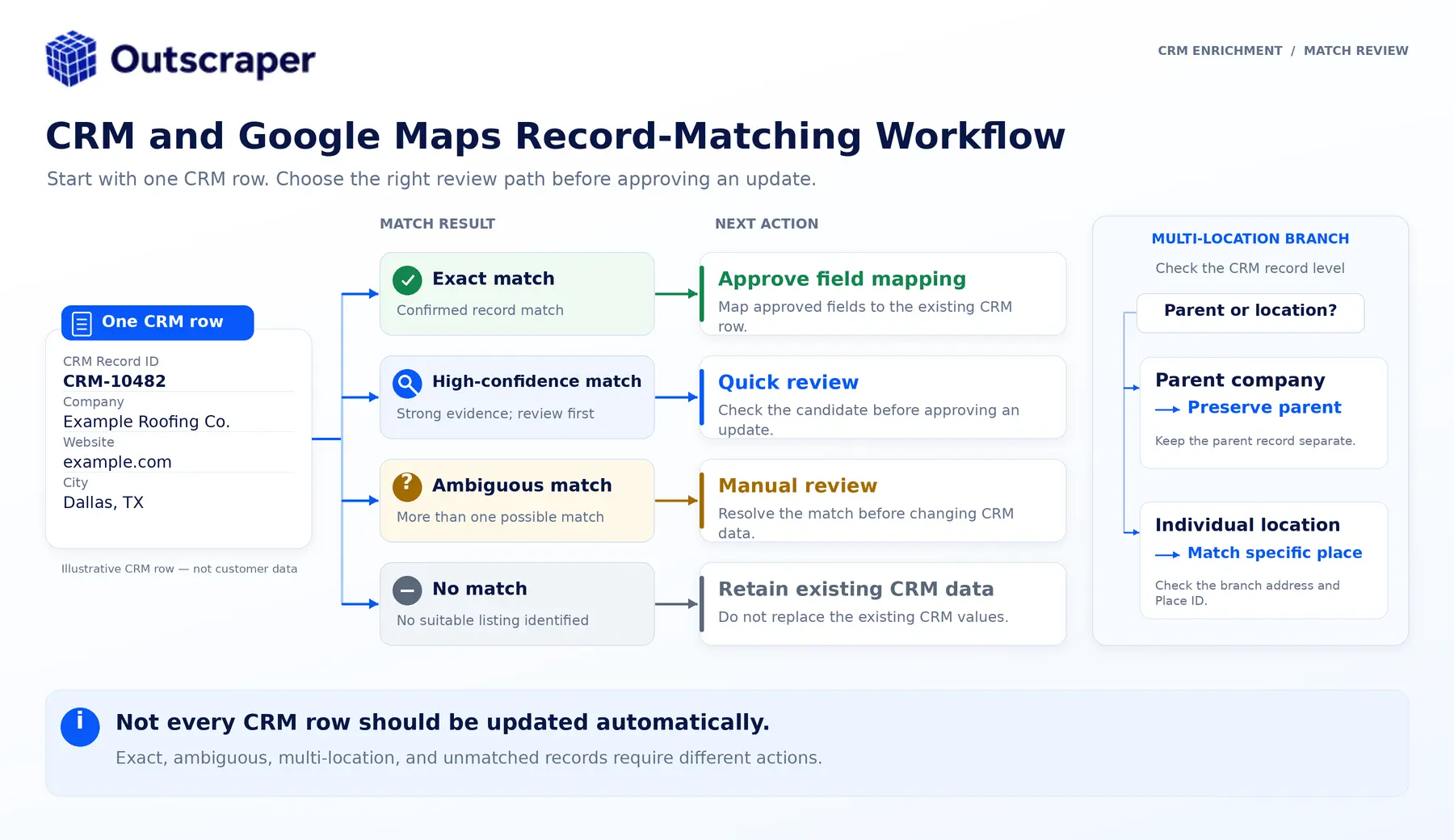
Outscraper returns the enriched data, but the following confidence labels are an editorial QA framework, not a claim that Outscraper automatically assigns these exact scores.
Exact and High-Confidence Matches
An exact or high-confidence match may have:
- the same website domain;
- the same phone number;
- a matching or strongly similar business name;
- a matching address or city;
- a compatible category;
- no major conflicts between the CRM and Google Maps listing.
A domain or phone match combined with location agreement is stronger than company-name similarity alone.
Ambiguous Matches
Move a result into manual review when:
- several businesses share a similar name;
- the domain conflicts;
- the phone belongs to another location;
- the address is different;
- the category is inconsistent;
- several plausible listings are returned;
- the CRM record contains too little information.
Do not force every row into a match.
Leaving one record unchanged is safer than attaching the wrong place to a live account.
बहु-स्थान व्यवसाय
A multi-location company may produce several valid Google Maps listings.
The correct action depends on the CRM structure:
- If the CRM row represents one branch, match it to that branch.
- If it represents a parent company, do not select one branch arbitrarily.
- If the CRM supports parent-child relationships, preserve the company record and associate separate location records.
- If the structure is unclear, route the record to review.
Use a review table like this:
| Match status | Typical evidence | Action |
|---|---|---|
| Exact | Domain or phone match plus address agreement | Approve selected fields |
| High confidence | Strong name, address, city, and category agreement | Review sample, then approve |
| Ambiguous | Similar name with conflicting contact or location data | Manual review |
| Multi-location | Several valid branches found | Match at the correct record level |
| No match | No credible listing found | Leave CRM record unchanged |
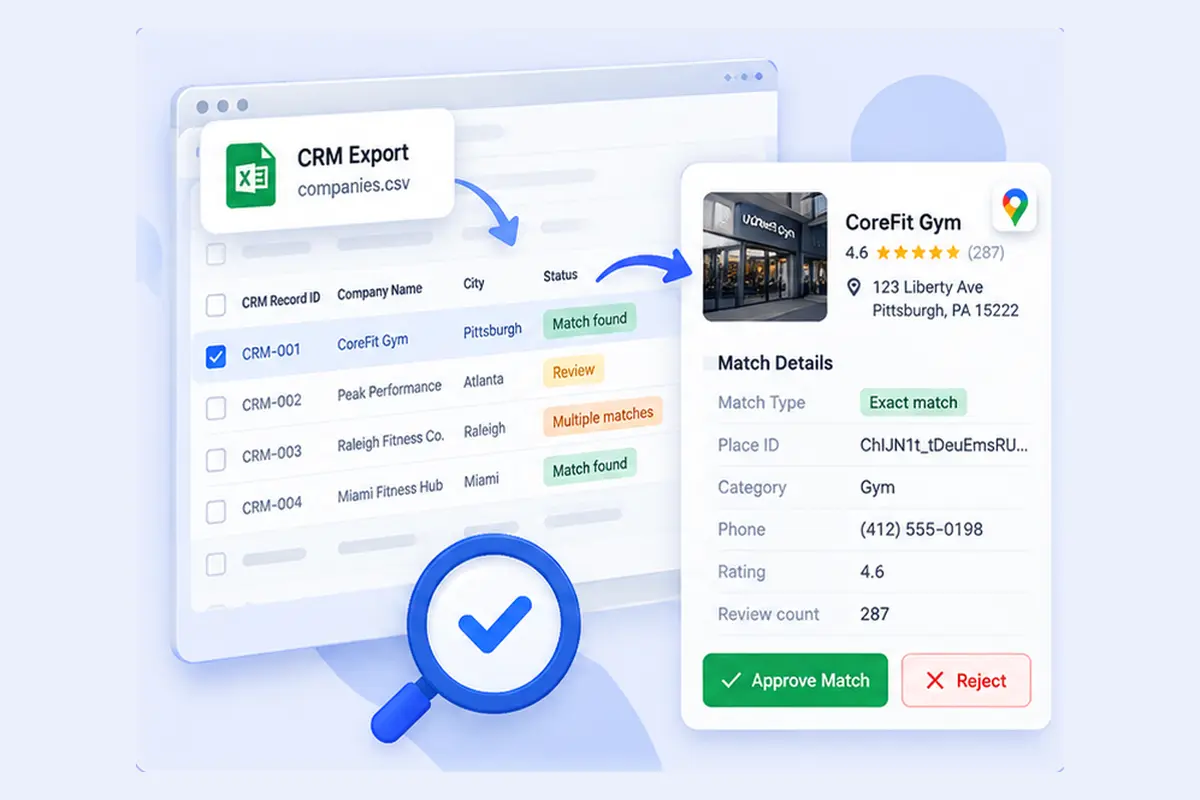
Run a small file through the enrichment workflow, inspect the selected listings, and document the rules used to approve or reject matches.
Choose Which Fields to Add, Update, or Protect
The safest approach is to divide fields into three groups before the CRM import.
| Field group | उदाहरण | Rule |
|---|---|---|
| Protected CRM fields | Record ID, account owner, lifecycle stage, notes, deal history, consent, opt-out status | Never overwrite automatically |
| Google Maps enrichment fields | Listed name, status, address, category, phone, website, rating, review count, hours, coordinates, Place ID, Maps URL | Add or update under documented rules |
| Optional enrichment fields | Public emails, social profiles, additional phones, company insights, chain status | Add only when selected and relevant |
Create a field map before importing.
| Field situation Recommended | d action |
|---|---|
| CRM field is blank, and enrichment has a value | Fill the blank field |
| CRM field and enrichment agree | Keep the CRM value and record the validation |
| Values conflict | Flag for review |
| Enrichment value is blank | Do not erase the CRM value |
| Google Maps indicates the business may be closed | Flag urgently; do not delete the account automatically |
| Record has a previously approved Place ID match | Update only approved enrichment fields |
| Match is ambiguous | Do not update automatically |
For important fields, consider keeping the enrichment value in a dedicated property rather than overwriting the CRM’s original value immediately.
Examples include:
google_maps_business_namegoogle_maps_listed_phonegoogle_maps_listed_addressgoogle_business_statusgoogle_ratinggoogle_review_countgoogle_place_idgoogle_maps_urlgoogle_match_statusgoogle_data_last_refreshedenrichment_source
This preserves provenance. A user can see where the value came from and when it was collected.
Store Place ID as a Source Identifier
Google allows Place IDs to be stored, but it also warns that they can change or become obsolete. Google recommends refreshing stored Place IDs that are more than 12 months old.
Use Place ID as the Google Maps source identifier.
Do not use it as:
- the CRM’s permanent Record ID;
- proof of legal company identity;
- a substitute for the company’s own account structure.
The CRM Record ID remains the update key. Place ID documents for the Google Maps place that was matched.

Update Existing CRM Records and Review Exceptions
Once the matches and field map are approved, update the CRM using the system’s own unique identifier.
के लिए HubSpot, the official import guidance says a unique identifier is needed to update existing records and avoid creating duplicates. Company domain name can be used for companies, while Record ID can update an existing record and supersedes other mapped unique identifiers when included.
के लिए Zoho CRM, teams can use Record ID or another supported matching field to find existing records. Zoho also provides an option to skip updating empty values, which helps prevent blank import cells from erasing populated CRM fields.
Use this controlled import sequence:
- Save an untouched copy of the original CRM export.
- Save the reviewed enriched file as a separate version.
- Test the import with a small batch.
- चुनें update existing records only when that matches the project.
- Map the CRM Record ID to the CRM’s unique identifier.
- Map only approved enrichment fields.
- Prevent blank values from replacing populated fields.
- Inspect the updated test records.
- Review duplicates, conflicts, and failed imports.
- Expand the import only after the test passes.
Outscraper also provides separate HubSpot तथा Zoho CRM integration guides. These are useful integration paths, but teams should still verify how the destination CRM handles matching, new-record creation, duplicate prevention, and overwrites before applying the workflow to an established database.
After the import, review:
- a sample of exact matches;
- every ambiguous match;
- every closed-business flag;
- multi-location accounts;
- records with conflicting websites or phones;
- records where a blank value may have replaced data;
- unexpected duplicates.
Record the collection date and decide when the fields should be refreshed again. Highly changeable fields such as business status, phone, hours, and review count may need more frequent checks than stable fields such as category or coordinates.
The safest enrichment workflow is not the one that adds the most columns. It is the one that can explain:
- why a record was matched;
- which source supplied each value;
- which fields were changed;
- which fields were protected;
- when the information was last reviewed.
Good CRM enrichment should improve the record without making it harder to trust.
Use Google Maps data to fill useful business and location gaps, keep the CRM’s own identifiers and first-party history protected, and review uncertain matches before updating anything at scale.
The goal is not to add more fields. It is to keep the CRM accurate, useful, and easier to work with.
अक्सर पूछे जाने वाले प्रश्न
अक्सर पूछे जाने वाले प्रश्न और उत्तर
हाँ। Google Maps व्यवसाय डेटा को मौजूदा कंपनी या स्थान रिकॉर्ड में जोड़ा जा सकता है, लेकिन अपडेट में CRM के अपने अनूठे पहचानकर्ता का उपयोग किया जाना चाहिए। समृद्ध फ़ाइल में मूल CRM रिकॉर्ड आईडी को संरक्षित रखा जाना चाहिए ताकि गंतव्य प्रणाली नई रिकॉर्ड बनाने के बजाय सही रिकॉर्ड को अपडेट कर सके।.
नियंत्रित अपडेट के लिए, CRM रिकॉर्ड आईडी या कोई अन्य ऐसी संपत्ति का उपयोग करें जिसे CRM अद्वितीय के रूप में पहचानता है। एक वेबसाइट डोमेन भी कंपनियों की पहचान में मदद कर सकता है, लेकिन जब कई स्थान या कंपनियाँ एक ही डोमेन साझा करती हैं तो यह पर्याप्त नहीं हो सकता।.
स्वचालित रूप से नहीं। खाली CRM फ़ील्ड्स को अक्सर एक विश्वसनीय मिलान के बाद सुरक्षित रूप से भरा जा सकता है। विरोधाभासी भरे हुए फ़ील्ड्स की समीक्षा की जानी चाहिए। बिक्री का इतिहास, स्वामित्व, जीवनचक्र चरण, सहमति, ऑप्ट-आउट स्थिति और मैन्युअल रूप से सत्यापित जानकारी सुरक्षित रखनी चाहिए।.
नहीं। Place ID Google Maps स्रोत पहचानकर्ता के रूप में उपयोगी है, लेकिन Google कहता है कि Place ID बदल सकती हैं या अप्रचलित हो सकती हैं और 12 महीने से अधिक पुरानी संग्रहीत ID को ताज़ा करने की सलाह देता है। CRM की अपनी Record ID स्थायी अपडेट कुंजी बनी रहनी चाहिए।.
Outscraper वैकल्पिक एनरिचमेंट का उपयोग करके संबंधित वेबसाइटों से सार्वजनिक ईमेल, सोशल लिंक, अतिरिक्त फोन नंबर और संपर्क विवरण प्राप्त कर सकता है। ईमेल डिस्कवरी का स्वचालित रूप से यह मतलब नहीं है कि ईमेल सत्यापित हो चुका है; जब डिलीवरीबिलिटी सत्यापन आवश्यक हो, तो अलग ईमेल-सत्यापन चरण का उपयोग करें।.
Export a small group of company or location records, keep their CRM IDs attached, enrich them with the business fields you need, and approve the mapping rules before scaling.