جدول المحتويات
إلى إثراء سجلات نظام إدارة علاقات العملاء (CRM) ببيانات خرائط Google بأمان، فأنت بحاجة إلى أكثر من مجرد ملف يحتوي على تفاصيل الأعمال الجديدة. تتمثل المهمة الحقيقية في مطابقة كل سجل شركة أو موقع في نظام إدارة علاقات العملاء (CRM) مع الإدراج الصحيح في خرائط Google، وتحديد الحقول التي يمكن تحديثها، وحماية سجل المبيعات الذي يمتلكه فريقك بالفعل. قد يؤدي الاستيراد غير الدقيق إلى إنشاء شركات مكررة، أو استبدال القيم المفيدة بفراغات، أو ربط عنوان فرع واحد بسلسلة كاملة. يوضح هذا الدليل سير عمل منظم لتصدير سجلات CRM مع معرّفاتها الفريدة، وإثرائها من خلال Outscraper، ومراجعة التطابقات غير المؤكدة، وتحديث الحقول التي تُحسّن قاعدة البيانات فقط.
ابدأ بدفعة صغيرة من المواد المُثريّة
قبل تحديث نظام إدارة علاقات العملاء (CRM) بالكامل، قم بتصدير دفعة تجريبية تتألف من 20 إلى 50 سجلًا للشركات أو المواقع مع معرّفات CRM الخاصة بها. استخدم هذه العينة للتحقق من منطق المطابقة، وتعيين الحقول، وقواعد الاستيراد.
إجابة سريعة
يكون إثراء نظام إدارة علاقات العملاء (CRM) ببيانات خرائط Google أكثر فاعلية عندما يظل معرّف السجل الخاص بنظام CRM هو مفتاح التحديث. قم بتصدير سجلات الشركات أو المواقع التي تحتوي على حقول تعريفية، وقم بمطابقتها مع قوائم خرائط Google، وأضف فقط البيانات التجارية المعتمدة، وأرسل المطابقات الغامضة للمراجعة، ثم استورد النتائج باستخدام معرّف CRM الأصلي. تجنب أبدًا الكتابة فوق حقول المبيعات أو الموافقة أو الأنشطة المحمية تلقائيًا.
ما الذي يمكن لبيانات خرائط جوجل أن تضيفه إلى نظام إدارة علاقات العملاء (CRM) وما الذي لا يمكنها إضافته
تكون بيانات خرائط جوجل أكثر فائدة في على مستوى الشركة أو موقع العمل.
ويمكنها إضافة معلومات عامة حول كيفية ظهور نشاط تجاري ما على خرائط Google، بما في ذلك الاسم المسجل، والفئة، والعنوان، ورقم الهاتف، والموقع الإلكتروني، وحالة التشغيل، وساعات العمل، والتقييم، وعدد التقييمات، والإحداثيات، ومعرّف المكان (Place ID)، وعنوان URL الخاص بخرائط Google.
Outscraper يمكنها تنظيم هذه التفاصيل في صفوف وأعمدة منظمة. كما يمكن لسير العمل الحالي الخاص بـ «Enrich File» إضافة بيانات خرائط Google إلى ملف قائم خاص بالأعمال التجارية أو نقاط الاهتمام، بدلاً من مطالبة الفرق بإنشاء قائمة جديدة تمامًا.
| مجموعة البيانات | أمثلة | الاستخدام السليم لنظام إدارة علاقات العملاء (CRM) |
|---|---|---|
| الهوية التجارية | اسم النشاط التجاري في خرائط Google، والفئة، والأنواع الفرعية | دعم تصنيف الشركة أو الموقع |
| تفاصيل الموقع | العنوان المسجل، المدينة، الرمز البريدي، الإحداثيات | تحسين سجلات الفروع ومناطق الخدمة |
| بيانات الاتصال العامة | رقم الهاتف والموقع الإلكتروني المذكورين | املأ الحقول الفارغة الخاصة ببيانات الاتصال التجارية |
| بيانات السمعة | عدد التقييمات والمراجعات | إضافة سياق السمعة العامة |
| معلومات التشغيل | حالة العمل وساعات العمل المعلنة | سجلات العلامات التي قد تحتاج إلى مراجعة |
| معرّفات المصدر | معرّف الموقع، معرّف Google، رابط خرائط Google | الحفاظ على علاقة المصدر |
| التخصيب الاختياري | عناوين البريد الإلكتروني العامة، وروابط مواقع التواصل الاجتماعي، وأرقام الهواتف الإضافية | أضف فقط عند تحديد الإثراء ذي الصلة |
الصياغة مهمة.
استخدم تسميات الحقول مثل:
- رقم الهاتف المدرج في خدمة خرائط جوجل
- العنوان المدرج في خرائط جوجل
- حالة النشاط التجاري في خرائط Google
- موقع إلكتروني مدرج في خدمة خرائط جوجل
- تقييم خرائط جوجل
لا تُصنف هذه الحقول تلقائيًّا على أنها مُثبتة قانونيًّا، أو حديثة بشكل قاطع، أو دليل على ملكية الشركة.
كما أن بيانات «خرائط جوجل» لا تحل محل المعلومات الموجودة في نظام إدارة علاقات العملاء (CRM) نفسه. ولا ينبغي أن تحل محلها:
- ملكية الحساب؛
- دورة الحياة أو مرحلة الصفقة؛
- ملاحظات المبيعات؛
- نشاط العميل؛
- سجل المشتريات والعقود؛
- معلومات تم التحقق منها يدويًّا؛
- سجلات الموافقة؛
- حالة «عدم الاتصال» أو «حظر الاتصال».
إذا كانت هناك حاجة إلى نص المراجعة الكامل، فإن ذلك يمثل خطوة جمع منفصلة عن إضافة التقييم وعدد المراجعات.
يتميز سير عمل الإثراء الحالي لـ Outscraper بـ خرائط جوجل مجالات الأعمال المستمدة من أداة «Google Maps Reviews Scraper» المستقلة.
يمكن لـ Outscraper أيضًا البحث في مواقع الويب الخاصة بالشركات عن عناوين البريد الإلكتروني العامة وروابط مواقع التواصل الاجتماعي وتفاصيل الاتصال الإضافية من خلال عملية إثراء البيانات الاختيارية. وينبغي أن يظل اكتشاف عناوين البريد الإلكتروني والتحقق من صحتها مفهومين منفصلين: فلا ينبغي اعتبار عنوان البريد الإلكتروني الذي تم اكتشافه «مُثبتًا» إلا بعد تطبيق خطوة التحقق من صحة العنوان.

ابدأ بحقول «خرائط جوجل» المطلوبة لسير العمل. ولا تقم بإضافة معلومات إضافية عن جهة الاتصال أو الشركة إلا عندما تخدم ذلك حاجة محددة تتعلق بالمبيعات أو الأبحاث أو جودة البيانات.
حدد ما إذا كان نظام إدارة علاقات العملاء (CRM) الخاص بك يخزن بيانات الشركات أم المواقع الفردية
قبل إجراء أي مطابقة، حدد ما يمثله كل صف في نظام إدارة علاقات العملاء (CRM).
يمكن أن يحتوي نظام إدارة علاقات العملاء (CRM) على عدة أنواع مختلفة من السجلات:
| كائن CRM | ما الذي يمثله | النهج الصحيح للتخصيب |
|---|---|---|
| الاتصال | شخص | لا تقم بمطابقة موقع ما مباشرةً مع موقع على خرائط جوجل |
| الشركة أو الحساب | منظمة | أضف الحقول على مستوى الشركة بعناية |
| فرع أو موقع | مقر فعلي للشركة | مطابقة مع إحدى الإدراجات ذات الصلة في خرائط جوجل |
| حساب الوالد | علامة تجارية أو شركة لها عدة فروع | يجب فصلها عن الفروع الفردية |
| الأعمال التجارية في منطقة الخدمة | شركة تقدم خدماتها في منطقة لا يوجد بها متجر تقليدي | تأكد من مراجعة حقول العنوان والموقع بعناية |
هذا التمييز يمنع وقوع أحد أكثر أخطاء التوسيع ضررًا: وهو ربط العنوان العام أو رقم الهاتف أو ساعات العمل الخاصة بفرع واحد بالشركة بأكملها.
لنفترض أن هناك مجموعة فنادق تمتلك حسابًا مؤسسيًّا واحدًا و40 موقعًا فندقيًّا.
عادةً ما تعرض خرائط Google الفنادق الفردية كسجلات أماكن منفصلة. وإذا كان نظام إدارة علاقات العملاء (CRM) يخزن حسابًا واحدًا فقط للشركة، فإن اختيار قائمة فندق واحد واستخدامها للكتابة فوق الحساب الأصلي سيؤدي إلى ظهور بيانات مضللة.
الهيكل الأكثر تنظيمًا لنظام إدارة علاقات العملاء (CRM) هو:
حساب الشركة الأم أو العلامة التجارية
مرتبط بـ:
سجلات المواقع أو الفروع الفردية
وبذلك يمكن لكل فرع أن يكون له ما يلي:
- معرّف المكان؛
- العنوان؛
- الهاتف؛
- التقييم؛
- عدد المراجعات؛
- ساعات العمل؛
- رابط خرائط جوجل.
وينطبق المبدأ نفسه على سلاسل المطاعم، والعلامات التجارية للتجزئة، والعيادات، وأنظمة الامتياز التجاري، وشركات الخدمات التي تمتلك مواقع متعددة.
عندما يتعلق الأمر بالسلاسل، يجب الحفاظ على كل موقع فعلي بدلاً من حذف الفروع باعتبارها نسخًا مكررة. يتم تناول الفرق بين الموقع، والانتماء إلى السلسلة، وتجميع العلامات التجارية، والملكية القانونية في دليل Outscraper الخاص بـ تحديد سلاسل المتاجر في بيانات خرائط جوجل.
Export CRM Records With Their Unique Identifiers
For a practical example, imagine a local marketing agency has 1,000 HVAC, plumbing, and electrical-company records in its CRM.
Some records contain:
- a company name;
- a website;
- a city;
- an old phone number.
The agency wants to add:
- Google Maps business status;
- listed address;
- category;
- listed phone;
- التقييم؛
- عدد المراجعات؛
- معرّف المكان؛
- رابط خرائط جوجل.
It does لا want to replace:
- the account owner;
- ملاحظات المبيعات؛
- lifecycle stage;
- opportunity history;
- communication preferences;
- opt-out status.
The agency should first export only the fields needed for matching and updating.
| CRM Record ID | Company name | الموقع الإلكتروني | الهاتف | العنوان | المدينة | Postal code | Record level |
|---|---|---|---|---|---|---|---|
| 10831 | Sample Heating LLC | sampleheating.example | Existing value | 123 Main St | Denver | 80202 | شركة |
| 10832 | Sample Plumbing North | sampleplumbing.example | Blank | 85 Lake Rd | Denver | 80216 | الموقع |
| 10833 | Sample Electric | Blank | Existing value | 42 West Ave | Aurora | 80012 | شركة |
The most important column is the CRM’s own unique identifier.
Do not remove, rename unpredictably, or regenerate that value while the file is being enriched. It is what allows the finished rows to update the correct records later.
A useful export normally includes:
- CRM Record ID;
- account or company name;
- website or domain;
- الهاتف؛
- full address;
- city;
- state or region;
- postal code;
- country;
- record level;
- any existing source identifier.
Before running the full file, test a small batch. The test should include:
- an obvious exact match;
- an incomplete record;
- a similar business name;
- a multi-location company;
- a record that should remain unmatched.
That sample is more useful than testing only the easiest records.

Match the Records With Google Maps Business Listings
Outscraper’s Enrich File workflow allows users to upload an existing business or POI file and add matching Google Maps data.
The current workflow supports CSV, XLSX, TXT, and Parquet files. Recognizable headers can include google_id, place_id, company or business name, address, city, state, ZIP code, and country. Outscraper uses the available values as references when looking for the corresponding Google Maps place.
A practical workflow is:
- Open Outscraper Google Maps Scraper.
- Choose the file-enrichment option.
- Upload the CRM export.
- Confirm that the identifying columns have clear headers.
- Select the Google Maps and optional enrichment fields required.
- Run a small test batch.
- Download and review the enriched file.
- Assign a match-review status before importing anything back into the CRM.
Outscraper returns the enriched data, but the following confidence labels are an editorial QA framework, not a claim that Outscraper automatically assigns these exact scores.
Exact and High-Confidence Matches
An exact or high-confidence match may have:
- the same website domain;
- the same phone number;
- a matching or strongly similar business name;
- a matching address or city;
- a compatible category;
- no major conflicts between the CRM and Google Maps listing.
A domain or phone match combined with location agreement is stronger than company-name similarity alone.
Ambiguous Matches
Move a result into manual review when:
- several businesses share a similar name;
- the domain conflicts;
- the phone belongs to another location;
- the address is different;
- the category is inconsistent;
- several plausible listings are returned;
- the CRM record contains too little information.
Do not force every row into a match.
Leaving one record unchanged is safer than attaching the wrong place to a live account.
Multi-Location Businesses
A multi-location company may produce several valid Google Maps listings.
The correct action depends on the CRM structure:
- If the CRM row represents one branch, match it to that branch.
- If it represents a parent company, do not select one branch arbitrarily.
- If the CRM supports parent-child relationships, preserve the company record and associate separate location records.
- If the structure is unclear, route the record to review.
Use a review table like this:
| Match status | Typical evidence | الإجراء |
|---|---|---|
| Exact | Domain or phone match plus address agreement | Approve selected fields |
| High confidence | Strong name, address, city, and category agreement | Review sample, then approve |
| Ambiguous | Similar name with conflicting contact or location data | Manual review |
| Multi-location | Several valid branches found | Match at the correct record level |
| No match | No credible listing found | Leave CRM record unchanged |
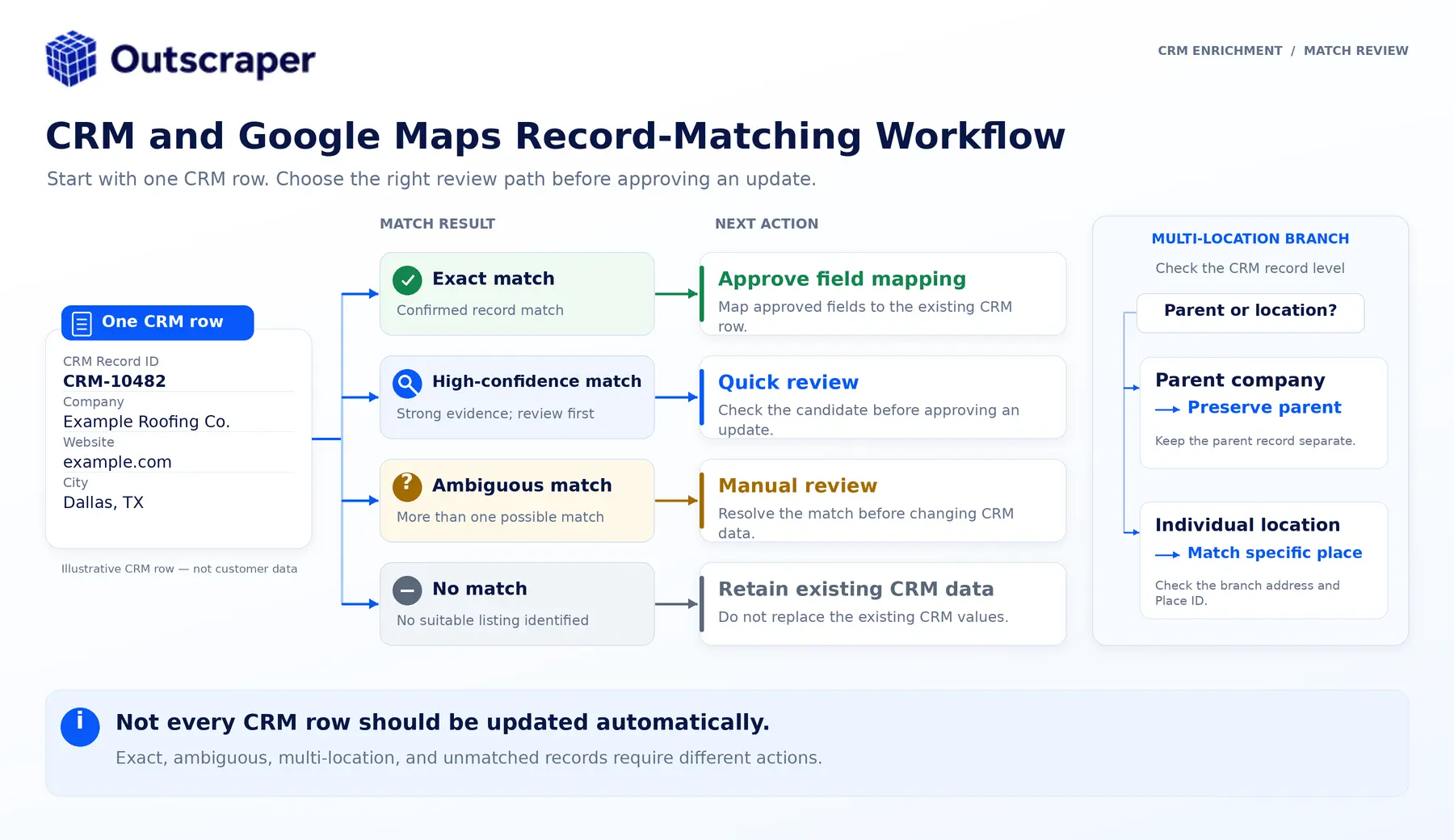
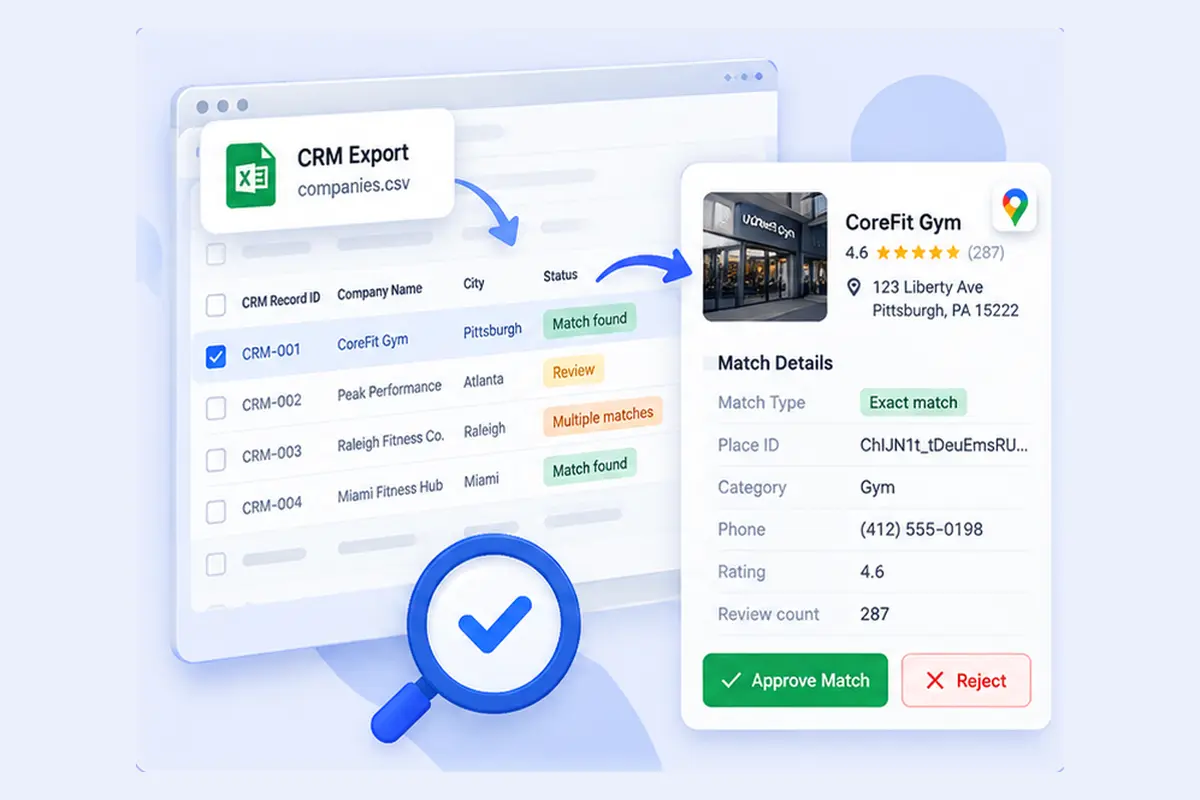
Run a small file through the enrichment workflow, inspect the selected listings, and document the rules used to approve or reject matches.
Choose Which Fields to Add, Update, or Protect
The safest approach is to divide fields into three groups before the CRM import.
| Field group | أمثلة | Rule |
|---|---|---|
| Protected CRM fields | Record ID, account owner, lifecycle stage, notes, deal history, consent, opt-out status | Never overwrite automatically |
| Google Maps enrichment fields | Listed name, status, address, category, phone, website, rating, review count, hours, coordinates, Place ID, Maps URL | Add or update under documented rules |
| Optional enrichment fields | Public emails, social profiles, additional phones, company insights, chain status | Add only when selected and relevant |
Create a field map before importing.
| Field situation Recommended | d action |
|---|---|
| CRM field is blank, and enrichment has a value | Fill the blank field |
| CRM field and enrichment agree | Keep the CRM value and record the validation |
| Values conflict | Flag for review |
| Enrichment value is blank | Do not erase the CRM value |
| Google Maps indicates the business may be closed | Flag urgently; do not delete the account automatically |
| Record has a previously approved Place ID match | Update only approved enrichment fields |
| Match is ambiguous | Do not update automatically |
For important fields, consider keeping the enrichment value in a dedicated property rather than overwriting the CRM’s original value immediately.
Examples include:
google_maps_business_namegoogle_maps_listed_phonegoogle_maps_listed_addressgoogle_business_statusgoogle_ratinggoogle_review_countgoogle_place_idgoogle_maps_urlgoogle_match_statusgoogle_data_last_refreshedenrichment_source
This preserves provenance. A user can see where the value came from and when it was collected.
Store Place ID as a Source Identifier
Google allows Place IDs to be stored, but it also warns that they can change or become obsolete. Google recommends refreshing stored Place IDs that are more than 12 months old.
Use Place ID as the Google Maps source identifier.
Do not use it as:
- the CRM’s permanent Record ID;
- proof of legal company identity;
- a substitute for the company’s own account structure.
The CRM Record ID remains the update key. Place ID documents for the Google Maps place that was matched.

Update Existing CRM Records and Review Exceptions
Once the matches and field map are approved, update the CRM using the system’s own unique identifier.
بالنسبة لـ HubSpot, the official import guidance says a unique identifier is needed to update existing records and avoid creating duplicates. Company domain name can be used for companies, while Record ID can update an existing record and supersedes other mapped unique identifiers when included.
بالنسبة لـ Zoho CRM, teams can use Record ID or another supported matching field to find existing records. Zoho also provides an option to skip updating empty values, which helps prevent blank import cells from erasing populated CRM fields.
Use this controlled import sequence:
- Save an untouched copy of the original CRM export.
- Save the reviewed enriched file as a separate version.
- Test the import with a small batch.
- اختر update existing records only when that matches the project.
- Map the CRM Record ID to the CRM’s unique identifier.
- Map only approved enrichment fields.
- Prevent blank values from replacing populated fields.
- Inspect the updated test records.
- Review duplicates, conflicts, and failed imports.
- Expand the import only after the test passes.
Outscraper also provides separate HubSpot و Zoho CRM integration guides. These are useful integration paths, but teams should still verify how the destination CRM handles matching, new-record creation, duplicate prevention, and overwrites before applying the workflow to an established database.
After the import, review:
- a sample of exact matches;
- every ambiguous match;
- every closed-business flag;
- multi-location accounts;
- records with conflicting websites or phones;
- records where a blank value may have replaced data;
- unexpected duplicates.
Record the collection date and decide when the fields should be refreshed again. Highly changeable fields such as business status, phone, hours, and review count may need more frequent checks than stable fields such as category or coordinates.
The safest enrichment workflow is not the one that adds the most columns. It is the one that can explain:
- why a record was matched;
- which source supplied each value;
- which fields were changed;
- which fields were protected;
- when the information was last reviewed.
Good CRM enrichment should improve the record without making it harder to trust.
Use Google Maps data to fill useful business and location gaps, keep the CRM’s own identifiers and first-party history protected, and review uncertain matches before updating anything at scale.
The goal is not to add more fields. It is to keep the CRM accurate, useful, and easier to work with.
الأسئلة الشائعة
الأسئلة والأجوبة الأكثر شيوعًا
نعم. يمكن إضافة بيانات الأعمال من خرائط Google إلى سجلات الشركات أو المواقع الموجودة بالفعل، ولكن يجب أن يستخدم التحديث المعرّف الفريد الخاص بنظام إدارة علاقات العملاء (CRM). ويجب أن يحتفظ الملف المُثري بمعرّف السجل الأصلي في نظام إدارة علاقات العملاء (CRM) حتى يتمكن النظام المستهدف من تحديث السجل الصحيح بدلاً من إنشاء سجل جديد.
لإجراء تحديث خاضع للرقابة، استخدم معرّف سجل CRM أو أي خاصية أخرى يعتبرها نظام CRM فريدة. كما يمكن أن يساعد نطاق موقع الويب في تحديد الشركات، لكنه قد لا يكون كافياً عندما يتشارك عدة مواقع أو شركات في نطاق واحد.
ليس تلقائيًا. غالبًا ما يمكن ملء الحقول الفارغة في نظام إدارة علاقات العملاء (CRM) بأمان بعد التأكد من مطابقتها. أما الحقول المملوءة التي تتعارض مع بعضها، فيجب مراجعتها. ويجب أن تظل معلومات سجل المبيعات، والملكية، ومرحلة دورة الحياة، والموافقة، وحالة إلغاء الاشتراك، والمعلومات التي تم التحقق منها يدويًّا، محمية.
لا. يُعد معرّف المكان (Place ID) مفيدًا كمُعرّف للمصدر في خرائط Google، لكن Google تشير إلى أن معرّفات المكان قد تتغير أو تصبح قديمة، وتوصي بتحديث المعرّفات المخزنة التي تجاوز عمرها 12 شهرًا. وينبغي أن يظل معرّف السجل الخاص بنظام إدارة علاقات العملاء (CRM) هو مفتاح التحديث الدائم.
يمكن لـ Outscraper استخدام ميزة الإثراء الاختيارية للعثور على عناوين البريد الإلكتروني العامة، وروابط مواقع التواصل الاجتماعي، وأرقام الهواتف الإضافية، وتفاصيل الاتصال من المواقع الإلكترونية المرتبطة. ولا يعني اكتشاف عنوان البريد الإلكتروني تلقائيًّا أن هذا العنوان قد تم التحقق من صحته؛ لذا، يرجى استخدام خطوة التحقق من صحة البريد الإلكتروني المنفصلة عندما يكون التحقق من قابلية التسليم مطلوبًا.
Export a small group of company or location records, keep their CRM IDs attached, enrich them with the business fields you need, and approve the mapping rules before scaling.