Table of Contents
Introduction
In the rapidly evolving landscape of business-to-business (B2B) marketing, understanding where to find high-intent leads is crucial for success. As we look ahead to 2026, Google Maps is emerging as a powerful tool for B2B marketers, offering vast access to businesses actively seeking services and solutions. Businesses struggle to connect with leads that are not only relevant but also ready to engage. This disconnect results in lower conversion rates and a less efficient sales process.
Moreover, the lack of accurate, real-time data can cause businesses to miss out on crucial opportunities. In a competitive market, the inability to connect with high-intent prospects can mean the difference between success and failure. As B2B companies strive to optimize their marketing strategies, the need for a reliable, high-intent database becomes increasingly urgent.
This article explores how Google Maps provides real-time data that is continually updated, enabling businesses to access the most current information about potential clients and uses Outscraper as a tool to extract this data. This allows B2B marketers to identify companies that are actively searching for services, making it easier to engage with high-intent leads.
Understanding of Google Maps
Google Maps has evolved far beyond a simple navigation tool. Initially designed to help users find directions, it has transformed into a comprehensive platform that provides detailed information about businesses, including reviews, photos, and operational hours. This evolution has made it an invaluable resource for B2B marketers aiming to connect with potential clients.
One of the key features that sets Google Maps apart is its enhanced business listings. Companies can create detailed profiles that showcase their services, products, and unique selling propositions. This level of detail allows potential clients to make informed decisions quickly, increasing the likelihood of conversion.
Local search engine optimization (SEO) plays a crucial role in B2B marketing. It is said that around 92% of customers consider a local vendor for B2B purchases. Google Maps integrates seamlessly with local SEO strategies, enabling businesses to appear prominently in search results when potential clients search for specific services in their area. This visibility is critical for attracting high-intent leads who are ready to engage.
User Intent and Behavior
Understanding user intent data is essential for any B2B strategy. Google Maps users typically exhibit high intent, as they are actively seeking specific services or products. This intent can be categorized into several key behaviors:
- Proximity Searches
Many users turn to Google Maps when they need immediate solutions. Proximity searches enable users to specify how close search terms should appear to each other in the results. For example, a business looking for a local supplier will use the platform to find nearby options. This is particularly useful in scenarios where the meaning of a phrase can change significantly based on the arrangement of words.
How Proximity Searches Work
Proximity searches typically involve the following components.
- Search Algorithm: The underlying technology that processes the query and retrieves documents based on the defined proximity.
- Search Terms: The keywords or phrases that users want to find.
- Proximity Operator: A special symbol or command that specifies the maximum distance allowed between the search terms. Common operators include:
- “NEAR” Indicates that the terms must appear close to each other.
- “WITHIN” Specifies a maximum number of words between the term
Research and Comparison
Users often use Google Maps to research and compare different businesses before making a decision. They can read reviews, view ratings, and even check out photos of products or services. This research phase is critical, as it allows businesses to position themselves effectively against competitors. Thus, it allows market analysis, competition benchmarking, and strategic marketing for the business.
Mobile Accessibility
With the increasing use of mobile devices, Google Maps has become even more accessible. Users can search for businesses on the go, making it easier for them to find solutions in real-time. This mobile accessibility further enhances the platform’s ability to generate high-intent leads.
Integration with Other Google Services
Google Maps does not operate in isolation; it integrates seamlessly with other Google services, enhancing its utility for B2B marketers.
Google Business Profile
By utilizing Google Business Profile, companies can manage their online presence across Google, including Maps and Search. This integration allows businesses to update their information, respond to reviews, and engage with customers directly, further increasing their visibility and credibility.
Google Ads
Google Ads can be strategically used in conjunction with Google Maps to target high-intent users. Businesses can create location-based ads that appear when users search for relevant keywords, driving traffic to their listings and increasing the likelihood of conversion.
Data Insights and Analytics
Another significant advantage of using Google Maps as a B2B database is the wealth of data insights it provides. Businesses can access analytics that reveal user behavior, such as how many people viewed their listing, requested directions, or called their business. This data is invaluable for refining marketing strategies and understanding customer preferences.
Targeted Marketing Strategies
With access to detailed analytics, businesses can develop targeted marketing strategies that resonate with their audience. For example, if a company notices a spike in interest from a specific geographic area, it can tailor its marketing efforts to that region, maximizing its chances of conversion.
Competitive Analysis
Google Maps also allows businesses to conduct competitive analysis. By examining competitors’ listings, reviews, and customer engagement, companies can identify gaps in the market and adjust their offerings accordingly.
The Future of B2B Marketing on Google Maps
As we move toward 2026, the role of Google Maps in B2B marketing is expected to grow even further. Several trends are likely to shape this evolution:
Increased Focus on User Experience
As competition intensifies, businesses will need to prioritize user experience (UX) on their Google Maps listings. This includes maintaining accurate information, responding to reviews promptly, and providing high-quality visuals that showcase their offerings. A positive UX can lead to increased customer satisfaction, loyalty, and ultimately, higher revenue. Here are some key reasons why UX is crucial in B2B:
- Complex Decision-Making: B2B purchases often involve multiple stakeholders and lengthy decision-making processes. A seamless and intuitive user experience can simplify this process, making it easier for teams to collaborate and reach consensus.
- Long-Term Relationships: B2B transactions typically involve long-term contracts and relationships. A focus on UX can enhance customer satisfaction, leading to repeat business and referrals.
- Brand Differentiation: In a crowded marketplace, a superior user experience can set a company apart from its competitors. Businesses that prioritize UX are more likely to be perceived as innovative and customer-centric.
- Increased Efficiency: A well-designed user experience can improve workflows, reduce training time, and minimize errors, ultimately saving time and resources for both the provider and the client.
Integration of AI and Machine Learning (ML)
The integration of artificial intelligence (AI) and machine learning will enhance the capabilities of Google Maps, providing even more personalized experiences for users. Businesses that use these technologies will be better positioned to capture high-intent leads.
Applications of AI and ML in B2B Transactions
1. Predictive Analytics
Predictive analytics utilizes AI and ML algorithms to analyze historical data and forecast future trends. In B2B transactions, this can help companies anticipate customer needs, optimize inventory levels, and improve supply chain management. For instance, businesses can predict demand fluctuations, allowing them to adjust their production schedules accordingly.
2. Automated Customer Service
AI-powered chatbots and virtual assistants can handle customer inquiries and support requests 24/7, reducing the need for human intervention. This not only enhances customer satisfaction but also allows companies to allocate resources more effectively. By analyzing customer interactions, these systems can continuously improve their responses and provide personalized support.
3. Fraud Detection
AI and ML algorithms can analyze transaction patterns to identify anomalies that may indicate fraudulent activity. By implementing these technologies, businesses can enhance their security measures, reduce financial losses, and build trust with their partners. Real-time monitoring and alerts enable companies to respond swiftly to potential threats.
4. Enhanced Data Management
AI and ML can automate data entry and management tasks, reducing human error and increasing efficiency. By integrating these technologies, businesses can ensure that their data is accurate, up-to-date, and easily accessible. This facilitates better decision-making and improves overall operational efficiency.
5. Personalized Marketing
AI-driven marketing solutions can analyze customer behavior and preferences to deliver targeted content and recommendations. In B2B transactions, this means that companies can tailor their marketing strategies to specific segments, increasing the likelihood of successful engagements and conversions.
Expansion of Augmented Reality (AR)
Augmented reality features may become more prevalent on Google Maps, allowing users to visualize products or services in real-time. This innovation could further enhance user engagement and drive conversions.
Applications of AR in B2B Transactions
1. Product Visualization
AR enables businesses to showcase their products in a more interactive and engaging manner. For instance, manufacturers can provide clients with AR-enabled catalogs that allow them to visualize products in their own environment. This capability is particularly beneficial for industries such as furniture, construction, and automotive, where spatial awareness is crucial.
2. Training and Development
Training employees or clients on complex products can be challenging. AR can simplify this process by providing immersive training experiences. For example, technicians can use AR glasses to receive real-time instructions while performing maintenance tasks, reducing errors and improving efficiency.
3. Enhanced Collaboration
AR facilitates remote collaboration among teams and clients. With AR tools, participants can share a virtual workspace, allowing them to visualize and manipulate 3D models together, regardless of their physical location. This capability is invaluable for design and engineering teams working on intricate projects.
4. Marketing and Sales
AR can significantly enhance marketing strategies by creating memorable experiences for potential clients. Interactive AR advertisements or virtual showrooms can capture attention and provide a deeper understanding of products. This engagement can lead to higher conversion rates and improved customer relationships.
5. Supply Chain Management
In supply chain operations, AR can improve inventory management and logistics. AR applications can provide real-time data on stock levels, helping businesses make informed decisions about restocking and distribution. This can lead to reduced costs and increased efficiency.
Outscraper for Business Data Extraction
1. Data Collection
Outscraper is a powerful tool that allows businesses to extract data from Google Maps, by automating the data collection process, Outscraper enables companies to gather large volumes of information quickly, saving time and resources.
2. Customizable Data Extraction
With Outscraper, users can customize their data extraction parameters. This means businesses can focus on specific industries, locations, or business types, ensuring that the data collected aligns with their target audience. This level of customization enhances the relevance of the data, making it more actionable.
3. Integration with Other Tools
Outscraper can seamlessly integrate with various CRM and marketing automation tools. This integration allows businesses to streamline their workflows, ensuring that the data collected from Google Maps can be easily utilized in their marketing strategies.
Steps to Implement Outscraper for B2B Transactions
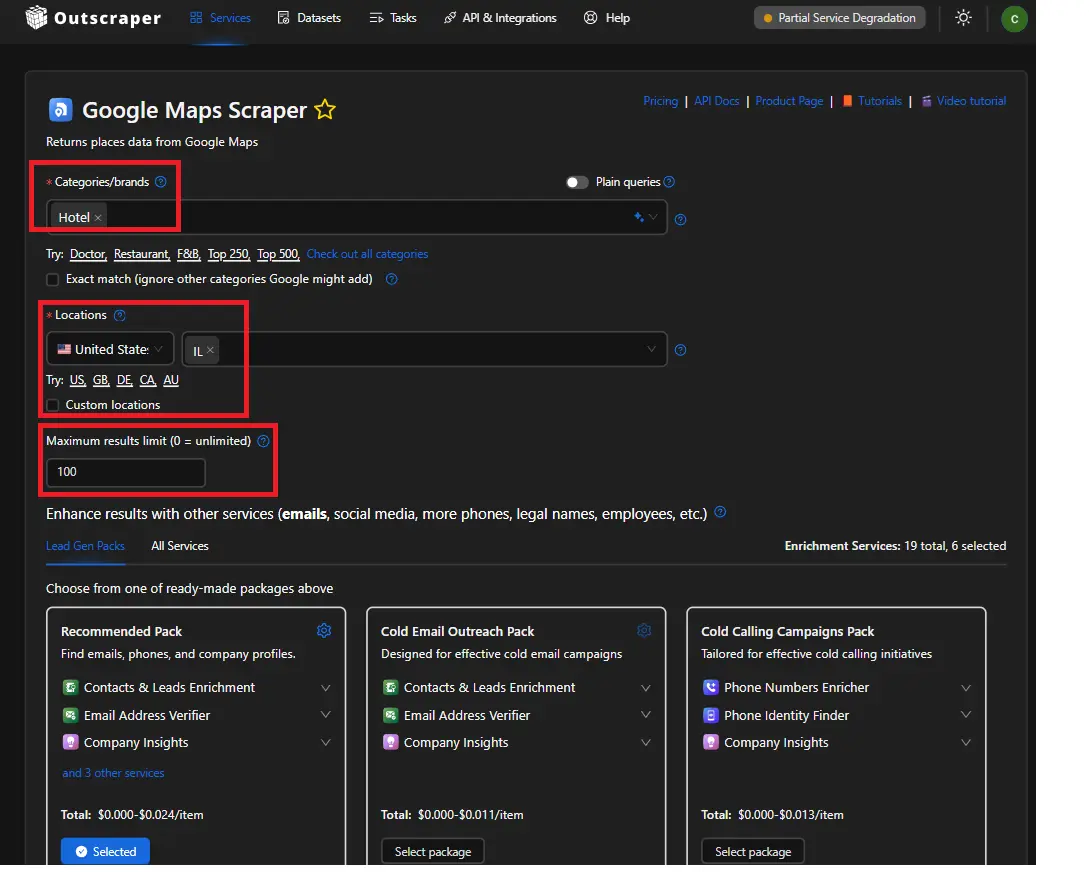
Step 1: Define Target Criteria
Before initiating the data extraction process, it is crucial to define the target criteria. This may include:
- Categories/Brands: Retail, hospitality, healthcare, etc.
- Location: Specific cities, regions, or countries.
- Business Size: Small, medium, or large enterprises.
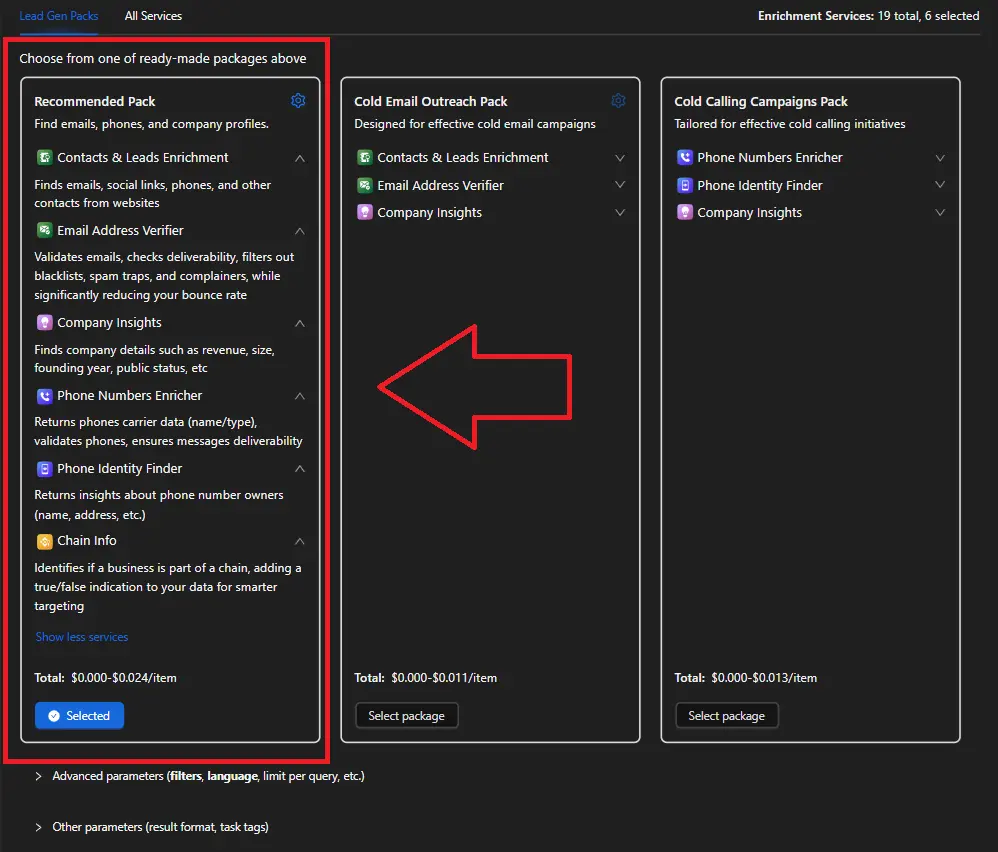
Step 2: Data Extraction with Outscraper
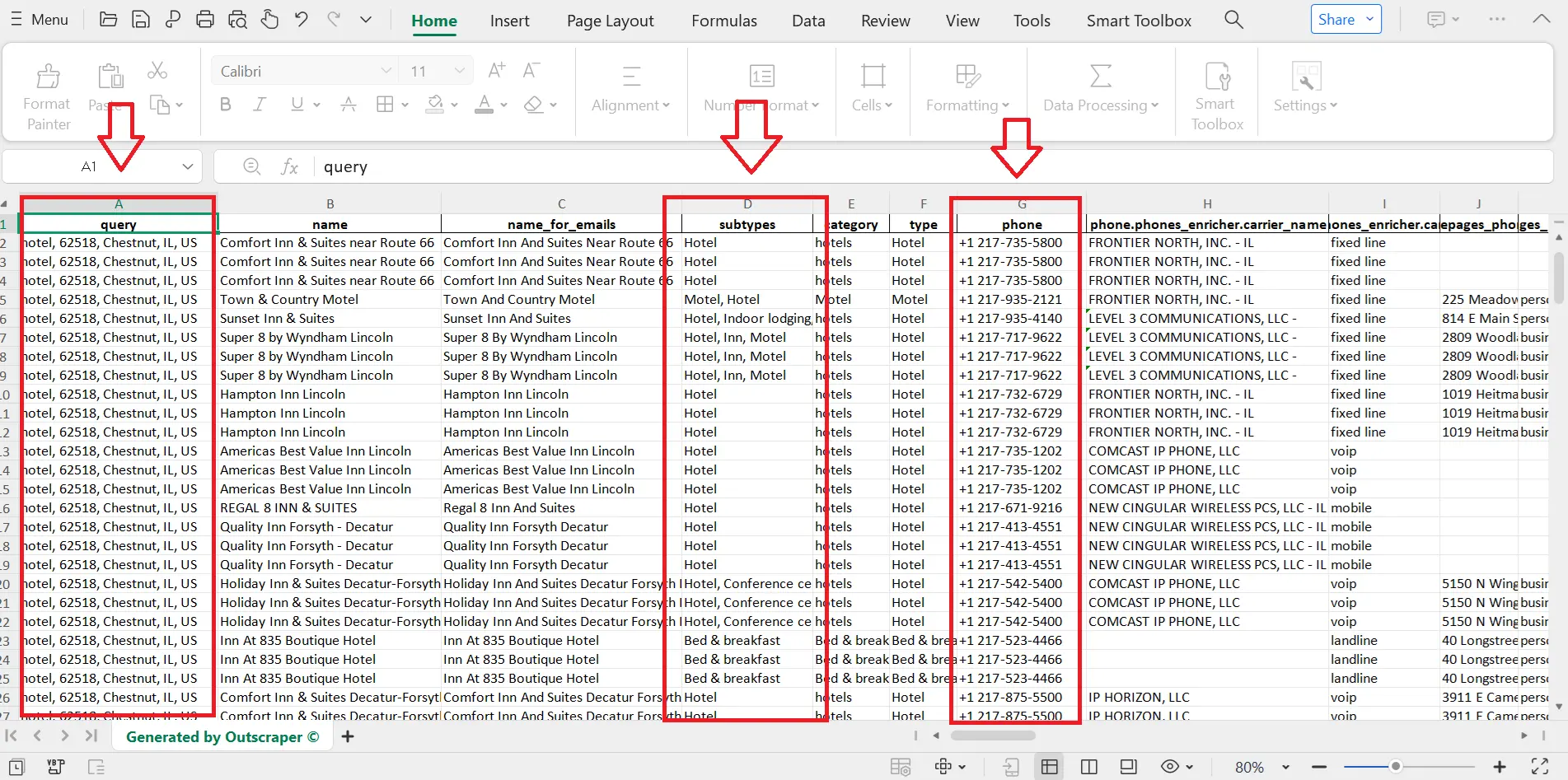
Using Outscraper, the company can extract relevant data from Google Maps. The data points may include:
- Business Name
- Address
- Phone Number
- Website URL
- Customer Reviews and Ratings
The extraction process can be automated, allowing the company to gather large datasets efficiently.
Step 3: Data Analysis
Once the data is extracted, the next step is to analyze it. The company can:
- Identify Potential Leads: Filter businesses based on size, ratings, and reviews to prioritize outreach.
- Assess Competition: Analyze competitors’ online presence and customer feedback to identify gaps in the market.
- Understand Market Trends: Use the data to identify emerging trends in the retail sector.
Step 4: Tailor Marketing Strategies
With the insights gained from the data analysis, the company can tailor its marketing strategies. This may involve:
- Personalized Outreach: Crafting personalized emails or messages for potential leads based on their business needs.
- Targeted Advertising: Running targeted ad campaigns on social media platforms to reach specific demographics.
- Content Marketing: Creating content that addresses the pain points of potential clients identified during the analysis.
Step 5: Monitor and Improve
After implementing the marketing strategies, it is essential to monitor their effectiveness. The company can:
- Track Engagement: Measure the response rates to outreach efforts.
- Adjust Strategies: Adjust marketing tactics based on what works best for different segments of the target audience.
Conclusion
Google Maps functions as a high-intent B2B data source because users search with clear needs, location context, and urgency. Business listings contain updated details, reviews, and activity signals that reflect real demand. This behavior supports better targeting, stronger engagement, and higher conversion potential compared to static or outdated lead sources.
The platform also provides continuous data through user interactions, local search activity, and integrated services such as Google Business Profile and Google Ads. These elements help businesses identify active prospects, analyze competitors, and adjust marketing strategies based on real signals. As user behavior shifts toward mobile and real-time decision making, Google Maps strengthens its role in B2B lead generation.
Outscraper supports this process by extracting structured data directly from Google Maps. You collect targeted business information, apply filters, and analyze datasets for lead qualification. This reduces manual research and improves data relevance for outreach campaigns.
Start using Google Maps as a direct source of high-intent B2B leads. Use Outscraper to extract, filter, and organize business data so you reach prospects who are already searching for solutions.
FAQ
Most frequent questions and answers
Google Maps functions as a high-intent B2B database because it reflects real-world business activity, not static or inferred data. It captures businesses that are operating, visible, and actively competing for customers right now.Toggle Content
High‑intent is important in a B2B database because it tells you who is actively considering or ready to buy, not just “who exists.” This radically improves conversion rates, shortens sales cycles, and lowers your cost per closed deal.
Cold email outreach involves sending unsolicited, personalized emails to prospects without prior relationships to spark business conversations.
Verified contact lists are databases of customer or prospect contact information such as emails, phone numbers, and company details, that have undergone validation processes to ensure accuracy, deliverability, and relevance.
Reputation management involves monitoring, influencing, and maintaining a positive public image for individuals, businesses, or brands, particularly online.
Sentiment analysis determines the emotional tone behind text data, classifying it as positive, negative, or neutral. Businesses apply it to customer feedback, social media, and reviews to gauge opinions and detect trends


