Table of Contents
Most people open Google Maps to get directions. Businesses use it for something entirely different and far more profitable.
Behind every coffee shop rating, clinic phone number, and restaurant review is a dataset. A living, constantly updated record of where businesses are, how customers feel about them, what hours they operate, and what services they offer. That data is sitting in plain sight, and smart operators across industries have figured out how to turn it into a real competitive edge.
This isn’t about hacking anything or scraping shady data. It’s about public information the same stuff any customer sees on their phone screen used systematically, at scale, with clear business goals in mind.
Here are seven ways businesses are doing exactly that, with real examples that show what it actually looks like in practice.
If your business sells to other businesses, Google Maps is one of the most underrated lead sources available. Think about it every plumber, dentist, law firm, restaurant, and contractor in any city has a listing. That listing usually includes a phone number, sometimes an email, hours of operation, and hundreds of data points you can use to qualify them before ever picking up the phone.
A B2B software company targeting dental practices, for example, can pull all dentist listings in a specific metro area, filter by review count, average rating, and whether they have a website listed. Those signals help them prioritize outreach a dental office with 200 reviews and no listed website is a warm prospect for a practice management software pitch.
What makes this approach different from buying a generic contact list is the layer of qualification built into the data itself. Review count tells you how active the business is. A low star rating tells you they have a problem worth solving.
No website tells you they’re behind on digital adoption. By the time your sales rep picks up the phone, they already know the prospect has a gap and they know exactly what to say about it. That specificity is what turns a cold call into a warm conversation.


Traditional lead generation methods buying lists, manual research, and scraping are either expensive, time consuming, or wildly inaccurate. Google Maps data sidesteps most of those problems because the information is current, location-specific, and categorized by industry.
Real Example
An insurance agency in Texas used Google Maps Scraper to pull auto repair shop listings across three counties, filtering by review count directly inside the export.of auto repair shops across three counties. They filtered for shops with fewer than 50 reviews a signal that these were newer, smaller operations that might not yet have business insurance locked in. Their outreach resulted in a 23% response rate, compared to the 4–6% they were getting from purchased contact lists.
Tools like Outscraper’s Google Maps Scraper make this kind of targeted pull straightforward. You can define a category, drop a pin on any city or region, and export a structured list with business names, addresses, phone numbers, websites, ratings, and review counts. No manual search required.
| Data Field | How Lead Gen Teams Use It |
|---|---|
| Business name + phone | Direct contact for cold outreach |
| Rating (1–5 stars) | Qualify businesses struggling with reputation (pitch review management software) |
| Review count | Identify newer businesses with less-established vendor relationships |
| Category + subcategory | Segment leads by industry vertical |
| Website presence | Find businesses without a digital presence (web design agency target) |
| Hours of operation | Schedule calls when prospects are most likely to answer |
Outscraper’s Maps Scraper exports business data in CSV, JSON, or Excel — no code required
Knowing who your competitors are is one thing. Understanding how they’re positioned in every city you operate in or plan to is a different challenge entirely. Google Maps gives you a bird’s eye view of the competitive landscape at a level of detail that would take weeks toassemble manually.
Market mapping with Google Maps data typically involves pulling all businesses in a specific category across one or more geographic areas. You end up with a structured dataset showing competitor density, average ratings, review volume, and service attributes all of which feed into strategic decisions about where to compete and how.
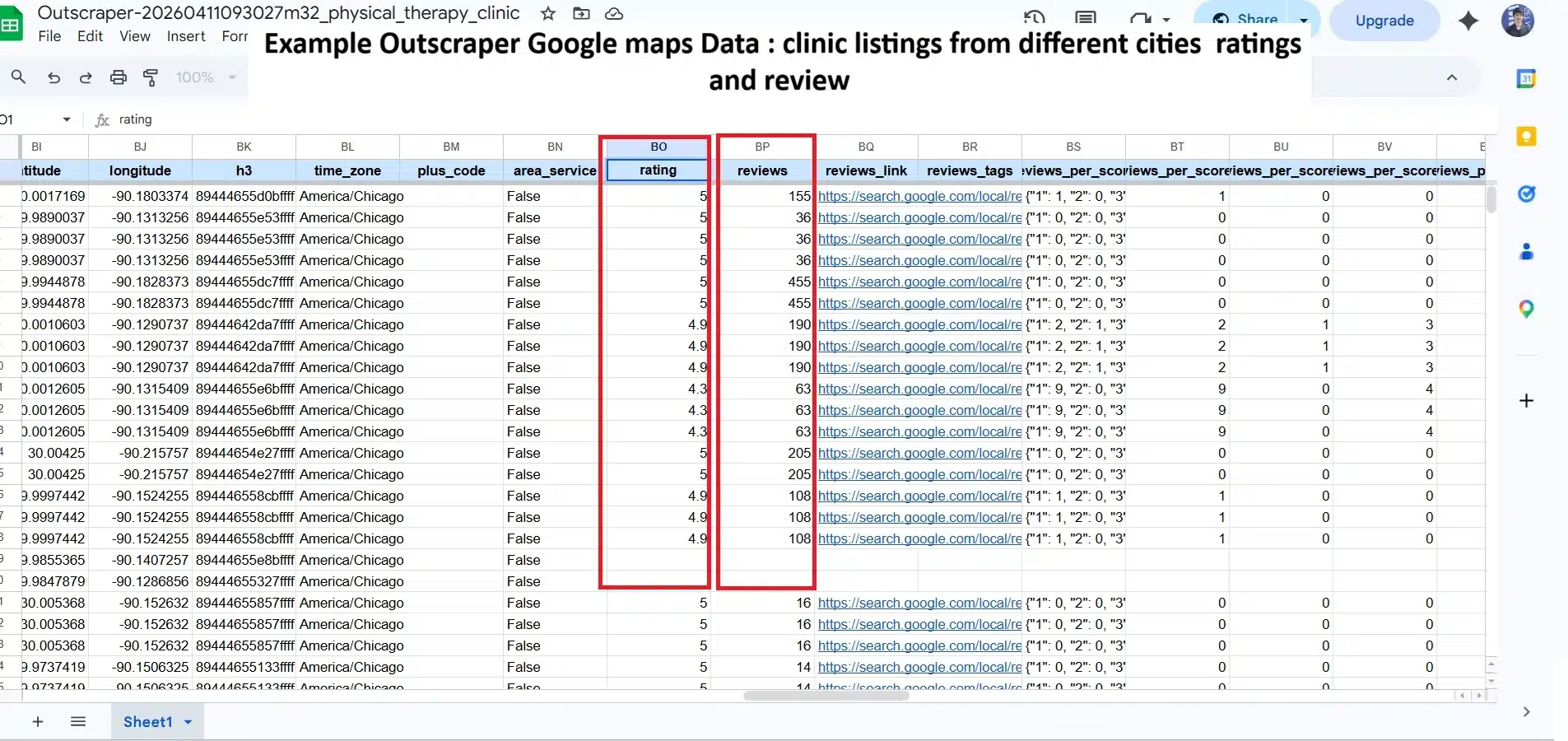
Let’s say you run a chain of physical therapy clinics. Before entering a new market, you can use Google Maps data to answer: How many PT clinics are already there? How are they rated? Which neighborhoods are underserved? Where are the highest-rated practices located, and what do patients say they do well?
The data fields themselves tell a deeper story. A clinic’s rating trend shows whether its reputation is improving or declining over time. Review velocity how frequently new reviews come in signals how active and engaged its customer base is. Response rate reveals whether the owner is attentive or absent. Together, these signals help you identify which competitors are genuinely strong and which ones only appear strong on the surface.
Real Example
A franchise coffee brand considering expansion into secondary markets used Outscraper’s Google Maps Scraper to map every café and chain coffee shop across 12 target cities, exporting ratings, review counts, and coordinates into one spreadsheet. They calculated the “review density” per square mile to find areas with high foot traffic but few established coffee options. Two of the cities they prioritized based on this analysis outperformed projections in their first year of operation.
| Target Criteria |
| 12 cities • Coffee expansion |
This kind of analysis also reveals competitive weaknesses. If your rivals consistently get complaints about wait times or parking in their reviews, that’s an opening. You can position around those specific friction points rather than guessing what matters to customers.
For deeper competitor intelligence, including review text mining, the market and competitor monitoring workflows at Outscraper walk through how teams set up scheduled data pulls that refresh weekly so they always have a current snapshot of how competitors are performing.


For businesses with multiple locations franchises, retail chains, healthcare networks, hotel groups reputation management is a serious operational challenge. One bad month at one location can quietly drag down a brand’s overall standing without anyone in HQ noticing until it’s too late.
Google Maps data makes it possible to monitor review activity, average ratings, and sentiment shifts across dozens or hundreds of locations on a regular cadence. Instead of manually checking each listing, operations teams can pull automated reports and get alerted when specific locations drop below a rating threshold or when negative reviews spike.
The signals that matter
It’s not just about the star rating. The velocity of new reviews tells you something a surge of 1-star reviews in a short window suggests a specific incident (bad service day, viral social media complaint, staffing issue). The response rate tells you whether location managers are engaged. And recurring keywords in review text point to systemic problems that need fixing.
Real Example
A regional restaurant group with 18 locations set up weekly Outscraper’s Google Maps review exports for all their listings. Within the first month, they identified that two locations had a pattern of reviews mentioning “slow service on Friday evenings” something no internal system had flagged. They adjusted staffing schedules at both locations, and those same two restaurants saw their Friday ratings improve from 3.6 to 4.2 over the next quarter.
| Target Criteria |
| Weekly exports • 2 flagged locations |
The practical tool for this is a used Outscraper’s Google Maps Scraper Google Maps Reviews Scraper, which can export all reviews for any listing including reviewer name, date, rating, and review text in a format that’s easy to pipe into a BI dashboard or feed to a sentiment classification model.
Location Intelligence and Expansion Planning
Opening a new location is one of the highest stakes decisions a business makes. Real estate costs, build out expenses, and long term leases mean that a bad location choice can take years to recover from. Google Maps data won’t tell you everything, but it adds a layer of ground truth intelligence that traditional demographic data often misses.
Location intelligence from Google Maps typically involves analyzing business density by category, understanding which neighborhoods attract foot traffic (indirectly evidenced by review volume), and spotting the whitespace areas where demand exists but established supply doesn’t.
High review volume on a small number of businesses is often a signal of unmet demand. If a neighborhood has two nail salons with 500 reviews each and a 4.7 average rating, customers clearly love the concept and there aren’t enough options. That’s a different opening than entering a market with twelve nail salons and average ratings around 3.8.
Real Example
A boutique fitness studio brand was evaluating three potential cities for expansion. They used Outscraper’s Google Maps data to map every gym, yoga studio, and fitness center in each market filtering by review count, average rating, and price indicators mentioned in reviews.
One city had strong demand signals but only two studios with 4+ star ratings and over 100 reviews, suggesting both high interest and limited quality options. They chose that market first, and it became their highest-grossing new location within 18 months.
| Target Criteria |
| Fitness market analysis |
How to evaluate a new market using Google Maps data
1 | Define your target category and pull all competing businesses in each potential market. |
2 | Calculate average ratings and review counts to measure both satisfaction and demand. |
3 | Identify zip codes or neighborhoods with high review volume but few high-rated competitors. |
4 | Cross-reference with demographic data from public sources to validate the opportunity. |
5 | Revisit the dataset monthly to catch new entrants before committing to a lease. |
Customer Sentiment Analysis From Reviews
Reviews are qualitative data, and most businesses barely scratch the surface of what’s in them. Reading through reviews manually works when you have fifty of them. At five hundred let alone five thousand you’re guessing at patterns that are actually sitting right there in the text.
Businesses doing sentiment analysis properly are pulling large volumes of Google Maps reviews across their own locations and competitors, then running the text through categorization either manually in a spreadsheet or through a language model to identify which themes come up most often, in what context, and with what emotional weight.
From noise to signal
A phrase that appears in 30% of negative reviews for a particular business type isn’t noise it’s a product or service failure hiding in plain sight. “Long wait times” at a dental practice.
“Confusing parking” at a retail location. “Staff seemed rushed” at a restaurant. These patterns don’t usually make it into internal feedback systems, but they’re available to anyone willing to look.
Real Example
A SaaS company serving auto dealerships scraped 15,000 Google Maps reviews from dealerships across the US, specifically targeting mentions of the service department. The most common complaint across all reviews wasn’t price it was follow-up communication. Customers hated not knowing the status of their repair.
The company used that insight to build a specific feature for their CRM product: automated service status text updates. That feature became their most-cited selling point in demos within six months of launch.
| Insight & Action |
| Auto dealership SaaS |
The customer sentiment analysis approach documented by Outscraper covers exactly this workflow: pulling reviews at scale, structuring the data, and turning recurring text patterns into a prioritized action list for product, operations, or marketing teams.
| Review Theme | Frequency Signal + Business Action |
|---|---|
| "Long wait times" | Appears in >40% of negative reviews. Staffing audit and appointment system review recommended. |
| "Staff was unfriendly" | Spikes at specific locations. Location-level training and management review suggested. |
| "Couldn't find parking" | Consistent across reviews and seasonal. Consider valet service or parking validation partnership. |
| "Best [product] I've ever had" | Positive spike after menu change. Double down on that item in marketing. |
Directory and Data Product Building
This one is less obvious but increasingly popular. A growing number of entrepreneurs and small teams are using Google Maps data as the raw material for niche directories, specialized business databases, and data products sold to other businesses.
The logic is simple: industries that are fragmented, offline first, or underserved by existing databases have poor or outdated business data. If you can build a well organized, regularly refreshed directory of businesses in that niche with useful enrichment like ratings, review counts, and contact info people will pay for it.
Real Example
Frey Chu, a solo operator who became well-known in the online business community, built a niche directory using Google Maps data enriched with sentiment signals from reviews. Instead of just listing business names and addresses (the old directory model), he added qualitative data: what services each business offered, based on what reviewers actually mentioned.
The result was a directory that felt genuinely useful rather than a simple listing. Using Outscraper for the data collection and enrichment, he scaled the project to $2,500 per month in recurring revenue run by one person, with minimal ongoing maintenance.
What makes this work is specificity. A generic business directory competes with Google itself. A directory of HVAC contractors in the Southeast, ranked by responsiveness based on review language, serves a much narrower audience and that audience will pay because the alternative is hours of manual research.
Outscraper’s pay-as-you-go model means you only pay for the data you actually collect. No monthly commitment.
Targeted Sales Outreach With Context
Cold outreach works better when you know something specific about the person you’re contacting. Generic emails get ignored. But if your opening line references something real a specific problem the business has, a pattern you noticed in their reviews, a recent change in their rating the response rate changes dramatically.
Google Maps data makes personalized outreach at scale actually possible. You’re not making up the context. It’s real, publicly visible information that the business owner presumably already knows about you’re just showing that you’ve done your homework.
What this looks like in practice
A reputation management agency, for instance, can identify businesses whose average rating has dropped over the past few months by pulling regular review exports. They can then reach out specifically to those businesses not with a generic pitch, but with “we noticed your rating dropped from 4.3 to 3.8 over the last 90 days, and from looking at your reviews, here’s what seems to be driving it.” That’s a conversation opener, not a cold pitch.
Real Example
A digital marketing agency specializing in local businesses used Google Maps data to identify restaurants in their city with below average ratings (under 3.5 stars) but high review volume meaning they had foot traffic but a satisfaction problem. They pulled contact information, studied the review patterns for each business before reaching out, and crafted outreach that referenced specific recurring issues. Their initial outreach campaign 87 personalized emails resulted in 19 discovery calls and 6 new clients within 30 days.
| Target Strategy |
| Local restaurant outreach |
The workflow typically involves pulling business data, enriching it with review text exports, doing a quick manual or automated read of the sentiment patterns, and using that to customize the first line of outreach for each prospect. It’s more work per lead but the conversion rate more than justifies it.
For teams doing this at volume, the lead generation workflow documented by Outscraper outlines how to combine Google Maps business data with email enrichment to build complete, outreach-ready contact lists without cobbling together five different tools.
Platforms like Outscraper let non technical teams collect, export, and work with Google Maps data without writing a line of code, managing proxies, or dealing with infrastructure. You define what you want, run the task, and get a clean file. The analysis and strategy are still yours to own.
Whether you’re a solo founder doing competitor research or an operations team monitoring 50 locations, the data is sitting there. The question is whether you’re going to use it.
Outscraper makes it easy to pull structured business data, reviews, and contact information no code required. Start with a free account
Frequently Asked Questions
Most frequent questions and answers
Google Maps data refers to the publicly available information found on Google Maps listings including business names, addresses, phone numbers, websites, star ratings, review counts, hours of operation, and review text. Businesses collect this data to build lead lists, monitor competitors, analyze customer sentiment, and make smarter decisions about where to expand or how to improve their service.
Yes collecting publicly available data from Google Maps is legal in most jurisdictions. The information on business listings (name, address, phone number, reviews) is visible to any user on the web and does not require logging in or bypassing any security measures. Tools like Outscraper are designed to collect only public data ethically and within platform guidelines. That said, how you use the data matters always follow applicable data protection laws like GDPR or CCPA when using contact information for outreach.
No. Platforms like Outscraper’s Google Maps Scraper are built for non-technical users. You simply enter your target business category and location, run the task, and download your results in CSV, JSON, or Excel format. No code, no proxies, no setup required. The whole process takes a few minutes.
The data is pulled directly from live Google Maps listings at the moment you run the task so it reflects exactly what any customer would see on their screen right now. Google Maps is kept up to date by both business owners and over 120 million Local Guides who contribute edits and corrections daily. That said, no dataset is 100% perfect some listings may be outdated or unclaimed. It’s always good practice to verify contact details before large-scale outreach campaigns.
Absolutely. This is one of the most popular use cases. You can pull all competitor listings in your category and region, track their ratings over time, read their review text to spot recurring complaints, and compare their service attributes against yours. Tools like Outscraper’s competitor monitoring even support scheduled pulls so you get a fresh snapshot weekly or monthly without logging in to rerun anything manually.
There is no hard cap Outscraper is built to scale. You can collect all reviews for a single business listing or run bulk tasks across hundreds of locations at once. Teams doing sentiment analysis often pull tens of thousands of reviews across entire industries. The platform handles the heavy lifting in the cloud, so your computer doesn’t need to stay on while the task runs.
Outscraper exports data in CSV, JSON, and Excel (XLSX) formats. These are ready to open in Google Sheets, Excel, or any BI tool like Looker Studio or Tableau. If you’re feeding the data into an AI or text analytics tool for sentiment analysis, JSON is the cleanest format to work with.
Outscraper uses a pay-as-you-go pricing model you only pay for the records you successfully collect. There are no monthly subscription fees or charges for failed queries. New accounts also get a free tier with 500 records per month to test the platform before committing. For most small to mid-size tasks, the cost is a fraction of what it would cost to collect the same data manually.