Table of Contents
Getting 100 leads a day using AI and Google Maps only works when the workflow turns raw business records into outreach-ready leads. A Google Maps scrape can give you business names, categories, websites, phone numbers, ratings, reviews, and locations, but those records are not leads yet. They still need to be filtered, enriched, deduped, scored, and connected to a fact-based outreach angle.
That is where most AI lead generation advice breaks. It treats AI like a magic lead database, then uses Google Maps data only as a raw export. A better workflow gives each layer a clear job: Outscraper collects fresh public business data, enrichment finds usable contact paths, AI writes specific openers from visible facts, and a human reviews the message before outreach.
What 100 Leads a Day Actually Means
Getting 100 leads a day does not mean exporting 100 random rows from Google Maps. A real lead is a qualified prospect with a usable contact path, a fact-based opening line, and an outreach step ready to send or already sent.
The mistake is counting too early. Many teams scrape a category, export the results, and call the spreadsheet finished before checking whether the businesses are active, relevant, reachable, or worth contacting. That creates a full-looking list, but it does not create a working lead pipeline.
The fix is to separate raw records, qualified prospects, and real leads before the campaign starts.
This article is about reaching the third stage. A business name is not enough. A phone number is not enough. A lead needs a reason for outreach that is grounded in visible business data.
Why One Google Maps Search Dries Up Fast
One Google Maps search usually cannot support 100 fresh leads every day for long. A city-and-category segment may look large at first, but once you apply rating range, review count, website status, business status, and contact availability, the usable pool becomes much smaller.
For example, a segment like “HVAC contractors in Austin with a 3.0 to 4.2 rating, 20 to 300 reviews, no website, and operational status” may only produce a limited number of real matches. That is not a scraper problem. It is a supply problem. The local market only has so many businesses that match the exact criteria.
This is why “just scrape Google Maps every morning” breaks down. If the same query runs again and again, the workflow eventually re-contacts the same businesses, repeats old outreach, and lowers campaign quality. The fix is segment rotation: track each city, category, filter, and contacted count so you know which segments still have fresh supply.
The goal is not to scrape harder. The goal is to stop re-mining the same market after the useful records are already gone.
Step 1: Build the Filter, Then Size the Pool
The first step is to build a clear Google Maps data filter and run one exploratory pull before committing to a segment. This tells you how many businesses actually match your criteria before you plan the daily lead volume around that market.
A weak workflow starts with a broad persona and no measurable pool, such as “local businesses that need more customers.” That kind of targeting cannot tell you whether the segment has 40 usable prospects or 400.
Use the Outscraper Google Maps Scraper API when you want this targeting logic to behave like a real query instead of a manual research task. For the first test, use a filter like this: plumbers in Austin, TX, rating 3.0–4.2, 20–300 reviews, no website, operational only, limit 50.
Before scaling the segment, count the usable records. Remove wrong categories, duplicates, closed listings, and records with no contact path. If the filtered segment returns 42 qualified prospects, it may be a two-day test, not a full-month source. If it returns 420, it can support more rotation.
That addressable pool number is the first real proof point in the workflow.
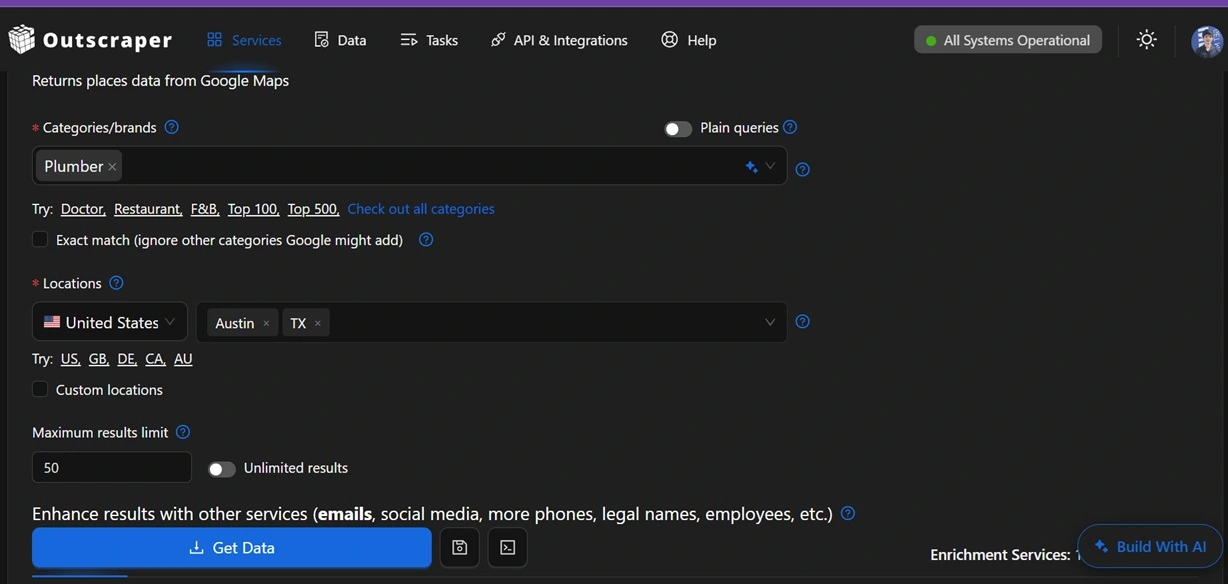
Use Outscraper to pull a filtered Google Maps segment first, then decide whether the market can support your daily lead target.
Step 2: Turn Raw Records Into Contactable Prospects
A Google Maps listing is useful, but it does not always give you a contactable person. To move from raw records to qualified prospects, you need enrichment, contact validation, and a routing decision for each record.
This is where many lead workflows create hidden waste. A listing may have a phone number but no email. It may have a website but no published contact page. It may look relevant from the category but turn out to be the wrong business type after review. If you skip this step, the outreach team spends time cleaning records instead of contacting real prospects.
Use the raw Google Maps data as the first layer, then enrich the records. The Emails and Contacts Scraper can help find published emails, social profiles, and contact details from the websites collected in the first pull.
After enrichment, separate records into four groups: email-ready, phone-first, manual review, and remove. Email-ready records can go into an email sequence. Phone-first records should not be forced into email outreach. Manual-review records need a human check before messaging. Removed records should never reach the AI opener step.
This keeps the workflow clean. AI should not write outreach for a closed business, a duplicate listing, a wrong-category match, or a record with no realistic contact path.
Step 3: Use AI to Write Fact-Based Openers
AI is most useful when it writes opening lines from specific business facts, not when it creates generic cold email copy. The best source for that first line is usually a visible signal from the record: review text, rating context, review count, website status, business category, or contact path.
The problem with generic AI outreach is that it sounds polished but proves nothing. A sentence like “I came across your business and wanted to reach out” could be sent to any business in any city. It does not show that the sender reviewed the record, checked the profile, or noticed anything specific.
A fact-based opener works differently. It uses only visible data and turns that data into a simple reason for outreach. For sharper personalization, the Google Maps Reviews Scraper can pull customer review text so AI can draft a line based on a real review pattern instead of a guessed pain point.
A weak opener says:
“I came across your business and wanted to reach out.”
A stronger opener uses a visible fact:
“Saw a review mention it took three calls to get a callback. That usually points to a missed-call follow-up gap, not a service-quality issue.”
That second line is not magic. It is grounded in a real review. The business owner can recognize the situation, and the outreach does not pretend to know private revenue, staffing, budget, or internal operations.

This is the task that does not scale well by hand. A person can write 10 specific openers manually. A person might write 25 before quality drops. At 100 per day, the work usually collapses into templates unless AI creates the first draft from real data and a human reviews it before sending
Step 4: Track Segments So You Do Not Re-Mine the Same Market
A segment log prevents the same businesses from being pulled and contacted again. This is not complicated automation. It is basic operating discipline that protects the campaign from duplicate outreach.
The broken workflow is running the same city, category, and filter every week with no memory of what already happened. That creates repeated outreach to businesses that already ignored the first message. It also makes the sender look careless because the system cannot tell the difference between a fresh prospect and a drained segment.
Keep one simple log with the date pulled, category, geography, filter, records pulled, qualified count, contacted count, and next action. AI can help summarize the log or suggest the next segment, but the mechanism itself is a spreadsheet.

This is what makes the daily number repeatable. Without the log, the workflow depends on memory. With the log, the team can see which segments are fresh, which are nearly exhausted, and which should not be touched again yet.
How to Get 100 Leads a Day Using AI and Google Maps in Practice
The 100-leads-a-day number comes from multiple small segments, not one endless Google Maps search. A practical daily batch can come from five segments that each produce 15 to 25 qualified, enriched, deduped prospects.
This is the part that makes the workflow realistic. One query may dry up quickly, but five rotating segments can create enough supply for a daily batch. Each segment contributes a manageable number of prospects, and each prospect still goes through filtering, enrichment, AI opener creation, and human review.
Here is the simple math:
This is not a promise that every market will produce the same number. It is the operating model. You size the pool first, rotate segments, remove duplicates, enrich contact paths, and count a record as a lead only when it is ready for outreach.
Use Outscraper to collect fresh Google Maps business data, enrich contact paths, and give AI the facts it needs to write specific openers.
Step 5: Use AI Connectors When You Do Not Want to Write API Code
The connector workflow is useful when you want structured Outscraper results inside an AI assistant without writing request code. It is best for testing segments, checking outputs, and turning plain-language instructions into a usable lead workflow.
A marketer or agency operator may not want to write API requests just to test a city and category. With the ChatGPT connector or the Claude connector, the query can be conversational while still returning structured business data from Outscraper.
Example prompt:
@Outscraper find plumbers in Austin, TX, rating 3.0–4.2, no website, limit 50
That prompt still follows the same workflow: define the segment, pull structured Google Maps records, review the output, enrich the contact path, ask AI to score the results, and draft fact-based openers for human review

What Actually Breaks This Workflow
The 100-leads-a-day workflow usually breaks because of quality control, not scraping speed. Bad category matches, missing contact paths, duplicate records, old exports, and unsupported AI assumptions can all turn a high-volume workflow into a low-quality campaign.
The first risk is wrong-category data. Google Maps categories can be messy, and some businesses appear in searches where they do not really belong. Catch that before enrichment, not after AI has already written openers.
The second risk is missing contact paths. Not every business has a scrapable email, and not every phone number should be treated the same way. Email-ready records, phone-first records, and manual-review records should be separated instead of forced into one outreach path.
The third risk is skipped dedupe. If a business appears across multiple segments, the segment log should catch it before a second outreach touch happens. Without that check, the workflow starts repeating itself and the quality drops.
The fourth risk is letting AI invent. AI should not guess revenue, headcount, ownership, budget, or private business problems. It should only write from visible facts in the record, such as rating, review count, website status, category, location, and review text.
The fifth risk is using an old export like it is still fresh. Local business data changes: businesses close, websites change, numbers change, and reviews update. Pull fresh data before outreach instead of recycling the same old CSV for months.
Quick-Start Checklist
A 100-leads-a-day workflow needs a repeatable checklist before the batch counts. The goal is not to pull more rows. The goal is to send better, deduped, fact-based outreach from fresh Google Maps data.
Use this checklist before scaling:
- Run one exploratory pull per target segment.
- Count the actual addressable pool before committing to the segment.
- Build the filter: category, geography, rating range, review range, website status, and business status.
- Enrich websites with Emails and Contacts Scraper.
- Pull review text when the offer needs sharper personalization.
- Start a segment log with category, geography, date pulled, qualified count, and contacted count.
- Use AI to write one fact-grounded opening line per qualified prospect.
- Review the opener before sending.
- Route email leads, phone-only leads, and manual-review leads separately.
- Count a lead only after it enters outreach.

Start with one category, one city, and one filter. Pull the data, enrich the records, write fact-based openers, and log what you contact.
Final Takeaway
Getting 100 leads a day using AI and Google Maps is possible only when the workflow defines a lead correctly. A raw business record is not a lead. A qualified prospect is not automatically a lead. A lead is a qualified prospect with a usable contact path, a specific opening line, and an outreach step ready or sent.
That is why the workflow needs four layers: Google Maps data, enrichment, AI-written opener, and segment tracking. Outscraper handles the public business data and enrichment layer. AI helps turn visible business signals into outreach angles. The segment log stops the workflow from re-mining the same market. Human review keeps the outreach from turning into fake personalization.
The real pipeline is not “scrape 100 rows” or “ask AI to find leads.” It is a daily operating loop that turns fresh Google Maps data into outreach-ready leads without pretending the spreadsheet did all the work.
Use Outscraper to pull Google Maps business data, enrich contact paths, and give AI the facts it needs to write better openers.
Frequently Asked Questions
Most frequent questions and answers
You get 100 leads a day using AI and Google Maps by rotating multiple filtered segments, enriching contact paths, removing duplicates, and using AI to write fact-based openers from real business data before outreach.
AI should not be treated as the lead database. It can help define filters, score records, write specific openers, and summarize segment logs, but it needs fresh Google Maps data and enrichment before the workflow becomes reliable.
A Google Maps lead list dries up when one city-category-filter segment has a limited number of matching businesses. Without segment rotation and dedupe, the workflow starts re-contacting the same businesses.
Do not let AI send outreach without human review. Use AI to draft fact-based openers from real data, then review the message, contact path, and offer fit before sending.