Mục lục
What Data Does Google Maps Provide?
Google Maps holds a lot of information about a location. Photos, reviews, addresses, working hours, website, phone number, plus code are the data shared on the main screen.
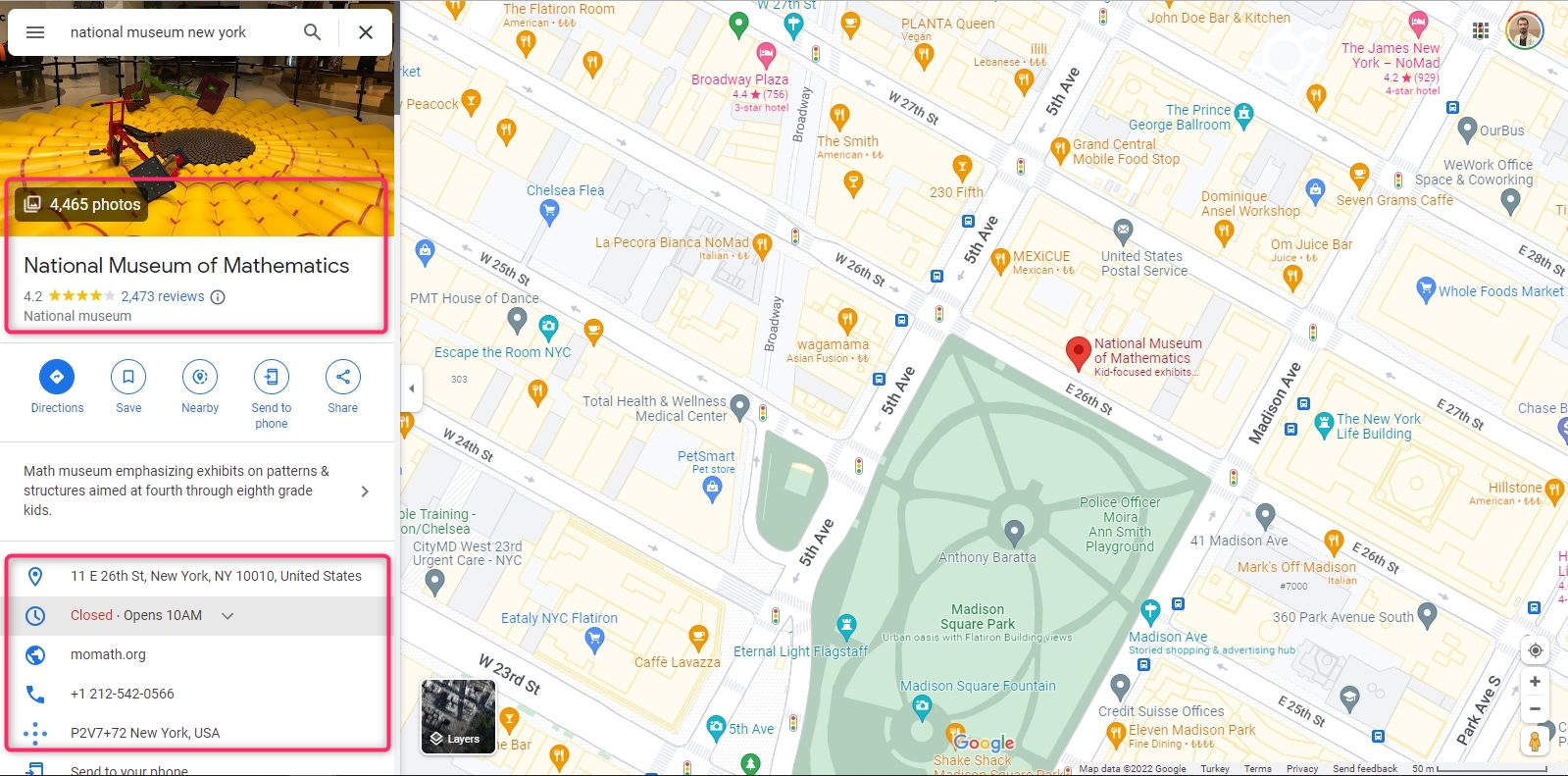
Although it is not visible on the main screen, there are many data about the location on Google Maps. Longitude and latitude are two of them. A scraping service must be used to extract all Google Maps data about the location. Outscraper Google Maps Data Scraper is one of these services. Outscraper extracts more than 45 data from a place on Google Maps. The data list is as follows:
- tên - tên địa điểm trên Google Maps.
- Địa điểm - trang web của địa điểm đó.
- type - loại địa điểm mà đối tượng được tìm thấy (có thể là bất kỳ phần tử nào trong các loại con).
- kiểu phụ - mọi loại địa điểm.
- danh mục - loại hình chính của địa điểm (đôi khi có thể được ghi bằng ngôn ngữ địa phương).
- điện thoại - Nhập số điện thoại.
- địa chỉ đầy đủ - Địa chỉ đầy đủ của địa điểm đó.
- quận - quận nơi đó.
- đường phố - Đường nơi đó.
- thành phố - Thành phố nơi đó tọa lạc.
- mã bưu điện - mã bưu chính của địa điểm đó.
- tiểu bang - Tình trạng của địa điểm.
- Tiểu bang chúng tôi - trạng thái vị trí (sẽ bị loại bỏ trong các phiên bản sau).
- Quốc gia - quốc gia nơi đó tọa lạc.
- mã quốc gia - mã quốc gia của địa điểm đó.
- vĩ độ - vĩ độ của địa điểm đó.
- kinh độ - kinh độ của địa điểm đó.
- Múi giờ - múi giờ của địa điểm đó.
- plus_code - mã vị trí Plus hoặc mã vị trí mở (chỉ hoạt động khi tìm kiếm riêng lẻ, ví dụ: truy vấn: "Hotel Colombo Berat", "0x3e49a63f6b05fe3b:0xc73d6b1f31b2ccc8").
- Xếp hạng - Đánh giá về địa điểm này.
- đánh giá - số lượng đánh giá
- reviews_link - liên kết đến các bài đánh giá về địa điểm này.
- reviews_per_score - Đối tượng JSON chứa các đánh giá theo từng mức điểm.
- số lượng ảnh - số lượng ảnh chụp tại địa điểm đó.
- ảnh - Liên kết đến hình ảnh của địa điểm đó.
- chế độ xem đường phố - Liên kết hình ảnh chế độ xem đường phố của địa điểm đó.
- giờ làm việc - Đối tượng JSON chứa thông tin về giờ làm việc của địa điểm.
- working_hours_old_format - giờ làm việc của cơ sở đó.
- thời gian phổ biến - Thời điểm đông khách nhất tại địa điểm đó (chỉ áp dụng cho tìm kiếm riêng lẻ, ví dụ: truy vấn: "Hotel Colombo Berat", "0x3e49a63f6b05fe3b:0xc73d6b1f31b2ccc8").
- business_status - tình hình hiện tại của doanh nghiệp.
- Về - thông tin bổ sung về địa điểm (ví dụ: được xác định là do phụ nữ làm chủ, thân thiện với cộng đồng LGBTQ+).
- mô tả - Mô tả địa điểm.
- phạm vi - mức giá của nơi đó.
- bài viết - Đối tượng JSON chứa các bài đăng từ địa điểm đó (chỉ hoạt động với một số địa điểm).
- xác minh - indicates if the place was claimed.
- owner_id - mã định danh duy nhất của chủ sở hữu địa điểm.
- owner_title - Tiêu đề của trang hồ sơ chủ sở hữu.
- owner_link - liên kết đến hồ sơ chủ sở hữu trên Google Maps.
- liên kết đặt chỗ - Liên kết để đặt chỗ.
- booking_appointment_link - Liên kết để đặt lịch hẹn.
- menu_link - liên kết đến menu.
- liên kết đặt hàng - Liên kết để đặt hàng.
- location_link - liên kết đến địa điểm trên Google Maps.
- place_id - mã định danh duy nhất của địa điểm (Google có thể cập nhật mã này vài lần mỗi năm).
- google_id - mã định danh duy nhất của địa điểm, còn được gọi là Feature ID (Google có thể cập nhật mã này vài lần mỗi năm).
- cid - Mã định danh đa nền tảng của một danh sách trong hệ sinh thái Google.
- reviews_id - mã định danh duy nhất của các bài đánh giá về các địa điểm.
Using Outscraper and extracting data is very easy. It is much faster than collecting data manually. It saves time. Let’s look at ways to manually and automatically collect longitude and latitude data from Google Maps.
Collecting Longitude and Latitude Data on Google Maps Manually
Google Maps does not directly show the location’s longitude and latitude information on the home screen. But it can be seen in the right-click menu.
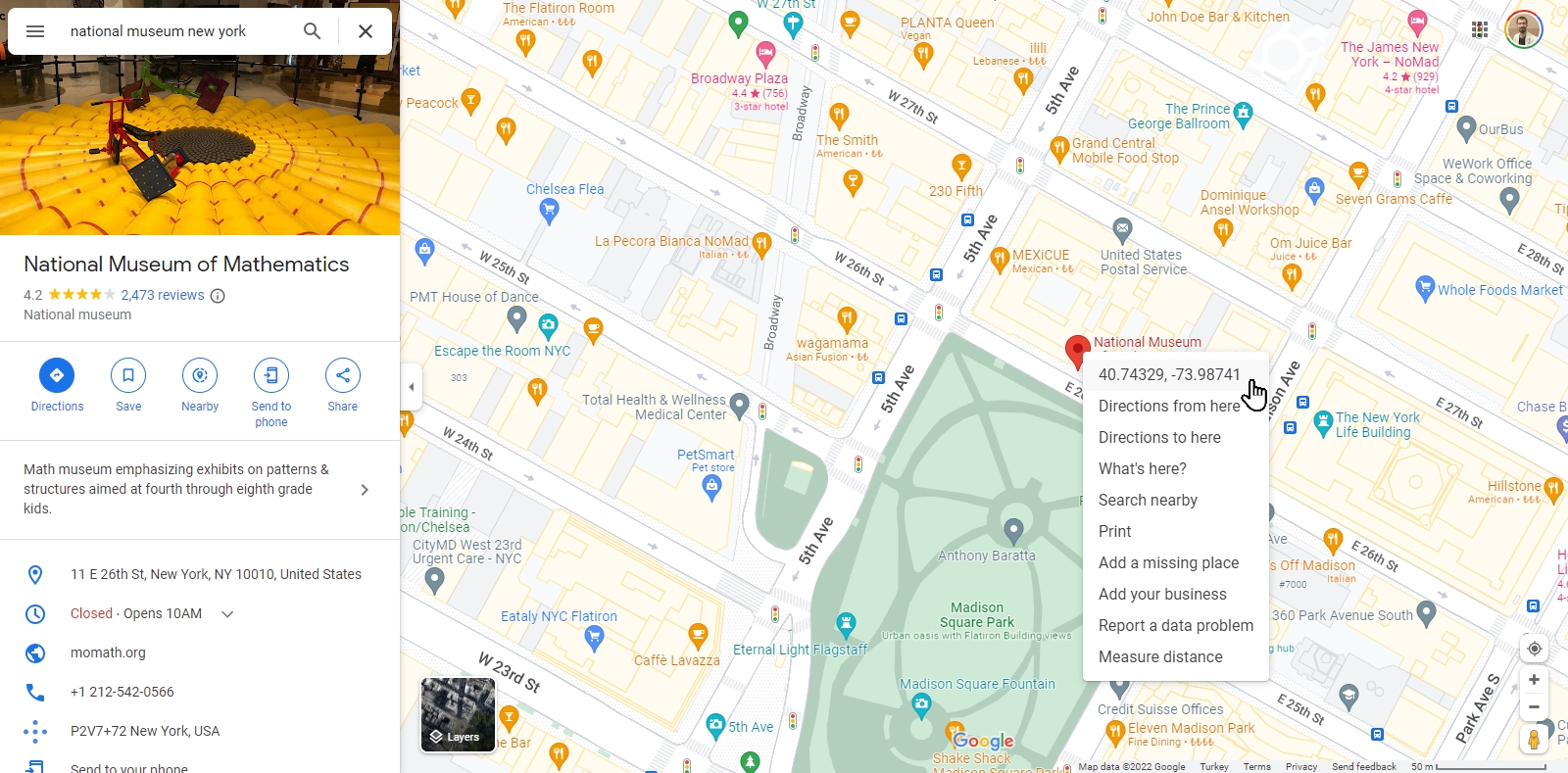
Clicking on the “Longitude and Latitude” line will copy this data to the clipboard. The data “40.7432294426243494, -73.98741247232803” is expressed in a text like this.
So what should you do if you want to find the coordinates of multiple places, for example, all museums in New York? Or from the Google Maps URL list of your locations?
For each location, “hover over the location pin, right-click, copy and paste” steps take a lot of time. Outscraper offers a solution to this issue with its Google Maps scraping service. Outscraper Công cụ trích xuất dữ liệu Google Maps service can extract the longitude and latitude data from both categories and URLs in bulk.
How to Extract Longitude and Latitude From Google Maps in Bulk?
There are two ways to extract longitude and latitude with Outscraper’s Google Maps Data Scraper service cumulatively. The first is to create a scraping task by specifying a location and category. The second is to create a task using location URLs.
When creating a scraping task, selecting the location and category is enough. If you need to create more complex tasks, it is recommended that you look at this article: “Getting Started With Google Maps Scraping.”
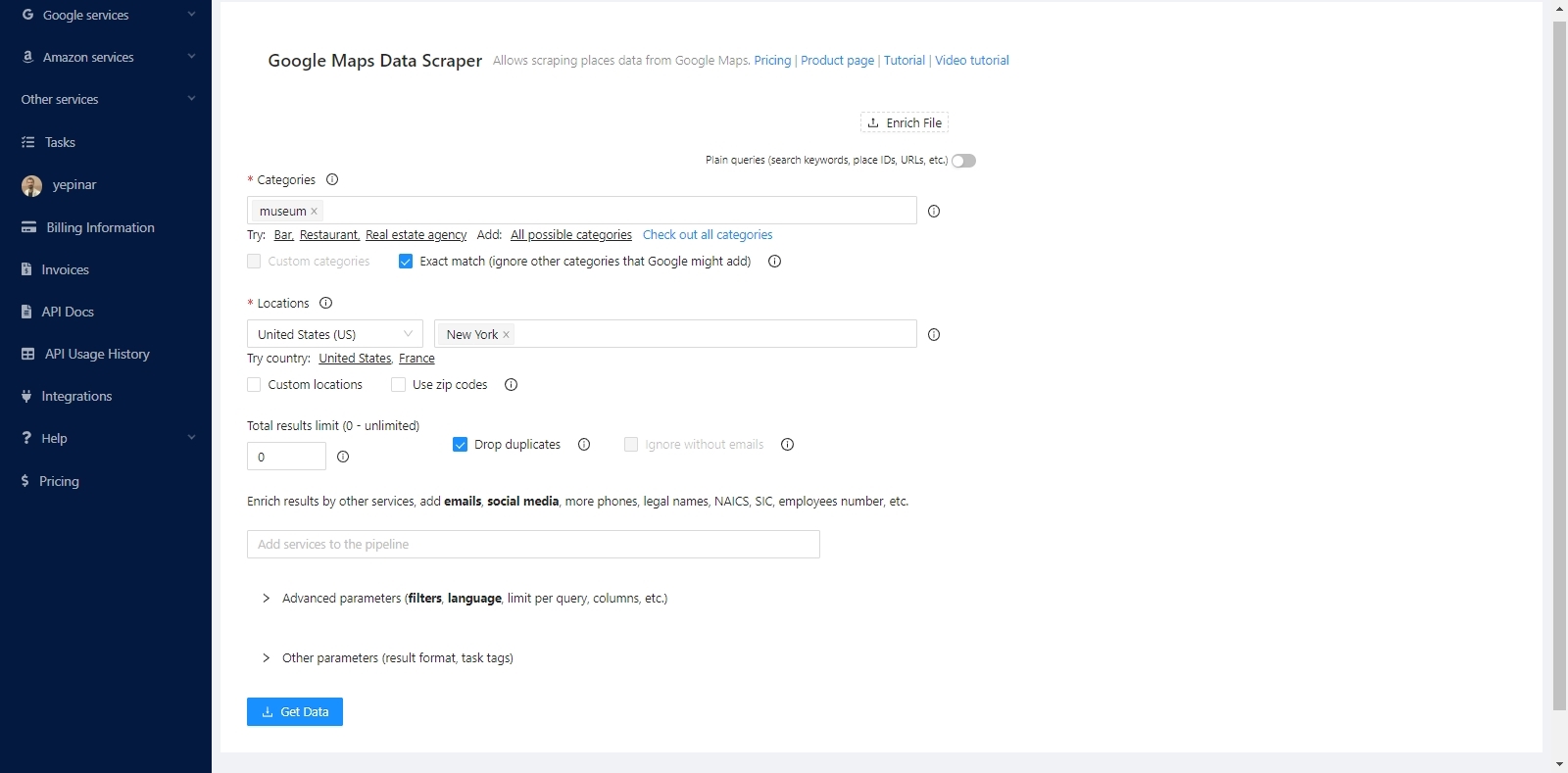
The service will find all the museums in New York and list the coordinates of these museums one by one. It will extract both coordinates and all other data.
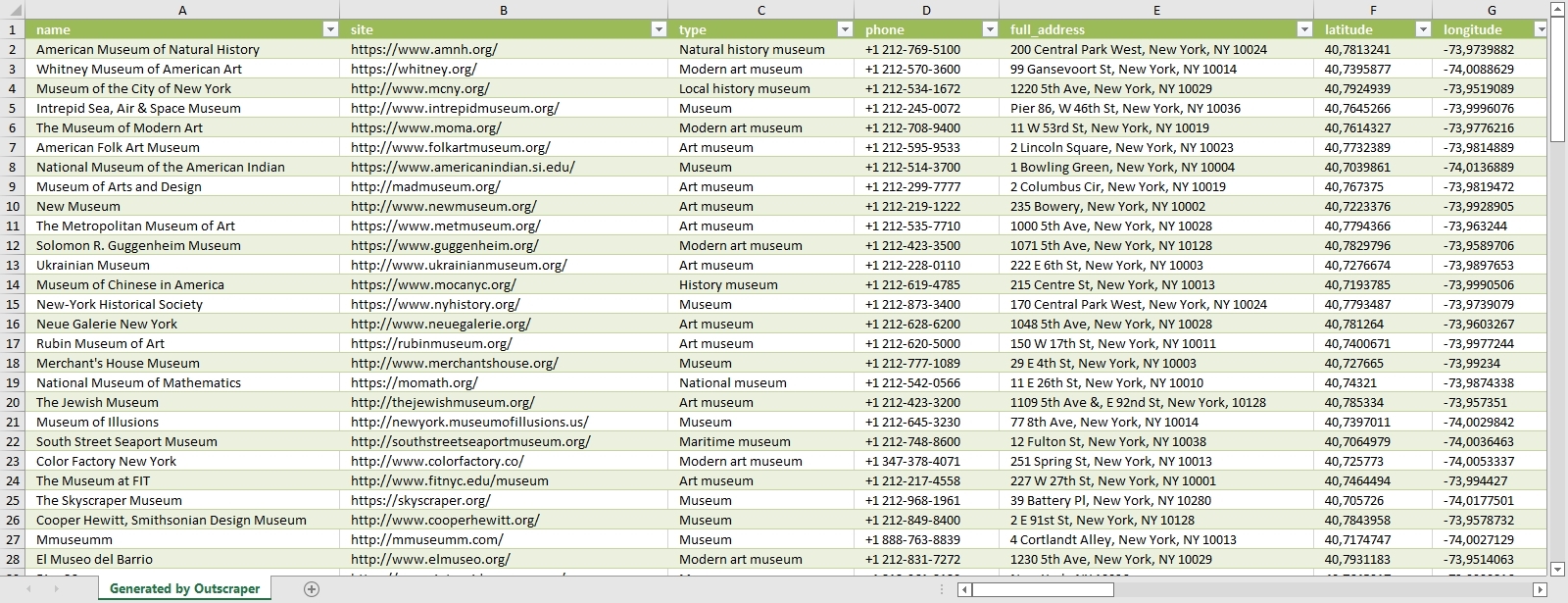
The data of all museums are sorted and listed in the result file. Each place and its data are listed one below the other. The result file can be in CSV/XLSX/JSON/Parquet format. And it can be opened with a spreadsheet viewer like Google Sheets.

“Plain queries” mode must be activated to extract coordinates with Google Maps links. In this mode, a category and location do not have to be selected. It is sufficient to just copy and paste the Google Maps links of the places.
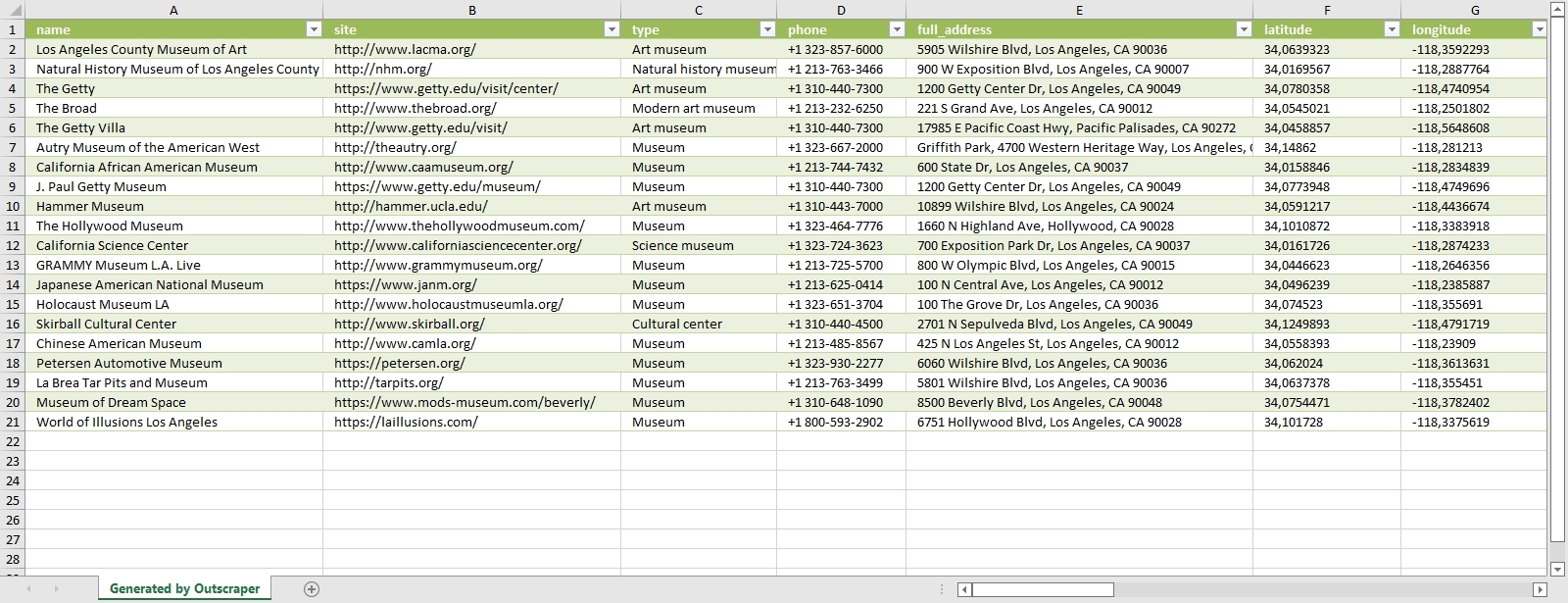
Results will be listed in the same way. It is possible to extract coordinates collectively in both ways. Whichever way is suitable for the intended use is preferred. You can try these two ways by signing up for Outscraper now.
Try for Free Now
It is free to try Outscraper Công cụ trích xuất dữ liệu Google Maps service with the free tier. Outscraper bills with the pay-as-you-go model. You only pay for what you use. There is no fixed monthly fee. Test first and then use more for your project.
Câu hỏi thường gặp
Các câu hỏi và câu trả lời thường gặp nhất
The only way to search and list all restaurants without skipping any of them is to use zip codes. For this, we recommend that you take a look at the “Scraping All Places From Google Maps” tutorial.
There are more than 650,000 restaurants in the US. The list and dataset of all these restaurants can be obtained with the Outscraper Google Maps Data Scraper service.
The best way to find restaurant data is with Google Maps. Restaurants in all states and cities can be easily found on Google Maps. The data of these restaurants can be extracted with the Outscraper Google Maps Data Scraper service.
There are more than 5,000 categories in Google Maps. Dozens of different categories determine the types of restaurants. Results can be filtered by choosing from these danh mục.



0 Comments