목차
What Data Does Google Maps Provide?
Google Maps holds a lot of information about a location. Photos, reviews, addresses, working hours, website, phone number, plus code are the data shared on the main screen.
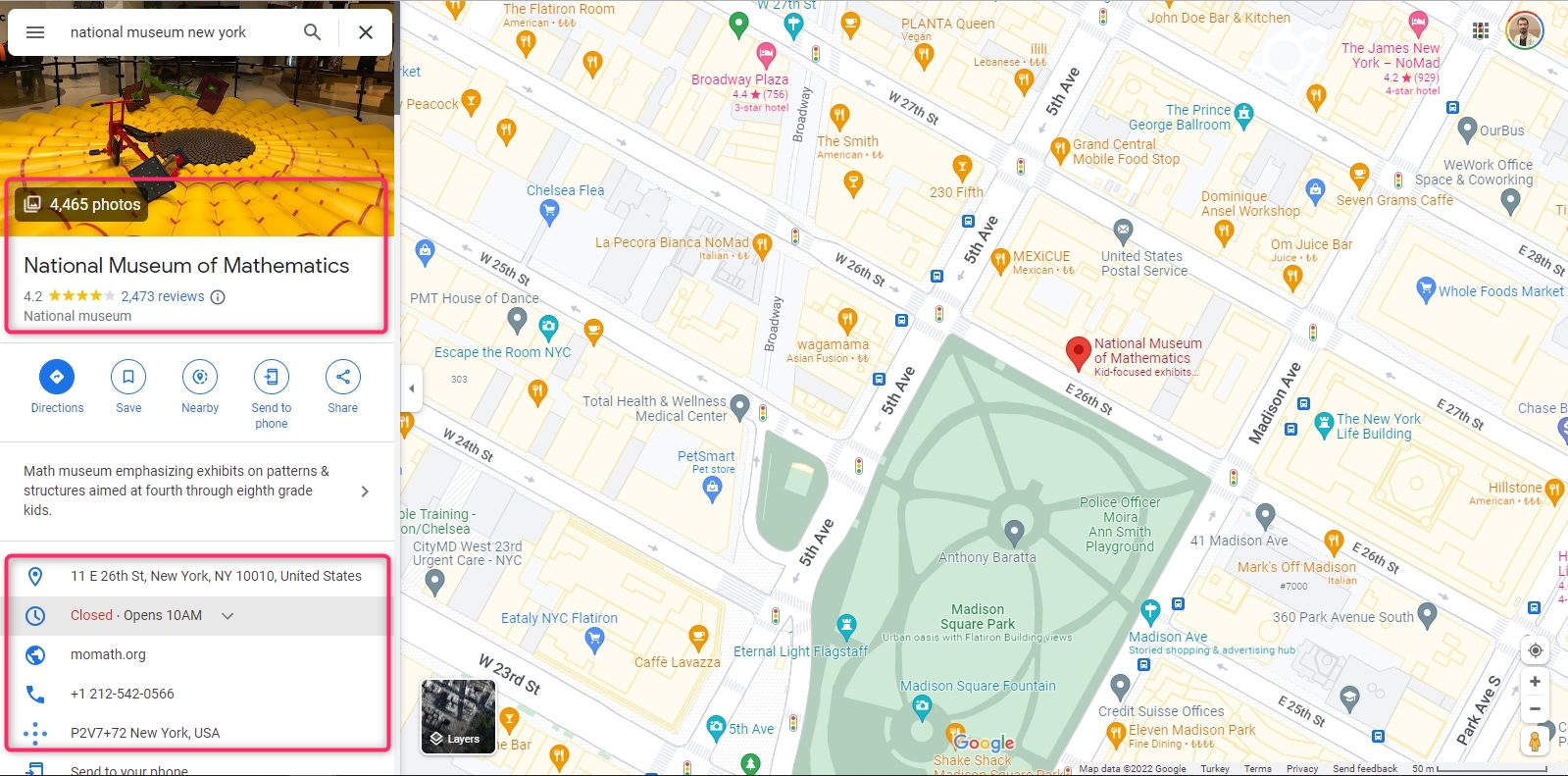
Although it is not visible on the main screen, there are many data about the location on Google Maps. Longitude and latitude are two of them. A scraping service must be used to extract all Google Maps data about the location. Outscraper Google Maps Data Scraper is one of these services. Outscraper extracts more than 45 data from a place on Google Maps. The data list is as follows:
- 이름 - Google 지도의 장소 이름입니다.
- 사이트 - 해당 장소의 웹사이트를 확인하세요.
- 유형 - 발견된 장소의 유형(하위 유형의 모든 요소일 수 있음).
- 하위 유형 - 모든 유형의 장소.
- 카테고리 - 장소의 주요 유형(현지 언어로 표시되는 경우도 있음).
- 전화 - 장소 전화번호를 입력합니다.
- 전체_주소 - 장소 위치의 전체 주소입니다.
- 자치구 - 장소 위치의 자치구입니다.
- 거리 - 장소 위치의 거리입니다.
- 도시 - 장소 위치의 도시.
- 우편번호 - 장소 위치의 우편 번호입니다.
- 상태 - 장소 위치의 상태입니다.
- us_state - 상태(향후 버전에서는 제거될 예정임).
- 국가 - 장소 위치의 국가입니다.
- 국가_코드 - 장소 위치의 국가 코드입니다.
- 위도 - 장소 위치의 위도입니다.
- 경도 - 장소 위치의 경도입니다.
- 시간대 - 장소 위치의 표준 시간대입니다.
- plus_code - 위치 플러스 코드 또는 열린 위치 코드(예: 쿼리와 같은 개별 검색에만 작동합니다: "호텔 콜롬보 베랏", "0x3e49a63f6b05fe3b:0xc73d6b1f31b2ccc8").
- 평가 - 장소의 평점을 입력합니다.
- 리뷰 - 리뷰 수
- 리뷰_링크 - 장소의 리뷰 링크.
- 리뷰_당_점수 - 점수별 리뷰가 포함된 JSON 객체입니다.
- 사진 수 - 장소의 사진 수입니다.
- 사진 - 장소의 이미지 링크를 입력합니다.
- street_view - 장소 스트리트 뷰의 이미지 링크입니다.
- working_hours - 장소의 근무 시간이 포함된 JSON 객체입니다.
- 근무_시간_오래된_형식 - 해당 장소의 근무 시간.
- 인기_시간 - 장소의 인기 시간(개별 검색(예: 쿼리)에만 작동합니다: "호텔 콜롬보 베라트", "0x3e49a63f6b05fe3b:0xc73d6b1f31b2ccc8").
- 비즈니스 상태 - 비즈니스의 현재 상태.
- 약 - 장소에 대한 추가 정보(예: 여성 소유, 성소수자 친화적임을 밝힘).
- 설명 - 장소 설명.
- 범위 - 장소의 가격대를 입력합니다.
- 게시물 - 장소의 게시물이 포함된 JSON 객체(일부 장소에서만 작동)입니다.
- 확인됨 - 는 해당 장소의 소유권을 주장했는지 여부를 나타냅니다.
- 소유자_ID - 장소 소유자의 고유 식별자입니다.
- 소유자_제목 - 소유자 프로필 페이지의 제목입니다.
- 소유자_링크 - Google 지도의 소유자 프로필 링크를 클릭합니다.
- 예약_링크 - 링크를 클릭하여 예약하세요.
- 예약_약속_링크 - 예약 링크를 클릭합니다.
- 메뉴_링크 - 메뉴로 연결되는 링크입니다.
- 주문_링크 - 링크를 클릭하여 주문할 수 있습니다.
- 위치_링크 - Google 지도에서 해당 장소로 연결되는 링크를 클릭합니다.
- 장소_ID - 장소의 고유 식별자(Google은 1년에 두어 번 업데이트할 수 있음)를 입력합니다.
- google_id - 장소의 고유 식별자(기능 ID라고도 함)입니다(Google에서 1년에 두어 번 업데이트할 수 있음).
- cid - Google 에코시스템에 있는 리스팅의 멀티 플랫폼 ID입니다.
- 리뷰_ID - 장소 리뷰의 고유 식별자입니다.
Using Outscraper and extracting data is very easy. It is much faster than collecting data manually. It saves time. Let’s look at ways to manually and automatically collect longitude and latitude data from Google Maps.
Collecting Longitude and Latitude Data on Google Maps Manually
Google Maps does not directly show the location’s longitude and latitude information on the home screen. But it can be seen in the right-click menu.
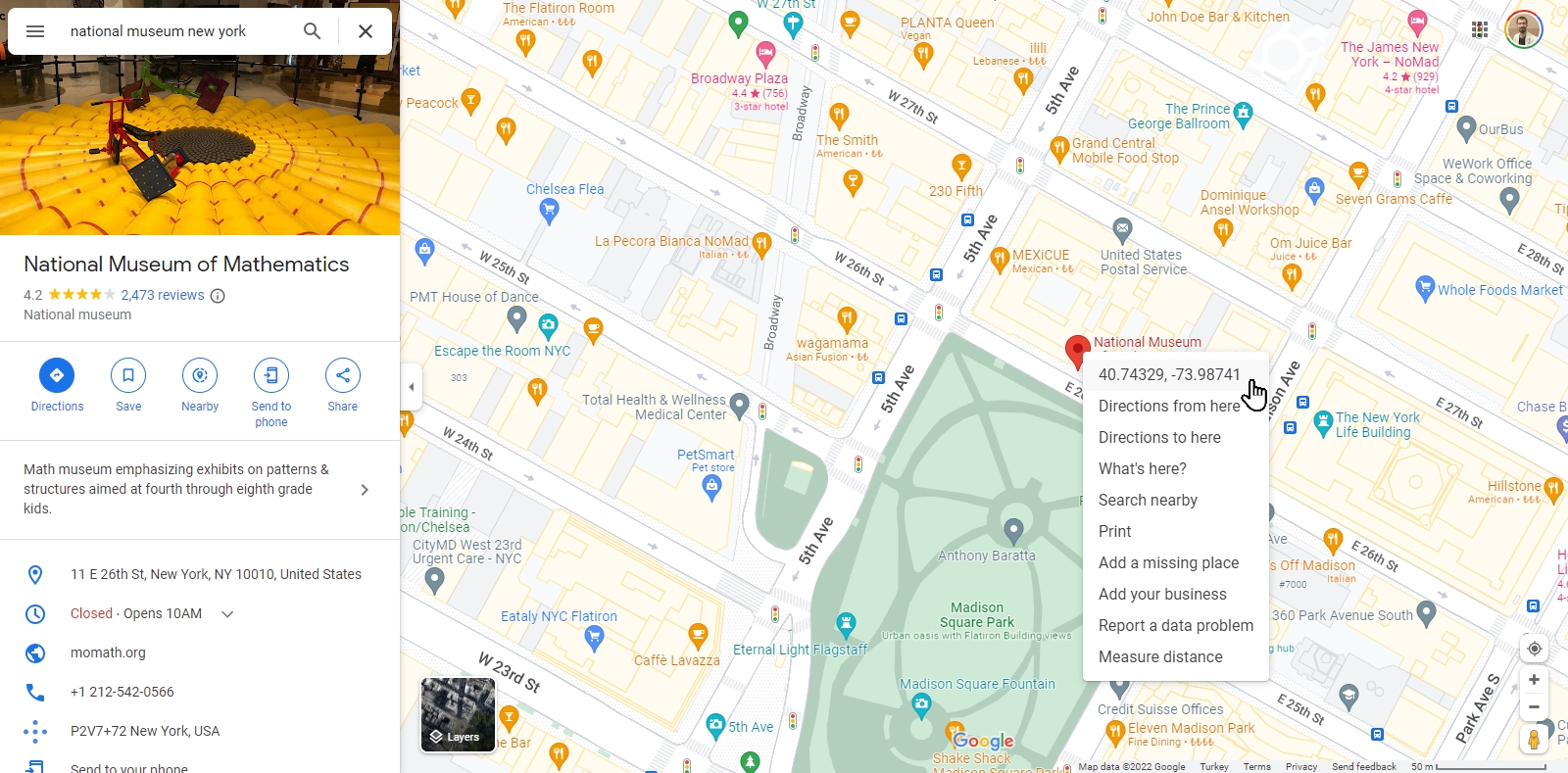
Clicking on the “Longitude and Latitude” line will copy this data to the clipboard. The data “40.7432294426243494, -73.98741247232803” is expressed in a text like this.
So what should you do if you want to find the coordinates of multiple places, for example, all museums in New York? Or from the Google Maps URL list of your locations?
For each location, “hover over the location pin, right-click, copy and paste” steps take a lot of time. Outscraper offers a solution to this issue with its Google Maps scraping service. Outscraper Google 지도 데이터 스크레이퍼 service can extract the longitude and latitude data from both categories and URLs in bulk.
How to Extract Longitude and Latitude From Google Maps in Bulk?
There are two ways to extract longitude and latitude with Outscraper’s Google Maps Data Scraper service cumulatively. The first is to create a scraping task by specifying a location and category. The second is to create a task using location URLs.
When creating a scraping task, selecting the location and category is enough. If you need to create more complex tasks, it is recommended that you look at this article: “Google 지도 스크래핑 시작하기.”
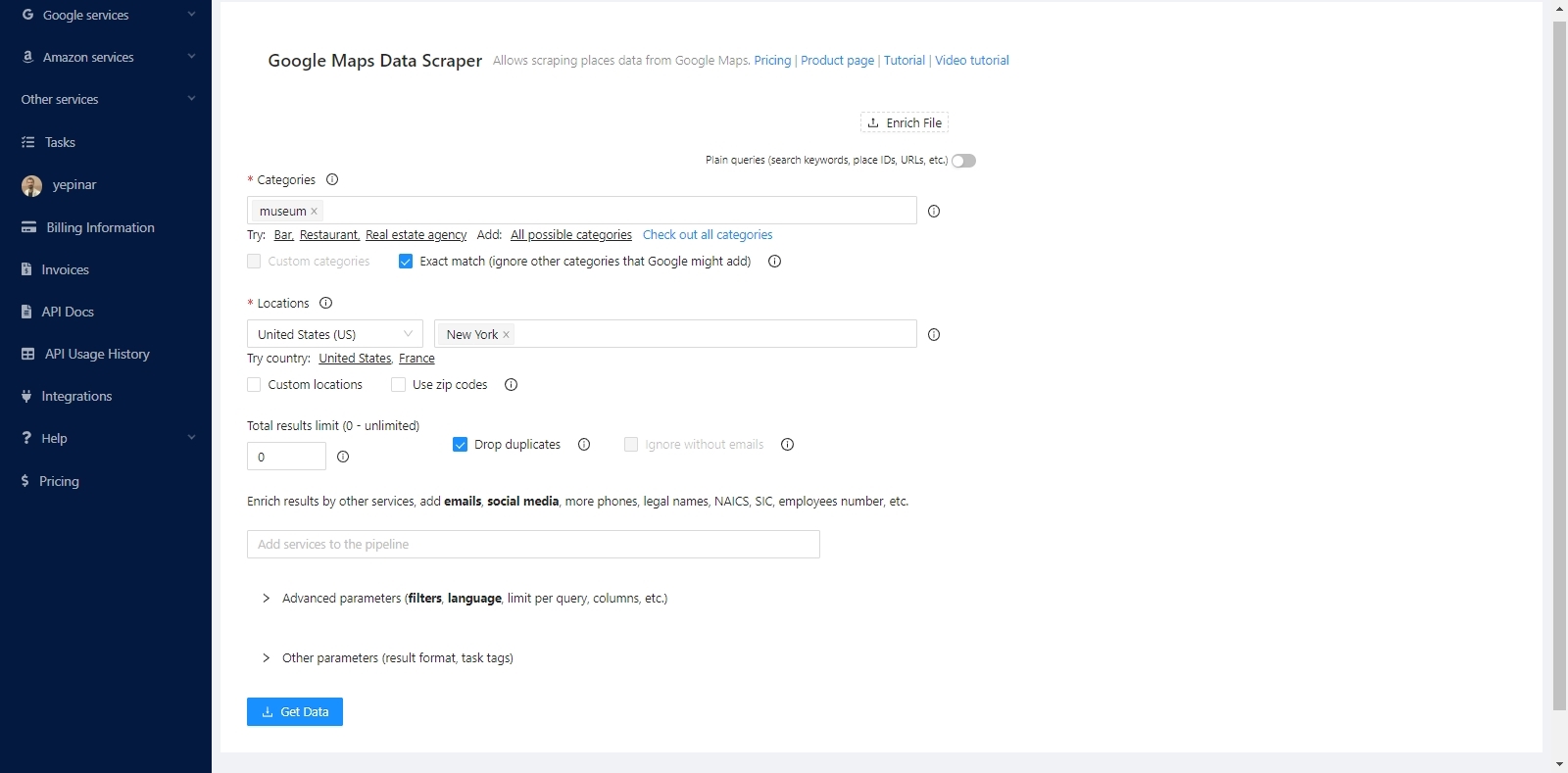
The service will find all the museums in New York and list the coordinates of these museums one by one. It will extract both coordinates and all other data.
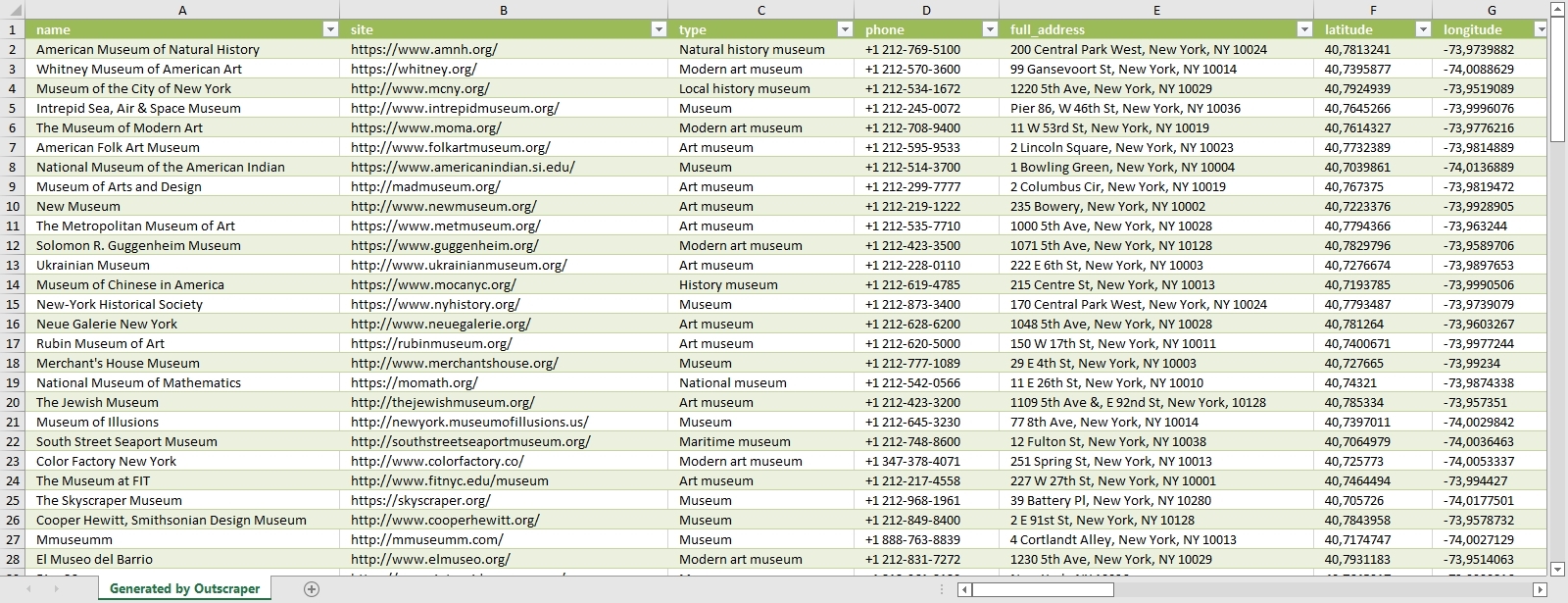
The data of all museums are sorted and listed in the result file. Each place and its data are listed one below the other. The result file can be in CSV/XLSX/JSON/Parquet format. And it can be opened with a spreadsheet viewer like Google Sheets.

“Plain queries” mode must be activated to extract coordinates with Google Maps links. In this mode, a category and location do not have to be selected. It is sufficient to just copy and paste the Google Maps links of the places.
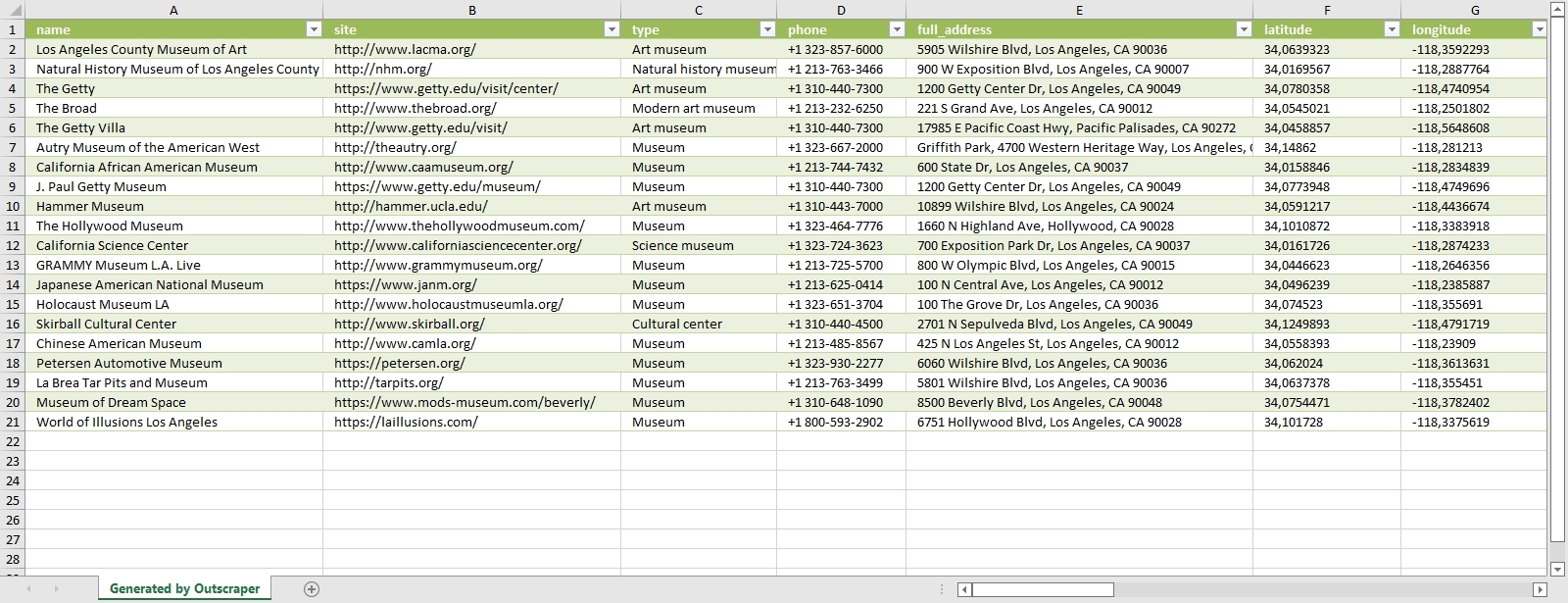
Results will be listed in the same way. It is possible to extract coordinates collectively in both ways. Whichever way is suitable for the intended use is preferred. You can try these two ways by signing up for Outscraper now.
Try for Free Now
It is free to try Outscraper Google 지도 데이터 스크레이퍼 service with the free tier. Outscraper bills with the pay-as-you-go model. You only pay for what you use. There is no fixed monthly fee. Test first and then use more for your project.
자주하는 질문
가장 자주 묻는 질문과 답변
The only way to search and list all restaurants without skipping any of them is to use zip codes. For this, we recommend that you take a look at the “Scraping All Places From Google Maps” 튜토리얼.
There are more than 650,000 restaurants in the US. The list and dataset of all these restaurants can be obtained with the Outscraper Google Maps Data Scraper service.
The best way to find restaurant data is with Google Maps. Restaurants in all states and cities can be easily found on Google Maps. The data of these restaurants can be extracted with the Outscraper Google Maps Data Scraper service.
There are more than 5,000 categories in Google Maps. Dozens of different categories determine the types of restaurants. Results can be filtered by choosing from these 카테고리.



0 Comments