Table of Contents
Introduction
Email marketing remains one of the most effective channels for businesses to engage with their audience. However, maintaining a clean email list is crucial for maximizing deliverability and minimizing bounce rates. Best practices for email validation are crucial to help businesses reduce their bounce rates to under 2%, ensuring that marketing efforts yield optimal results.
However, manually checking each email address would be extremely difficult, which undoubtedly requires a significant amount of time and effort. Lost opportunities, increased bounce rates, lower deliverability, lower engagement rates, and a crash of the sender’s reputation are inevitable results if the bounce rate is not reduced to 2%.
According to Amazon Pinpoint, “The bounce rate for your account should remain below 2%. If your bounce rate is 5% or greater, we’ll place your account under review. If the bounce rate for your account exceeds 10%, we might temporarily pause your account’s ability to send email.” This article will help users avoid exceeding their email deliverability to 2% and allow users to use tools such as Outscraper to validate emails and enrich their database.
Role of Email Validation
Email validation is a crucial process in ensuring the integrity and effectiveness of email communication. It involves verifying the accuracy and authenticity of email addresses before they are used in marketing campaigns, user registrations, or any form of digital communication.
Importance of Email Validation
- Improved Deliverability: One of the primary reasons for email validation is to enhance deliverability rates. Validating email addresses helps ensure that messages reach their intended recipients, reducing the chances of bounces and improving sender reputation.
- Cost Efficiency: Sending emails to invalid addresses can be costly. Email service providers often charge based on the volume of emails sent. By validating addresses beforehand, businesses can save money and resources by avoiding unnecessary sends.
- Enhanced Engagement: Valid email addresses are more likely to belong to active users. By ensuring that only valid addresses are included in mailing lists, businesses can improve engagement rates, leading to higher open and click-through rates.
- Data Quality: Maintaining a clean and accurate email list is essential for effective marketing strategies. Email validation helps businesses keep their databases up to date, ensuring that they are working with reliable data.
- Spam Prevention: Validating emails can help identify potential spam traps or disposable email addresses. This is crucial for maintaining a good sender reputation and avoiding blacklisting.
Understanding Email Bounce Rates
Email bounce rates are a critical metric for anyone involved in email marketing or communication. They indicate the percentage of emails that were not successfully delivered to the recipient’s inbox. Understanding bounce rates can help organizations improve their email deliverability, maintain a healthy sender reputation, and ultimately enhance their marketing efforts. There are types of bounce rates:
Hard Bounces
A hard bounce occurs when an email cannot be delivered due to
permanent reasons. Common causes include:
- Invalid Email Addresses: The recipient’s email address does not exist or has been deactivated.
- Domain Issues: The domain name is invalid or no longer in use.
- Blocked Addresses: The recipient’s server has blocked the sender’s email address.
Hard bounces are concerning because they indicate a fundamental
issue with the email list. Regularly cleaning your email list to remove
hard bounces is essential for maintaining a good sender reputation.
Soft Bounces
Soft bounces are temporary delivery failures. They can occur for
several reasons, including:
- Mailbox Full: The recipient’s inbox has reached its storage limit.
- Server Issues: The recipient’s email server is down or experiencing issues.
- Message Size: The email is too large for the recipient’s inbox.
While soft bounces are less concerning than hard bounces, they still
require attention. If an email address consistently results in soft
bounces, it may be worth investigating further. A high bounce rate
can negatively impact sender reputation and deliverability, making it
vital to implement effective validation strategies.
Causes of High Bounce Rates
Bounce rate refers to the percentage of emails that are returned to the sender. One of the primary causes of a high bounce rate is the presence of invalid email addresses. Exploring the various reasons behind invalid email addresses and their impact on bounce rates:
1. Typographical Errors
One of the most common reasons for invalid email addresses is simple human error. When users manually enter their email addresses, they may make typographical mistakes, such as:
- Missing characters (e.g., “john.doe@gmail.com” entered as “john.doe@gamil.com”)
- Incorrect domain names (e.g., “example@domain.con” instead of “example@domain.com”)
- Extra spaces or characters
2. Temporary Email Addresses
Some users may opt for temporary or disposable email addresses for various reasons, such as privacy concerns or to avoid spam. These addresses are often short-lived and can lead to a high bounce rate when they expire.
3. Deactivated Accounts
Email addresses that belong to accounts that have been deactivated or deleted will result in bounces. Users may change their email addresses or abandon accounts, leading to outdated information in your mailing list.
4. Domain Issues
Sometimes, the domain itself may have issues, such as:
- The domain no longer exists
- The domain is misconfigured (e.g., DNS issues)
- The domain is blacklisted
5. Spam Traps
Spam traps are email addresses created specifically to catch spammers. If you inadvertently send emails to these addresses, it can lead to bounces and damage your sender reputation.
6. List Quality
The quality of your email list plays a significant role in bounce rates. If your list is compiled from unreliable sources or purchased from third parties, it is likely to contain a higher percentage of invalid addresses.
Best Practices for Email Validation
1. Use Double Opt-In
Implementing a double opt-in process ensures that subscribers confirm their email addresses before being added to your list. This method not only verifies the validity of the email but also confirms the user’s interest, leading to higher engagement rates.
2. Regularly Clean Your Email List
Periodically review and clean your email list to remove inactive or invalid addresses. This can be done through:
- Automated Tools: Utilize email validation services that can identify and remove invalid addresses.
- Manual Checks: Regularly review engagement metrics to identify and remove users who haven’t interacted with your emails in a specified period.
3. Validate Emails at the Point of Entry
Integrate email validation at the point of entry on your website or sign-up forms. This can include:
- Syntax checks ensure the email format is correct (e.g., user@domain.com).
- Domain Validation checks if the domain exists and is capable of receiving emails.
- SMTP verification tests if the inbox receives messages
- Risk detection, flags catch all domains and role-based emails
4. Monitor Engagement Metrics
Keep an eye on engagement metrics such as open rates, click-through rates, and unsubscribe rates. Low engagement can indicate issues with your email list. Regularly analyze these metrics to identify trends and adjust your strategy accordingly.
5. Use Email Verification Services
Consider using third-party email verification services that can validate email addresses in real-time. These services can help identify:
- Disposable email addresses
- Temporary email services
- Invalid or misspelled domains
6. Implement Feedback Loops
Set up feedback loops with major ISPs to receive notifications when recipients mark your emails as spam. This information can help you identify problematic addresses and improve your list quality.
7. Segment Your Email List
Segmenting your email list allows you to tailor your messages to specific audience groups. By sending targeted content, you can improve engagement rates and reduce the likelihood of bounces from uninterested recipients.
8. Monitor Your Sender Reputation
Your sender reputation plays a crucial role in email deliverability. Regularly check your reputation score using tools like Sender Score or Google Postmaster Tools. A good reputation can help ensure your emails land in the inbox rather than the spam folder.
9. Educate Your Subscribers
Provide clear instructions on how to subscribe and unsubscribe from your emails. This transparency can help reduce the number of invalid addresses on your list and improve overall engagement.
10. Test Your Emails Before Sending
Before launching a campaign, send test emails to various email clients and devices. This practice can help identify potential issues with deliverability and ensure that your emails render correctly.
How Outscraper Supports Email Validation
Outscraper supports lead generation and data extraction, but its strength comes from combining scraping with structured data filtering. You use it to build cleaner lists before validation even starts.
Key Features
Data Extraction from Google Maps
Outscraper is a web scraping service that allows users to extract data from various online platforms, including Google Maps. It provides a user-friendly interface and API, making it accessible for both technical and non-technical users. With Outscraper, you can gather information such as business names, addresses, phone numbers, reviews, and more from Google Maps listings.
- Email Discovery from Business Domains
Outscraper is a versatile web scraping service that allows users to extract data from various online sources. It provides a user-friendly interface and supports multiple data extraction tasks, including email discovery from business domains. This tool is particularly useful for marketers, sales teams, and researchers who need to gather contact information efficiently.
- Filtering and Enrichment
Outscraper is a web scraping tool designed to help users gather data from the internet efficiently. It provides a user-friendly interface and robust API that allows for the extraction of data from multiple sources, including search engines, social media platforms, and business directories. You filter by category, location, and business size. This removes irrelevant contacts early.
- Export Structured Datasets
Exporting structured datasets is a fundamental task in data management and analysis. It allows users to transfer data from one system to another, facilitating collaboration, reporting, and further analysis. These clean and structured datasets can be exported with XLSX, CSV, JSON, or Parquet formats.
Using Outscraper for Email Validation
Follow this process if you want bounce rates under 2 percent.
Step 1. Collect Targeted Data
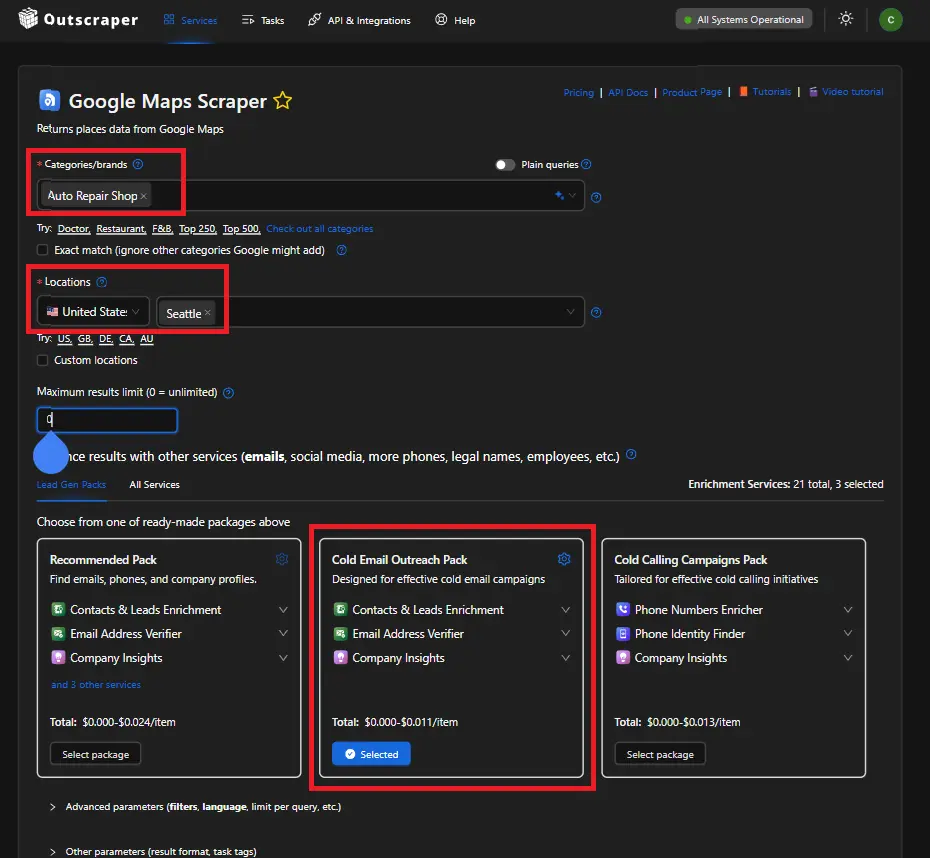
Use Outscraper to extract niche-specific leads. For instance, an auto repair shop in Seattle. Filters are based on categories/brands and location. Add enrichment for the specified needs, just as the Cold Email Enrichment Pack, which was designed for effective cold email campaigns.
Step 2. Clean the Dataset
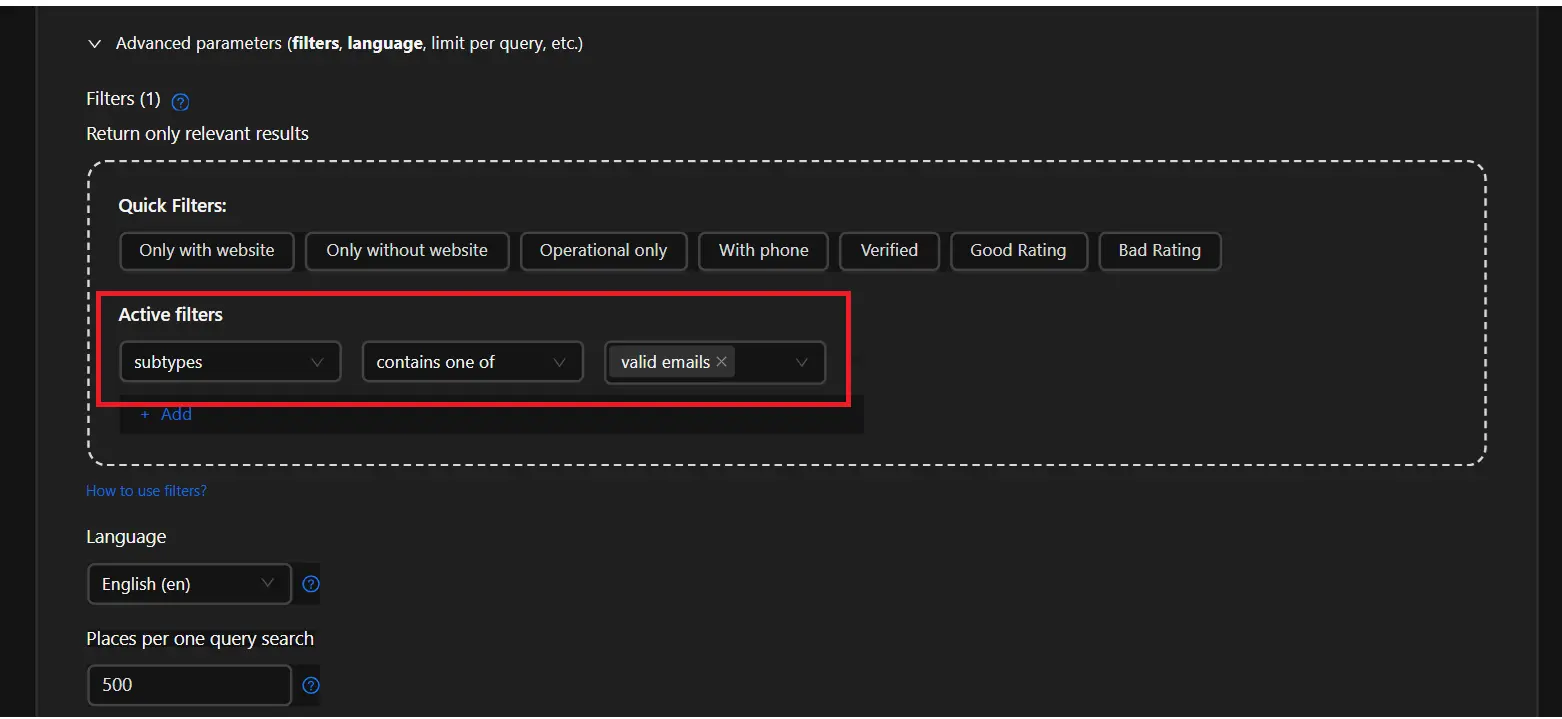
While using Google Maps Scraper, there is an advanced parameter that users may use. Additional filters “(subtypes, contains one of, or valid email)” users may use it or not, but even without additional filters, it was designed to produce a clean and enriched dataset.
Step 3. Mailbox Verification
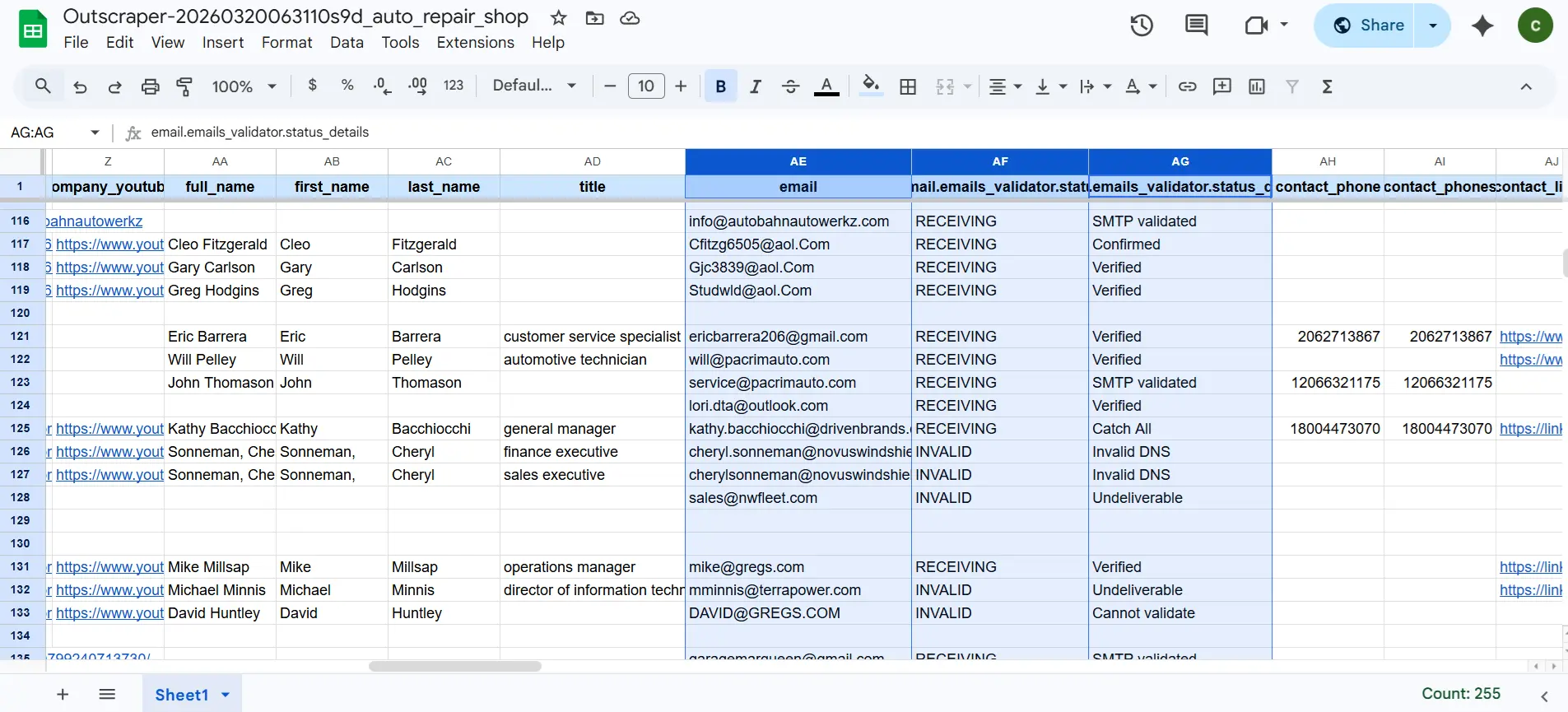
Verify whether the specific mailbox exists and is active. Outscraper employs various techniques, including SMTP checks, to determine if the mailbox is reachable. This step is crucial as it helps identify temporary issues, such as full mailboxes, as well as permanently invalid addresses.
Step 4. Segment Risky Emails
Check all and unknown emails carry risk. Send to them in smaller batches or exclude them. This step lowers the risk of a higher bounce rate on your emails.
Step 5. Warm up Your Sending Domain
Domain warming refers to the gradual increase in the volume of emails sent from a new or inactive domain. This process is essential for establishing a good sender reputation with ISPs, which can significantly impact your email deliverability. A well-warmed domain is less likely to be marked as spam, ensuring that your messages reach your intended audience.
Step 6. Monitor Bounce Rate Per Campaign
Monitoring bounce rates per campaign is essential for understanding user engagement and optimizing marketing strategies. By setting up proper tracking, analyzing data, and implementing actionable insights, marketers can significantly improve their campaign performance. A lower bounce rate not only indicates better engagement but also contributes to higher conversion rates and overall success.
Conclusion
Email validation supports deliverability, sender reputation, and campaign performance. High bounce rates come from invalid addresses, poor list quality, domain issues, and a lack of validation at entry. Hard bounces signal permanent problems in your list. Soft bounces show temporary issues but still affect performance if ignored.
Reducing bounce rates to under 2 percent depends on strict validation practices. Double opt-in confirms real users. Real-time validation blocks invalid entries before they enter your system. Regular list cleaning removes inactive and risky contacts. Monitoring engagement metrics helps you detect problems early. Segmenting your list improves targeting and reduces unnecessary sends.
Data quality drives results. Clean and verified email lists lead to higher open rates, better engagement, and a stable sender reputation. Without validation, campaigns waste budget and risk account penalties.
Outscraper supports this process by improving data quality at the source. You extract targeted leads, apply filters, and work with structured datasets before validation. You verify mailboxes, segment risky emails, and monitor campaign performance using cleaner inputs.
FAQ
Most frequent questions and answers
Email validation is the process of verifying that an email address is correctly formatted, exists, and can receive messages.
Bounce rates measure the percentage of emails that fail to deliver, directly signaling email list quality to ISPs.
A 2% bounce rate threshold is significant because it marks the upper limit for “healthy” email lists, beyond which ISPs like Gmail flag senders for poor hygiene. Exceeding it risks sender reputation damage, throttling future emails, and revenue loss from undelivered campaigns.
Cold email outreach involves sending unsolicited, personalized emails to prospects without prior relationships to spark business conversations.
Verified contact lists are databases of customer or prospect contact information such as emails, phone numbers, and company details, that have undergone validation processes to ensure accuracy, deliverability, and relevance.
Reputation management involves monitoring, influencing, and maintaining a positive public image for individuals, businesses, or brands, particularly online.
Sentiment analysis determines the emotional tone behind text data, classifying it as positive, negative, or neutral. Businesses apply it to customer feedback, social media, and reviews to gauge opinions and detect trends