Table of Contents
Introduction
The process of acquiring business email addresses at scale from Google Maps presents both an opportunity and significant challenges , especially in finding qualified leads using business emails. While Google Maps serves as a source of verified businesses, complete with location details and phone numbers, it traditionally falls short in providing direct access to corporate email addresses and social media contacts.
This limitation forces sales and marketing professionals to resort to manually extracting contact information from individual business websites , resulting in a time-consuming and inefficient approach to data collection. Thus, Google Maps only allows a 120 business result limit per query, leading such professionals to alternative methods other than manual data extraction.
In this article, Google Maps business data extraction is maximized by using automation tools capable of enriching basic data with comprehensive contact details. Web scraping tools like Outscraper extract business insights like business name, phone numbers, addresses, emails, etc. , and social media platforms directly within the Google Maps interface or export bulk data sets for large-scale campaigns.
Additionally, API Integrations help improve accuracy and reduce risks through ethical scraping. These innovations collectively enable organizations to transition from labor-intensive manual processes to efficient, scalable workflows, thus unlocking substantial potential for targeted outreach, market research, and competitive analysis.
Understanding the Value of Business Emails
Business emails serve as a digital business card used in sales, operations, branding, customer support, hiring, communications, and more.
Despite the rise of instant messaging and other communication platforms, business emails continue to be a cornerstone of professional interaction. Their enduring relevance stems from several key factors:
- Formal Communication: Emails provide a documented record of communication, making them ideal for formal announcements, contracts, and other important business matters.
- Convenience: Emails allow recipients to respond at their convenience, minimizing interruptions and promoting focused work.
- Wide Reach: Emails can be easily sent to multiple recipients, facilitating efficient communication with teams, clients, and stakeholders.
- Accessibility: Emails can be accessed from various devices, ensuring seamless communication regardless of location.
Business emails play a significant role in enhancing communication and collaboration among team members, preventing misunderstandings, and conveying information more accurately, ultimately leading to effective collaboration.
Methods for Finding Business Emails from Google Maps
Manual Searching
The most basic method involves manually visiting each business listing on Google Maps and searching for an email address on their website.
- Company Website Review
- Google Search Queries
- Google Maps Profile Inspection
- Social Media Page Checks
- PDF and Document Search
- Validation Before Use
- Pattern Confirmation
Using Google Search Operators
Google Search Operators can help you find email addresses associated with specific websites more efficiently. It also helps to find business emails hidden in public pages, documents, and subdomains.
- Basic Site Operator
- Finding Emails With the “@” Symbol
- Targeting Contact Pages
- Searching for Role-Based Emails
- Google Maps Related Searches
Email Finder Tools
Email finder tools help you locate business emails quickly from public data. You enter a domain, name, or company.
- Hunter.io: Allows you to find email addresses associated with a website domain.
- Snov.io: Offers email finding and verification services.
- Apollo.io: Provides a comprehensive sales intelligence platform with email finding capabilities.
- Clearbit: Enriches business data and helps find email addresses.
Web Scraping
Web Scraping involves using automated scripts or software to extract data from websites. This method can be used to extract email addresses from Google Maps listings and business websites at scale.
- No Code Scrapers
- Code-Based Scrapers
- API Based Scrapers
Effective Strategies For Data Extraction
There are effective strategies for data extraction, especially if your primary source is Google Maps, which covers 200+ million business listings. These strategies give a substantial dataset, crucial for having a solid network of qualified leads.
Define Your Goals , Data Requirements , and Compliance Boundaries
Establishing clear goals, data necessities, and compliance boundaries forms the cornerstone of any effort involving Google Maps email scraping, especially when attempting to find business emails at scale. The first consideration is to define precisely what information is essential; businesses should prioritise data that is publicly accessible and relevant, such as business names, addresses, and websites.
Compliance with legal considerations like GDPR and CCPA remains critical, particularly when the data is used for outreach purposes. This restricts extraction to publicly available business details and prohibits scraping personal user data, especially from reviews, unless there’s an evident legitimate interest.
Time investment is another crucial factor: manually hunting for emails can consume 1 to 2 minutes per business, and, given Google Maps’ 120-result limit per query, completing one search can easily take a couple of hours, highlighting why automation is becoming increasingly integrated into lead generation; despite this, many teams still rely on manual methods, which influences decisions about scale and tool choice.
Balancing ethical considerations and operational efficiency demands a thorough assessment of these parameters before moving forward with data acquisition strategies. These foundational elements set the stage for maximizing tools and techniques designed to build targeted Google Maps searches and effectively collect business intelligence.
Business Growth Through Targeted Outreach
Building targeted outreach through Google Maps searches and collecting business insights. Rather than relying on manual workflows or the limited Google Maps and Google Places API, a web scraping tool such as Outscraper offers a more scalable alternative by enabling multiple search terms, locations, and languages simultaneously.
Users can set a maximum number of results per term and apply filters such as categories. This is particularly advantageous for lead generation efforts that prioritize businesses with active domains.
Additionally, spatial targeting plays a significant role in targeting specific areas that address needs, reduce noise, and improve data relevance.
Extract and Enrich Emails From Websites at Scale
In extracting and enriching emails from websites at scale, Outscraper took the role as a powerful tool used for web scraping and data extraction that offers data extraction from the web. Thus, extracting email addresses from websites, along with relevant data points that can be used to enrich the extracted emails. This is useful for lead generation, market research, data analysis, and building contact lists.
Key Features for Email Extraction
Outscraper provides several features that make it well-suited for email extraction at scale:
- Website Scraping: Outscraper can check entire websites or specific pages to identify and extract email addresses.
- Data Enrichment: Outscraper can enrich extracted email addresses with additional information, such as company name, website URL, social media profiles, and employee details.
- Scalability: The platform is designed to handle large-scale extraction tasks, allowing you to process thousands or even millions of websites efficiently.
- API Access: Outscraper offers an API that allows you to integrate email extraction into your own applications and workflows.
- Data Export: Extracted data can be exported in various formats, including CSV, JSON, and Excel, making it easy to integrate with other tools and systems.
Data Enrichment
Data enrichment is a feature of Outscraper that can be attached or not.
Several of which can add more depth and value to the data extracted.
Lists of Enrichments Available:
- Contacts & Leads Enrichment: Finds contacts for each company, adding emails, phone numbers, full names, job titles, and social links.
- Company Insights: Finds company firmographics such as revenue, size, founding year, public status, etc
- Phone Identity Finder: Returns insights about phone number owners (name, address, etc.)
- SimilarWeb Scraper: Provides web data for domains, including traffic statistics, engagement metrics, and audience insights
- Phone Numbers Enricher: Returns phone carrier data (name/type), validates phones, ensures message deliverability
- Chain Info: Identifies if a business is part of a chain, adding a true/false indication to your data for smarter targeting
- BuiltWith Scraper: Returns detailed information about a website’s tech stack
- Fastbackgroundcheck Addresses Scraper: Returns insights about addresses and their residents
- Google Maps Reviews Sentiment Analysis: Analyzes reviews and comments into clear, actionable insights.
- Google Maps Reviews Summary: Summarizes reviews and comments to uncover sentiment and key insights.
- Trustpilot Scraper: Returns data from a list of businesses
- Trustpilot Reviews Sentiment Analysis: Analyzes reviews and comments into clear, actionable insights.
- Trustpilot Reviews Summary: Summarizes reviews and comments to uncover sentiment and key insights.
- Whitepages Addresses Scraper: Returns insights about addresses and their residents
- Geocoding: Translates human-readable addresses into locations on the map (latitude, longitude)
- Emails & Contacts Scraper: Finds emails, social links, phones, and other contacts from websites
Getting Business Emails Using Outscraper
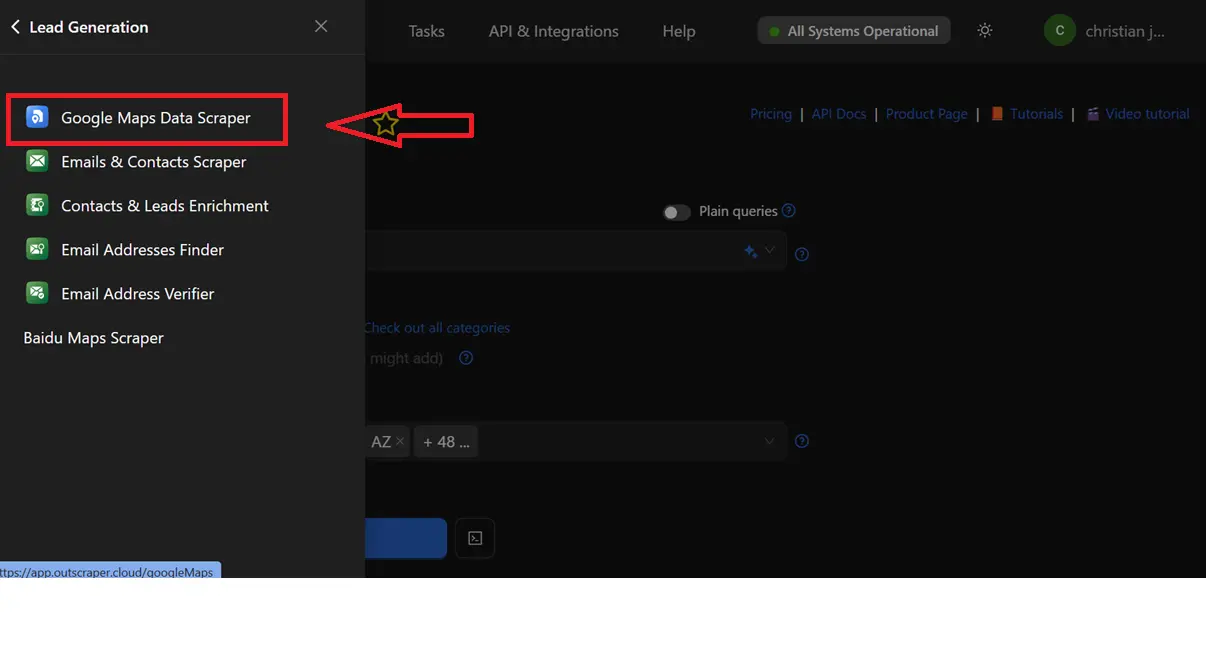
Step 1: Choose Google Maps Data Scraper
Choose Google Maps Data Scraper from a variety of services offered by Outscraper. Google Maps Data Scraper, Emails & Contacts Scraper, Contacts & Leads Enrichment, Email Addresses Finder, Email Address Verifier, Baidu Maps Scraper, and more.
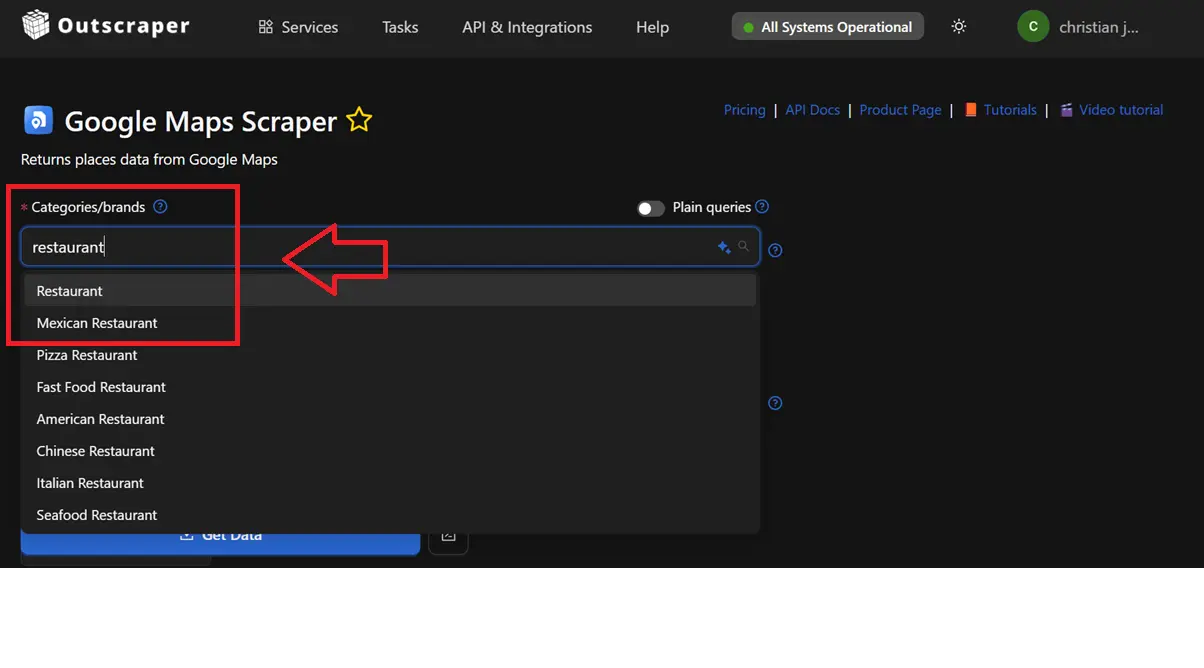
Step 2: Identify Categories/ Brands
Identify Categories/ Brands (Doctor, Restaurant, F&B, Top 250,
Top 500, etc.). It depends on each business’s needs and preferences. It helps pinpoint which industry should be scraped.
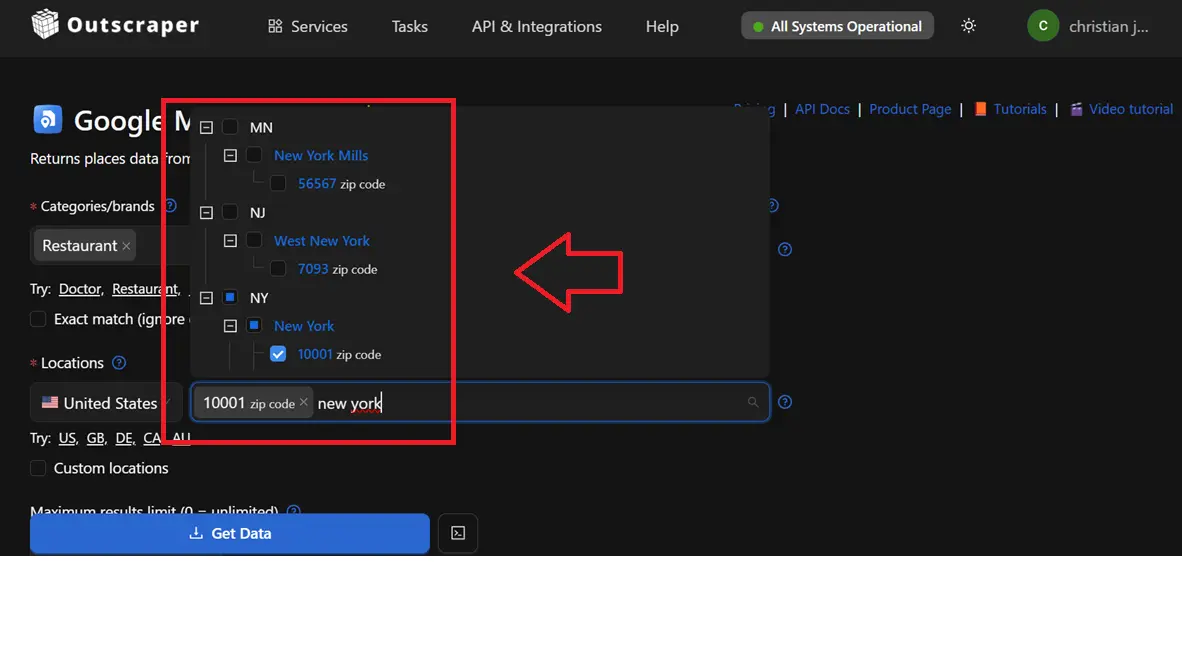
Step 3: Select Location
Select Location (US, GB, DE, CA, AU). It may include the city, zip code, and country. This focuses the scope based on the selected location.
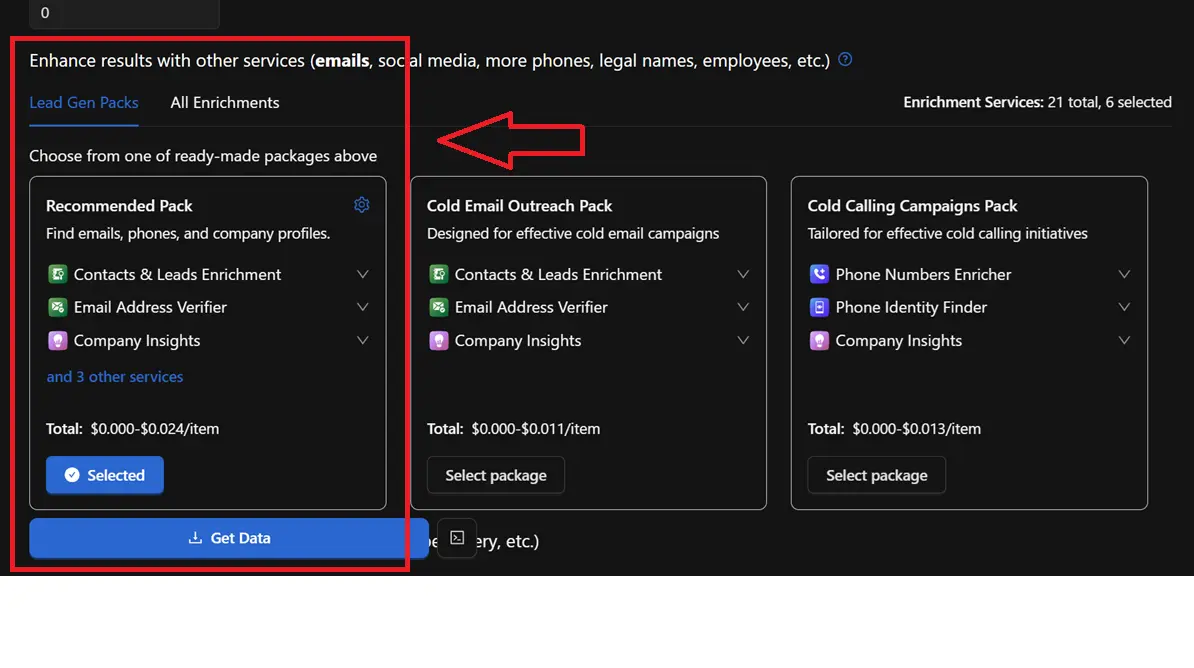
Step 4: Include Enrichments
Include Enrichments that can be selected individually, or preferably, clients may choose from one of the ready-made packages or all of the enrichment packages.
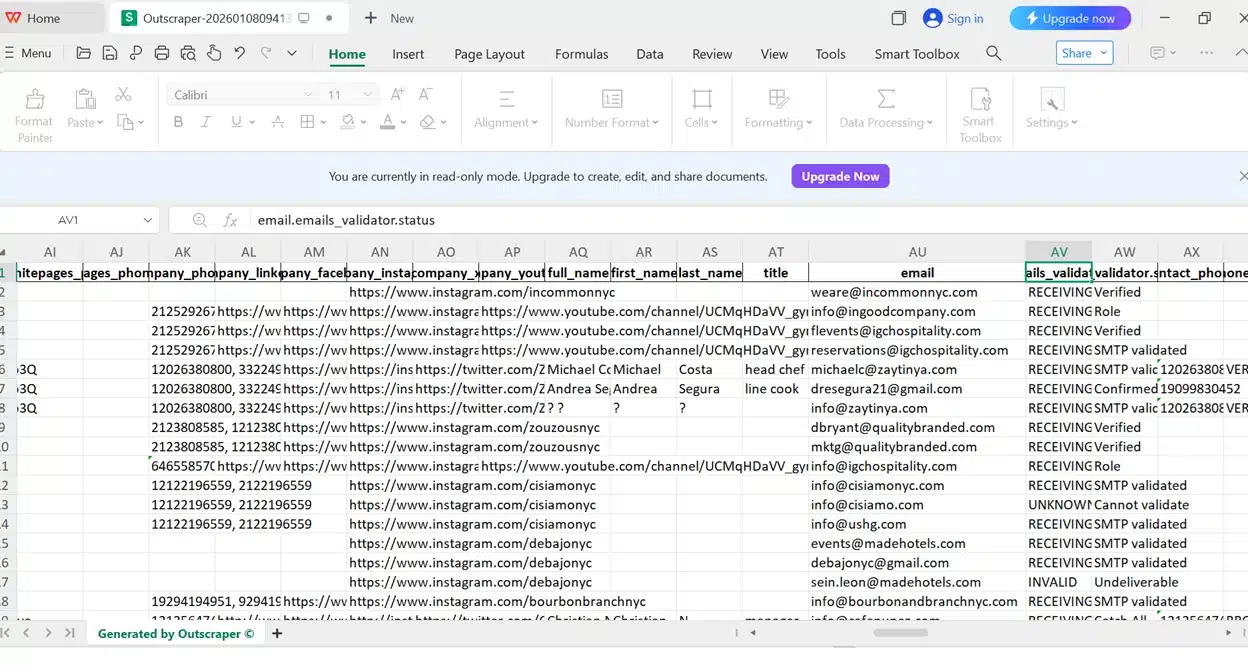
Step 5: Get Data
Get Data is the process of downloading the dataset into formats XLSX, CSV, JSON, or Parquet.
Conclusion
Finding business emails from Google Maps at scale depends on moving beyond manual collection and limited query results. The article shows how business emails remain a core asset for sales, marketing, operations, and professional communication, despite changes in messaging tools. Manual searching, search operators, and email finder tools offer value, yet they demand time and restrict scale, especially with Google Maps result limits.
Automation through web scraping and API based tools addresses these limits by extracting and enriching publicly available business data across locations and categories. Defined goals, clear compliance boundaries, and respect for data protection rules shape responsible extraction. Tools such as Outscraper support large-scale data extraction by combining Google Maps data scraping, website email extraction, enrichment features, and flexible export formats.
It is necessary to identify categories for effective targeting, location filtering, enrichment selection, and scalable extraction to replace slow manual processes with structured datasets suited for outreach, research, and competitive analysis. This approach aligns efficiency with ethical use and supports consistent business growth using Outscraper as your web scraping tool.
FAQ
Most frequent questions and answers
Business emails refer to professional email addresses tied to a custom domain, which enhances credibility and brand recognition for companies.
Business data encompasses information collected and stored by organizations to support operations, decision-making, and strategy. Content
Yes. You can use Emails & Contacts Scraper along with Google Maps scraper to enrich the data from Google. In order to do so, select “Emails & Contacts Scraper” in the “Enrich by other services” section on the Google Maps Scraper page.

Negative reviews signal customer dissatisfaction but can also enhance authenticity and drive sales from discerning buyers. They impact revenue by deterring impulse purchases while offering opportunities for improvement and engagement.
Qualifying opportunities from negative reviews involves scraping feedback for pain points, prioritizing high-intent signals like recent complaints, and personalizing outreach to convert dissatisfied businesses into leads.
Reputation management is the practice of monitoring, influencing, and improving public perception of a business or brand, especially online through reviews and social media.
Google Maps serves as a public mapping platform providing geospatial data on businesses, landmarks, and properties, including user-generated details like photos, reviews, and contact information, which supports lead generation in digital marketing
No. All scraping activities occur on Outscraper servers, ensuring that your IP address is not utilized for data scraping. You can close your computer an the scraping task will still be running.
An API is a tool that lets you access Google Maps data automatically. With a scraper API, you can quickly gather the information you need.