Table of Contents
Adding advanced local business directory features became a data-cleaning problem before it became a website update.
I found that out after collecting a new set of Chicago dental clinic records with Outscraper. The export contained 930 rows but only 500 unique Google Place IDs because Leads & Contacts Enrichment returned separate rows for some emails and professional contacts.
Uploading all 930 rows without checking them first risked creating repeated clinic listings and exposing fields that did not belong in a public directory.
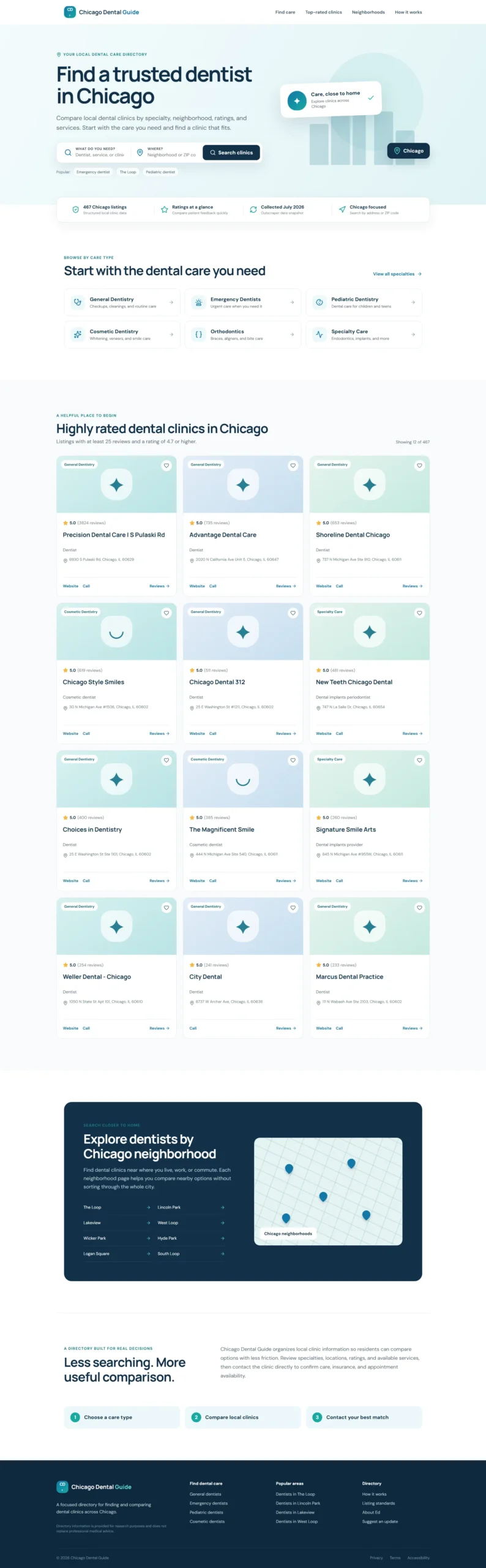
In the first part of this project, I used ChatGPT Work and an Outscraper JSON export to build a searchable directory with 467 qualifying dental listings. Visitors searched by clinic name, category, address, or ZIP code and compare available business details.
The original setup is covered in How to Build a Local Business Directory in 6 Simple Steps with Outscraper.
For this second part, I grouped the repeated enrichment rows and reapplied the Chicago, operating-status, dental-category, and Place ID rules. This left 475 clinic records for the updated directory.
I then used ChatGPT Work to add reusable clinic pages, more search controls, pagination, a multi-tag category system, and an interactive map. Instead of replacing the original Chicago Dental Guide, I published the advanced version as a separate updated directory.
Quick Answer: How to Improve a Local Business Directory
- Group the 930 source rows by Google Place ID.
- Create one public record for each of the 500 unique clinics.
- Keep enrichment emails and person-level contacts in a private file.
- Reapply the directory rules and retain 475 Chicago clinics.
- Connect the 475 cleaned public records to the updated directory.
- Add clinic pages, filters, sorting, pagination, category groups, and a map.
- Test the updated build, fix publishing problems, and publish it as a separate public directory.
Want to collect local business data for your directory? Use the Outscraper Google Maps Scraper to search category and location.
Use Outscraper Google Maps Scraper to collect public business data by category and location, then review the records before adding them to your directory.

What Changed After the First Directory Build
The first Chicago Dental Guide showed that a local directory can run from a cleaned JSON file.
I started with 500 Outscraper records and kept 467 listings that matched the first directory’s rules.
What the First Directory Already Included
Visitors could search by:
- clinic name;
- dental category;
- address;
- Chicago ZIP code.
The listing cards displayed available ratings, review counts, phone numbers, websites, and review links.
The site also included dental-category shortcuts, location browsing, highly rated listings, and a responsive layout for desktop and mobile.
The full collection, filtering, and publishing process is covered in the first local business directory tutorial.
Why the Directory Needed a Second Update
The first version still had clear limits.
It did not include:
- a working map with clinic markers;
- individual clinic pages;
- pagination;
- detailed filters;
- consistent opening-hours fields;
- booking links;
- structured area labels.
The original prepared file also lacked the coordinates needed for a real map. Its location searches depended mainly on full addresses and ZIP codes.
For the second collection, I kept the 500-result limit and the operational-only setting, then added Leads & Contacts Enrichment.
The updated export included coordinates, ZIP codes, area labels, photos, working hours, booking links, company social profiles, and person-level enrichment fields.
The enrichment emails and professional contact details were treated as private data. They were not added to the public clinic file or sent to the browser.
The source field called county also needed different wording. It contained values such as West Loop rather than Illinois counties, so I renamed it area_label in the prepared data.
Clean and Normalize the Updated Outscraper Data
Why 930 Rows Did Not Mean 930 Clinics
The new export contained:
- 930 source rows;
- 500 unique Google Place IDs;
- 430 additional enrichment rows;
- no missing Place IDs.
The 500 clinics were distributed like this:
- 247 clinics appeared in one row;
- 76 clinics appeared in two rows;
- 177 clinics appeared in three rows.
The repeated rows came from Leads & Contacts Enrichment. When several emails or professional contacts were found for one clinic, the export returned separate rows for those results.
The clinic-level fields remained consistent within each Place ID. The name, address, website, rating, coordinates, hours, photo, booking link, and company social profiles did not conflict across the repeated rows.
That made it possible to create one main public record for each clinic.

Group Records by Google Place ID
I grouped the source records by place_id and created one clinic-level object for every unique business.
The public master file contained all 500 unique clinics with no repeated Place IDs.
Each public record stored the data in clearer sections, including:
- clinic identity and categories;
- structured address fields;
- ZIP code and area label;
- latitude and longitude;
- public phone number and website;
- rating and review count;
- opening hours;
- booking link;
- approved company-level fields.
I then reapplied the original directory rules. Each record needed to:
- have a Chicago location;
- be marked as operational;
- have a relevant dental category or subtype;
- have a unique Google Place ID.
This produced 475 directory-ready clinics. The other 25 records were excluded because they were outside Chicago.
The result was eight listings higher than the first directory’s 467-record count. That difference does not prove that eight new clinics opened. The two files came from separate data collections, so the returned businesses and available fields were not identical.
Separate Public Business Data From Private Contact Data
The enrichment export included both clinic-level data and person-level contact data. Those fields needed separate files.
The private fields included:
- full names;
- first and last names;
- job titles;
- enrichment emails;
- contact phone numbers;
- personal LinkedIn profiles;
- other person-level social links;
- enrichment-source fields.
After exact repeated contact objects were removed, 779 distinct contact objects remained in the private file.
Advanced directory features work best with clean, structured business data.
The email wording also needed care. I used Leads & Contacts Enrichment, but I did not use the separate Email Address Verifier.
The results should therefore be described as found enrichment emails, not verified emails. All of those email values remained private during this project.
The link review found 48 suspicious URL values. Instead of displaying uncertain links, I changed those public link fields to null until they can be checked manually.


Use Google Maps scraper to collect enriched business records of dentists in Chicago to populate your local directory.
Add Richer Clinic Profile Pages
In the updated directory, ChatGPT Work uses one reusable clinic-detail component instead of creating hundreds of separate pages manually.
Create One Reusable Page for Every Clinic
All 475 clinic records in the updated directory can open a unique detail route.
The routes follow this structure:
/clinics/<safe-clinic-slug>--<place-id>
The clinic name creates a readable slug, while the Google Place ID keeps each route unique.
The final project checks found:
- 475 clinic-card detail links;
- 475 unique routes;
- no route collisions;
- no broken generated detail links.
Each listing card also includes a Clinic Details link. The reusable component reads the route, finds the matching clinic in the public JSON, and displays its available business details.
Show Approved Public Fields
The clinic pages can display these public fields when they are present:
- clinic name;
- category and dental subtypes;
- full address;
- area label;
- ZIP code;
- clinic phone number;
- website;
- rating and review count;
- Google review link;
- Google Maps link;
- working hours;
- booking link;
- accessibility details.
The structured about data can also contain service, payment, appointment, parking, and accessibility attributes. Only selected details that fit a consumer-facing dental directory were added to the page.
The public dataset can contain photo URLs and company social-profile fields when they are available. I did not rely on those fields as core clinic-page features in this version.
Enrichment emails were also excluded because the export did not contain a separately reviewed public clinic-email field.
Hide Missing Sections and Broken Actions
Not every clinic has the same amount of data.
The updated public dataset contained:
- 125 clinics without websites;
- seven clinics without phone numbers;
- 82 clinics without review links;
- 300 clinics without booking links;
- 123 clinics without working-hours data.
The reusable page checks each field before displaying a section or button.
A clinic without a website does not show a website button. A clinic without hours or a booking link does not show empty Working Hours or Appointments sections.
An unknown clinic route displays a Clinic not found message and a link back to the directory instead of showing an empty page.
The updated build passed without JavaScript compilation errors.
Keep Individual Contact Details Outside Public Pages
The public clinic pages use clinic-level fields such as the phone number, website, address, hours, booking link, review link, and map link.
They do not use:
- named professional contacts;
- enrichment emails;
- job titles;
- direct contact phone numbers;
- personal social profiles;
- owner profile fields.
Privacy checks found no private enrichment fields in the public JSON, website source, or compiled browser files.
The clinic-detail routes have passed data, route, privacy, and build checks.
Improve Search, Filters, and Local Browsing
The first directory allowed visitors to search by clinic name, category, address, or ZIP code.
The updated directory adds more controls so visitors can narrow the 475 clinic records without loading every card on one page.

You can view the updated Chicago Dental Guide. The original directory remains unchanged. This directory is a research and comparison tool only. Business details can change, so visitors should confirm treatment options, insurance, availability, fees, and appointments directly with each clinic.
Add Filters, Sorting, Result Counts, and Pagination
The updated directory displays the number of clinics that match the active search and filters.
Visitors can narrow the records by:
- directory group;
- raw category or subtype;
- ZIP code;
- area label;
- minimum rating;
- minimum review count;
- website availability;
- booking-link availability;
- working-hours availability.
The sorting choices include:
- default order;
- clinic name A–Z;
- highest rating;
- highest review count.
The directory displays 12 clinic cards per page. This matches the existing three-column desktop card layout.
The unfiltered 475-record directory creates 40 pages. Tests confirmed that every clinic appeared exactly once across those pages, with no repeated cards, missing records, or broken clinic-detail links.
The directory returns to page one when a search, filter, or sorting choice changes.
It also keeps the active directory state when a visitor opens a clinic page and returns to the results.
A no-results search displays a clear message and a reset action instead of old cards or unusable pagination.
I did not add an Open Now filter. The opening-hours data is stored as display text rather than consistent, time-zone-aware schedule data, so the directory cannot calculate current availability reliably.
Use ZIP Codes and Area Labels for Local Browsing
ZIP filtering now reads the supplied postal_code field rather than extracting a ZIP code from the full address.
Four records contained valid nine-digit ZIP values without a ZIP+4 hyphen.
For example:
606021708
was changed for display to:
60602-1708
The first five digits are used for the main ZIP filter.
This correction changed the ZIP 60602 result from 64 clinics to 65. The other checked results included 34 clinics for ZIP 60607 and 60 for ZIP 60625.
For larger city searches, the guide to scraping businesses by ZIP code explains how location-based searches can help collect records across densely populated areas.
The former county field is displayed only as an area label. It is not presented as an Illinois county or a confirmed Chicago neighborhood.
During testing, the area filters returned:
- West Loop: 33 clinics;
- South Loop: 24 clinics;
- Chicago Loop: 92 clinics.
Let Clinics Match More Than One Directory Group
The updated directory uses a multi-tag care taxonomy instead of forcing every clinic into one category.
Each of the 475 public clinic records can belong to more than one directory group when its public category and subtype data support it.
The current directory includes:
- 413 General Dentistry memberships;
- 65 Pediatric Dentistry memberships;
- 166 Cosmetic Dentistry memberships;
- 71 Orthodontics memberships;
- 84 Emergency Dentistry memberships;
- 135 Specialty Care memberships.
These numbers do not add up to 475 because the groups overlap. A total of 197 clinics belong to more than one group.
Nineteen clinics do not have enough structured category information for one of these directory groups. They remain searchable in the full directory rather than being assigned to a care type based only on their business names.
A clinic that belongs to several groups still appears only once in the results for the selected group.
Connect the Filtered Results to an Interactive Map
I used ChatGPT Work to add an interactive map to the updated directory using
- Leaflet;
- Leaflet MarkerCluster;
- OpenStreetMap tiles.
This approach did not require a paid map API key.
The map follows the full filtered result set rather than the current pagination page.
The data tests returned matching clinic and marker totals:
- no filters: 475 clinics and 475 markers;
- ZIP 60602: 65 clinics and 65 markers;
- West Loop: 33 clinics and 33 markers;
- General Dentistry: 413 clinics and 413 markers;
- Emergency Dentistry: 84 clinics and 84 markers;
- one-clinic name search: one clinic and one marker;
- no-results search: zero clinics and zero markers.
The coordinate review found 47 shared-location groups containing 131 clinics. These often represented several dental practices in the same building.
Marker clustering and close-range marker separation keep those clinics as separate selectable records instead of hiding one behind another.
Each marker popup is designed to show approved public information:
- clinic name;
- address;
- rating and review count when available;
- clinic-detail link;
- Google Maps link.
The map uses the complete filtered result set rather than only the 12 clinics shown on the current pagination page. Clinic cards also include a Show on map action that moves to the correct location while preserving the active directory filters.
Outscraper also offers services for finding contact details, enriching existing records, exporting structured data, and connecting business-data workflows through the API.
Test the Advanced Local Business Directory Features and Fix Publishing Problems
Adding more features meant testing the data, routes, filters, map, and public files before publishing the updated directory.
I worked through the changes in separate stages to catch problems without replacing the original Chicago Dental Guide.
Add and Test One Feature at a Time
Before publication, I updated the project in this order:
- Group the 930 source rows by Place ID.
- Create separate public and private files.
- Reapply the original directory rules.
- Connect the 475 public clinic records to the updated build.
- Add reusable clinic-detail pages.
- Add filters, sorting, result counts, and pagination.
- Review and replace the original category logic.
- Add and check the interactive map.
This order helped me find data and logic problems before they reached the live website.
For example, it exposed:
- repeated enrichment rows;
- private contact fields mixed with public business fields;
- suspicious URLs;
- non-standard ZIP+4 values;
- category rules that hid valid specialties;
- records without enough structured data for shortcut groups.
What Passed Before Publication
Before publishing the updated directory, the project checks confirmed:
- 475 public clinics loaded;
- 475 unique Place IDs;
- no repeated clinic cards;
- no missing records across pagination;
- no broken generated clinic routes;
- no route collisions;
- no invalid map coordinates;
- no private enrichment fields in public files or browser assets;
- no JavaScript build errors.
The existing search behavior also remained available for clinic names, categories, addresses, and ZIP codes.
The build command completed successfully after the clinic-page, control, taxonomy, and map stages.
What Broke During Preview and Publishing
Previewing the updated directory caused some of the hardest problems in this project.
The isolated workspace failed to reliably expose the local Vite server. Vite failed while reading restricted network-interface information, so the browser was unable to reach the local preview.
I later created a hosted preview that returned a successful response but showed a blank page because the application had been packaged incorrectly.
Instead of replacing the original Chicago Dental Guide, I used ChatGPT Work to publish the advanced version as a separate public site. This kept the first directory unchanged while giving the updated version its own URL.
The updated directory is publicly accessible through a direct link, but it currently uses a noindex directive while the project is still being reviewed.
Compare Future Outscraper Exports by Place ID
Later Outscraper exports can be matched with the current records through the Google Place ID.
This is safer than matching only by clinic name. Business names, websites, phone numbers, and addresses can change or appear in different formats.
When collecting a new dataset, the Google Maps scraping getting started guide explains how to set categories, locations, result limits, and other task settings before running the export.
A later comparison can check changes in:
- rating and review count;
- phone number and website;
- address and category;
- operating status;
- opening hours;
- booking links;
- photos;
- approved public business fields;
- separately stored private contact records.
Suspicious or malformed links should remain outside the public file until they are checked.
A fresh export should also pass the same location, operating-status, category, Place ID, privacy, ZIP, URL, and missing-field checks before it is used to update the public directory.
Final Workflow for Updating a Local Business Directory
Use this workflow to move from a directory idea to a published website:
- Collect a new public-business-data export.
- Group repeated records by Google Place ID.
- Separate public business fields from private enrichment data.
- Reapply location, operating-status, and category rules.
- Test clinic pages, filters, pagination, map records, and missing fields.
- Publish the approved version without overwriting the previous directory until the update is confirmed.
Advanced directory features work best with clean, structured business data.
Use Outscraper Google Maps Scraper to collect records by category and location, then prepare the fields your directory needs.
FAQ
Most frequent questions and answers
A business can appear in several rows when Leads & Contacts Enrichment finds more than one email or professional contact for the same company.
In this project, 930 rows represented 500 unique Google Place IDs. The other 430 rows were additional enrichment results.
Grouping the records by place_id created one public clinic record for every business and prevented repeated clinic cards.
In this project, person-level contact information was kept outside the public directory. The published clinic records use public business fields such as addresses, websites, phone numbers, ratings, hours, booking links, and location data.
Yes. The first Chicago Dental Guide used a static JSON file with 467 qualifying listings. The updated public directory uses 475 normalized clinic records and supports search, clinic-detail pages, filters, sorting, pagination, category groups, and map-based browsing.
The timing depends on the directory and how quickly its business information changes. A monthly or quarterly review is a practical starting point for checking websites, phone numbers, ratings, hours, booking links, and operating status.
Not necessarily. ChatGPT Work helped with the website changes, while I defined the requirements, reviewed the data, tested the results, and documented the problems. More advanced projects may still need technical support for databases, integrations, or automated updates.
No. The original Chicago Dental Guide remains unchanged. The advanced version was published as a separate public directory with 475 normalized clinic records, additional filters, clinic-detail pages, pagination, multi-tag care groups, and map-based browsing.