विषयसूची
The Outscraper custom connector lets you use Outscraper directly inside ChatGPT. After setting it up, you can type @Outscraper in a new chat and run a business data search using a simple prompt.
This is useful for sales teams, agencies, and researchers who want to check local business data without manually copying results from Google Maps.
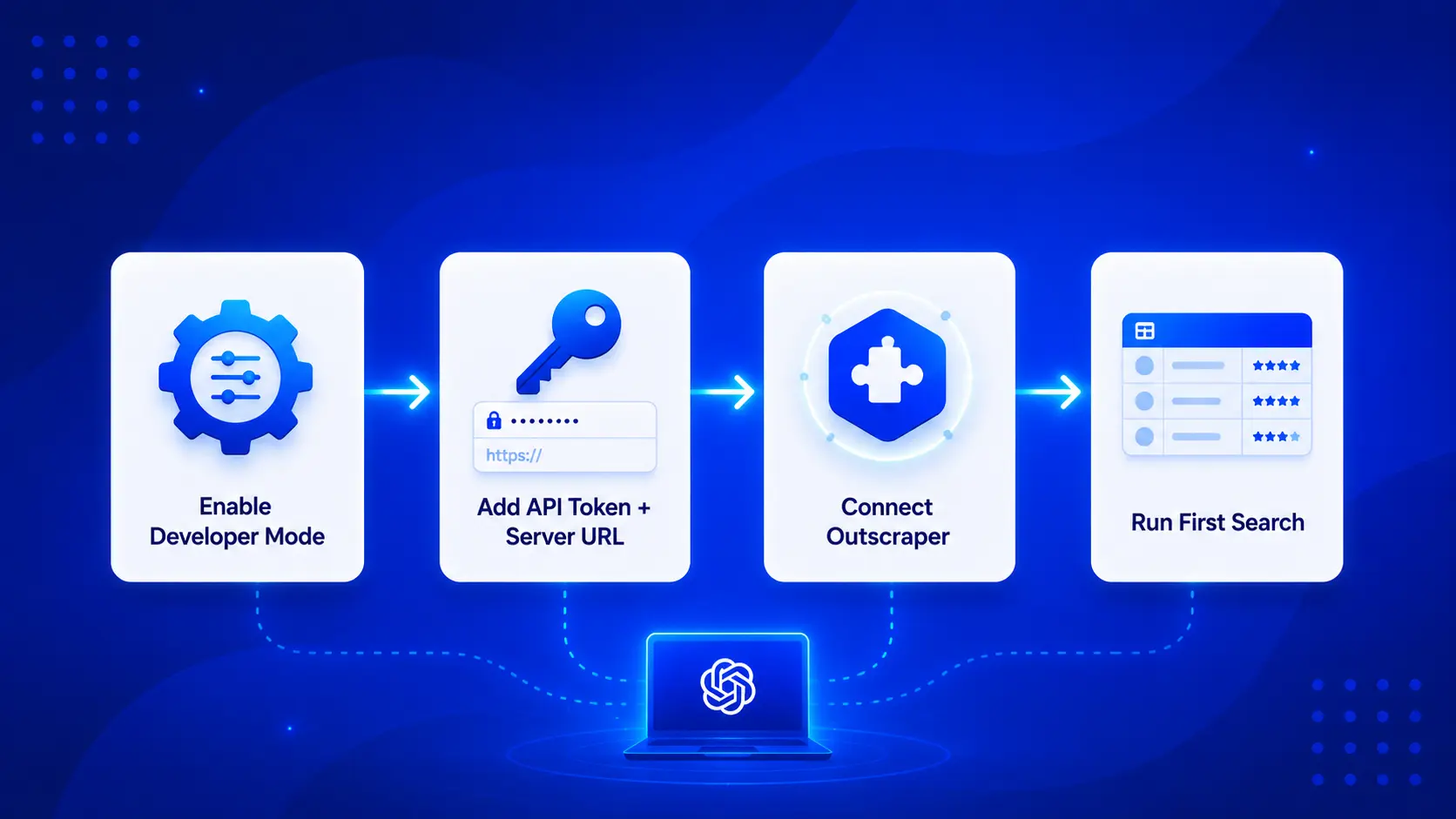
In this guide, I’ll walk through the setup process based on the technical instructions and actual testing. The steps include enabling Developer Mode in ChatGPT, creating a custom Outscraper app, adding your Outscraper API token, connecting the app, and running your first test search.
One important note before starting: make sure your Outscraper account has available funds or credits. In testing, the connector worked in the Free version of ChatGPT after refreshing the app information and opening a new chat, but the Outscraper account still needed enough balance to run the request.
Quick Answer: How to connect the Outscraper custom connector in ChatGPT
- खोलना Settings → Apps → Advanced Settings in ChatGPT and turn on Developer Mode.
- Click Create app या Add more, name the app आउटस्क्रैपर, and choose Server URL.
- Copy your Outscraper API token from API & Integrations → API Key.
- Add your token to this URL format:
https://mcp.outscraper.com/v1/mcp/YOUR_API_TOKEN, then set Authentication to No Auth. Click Create, then जुडिये. Start a new chat, select
@Outscraper, and run a test search.
What You Need Before Connecting the Outscraper Custom Connector in ChatGPT
Before you connect the Outscraper custom connector in ChatGPT, make sure you have access to your ChatGPT Apps settings and an active Outscraper account.
You also need your Outscraper API token. You can find it inside your Outscraper dashboard under API & Integrations → API Key. You can also review the Outscraper API Docs if you want to test requests before connecting the app to ChatGPT.
The connector uses a custom MCP server URL, so you may need to turn on Developer Mode in ChatGPT before the Create app option appears. This is an important step because the app setup may not be visible right away for all users.
Also, make sure your Outscraper account has available funds or credits. During testing, the connector worked after refreshing the app information and opening a new chat, but the request still needed an active Outscraper account balance to run properly.
Step 1: Enable Developer Mode in ChatGPT
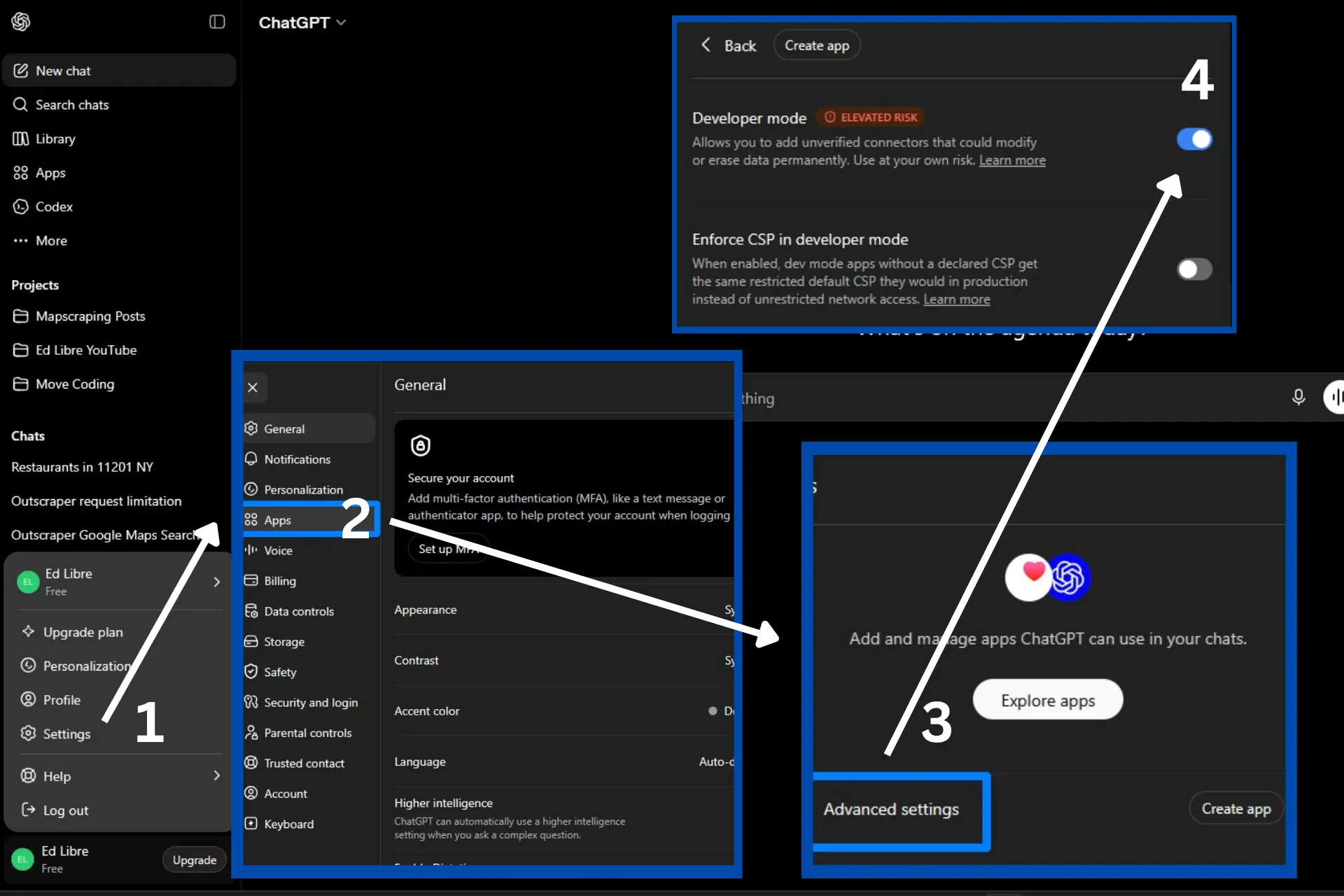
Open ChatGPT and click your profile or workspace name in the bottom-left corner. From the menu, select Settings, then go to Apps.
According to OpenAI’s Developer Mode documentation, Developer Mode can be turned on from Settings → Apps → Advanced Settings in ChatGPT.
If you do not see the option to create a custom app, open Advanced Settings inside the Apps section and turn on Developer Mode. After enabling it, go back to the Apps page.
This step is important because the Create app option may not appear until Developer Mode is enabled. In my test, this was the missing step that made the custom app setup visible.
Step 2: Create the Outscraper Custom App
After turning on Developer Mode, go back to the Apps section in ChatGPT. Click Create app या Add more, depending on what appears in your interface.
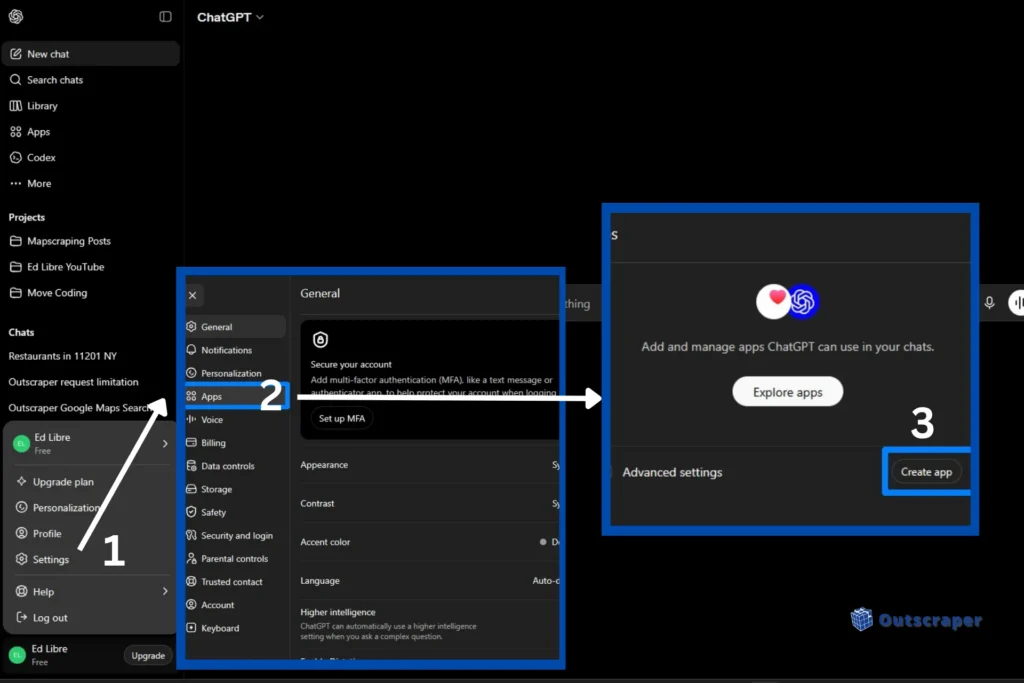
A New App setup window will open. In the name field, enter:
आउटस्क्रैपर
Next, choose Server URL as the connection type. This tells ChatGPT that the custom app will connect through the Outscraper MCP server URL instead of another connection method.
At this stage, keep the setup window open. You will need to copy your Outscraper API token in the next step and add it to the server URL field.
Step 3: Add Your Outscraper API Token and MCP URL
Now go to your Outscraper dashboard and copy your API token.
In Outscraper, open API & Integrations from the top navigation, then select एपीआई कुंजी. Find your API token and click Copy.
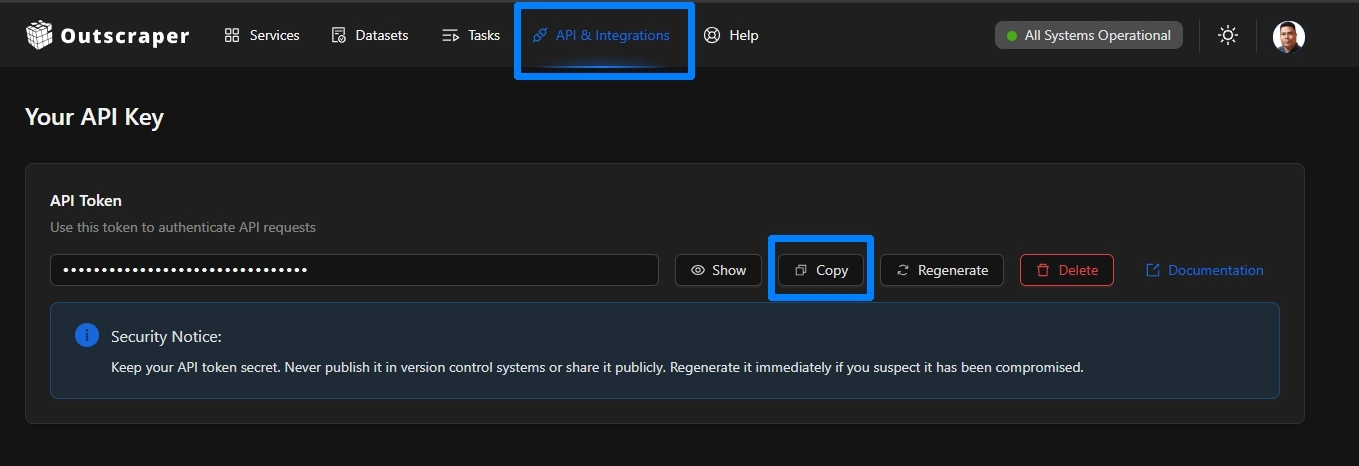
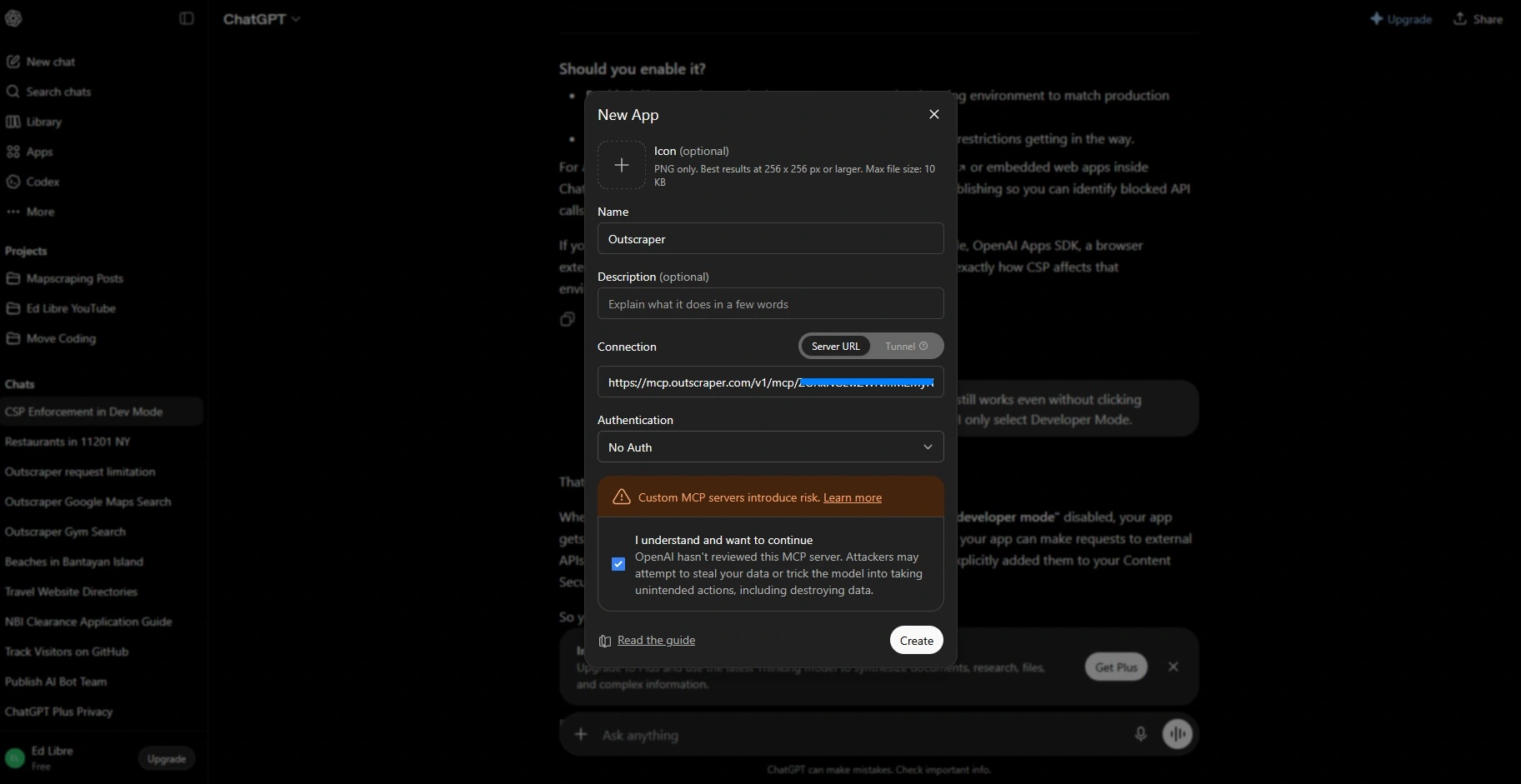
Return to the ChatGPT New App setup window. In the URL field, enter the Outscraper MCP server URL and place your API token after the final slash:
https://mcp.outscraper.com/v1/mcp/YOUR_API_TOKEN
For the authentication field, select No Auth.
This is correct because the API token is already included in the MCP server URL. Make sure there are no extra spaces before or after the token, because that can cause the connection to fail.
Try Outscraper requests directly in the API Playground. Test a small Google Maps search, or see the returned data before running the connector inside ChatGPT.
Step 4: Connect and Test Outscraper in ChatGPT
After adding the MCP server URL and selecting No Auth, scroll down and check the custom MCP server warning box. Then click Create.
A confirmation window should appear with the title Add Outscraper to ChatGPT. Click जुडिये to finish the setup.
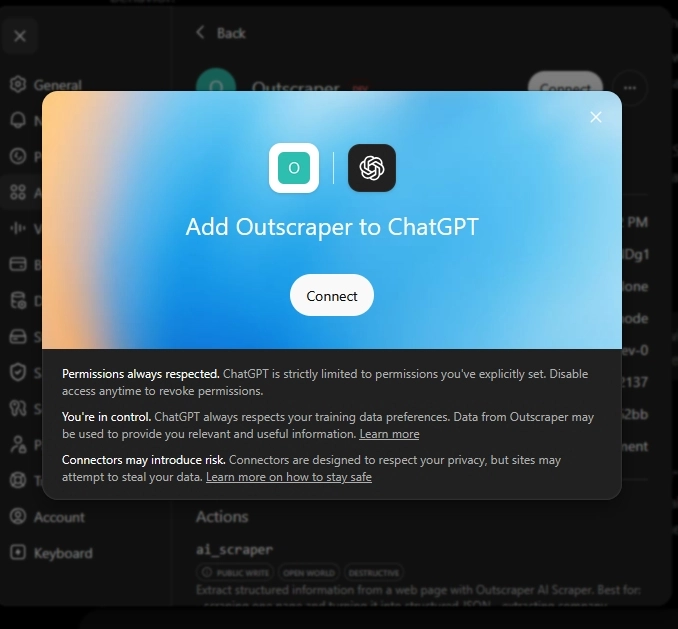
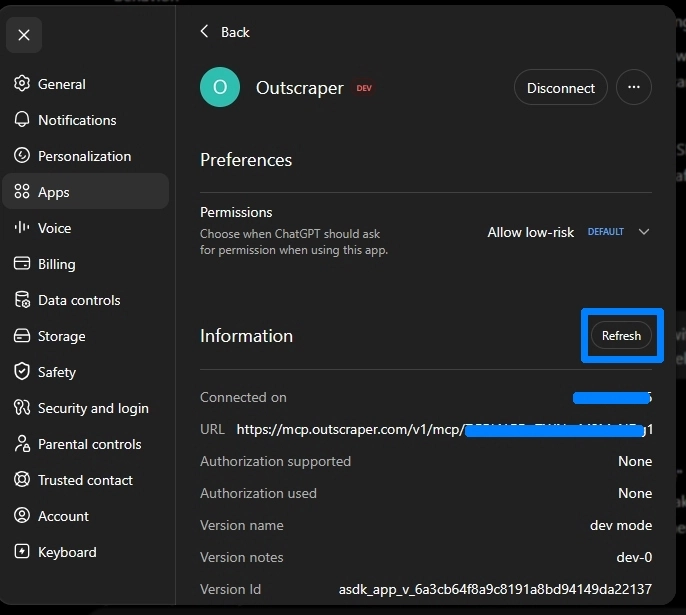
After finishing the setup, make sure to confirm that it was added successfully. Click Refresh and open a new chat window for your lead generation task.
Once Outscraper is connected, start a new chat. Type @ in the message box and select आउटस्क्रैपर from the list of available apps.
To test the connector, use the example prompt below:
@Outscraper find 10 restaurants, 11201, NY, US
@Outscraper find 10 dentists, Austin, TX, US
@Outscraper find 10 coffee shops, 90210, CA, US
This example uses local business data similar to what you can collect with the गूगल मैप्स स्क्रैपर.
ChatGPT should run the Outscraper connector and return a structured table. In this example, the results include restaurant name, type, rating, reviews, and phone number.
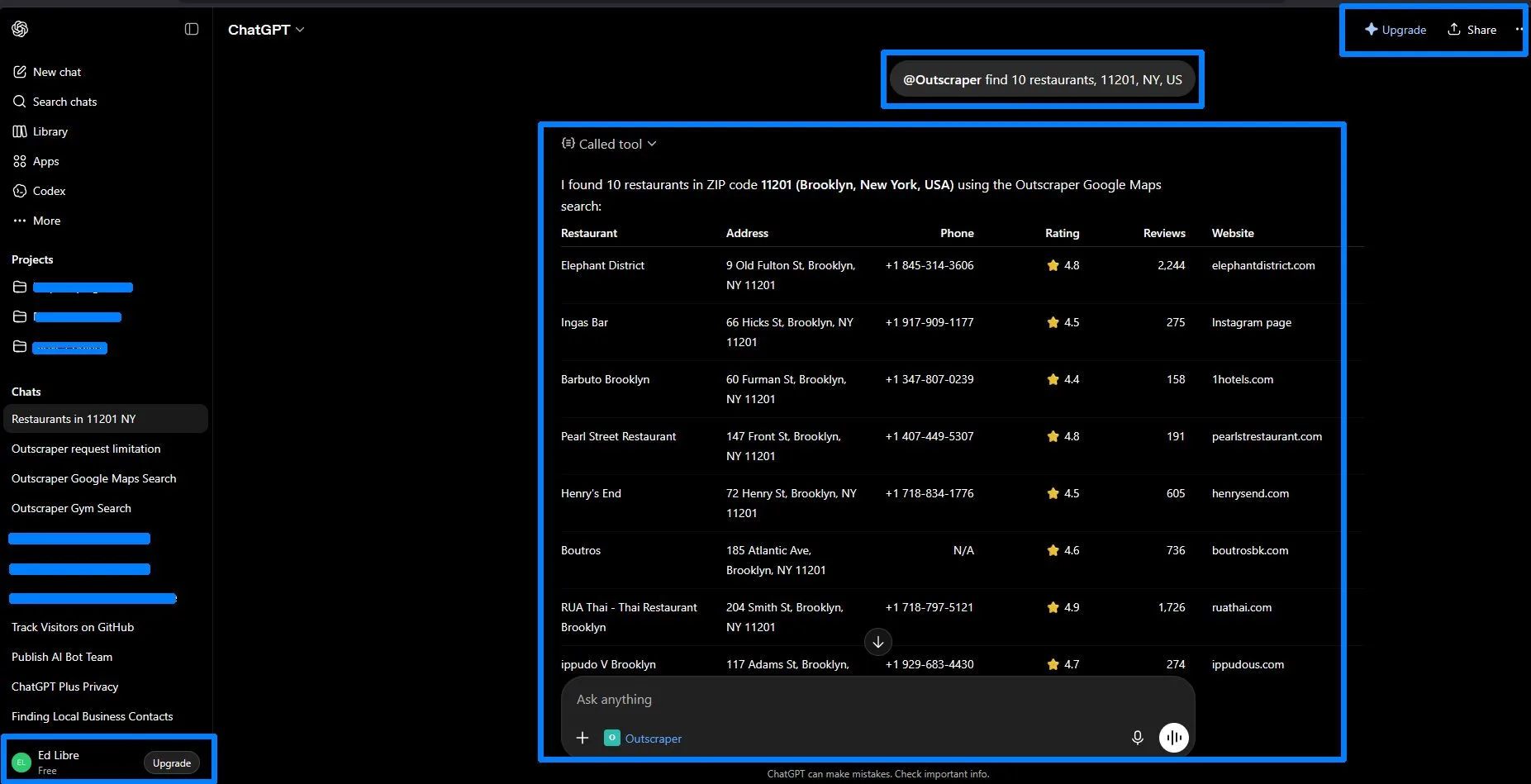
For lead generation, this gives you a quick way to review business category, location, ratings, review count, and phone number before deciding which businesses to contact.
Once your connector is added, start with a small search to confirm everything works. Make sure your Outscraper account has available funds or credits, then run your first @Outscraper prompt inside ChatGPT.
Troubleshooting Guide
If the Outscraper custom connector does not work right away, check these setup issues first. Most problems are related to Developer Mode, the MCP server URL, app refresh, authentication settings, or Outscraper account balance.
I do not see the Create app option
खोलना Settings → Apps → Advanced Settings and turn on Developer Mode. According to OpenAI’s ChatGPT Developer Mode guide, the Create app button only appears when Developer Mode is enabled.
After turning on Developer Mode, go back to the Apps section and check if Create app या Add more appears.
The connector is visible, but ChatGPT cannot run it
Try refreshing the app information first. In my test, the connector started working after I clicked the Refresh button in the app information area and opened a new chat.
After refreshing, start a new conversation, type @, select आउटस्क्रैपर, and run the test prompt again.
The connector does not connect
Check that the MCP server URL uses this format:
https://mcp.outscraper.com/v1/mcp/YOUR_API_TOKEN
Make sure your API token is placed after the final slash and that there are no extra spaces before or after it.
Authentication does not work
Make sure the authentication field is set to No Auth. The API token is already included in the server URL, so you do not need to add another authentication method.
The request does not return results
Check your Outscraper account balance. You can review the Outscraper pricing page to understand available credits and usage options.
Based on testing, the connector can work in the Free version of ChatGPT, but your Outscraper account still needs available funds or credits to run the request.
Do I need to turn on Enforce CSP?
You do not need to turn on Enforce CSP for the basic Outscraper custom connector setup. Based on testing, the connector worked with Developer Mode enabled whether Enforce CSP was on or off.
If you also use Claude, see the related guide on how to connect and use Outscraper in Claude. The setup still uses the Outscraper MCP server URL, but Claude has its own Connectors settings and testing flow.
Outscraper Custom Connector in ChatGPT: Final Setup Checklist
- Turn on Developer Mode in ChatGPT Apps settings.
- Create a new app and name it आउटस्क्रैपर.
- Select Server URL as the connection type.
- Add your Outscraper API token to this URL format:
https://mcp.outscraper.com/v1/mcp/YOUR_API_TOKEN. - Set Authentication to No Auth.
- Click Create, then जुडिये.
- Refresh the app information, open a new chat, select
@Outscraper, and run a small test search.
Use ChatGPT to request fresh local business data with simple prompts. Start with a small search, review the returned table, and adjust your prompt by category, location, or number of results.
सामान्य प्रश्न
अक्सर पूछे जाने वाले प्रश्न और उत्तर
Yes. You need an Outscraper API token to connect the Outscraper custom connector in ChatGPT. You can find it in your Outscraper dashboard under API & Integrations → API Key.
Use this format:
https://mcp.outscraper.com/v1/mcp/YOUR_API_TOKEN
Paste your Outscraper API token after the final slash.
Choose No Auth because the API token is already included in the MCP server URL. You do not need to add a separate authentication method inside ChatGPT.
You may need to enable Developer Mode first. Go to Settings → Apps → Advanced Settings, turn on Developer Mode, then return to the Apps section.
Based on testing, the connector worked on the Free version of ChatGPT after refreshing the app information and opening a new chat. You still need an Outscraper account with available funds or credits to run requests.
You can use the example below:
@Outscraper find 10 restaurants, 11201, NY, US
ChatGPT should return a structured table with business results. In the video example, the table included restaurant name, type, rating, reviews, and phone number.