विषयसूची
आप कर सकते हैं Google Places API का उपयोग करके एक व्यवसाय निर्देशिका बनाएँ व्यवसायों को खोजने और लिस्टिंग, मानचित्र, फ़िल्टर और स्थान पृष्ठों के लिए स्थान डेटा प्राप्त करने के लिए। व्यवसाय के नाम, पते, निर्देशांक, श्रेणियाँ, रेटिंग, खुलने का समय, फ़ोन नंबर और वेबसाइट सभी निर्देशिका संरचना का हिस्सा बन सकते हैं।.
API अनुरोध करने से पहले ही पहले निर्णय लिए जाते हैं। एक शहर के लिए रेस्तरां निर्देशिका बनाने वाले डेवलपर को स्वास्थ्य सेवा प्रदाताओं की देशव्यापी निर्देशिका बनाने वाली टीम से अलग डेटासेट की आवश्यकता होती है। श्रेणी, भौगोलिक कवरेज, लिस्टिंग फ़ील्ड और खोज सुविधाएँ यह निर्धारित करती हैं कि निर्देशिका को किस डेटा की आवश्यकता है और उन रिकॉर्ड्स को कैसे व्यवस्थित किया जाना चाहिए।.
इन आवश्यकताओं की पहले से योजना बनाना यह चुनना भी आसान बनाता है कि जैसे-जैसे निर्देशिका बढ़ेगी, व्यावसायिक डेटा कैसे एकत्रित, संरचित, प्रदर्शित और अद्यतन किया जाएगा।.
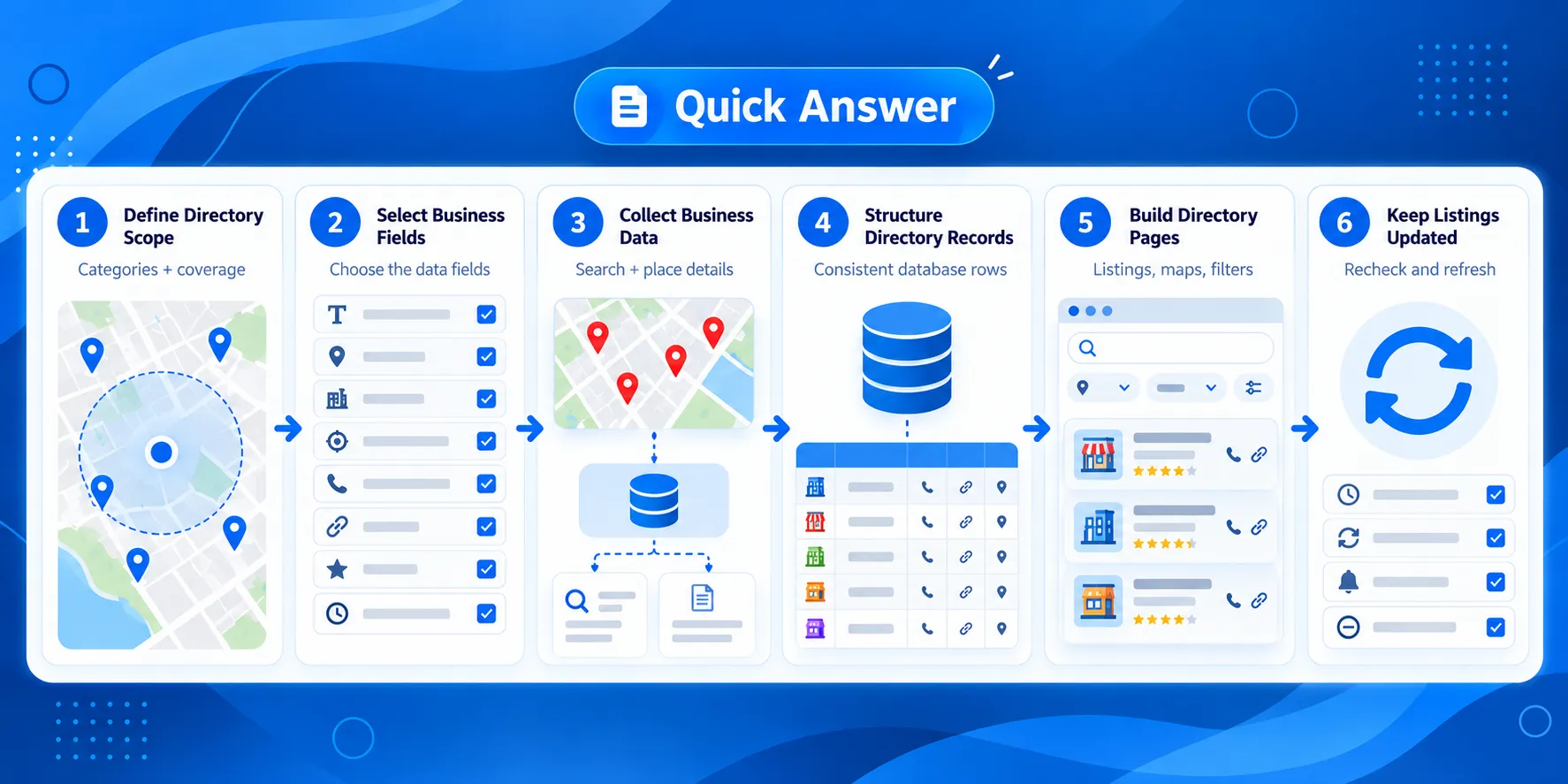
त्वरित उत्तर: Google Places API का उपयोग करके एक व्यवसाय निर्देशिका कैसे बनाएं
- निर्देशिका दायरा परिभाषित करें
- सूची के फ़ील्ड चुनें
- Google Places API के साथ व्यावसायिक डेटा एकत्र करें
- निर्देशिका रिकॉर्ड्स को संरचित करें
- निर्देशिका पृष्ठ बनाएँ
- व्यावसायिक डेटा को बनाए रखें और अपडेट करें।
Watch the Business Directory Workflow
This short walkthrough shows how to plan your directory, collect business data with Google Places API, structure the records, build directory pages, and keep the data updated.
The video summarizes how to build a business directory using Google Places API, from planning the data fields to publishing and updating the listings. The next sections explain each step in more detail.
आपकी निर्देशिका द्वारा कवर किए गए स्थानों और श्रेणियों के लिए Google Maps व्यवसाय डेटा एकत्र करें।.
Google Places API का उपयोग करके एक व्यवसाय निर्देशिका की योजना बनाएँ
एक स्पष्ट डेटा प्लान यह तय करना आसान बनाता है कि से क्या अनुरोध किया जाए। Google स्थल API और प्रत्येक परिणाम निर्देशिका में कैसे फिट होगा। तीन प्रश्नों से शुरू करें:
- कौन-कौन से व्यवसाय शामिल किए जाएंगे?
- निर्देशिका कहाँ तक कवर करेगी?
- प्रत्येक लिस्टिंग को किन जानकारियों की आवश्यकता है?
व्यावसायिक श्रेणी और भौगोलिक कवरेज परिभाषित करें
निर्देशिका की सीमाएँ निर्धारित करके शुरुआत करें। एक परियोजना एक ही शहर में एक व्यावसायिक श्रेणी को कवर कर सकती है, एक राज्य में कई संबंधित श्रेणियों को कवर कर सकती है, या कई देशों में एक विशिष्ट प्रकार के व्यवसाय को कवर कर सकती है।.
उदाहरण के लिए, एक निर्देशिका निम्नलिखित पर केंद्रित हो सकती है:
- शिकागो में दंत चिकित्सक
- कैलिफ़ोर्निया में कोवर्किंग स्पेस
- जर्मनी भर में ईवी चार्जिंग स्टेशन
- कई पर्यटन स्थलों में रेस्तरां
ये विकल्प इस बात को प्रभावित करते हैं कि आप स्थानों की खोज कैसे करते हैं और परिणामों को कैसे व्यवस्थित करते हैं। एक शहर निर्देशिका स्थान पृष्ठों पर बहुत अधिक निर्भर हो सकती है, जबकि एक बड़ी निर्देशिका को देश, राज्य, शहर और व्यवसाय श्रेणी के आधार पर एक पदानुक्रम की आवश्यकता हो सकती है।.
दायरा जल्दी निर्धारित करने से उन रिकॉर्ड्स को इकट्ठा करने से भी बचाव होता है जिनकी तैयार निर्देशिका में कोई स्पष्ट जगह नहीं होती।.
अपनी डायरेक्टरी के लिए व्यवसायिक क्षेत्रों का चयन करें
अगला कदम यह तय करना है कि प्रत्येक लिस्टिंग पर कौन-सी जानकारी दिखाई देनी चाहिए। सटीक फ़ील्ड्स इस बात पर निर्भर करते हैं कि लोग आपकी डायरेक्टरी में व्यवसायों को खोजने और तुलना करने के लिए क्या जानकारी चाहते हैं।.
सामान्य निर्देशिका फ़ील्ड्स में शामिल हो सकते हैं:
| क्षेत्र | संभावित निर्देशिका उपयोग |
|---|---|
| व्यवसाय का नाम | सूची शीर्षक |
| पता | स्थान की जानकारी |
| निर्देशांक | नक्शा प्लेसमेंट |
| व्यवसाय का प्रकार | श्रेणियाँ और फ़िल्टर |
| फ़ोन नंबर | संपर्क जानकारी |
| वेबसाइट | व्यावसायिक वेबसाइट लिंक |
| रेटिंग | व्यावसायिक जानकारी |
| खुलने का समय | उपलब्धता की जानकारी |
| स्थान आईडी | गूगल प्लेस का संदर्भ |
केवल इसलिए फ़ील्ड्स का अनुरोध करने से बचें क्योंकि वे उपलब्ध हैं। डायरेक्टरी अनुभव के लिए आवश्यक जानकारी से शुरुआत करें, फिर जब कोई फ़ील्ड स्पष्ट उद्देश्य पूरा करे तो उसे जोड़ें।.
सूचियाँ कैसे व्यवस्थित की जाएँगी, इसकी योजना बनाएँ
डेटा संरचना को यह दर्शाना चाहिए कि लोग निर्देशिका को कैसे ब्राउज़ करेंगे। अधिकांश परियोजनाओं को केवल व्यक्तिगत व्यवसाय पृष्ठों से अधिक की आवश्यकता होती है।.
एक निर्देशिका समान रिकॉर्डों को निम्नलिखित में व्यवस्थित कर सकती है:
- श्रेणी पृष्ठ, जैसे
/दंत चिकित्सक/ - स्थान पृष्ठ, जैसे
/शिकागो/ - श्रेणी-और-स्थान पृष्ठ, जैसे
/शिकागो/दंतचिकित्सक/ - individual business pages
- map or search results
Planning these page types before collecting data helps identify which fields will be needed for filtering, grouping, URLs, maps, and individual listings.
Once the directory scope, fields, and page structure are defined, you can translate those requirements into Google Places API searches and requests.
Collect Business Data With the Google Places API
Once you know which businesses and fields the directory needs, the next step is to retrieve matching places. The Google Places API provides different search methods depending on whether the directory starts with a search term, an area, or a known place.
For a business directory, the usual flow is to find matching businesses first and then request the details needed for each listing.
Search for Businesses With Text Search or Nearby Search
पाठ खोज works when the directory query combines a business type, name, or other search term with a location. A query such as शिकागो में दंत चिकित्सक या बर्लिन में कोवर्किंग स्पेस is a straightforward example.
Nearby Search is useful when the search starts from a geographic area. It can find places around a specified location and works well for directories where proximity is part of the search experience.
The right method depends on how the directory defines its coverage. A category-and-city directory may start with text-based searches, while a location-based application may rely more on coordinates and nearby searches.
For the initial collection, keep the query aligned with the scope defined earlier. If the directory covers dentists in Chicago, for example, the collection process should be designed around that category and location rather than gathering unrelated businesses and filtering them later.
Use Place IDs and Place Details
Search results provide a way to identify individual places. The स्थान आईडी is particularly useful because it provides a reference to a specific place that can be used when requesting more information about that business. You can use स्थान विवरण to request the business information needed for each directory listing.
After finding a place, the directory can request the details required for its listing. Depending on the fields requested and available for that place, these may include information such as the business name, address, coordinates, phone number, website, rating, and opening hours.
This creates a simple collection flow:

Keeping the Place ID with the directory record also gives the application a reference when it needs to work with that place again.
Request Only the Fields Your Directory Needs
The list of fields planned in the previous section should determine what the application requests.
A basic directory listing may need only a name, category, address, and coordinates. A detailed business page may also need a phone number, website, opening hours, rating, or other supported information.
Requesting fields based on their actual use keeps the API workflow tied to the directory rather than collecting information with no planned purpose.
It can also be useful to separate fields by page type. Search results may need a smaller set of information, while individual business pages can request additional details when required.
Google Places API Example for a Directory Search
The collection workflow could look like this:
- Search for dentists within the target location.
- Receive matching places from the Google Places API.
- Keep the Place ID and fields needed for the directory.
- Request additional place details when the listing requires them.
- Map the returned fields to the directory’s record structure.
- Use those records to populate dentist listings and relevant location or category pages.
The same pattern can be reused for other directories by changing the category, location, and fields. A directory for gyms in London or veterinary clinics in Sydney follows the same basic data flow even though the records and page requirements may differ.
At this point, the API responses still need to be converted into a consistent structure that the directory can use. The next step is deciding how each returned field maps to a business record and how those records support the directory’s pages.
Turn Google Places API Results Into Directory Listings
The business data returned by the Google Places API needs a consistent structure before it can be used across directory pages. Each place can become a directory record with fields for its identity, location, category, contact details, and other information selected for the project.
These records can also form a स्थानीय व्यवसाय डेटाबेस that stores the information used across the directory.
A consistent record structure also makes it easier to use the same business data across search results, category pages, location pages, maps, and individual listings.
Map Places API Fields to Your Directory Structure
Start by connecting each API field to a field in your directory.
For example, a directory record might contain:
| Directory Field | Place Data | Used For |
|---|---|---|
| व्यवसाय का नाम | Display name | Listing and business page |
| स्थान आईडी | Place identifier | Referencing the place |
| पता | Formatted address | Listing and location information |
| Latitude / longitude | Location coordinates | Maps and location searches |
| व्यवसाय का प्रकार | Place type | श्रेणियाँ और फ़िल्टर |
| फ़ोन नंबर | Phone field | संपर्क जानकारी |
| वेबसाइट | वेबसाइट क्षेत्र | व्यावसायिक वेबसाइट लिंक |
| रेटिंग | Rating field | Listing information |
| खुलने का समय | Opening-hours data | Business availability |
You do not need to display every stored field in every part of the directory. A search result might show the business name, category, address, and rating, while the individual listing page can display additional information.
Keeping the underlying records consistent allows different page types to use the fields they need.
Handle Missing Fields and Duplicate Businesses
Not every business record will contain the same information. One place may have a website, phone number, and opening hours, while another may return only basic location information.
The directory should account for missing values instead of assuming that every field will be present. For example, a listing template can hide the website button when no website is available rather than displaying an empty field.
Duplicate handling is also important when business data is collected through multiple searches. A dentist could appear in a search for शिकागो में दंत चिकित्सक and another search covering the surrounding area.
The Place ID can help identify records that refer to the same Google place. Before adding a new result, the application can check whether that Place ID already exists in the directory.
This prevents repeated searches from automatically creating repeated listings. A practical example is covered in our guide to handling duplicate records when updating a local business directory.
Build Category, Location, and Business Pages
Once the records have a consistent structure, the same dataset can support several parts of the directory.
A directory for dentists, for example, could use its records to create:
- a main dentist category page
- city or neighborhood pages
- dentist listings for each location
- individual business pages
- map results
- filters based on available business fields
A record for a dentist in Chicago could therefore appear on both a Dentists category page and a Chicago location page while linking to its own business listing.
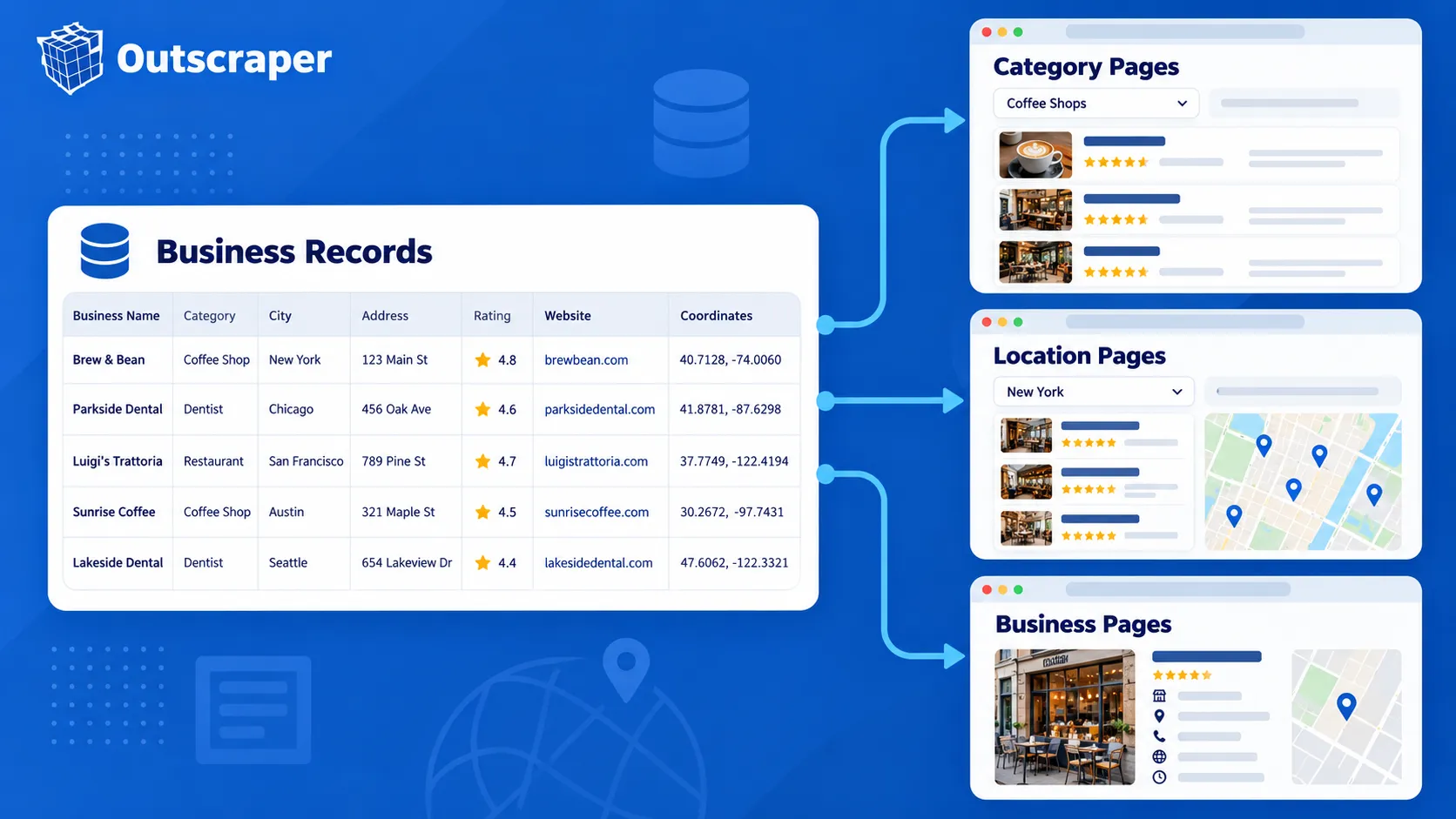
This structure also gives the directory room to grow. Adding another city or business category does not require creating a separate data format. New records can follow the same structure and be assigned to the appropriate category and location.
The result is a directory where the Google Places API supplies the place information and the application determines how those records are stored, grouped, and presented to visitors.
See how these records can be used to build a local business directory with search and structured business listings.
Handle Costs, Data Rules, and Directory Maintenance
As the directory grows, consider three things, API usage, Google’s data rules, and changes to business information.
Control API Requests and Field Usage
Places API (New) uses field masks to specify which information an API request should return. The fields requested can also affect the applicable billing tier.
Request only the fields the directory needs. A search page may use basic business and location information, while an individual listing may require additional fields such as a website, phone number, rating, or opening hours.
This keeps API requests focused and makes usage easier to manage as the number of listings grows.
Check the Rules for Storing Places Data
Review the current Google Maps Platform terms and Places API policies before deciding what information your directory will store.
Google has restrictions on caching and storing some Maps content. Place IDs can be stored, making them useful as references when your application needs to work with a place again.
Check the current requirements for data storage, attribution, and display before putting the directory into production.
Keep Business Listings Updated
Business information changes. Opening hours, phone numbers, websites, addresses, and operating status may be different months after a listing was first added.
Plan how the directory will check important records again and how it will handle missing or changed information. Google also recommends refreshing stored Place IDs that are more than 12 months old.
The update schedule depends on the size and purpose of the directory. What matters is having a process for keeping important listing information current instead of treating the first API response as permanent.
When to Use Outscraper for a Business Directory
Building directly with the Google Places API gives developers control over how place searches and business details are used inside an application. For some directory projects, the main requirement is collecting business data at scale rather than building and maintaining the entire collection process.
आउटस्क्रैपर provides another way to collect Google Maps business data for directories that need bulk records, structured exports, or API-based data collection.
You can extract गूगल मैप्स व्यवसाय डेटा for use in your own database, directory, or application.

Collect Google Maps business data through an एपीआई and use the results in your directory, database, or application.
Google Places API vs. Bulk Business Data Collection
The right approach depends on what the directory needs to do.
| Requirement | Google स्थल API | आउटस्क्रैपर |
|---|---|---|
| Search for places inside an application | Supported | Different primary use case |
| Retrieve information about a known place | Supported | Available through business-data workflows |
| Collect many business records | Requires API request planning | Bulk collection supported |
| No-code business-data collection | Requires another workflow | Google Maps Scraper available |
| Programmatic data collection | Supported through Google's Places methods | Google Maps API available |
| Export collected records | Application handles storage and export | Dataset export options available |

A developer building live place search into an application may prefer to work directly with the Google Places API. A team building a directory dataset may put more emphasis on collecting many business records and preparing them for use outside the collection process.
Use No-Code or API-Based Collection
Outscraper provides different ways to collect Google Maps business data depending on the project.
NS गूगल मैप्स स्क्रैपर provides a no-code option for collecting business records. This can be useful when the team needs a dataset for a directory without first building its own collection application.
For programmatic workflows, the Outscraper Google Maps API can be used when business-data collection needs to become part of an application or automated process.
The collected records can then feed the directory’s database and page-generation process rather than making the directory application responsible for every part of data collection.
Choose the Workflow That Fits the Directory
The decision comes back to what your application needs.
Use the Google Places API when place search and place details are part of the application’s functionality. Consider Outscraper when the project is more focused on collecting business records in bulk, exporting business data, or reducing the amount of data-collection infrastructure your team needs to maintain.
Both approaches can support a business-directory project, but they solve different parts of the data workflow.
Final Checklist for Building Your Business Directory
Before publishing your directory, check the following:
- Define the business categories and locations.
- Select the fields each listing needs.
- Collect the required business data.
- Organize the data into directory records.
- Plan how business information will be updated.
- Test the directory before publishing.
Collect the Google Maps business data you need with आउटस्क्रैपर and start building your directory today.
सामान्य प्रश्न
अक्सर पूछे जाने वाले प्रश्न और उत्तर
हाँ। Google Places API व्यवसायों को खोज सकता है और निर्देशिका लिस्टिंग के लिए स्थान संबंधी जानकारी लौटा सकता है। आपका एप्लिकेशन फिर उन परिणामों को श्रेणी, स्थान, मानचित्र और व्यक्तिगत व्यवसाय पृष्ठों में व्यवस्थित कर सकता है।.
निर्देशिका में स्पष्ट उद्देश्य वाले फ़ील्ड्स से शुरू करें। इनमें व्यवसाय का नाम, पता, निर्देशांक, व्यवसाय का प्रकार, फ़ोन नंबर, वेबसाइट, रेटिंग, खुलने का समय और प्लेस आईडी शामिल हो सकते हैं।.
Google के पास कुछ Maps सामग्री को संग्रहीत और कैश करने के नियम हैं, इसलिए यह तय करने से पहले कि आप अपने डेटाबेस में क्या रखना चाहते हैं, वर्तमान Google Maps Platform नीतियों की समीक्षा करें। स्थान आईडी संग्रहीत की जा सकती हैं और बाद में स्थानों को संदर्भित करने के लिए उपयोग की जा सकती हैं।.
महत्वपूर्ण रिकॉर्ड्स को फिर से जांचने की योजना बनाएं क्योंकि व्यवसाय संबंधी विवरण पहली बार एकत्रित किए जाने के बाद बदल सकते हैं। पते, फोन नंबर, वेबसाइटें, खुलने का समय और संचालन की स्थिति जैसी जानकारी पर विशेष ध्यान दें।.
हाँ। Outscraper गूगल मैप्स व्यवसाय डेटा एकत्र करने के लिए नो-कोड और API विकल्प प्रदान करता है। आप आवश्यक व्यवसाय रिकॉर्ड एकत्र कर सकते हैं और पूरे डेटा संग्रहण प्रक्रिया को स्वयं प्रबंधित किए बिना अपनी निर्देशिका बनाने के लिए उनका उपयोग कर सकते हैं।.