Indice
È possibile build a business directory using Google Places API to search for businesses and retrieve place data for listings, maps, filters, and location pages. Business names, addresses, coordinates, categories, ratings, opening hours, phone numbers, and websites can all become part of the directory structure.
The first decisions happen before making an API request. A developer building a restaurant directory for one city needs a different dataset from a team building a nationwide directory of healthcare providers. Category, geographic coverage, listing fields, and search features determine what data the directory needs and how those records should be organized.
Planning these requirements early also makes it easier to choose how business data will be collected, structured, displayed, and updated as the directory grows.
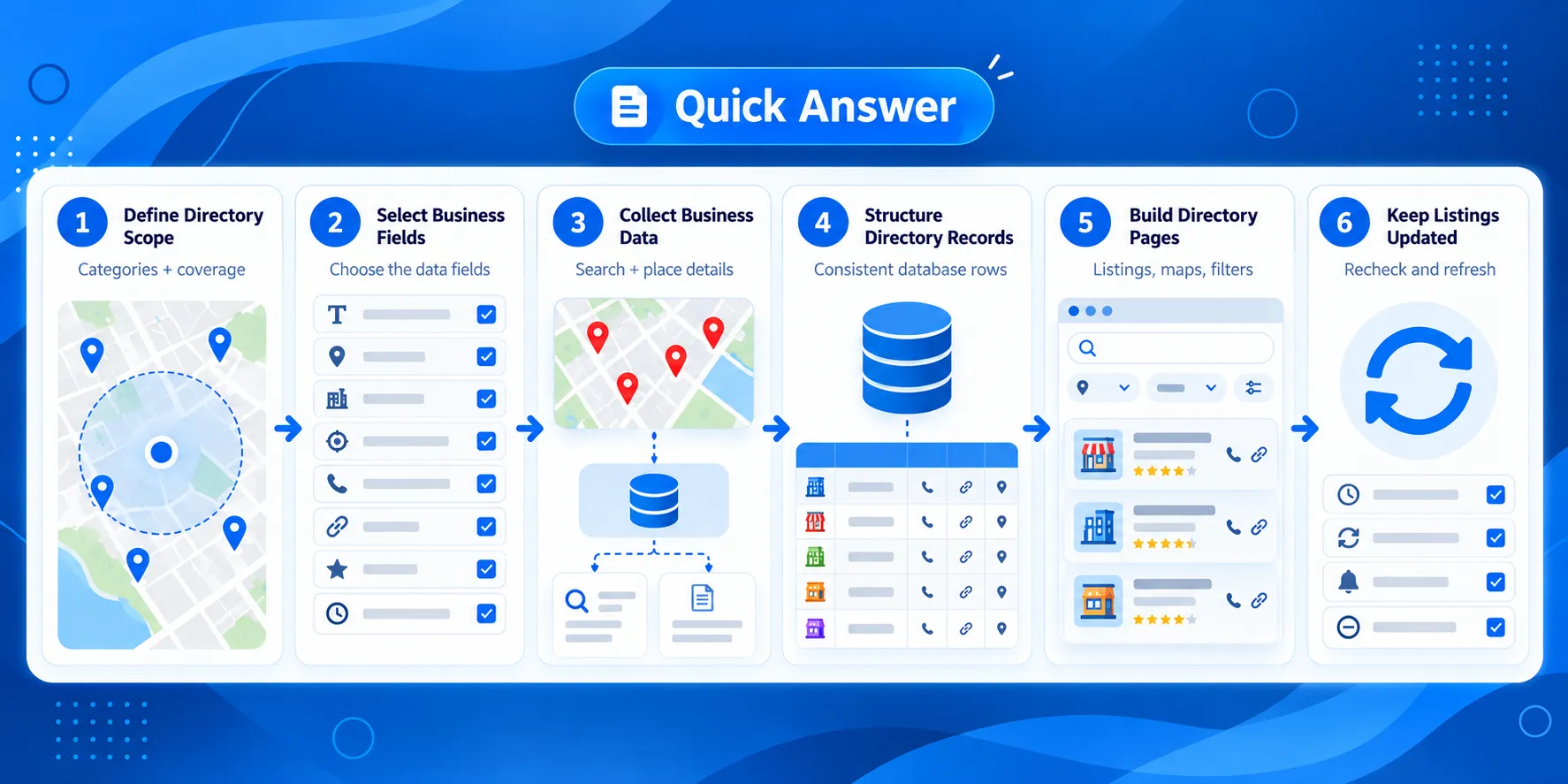
Quick Answer: How to Build a Business Directory Using Google Places API
- Define the directory scope
- Choose the listing fields
- Collect business data with Google Places API
- Structure the directory records
- Build the directory pages
- Maintain and update the business data
Collect Google Maps business data for the locations and categories your directory covers.
Plan a Business Directory Using Google Places API
A clear data plan makes it easier to decide what to request from the API di Google Places and how each result will fit into the directory. Start with three questions:
- Which businesses will be included?
- Where will the directory cover?
- What information does each listing need?
Define the Business Category and Geographic Coverage
Start by setting the boundaries of the directory. A project may cover one business category in a single city, several related categories across a state, or a specific type of business across multiple countries.
For example, a directory could focus on:
- dentists in Chicago
- coworking spaces in California
- EV charging stations across Germany
- restaurants in several tourist destinations
These choices affect how you search for places and organize the results. A city directory may rely heavily on location pages, while a larger directory may need a hierarchy based on country, state, city, and business category.
Defining the scope early also helps prevent collecting records that have no clear place in the finished directory.
Choose the Business Fields Your Directory Needs
The next step is to decide what information should appear on each listing. The exact fields depend on what people need to find and compare businesses in your directory.
Common directory fields can include:
| Field | Possible Directory Use |
|---|---|
| Ragione sociale | Listing title |
| Indirizzo | Location information |
| Coordinates | Map placement |
| Business type | Categories and filters |
| Phone number | Contact information |
| Sito web | Business website link |
| Valutazione | Informazioni aziendali |
| Orari di apertura | Availability information |
| Luogo ID | Reference to the Google place |
Avoid requesting fields simply because they are available. Start with the information required for the directory experience, then add fields when they serve a clear purpose.
Plan How Listings Will Be Organized
The data structure should reflect how people will browse the directory. Most projects need more than individual business pages.
A directory may organize the same records into:
- category pages, such as
/dentists/ - location pages, such as
/chicago/ - category-and-location pages, such as
/chicago/dentists/ - individual business pages
- map or search results
Planning these page types before collecting data helps identify which fields will be needed for filtering, grouping, URLs, maps, and individual listings.
Once the directory scope, fields, and page structure are defined, you can translate those requirements into Google Places API searches and requests.
Collect Business Data With the Google Places API
Once you know which businesses and fields the directory needs, the next step is to retrieve matching places. The Google Places API provides different search methods depending on whether the directory starts with a search term, an area, or a known place.
For a business directory, the usual flow is to find matching businesses first and then request the details needed for each listing.
Search for Businesses With Text Search or Nearby Search
Text Search works when the directory query combines a business type, name, or other search term with a location. A query such as dentists in Chicago o coworking spaces in Berlin is a straightforward example.
Nearby Search is useful when the search starts from a geographic area. It can find places around a specified location and works well for directories where proximity is part of the search experience.
The right method depends on how the directory defines its coverage. A category-and-city directory may start with text-based searches, while a location-based application may rely more on coordinates and nearby searches.
For the initial collection, keep the query aligned with the scope defined earlier. If the directory covers dentists in Chicago, for example, the collection process should be designed around that category and location rather than gathering unrelated businesses and filtering them later.
Use Place IDs and Place Details
Search results provide a way to identify individual places. The Luogo ID is particularly useful because it provides a reference to a specific place that can be used when requesting more information about that business. You can use Place Details to request the business information needed for each directory listing.
After finding a place, the directory can request the details required for its listing. Depending on the fields requested and available for that place, these may include information such as the business name, address, coordinates, phone number, website, rating, and opening hours.
This creates a simple collection flow:

Keeping the Place ID with the directory record also gives the application a reference when it needs to work with that place again.
Request Only the Fields Your Directory Needs
The list of fields planned in the previous section should determine what the application requests.
A basic directory listing may need only a name, category, address, and coordinates. A detailed business page may also need a phone number, website, opening hours, rating, or other supported information.
Requesting fields based on their actual use keeps the API workflow tied to the directory rather than collecting information with no planned purpose.
It can also be useful to separate fields by page type. Search results may need a smaller set of information, while individual business pages can request additional details when required.
Google Places API Example for a Directory Search
The collection workflow could look like this:
- Search for dentists within the target location.
- Receive matching places from the Google Places API.
- Keep the Place ID and fields needed for the directory.
- Request additional place details when the listing requires them.
- Map the returned fields to the directory’s record structure.
- Use those records to populate dentist listings and relevant location or category pages.
The same pattern can be reused for other directories by changing the category, location, and fields. A directory for gyms in London or veterinary clinics in Sydney follows the same basic data flow even though the records and page requirements may differ.
At this point, the API responses still need to be converted into a consistent structure that the directory can use. The next step is deciding how each returned field maps to a business record and how those records support the directory’s pages.
Turn Google Places API Results Into Directory Listings
The business data returned by the Google Places API needs a consistent structure before it can be used across directory pages. Each place can become a directory record with fields for its identity, location, category, contact details, and other information selected for the project.
These records can also form a local business database that stores the information used across the directory.
A consistent record structure also makes it easier to use the same business data across search results, category pages, location pages, maps, and individual listings.
Map Places API Fields to Your Directory Structure
Start by connecting each API field to a field in your directory.
For example, a directory record might contain:
| Directory Field | Place Data | Used For |
|---|---|---|
| Ragione sociale | Display name | Listing and business page |
| Luogo ID | Place identifier | Referencing the place |
| Indirizzo | Formatted address | Listing and location information |
| Latitude / longitude | Location coordinates | Maps and location searches |
| Business type | Place type | Categories and filters |
| Phone number | Phone field | Contact information |
| Sito web | Website field | Business website link |
| Valutazione | Rating field | Listing information |
| Orari di apertura | Opening-hours data | Business availability |
You do not need to display every stored field in every part of the directory. A search result might show the business name, category, address, and rating, while the individual listing page can display additional information.
Keeping the underlying records consistent allows different page types to use the fields they need.
Handle Missing Fields and Duplicate Businesses
Not every business record will contain the same information. One place may have a website, phone number, and opening hours, while another may return only basic location information.
The directory should account for missing values instead of assuming that every field will be present. For example, a listing template can hide the website button when no website is available rather than displaying an empty field.
Duplicate handling is also important when business data is collected through multiple searches. A dentist could appear in a search for dentists in Chicago and another search covering the surrounding area.
The Place ID can help identify records that refer to the same Google place. Before adding a new result, the application can check whether that Place ID already exists in the directory.
This prevents repeated searches from automatically creating repeated listings. A practical example is covered in our guide to handling duplicate records when updating a local business directory.
Build Category, Location, and Business Pages
Once the records have a consistent structure, the same dataset can support several parts of the directory.
A directory for dentists, for example, could use its records to create:
- a main dentist category page
- city or neighborhood pages
- dentist listings for each location
- individual business pages
- map results
- filters based on available business fields
A record for a dentist in Chicago could therefore appear on both a Dentists category page and a Chicago location page while linking to its own business listing.
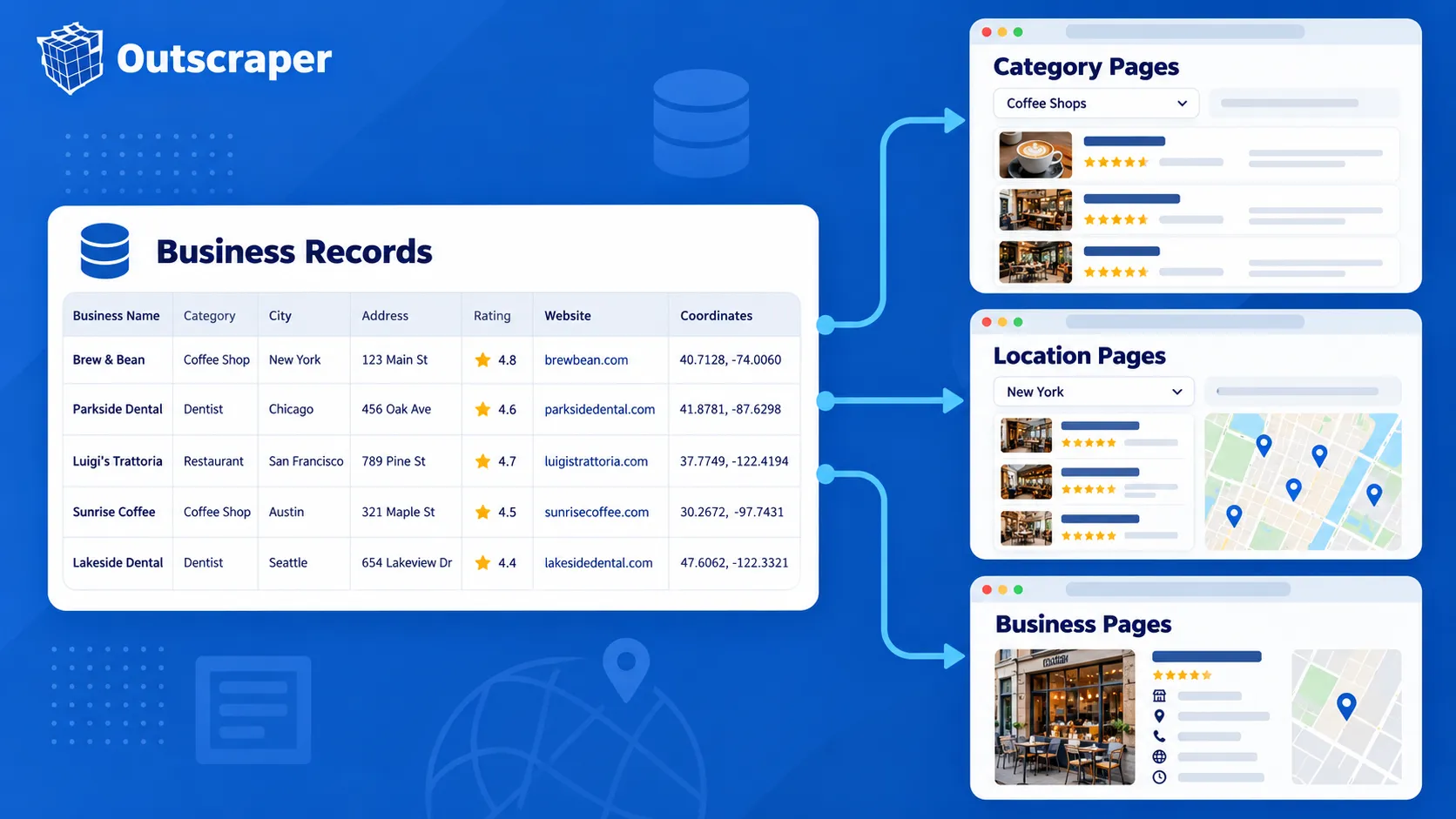
This structure also gives the directory room to grow. Adding another city or business category does not require creating a separate data format. New records can follow the same structure and be assigned to the appropriate category and location.
The result is a directory where the Google Places API supplies the place information and the application determines how those records are stored, grouped, and presented to visitors.
See how these records can be used to build a local business directory with search and structured business listings.
Handle Costs, Data Rules, and Directory Maintenance
As the directory grows, consider three things, API usage, Google’s data rules, and changes to business information.
Control API Requests and Field Usage
Places API (New) uses field masks to specify which information an API request should return. The fields requested can also affect the applicable billing tier.
Request only the fields the directory needs. A search page may use basic business and location information, while an individual listing may require additional fields such as a website, phone number, rating, or opening hours.
This keeps API requests focused and makes usage easier to manage as the number of listings grows.
Check the Rules for Storing Places Data
Review the current Google Maps Platform terms and Places API policies before deciding what information your directory will store.
Google has restrictions on caching and storing some Maps content. Place IDs can be stored, making them useful as references when your application needs to work with a place again.
Check the current requirements for data storage, attribution, and display before putting the directory into production.
Keep Business Listings Updated
Business information changes. Opening hours, phone numbers, websites, addresses, and operating status may be different months after a listing was first added.
Plan how the directory will check important records again and how it will handle missing or changed information. Google also recommends refreshing stored Place IDs that are more than 12 months old.
The update schedule depends on the size and purpose of the directory. What matters is having a process for keeping important listing information current instead of treating the first API response as permanent.
When to Use Outscraper for a Business Directory
Building directly with the Google Places API gives developers control over how place searches and business details are used inside an application. For some directory projects, the main requirement is collecting business data at scale rather than building and maintaining the entire collection process.
Outscraper provides another way to collect Google Maps business data for directories that need bulk records, structured exports, or API-based data collection.
You can extract Dati aziendali di Google Maps for use in your own database, directory, or application.

Collect Google Maps business data through an API and use the results in your directory, database, or application.
Google Places API vs. Bulk Business Data Collection
The right approach depends on what the directory needs to do.
| Requirement | API di Google Places | Outscraper |
|---|---|---|
| Search for places inside an application | Supported | Different primary use case |
| Retrieve information about a known place | Supported | Available through business-data workflows |
| Collect many business records | Requires API request planning | Bulk collection supported |
| No-code business-data collection | Requires another workflow | Google Maps Scraper available |
| Programmatic data collection | Supported through Google's Places methods | Google Maps API available |
| Export collected records | Application handles storage and export | Dataset export options available |

A developer building live place search into an application may prefer to work directly with the Google Places API. A team building a directory dataset may put more emphasis on collecting many business records and preparing them for use outside the collection process.
Use No-Code or API-Based Collection
Outscraper provides different ways to collect Google Maps business data depending on the project.
Le Scraper di Google Maps provides a no-code option for collecting business records. This can be useful when the team needs a dataset for a directory without first building its own collection application.
For programmatic workflows, the Outscraper Google Maps API can be used when business-data collection needs to become part of an application or automated process.
The collected records can then feed the directory’s database and page-generation process rather than making the directory application responsible for every part of data collection.
Choose the Workflow That Fits the Directory
The decision comes back to what your application needs.
Use the Google Places API when place search and place details are part of the application’s functionality. Consider Outscraper when the project is more focused on collecting business records in bulk, exporting business data, or reducing the amount of data-collection infrastructure your team needs to maintain.
Both approaches can support a business-directory project, but they solve different parts of the data workflow.
Final Checklist for Building Your Business Directory
Before publishing your directory, check the following:
- Define the business categories and locations.
- Select the fields each listing needs.
- Collect the required business data.
- Organize the data into directory records.
- Plan how business information will be updated.
- Test the directory before publishing.
Collect the Google Maps business data you need with Outscraper and start building your directory today.
Domande frequenti
Domande e risposte più frequenti
Yes. Google Places API can find businesses and return place information for directory listings. Your application can then organize those results into category, location, map, and individual business pages.
Start with fields that have a clear purpose in the directory. These may include business name, address, coordinates, business type, phone number, website, rating, opening hours, and Place ID.
Google has rules for storing and caching some Maps content, so review the current Google Maps Platform policies before deciding what to keep in your database. Place IDs can be stored and used to reference places later.
Plan to check important records again because business details can change after they are first collected. Pay particular attention to information such as addresses, phone numbers, websites, opening hours, and operating status.
Yes. Outscraper provides no-code and API options for collecting Google Maps business data. You can collect the business records you need and use them to build your directory without managing the entire data collection process yourself.