Indice
This is a practical tutorial using ChatGPT Work and Outscraper data to create a searchable directory of Chicago dental clinics. Building a local business directory becomes more manageable when the website structure and business data are handled as separate parts of the same workflow.
In this tutorial, I explain the six passi I followed to create a searchable directory using ChatGPT Work and an Outscraper JSON export.
I used Chicago dental clinics as the working example. ChatGPT Work helped me plan the interface, generate the website code, connect the search functionality, and troubleshoot the deployment. Outscraper provided the structured local business data used to populate the directory.
The original Outscraper export contained 500 business records. After checking the addresses, operational status, and business categories, I used 467 qualifying Chicago dental listings. Visitors can search the resulting directory by clinic name, dental category, address, or ZIP code.
I approached this project as an SEO strategist and technical writer who is still learning web development. I did not manually write the entire application. My role was to define the requirements, organize the data, review the interface, test the results, and document what worked and what broke.
Quick Answer: How to Build a Local Business Directory
- Define the niche, location, and website structure.
- Build the searchable interface with ChatGPT Work.
- Collect relevant business records with Outscraper.
- Export, clean, and organize the JSON data.
- Connect the records to the directory listings and filters.
- Test, publish, and regularly update the website.
Want to collect local business data for your directory? Use the Outscraper Google Maps Scraper to search category and location.

What I Built With ChatGPT Work and Outscraper
For this project, I created a searchable directory for people looking for dental clinics in Chicago. I chose one business category and one city so I could focus on the complete workflow, from collecting the data to publishing the website.
The finished prototype allows visitors to:
- Search by clinic name or dental category
- Search by address or Chicago ZIP code
- Browse general, pediatric, cosmetic, orthodontic, and specialty dental listings
- Compare ratings and review counts
- Access available clinic websites, phone numbers, and review pages.
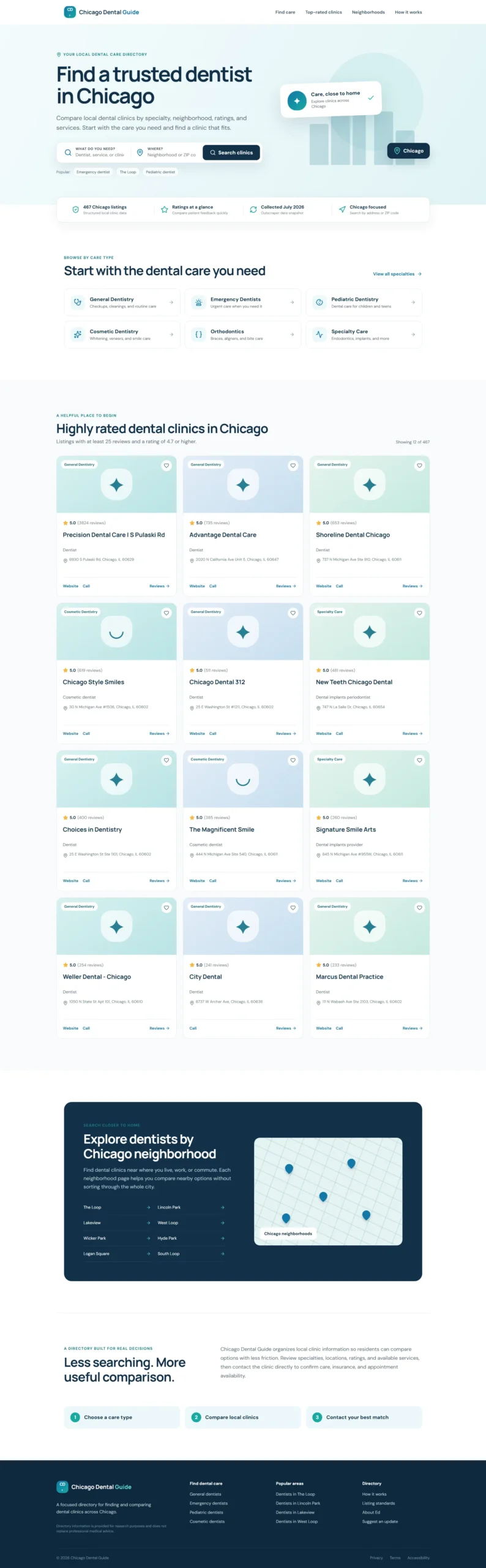
Check below the completed prototype of the directory website as it lets visitor search and compare Chicago dental clinics.
How Each Tool Contributed to the Directory
ChatGPT Work, Outscraper, JSON, and editorial review each supported a different part of the website workflow.
This smaller, focused project gave me a practical way to understand how structured local business data can move from an exported file into a searchable website. The first step was defining exactly what the directory needed to cover.
How I Built the Local Business Directory
I divided the project into six practical steps, starting with the directory concept and ending with a published website populated with real business records. Each step addressed a specific part of the workflow, including website planning, interface development, data collection, JSON preparation, search integration, and testing.
The process began with a small prototype using sample listings. Once the layout and search experience were clear, I collected the Chicago dental clinic records with Outscraper and replaced the sample content with filtered JSON data. This approach allowed me to review the website structure before working with the complete dataset.

Use Google Maps scraper to collect business records by category and location, including available contact details, ratings, reviews, websites, and business-status fields.
Step 1: Define the Directory Niche and Requirements
Before building the website, I defined the directory’s scope:
- Category: Dental clinics
- Posizione: Chicago, Illinois
- Users: Chicago residents looking for dental care
- Purpose: Help visitors search and compare local clinics
I also selected the most useful listing fields, including the clinic name, category, address, ZIP code, rating, review count, phone number, website, and business status. These fields guided both the Outscraper data collection and the website layout.
If you are still choosing a directory niche, Outscraper’s list of Categorie di attività di Google Maps can help you identify consistent category names for the data collection task.
For the first version, I focused on a searchable homepage with specialty categories, clinic cards, location filters, trust indicators, and an SEO-friendly footer. Features such as individual clinic pages, appointment booking, and user accounts could be considered later.
With the scope and requirements defined, I was ready to create the website prototype with ChatGPT Work.
Step 2: Build the Website Prototype With ChatGPT Work
I gave ChatGPT Work a structured brief covering the directory’s purpose, intended users, homepage sections, search fields, visual style, and local SEO requirements.
Here is the prompt I used:
View the ChatGPT Work Prompt Used for the Prototype
Read or copy the complete prompt below.
@Sites Act as an expert UX/UI designer and SEO content strategist.

I am building a high-performance directory website focused on Chicago dental clinics, and I need the content and layout strategy for the homepage.

Who I am:

I am Ed, a professional SEO strategist and technical writer. I am building this directory to provide value to Chicago residents by organizing local dental clinic data into an easy-to-use resource.

What I need:

Please provide a comprehensive layout and content plan for the homepage. Include:

1. Hero Section

Create an impactful headline and subheadline that clearly state the site's value. Include a prominent search bar design.

2. Key Value Proposition

Add a section briefly explaining why users should trust the directory, such as verified ratings, updated data, and a local focus.

3. Primary Navigation and Categories

Suggest four to six logical categories, such as General Dentistry, Pediatric Dentistry, Emergency Dentistry, and Cosmetic Dentistry, to help users navigate quickly.

4. Featured or Top-Rated Listings

Create a layout for displaying a small sample of top-rated clinics to establish immediate authority.

5. SEO Footer

Create a footer-link strategy that supports site navigation and local SEO authority.

What good looks like:

Visuals:

The design must be clean, professional, and clinical. Use a trustworthy color palette with shades of medical blue, slate gray, and crisp white.

UX and conversion:

The website should be fast and intuitive. A user should be able to start a search within three seconds of landing on the page.

Constraints:

Use clear, direct, and human-sounding language. Do not use em dashes anywhere in the copy. Avoid generic AI marketing language. Optimize the content and layout for local SEO.

Provide the output in a clean, organized format that I can hand off to developers or implement in the website structure.
ChatGPT Work used this brief to create the first website prototype with:
- A hero section with care and location search
- Dental specialty categories
- Trust and data-quality indicators
- Highly rated clinic cards
- Chicago location navigation
- A local SEO footer
- Responsive desktop and mobile layouts
The first version used sample clinic listings so I could review the structure before importing real business records. I checked the wording, colors, spacing, mobile behavior, and listing-card design before moving to the Outscraper data collection stage.
Step 3: Collect the Business Data With Outscraper
Once the website prototype was ready, I used the Outscraper Google Maps Scraper to collect public business information for dentists in Chicago.
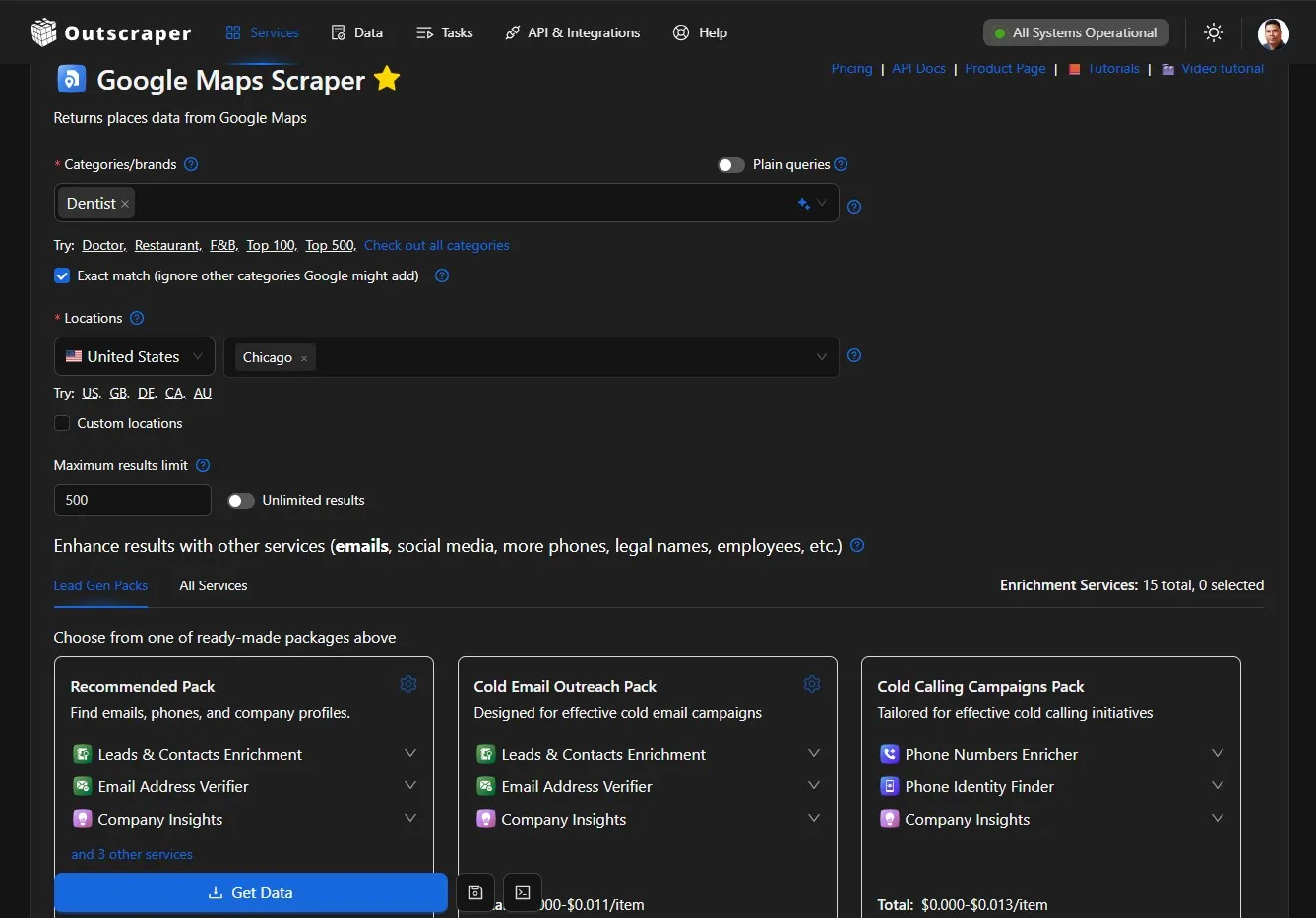
I configured the search around the dental category and Chicago location, then downloaded the results as a JSON file. The export contained 500 business records with fields such as:
- Business name and category
- Indirizzo
- Phone number
- Sito web
- Rating and review count
- Situazione aziendale
- Link alla recensione
- Google Place ID
If you want to repeat this process, the Google Maps scraping getting-started guide explains how to configure a task, monitor its progress, and download the results file.
The exported file provided the raw data needed for the directory. Before adding it to the website, I still needed to check the locations, remove unrelated categories, handle missing values, and organize the records into a consistent format.
The complete data-cleaning and JSON workflow will be covered in the separate tutorial about populating a local business directory with Outscraper data.
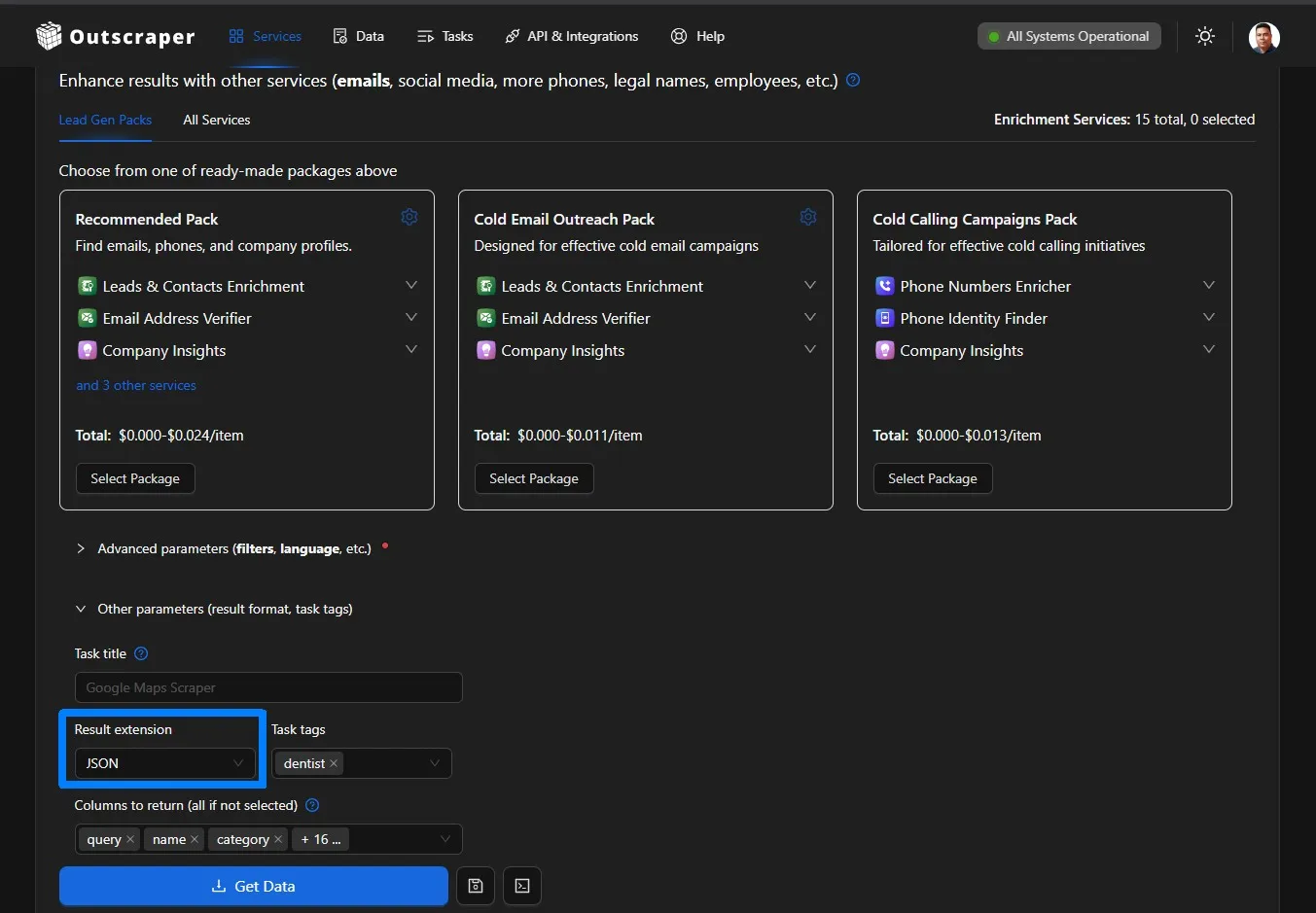
Outscraper also offers services for finding contact details, enriching existing records, exporting structured data, and connecting business-data workflows through the API.
Step 4: Review, Filter, and Organize the JSON Data
The Outscraper export contained 500 records, but I needed to review the data before using it on the website.
I kept listings that:
- Had a Chicago address
- Were marked as operational
- Belonged to a relevant dental category
- Had a unique Google Place ID
I removed records with unrelated or blank categories and organized the remaining fields into a consistent structure. I also grouped specific categories, such as pediatric dentists, cosmetic dentists, orthodontists, and oral surgeons, into broader directory sections.
For a detailed explanation of structuring business records, see the guide to building a local business database from Google Maps.
After filtering, 467 Chicago dental listings qualified for the prototype. The cleaned JSON file was then ready to replace the sample listings used in the original website design.

Step 5: Connect the Data and Test the Directory
I uploaded the cleaned JSON file to ChatGPT Work and asked it to replace the sample listings with the qualifying Chicago dental records.
The website connected the data to:
- Clinic listing cards
- Name and category search
- Address and ZIP code search
- Ratings and review counts
- Website, phone, and review links
- Dental specialty filters
I then tested different searches and checked how the cards handled missing websites, phone numbers, and ratings. I also reviewed the layout on desktop and mobile to confirm that the search fields, categories, and listing information remained easy to use.
Once the real records and search functions were working, the directory was ready for publishing.

Step 6: Publish, Verify, and Plan Data Updates
After testing the populated directory, I used ChatGPT Work to build and publish the website through ChatGPT Sites.
Publishing required more than confirming that the deployment had finished. I also checked:
- Whether the website was publicly accessible
- Whether the homepage returned a successful response
- Whether the interface rendered correctly
- Whether the search and listing links worked
- Whether the mobile layout remained usable
The first deployment had access and rendering problems, which I resolved by reviewing the site settings, production response, and deployment logs. I will explain these issues in the troubleshooting section.
The published directory uses a snapshot of the Outscraper data. Because ratings, websites, phone numbers, and business status can change, the project will also need a repeatable process for collecting fresh data, reviewing the changes, and updating the website.
For a more detailed directory, Outscraper’s enrichment services can help add available contact details and other business information to existing records.
What Broke and What the Prototype Still Needs
The website worked during the local build, but publishing revealed problems that were not visible in the prototype. The Outscraper export also lacked several fields that would be useful in a more complete directory.
Problems I Found During Publishing
The first published version had a restricted access setting connected to the Team workspace. After changing the site to public, the homepage returned an HTTP 404 error because the production environment could not locate the website files correctly.
The next version loaded but displayed part of the JavaScript as visible text. A final packaging change placed the page container, styles, and application script in the correct order.
I republished the website and confirmed that the homepage returned a successful 200 OK response. This showed me that a completed build still needs to be tested through the public URL.
Current Data Limitations
Le directory uses one Outscraper data export, and the file did not contain every field needed for a complete local directory.
The main limitations included:
- No latitude and longitude coordinates
- No consistent Chicago neighborhood field
- No opening hours
- No clinic photos
- No detailed list of dental services
- Missing websites, phone numbers, or ratings in some records
- No appointment or insurance information
Because reliable coordinates and neighborhood names were unavailable, the map remained decorative and location searches relied on addresses and ZIP codes.
Business information can also change after collection. Visitors should confirm services, opening hours, insurance acceptance, and appointment availability directly with each clinic.
A future Outscraper export with additional fields would support richer listings and more accurate location pages.
What I Learned and What I Will Improve Next
This project gave me a practical view of how website planning, structured data, search functionality, and publishing work together. It also showed me which parts of the prototype need further development.
What I Learned
My main lessons were:
- A focused scope makes the project manageable. Choosing one category and one city helped me prioritize the essential directory features.
- Structured data needs editorial review. I needed clear rules for location, business status, category relevance, duplicates, and missing fields.
- A prototype helps validate the interface. Sample listings allowed me to review the layout before connecting the complete JSON export.
- AI-assisted development still requires direction. Clear prompts, testing, and specific feedback improved the website.
- Publishing needs separate verification. A successful local build did not guarantee that the public website would work correctly.
- Directory data needs maintenance. Ratings, websites, phone numbers, and operating status can change over time.
I did not manually write every line of code, but I became more familiar with JSON, search filters, website components, deployment logs, and data-quality decisions.
What I Will Improve Next
My next priorities are:
- Collect coordinates, opening hours, photos, and additional clinic details
- Map listings to accurate Chicago neighborhoods
- Create individual pages for qualifying clinics
- Move the records from a static JSON file into a database
- Add pagination and more detailed search filters
- Create a process for comparing new and previous Outscraper exports
- Test page speed, accessibility, and mobile usability
I plan to approach these improvements in smaller stages and document what works, what needs revision, and what I learn from each update.
Final Checklist: How to Build a Local Business Directory
Use this workflow to move from a directory idea to a published website:
- Define the directory scope. Choose the business category, target location, intended users, and information each listing should contain.
- Plan and build the prototype. Create the search fields, categories, listing cards, navigation and responsive layout with ChatGPT Work.
- Collect the business data. Utilizzo Outscraper to gather relevant public business records by category and location.
- Review and organize the export. Check the addresses, operating status, categories, duplicates, and missing fields before importing the JSON data.
- Connect and test the listings. Add the cleaned records to the website and test the search, filters, contact links, and mobile layout.
- Publish and maintain the directory. Verify the public website and create a process for updating the business records.
You can use Google Maps Scraper to collect public business details by category and location. Export the results, organize the fields your directory needs, and use the data to populate searchable business listings.
Domande frequenti
Domande e risposte più frequenti
At minimum, include the business name, category, address, phone number, website, rating, review count, and business status. Add opening hours, services, photos, coordinates, and appointment details when reliable data is available.
Yes. A JSON file can work well for an early prototype with a focused number of listings. As the directory grows, a database is usually a better option for managing updates, individual listing pages, filtering, and larger datasets.
Use a business-data tool such as the Outscraper Google Maps Scraper to collect public business records by category and location. Review the exported records before publishing them in your directory.
Set clear qualification rules before importing the data. In this project, I kept records with a Chicago address, operational status, a relevant dental category, and a unique Google Place ID.
The update schedule depends on the niche and directory size. A monthly or quarterly review is a practical starting point because business websites, phone numbers, ratings, opening hours, and operating status can change.
Not necessarily. Tools such as ChatGPT Work can help create a prototype, but you still need to define the directory structure, review the data, test the website, and verify the published result. More advanced features, such as a database and automated updates, may require additional technical support.
Indice
This is a practical tutorial using ChatGPT Work and Outscraper data to create a searchable directory of Chicago dental clinics. Building a local business directory becomes more manageable when the website structure and business data are handled as separate parts of the same workflow.
In this tutorial, I explain the six passi I followed to create a searchable directory using ChatGPT Work and an Outscraper JSON export.
I used Chicago dental clinics as the working example. ChatGPT Work helped me plan the interface, generate the website code, connect the search functionality, and troubleshoot the deployment. Outscraper provided the structured local business data used to populate the directory.
The original Outscraper export contained 500 business records. After checking the addresses, operational status, and business categories, I used 467 qualifying Chicago dental listings. Visitors can search the resulting directory by clinic name, dental category, address, or ZIP code.
I approached this project as an SEO strategist and technical writer who is still learning web development. I did not manually write the entire application. My role was to define the requirements, organize the data, review the interface, test the results, and document what worked and what broke.
Quick Answer: How to Build a Local Business Directory
- Define the niche, location, and website structure.
- Build the searchable interface with ChatGPT Work.
- Collect relevant business records with Outscraper.
- Export, clean, and organize the JSON data.
- Connect the records to the directory listings and filters.
- Test, publish, and regularly update the website.
Want to collect local business data for your directory? Use the Outscraper Google Maps Scraper to search category and location.
What I Built With ChatGPT Work and Outscraper
For this project, I created a searchable directory for people looking for dental clinics in Chicago. I chose one business category and one city so I could focus on the complete workflow, from collecting the data to publishing the website.
The finished prototype allows visitors to:
- Search by clinic name or dental category
- Search by address or Chicago ZIP code
- Browse general, pediatric, cosmetic, orthodontic, and specialty dental listings
- Compare ratings and review counts
- Access available clinic websites, phone numbers, and review pages.
Check below the completed prototype of the directory website as it lets visitor search and compare Chicago dental clinics.
How Each Tool Contributed to the Directory
ChatGPT Work, Outscraper, JSON, and editorial review each supported a different part of the website workflow.
This smaller, focused project gave me a practical way to understand how structured local business data can move from an exported file into a searchable website. The first step was defining exactly what the directory needed to cover.
How I Built the Local Business Directory
I divided the project into six practical steps, starting with the directory concept and ending with a published website populated with real business records. Each step addressed a specific part of the workflow, including website planning, interface development, data collection, JSON preparation, search integration, and testing.
The process began with a small prototype using sample listings. Once the layout and search experience were clear, I collected the Chicago dental clinic records with Outscraper and replaced the sample content with filtered JSON data. This approach allowed me to review the website structure before working with the complete dataset.
Use Google Maps scraper to collect business records by category and location, including available contact details, ratings, reviews, websites, and business-status fields.
Step 1: Define the Directory Niche and Requirements
Before building the website, I defined the directory’s scope:
- Category: Dental clinics
- Posizione: Chicago, Illinois
- Users: Chicago residents looking for dental care
- Purpose: Help visitors search and compare local clinics
I also selected the most useful listing fields, including the clinic name, category, address, ZIP code, rating, review count, phone number, website, and business status. These fields guided both the Outscraper data collection and the website layout.
If you are still choosing a directory niche, Outscraper’s list of Categorie di attività di Google Maps can help you identify consistent category names for the data collection task.
For the first version, I focused on a searchable homepage with specialty categories, clinic cards, location filters, trust indicators, and an SEO-friendly footer. Features such as individual clinic pages, appointment booking, and user accounts could be considered later.
With the scope and requirements defined, I was ready to create the website prototype with ChatGPT Work.
Step 2: Build the Website Prototype With ChatGPT Work
I gave ChatGPT Work a structured brief covering the directory’s purpose, intended users, homepage sections, search fields, visual style, and local SEO requirements.
Here is the prompt I used:
View the ChatGPT Work Prompt Used for the Prototype
Read or copy the complete prompt below.
@Sites Act as an expert UX/UI designer and SEO content strategist.

I am building a high-performance directory website focused on Chicago dental clinics, and I need the content and layout strategy for the homepage.

Who I am:

I am Ed, a professional SEO strategist and technical writer. I am building this directory to provide value to Chicago residents by organizing local dental clinic data into an easy-to-use resource.

What I need:

Please provide a comprehensive layout and content plan for the homepage. Include:

1. Hero Section

Create an impactful headline and subheadline that clearly state the site's value. Include a prominent search bar design.

2. Key Value Proposition

Add a section briefly explaining why users should trust the directory, such as verified ratings, updated data, and a local focus.

3. Primary Navigation and Categories

Suggest four to six logical categories, such as General Dentistry, Pediatric Dentistry, Emergency Dentistry, and Cosmetic Dentistry, to help users navigate quickly.

4. Featured or Top-Rated Listings

Create a layout for displaying a small sample of top-rated clinics to establish immediate authority.

5. SEO Footer

Create a footer-link strategy that supports site navigation and local SEO authority.

What good looks like:

Visuals:

The design must be clean, professional, and clinical. Use a trustworthy color palette with shades of medical blue, slate gray, and crisp white.

UX and conversion:

The website should be fast and intuitive. A user should be able to start a search within three seconds of landing on the page.

Constraints:

Use clear, direct, and human-sounding language. Do not use em dashes anywhere in the copy. Avoid generic AI marketing language. Optimize the content and layout for local SEO.

Provide the output in a clean, organized format that I can hand off to developers or implement in the website structure.ChatGPT Work used this brief to create the first website prototype with:
- A hero section with care and location search
- Dental specialty categories
- Trust and data-quality indicators
- Highly rated clinic cards
- Chicago location navigation
- A local SEO footer
- Responsive desktop and mobile layouts
The first version used sample clinic listings so I could review the structure before importing real business records. I checked the wording, colors, spacing, mobile behavior, and listing-card design before moving to the Outscraper data collection stage.
Step 3: Collect the Business Data With Outscraper
Once the website prototype was ready, I used the Outscraper Google Maps Scraper to collect public business information for dentists in Chicago.
I configured the search around the dental category and Chicago location, then downloaded the results as a JSON file. The export contained 500 business records with fields such as:
- Business name and category
- Indirizzo
- Phone number
- Sito web
- Rating and review count
- Situazione aziendale
- Link alla recensione
- Google Place ID
If you want to repeat this process, the Google Maps scraping getting-started guide explains how to configure a task, monitor its progress, and download the results file.
The exported file provided the raw data needed for the directory. Before adding it to the website, I still needed to check the locations, remove unrelated categories, handle missing values, and organize the records into a consistent format.
The complete data-cleaning and JSON workflow will be covered in the separate tutorial about populating a local business directory with Outscraper data.
Outscraper also offers services for finding contact details, enriching existing records, exporting structured data, and connecting business-data workflows through the API.
Step 4: Review, Filter, and Organize the JSON Data
The Outscraper export contained 500 records, but I needed to review the data before using it on the website.
I kept listings that:
- Had a Chicago address
- Were marked as operational
- Belonged to a relevant dental category
- Had a unique Google Place ID
I removed records with unrelated or blank categories and organized the remaining fields into a consistent structure. I also grouped specific categories, such as pediatric dentists, cosmetic dentists, orthodontists, and oral surgeons, into broader directory sections.
For a detailed explanation of structuring business records, see the guide to building a local business database from Google Maps.
After filtering, 467 Chicago dental listings qualified for the prototype. The cleaned JSON file was then ready to replace the sample listings used in the original website design.
Step 5: Connect the Data and Test the Directory
I uploaded the cleaned JSON file to ChatGPT Work and asked it to replace the sample listings with the qualifying Chicago dental records.
The website connected the data to:
- Clinic listing cards
- Name and category search
- Address and ZIP code search
- Ratings and review counts
- Website, phone, and review links
- Dental specialty filters
I then tested different searches and checked how the cards handled missing websites, phone numbers, and ratings. I also reviewed the layout on desktop and mobile to confirm that the search fields, categories, and listing information remained easy to use.
Once the real records and search functions were working, the directory was ready for publishing.
Step 6: Publish, Verify, and Plan Data Updates
After testing the populated directory, I used ChatGPT Work to build and publish the website through ChatGPT Sites.
Publishing required more than confirming that the deployment had finished. I also checked:
- Whether the website was publicly accessible
- Whether the homepage returned a successful response
- Whether the interface rendered correctly
- Whether the search and listing links worked
- Whether the mobile layout remained usable
The first deployment had access and rendering problems, which I resolved by reviewing the site settings, production response, and deployment logs. I will explain these issues in the troubleshooting section.
The published directory uses a snapshot of the Outscraper data. Because ratings, websites, phone numbers, and business status can change, the project will also need a repeatable process for collecting fresh data, reviewing the changes, and updating the website.
For a more detailed directory, Outscraper’s enrichment services can help add available contact details and other business information to existing records.
What Broke and What the Prototype Still Needs
The website worked during the local build, but publishing revealed problems that were not visible in the prototype. The Outscraper export also lacked several fields that would be useful in a more complete directory.
Problems I Found During Publishing
The first published version had a restricted access setting connected to the Team workspace. After changing the site to public, the homepage returned an HTTP 404 error because the production environment could not locate the website files correctly.
The next version loaded but displayed part of the JavaScript as visible text. A final packaging change placed the page container, styles, and application script in the correct order.
I republished the website and confirmed that the homepage returned a successful 200 OK response. This showed me that a completed build still needs to be tested through the public URL.
Current Data Limitations
Le directory uses one Outscraper data export, and the file did not contain every field needed for a complete local directory.
The main limitations included:
- No latitude and longitude coordinates
- No consistent Chicago neighborhood field
- No opening hours
- No clinic photos
- No detailed list of dental services
- Missing websites, phone numbers, or ratings in some records
- No appointment or insurance information
Because reliable coordinates and neighborhood names were unavailable, the map remained decorative and location searches relied on addresses and ZIP codes.
Business information can also change after collection. Visitors should confirm services, opening hours, insurance acceptance, and appointment availability directly with each clinic.
A future Outscraper export with additional fields would support richer listings and more accurate location pages.
What I Learned and What I Will Improve Next
This project gave me a practical view of how website planning, structured data, search functionality, and publishing work together. It also showed me which parts of the prototype need further development.
What I Learned
My main lessons were:
- A focused scope makes the project manageable. Choosing one category and one city helped me prioritize the essential directory features.
- Structured data needs editorial review. I needed clear rules for location, business status, category relevance, duplicates, and missing fields.
- A prototype helps validate the interface. Sample listings allowed me to review the layout before connecting the complete JSON export.
- AI-assisted development still requires direction. Clear prompts, testing, and specific feedback improved the website.
- Publishing needs separate verification. A successful local build did not guarantee that the public website would work correctly.
- Directory data needs maintenance. Ratings, websites, phone numbers, and operating status can change over time.
I did not manually write every line of code, but I became more familiar with JSON, search filters, website components, deployment logs, and data-quality decisions.
What I Will Improve Next
My next priorities are:
- Collect coordinates, opening hours, photos, and additional clinic details
- Map listings to accurate Chicago neighborhoods
- Create individual pages for qualifying clinics
- Move the records from a static JSON file into a database
- Add pagination and more detailed search filters
- Create a process for comparing new and previous Outscraper exports
- Test page speed, accessibility, and mobile usability
I later revisited this project with a newer Outscraper export and added clinic pages, more filters, pagination, category groups, and map-based browsing. Read how I added advanced local business directory features to see the second stage of the project.
Final Checklist: How to Build a Local Business Directory
Use this workflow to move from a directory idea to a published website:
- Define the directory scope. Choose the business category, target location, intended users, and information each listing should contain.
- Plan and build the prototype. Create the search fields, categories, listing cards, navigation and responsive layout with ChatGPT Work.
- Collect the business data. Utilizzo Outscraper to gather relevant public business records by category and location.
- Review and organize the export. Check the addresses, operating status, categories, duplicates, and missing fields before importing the JSON data.
- Connect and test the listings. Add the cleaned records to the website and test the search, filters, contact links, and mobile layout.
- Publish and maintain the directory. Verify the public website and create a process for updating the business records.
You can use Google Maps Scraper to collect public business details by category and location. Export the results, organize the fields your directory needs, and use the data to populate searchable business listings.
Domande frequenti
Domande e risposte più frequenti
At minimum, include the business name, category, address, phone number, website, rating, review count, and business status. Add opening hours, services, photos, coordinates, and appointment details when reliable data is available.
Yes. A JSON file can work well for an early prototype with a focused number of listings. As the directory grows, a database is usually a better option for managing updates, individual listing pages, filtering, and larger datasets.
Use a business-data tool such as the Outscraper Google Maps Scraper to collect public business records by category and location. Review the exported records before publishing them in your directory.
Set clear qualification rules before importing the data. In this project, I kept records with a Chicago address, operational status, a relevant dental category, and a unique Google Place ID.
The update schedule depends on the niche and directory size. A monthly or quarterly review is a practical starting point because business websites, phone numbers, ratings, opening hours, and operating status can change.
Not necessarily. Tools such as ChatGPT Work can help create a prototype, but you still need to define the directory structure, review the data, test the website, and verify the published result. More advanced features, such as a database and automated updates, may require additional technical support.