目录
这是一个实操教程,将利用 ChatGPT Work 和 Outscraper 数据,创建一个可搜索的芝加哥牙科诊所目录。构建一个 本地企业名录 当将网站结构和业务数据作为同一工作流中的独立部分来处理时,管理起来就会更加轻松。.
在本教程中,我将讲解 六 步骤 我按照该方法,利用 ChatGPT Work 和 Outscraper JSON 导出文件创建了一个可搜索的目录。.
我以芝加哥的牙科诊所作为示例。ChatGPT Work 帮助我规划了界面、生成网站代码、集成搜索功能,并排查了部署过程中出现的问题。Outscraper 提供了用于填充目录的结构化本地企业数据。.
最初的Outscraper导出文件包含500条企业记录。在核对了地址、营业状态和业务类别后,我筛选出了467条符合条件的芝加哥牙科机构信息。访客可以按诊所名称、牙科类别、地址或邮政编码搜索该目录。.
我以一名仍在学习网页开发、兼具SEO策略师和技术撰稿人双重身份的身份参与了这个项目。我并没有亲手编写整个应用程序。我的职责是定义需求、整理数据、审核界面、测试结果,并记录哪些功能正常运行、哪些功能出现故障。.
快速解答:如何建立本地企业名录
- 确定细分领域、目标地区和网站结构。.
- 使用 ChatGPT Work 构建可搜索的界面。.
- 使用 Outscraper 收集相关业务记录。.
- 导出、清理并整理 JSON 数据。.
- 将记录与目录列表和过滤器关联起来。.
- 对网站进行测试、发布并定期更新。.
想为您的企业名录收集本地企业数据吗?请使用 Outscraper 谷歌地图搜刮器 按类别和位置搜索。.

我用 ChatGPT Work 和 Outscraper 开发了什么
在这个项目中,我为想要在芝加哥寻找牙科诊所的人创建了一个可搜索的目录。我选择了一个商业类别和一个城市,以便能够专注于从数据收集到网站发布的全流程。.
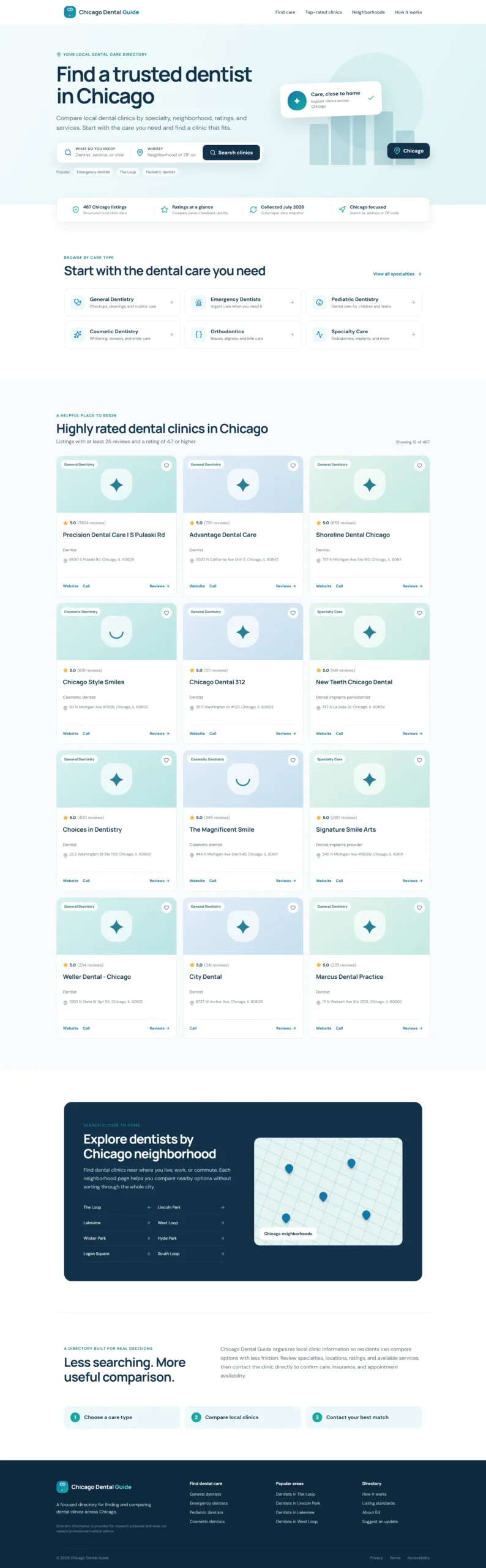
这款已完成的原型机让参观者能够:
- 按诊所名称或牙科类别搜索
- 按地址或芝加哥邮政编码搜索
- 浏览综合牙科、儿童牙科、美容牙科、正畸科及专科牙科的机构列表
- 比较评分和评论数量
- 访问各诊所的网站、电话号码和评价页面。.
请查看下方已完成的目录网站原型,该网站允许访客搜索和比较芝加哥的牙科诊所。.
每种工具对该目录的贡献
ChatGPT Work、Outscraper、JSON 和编辑审核分别支持网站工作流的不同环节。.
这个规模较小且目标明确的项目,让我通过实践了解了结构化的本地企业数据如何从导出文件转化为可搜索的网站。第一步是明确该目录需要涵盖哪些内容。.
我是如何建立本地企业名录的
我将该项目分为六个实操步骤,从目录概念开始,到发布一个包含真实商业记录的网站结束。每个步骤都针对工作流中的特定环节,包括网站规划、界面开发、数据收集、JSON数据准备、搜索功能集成以及测试。.
该流程始于使用示例列表制作的一个小型原型。在明确了版式和搜索体验后,我利用Outscraper收集了芝加哥牙科诊所的记录,并将示例内容替换为经过筛选的 JSON 数据。这种方法使我能够在处理完整数据集之前先审视网站结构。.

步骤 1:确定目录细分领域及要求
在构建网站之前,我界定了该目录的范围:
- 分类: 牙科诊所
- 位置。 伊利诺伊州芝加哥市
- 用户: 寻求牙科护理的芝加哥居民
- 目的: 帮助访客搜索和比较当地的诊所
我还筛选出了最有用的信息字段,包括诊所名称、类别、地址、邮政编码、评分、评论数量、电话号码、网站以及营业状态。这些字段既指导了Outscraper的数据收集工作,也影响了网站的布局设计。.
如果你还在选择目录细分领域,Outscraper 提供的列表中 谷歌地图商家分类 可帮助您为数据收集任务确定统一的类别名称。.
在第一个版本中,我重点开发了一个支持搜索的首页,其中包含专科分类、诊所介绍卡片、位置筛选功能、可信度标识以及符合SEO优化的页脚。至于单个诊所页面、预约功能和用户账户等功能,可以稍后再考虑。.
在明确了范围和要求后,我准备使用 ChatGPT Work 来制作网站原型。.
步骤 2:使用 ChatGPT 构建网站原型
我向ChatGPT Work提供了一份结构清晰的简报,其中涵盖了该目录的宗旨、目标用户、主页版块、搜索栏、视觉风格以及本地搜索引擎优化(SEO)要求。.
以下是我使用的提示词:
查看原型中使用的 ChatGPT 工作提示
请阅读或复制下面的完整提示。.
@Sites Act as an expert UX/UI designer and SEO content strategist.

I am building a high-performance directory website focused on Chicago dental clinics, and I need the content and layout strategy for the homepage.

Who I am:

I am Ed, a professional SEO strategist and technical writer. I am building this directory to provide value to Chicago residents by organizing local dental clinic data into an easy-to-use resource.

What I need:

Please provide a comprehensive layout and content plan for the homepage. Include:

1. Hero Section

Create an impactful headline and subheadline that clearly state the site's value. Include a prominent search bar design.

2. Key Value Proposition

Add a section briefly explaining why users should trust the directory, such as verified ratings, updated data, and a local focus.

3. Primary Navigation and Categories

Suggest four to six logical categories, such as General Dentistry, Pediatric Dentistry, Emergency Dentistry, and Cosmetic Dentistry, to help users navigate quickly.

4. Featured or Top-Rated Listings

Create a layout for displaying a small sample of top-rated clinics to establish immediate authority.

5. SEO Footer

Create a footer-link strategy that supports site navigation and local SEO authority.

What good looks like:

Visuals:

The design must be clean, professional, and clinical. Use a trustworthy color palette with shades of medical blue, slate gray, and crisp white.

UX and conversion:

The website should be fast and intuitive. A user should be able to start a search within three seconds of landing on the page.

Constraints:

Use clear, direct, and human-sounding language. Do not use em dashes anywhere in the copy. Avoid generic AI marketing language. Optimize the content and layout for local SEO.

Provide the output in a clean, organized format that I can hand off to developers or implement in the website structure.
ChatGPT Work 根据这份简报,创建了首个网站原型,其中包含:
- 一个包含“精选内容”板块以及护理和位置搜索功能的页面
- 牙科专科分类
- 信任与数据质量指标
- 评价极高的诊所名片
- 芝加哥地点导航
- 本地搜索引擎优化(SEO)页脚
- 适用于桌面端和移动端的响应式布局
第一个版本使用了示例诊所列表,这样我就能在导入真实的企业记录之前先检查一下结构。在进入Outscraper数据收集阶段之前,我检查了措辞、颜色、间距、移动端显示效果以及列表卡片的设计。.
第 3 步:使用 Outscraper 收集业务数据
网站原型完成后,我使用了 Outscraper 谷歌地图搜刮器 收集芝加哥牙医的公开商业信息。.
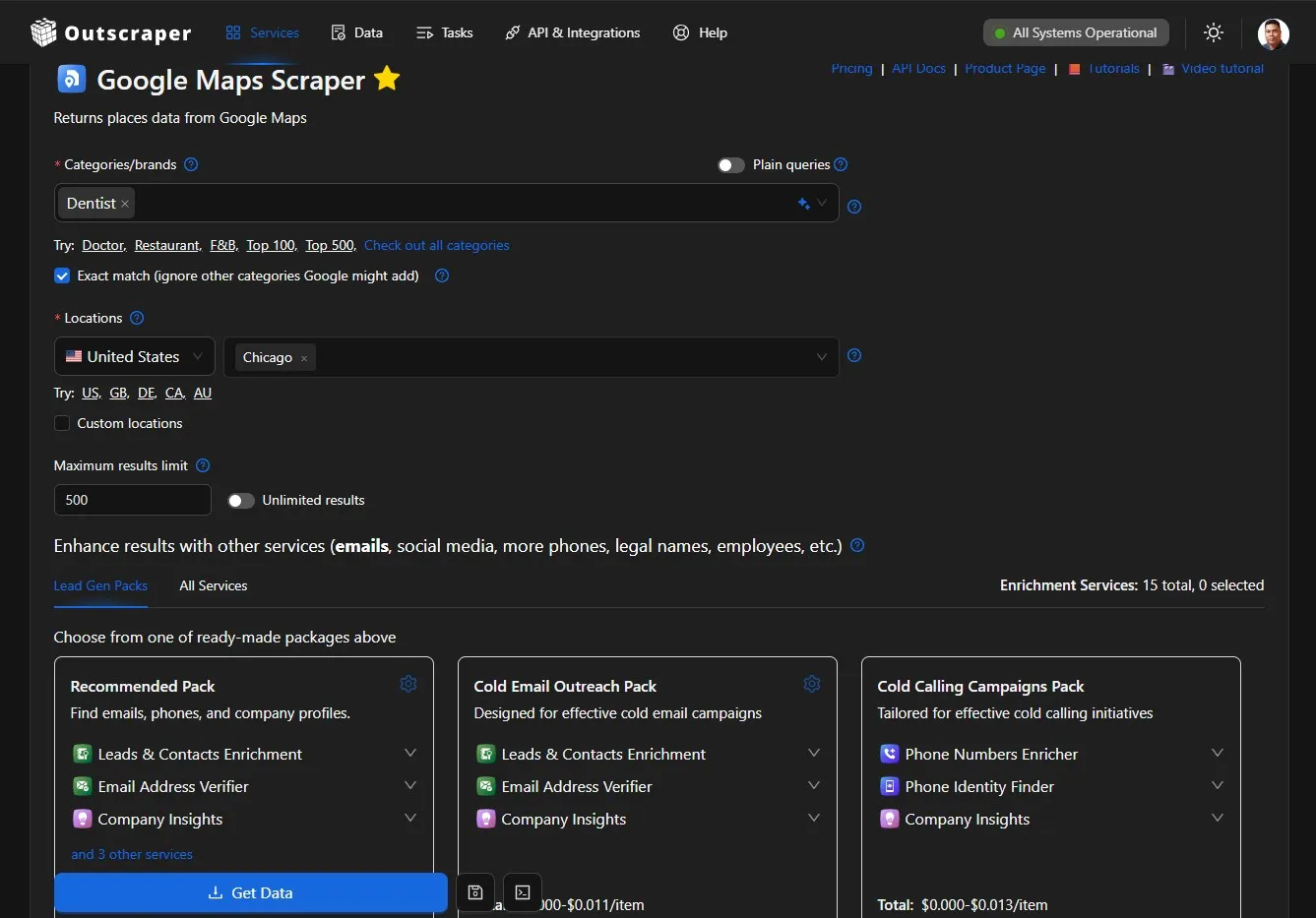
我围绕“牙科”类别和“芝加哥”地点配置了搜索,然后将结果下载为 JSON 文件。导出的文件包含 500 条商家记录,字段包括:
- 企业名称和类别
- 地址
- 电话号码
- 网站
- 评分和评论数量
- 业务状态
- 评论链接
- Google 地点 ID
如果您想重复此过程,请 Google 地图数据抓取入门指南 介绍了如何配置任务、监控其进度以及下载结果文件。.
导出的文件提供了该目录所需的原始数据。在将其添加到网站之前,我还需要核对位置信息、删除无关的分类、处理缺失值,并将记录整理成统一的格式。.
关于使用 Outscraper 数据填充本地企业目录的完整数据清理和 JSON 工作流,将在另一篇教程中详细介绍。.
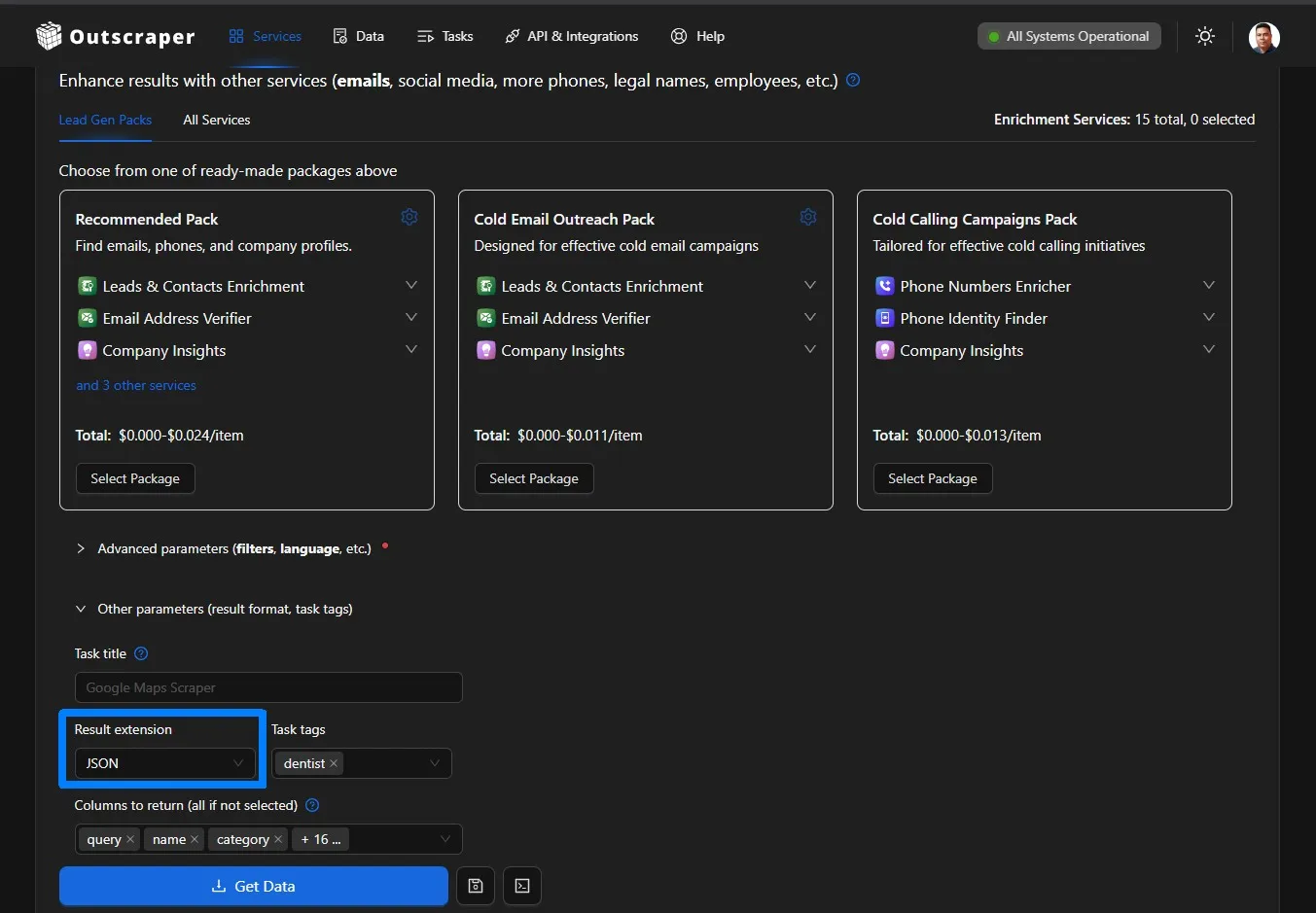
Outscraper 还提供通过 API 查找联系信息、丰富现有记录、导出结构化数据以及连接业务数据工作流等服务。.
第 4 步:审查、筛选和整理 JSON 数据
该 Outscraper 导出文件包含 500 条记录,但我需要在网站上使用这些数据之前先对其进行审核。.
我保留了符合以下条件的房源:
- 曾有一个芝加哥的地址
- 已被标记为可运行
- 属于相关牙科类别
- 有一个唯一的 Google 地点 ID
我删除了类别不相关或为空的记录,并将剩余字段整理成统一的结构。此外,还将某些特定类别(如儿科牙医、美容牙医、正畸医生和口腔外科医生)归入更广泛的目录分类中。.
有关业务记录编制的详细说明,请参阅 利用谷歌地图构建本地企业数据库指南.
经过筛选后,共有467条芝加哥牙科机构信息符合原型设计的要求。随后,经过清理的JSON文件便可用于替换原始网站设计中使用的示例信息。.

第 5 步:连接数据并测试目录
我将清理后的 JSON 文件上传到了 ChatGPT Work,并要求它用符合条件的芝加哥牙科记录替换示例列表。.
该网站将数据与以下内容关联起来:
- 诊所信息卡
- 按名称和类别搜索
- 地址和邮政编码搜索
- 评分和评论数量
- 网站、电话和评论链接
- 牙科专用过滤器
随后,我测试了不同的搜索方式,并检查了这些卡片在网站、电话号码和评分信息缺失时如何处理。我还审查了桌面端和移动端的布局,以确认搜索框、分类和列表信息仍然易于使用。.
一旦真实记录和搜索功能正常运行,该目录便可发布。.

第 6 步:发布、验证并规划数据更新
在测试了已填充内容的目录后,我使用 ChatGPT Work 通过 ChatGPT Sites 构建并发布了该网站。.
发布不仅需要确认部署已完成,我还检查了以下内容:
- 该网站是否对公众开放
- 主页是否返回了成功的响应
- 界面是否渲染正确
- 搜索和列表链接是否有效
- 移动端布局是否仍然易于使用
首次部署时出现了访问和渲染问题,我通过检查网站设置、生产环境响应以及部署日志解决了这些问题。我将在“故障排除”部分详细说明这些问题。.
已发布的目录采用的是Outscraper数据的快照。由于评分、网站、电话号码和企业状态可能会发生变化,该项目还需要建立一套可重复的流程,用于收集最新数据、审核变更内容并更新网站。.
如需更详细的目录,Outscraper 的数据丰富服务可帮助将可用的联系方式及其他商业信息添加到现有记录中。.
哪些功能出现故障,以及原型机仍需改进之处
在本地构建过程中,该网站运行正常,但在发布时却暴露出一些在原型中无法察觉的问题。此外,Outscraper导出文件还缺少几个字段,这些字段对于构建更完整的目录会很有帮助。.
发布过程中发现的问题
最初发布的版本对 Team 工作区设置了访问限制。将站点设为公开后,首页返回了 HTTP 404 错误,原因是生产环境无法正确定位网站文件。.
下一个版本虽然成功加载,但将部分 JavaScript 代码以可见文本的形式显示了出来。最终通过调整打包顺序,将页面容器、样式和应用程序脚本按正确顺序排列。.
我重新发布了网站,并确认主页返回了成功状态 200 OK 响应。这让我意识到,即使构建已经完成,仍需通过公共 URL 进行测试。.
当前数据的局限性
这 目录用途 一次 Outscraper 数据导出, ,而且该文件并未包含构建完整本地目录所需的所有字段。.
主要局限性包括:
- 没有经纬度坐标
- 芝加哥各社区的情况不尽相同
- 无营业时间
- 没有诊所照片
- 未提供牙科服务的详细清单
- 部分记录中缺少网站、电话号码或评分
- No appointment or insurance information
Because reliable coordinates and neighborhood names were unavailable, the map remained decorative and location searches relied on addresses and ZIP codes.
Business information can also change after collection. Visitors should confirm services, opening hours, insurance acceptance, and appointment availability directly with each clinic.
A future Outscraper export with additional fields would support richer listings and more accurate location pages.
What I Learned and What I Will Improve Next
This project gave me a practical view of how website planning, structured data, search functionality, and publishing work together. It also showed me which parts of the prototype need further development.
What I Learned
My main lessons were:
- A focused scope makes the project manageable. Choosing one category and one city helped me prioritize the essential directory features.
- Structured data needs editorial review. I needed clear rules for location, business status, category relevance, duplicates, and missing fields.
- A prototype helps validate the interface. Sample listings allowed me to review the layout before connecting the complete JSON export.
- AI-assisted development still requires direction. Clear prompts, testing, and specific feedback improved the website.
- Publishing needs separate verification. A successful local build did not guarantee that the public website would work correctly.
- Directory data needs maintenance. Ratings, websites, phone numbers, and operating status can change over time.
I did not manually write every line of code, but I became more familiar with JSON, search filters, website components, deployment logs, and data-quality decisions.
What I Will Improve Next
My next priorities are:
- Collect coordinates, opening hours, photos, and additional clinic details
- Map listings to accurate Chicago neighborhoods
- Create individual pages for qualifying clinics
- Move the records from a static JSON file into a database
- Add pagination and more detailed search filters
- Create a process for comparing new and previous Outscraper exports
- Test page speed, accessibility, and mobile usability
I plan to approach these improvements in smaller stages and document what works, what needs revision, and what I learn from each update.
Final Checklist: How to Build a Local Business Directory
Use this workflow to move from a directory idea to a published website:
- Define the directory scope. Choose the business category, target location, intended users, and information each listing should contain.
- Plan and build the prototype. Create the search fields, categories, listing cards, navigation and responsive layout with ChatGPT Work.
- Collect the business data. 用 Outscraper to gather relevant public business records by category and location.
- Review and organize the export. Check the addresses, operating status, categories, duplicates, and missing fields before importing the JSON data.
- Connect and test the listings. Add the cleaned records to the website and test the search, filters, contact links, and mobile layout.
- Publish and maintain the directory. Verify the public website and create a process for updating the business records.
You can use Google Maps Scraper to collect public business details by category and location. Export the results, organize the fields your directory needs, and use the data to populate searchable business listings.
常见问题
最常见的问题和答案
至少应包含商家名称、类别、地址、电话号码、网站、评分、评论数量和商家状态。如有可靠数据,请补充营业时间、服务项目、照片、坐标和预约详情。.
是的。对于列表数量有限的早期原型,JSON 文件完全可以胜任。随着目录规模的扩大,通常使用数据库来管理更新、单个列表页面、筛选功能以及更大数据集会是更好的选择。.
使用商业数据工具,例如 Outscraper 谷歌地图搜刮器 按类别和位置收集公共商业记录。在将这些记录发布到目录中之前,请先进行审核。.
在导入数据之前,请设定明确的筛选规则。在这个项目中,我保留了包含芝加哥地址、运营状态、相关牙科类别以及唯一 Google Place ID 的记录。.
更新频率取决于细分领域和目录规模。由于企业网站、电话号码、评分、营业时间及运营状态都可能发生变化,因此每月或每季度进行一次审核是一个切实可行的起点。.
不一定。像 ChatGPT Work 这样的工具虽然可以帮助创建原型,但您仍然需要定义目录结构、审核数据、测试网站并验证发布结果。对于数据库和自动更新等更高级的功能,可能还需要额外的技术支持。.
目录
这是一个实操教程,将利用 ChatGPT Work 和 Outscraper 数据,创建一个可搜索的芝加哥牙科诊所目录。构建一个 本地企业名录 当将网站结构和业务数据作为同一工作流中的独立部分来处理时,管理起来就会更加轻松。.
在本教程中,我将讲解 六 步骤 我按照该方法,利用 ChatGPT Work 和 Outscraper JSON 导出文件创建了一个可搜索的目录。.
我以芝加哥的牙科诊所作为示例。ChatGPT Work 帮助我规划了界面、生成网站代码、集成搜索功能,并排查了部署过程中出现的问题。Outscraper 提供了用于填充目录的结构化本地企业数据。.
最初的Outscraper导出文件包含500条企业记录。在核对了地址、营业状态和业务类别后,我筛选出了467条符合条件的芝加哥牙科机构信息。访客可以按诊所名称、牙科类别、地址或邮政编码搜索该目录。.
我以一名仍在学习网页开发、兼具SEO策略师和技术撰稿人双重身份的身份参与了这个项目。我并没有亲手编写整个应用程序。我的职责是定义需求、整理数据、审核界面、测试结果,并记录哪些功能正常运行、哪些功能出现故障。.
快速解答:如何建立本地企业名录
- 确定细分领域、目标地区和网站结构。.
- 使用 ChatGPT Work 构建可搜索的界面。.
- 使用 Outscraper 收集相关业务记录。.
- 导出、清理并整理 JSON 数据。.
- 将记录与目录列表和过滤器关联起来。.
- 对网站进行测试、发布并定期更新。.
想为您的企业名录收集本地企业数据吗?请使用 Outscraper 谷歌地图搜刮器 按类别和位置搜索。.
我用 ChatGPT Work 和 Outscraper 开发了什么
在这个项目中,我为想要在芝加哥寻找牙科诊所的人创建了一个可搜索的目录。我选择了一个商业类别和一个城市,以便能够专注于从数据收集到网站发布的全流程。.
这款已完成的原型机让参观者能够:
- 按诊所名称或牙科类别搜索
- 按地址或芝加哥邮政编码搜索
- 浏览综合牙科、儿童牙科、美容牙科、正畸科及专科牙科的机构列表
- 比较评分和评论数量
- 访问各诊所的网站、电话号码和评价页面。.
请查看下方已完成的目录网站原型,该网站允许访客搜索和比较芝加哥的牙科诊所。.
每种工具对该目录的贡献
ChatGPT Work、Outscraper、JSON 和编辑审核分别支持网站工作流的不同环节。.
这个规模较小且目标明确的项目,让我通过实践了解了结构化的本地企业数据如何从导出文件转化为可搜索的网站。第一步是明确该目录需要涵盖哪些内容。.
我是如何建立本地企业名录的
我将该项目分为六个实操步骤,从目录概念开始,到发布一个包含真实商业记录的网站结束。每个步骤都针对工作流中的特定环节,包括网站规划、界面开发、数据收集、JSON数据准备、搜索功能集成以及测试。.
该流程始于使用示例列表制作的一个小型原型。在明确了版式和搜索体验后,我利用Outscraper收集了芝加哥牙科诊所的记录,并将示例内容替换为经过筛选的 JSON 数据。这种方法使我能够在处理完整数据集之前先审视网站结构。.
步骤 1:确定目录细分领域及要求
在构建网站之前,我界定了该目录的范围:
- 分类: 牙科诊所
- 位置。 伊利诺伊州芝加哥市
- 用户: 寻求牙科护理的芝加哥居民
- 目的: 帮助访客搜索和比较当地的诊所
我还筛选出了最有用的信息字段,包括诊所名称、类别、地址、邮政编码、评分、评论数量、电话号码、网站以及营业状态。这些字段既指导了Outscraper的数据收集工作,也影响了网站的布局设计。.
如果你还在选择目录细分领域,Outscraper 提供的列表中 谷歌地图商家分类 可帮助您为数据收集任务确定统一的类别名称。.
在第一个版本中,我重点开发了一个支持搜索的首页,其中包含专科分类、诊所介绍卡片、位置筛选功能、可信度标识以及符合SEO优化的页脚。至于单个诊所页面、预约功能和用户账户等功能,可以稍后再考虑。.
在明确了范围和要求后,我准备使用 ChatGPT Work 来制作网站原型。.
步骤 2:使用 ChatGPT 构建网站原型
我向ChatGPT Work提供了一份结构清晰的简报,其中涵盖了该目录的宗旨、目标用户、主页版块、搜索栏、视觉风格以及本地搜索引擎优化(SEO)要求。.
以下是我使用的提示词:
查看原型中使用的 ChatGPT 工作提示
请阅读或复制下面的完整提示。.
@Sites Act as an expert UX/UI designer and SEO content strategist.

I am building a high-performance directory website focused on Chicago dental clinics, and I need the content and layout strategy for the homepage.

Who I am:

I am Ed, a professional SEO strategist and technical writer. I am building this directory to provide value to Chicago residents by organizing local dental clinic data into an easy-to-use resource.

What I need:

Please provide a comprehensive layout and content plan for the homepage. Include:

1. Hero Section

Create an impactful headline and subheadline that clearly state the site's value. Include a prominent search bar design.

2. Key Value Proposition

Add a section briefly explaining why users should trust the directory, such as verified ratings, updated data, and a local focus.

3. Primary Navigation and Categories

Suggest four to six logical categories, such as General Dentistry, Pediatric Dentistry, Emergency Dentistry, and Cosmetic Dentistry, to help users navigate quickly.

4. Featured or Top-Rated Listings

Create a layout for displaying a small sample of top-rated clinics to establish immediate authority.

5. SEO Footer

Create a footer-link strategy that supports site navigation and local SEO authority.

What good looks like:

Visuals:

The design must be clean, professional, and clinical. Use a trustworthy color palette with shades of medical blue, slate gray, and crisp white.

UX and conversion:

The website should be fast and intuitive. A user should be able to start a search within three seconds of landing on the page.

Constraints:

Use clear, direct, and human-sounding language. Do not use em dashes anywhere in the copy. Avoid generic AI marketing language. Optimize the content and layout for local SEO.

Provide the output in a clean, organized format that I can hand off to developers or implement in the website structure.ChatGPT Work 根据这份简报,创建了首个网站原型,其中包含:
- 一个包含“精选内容”板块以及护理和位置搜索功能的页面
- 牙科专科分类
- 信任与数据质量指标
- 评价极高的诊所名片
- 芝加哥地点导航
- 本地搜索引擎优化(SEO)页脚
- 适用于桌面端和移动端的响应式布局
第一个版本使用了示例诊所列表,这样我就能在导入真实的企业记录之前先检查一下结构。在进入Outscraper数据收集阶段之前,我检查了措辞、颜色、间距、移动端显示效果以及列表卡片的设计。.
第 3 步:使用 Outscraper 收集业务数据
网站原型完成后,我使用了 Outscraper 谷歌地图搜刮器 收集芝加哥牙医的公开商业信息。.
我围绕“牙科”类别和“芝加哥”地点配置了搜索,然后将结果下载为 JSON 文件。导出的文件包含 500 条商家记录,字段包括:
- 企业名称和类别
- 地址
- 电话号码
- 网站
- 评分和评论数量
- 业务状态
- 评论链接
- Google 地点 ID
如果您想重复此过程,请 Google 地图数据抓取入门指南 介绍了如何配置任务、监控其进度以及下载结果文件。.
导出的文件提供了该目录所需的原始数据。在将其添加到网站之前,我还需要核对位置信息、删除无关的分类、处理缺失值,并将记录整理成统一的格式。.
关于使用 Outscraper 数据填充本地企业目录的完整数据清理和 JSON 工作流,将在另一篇教程中详细介绍。.
Outscraper 还提供通过 API 查找联系信息、丰富现有记录、导出结构化数据以及连接业务数据工作流等服务。.
第 4 步:审查、筛选和整理 JSON 数据
该 Outscraper 导出文件包含 500 条记录,但我需要在网站上使用这些数据之前先对其进行审核。.
我保留了符合以下条件的房源:
- 曾有一个芝加哥的地址
- 已被标记为可运行
- 属于相关牙科类别
- 有一个唯一的 Google 地点 ID
我删除了类别不相关或为空的记录,并将剩余字段整理成统一的结构。此外,还将某些特定类别(如儿科牙医、美容牙医、正畸医生和口腔外科医生)归入更广泛的目录分类中。.
有关业务记录编制的详细说明,请参阅 利用谷歌地图构建本地企业数据库指南.
经过筛选后,共有467条芝加哥牙科机构信息符合原型设计的要求。随后,经过清理的JSON文件便可用于替换原始网站设计中使用的示例信息。.
第 5 步:连接数据并测试目录
我将清理后的 JSON 文件上传到了 ChatGPT Work,并要求它用符合条件的芝加哥牙科记录替换示例列表。.
该网站将数据与以下内容关联起来:
- 诊所信息卡
- 按名称和类别搜索
- 地址和邮政编码搜索
- 评分和评论数量
- 网站、电话和评论链接
- 牙科专用过滤器
随后,我测试了不同的搜索方式,并检查了这些卡片在网站、电话号码和评分信息缺失时如何处理。我还审查了桌面端和移动端的布局,以确认搜索框、分类和列表信息仍然易于使用。.
一旦真实记录和搜索功能正常运行,该目录便可发布。.
第 6 步:发布、验证并规划数据更新
在测试了已填充内容的目录后,我使用 ChatGPT Work 通过 ChatGPT Sites 构建并发布了该网站。.
发布不仅需要确认部署已完成,我还检查了以下内容:
- 该网站是否对公众开放
- 主页是否返回了成功的响应
- 界面是否渲染正确
- 搜索和列表链接是否有效
- 移动端布局是否仍然易于使用
首次部署时出现了访问和渲染问题,我通过检查网站设置、生产环境响应以及部署日志解决了这些问题。我将在“故障排除”部分详细说明这些问题。.
已发布的目录采用的是Outscraper数据的快照。由于评分、网站、电话号码和企业状态可能会发生变化,该项目还需要建立一套可重复的流程,用于收集最新数据、审核变更内容并更新网站。.
如需更详细的目录,Outscraper 的数据丰富服务可帮助将可用的联系方式及其他商业信息添加到现有记录中。.
哪些功能出现故障,以及原型机仍需改进之处
在本地构建过程中,该网站运行正常,但在发布时却暴露出一些在原型中无法察觉的问题。此外,Outscraper导出文件还缺少几个字段,这些字段对于构建更完整的目录会很有帮助。.
发布过程中发现的问题
最初发布的版本对 Team 工作区设置了访问限制。将站点设为公开后,首页返回了 HTTP 404 错误,原因是生产环境无法正确定位网站文件。.
下一个版本虽然成功加载,但将部分 JavaScript 代码以可见文本的形式显示了出来。最终通过调整打包顺序,将页面容器、样式和应用程序脚本按正确顺序排列。.
我重新发布了网站,并确认主页返回了成功状态 200 OK 响应。这让我意识到,即使构建已经完成,仍需通过公共 URL 进行测试。.
当前数据的局限性
这 目录用途 一次 Outscraper 数据导出, ,而且该文件并未包含构建完整本地目录所需的所有字段。.
主要局限性包括:
- 没有经纬度坐标
- 芝加哥各社区的情况不尽相同
- 无营业时间
- 没有诊所照片
- 未提供牙科服务的详细清单
- 部分记录中缺少网站、电话号码或评分
- No appointment or insurance information
Because reliable coordinates and neighborhood names were unavailable, the map remained decorative and location searches relied on addresses and ZIP codes.
Business information can also change after collection. Visitors should confirm services, opening hours, insurance acceptance, and appointment availability directly with each clinic.
A future Outscraper export with additional fields would support richer listings and more accurate location pages.
What I Learned and What I Will Improve Next
This project gave me a practical view of how website planning, structured data, search functionality, and publishing work together. It also showed me which parts of the prototype need further development.
What I Learned
My main lessons were:
- A focused scope makes the project manageable. Choosing one category and one city helped me prioritize the essential directory features.
- Structured data needs editorial review. I needed clear rules for location, business status, category relevance, duplicates, and missing fields.
- A prototype helps validate the interface. Sample listings allowed me to review the layout before connecting the complete JSON export.
- AI-assisted development still requires direction. Clear prompts, testing, and specific feedback improved the website.
- Publishing needs separate verification. A successful local build did not guarantee that the public website would work correctly.
- Directory data needs maintenance. Ratings, websites, phone numbers, and operating status can change over time.
I did not manually write every line of code, but I became more familiar with JSON, search filters, website components, deployment logs, and data-quality decisions.
What I Will Improve Next
My next priorities are:
- Collect coordinates, opening hours, photos, and additional clinic details
- Map listings to accurate Chicago neighborhoods
- Create individual pages for qualifying clinics
- Move the records from a static JSON file into a database
- Add pagination and more detailed search filters
- Create a process for comparing new and previous Outscraper exports
- Test page speed, accessibility, and mobile usability
I later revisited this project with a newer Outscraper export and added clinic pages, more filters, pagination, category groups, and map-based browsing. Read how I added advanced local business directory features to see the second stage of the project.
Final Checklist: How to Build a Local Business Directory
Use this workflow to move from a directory idea to a published website:
- Define the directory scope. Choose the business category, target location, intended users, and information each listing should contain.
- Plan and build the prototype. Create the search fields, categories, listing cards, navigation and responsive layout with ChatGPT Work.
- Collect the business data. 用 Outscraper to gather relevant public business records by category and location.
- Review and organize the export. Check the addresses, operating status, categories, duplicates, and missing fields before importing the JSON data.
- Connect and test the listings. Add the cleaned records to the website and test the search, filters, contact links, and mobile layout.
- Publish and maintain the directory. Verify the public website and create a process for updating the business records.
You can use Google Maps Scraper to collect public business details by category and location. Export the results, organize the fields your directory needs, and use the data to populate searchable business listings.
常见问题
最常见的问题和答案
至少应包含商家名称、类别、地址、电话号码、网站、评分、评论数量和商家状态。如有可靠数据,请补充营业时间、服务项目、照片、坐标和预约详情。.
是的。对于列表数量有限的早期原型,JSON 文件完全可以胜任。随着目录规模的扩大,通常使用数据库来管理更新、单个列表页面、筛选功能以及更大数据集会是更好的选择。.
使用商业数据工具,例如 Outscraper 谷歌地图搜刮器 按类别和位置收集公共商业记录。在将这些记录发布到目录中之前,请先进行审核。.
在导入数据之前,请设定明确的筛选规则。在这个项目中,我保留了包含芝加哥地址、运营状态、相关牙科类别以及唯一 Google Place ID 的记录。.
更新频率取决于细分领域和目录规模。由于企业网站、电话号码、评分、营业时间及运营状态都可能发生变化,因此每月或每季度进行一次审核是一个切实可行的起点。.
不一定。像 ChatGPT Work 这样的工具虽然可以帮助创建原型,但您仍然需要定义目录结构、审核数据、测试网站并验证发布结果。对于数据库和自动更新等更高级的功能,可能还需要额外的技术支持。.