目录
什么是本地企业数据库
如今,消费者和企业都是根据数据来做出决策的。. 近一半的谷歌搜索都具有本地意图,这意味着人们正在积极寻找所在地区的服務和商家,而不是一般信息, ,以及关于 72% 其中,有部分搜索者会前往距离其所在位置五英里范围内的商店。.
这一模式突显了为什么需要一个本地企业数据库 事项 因为它 圈数 将分散的商家信息和联系方式整合到一个数据库中,供市场营销人员、销售团队和数据分析师用于查找、细分潜在客户并采取相应行动。.
本地企业数据库是一组结构化的企业记录集合,支持搜索、筛选和操作任务。它是POI数据库的一个商业子集。. 兴趣点(POI)数据库 还可能包括地标或公共设施等非商业场所。.
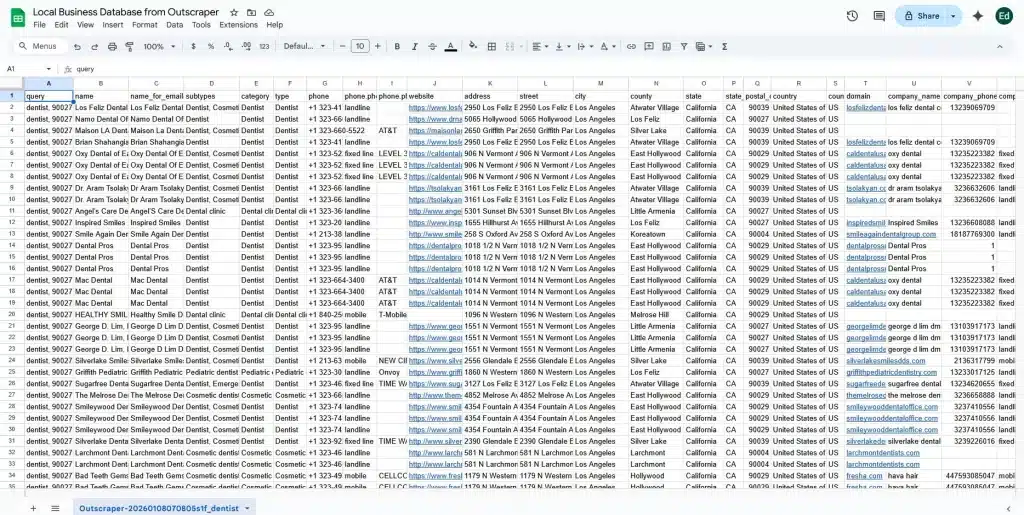
本地企业数据库中的每条记录通常包含企业名称、类别、实际地址、电话号码、网站以及评价信息。其显著特点在于数据组织有序。数据经过合理整理,以便团队能够进行查询、导出、更新以及与其他工具对接。.
当有人搜索“本地企业数据库”时,他们通常想要的是有用的信息,而不是一份需要翻阅的列表。大多数营销人员会利用这些数据集,按地理位置和服务类别构建精准的受众名单。.
销售团队提取联系人及决策者信息。数据团队对记录进行清理和关联,并通过评论或互动指标来丰富这些记录。该数据库的存在旨在支持相关工作,从而推动外联、分析和洞察。.
本地企业数据库与普通名录有何不同
A 简单目录 该平台旨在帮助用户发现信息,而本地商家数据库则为实际行动提供支持。使用目录时,您只需输入类别或名称,界面就会显示可供点击的搜索结果。这有助于消费者找到附近的管道工或咖啡馆。.
与此同时,本地商家数据库为实际操作提供支持。您可以按位置、类别或评论数量筛选商家。您可以导出记录,并将其用于外联活动、仪表盘或数据分析。两者的区别在于实用性:一个用于浏览,另一个用于工作。 如需了解如何借助经过审核的 Outscraper JSON 专家逐步实现企业目录,请参阅 我们是如何构建一个可搜索的本地企业名录的.
人们如何使用本地企业数据库
实际应用场景往往呈现出明显的规律:
- 潜在客户开发: 查找符合特定类别和区域的企业。.
- 市场分析: 各地区的评论数量、星级评分或分类分布情况。.
- 区域规划: 了解服务集中在哪些地方,或者哪些地方缺乏服务。.
- 数据增强: 向现有记录中添加缺失的电子邮件、域名或联系信息字段。.
当这些数据按位置和类别进行结构化整理后,便能实现位置智能,使团队能够分析地理模式、比较市场,并根据企业的实际运营地点而非孤立的商铺信息来做出决策。这使得本地企业数据从一堆静态记录转变为营销、销售和研究的战略资产。.
许多团队会从以下来源构建这些数据库: 谷歌地图 因为这些信息是最新的、易于获取的,并且通过评论与真实的用户活动相关联。当这些信息以结构化格式收集并存储时,它就成为了一项 本地企业数据库 能够支持实际工作,而不仅仅是探索。.
使用每月可更新的免费套餐,免费试用Outscraper。
本地企业数据库的常见示例
了解本地企业数据库的来源,有助于厘清其构建和使用方式。虽然数据库本身是一组结构化的数据集,但其数据往往源自公开渠道或专业来源。像谷歌地图这样的平台不仅是企业名录,还充当着兴趣点(POI)数据源的作用。与此同时,您还可以 利用谷歌地图丰富兴趣点(POI)数据.
公共企业名录
Google 地图、黄页和 Bing Places 等公共目录提供了广泛可用的商家信息。这些平台是原始数据的来源,本身并非数据库。团队会收集、清理并整理这些信息,以此构建一个结构化的本地商家数据库,该数据库支持搜索、筛选和导出,可用于营销、销售或研究等目的。.
行业专用名录
某些行业设有专门的目录,例如 商业改进局 (BBB) 列表 或行业专用数据库。这些名录收录的企业数量较少,但通常能提供更准确的分类或认证信息。团队将这些信息作为数据源来丰富其数据库,从而确保在受众细分、信息验证和精准触达方面取得更好的效果。.
B2B 和营销数据库
B2B 和营销数据库从一开始就旨在具备可操作性。它们将公开数据和行业特定数据与额外补充信息相结合,形成结构化且可搜索的数据集。这些数据库允许团队按行业、地点、规模或联系信息进行筛选,并导出记录以用于营销活动或分析。与原始名录不同,它们的设计初衷是支持工作流程,而不仅仅是提供信息可见性。.
本地企业数据库通常包含哪些数据
本地企业数据库汇集了关于企业的多层次信息,使其能够为市场营销、销售和研究提供可操作的依据。该数据库所包含数据的结构和类型反映了现实工作流程,而非理论上的分类。.
核心业务信息
基础部分包含用于识别企业的基本信息:
- 公司名称、地址和电话号码
- 用于定义所提供产品或服务的一级和二级分类。.
这些字段 允许 团队用于搜索、筛选和细分企业 很快. 这些是构建潜在客户名单或进行市场调研所需的最低要求。.
操作详情
运营数据为了解企业如何运作以及如何服务客户提供了背景信息:
- 营业时间
- 服务区域或配送区域
- 位置信号,例如 GPS 坐标或多个分支机构的地址
这些字段有助于团队确定外联工作的优先级并高效规划覆盖范围,确保在合适的时间和地区进行联系尝试。.
声誉与活动信号
客户反馈和参与度有助于了解业务表现:
- 评论和评分。.
- 评论数量或近期活动
这些信号 允许 营销人员和销售团队应优先关注那些活跃且在客户面前有存在感的业务,, 帮助 有效配置资源。.
所有权及联系方式
基础企业信息仅提供有限的业主或决策者信息。例如,谷歌地图可能会显示电子邮件地址或网站,但要获取直接联系方式,通常需要进行额外的信息来源核查或数据补充。.
尽早设定切合实际的预期,有助于团队规划填补数据缺口所需的工作量,并确保营销活动基于准确且可付诸行动的信息展开。.
谷歌地图如何融入本地企业数据库
为什么谷歌地图常常是起点
Google 地图通常是构建本地企业数据库的首要起点。其广泛的覆盖范围、频繁的更新以及结构化的列表,为团队提供了原始数据,这些数据可被收集、清理并整理成可操作的数据集。.
Google 地图具有多项优势,使其成为首选的数据来源:
- 各城市及各类别的覆盖范围 – 从餐厅到服务提供商,“地图”应用收录了来自各行各业、遍布各地的数百万条商家信息。.
- 来自企业主和用户的定期更新 – 营业时间、地址和评论数据会持续更新,确保信息始终最新。.
这些特点使得 谷歌地图 一个实用的商业数据提取起点,对营销人员、销售团队和数据分析师都很有帮助 正在寻找 以汇编一份全面的 本地企业数据集.
Google 地图作为独立数据库的局限性
虽然“地图”是一个信息丰富的来源,但若将其视为一个完整的数据库,它显然存在局限性:
- 不包含所有者的直接电子邮件地址或内部业务标识符 – 大多数列表缺少开展外联工作所需的联系方式。.
- 列表并非用于批量存储或高级搜索 – 该平台旨在供用户浏览,而非用于数据导出或大规模分析。.
由于 这些 限制, Google 地图的数据库通常会被收集并整理成一个独立的本地商家数据库,, 允许 团队对数据进行筛选、丰富,并将其整合到工作流中。.
开始之前需考虑的法律和伦理问题
在收集或构建本地企业数据库之前,了解合规要求和负责任的做法至关重要。首先解决法律和道德方面的考量,可确保技术措施得以安全、恰当地实施。.
谷歌服务条款
谷歌地图是获取本地商家数据的常见来源,但直接抓取数据用于商业用途可能会违反 谷歌的服务条款. 各团队应意识到这一风险,并谨慎规划数据收集方法。目的是强调合规性,而非引发不必要的担忧。A r推荐方法 是使用 API 或授权数据,这是一种常见的 方法 遵守规则。.
数据保护与隐私法律
诸如以下法规: 《通用数据保护条例》(GDPR) 和 CCPA 规范个人数据的处理。大多数本地企业数据库侧重于企业层面的信息,而非 个人 个人资料。. 这种区分使合规变得更容易, ,但是 各团队仍应避免在未经同意的情况下存储或使用个人身份信息。.
对收集数据的负责任使用
即使仅收集商业信息,也必须确保数据的存储和使用具有明确、合法的目的。应避免收集私人联系方式或员工个人资料。将数据库用于外联、分析或运营规划,而非侵入性追踪,将确保工作流程符合道德规范且符合相关法规。.
构建本地企业数据库的方法
根据您的技术能力、合规要求和业务规模,构建本地企业数据库有多种方法。有些方法依赖于官方数据访问,而有些则涉及收集和整理公开信息。.
以下各节概述了构建本地企业数据库最常见的方法。.
方法 1:使用 Google Maps Platform API 构建数据库
该方法利用谷歌的官方 API,以结构化且符合规范的方式收集企业数据。它最适合用于开发内部工具、分析系统或小型企业数据库软件的团队,这些场景中数据质量和可预测的行为至关重要。.
If you plan to use Google’s official service, review the Google Places API setup and pricing guide before choosing fields and estimating request costs.
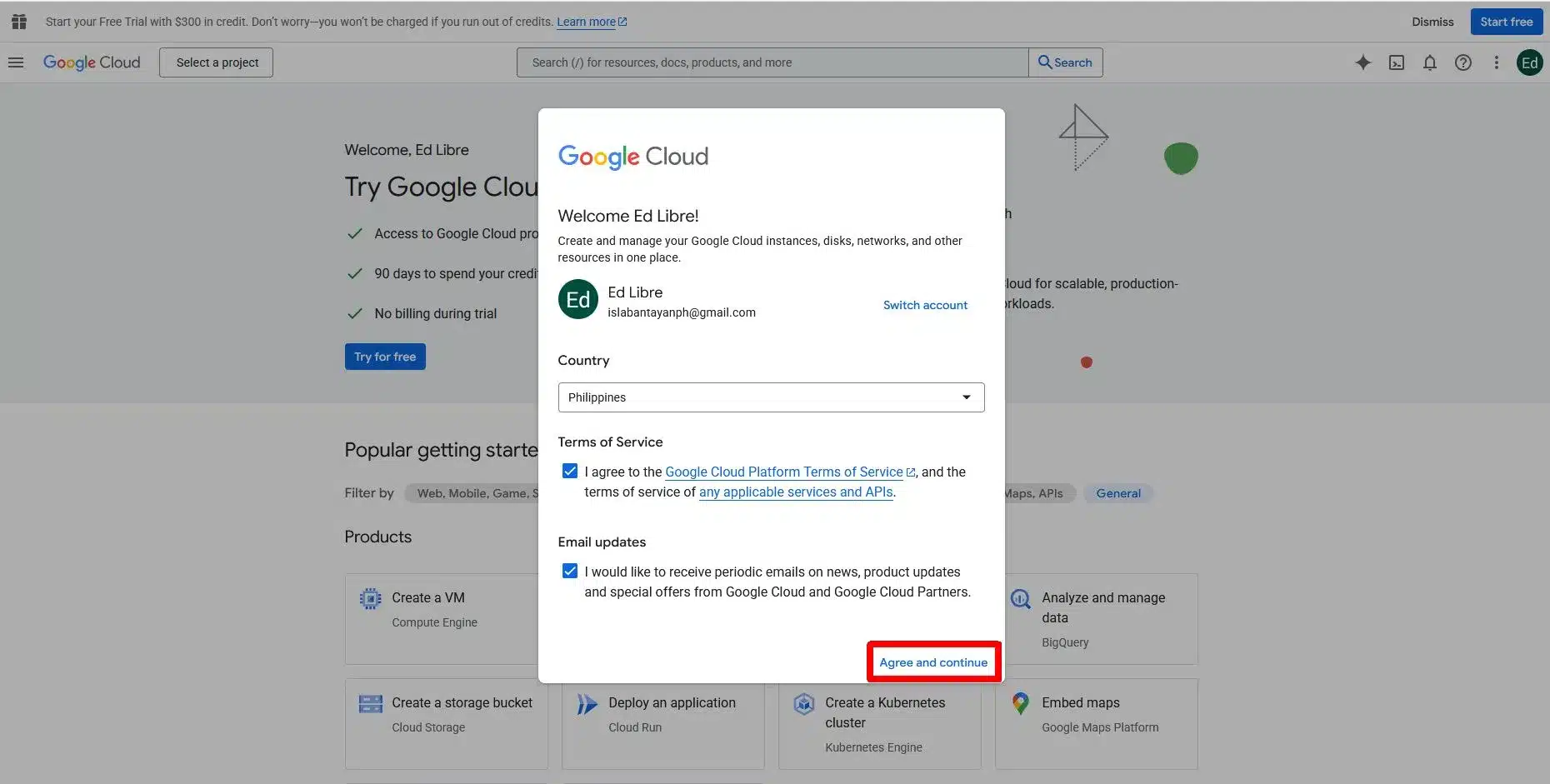
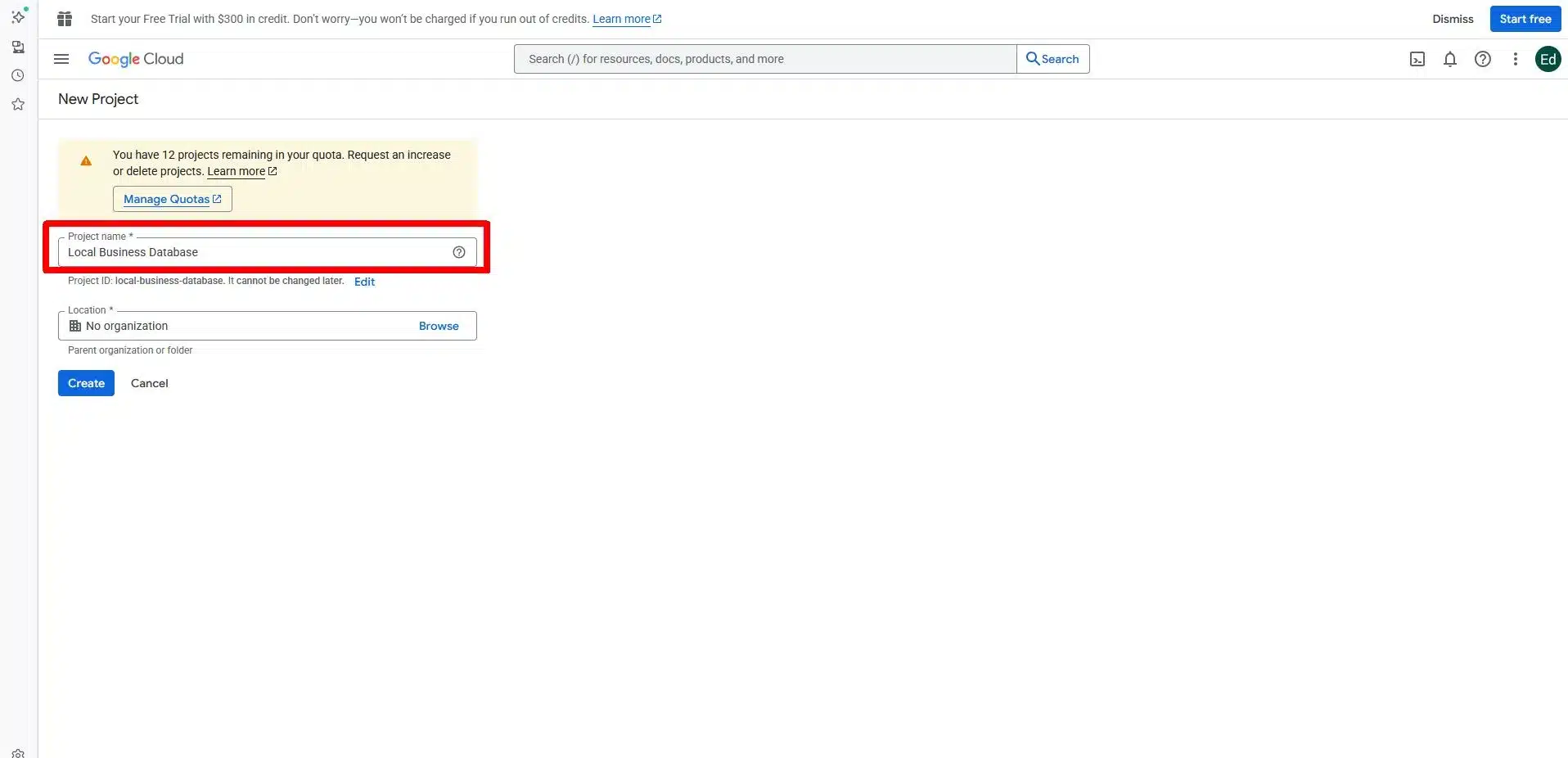
步骤 1:创建一个 Google Cloud 项目
首先在 Google Cloud. 该项目负责管理 Google 地图服务的计费、权限及访问控制。请启用 Places API 以及您的用例所需的任何相关位置服务。.
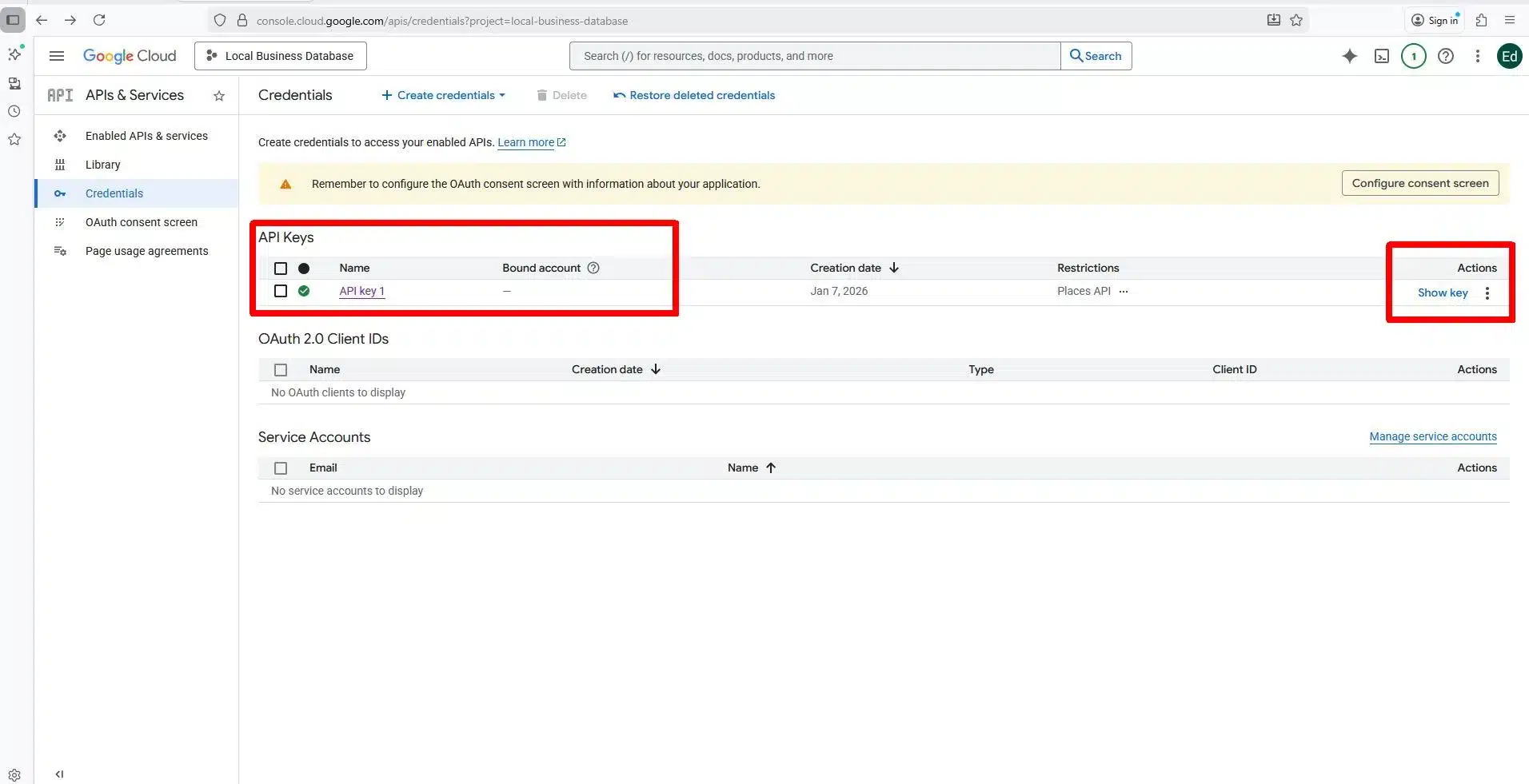
步骤 2:生成并保护 API 密钥
创建 API 密钥以对请求进行身份验证。可通过 IP 地址、域名或应用程序类型对密钥进行限制,从而控制使用情况并降低风险。配额和限制有助于管理成本。.
第 3 步:搜索商家
使用“附近搜索”请求,可在指定的区域和半径范围内查找商家。可通过类别或关键词进行筛选,以缩小搜索结果范围。每个搜索结果都包含一个唯一的地点 ID。.

第 4 步:查询企业信息
使用包含“地点 ID”的“地点详情”请求,可获取地址、电话号码、网站、营业时间、评分和评论等字段。此步骤可完成单条记录的填充。.

获取所有地点 ID 后,如果只有一两家商户,你可以通过浏览器查询所有地点的详细信息;但如果你想下载所有附近商户的数据,建议使用自动化方式。.
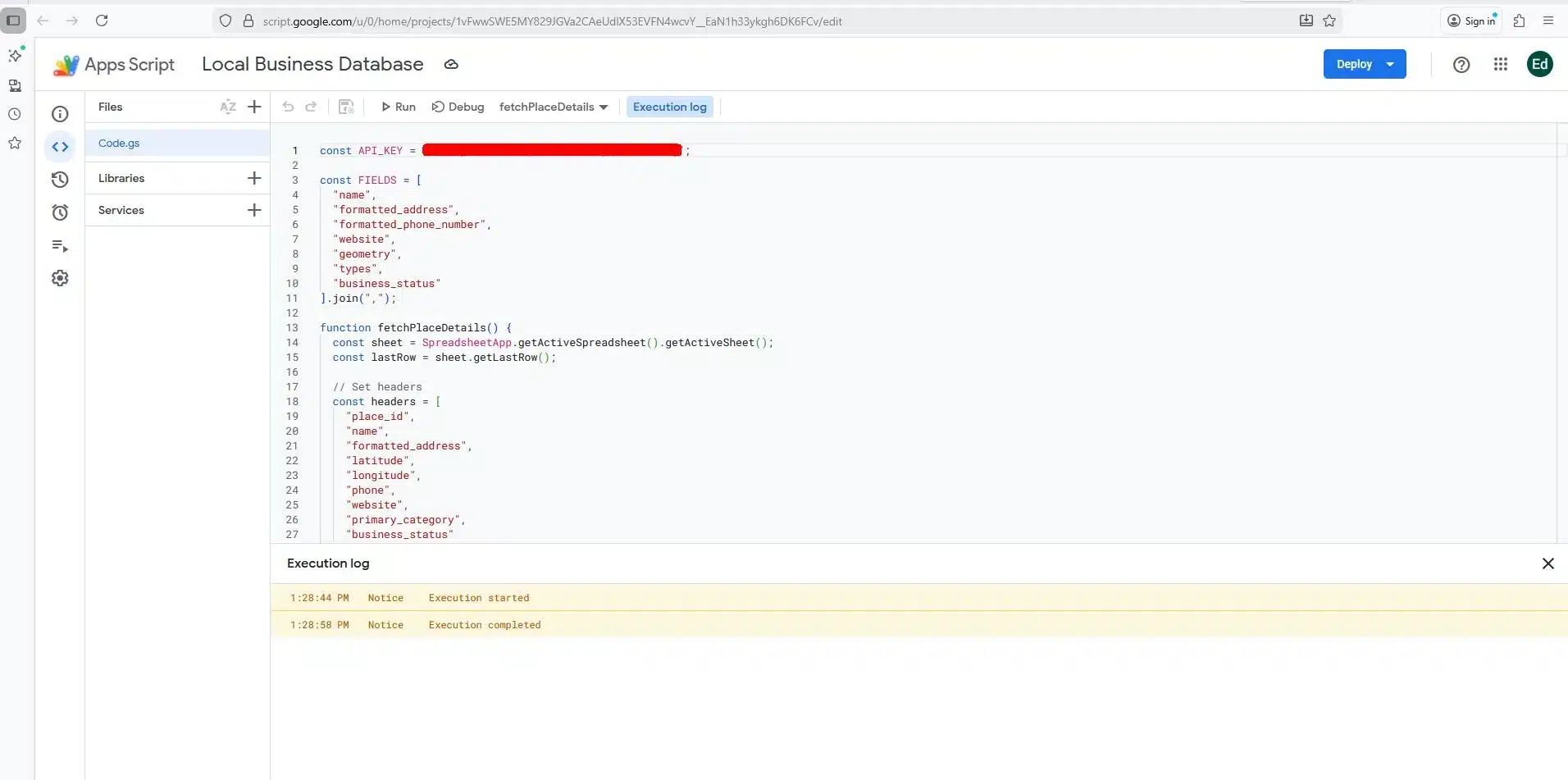
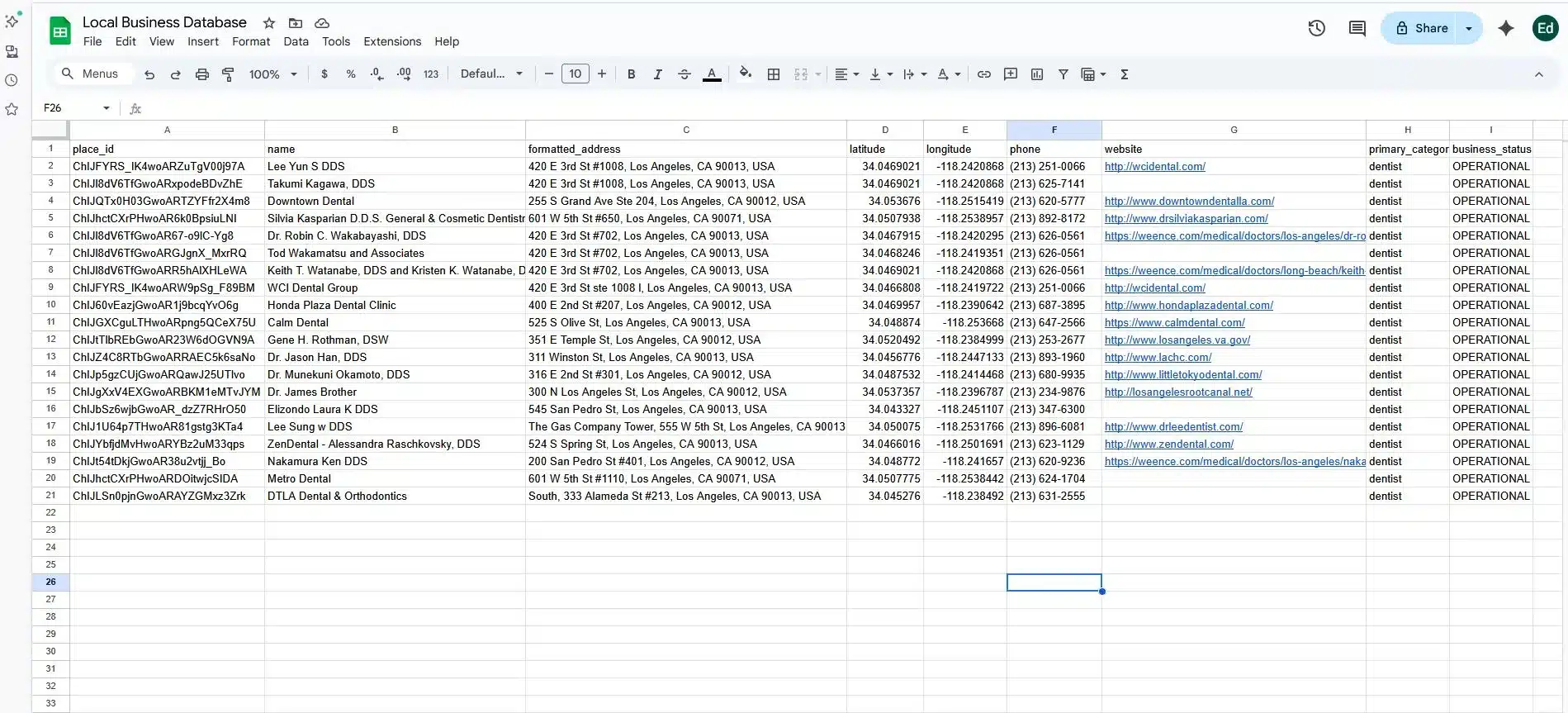
In this example, I will be using Google Sheet to download the raw JSON files and use the Apps Script extension to populate the data of our Local Business database.
If you have some backgrounds in Python programming you can also used some Python script to convert the raw JSON files into CSV.
Step 5: Analyzing the Data of Your Local Business Database
This is the only time that you can start building your Local Business database. You can add more details in your database based on your needs.
使用每月可更新的免费套餐,免费试用Outscraper。
Method 2: Building a Database Using Third-Party Tools
This method relies on third-party tools to collect public business listings and organize them into usable datasets. It reduces technical setup compared to APIs, but still requires careful input selection, cleanup, and validation.
Step 1: Choose a Data Collection Tool
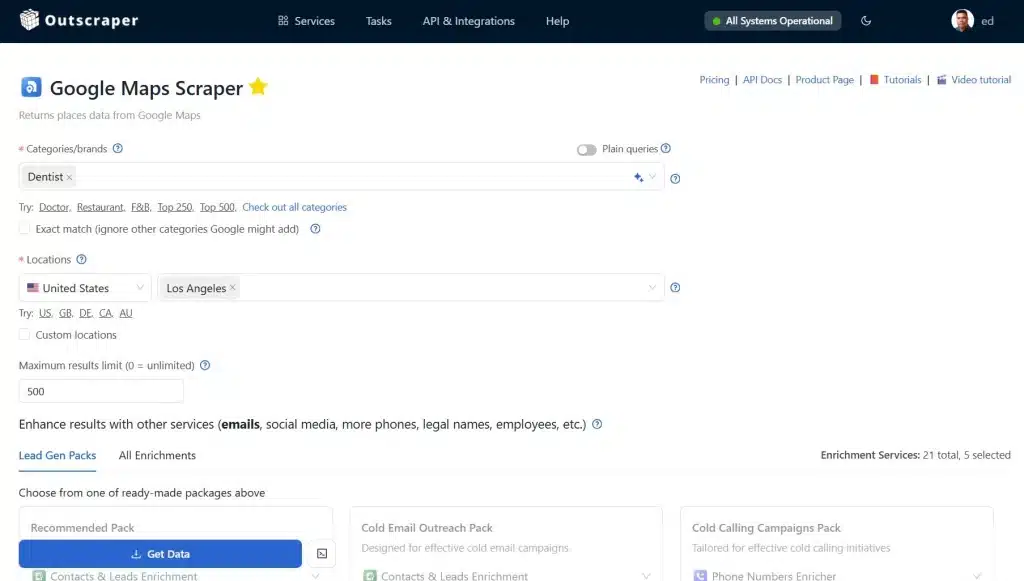
Select a tool that supports local business data collection and exports. Options like Outscraper, Apify, and Scrap.io differ in sources, filters, and output formats, so focus on how well they fit your workflow rather than brand claims. in this example we will be using 谷歌地图抓取工具 to build a local business database.
Step 2: Define Categories and Locations
Set clear inputs such as business type, city, or service area. Consistent categories and location boundaries help avoid gaps, overlaps, and uneven coverage in the results.
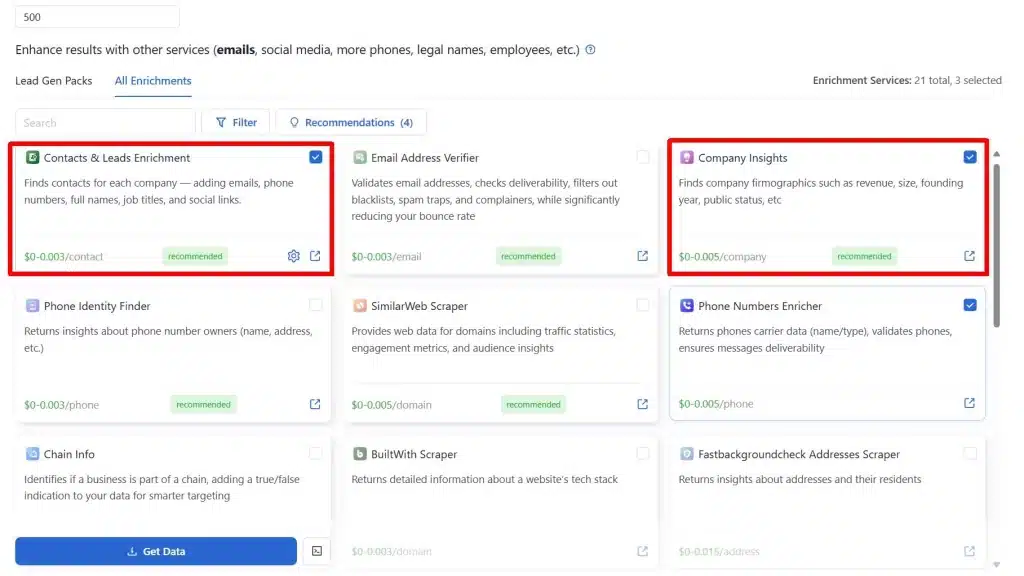
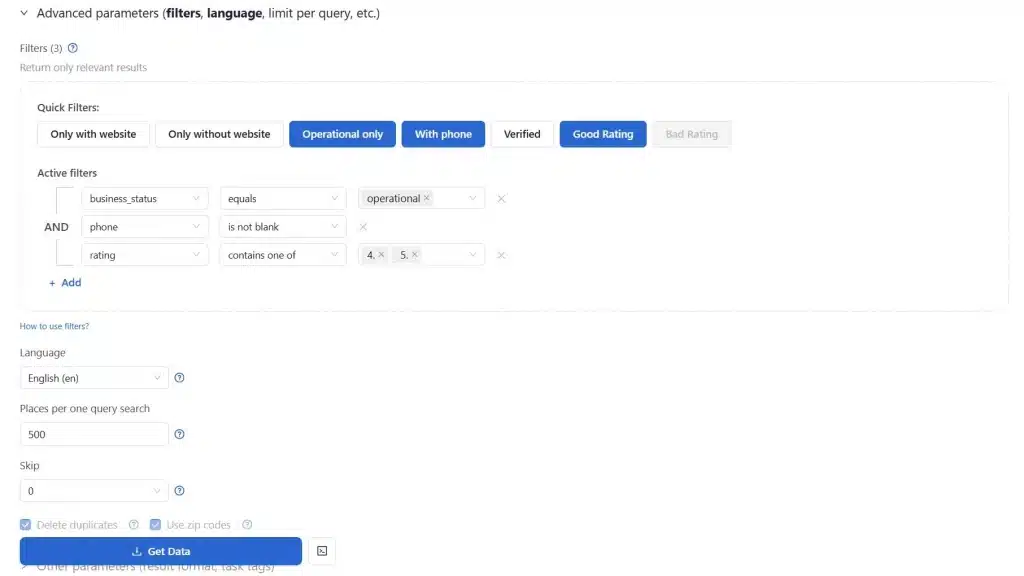
Step 3: Add Enrichments & Advanced Filters
Adding enrichment to your existing data will make your local business database stand out from the rest. Don’t just rely on typical fields such as business name, address, phone number, website, ratings, and reviews. You can add email addresses, tech stacks and other relevant business details. Mastering how to use the Google Maps Data scraper filter will also help improve your local business database.
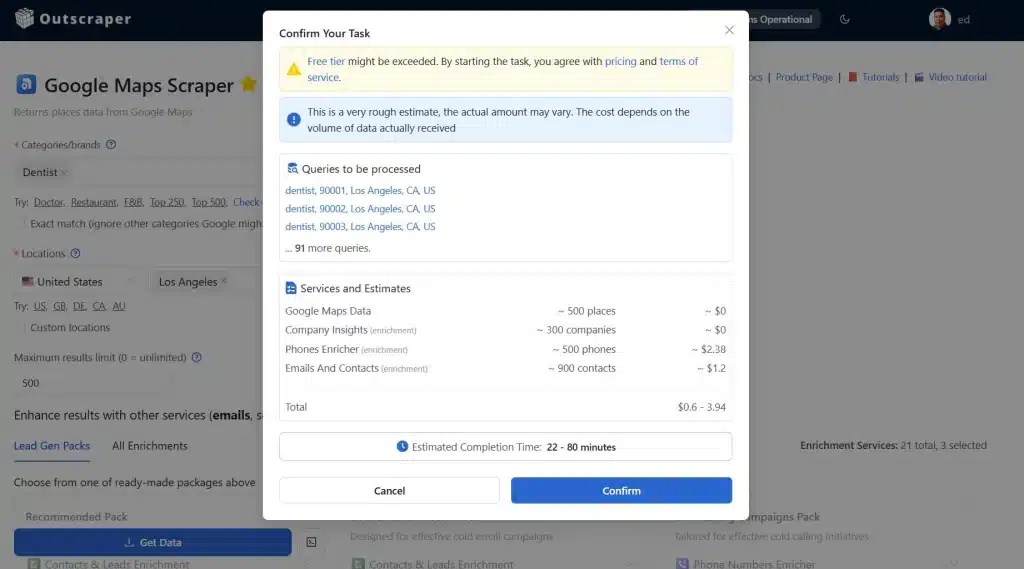
Step 4: Extract & Export the Results
Download the data in CSV or Excel format. These formats make it easier to review records, apply filters, and prepare the dataset for storage or import into other systems.
Step 5: Clean and Validate the Data
Remove duplicate entries and review missing or outdated fields. Basic cleanup at this stage improves accuracy and reduces issues during outreach or analysis.
This approach works well for teams that need flexibility and faster setup, with the understanding that data quality depends on careful input selection and review.
Method 3: Building a Database from Public Records and Government Sources
This method uses official datasets published by government or regulatory bodies to create a verified business database.
Step 1: Identify Relevant Public Data Sources
Locate business registries, licensing databases, or open data portals at the city, state, or national level that cover your target region or industry.
Step 2: Download Available Business Records
Access bulk files or searchable exports containing registered business names, addresses, license types, and registration statuses.
Step 3: Normalize and Standardize Fields
Clean inconsistent formats for names, addresses, and categories so records can be filtered and matched across locations.
Step 4: Store Data in a Searchable Structure
Import the cleaned data into tables or database software that supports filtering by location, industry, or registration type.
Step 5: Validate Against Other Sources
Cross-check records with listing platforms or internal data to identify closed, inactive, or duplicate businesses.
This method works best for verification, compliance checks, and industries where official registration matters more than online presence.
使用每月可更新的免费套餐,免费试用Outscraper。
Method 4: Building a Database from First-Party and Internal Data
This method builds a local business database using data already collected through your own systems and interactions.
Step 1: Gather Existing Business Records
Export data from CRMs, email platforms, lead lists, sales tools, or customer databases that contain business-level information.
Step 2: Consolidate Data into a Single Dataset
Merge records from multiple sources into one structured file or database to remove silos and inconsistencies.
Step 3: Deduplicate and Clean Entries
Remove repeated businesses, standardize naming conventions, and correct missing or outdated fields.
Step 4: Enrich Records Where Needed
Add missing categories, locations, or website data using public sources to improve usability.
Step 5: Organize for Search and Analysis
Structure the database so it can be filtered by region, industry, or engagement history.
This approach is most effective for expansion, prioritization, and analysis based on known business relationships.
Free vs Paid Local Business Databases
When building a local business database, teams often weigh free sources against paid options. The choice depends less on features and more on scale, reliability, and intended use. Understanding the strengths and limits of each helps guide planning and resource allocation.
What Free Data Is Useful For
Free sources such as public directories, Google Maps, or open government datasets are best for:
- Research and market analysis – getting a rough sense of business distribution or category counts.
- Planning – identifying potential service areas or gaps.
- Early testing – prototyping a database structure or workflow before scaling
Free data is ideal for experimentation and light operational work where accuracy or volume is not critical.
Where Free Data Breaks Down
Free datasets often come with limitations:
- Incomplete coverage – not all businesses are listed, or categories may be inconsistent.
- Manual cleanup required – duplicates, missing fields, and outdated information often need to be fixed before use.
These gaps make free data challenging for systematic outreach or internal systems that depend on consistent and reliable records.
When Paid Data Makes Sense
Paid databases are appropriate when teams need reliable, large-scale coverage for:
- Lead generation and outreach – reaching prospects efficiently without manual collection.
- Internal systems and reporting – feeding CRMs, dashboards, or analytics tools with up-to-date data.
The choice to invest in paid data should be based on time saved, volume handled, and operational scale, rather than just the raw features offered by the vendor.
That is why we encourage our free users to upgrade your accounts and utilize the full potential of Outscraper’s newly-improved business data and enrichment platform.
Updating and Choosing the Right Approach in 2026
A local business database is only valuable if the information remains current. Fresh data ensures accurate analysis, reliable outreach, and effective planning. Regular updates prevent stale records from reducing the database’s usefulness.
Why Updates Matter
Business information changes constantly. Stores relocate, hours change, phone numbers update, and companies open or close. Without periodic updates, a database quickly becomes outdated, leading to wasted time, inaccurate insights, or failed outreach.
Update Options
There are two common ways to maintain freshness:
- Scheduled API pulls – For databases built via Google Maps APIs or other official endpoints, schedule automated queries to retrieve the latest details. This ensures the system always reflects current business data.
- Periodic tool-based re-runs – For datasets collected with third-party tools, rerun data collection at defined intervals. Compare new results with existing records to update fields, add new businesses, and remove closed ones.
Both methods require planning around frequency and scale, balancing cost and maintenance effort against data accuracy.
使用每月可更新的免费套餐,免费试用Outscraper。
Choosing the Right Approach in 2026
Building a local business database involves balancing accuracy, scale, compliance, and maintenance. Each method has unique advantages and limitations. Understanding these helps teams select the approach best suited for their use case.
Comparisons of Methods for Building a Local Business Database
| 方法 | 优点 | 缺点 | Best Use Case | Suggested Choice |
|---|---|---|---|---|
| Method 1: Google Maps API | Structured, reliable, compliant; automated updates; predictable results | Requires technical setup; usage costs; limited enrichment | Internal systems, analytics dashboards, SEO-targeted outreach | Best for teams needing compliance and structured, current data |
| Method 2: Third-Party Tools | Easy to set up; handles IP rotation and CAPTCHAs; no-code or low-code | Quality varies; input definition and cleanup required; risk if misused | Fast collection, research, large-scale data gathering without API coding | Good for teams needing speed and flexibility, with validation processes |
| Method 3: Public Records / Government Sources | Verified business registrations; high legal accuracy; useful for regulated industries | Limited category coverage; no reviews or ratings; often less current | Compliance checks, verification, regulated industries | Best for verification and legal validation alongside another method |
| Method 4: First-Party / Internal Data | High relevance; known accuracy; includes engagement and interaction history | Limited coverage; may need enrichment for completeness | Sales, territory planning, outreach prioritization | Ideal for teams leveraging internal knowledge and expanding existing datasets |
If the database will power an application rather than remain a standalone dataset, the next step is mapping the business records into an application schema. This location-based app example shows how JSON records can be normalized and stored in Supabase.
Recommendations for 2026
- Single-method approach: Use API-based builds if compliance, automated updates, and structured data are top priorities.
- Hybrid approach: Combine API + internal data or API + third-party tools for a database that is scalable, current, and enriched.
- Verification-focused approach: Layer public records on top of API or tool-based data for regulated industries or when legal accuracy is required.
- Operational workflows: Use first-party/internal data to prioritize leads, plan territories, and enrich datasets with known engagement history.
Cost and efficiency tip: 使用 Outscraper的 谷歌地图数据抓取工具 与 API 集成 can save both time and money compared with building directly on Google Places API. Outscraper handles infrastructure, request limits, and batching, reducing setup effort and allowing smaller teams to collect large datasets without managing quotas or paying high API overages.
For most modern teams in 2026, a hybrid strategy, starting with API data (via Outscraper for efficiency), adding enrichment through third-party tools (also available with Outscraper), and validating with public records, offers the best balance of scale, accuracy, compliance, and usability.
Conclusion: Build a Local Business Database That Works
Creating a local business database in 2026 is no longer just about collecting listings, but it’s about turning raw business data into actionable insights for marketing, sales, and research. Whether you use Google Maps APIs, third-party tools, public records, or your internal data, the key is organization, accuracy, and usability.
Regular updates, ethical collection practices, and structured storage ensure your database remains reliable and ready to drive decisions.
By combining multiple methods, especially using Outscraper’s Business Data & Enrichment Platform for efficiency and cost savings, teams can build a dataset that supports outreach, analytics, and operational planning at scale.
常见问题
最常见的问题和答案
本地企业数据库是一组结构化的企业记录集合,旨在支持实际操作,而不仅仅是浏览。与简单的名录不同,它支持对企业数据进行筛选、导出,并将其整合到营销、销售和分析的工作流程中。.
典型数据包括核心业务信息(名称、地址、电话)、运营详情(营业时间、服务区域、GPS坐标)、声誉指标(评论、评分、近期动态)以及所有权/联系方式。这种结构使得该数据库能够有效用于潜在客户开发、市场调研和区域规划。.
Google 地图覆盖范围广,信息更新及时,且提供结构化数据。其数据易于获取,非常适合营销人员、销售团队和分析师用于整理全面的数据集。不过,它也存在一些局限性,例如缺少所有者邮箱地址,且不支持批量导出功能。.
有四种常见的方法:
- 利用 Google 地图 API 获取结构化且符合规范的数据。.
- 利用第三方工具收集和整理公开信息。.
- 利用公共记录和政府来源获取经核实的数据。.
- 基于通过CRM或销售系统收集的第一方/内部数据进行构建。.
免费数据源(如谷歌地图、公共名录、政府数据)虽适用于研究、规划或原型设计,但通常需要进行数据清理,且覆盖范围可能不完整。付费数据库则为外联工作、内部系统和运营工作流程提供了可靠、大规模且可直接使用的数据集。.
定期更新至关重要。请通过定时调用 API 或使用工具进行周期性数据采集,来刷新记录、添加新企业并移除已关闭的企业。保持数据的及时性,可确保有效的推广、准确的分析以及可靠的运营规划。.