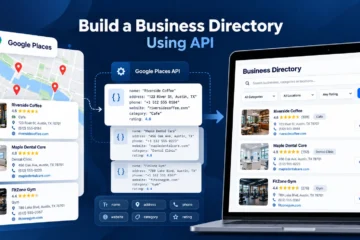
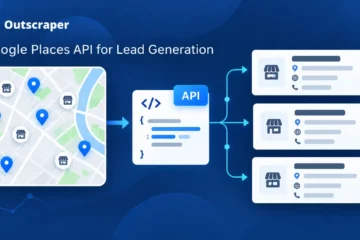
目录
这 Google 地方信息 API 支持地点搜索、自动完成、周边发现、商家详情以及其他基于位置的功能。真正的挑战在于确定哪项“地点”服务最适合该任务、哪些字段值得查询,以及这些选择如何影响成本。.
谷歌向 Places API(新版)的过渡改变了开发者处理请求、字段选择、响应数据和计费的方式。旧有的实现模式并不总能顺利迁移,尤其是在涉及字段掩码和基于 SKU 的定价时。.
正确的配置取决于您正在构建什么。应用内的位置搜索可能只需要一小部分地点详情。一个使用该 用于潜在客户开发的 Google Places API 在许多城市中,可能需要采用不同的工作流程。如果将这两种使用场景一视同仁,可能会增加不必要的成本和额外的 API 工作量。.
在选择端点或估算月度使用量之前,了解 Google 如何构建地点搜索、字段选择、计费和配额机制会很有帮助。这些决策也有助于判断何时应使用官方的 Places API,何时采用独立的商业数据工作流更为合理。.
简答:Google Places API 的工作原理
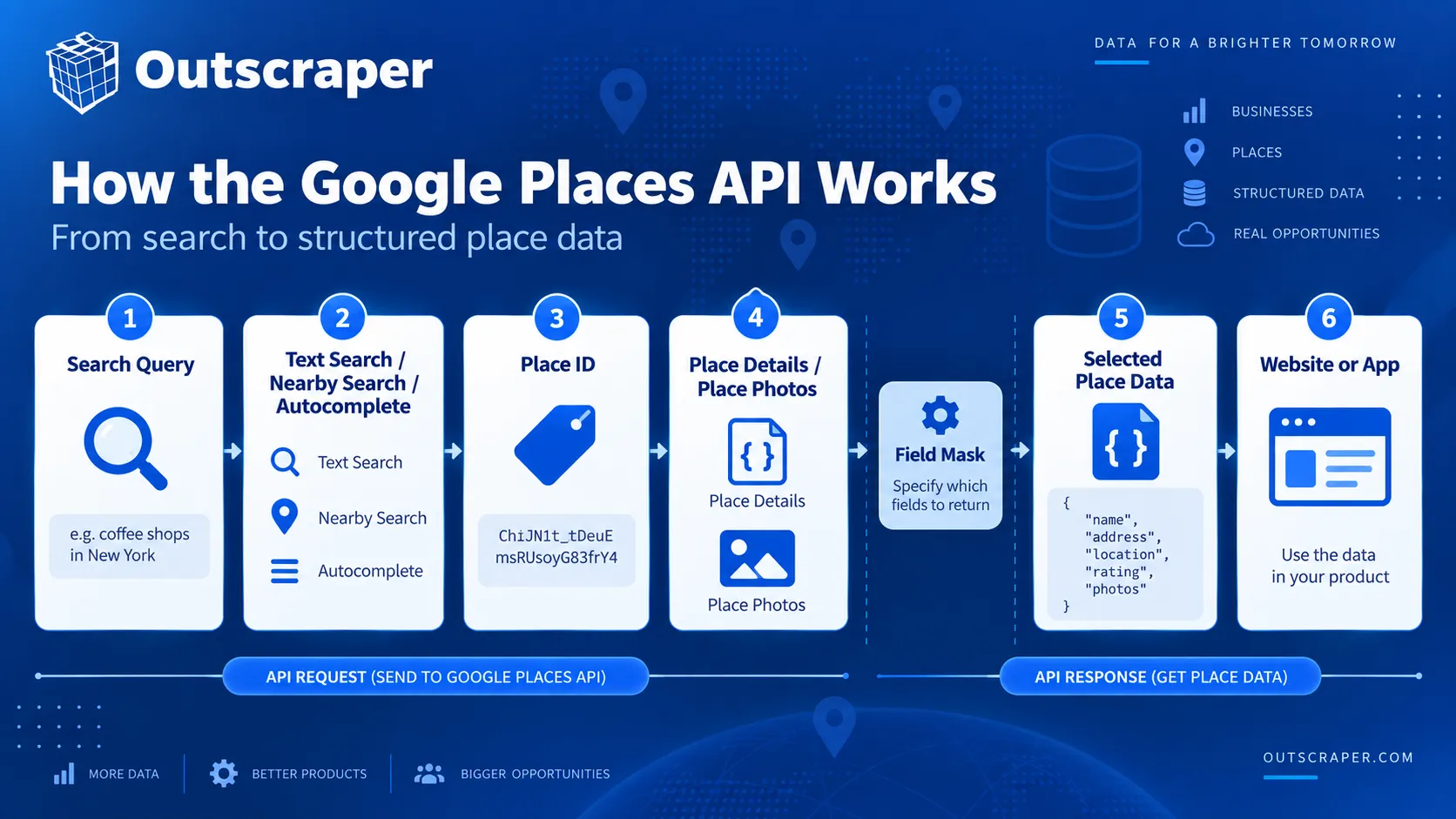
- 使用“文本搜索”或“附近搜索”查找地点。.
- 获取特定地点的详细信息、照片和地点 ID。.
- 在用户输入时,使用自动完成功能来推荐地点。.
- 创建一个 Google Cloud 项目、计费账户和受限 API 密钥。.
- 使用字段掩码来控制返回的数据和计费。.
- 费用取决于服务内容、所需字段以及使用情况。.
- 对于大量业务数据或额外的联系人字段,采用另一种数据处理流程可能更合适。.
什么是 Google Places API?
Google Places API 是 Google 地图平台的一部分。它允许开发者通过编程方式访问 Google 地点数据库中列出的商家、地标、地址、地理位置及其他地点的相关信息。.
谷歌目前表示 地点 API(新) 为超过2亿个地点提供位置数据。开发者可以利用该服务,在网站、移动应用和其他软件中添加地点搜索、周边发现、自动完成、地点详情和照片等功能。.
一个典型的请求通常以搜索查询、地理区域或已知的地点 ID 开始。Google 会根据请求类型和开发者选择的字段,返回结构化的地点信息。.
例如,一款餐厅搜索应用可以利用“附近搜索”功能查找用户当前位置附近的餐厅。当用户选定一家餐厅后,该应用可以请求“地点详情”,以获取其地址、评分、营业时间、电话号码或评论等信息。.
Google Places API 可以返回哪些数据?
可用的字段取决于请求以及字段掩码中包含的字段。Places API(新版)可以返回以下信息:
| 数据类型 | 示例字段 | 描述内容 |
|---|---|---|
| 身份 | 地名、地点ID、地点类型 | 标明地点及其类别。. |
| 地点 | 地址、地理坐标 | 显示该地点的位置。. |
| 企业详情 | 企业状态、电话号码、网站、营业时间 | 提供运营和联系方式信息。. |
| 客户信息 | 评分、评论、价格信息 | 提供评分、评论和价格相关的数据。. |
| 媒体 | 照片 | 返回与该地点相关的可用图片。. |
| 无障碍功能 | 无障碍信息 | 描述了支持的辅助功能。. |
| 服务选项 | 外卖、堂食、路边自取 | 在支持的情况下,显示可用的服务选项。. |
Google 将这些字段划分为不同的定价层级。一些基本字段属于低价 SKU,而评分、营业时间和评论等字段则可能触发高价 SKU。Google 在其 Places API 数据字段文档. 请仅请求应用程序所需的字段,因为字段选择可能会导致计费 SKU 发生变化。.
Places API(新版)还要求在“地点详情”、“文本搜索”和“附近搜索”请求中提供字段掩码。必须至少指定一个字段。如果请求中未包含字段掩码,系统将返回错误。.
Places API 在 Google 地图平台中的作用
Places API 负责处理与地点相关的信息,但这只是 Google 地图平台的一部分。.
开发者可以使用 Places API 查找商家,然后使用 Google Maps Platform 的另一项服务来完成其他任务。例如,Geocoding API 可以将地址转换为坐标,而路线规划服务可以计算不同地点之间的路线或行车时间。.
在 Places API 本身中,主要服务负责处理地点搜索流程的不同环节:
- 文本搜索 根据书面查询查找地点。.
- 附近搜索 在指定的地理区域内查找地点。.
- 地点详情 检索有关某个已知地点的信息。.
- 自动完成 在用户输入时推荐地点。.
- 上传照片 检索与某个地点相关的可用图片。.
Google 建议使用 地点详情 当已知地点 ID 时,因为无需针对同一地点再次发送搜索请求。.
在整个城市范围内进行商家搜索、使用自动完成框以及查询某个已知位置的详细信息,这三项操作分别需要调用不同的 Places API 方法。.
Google Places API 的工作原理
Google Places API 会根据您已有的输入以及所需的地点数据类型,使用不同的方法。.
书面查询、一组坐标和已知的地点 ID 分别需要采用不同的方法。Places API(新版)目前为这些任务提供了文本搜索、附近搜索、地点详情、自动完成和地点照片等功能。.
| 需要 | 用 |
|---|---|
| 根据书面查询进行搜索 | 文本搜索 |
| 在坐标周围搜索 | 附近搜索 |
| 查看某个已知地点的详细信息 | 地点详情 |
| 输入时推荐地点 | 自动完成 |
| 检索地点图片 | 上传照片 |
| 稍后引用一个已知地点 | 地点标识 |
文本搜索
“文本搜索”可根据书面查询(例如企业名称、类别、地址或短语)查找地点,例如 pizza in New York.
“文本搜索”(新功能)使用 HTTP POST 请求,并返回匹配的“地点”对象。可通过可选参数按位置、地点类型、营业状态、评分或价格区间来缩小搜索结果范围。.
谷歌目前在所有页面上最多显示 60 个搜索结果,并指出相同的搜索请求并不总能返回相同的列表。.
附近搜索
“附近搜索”可在指定的地理区域内查找地点。.
该请求使用纬度、经度和半径,然后根据一种或多种地点类型对结果进行筛选。例如,某款应用可以查找位于酒店一定距离范围内的餐厅。.
“附近搜索”(新功能)同样使用 HTTP POST 请求,并且需要为返回的数据指定字段掩码。.
地点详情
“地点详情”功能可通过地点 ID 检索某个已知地点的相关信息。.
一种常见的流程是:
- 使用“文本搜索”、“附近搜索”或“自动完成”功能查找地点。.
- 保留其位置 ID。.
- 仅请求应用程序所需的详细信息。.
这样可以避免在已经确定地点的情况下再次进行搜索。.
自动完成
当用户在搜索框中输入内容时,自动完成功能会提供地点建议。.
会话令牌可将用户的请求归入一个搜索会话中,以便进行计费。每次新的搜索都应使用一个新的令牌,且该会话应以一个兼容的“地点详情”或“地址验证”请求结束。.
地点照片和地点ID
“地点照片”功能会在以下情况下检索与某个地点相关的图片:当 photos 该字段由“文本搜索”、“周边搜索”或“地点详情”返回。.
位置 ID 用于标识特定位置,以便在受支持的 Google Maps Platform 各项服务中再次引用这些位置。.
例如,应用程序可以通过文本搜索找到一家商家,保存其地点 ID,随后无需重复初始搜索即可请求该商家的详细信息。.
Places API(新版)与 Places API(旧版)
谷歌已于 2025 年 3 月 1 日将原始的 Places API 设为“遗留”状态。现有项目仍可继续使用该 API,但新的 Cloud 项目无法启用遗留服务。.
Places API(新版)现已成为 Google 推荐用于新开发的版本。这些变更涉及请求方法、字段选择、响应结构、身份验证和计费。.
| 区域 | 地点 API(旧版) | 地点 API(新) |
|---|---|---|
| 新项目 | 无法启用 | 推荐用于新开发项目 |
| 文本搜索和周边搜索 | HTTP GET | HTTP POST |
| 字段选择 | 旧版响应模型 | 关键方法所需的字段掩码 |
| 响应字段 | 许多蛇形命名法 | 驼峰式命名法 |
| 身份验证 | API密钥 | API密钥或OAuth |
| 查找地点 | 单独的方法 | 使用文本搜索 |
| 账单 | 旧版 SKU 模型 | 当前与方法和字段相关的 SKU 模型 |
Places API 有哪些变化(新功能)?
“文本搜索”和“附近搜索”现采用 HTTP POST 请求,而非旧版所使用的基于 GET 的模式。.
Places API(新版)同样支持 API 密钥和 OAuth,返回 JSON 响应,并且在“地点详情”、“文本搜索”和“附近搜索”中需要字段掩码。.
“查找地点”没有直接对应的新版本。谷歌会将此类搜索重定向至“文本搜索”。.
字段掩码和响应更改
字段掩码是 Places API(新版)与旧版 API 之间的主要区别之一。.
对于“地点详情”、“文本搜索”和“附近搜索”,请求必须指定至少一个要返回的字段。如果省略字段掩码,请求将失败。.
字段选择也会影响计费,因为 Google 会将位置数据字段分配给不同的 SKU。本文后面的“定价”部分将更详细地解释这种关系。.
响应对象也发生了变化。Places API(新版)使用驼峰式(camelCase)字段名,而旧版响应中则多采用蛇形式(snake_case)命名。.
例如:
格式化地址变成格式化地址business_status变成业务状态格式化电话号码变成国家电话号码geometry.location变成地点
“文本搜索”和“附近搜索”也会以一种 地点 数组,而不是旧版 结果 数组。状态和错误信息现采用标准的 HTTP 响应代码和消息,而非诸如 状态 和 error_message.
当现有应用程序解析旧版响应或依赖旧版字段名时,这些更改就显得尤为重要。.
旧版 API 用户需要了解的迁移相关事项
迁移通常不仅需要更改端点。Google 提供了一个 Places API 迁移指南 介绍了旧版 API 与 Places API(新版)之间的主要区别。.
请先检查以下几个方面:
- 将“查找地点”功能移至“文本搜索”(新功能)。.
- 将“文本搜索”和“附近搜索”请求从 GET 改为 POST。.
- 添加所需的字段掩码。.
- 更新用于读取旧版响应字段的代码。.
- 检查每个请求所使用的 SKU。.
此外,请确认项目中已启用“Places API(新版)”,且该 API 受 API 密钥限制的允许范围。.
如果测试期间需要同时运行旧版和新版请求,请将这两个流程分开。Google 建议在迁移过程中使用不同的 API 密钥。.
现有的旧版集成目前仍可继续运行,但新项目应使用 Places API(新版)。.
Google Places API 教程:设置与首次请求
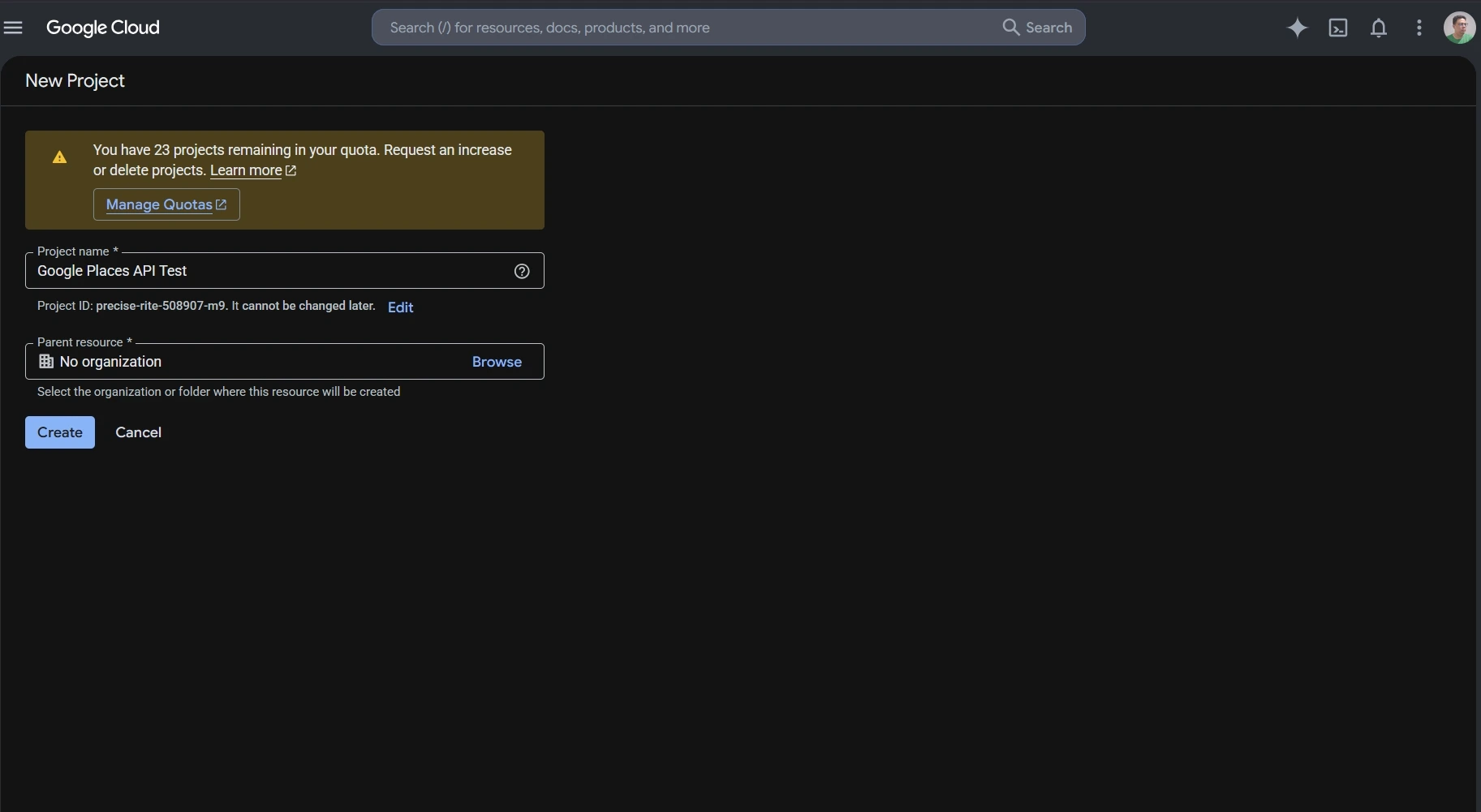
Using Places API (New) starts with a Google Cloud project connected to a billing account. The project must have Places API (New) enabled before authenticated requests can be sent.
For a basic web service request, the setup follows five steps: choose a Cloud project, enable the API, create an API key, restrict the key, and send a request with the fields you want returned.
Create or Select a Google Cloud Project
Every Google Maps Platform request belongs to a Google Cloud project.
You can create a new project or use an existing one. The selected project also needs an active billing account. Google uses the project to track API access, usage, quotas, and charges.
Keeping separate projects can also make sense when development, testing, and production environments need different credentials or usage controls.
Once the correct project is selected, Places API (New) can be enabled from the Google Cloud Console.
Enable Places API (New)
Places API (New) must be enabled for the project before the application can call its web service methods.
In Google Cloud Console:
- Select the project you want to use.
- 开放式 APIs & Services.
- Find 地点 API(新) in the API Library.
- Enable it for the project.
This distinction matters for older projects because Places API (Legacy) and Places API (New) are separate services. A project that previously used the Legacy API may still need Places API (New) enabled before newer endpoints work.

API Key Setup and Restrictions
An API key identifies the Google Cloud project making the request.
Google requires billing to be enabled before Places API (New) can be used for live requests. If you are only following the setup process and do not want to attach a billing account yet, you can stop before creating the key and return to this step later.
When billing is enabled, create an API key in Google Cloud Console and restrict it before using it in an application.
For server-side Places API requests, an IP address restriction can limit the key to approved servers. You can also restrict the key so it only works with Places API (New) and any other Google Maps Platform services the application actually needs.
Google also requires Places API web service requests to use HTTPS. A missing key, incorrect restriction, or unsupported configuration can return a REQUEST_DENIED response.
Google Places API Examples: Make Your First Text Search Request
Text Search is a simple Google Places API example for understanding the request format, API key header, and field mask.
Places API (New) sends Text Search requests to:
https://places.googleapis.com/v1/places:searchText
The request uses HTTP POST. The search text goes in the JSON body, while the API key and field mask can be sent through request headers.
A basic request can look like this:
					curl -X POST \
  -H "Content-Type: application/json" \
  -H "X-Goog-Api-Key: YOUR_API_KEY" \
  -H "X-Goog-FieldMask: places.id,places.displayName,places.formattedAddress" \
  -d '{ "textQuery": "dentists in Chicago" }' \
  "https://places.googleapis.com/v1/places:searchText"
This request searches for dentists in Chicago and asks Google to return only:
- 地点标识
- display name
- formatted address
A successful response returns matching Place objects inside a places array. The fields included in each result depend on the field mask used in the request.
Using a limited field mask keeps the response easier to read and avoids requesting data the application does not need.
For current request parameters, supported fields, quotas, and API changes, check the official Google Places API documentation.
Google Places API Example: Retrieve Place Details
A Text Search response can return a Place ID for each matching location. Once the application knows the Place ID, it can use Place Details to request information about that specific place without running another search.
The request follows this pattern:
https://places.googleapis.com/v1/places/PLACE_ID
例如:
curl -X GET -H "Content-Type: application/json" -H "X-Goog-Api-Key: YOUR_API_KEY" -H "X-Goog-FieldMask: id,displayName,formattedAddress" "https://places.googleapis.com/v1/places/PLACE_ID"
替换 PLACE_ID with the ID returned by Text Search, Nearby Search, or another supported Places method.
Notice that the Place Details field mask uses id, displayName,以及 formattedAddress rather than places.id, places.displayName,以及 places.formattedAddress. Place Details returns one Place object, while Text Search returns Place objects inside a places array.
Choose the Fields You Need
Place Details, Text Search, and Nearby Search require a field mask in Places API (New). If no field is specified, the request returns an error.
For Text Search, a field mask might look like:
places.displayName,places.formattedAddress
If the application also needs a website and rating, the field mask can be expanded:
places.displayName,places.formattedAddress,places.websiteUri,places.rating
Google also supports * as a wildcard for all available fields, but it discourages using the wildcard in production. Requesting unnecessary fields can increase the amount of returned data and move the request into a higher billing SKU.
Keep the field mask limited to the data the application actually uses. Field selection affects both the response and the request cost.
The pricing section below explains how those field choices map to Google Places API SKUs.
Use Outscraper 谷歌地图抓取工具 to collect business data through a no-code workflow without setting up individual Places API requests.
Google Places API Pricing and Free Usage
Google Places API uses pay-as-you-go pricing. Each request is billed under a specific SKU, and the cost depends on the method used, the fields requested, and the number of monthly billable events.
Google no longer uses the old recurring $200 Maps Platform credit. The current model gives each SKU its own monthly free usage cap. Those caps reset at the start of each month.
How Google Places API SKUs Work
A SKU is the billing category attached to a Places API request.
Places API (New) divides many requests into pricing levels such as Essentials, Pro, and Enterprise. The fields requested can move a request into a higher-priced SKU.
For example, Place Details can be billed under different SKUs depending on the requested fields:
- Place Details Essentials includes a monthly free usage cap of 10,000 events.
- The monthly free usage cap for Place Details Pro is 5,000 events.
- 对于 Place Details Enterprise, the monthly free usage cap is 1,000 events.
After the free usage cap, pricing is applied per 1,000 events and becomes lower at higher monthly volumes.
Text Search and Nearby Search follow a similar structure.
For the first paid usage tier, Google currently lists the following rates on the official Google Maps Platform pricing page:
| SKU | Monthly Free Usage | Price per 1,000 Events After Free Cap* |
|---|---|---|
| Place Details Essentials | 10,000 | $5.00 |
| Place Details Pro | 5,000 | $17.00 |
| Place Details Enterprise | 1,000 | $20.00 |
| Text Search Pro | 5,000 | $32.00 |
| Text Search Enterprise | 1,000 | $35.00 |
| Nearby Search Pro | 5,000 | $32.00 |
| Nearby Search Enterprise | 1,000 | $35.00 |
*These figures are for the first pricing tier shown on Google's global pricing page. Higher monthly volumes use lower per-1,000 rates.
Google also offers some IDs-only SKUs with unlimited free usage, including Place Details Essentials (IDs Only) and Text Search Essentials (IDs Only).
Current Free Usage Caps
Free usage is attached to individual SKUs rather than to one shared dollar credit.
例如:
- Autocomplete Requests: 10,000 free monthly events
- Place Details Essentials: 10,000
- Place Details Pro: 5,000
- Text Search Pro: 5,000
- Nearby Search Pro: 5,000
- Place Details Enterprise: 1,000
- Text Search Enterprise: 1,000
- Nearby Search Enterprise: 1,000
Some IDs-only services have unlimited free usage.
This makes cost estimates more dependent on the exact request than under the older credit system. Two applications making the same number of Places API calls can have different bills if they request different fields or use different methods.
How Requested Fields Affect Billing
Field masks control more than the size of the response.
For Place Details, Text Search, and Nearby Search, Google bills the request according to the highest SKU represented by the requested fields. If the field mask includes fields from both Essentials and Pro, the request is billed at the Pro level.
For example, an application that only needs a Place ID and address may not need the same fields as one requesting ratings, opening hours, reviews, and additional place attributes.
This makes field selection part of the cost calculation.
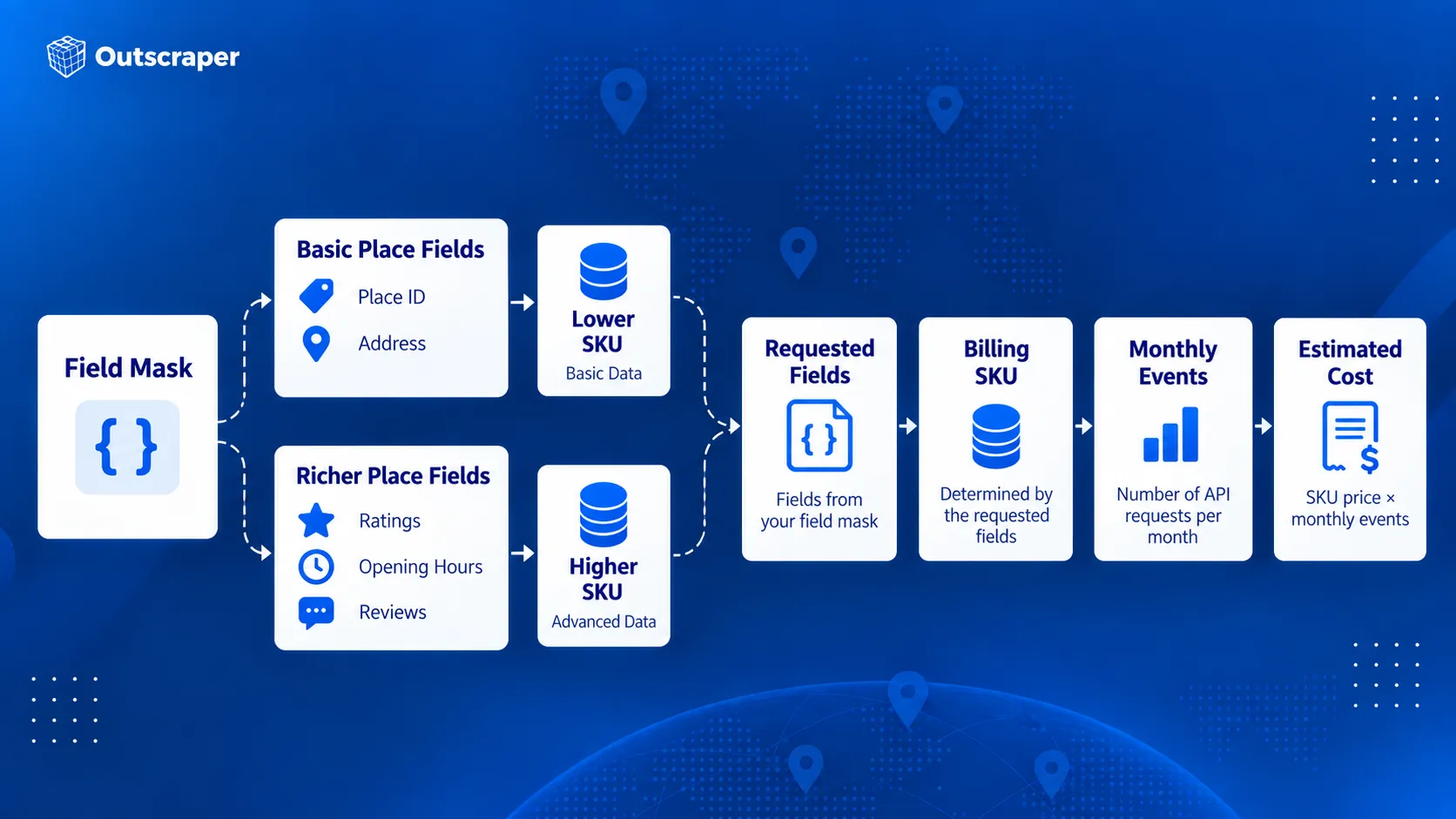
Avoid requesting every available field by default. Start with the fields required by the feature and add others only when they serve a clear purpose.
How Autocomplete Sessions Affect Billing
Autocomplete can be billed per request or as part of a session.
Without a session token, each Autocomplete request is billed separately under the Autocomplete Requests SKU.
A session groups a user’s Autocomplete requests with the request that completes the selection. A typical session begins with one or more Autocomplete calls and ends with Place Details (New) or Address Validation. Each new user search should use a new session token.
For sessions that end with Place Details Essentials, Google currently bills the first 12 Autocomplete requests individually. Requests after the 12th are billed under Autocomplete Session Usage, which has no charge. The terminating Place Details request is still billed under its own SKU.
Abandoned sessions do not receive that session treatment. If the user never completes the session with Place Details or Address Validation, the Autocomplete calls revert to per-request pricing.
How to Estimate Google Places API Costs
A useful cost estimate starts with the actual request flow rather than the total number of users.
Check:
- Which Places API method will be called.
- How many times the method is called during one user action.
- Which fields are included in the field mask.
- Which SKU those fields trigger.
- How many billable events are expected each month.
- How much of that usage falls inside the SKU’s free monthly cap.
- Whether Autocomplete requests are grouped into properly completed sessions.
For example, an application making 20,000 monthly Place Details Essentials requests would first use the 10,000-event monthly free cap. The remaining 10,000 events would fall into the paid pricing tier.
At the current first-tier rate of $5 per 1,000 events, those 10,000 paid requests would cost about $50 before taxes or any other Maps Platform usage is included.
The calculation changes if the field mask triggers a Pro or Enterprise SKU, so the expected fields should be part of the cost estimate from the beginning.
When Google Places API Is and Isn't the Right Tool
Google Places API works well when place information is part of an application feature. A search box, store locator, travel app, delivery interface, or nearby-business feature can request place information when the user needs it.
The requirements change when the main goal is building a business dataset. Collecting records across many categories, cities, or regions is a different workflow from looking up places inside an application.
For a deeper comparison of official API access and large-scale data extraction, see Google Maps API vs. web scraping.
When Google Places API Works Well
Google designed Places API (New) around location-aware application features.
It is a strong fit when an application needs to:
- search for places from user input
- find nearby businesses or points of interest
- suggest places while someone types
- retrieve details about a known place
- display place photos
- use Place IDs across supported Google Maps Platform services
For example, a hotel-booking app could show restaurants near a selected property. A delivery app could use Autocomplete to help a customer enter a destination. A store locator could retrieve details about a specific branch after the user selects it.
These requests usually happen as part of an interaction inside the application. The developer controls which method is called, which fields are returned, and how the results appear to the user.
Google’s documentation describes Places API (New) around these types of place search, lookup, autocomplete, and location-aware application features.
When You Need Business Data in Bulk
Some projects need a dataset rather than a place-search feature.
与其问:
离这位用户最近有哪些餐厅?
a research team may need:
这50个城市里有哪些餐厅?
The same pattern appears across different teams:
- 开发者 may need place search or details inside an application.
- Marketers may need businesses by category and location for market research.
- Sales teams may need business records that match geographic or company criteria.
- Data professionals may need structured records for analysis, dashboards, or internal systems.
When the work involves collecting hundreds or thousands of business records, the process shifts from individual place lookup to data collection.
For market research, see what Google Maps business data to collect for market analysis before deciding which fields belong in your dataset.
A No-Code Option for Business Data Collection
Teams that do not need to build a place-search feature can use Outscraper 谷歌地图抓取工具 to collect business records without setting up Google Cloud requests or writing API code.
Users can search by category and location, run the collection through the web interface, and export the results for research, prospecting, or analysis.
For developers and data teams that need programmatic access, Outscraper 谷歌地图地点API is a separate service from Google’s 地点 API(新). It supports bulk business-data collection. See the Outscraper API 文档 for request details.
| Requirement | Google 地方信息 API | Outscraper |
|---|---|---|
| Place search inside an application | Strong fit | Different primary use case |
| 自动完成 | Supported | Not the main product purpose |
| Retrieve details about one known place | Supported | Available through business-data workflows |
| Collect many business records | Requires API request planning | Bulk collection supported |
| No-code business-data collection | Requires another workflow | Google Maps Scraper available |
| Programmatic business-data collection | Supported through Google's place methods | Google Maps Places API available |
| Export datasets | Application handles storage and export | CSV, Excel, Parquet, and JSON |
| Add contact or enrichment data | Limited to supported Google fields | Enrichment options available |
An application that needs nearby place search has a different data requirement from a team building a reusable business dataset.
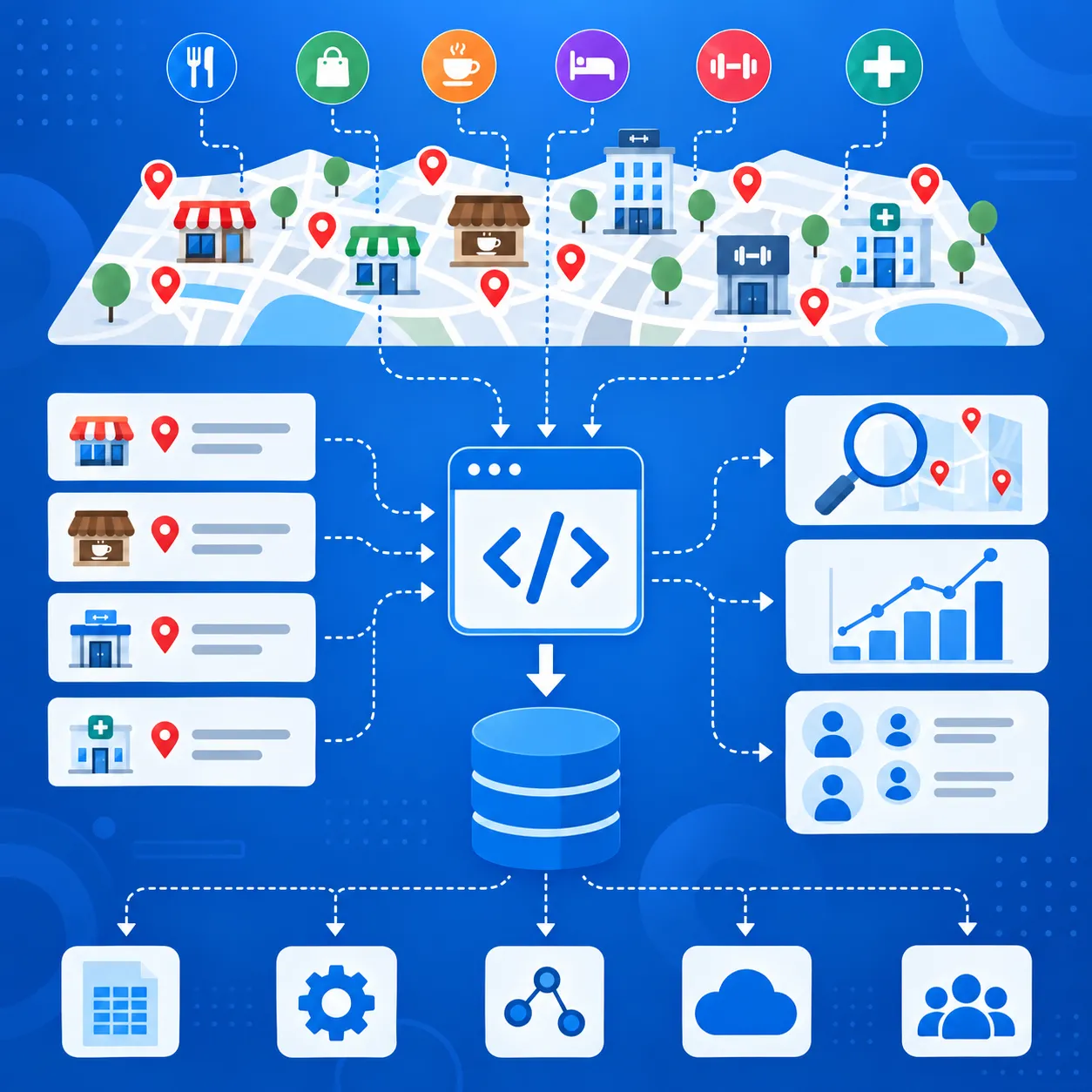
Use Outscraper 谷歌地图地点API when you need business records across multiple categories or locations for research, sales, analysis, or another data workflow.
When You Need Additional Business or Contact Data
Google Places API can return addresses, phone numbers, websites, ratings, reviews, opening hours, business status, and other place fields.
For prospecting or market research, that may still leave gaps. Teams may also need email addresses, contact details, social profiles, or other company information before a record is ready to use.
If you need to add contact and company information after collecting place data, see the guide to Google 地图地点数据增强.
A typical workflow is:
- Find businesses by category and location.
- Keep the fields needed for targeting.
- Add contact or company data.
- Export the records for sales, research, or another system.
Outscraper supports business-data collection through both no-code and API workflows, with additional enrichment options for emails, contacts, and social profiles.
Google Places API fits place search and place details inside applications. Business-data workflows that need contact data, enrichment, or export usually require additional tools.
Google Places API Limits, Quotas, and Billing Risks
A Places API setup can work in testing and still run into cost, quota, or access problems once usage increases.
Google applies quotas by API method and project rather than through one shared daily limit. Usage, quotas, errors, and billing can be checked in Google Cloud Console.
Request Only the Fields You Need
Field masks affect both the response and the billing SKU.
If a request includes Pro-level fields, Google can bill the request at the Pro rate even when lower-cost fields are also included. Keep the field mask limited to data the application actually uses.
Use the Right Search Method
Text Search works from a written query. Nearby Search works from a defined geographic area and place-type criteria.
例如:
波士顿的咖啡馆fits Text Search.- restaurants within a set radius fit Nearby Search.
Choosing the right method reduces unnecessary requests and extra filtering.
Manage Autocomplete Sessions Correctly
Autocomplete can generate several requests while a user types.
Use a new session token for each search session and complete the session with a compatible Place Details or Address Validation request. Abandoned or incorrectly configured sessions can be billed as separate requests.
Keep Legacy and New Requests Separate
Places API (Legacy) and Places API (New) use different request formats, field names, and response structures.
Do not mix Autocomplete session tokens between Legacy and New requests. Check older integrations before moving production traffic to Places API (New).
Restrict Your API Keys
Google recommends restricting API keys by application and API.
For server-side requests, IP restrictions can limit where the key is used. API restrictions can limit the same key to Places API (New) and other required services.
An incorrectly configured key can also cause REQUEST_DENIED errors, so restrictions should be tested before production use.
Set Quotas and Billing Alerts
Google Cloud Console can track traffic, errors, quotas, and spending.
Set quota limits and billing alerts before request volume grows. Billing alerts warn you when spending reaches selected thresholds, but they do not automatically stop API usage.
Final Checklist: Before You Use the Google Places API
- Choose the Places API method that matches the task.
- Use Places API (New) and request only the fields you need.
- Check the SKU, free usage cap, and expected monthly cost.
- Restrict the API key and set quotas or billing alerts.
- Decide whether you need app-based place lookup or bulk business-data collection.
用 Outscraper Google Maps Places API to collect business records across multiple locations or categories.
常见问题
最常见的问题和答案
Google Places API 并非完全免费。Google 采用按需付费的定价模式,并对各个 SKU 设定了每月免费使用额度上限。例如,“自动完成请求”和“地点详情基础版”目前每月包含 10,000 次免费调用,而其他 SKU 的免费额度则较低。.
Places API 用于搜索地点并获取有关商家、地标和其他位置的信息。Geocoding API 主要用于将地址转换为坐标,或将坐标转换回地址。两者均可使用 Place ID,但它们解决的定位数据任务各不相同。.
Places API 通过 HTTP 请求提供地点数据。Maps JavaScript API 用于在网站中添加交互式地图和基于浏览器的地图功能。其 Places 库还可在 Web 应用程序中提供地点搜索和自动完成功能。.
是的。一个生产环境的 Places API 项目需要一个已连接到计费账户的 Google Cloud 项目。该项目还需启用所需的 Places API 服务,并具备有效的身份验证凭据。.
地点 ID 是 Google 地点数据库和 Google 地图中用于标识某个地点的文本标识符。它可在多个 Google 地图平台服务中使用,包括地点 API、地理编码 API、地图 JavaScript API 和路线 API。Google 指出,地点 ID 可能会随时间变化,并建议刷新存储时间超过 12 个月的 ID。.
Places API(新版)是当前适用于新开发的版本。部分旧版方法与新版方法直接对应,而其他方法则发生了变化。例如,“文本搜索(新版)”取代了“查找地点(旧版)”。现有的旧版项目仍受支持,但新的 Cloud 项目无法启用旧版服务。.
在 Google 当前的 Places API(新版)“place-data”字段列表中,未出现“企业邮箱”字段。该 API 可以返回电话号码和网站 URL 等字段,但企业邮箱地址并未被列为受支持的 Place 字段。.