Mục lục
Các API Google Địa điểm supports place search, autocomplete, nearby discovery, business details, and other location-based features. The real challenge is deciding which Places service fits the task, which fields are worth requesting, and how those choices affect cost.
Google’s move toward Places API (New) changes how developers handle requests, field selection, response data, and billing. Older implementation patterns do not always carry over cleanly, especially when field masks and SKU-based pricing come into play.
The right setup depends on what you are building. A location search inside an app may only need a small set of place details. A team using the Google Places API for lead generation across many cities may need a different workflow. Treating both use cases the same can add unnecessary cost and extra API work.
Before choosing an endpoint or estimating monthly usage, it helps to understand how Google structures place search, field selection, billing, and quotas. Those decisions also make it easier to see when the official Places API fits the job and when a separate business-data workflow makes more sense.
Quick Answer: How the Google Places API Works
- Search for places with Text Search or Nearby Search.
- Get details, photos, and Place IDs for specific locations.
- Use Autocomplete to suggest places while users type.
- Set up a Google Cloud project, billing, and a restricted API key.
- Use field masks to control returned data and billing.
- Costs depend on the service, fields requested, and usage.
- For bulk business data or extra contact fields, a different data workflow may fit better.
What Is the Google Places API?
The Google Places API is part of Google Maps Platform. It gives developers programmatic access to information about businesses, landmarks, addresses, geographic locations, and other places listed in Google’s place database.
Google currently says Places API (New) provides location data for more than 200 million places. Developers can use it to add place search, nearby discovery, autocomplete, place details, and photos to websites, mobile apps, and other software.
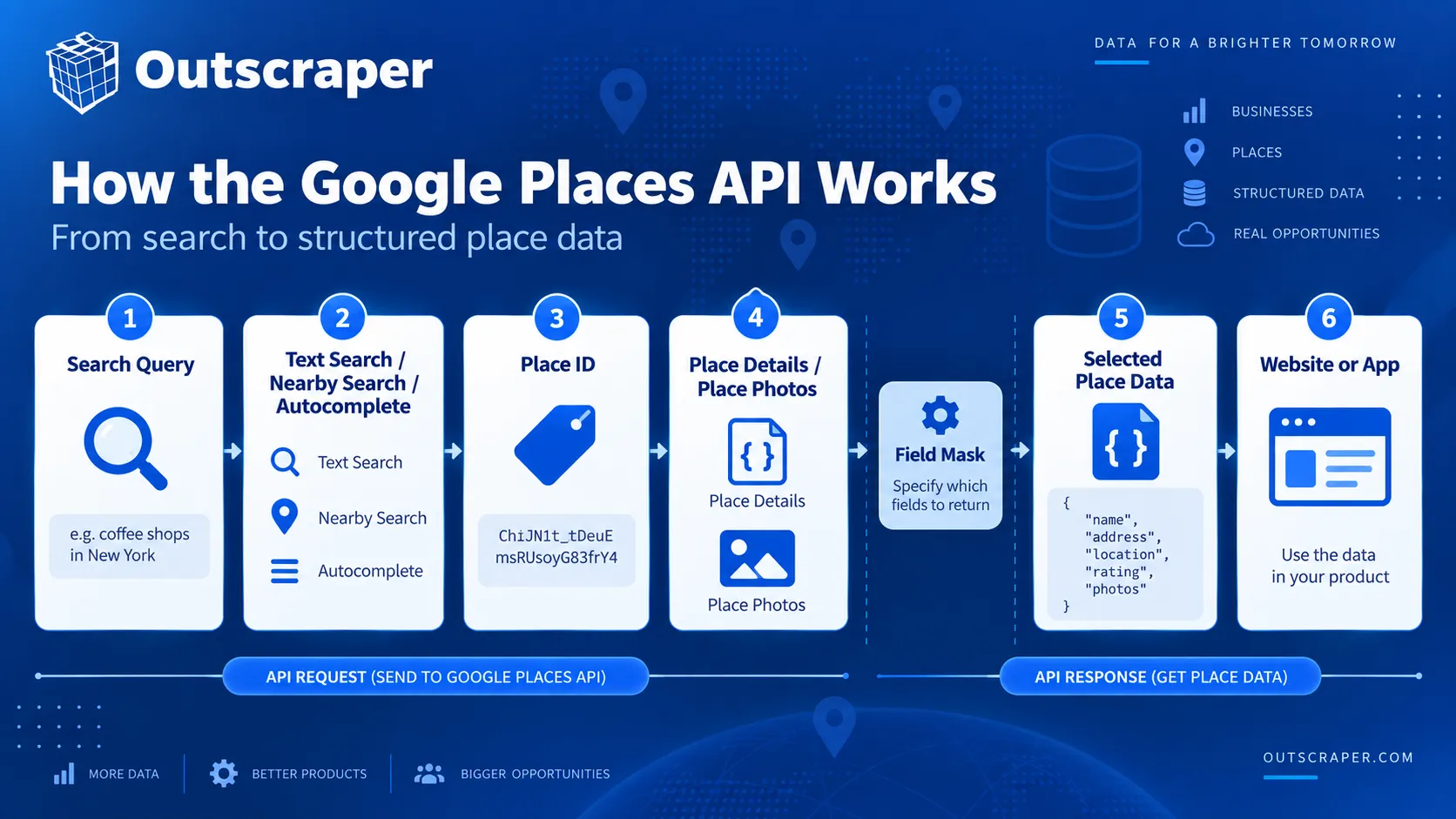
A typical request starts with a search query, geographic area, or known Place ID. Google returns structured place information based on the request type and the fields selected by the developer.
For example, a restaurant-finding app could use Nearby Search to find restaurants around a user’s location. Once the user selects a restaurant, the app could request Place Details for information such as its address, rating, opening hours, phone number, or reviews.
What Data Can the Google Places API Return?
The available fields depend on the request and the fields included in the field mask. Places API (New) can return information such as:
| Data Type | Example Fields | What It Describes |
|---|---|---|
| Identity | Place name, Place ID, place type | Identifies the place and its category. |
| Địa điểm | Address, geographic coordinates | Shows where the place is located. |
| Business Details | Business status, phone number, website, opening hours | Provides operational and contact information. |
| Customer Information | Rating, reviews, price information | Provides rating, review, and pricing-related data. |
| Media | Photos | Returns available images associated with the place. |
| Khả năng tiếp cận | Accessibility information | Describes supported accessibility features. |
| Service Options | Delivery, dine-in, curbside pickup | Shows available service options where supported. |
Google groups these fields into different pricing levels. Some basic fields fall under lower-cost SKUs, while fields such as ratings, opening hours, and reviews can trigger higher-priced SKUs. Google explains the relationship between fields and billing in its Places API data fields documentation. Request only the fields the application needs because field selection can change the billing SKU.
Places API (New) also requires a field mask for Place Details, Text Search, and Nearby Search requests. At least one field must be specified. A request without a field mask returns an error.
How the Places API Fits Into Google Maps Platform
Places API handles information about places, but it is only one part of Google Maps Platform.
A developer may use Places API to find a business, then use another Google Maps Platform service for a different task. For example, the Geocoding API can convert an address into coordinates, while routing services can calculate directions or travel times between locations.
Within Places API itself, the main services handle different parts of the place-search process:
- Text Search finds places from written queries.
- Nearby Search finds places inside a defined geographic area.
- Place Details retrieves information about a known place.
- Autocomplete suggests places as a user types.
- Place Photos retrieves available images associated with a place.
Google recommends using Place Details when the Place ID is already known because there is no need to run another search request for the same place.
A business search across a city, an autocomplete box, and a request for details about one known location each require a different Places API method.
How the Google Places API Works
The Google Places API uses different methods depending on the input you already have and the type of place data you need.
A written query, a set of coordinates, and a known Place ID each call for a different method. Places API (New) currently provides Text Search, Nearby Search, Place Details, Autocomplete, and Place Photos for these tasks.
| Need | Sử dụng |
|---|---|
| Search from a written query | Text Search |
| Search around coordinates | Nearby Search |
| Get details for one known place | Place Details |
| Suggest places while typing | Autocomplete |
| Retrieve place images | Place Photos |
| Reference a known place later | Mã địa điểm |
Text Search
Text Search finds places from a written query such as a business name, category, address, or phrase like pizza in New York.
Text Search (New) uses an HTTP POST request and returns matching Place objects. Optional parameters can narrow results by location, place type, opening status, rating, or price level.
Google currently returns up to 60 results across all pages and notes that identical requests may not always return the same list.
Nearby Search
Nearby Search finds places inside a defined geographic area.
The request uses latitude, longitude, and radius, then filters results by one or more place types. For example, an app could find restaurants within a set distance of a hotel.
Nearby Search (New) also uses HTTP POST and requires a field mask for the returned data.
Place Details
Place Details retrieves information about one known place using its Place ID.
A common flow is:
- Find a place with Text Search, Nearby Search, or Autocomplete.
- Keep its Place ID.
- Request only the details the application needs.
This avoids running another search when the place has already been identified.
Autocomplete
Autocomplete suggests places while a user types into a search field.
A session token can group the user’s requests into one search session for billing. Each new search should use a new token, and the session should end with a compatible Place Details or Address Validation request.
Place Photos and Place IDs
Place Photos retrieves images associated with a place when the photos field is returned by Text Search, Nearby Search, or Place Details.
Place IDs identify specific places so they can be referenced again across supported Google Maps Platform services.
For example, an application can find a business through Text Search, keep its Place ID, and later request Place Details without repeating the original search.
Places API (New) vs. Places API (Legacy)
Google moved the original Places API to Legacy status on March 1, 2025. Existing projects can still use it, but new Cloud projects cannot enable Legacy services.
Places API (New) is now the version Google recommends for new development. The changes affect request methods, field selection, response structure, authentication, and billing.
| Area | Places API (Legacy) | Places API (New) |
|---|---|---|
| New projects | Cannot be enabled | Recommended for new development |
| Text Search and Nearby Search | HTTP GET | HTTP POST |
| Field selection | Older response model | Field masks required for key methods |
| Response fields | Many snake_case names | camelCase names |
| Authentication | API key | API key or OAuth |
| Find Place | Separate method | Use Text Search |
| Billing | Legacy SKU model | Current SKU model tied to methods and fields |
What Changed in Places API (New)?
Text Search and Nearby Search now use HTTP POST instead of the GET-based pattern used by Legacy.
Places API (New) also supports API keys and OAuth, returns JSON responses, and requires field masks for Place Details, Text Search, and Nearby Search.
Find Place does not have a direct New version. Google directs those searches to Text Search.
Field Masks and Response Changes
Field masks are one of the main differences between Places API (New) and the older API.
For Place Details, Text Search, and Nearby Search, the request must specify at least one field to return. Leaving out the field mask causes the request to fail.
Field selection also affects billing because Google assigns place-data fields to different SKUs. The pricing section later in this article explains that relationship in more detail.
Response objects have changed as well. Places API (New) uses camelCase field names instead of many of the snake_case names found in Legacy responses.
Examples include:
formatted_addressbecomesformattedAddressbusiness_statusbecomesbusinessStatusformatted_phone_numberbecomesnationalPhoneNumbergeometry.locationbecomesvị trí
Text Search and Nearby Search also return results in a places array rather than the Legacy kết quả array. Status and error information now use standard HTTP response codes and messages instead of Legacy fields such as status và error_message.
These changes are important when existing applications parse Legacy responses or depend on older field names.
What Legacy API Users Need to Know About Migration
Migration usually requires more than changing the endpoint. Google provides a Places API migration guide covering the main differences between Legacy and Places API (New).
Check these areas first:
- Move Find Place searches to Text Search (New).
- Change Text Search and Nearby Search requests from GET to POST.
- Add the required field masks.
- Update code that reads Legacy response fields.
- Review the SKU used by each request.
Also check that Places API (New) is enabled in the project and allowed by the API key restrictions.
If Legacy and New requests need to run at the same time during testing, keep the two flows separate. Google recommends separate API keys during migration.
Existing Legacy integrations can continue running for now, but new projects should use Places API (New).
Google Places API Tutorial: Setup and Your First Request
Using Places API (New) starts with a Google Cloud project connected to a billing account. The project must have Places API (New) enabled before authenticated requests can be sent.
For a basic web service request, the setup follows five steps: choose a Cloud project, enable the API, create an API key, restrict the key, and send a request with the fields you want returned.
Create or Select a Google Cloud Project
Every Google Maps Platform request belongs to a Google Cloud project.
You can create a new project or use an existing one. The selected project also needs an active billing account. Google uses the project to track API access, usage, quotas, and charges.
Keeping separate projects can also make sense when development, testing, and production environments need different credentials or usage controls.
Once the correct project is selected, Places API (New) can be enabled from the Google Cloud Console.
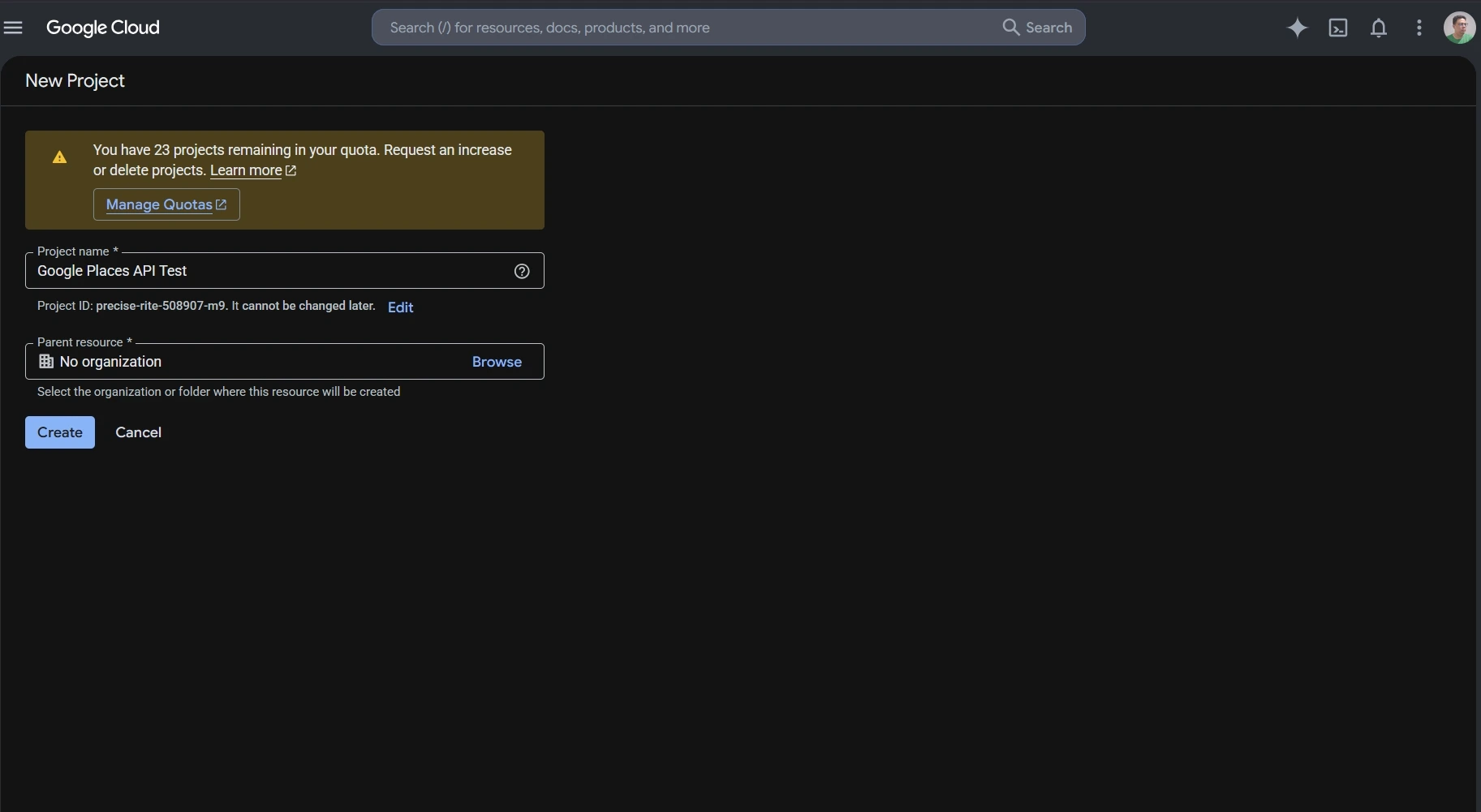
Enable Places API (New)
Places API (New) must be enabled for the project before the application can call its web service methods.
In Google Cloud Console:
- Select the project you want to use.
- Mở ra APIs & Services.
- Tìm Places API (New) in the API Library.
- Enable it for the project.
This distinction matters for older projects because Places API (Legacy) and Places API (New) are separate services. A project that previously used the Legacy API may still need Places API (New) enabled before newer endpoints work.

API Key Setup and Restrictions
An API key identifies the Google Cloud project making the request.
Google requires billing to be enabled before Places API (New) can be used for live requests. If you are only following the setup process and do not want to attach a billing account yet, you can stop before creating the key and return to this step later.
When billing is enabled, create an API key in Google Cloud Console and restrict it before using it in an application.
For server-side Places API requests, an IP address restriction can limit the key to approved servers. You can also restrict the key so it only works with Places API (New) and any other Google Maps Platform services the application actually needs.
Google also requires Places API web service requests to use HTTPS. A missing key, incorrect restriction, or unsupported configuration can return a REQUEST_DENIED response.
Google Places API Examples: Make Your First Text Search Request
Text Search is a simple Google Places API example for understanding the request format, API key header, and field mask.
Places API (New) sends Text Search requests to:
https://places.googleapis.com/v1/places:searchText
The request uses HTTP POST. The search text goes in the JSON body, while the API key and field mask can be sent through request headers.
A basic request can look like this:
					curl -X POST \
  -H "Content-Type: application/json" \
  -H "X-Goog-Api-Key: YOUR_API_KEY" \
  -H "X-Goog-FieldMask: places.id,places.displayName,places.formattedAddress" \
  -d '{ "textQuery": "dentists in Chicago" }' \
  "https://places.googleapis.com/v1/places:searchText"
This request searches for dentists in Chicago and asks Google to return only:
- Mã địa điểm
- display name
- formatted address
A successful response returns matching Place objects inside a places array. The fields included in each result depend on the field mask used in the request.
Using a limited field mask keeps the response easier to read and avoids requesting data the application does not need.
For current request parameters, supported fields, quotas, and API changes, check the official Google Places API documentation.
Google Places API Example: Retrieve Place Details
A Text Search response can return a Place ID for each matching location. Once the application knows the Place ID, it can use Place Details to request information about that specific place without running another search.
The request follows this pattern:
https://places.googleapis.com/v1/places/PLACE_ID
Ví dụ:
curl -X GET -H "Content-Type: application/json" -H "X-Goog-Api-Key: YOUR_API_KEY" -H "X-Goog-FieldMask: id,displayName,formattedAddress" "https://places.googleapis.com/v1/places/PLACE_ID"
Replace PLACE_ID with the ID returned by Text Search, Nearby Search, or another supported Places method.
Notice that the Place Details field mask uses id, displayName, và formattedAddress rather than places.id, places.displayName, và places.formattedAddress. Place Details returns one Place object, while Text Search returns Place objects inside a places array.
Choose the Fields You Need
Place Details, Text Search, and Nearby Search require a field mask in Places API (New). If no field is specified, the request returns an error.
For Text Search, a field mask might look like:
places.displayName,places.formattedAddress
If the application also needs a website and rating, the field mask can be expanded:
places.displayName,places.formattedAddress,places.websiteUri,places.rating
Google also supports * as a wildcard for all available fields, but it discourages using the wildcard in production. Requesting unnecessary fields can increase the amount of returned data and move the request into a higher billing SKU.
Keep the field mask limited to the data the application actually uses. Field selection affects both the response and the request cost.
The pricing section below explains how those field choices map to Google Places API SKUs.
Use Outscraper Google Maps Scraper to collect business data through a no-code workflow without setting up individual Places API requests.
Google Places API Pricing and Free Usage
Google Places API uses pay-as-you-go pricing. Each request is billed under a specific SKU, and the cost depends on the method used, the fields requested, and the number of monthly billable events.
Google no longer uses the old recurring $200 Maps Platform credit. The current model gives each SKU its own monthly free usage cap. Those caps reset at the start of each month.
How Google Places API SKUs Work
A SKU is the billing category attached to a Places API request.
Places API (New) divides many requests into pricing levels such as Essentials, Pro, and Enterprise. The fields requested can move a request into a higher-priced SKU.
For example, Place Details can be billed under different SKUs depending on the requested fields:
- Place Details Essentials includes a monthly free usage cap of 10,000 events.
- The monthly free usage cap for Place Details Pro is 5,000 events.
- For Place Details Enterprise, the monthly free usage cap is 1,000 events.
After the free usage cap, pricing is applied per 1,000 events and becomes lower at higher monthly volumes.
Text Search and Nearby Search follow a similar structure.
For the first paid usage tier, Google currently lists the following rates on the official Google Maps Platform pricing page:
| SKU | Monthly Free Usage | Price per 1,000 Events After Free Cap* |
|---|---|---|
| Place Details Essentials | 10,000 | $5.00 |
| Place Details Pro | 5,000 | $17.00 |
| Place Details Enterprise | 1,000 | $20.00 |
| Text Search Pro | 5,000 | $32.00 |
| Text Search Enterprise | 1,000 | $35.00 |
| Nearby Search Pro | 5,000 | $32.00 |
| Nearby Search Enterprise | 1,000 | $35.00 |
*These figures are for the first pricing tier shown on Google's global pricing page. Higher monthly volumes use lower per-1,000 rates.
Google also offers some IDs-only SKUs with unlimited free usage, including Place Details Essentials (IDs Only) and Text Search Essentials (IDs Only).
Current Free Usage Caps
Free usage is attached to individual SKUs rather than to one shared dollar credit.
Ví dụ:
- Autocomplete Requests: 10,000 free monthly events
- Place Details Essentials: 10,000
- Place Details Pro: 5,000
- Text Search Pro: 5,000
- Nearby Search Pro: 5,000
- Place Details Enterprise: 1,000
- Text Search Enterprise: 1,000
- Nearby Search Enterprise: 1,000
Some IDs-only services have unlimited free usage.
This makes cost estimates more dependent on the exact request than under the older credit system. Two applications making the same number of Places API calls can have different bills if they request different fields or use different methods.
How Requested Fields Affect Billing
Field masks control more than the size of the response.
For Place Details, Text Search, and Nearby Search, Google bills the request according to the highest SKU represented by the requested fields. If the field mask includes fields from both Essentials and Pro, the request is billed at the Pro level.
For example, an application that only needs a Place ID and address may not need the same fields as one requesting ratings, opening hours, reviews, and additional place attributes.
This makes field selection part of the cost calculation.
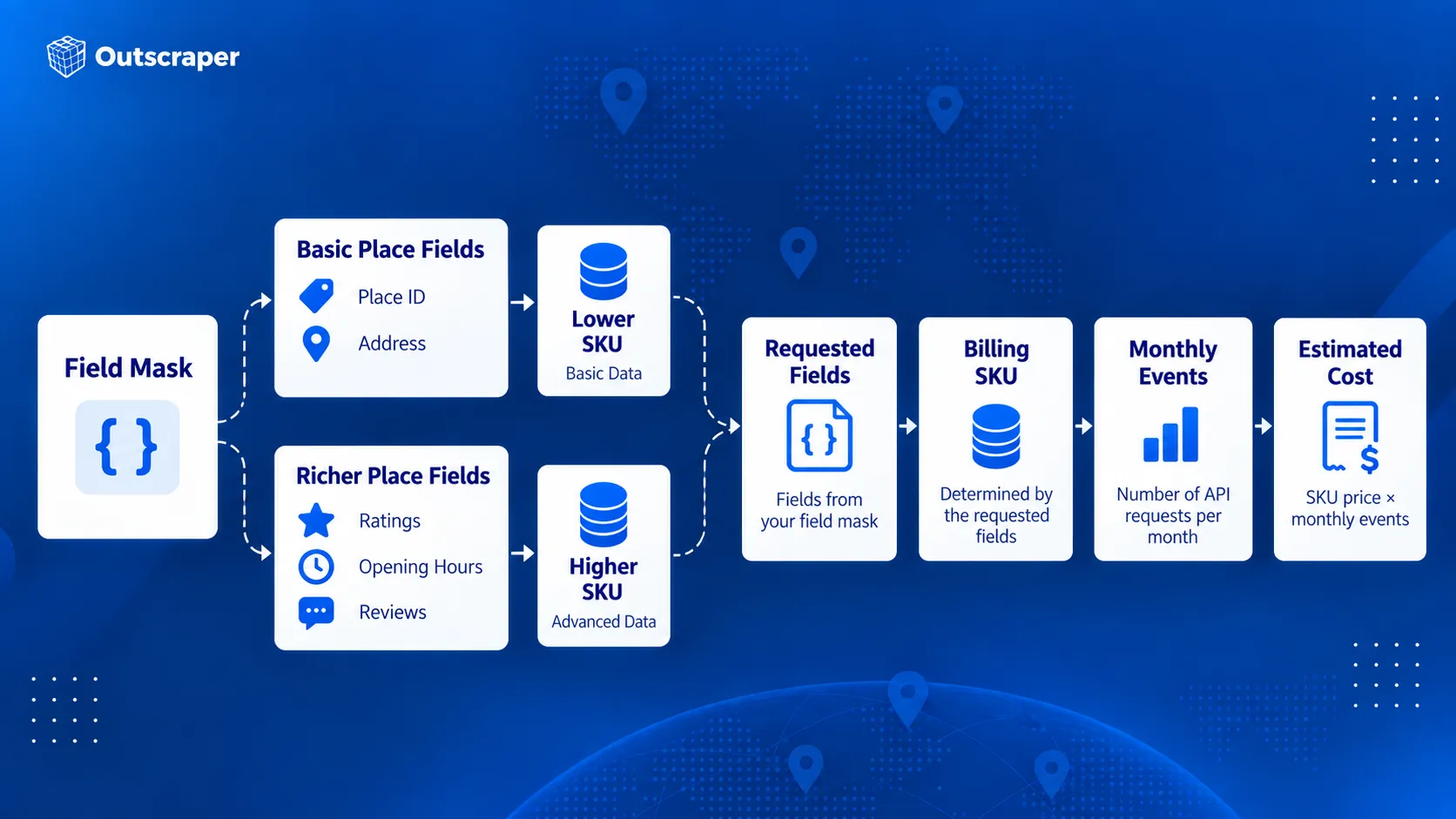
Avoid requesting every available field by default. Start with the fields required by the feature and add others only when they serve a clear purpose.
How Autocomplete Sessions Affect Billing
Autocomplete can be billed per request or as part of a session.
Without a session token, each Autocomplete request is billed separately under the Autocomplete Requests SKU.
A session groups a user’s Autocomplete requests with the request that completes the selection. A typical session begins with one or more Autocomplete calls and ends with Place Details (New) or Address Validation. Each new user search should use a new session token.
For sessions that end with Place Details Essentials, Google currently bills the first 12 Autocomplete requests individually. Requests after the 12th are billed under Autocomplete Session Usage, which has no charge. The terminating Place Details request is still billed under its own SKU.
Abandoned sessions do not receive that session treatment. If the user never completes the session with Place Details or Address Validation, the Autocomplete calls revert to per-request pricing.
How to Estimate Google Places API Costs
A useful cost estimate starts with the actual request flow rather than the total number of users.
Check:
- Which Places API method will be called.
- How many times the method is called during one user action.
- Which fields are included in the field mask.
- Which SKU those fields trigger.
- How many billable events are expected each month.
- How much of that usage falls inside the SKU’s free monthly cap.
- Whether Autocomplete requests are grouped into properly completed sessions.
For example, an application making 20,000 monthly Place Details Essentials requests would first use the 10,000-event monthly free cap. The remaining 10,000 events would fall into the paid pricing tier.
At the current first-tier rate of $5 per 1,000 events, those 10,000 paid requests would cost about $50 before taxes or any other Maps Platform usage is included.
The calculation changes if the field mask triggers a Pro or Enterprise SKU, so the expected fields should be part of the cost estimate from the beginning.
When Google Places API Is and Isn't the Right Tool
Google Places API works well when place information is part of an application feature. A search box, store locator, travel app, delivery interface, or nearby-business feature can request place information when the user needs it.
The requirements change when the main goal is building a business dataset. Collecting records across many categories, cities, or regions is a different workflow from looking up places inside an application.
For a deeper comparison of official API access and large-scale data extraction, see Google Maps API vs. web scraping.
When Google Places API Works Well
Google designed Places API (New) around location-aware application features.
It is a strong fit when an application needs to:
- search for places from user input
- find nearby businesses or points of interest
- suggest places while someone types
- retrieve details about a known place
- display place photos
- use Place IDs across supported Google Maps Platform services
For example, a hotel-booking app could show restaurants near a selected property. A delivery app could use Autocomplete to help a customer enter a destination. A store locator could retrieve details about a specific branch after the user selects it.
These requests usually happen as part of an interaction inside the application. The developer controls which method is called, which fields are returned, and how the results appear to the user.
Google’s documentation describes Places API (New) around these types of place search, lookup, autocomplete, and location-aware application features.
When You Need Business Data in Bulk
Some projects need a dataset rather than a place-search feature.
Instead of asking:
What restaurants are close to this user?
a research team may need:
Which restaurants operate across these 50 cities?
The same pattern appears across different teams:
- Các nhà phát triển may need place search or details inside an application.
- Marketers may need businesses by category and location for market research.
- Sales teams may need business records that match geographic or company criteria.
- Data professionals may need structured records for analysis, dashboards, or internal systems.
When the work involves collecting hundreds or thousands of business records, the process shifts from individual place lookup to data collection.
For market research, see what Google Maps business data to collect for market analysis before deciding which fields belong in your dataset.
A No-Code Option for Business Data Collection
Teams that do not need to build a place-search feature can use Outscraper Google Maps Scraper to collect business records without setting up Google Cloud requests or writing API code.
Users can search by category and location, run the collection through the web interface, and export the results for research, prospecting, or analysis.
For developers and data teams that need programmatic access, Outscraper API Địa điểm của Google Maps is a separate service from Google’s Places API (New). It supports bulk business-data collection. See the Outscraper API Docs for request details.
| Requirement | API Google Địa điểm | Outscraper |
|---|---|---|
| Place search inside an application | Strong fit | Different primary use case |
| Autocomplete | Supported | Not the main product purpose |
| Retrieve details about one known place | Supported | Available through business-data workflows |
| Collect many business records | Requires API request planning | Bulk collection supported |
| No-code business-data collection | Requires another workflow | Google Maps Scraper available |
| Programmatic business-data collection | Supported through Google's place methods | Google Maps Places API available |
| Export datasets | Application handles storage and export | CSV, Excel, Parquet, and JSON |
| Add contact or enrichment data | Limited to supported Google fields | Enrichment options available |
An application that needs nearby place search has a different data requirement from a team building a reusable business dataset.
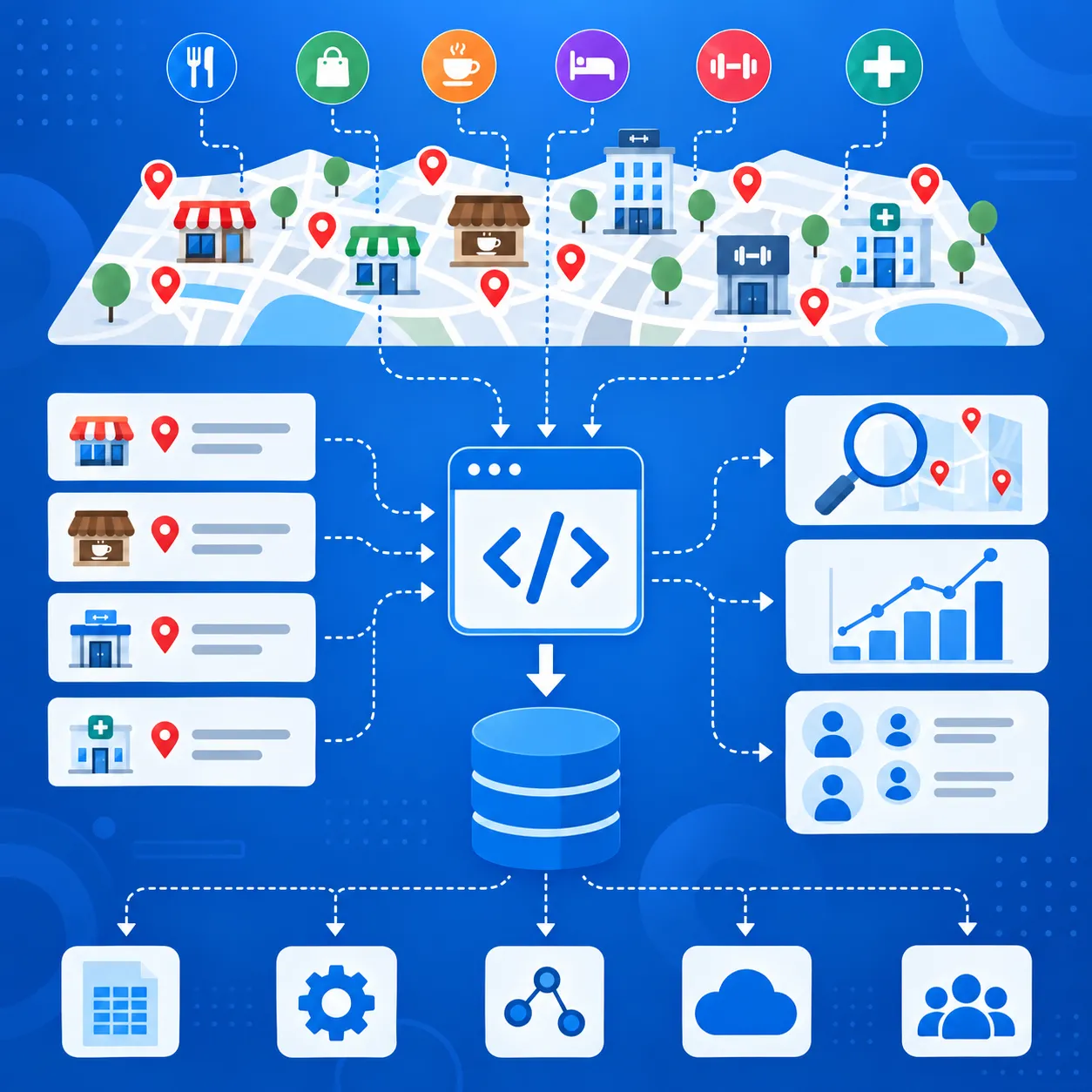
Use Outscraper API Địa điểm của Google Maps when you need business records across multiple categories or locations for research, sales, analysis, or another data workflow.
When You Need Additional Business or Contact Data
Google Places API can return addresses, phone numbers, websites, ratings, reviews, opening hours, business status, and other place fields.
For prospecting or market research, that may still leave gaps. Teams may also need email addresses, contact details, social profiles, or other company information before a record is ready to use.
If you need to add contact and company information after collecting place data, see the guide to Google Maps Places data enrichment.
A typical workflow is:
- Find businesses by category and location.
- Keep the fields needed for targeting.
- Add contact or company data.
- Export the records for sales, research, or another system.
Outscraper supports business-data collection through both no-code and API workflows, with additional enrichment options for emails, contacts, and social profiles.
Google Places API fits place search and place details inside applications. Business-data workflows that need contact data, enrichment, or export usually require additional tools.
Google Places API Limits, Quotas, and Billing Risks
A Places API setup can work in testing and still run into cost, quota, or access problems once usage increases.
Google applies quotas by API method and project rather than through one shared daily limit. Usage, quotas, errors, and billing can be checked in Google Cloud Console.
Request Only the Fields You Need
Field masks affect both the response and the billing SKU.
If a request includes Pro-level fields, Google can bill the request at the Pro rate even when lower-cost fields are also included. Keep the field mask limited to data the application actually uses.
Use the Right Search Method
Text Search works from a written query. Nearby Search works from a defined geographic area and place-type criteria.
Ví dụ:
coffee shops in Bostonfits Text Search.- restaurants within a set radius fit Nearby Search.
Choosing the right method reduces unnecessary requests and extra filtering.
Manage Autocomplete Sessions Correctly
Autocomplete can generate several requests while a user types.
Use a new session token for each search session and complete the session with a compatible Place Details or Address Validation request. Abandoned or incorrectly configured sessions can be billed as separate requests.
Keep Legacy and New Requests Separate
Places API (Legacy) and Places API (New) use different request formats, field names, and response structures.
Do not mix Autocomplete session tokens between Legacy and New requests. Check older integrations before moving production traffic to Places API (New).
Restrict Your API Keys
Google recommends restricting API keys by application and API.
For server-side requests, IP restrictions can limit where the key is used. API restrictions can limit the same key to Places API (New) and other required services.
An incorrectly configured key can also cause REQUEST_DENIED errors, so restrictions should be tested before production use.
Set Quotas and Billing Alerts
Google Cloud Console can track traffic, errors, quotas, and spending.
Set quota limits and billing alerts before request volume grows. Billing alerts warn you when spending reaches selected thresholds, but they do not automatically stop API usage.
Final Checklist: Before You Use the Google Places API
- Choose the Places API method that matches the task.
- Use Places API (New) and request only the fields you need.
- Check the SKU, free usage cap, and expected monthly cost.
- Restrict the API key and set quotas or billing alerts.
- Decide whether you need app-based place lookup or bulk business-data collection.
Sử dụng Outscraper API Địa điểm của Google Maps to collect business records across multiple locations or categories.
Câu hỏi thường gặp
Các câu hỏi và câu trả lời thường gặp nhất
The Google Places API is not fully free. Google uses pay-as-you-go pricing with monthly free usage caps for individual SKUs. For example, Autocomplete Requests and Place Details Essentials currently include 10,000 free monthly events, while other SKUs have lower caps.
Places API is used to search for places and retrieve information about businesses, landmarks, and other locations. Geocoding API is mainly used to convert addresses into coordinates or coordinates back into addresses. Both can work with Place IDs, but they solve different location-data tasks.
Places API provides place data through HTTP requests. Maps JavaScript API is used to add interactive maps and browser-based map features to websites. Its Places Library can also provide place search and autocomplete inside a web application.
Yes. A production Places API project needs a Google Cloud project connected to a billing account. The project also needs the required Places API service enabled and valid authentication credentials.
A Place ID is a textual identifier for a place in the Google Places database and Google Maps. It can be used across several Google Maps Platform services, including Places API, Geocoding API, Maps JavaScript API, and Routes API. Google notes that Place IDs can change over time and recommends refreshing stored IDs that are more than 12 months old.
Places API (New) is the current version for new development. Some Legacy methods map directly to newer methods, while others changed. For example, Text Search (New) replaces Find Place (Legacy). Existing Legacy projects are still supported, but new Cloud projects cannot enable Legacy services.
No business email field appears in Google’s current Places API (New) place-data field list. The API can return fields such as phone numbers and website URLs, but business email addresses are not listed as a supported Place field.