Das Inhaltsverzeichnis
Die Google Places API Unterstützt die Suche nach Orten, die automatische Vervollständigung, die Suche nach Orten in der Nähe, Unternehmensdetails und weitere standortbezogene Funktionen. Die eigentliche Herausforderung besteht darin, zu entscheiden, welcher „Places“-Dienst für die jeweilige Aufgabe geeignet ist, welche Felder abgefragt werden sollten und wie sich diese Entscheidungen auf die Kosten auswirken.
Googles Umstellung auf die Places-API (neu) verändert die Art und Weise, wie Entwickler Anfragen, die Feldauswahl, Antwortdaten und die Abrechnung handhaben. Ältere Implementierungsmuster lassen sich nicht immer nahtlos übertragen, insbesondere wenn Feldmasken und SKU-basierte Preisgestaltung ins Spiel kommen.
Die richtige Konfiguration hängt davon ab, was Sie entwickeln. Für eine Standortsuche innerhalb einer App sind möglicherweise nur wenige Standortdetails erforderlich. Ein Team, das die Google Places-API zur Lead-Generierung In vielen Städten ist möglicherweise ein anderer Arbeitsablauf erforderlich. Werden beide Anwendungsfälle gleich behandelt, kann dies zu unnötigen Kosten und zusätzlichem API-Aufwand führen.
Bevor man sich für einen Endpunkt entscheidet oder den monatlichen Verbrauch abschätzt, ist es hilfreich zu verstehen, wie Google die Standortsuche, die Feldauswahl, die Abrechnung und die Kontingente strukturiert. Diese Entscheidungen machen es zudem leichter zu erkennen, wann die offizielle Places-API für die jeweilige Aufgabe geeignet ist und wann ein separater Workflow für Geschäftsdaten sinnvoller ist.
Kurzantwort: So funktioniert die Google Places-API
- Suchen Sie nach Orten mithilfe der Textsuche oder der Suche in der Umgebung.
- Rufen Sie Details, Fotos und Orts-IDs für bestimmte Orte ab.
- Verwenden Sie die Autovervollständigung, um Orte vorzuschlagen, während die Benutzer tippen.
- Richten Sie ein Google Cloud-Projekt, die Abrechnung und einen eingeschränkten API-Schlüssel ein.
- Verwenden Sie Feldmasken, um die zurückgegebenen Daten und die Abrechnung zu steuern.
- Die Kosten hängen von der Dienstleistung, den angeforderten Feldern und der Nutzung ab.
- Für umfangreiche Geschäftsdaten oder zusätzliche Kontaktfelder ist möglicherweise ein anderer Datenworkflow besser geeignet.
Was ist die Google Places-API?
Die Google Places-API ist Teil der Google Maps Platform. Sie bietet Entwicklern programmgesteuerten Zugriff auf Informationen zu Unternehmen, Sehenswürdigkeiten, Adressen, geografischen Standorten und anderen Orten, die in der Ortsdatenbank von Google erfasst sind.
Google teilt derzeit mit, dass Places-API (neu) bietet Standortdaten für mehr als 200 Millionen Orte. Entwickler können damit Websites, mobile Apps und andere Software um Funktionen wie die Suche nach Orten, die Entdeckung von Orten in der Nähe, die automatische Vervollständigung, Ortsdetails und Fotos erweitern.
Eine typische Anfrage beginnt mit einer Suchanfrage, einem geografischen Gebiet oder einer bekannten Orts-ID. Google gibt strukturierte Ortsinformationen zurück, die auf der Art der Anfrage und den vom Entwickler ausgewählten Feldern basieren.
Beispielsweise könnte eine App zur Restaurantsuche die Funktion „Suche in der Nähe“ nutzen, um Restaurants in der Umgebung des Nutzers zu finden. Sobald der Nutzer ein Restaurant ausgewählt hat, könnte die App „Ortsdetails“ abfragen, um Informationen wie Adresse, Bewertung, Öffnungszeiten, Telefonnummer oder Bewertungen zu erhalten.
Welche Daten kann die Google Places-API zurückgeben?
Die verfügbaren Felder hängen von der Anfrage und den in der Feldmaske enthaltenen Feldern ab. Die Places-API (neu) kann unter anderem folgende Informationen zurückgeben:
| Datentyp | Beispielfelder | Was darin beschrieben wird |
|---|---|---|
| Identität | Ortsname, Orts-ID, Ortstyp | Gibt den Ort und dessen Kategorie an. |
| Standort | Adresse, geografische Koordinaten | Zeigt an, wo sich der Ort befindet. |
| Unternehmensdaten | Unternehmensstatus, Telefonnummer, Website, Öffnungszeiten | Enthält Informationen zum Betrieb und zu den Kontaktdaten. |
| Kundeninformationen | Bewertungen, Rezensionen, Preisinformationen | Stellt Daten zu Bewertungen, Rezensionen und Preisen bereit. |
| Medien | Fotos | Gibt die verfügbaren Bilder zurück, die mit dem Ort verknüpft sind. |
| Barrierefreiheit | Informationen zur Barrierefreiheit | Beschreibt die unterstützten Barrierefreiheitsfunktionen. |
| Serviceoptionen | Lieferung, Essen im Restaurant, Abholung vor dem Restaurant | Zeigt die verfügbaren Serviceoptionen an, sofern diese unterstützt werden. |
Google fasst diese Felder in verschiedene Preisstufen zusammen. Einige grundlegende Felder fallen unter kostengünstigere SKUs, während Felder wie Bewertungen, Öffnungszeiten und Rezensionen zu teureren SKUs führen können. Google erläutert den Zusammenhang zwischen Feldern und Abrechnung in seiner Dokumentation zu den Datenfeldern der Places-API. Fordern Sie nur die Felder an, die die Anwendung benötigt, da sich durch die Feldauswahl die Abrechnungs-SKU ändern kann.
Die Places-API (neu) erfordert außerdem eine Feldmaske für Anfragen zu Ortsdetails, Textsuche und Suche in der Umgebung. Es muss mindestens ein Feld angegeben werden. Eine Anfrage ohne Feldmaske führt zu einer Fehlermeldung.
Wie sich die Places-API in die Google Maps Platform einfügt
Die Places-API verarbeitet Informationen zu Orten, ist jedoch nur ein Teil der Google Maps Platform.
Ein Entwickler kann die Places-API nutzen, um ein Unternehmen zu finden, und anschließend einen anderen Dienst der Google Maps Platform für eine andere Aufgabe verwenden. So kann beispielsweise die Geocoding-API eine Adresse in Koordinaten umwandeln, während Routing-Dienste Wegbeschreibungen oder Fahrzeiten zwischen Orten berechnen können.
Innerhalb der Places-API selbst übernehmen die wichtigsten Dienste verschiedene Teile des Prozesses der Ortssuche:
- Textsuche findet Orte anhand schriftlicher Anfragen.
- Suche in der Umgebung findet Orte innerhalb eines festgelegten geografischen Gebiets.
- Details zum Ort ruft Informationen zu einem bekannten Ort ab.
- Automatische Vervollständigung schlägt Orte vor, während der Nutzer tippt.
- Fotos einfügen ruft die zu einem Ort gehörenden verfügbaren Bilder ab.
Google empfiehlt die Verwendung von Details zum Ort wenn die Orts-ID bereits bekannt ist, da keine weitere Suchanfrage für denselben Ort erforderlich ist.
Eine Unternehmenssuche in einer Stadt, ein Autovervollständigungsfeld und eine Anfrage nach Details zu einem bekannten Standort erfordern jeweils eine andere Methode der Places-API.
So funktioniert die Google Places-API
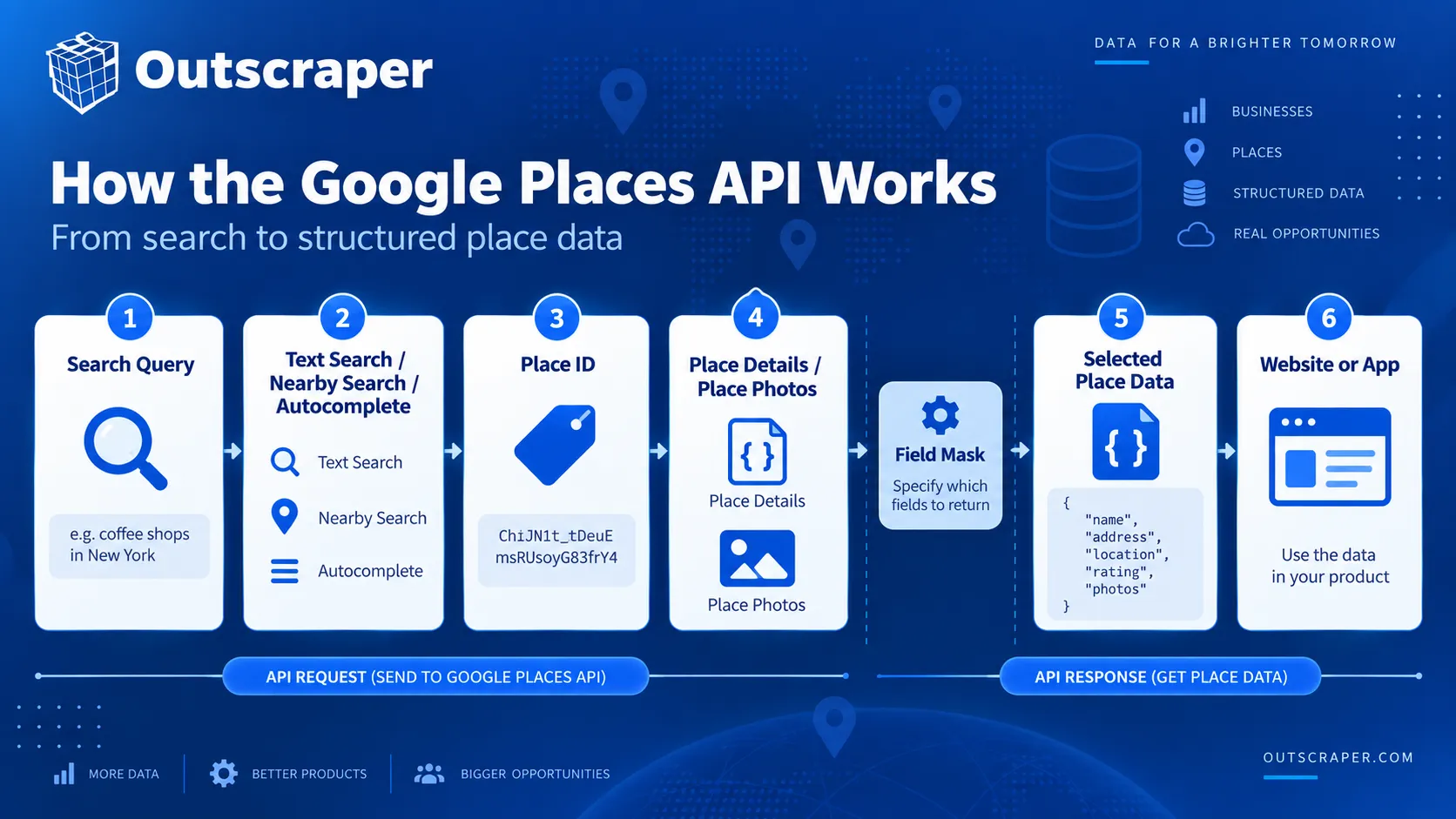
Die Google Places-API verwendet je nach den Ihnen bereits vorliegenden Eingabedaten und der Art der benötigten Ortsdaten unterschiedliche Methoden.
Eine schriftliche Anfrage, ein Koordinatensatz und eine bekannte Orts-ID erfordern jeweils eine andere Methode. Die Places-API (neu) bietet derzeit für diese Aufgaben die Funktionen „Textsuche“, „Suche in der Nähe“, „Ortsdetails“, „Autovervollständigung“ und „Ortsfotos“ an.
| Bedarf | Verwenden |
|---|---|
| Suche anhand einer schriftlichen Anfrage | Textsuche |
| Um die Koordinaten herum suchen | Suche in der Umgebung |
| Details zu einem bekannten Ort abrufen | Details zum Ort |
| Orte während der Eingabe vorschlagen | Automatische Vervollständigung |
| Ortsbilder abrufen | Fotos einfügen |
| Später auf einen bekannten Ort verweisen | Ortskennung |
Textsuche
Die Textsuche findet Orte anhand einer schriftlichen Suchanfrage, beispielsweise eines Firmennamens, einer Kategorie, einer Adresse oder einer Wortgruppe wie pizza in New York.
Die Textsuche (neu) verwendet eine HTTP-POST-Anfrage und gibt passende „Place“-Objekte zurück. Mit optionalen Parametern lassen sich die Ergebnisse nach Standort, Ortstyp, Öffnungsstatus, Bewertung oder Preisklasse eingrenzen.
Google liefert derzeit bis zu 60 Ergebnisse über alle Seiten hinweg und weist darauf hin, dass identische Suchanfragen möglicherweise nicht immer dieselbe Liste liefern.
Suche in der Umgebung
Die Umkreissuche findet Orte innerhalb eines festgelegten geografischen Gebiets.
Die Anfrage verwendet Breitengrad, Längengrad und Radius und filtert die Ergebnisse anschließend nach einem oder mehreren Ortstypen. So könnte eine App beispielsweise Restaurants in einem bestimmten Umkreis um ein Hotel finden.
Die Umkreissuche (neu) nutzt ebenfalls HTTP-POST und erfordert eine Feldmaske für die zurückgegebenen Daten.
Details zum Ort
„Ortsdetails“ ruft anhand der Orts-ID Informationen zu einem bekannten Ort ab.
Ein üblicher Ablauf ist:
- Finden Sie einen Ort mithilfe der Textsuche, der Suche in der Nähe oder der Autovervollständigung.
- Behalte die Platz-ID bei.
- Fordern Sie nur die Daten an, die die Anwendung benötigt.
Dadurch wird vermieden, dass eine weitere Suche durchgeführt wird, wenn der Ort bereits identifiziert wurde.
Automatische Vervollständigung
Die Autovervollständigung schlägt Orte vor, während ein Nutzer etwas in ein Suchfeld eingibt.
Ein Sitzungs-Token kann die Anfragen des Nutzers für Abrechnungszwecke zu einer Suchsitzung zusammenfassen. Für jede neue Suche sollte ein neues Token verwendet werden, und die Sitzung sollte mit einer kompatiblen Anfrage zu Ortsdetails oder zur Adressüberprüfung beendet werden.
Ortsfotos und Orts-IDs
„Place Photos“ ruft Bilder ab, die mit einem Ort verknüpft sind, wenn die photos Das Feld wird von der Textsuche, der Suche in der Umgebung oder den Ortsdetails zurückgegeben.
Orts-IDs identifizieren bestimmte Orte, sodass in allen unterstützten Diensten der Google Maps Platform erneut auf diese verwiesen werden kann.
Beispielsweise kann eine Anwendung über die Textsuche ein Unternehmen finden, dessen Place-ID speichern und später die Ortsdetails abrufen, ohne die ursprüngliche Suche erneut durchführen zu müssen.
Places-API (neu) vs. Places-API (alt)
Google hat die ursprüngliche Places-API am 1. März 2025 in den Status „Legacy“ versetzt. Bestehende Projekte können sie weiterhin nutzen, bei neuen Cloud-Projekten können Legacy-Dienste jedoch nicht mehr aktiviert werden.
Die Places-API (neu) ist nun die von Google für neue Entwicklungsprojekte empfohlene Version. Die Änderungen betreffen die Anfragemethoden, die Feldauswahl, die Antwortstruktur, die Authentifizierung und die Abrechnung.
| Area | Places API (Legacy) | Places-API (neu) |
|---|---|---|
| New projects | Cannot be enabled | Recommended for new development |
| Text Search and Nearby Search | HTTP GET | HTTP POST |
| Field selection | Older response model | Field masks required for key methods |
| Response fields | Many snake_case names | camelCase names |
| Authentifizierung | API key | API key or OAuth |
| Find Place | Separate method | Use Text Search |
| Billing | Legacy SKU model | Current SKU model tied to methods and fields |
What Changed in Places API (New)?
Text Search and Nearby Search now use HTTP POST instead of the GET-based pattern used by Legacy.
Places API (New) also supports API keys and OAuth, returns JSON responses, and requires field masks for Place Details, Text Search, and Nearby Search.
Find Place does not have a direct New version. Google directs those searches to Text Search.
Field Masks and Response Changes
Field masks are one of the main differences between Places API (New) and the older API.
For Place Details, Text Search, and Nearby Search, the request must specify at least one field to return. Leaving out the field mask causes the request to fail.
Field selection also affects billing because Google assigns place-data fields to different SKUs. The pricing section later in this article explains that relationship in more detail.
Response objects have changed as well. Places API (New) uses camelCase field names instead of many of the snake_case names found in Legacy responses.
Beispiele hierfür sind:
formatierte_AdressebecomesformatierteAdressebusiness_statusbecomesGeschäftsstatusformatierte_Telefonnummerbecomesnationale Telefonnummergeometry.locationbecomesStandort
Text Search and Nearby Search also return results in a Orte array rather than the Legacy Ergebnisse array. Status and error information now use standard HTTP response codes and messages instead of Legacy fields such as Status und Fehlermeldung.
These changes are important when existing applications parse Legacy responses or depend on older field names.
What Legacy API Users Need to Know About Migration
Migration usually requires more than changing the endpoint. Google provides a Places API migration guide covering the main differences between Legacy and Places API (New).
Check these areas first:
- Move Find Place searches to Text Search (New).
- Change Text Search and Nearby Search requests from GET to POST.
- Add the required field masks.
- Update code that reads Legacy response fields.
- Review the SKU used by each request.
Also check that Places API (New) is enabled in the project and allowed by the API key restrictions.
If Legacy and New requests need to run at the same time during testing, keep the two flows separate. Google recommends separate API keys during migration.
Existing Legacy integrations can continue running for now, but new projects should use Places API (New).
Google Places API Tutorial: Setup and Your First Request
Using Places API (New) starts with a Google Cloud project connected to a billing account. The project must have Places API (New) enabled before authenticated requests can be sent.
For a basic web service request, the setup follows five steps: choose a Cloud project, enable the API, create an API key, restrict the key, and send a request with the fields you want returned.
Create or Select a Google Cloud Project
Every Google Maps Platform request belongs to a Google Cloud project.
You can create a new project or use an existing one. The selected project also needs an active billing account. Google uses the project to track API access, usage, quotas, and charges.
Keeping separate projects can also make sense when development, testing, and production environments need different credentials or usage controls.
Once the correct project is selected, Places API (New) can be enabled from the Google Cloud Console.
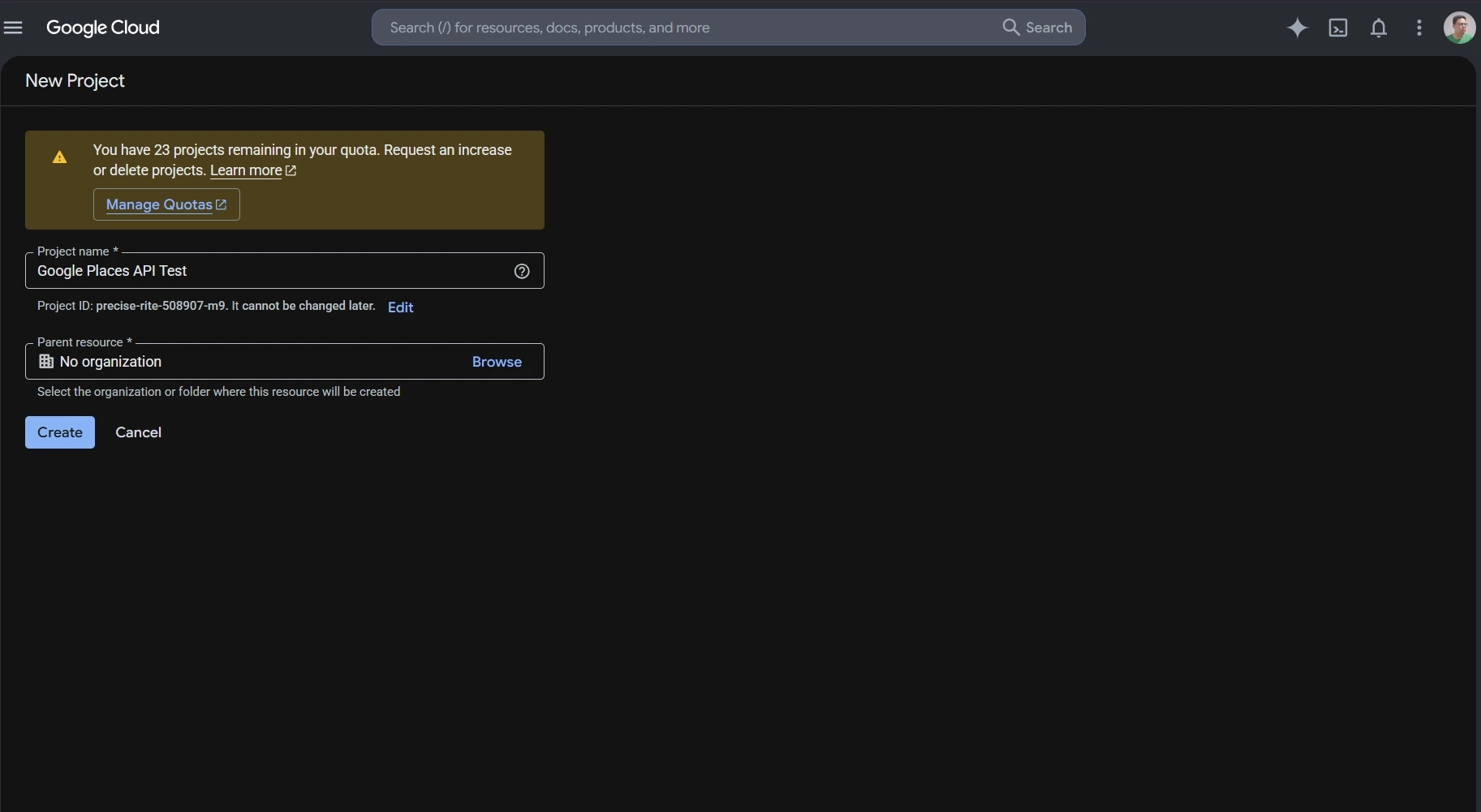
Enable Places API (New)
Places API (New) must be enabled for the project before the application can call its web service methods.
In Google Cloud Console:
- Select the project you want to use.
- Offen APIs & Services.
- finden. Places-API (neu) in the API Library.
- Enable it for the project.
This distinction matters for older projects because Places API (Legacy) and Places API (New) are separate services. A project that previously used the Legacy API may still need Places API (New) enabled before newer endpoints work.

API Key Setup and Restrictions
An API key identifies the Google Cloud project making the request.
Google requires billing to be enabled before Places API (New) can be used for live requests. If you are only following the setup process and do not want to attach a billing account yet, you can stop before creating the key and return to this step later.
When billing is enabled, create an API key in Google Cloud Console and restrict it before using it in an application.
For server-side Places API requests, an IP address restriction can limit the key to approved servers. You can also restrict the key so it only works with Places API (New) and any other Google Maps Platform services the application actually needs.
Google also requires Places API web service requests to use HTTPS. A missing key, incorrect restriction, or unsupported configuration can return a REQUEST_DENIED response.
Google Places API Examples: Make Your First Text Search Request
Text Search is a simple Google Places API example for understanding the request format, API key header, and field mask.
Places API (New) sends Text Search requests to:
https://places.googleapis.com/v1/places:searchText
The request uses HTTP POST. The search text goes in the JSON body, while the API key and field mask can be sent through request headers.
A basic request can look like this:
					curl -X POST \
  -H "Content-Type: application/json" \
  -H "X-Goog-Api-Key: YOUR_API_KEY" \
  -H "X-Goog-FieldMask: places.id,places.displayName,places.formattedAddress" \
  -d '{ "textQuery": "dentists in Chicago" }' \
  "https://places.googleapis.com/v1/places:searchText"
This request searches for dentists in Chicago and asks Google to return only:
- Ortskennung
- display name
- formatted address
A successful response returns matching Place objects inside a places array. The fields included in each result depend on the field mask used in the request.
Using a limited field mask keeps the response easier to read and avoids requesting data the application does not need.
For current request parameters, supported fields, quotas, and API changes, check the official Google Places API documentation.
Google Places API Example: Retrieve Place Details
A Text Search response can return a Place ID for each matching location. Once the application knows the Place ID, it can use Place Details to request information about that specific place without running another search.
The request follows this pattern:
https://places.googleapis.com/v1/places/PLACE_ID
Zum Beispiel:
curl -X GET -H "Content-Type: application/json" -H "X-Goog-Api-Key: YOUR_API_KEY" -H "X-Goog-FieldMask: id,displayName,formattedAddress" "https://places.googleapis.com/v1/places/PLACE_ID"
Ersetzen PLACE_ID with the ID returned by Text Search, Nearby Search, or another supported Places method.
Notice that the Place Details field mask uses id, displayNameund formattedAddress rather than places.id, places.displayNameund places.formattedAddress. Place Details returns one Place object, while Text Search returns Place objects inside a places array.
Choose the Fields You Need
Place Details, Text Search, and Nearby Search require a field mask in Places API (New). If no field is specified, the request returns an error.
For Text Search, a field mask might look like:
places.displayName,places.formattedAddress
If the application also needs a website and rating, the field mask can be expanded:
places.displayName,places.formattedAddress,places.websiteUri,places.rating
Google also supports * as a wildcard for all available fields, but it discourages using the wildcard in production. Requesting unnecessary fields can increase the amount of returned data and move the request into a higher billing SKU.
Keep the field mask limited to the data the application actually uses. Field selection affects both the response and the request cost.
The pricing section below explains how those field choices map to Google Places API SKUs.
Verwende Outscraper Google Maps-Schaber to collect business data through a no-code workflow without setting up individual Places API requests.
Google Places API Pricing and Free Usage
Google Places API uses pay-as-you-go pricing. Each request is billed under a specific SKU, and the cost depends on the method used, the fields requested, and the number of monthly billable events.
Google no longer uses the old recurring $200 Maps Platform credit. The current model gives each SKU its own monthly free usage cap. Those caps reset at the start of each month.
How Google Places API SKUs Work
A SKU is the billing category attached to a Places API request.
Places API (New) divides many requests into pricing levels such as Essentials, Pro, and Enterprise. The fields requested can move a request into a higher-priced SKU.
For example, Place Details can be billed under different SKUs depending on the requested fields:
- Place Details Essentials includes a monthly free usage cap of 10,000 events.
- The monthly free usage cap for Place Details Pro is 5,000 events.
- Für Place Details Enterprise, the monthly free usage cap is 1,000 events.
After the free usage cap, pricing is applied per 1,000 events and becomes lower at higher monthly volumes.
Text Search and Nearby Search follow a similar structure.
For the first paid usage tier, Google currently lists the following rates on the official Google Maps Platform pricing page:
| SKU | Monthly Free Usage | Price per 1,000 Events After Free Cap* |
|---|---|---|
| Place Details Essentials | 10,000 | $5.00 |
| Place Details Pro | 5,000 | $17.00 |
| Place Details Enterprise | 1,000 | $20.00 |
| Text Search Pro | 5,000 | $32.00 |
| Text Search Enterprise | 1,000 | $35.00 |
| Nearby Search Pro | 5,000 | $32.00 |
| Nearby Search Enterprise | 1,000 | $35.00 |
*These figures are for the first pricing tier shown on Google's global pricing page. Higher monthly volumes use lower per-1,000 rates.
Google also offers some IDs-only SKUs with unlimited free usage, including Place Details Essentials (IDs Only) and Text Search Essentials (IDs Only).
Current Free Usage Caps
Free usage is attached to individual SKUs rather than to one shared dollar credit.
Zum Beispiel:
- Autocomplete Requests: 10,000 free monthly events
- Place Details Essentials: 10,000
- Place Details Pro: 5,000
- Text Search Pro: 5,000
- Nearby Search Pro: 5,000
- Place Details Enterprise: 1,000
- Text Search Enterprise: 1,000
- Nearby Search Enterprise: 1,000
Some IDs-only services have unlimited free usage.
This makes cost estimates more dependent on the exact request than under the older credit system. Two applications making the same number of Places API calls can have different bills if they request different fields or use different methods.
How Requested Fields Affect Billing
Field masks control more than the size of the response.
For Place Details, Text Search, and Nearby Search, Google bills the request according to the highest SKU represented by the requested fields. If the field mask includes fields from both Essentials and Pro, the request is billed at the Pro level.
For example, an application that only needs a Place ID and address may not need the same fields as one requesting ratings, opening hours, reviews, and additional place attributes.
This makes field selection part of the cost calculation.
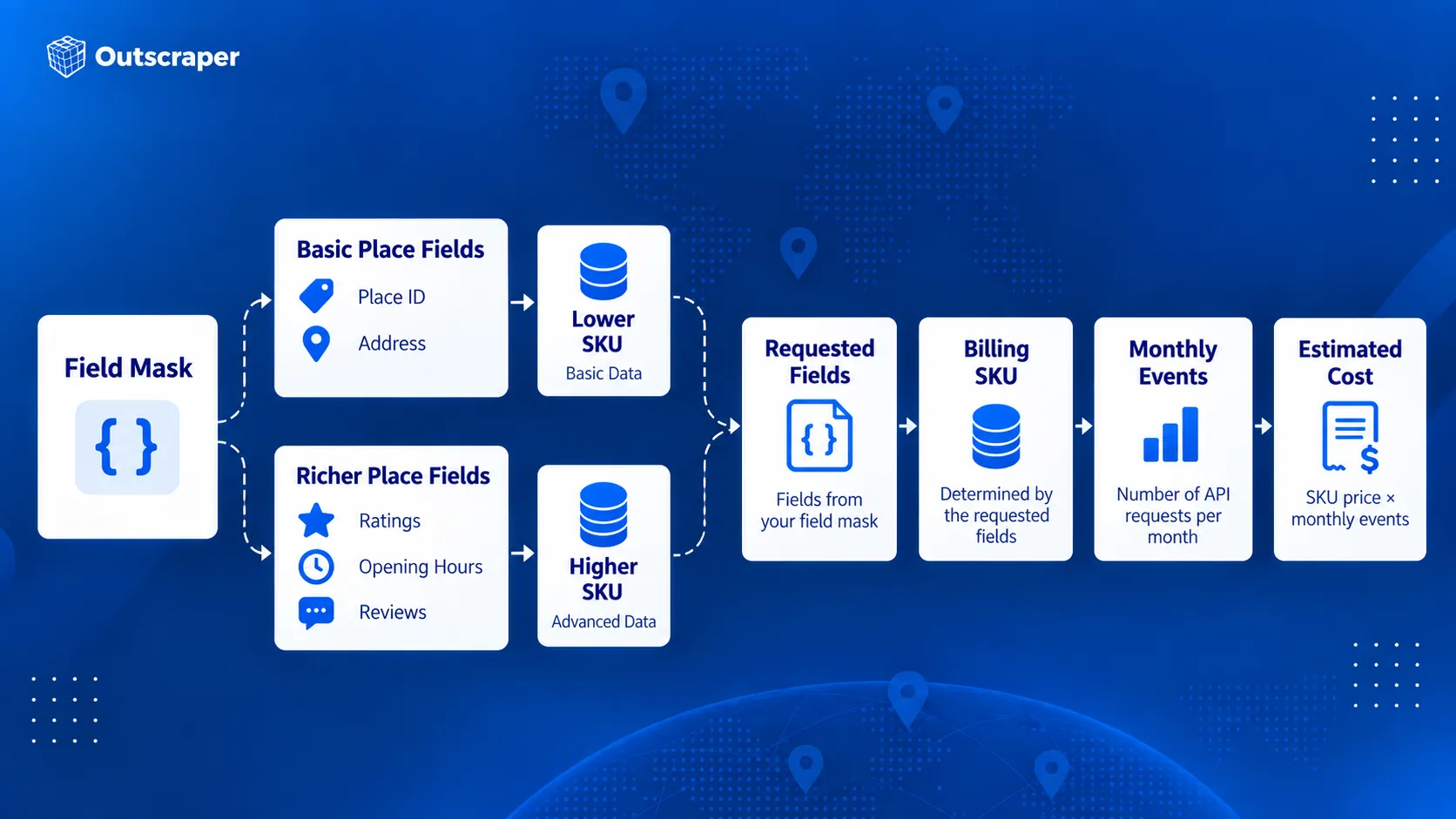
Avoid requesting every available field by default. Start with the fields required by the feature and add others only when they serve a clear purpose.
How Autocomplete Sessions Affect Billing
Autocomplete can be billed per request or as part of a session.
Without a session token, each Autocomplete request is billed separately under the Autocomplete Requests SKU.
A session groups a user’s Autocomplete requests with the request that completes the selection. A typical session begins with one or more Autocomplete calls and ends with Place Details (New) or Address Validation. Each new user search should use a new session token.
For sessions that end with Place Details Essentials, Google currently bills the first 12 Autocomplete requests individually. Requests after the 12th are billed under Autocomplete Session Usage, which has no charge. The terminating Place Details request is still billed under its own SKU.
Abandoned sessions do not receive that session treatment. If the user never completes the session with Place Details or Address Validation, the Autocomplete calls revert to per-request pricing.
How to Estimate Google Places API Costs
A useful cost estimate starts with the actual request flow rather than the total number of users.
Check:
- Which Places API method will be called.
- How many times the method is called during one user action.
- Which fields are included in the field mask.
- Which SKU those fields trigger.
- How many billable events are expected each month.
- How much of that usage falls inside the SKU’s free monthly cap.
- Whether Autocomplete requests are grouped into properly completed sessions.
For example, an application making 20,000 monthly Place Details Essentials requests would first use the 10,000-event monthly free cap. The remaining 10,000 events would fall into the paid pricing tier.
At the current first-tier rate of $5 per 1,000 events, those 10,000 paid requests would cost about $50 before taxes or any other Maps Platform usage is included.
The calculation changes if the field mask triggers a Pro or Enterprise SKU, so the expected fields should be part of the cost estimate from the beginning.
When Google Places API Is and Isn't the Right Tool
Google Places API works well when place information is part of an application feature. A search box, store locator, travel app, delivery interface, or nearby-business feature can request place information when the user needs it.
The requirements change when the main goal is building a business dataset. Collecting records across many categories, cities, or regions is a different workflow from looking up places inside an application.
For a deeper comparison of official API access and large-scale data extraction, see Google Maps API vs. web scraping.
When Google Places API Works Well
Google designed Places API (New) around location-aware application features.
It is a strong fit when an application needs to:
- search for places from user input
- find nearby businesses or points of interest
- suggest places while someone types
- retrieve details about a known place
- display place photos
- use Place IDs across supported Google Maps Platform services
For example, a hotel-booking app could show restaurants near a selected property. A delivery app could use Autocomplete to help a customer enter a destination. A store locator could retrieve details about a specific branch after the user selects it.
These requests usually happen as part of an interaction inside the application. The developer controls which method is called, which fields are returned, and how the results appear to the user.
Google’s documentation describes Places API (New) around these types of place search, lookup, autocomplete, and location-aware application features.
When You Need Business Data in Bulk
Some projects need a dataset rather than a place-search feature.
Anstatt zu fragen:
Welche Restaurants befinden sich in der Nähe dieses Nutzers?
a research team may need:
Welche Restaurants gibt es in diesen 50 Städten?
The same pattern appears across different teams:
- Entwickler may need place search or details inside an application.
- Marketingfachleute may need businesses by category and location for market research.
- Sales teams may need business records that match geographic or company criteria.
- Data professionals may need structured records for analysis, dashboards, or internal systems.
When the work involves collecting hundreds or thousands of business records, the process shifts from individual place lookup to data collection.
For market research, see what Google Maps business data to collect for market analysis before deciding which fields belong in your dataset.
A No-Code Option for Business Data Collection
Teams that do not need to build a place-search feature can use Outscraper Google Maps-Schaber to collect business records without setting up Google Cloud requests or writing API code.
Users can search by category and location, run the collection through the web interface, and export the results for research, prospecting, or analysis.
For developers and data teams that need programmatic access, Outscraper Google Maps Orte API is a separate service from Google’s Places-API (neu). It supports bulk business-data collection. See the Outscraper-API-Dokumentation for request details.
| Requirement | Google Places API | Auskratzer |
|---|---|---|
| Place search inside an application | Strong fit | Different primary use case |
| Automatische Vervollständigung | Supported | Not the main product purpose |
| Retrieve details about one known place | Supported | Available through business-data workflows |
| Collect many business records | Requires API request planning | Bulk collection supported |
| No-code business-data collection | Requires another workflow | Google Maps Scraper available |
| Programmatic business-data collection | Supported through Google's place methods | Google Maps Places API available |
| Export datasets | Application handles storage and export | CSV, Excel, Parquet, and JSON |
| Add contact or enrichment data | Limited to supported Google fields | Enrichment options available |
An application that needs nearby place search has a different data requirement from a team building a reusable business dataset.
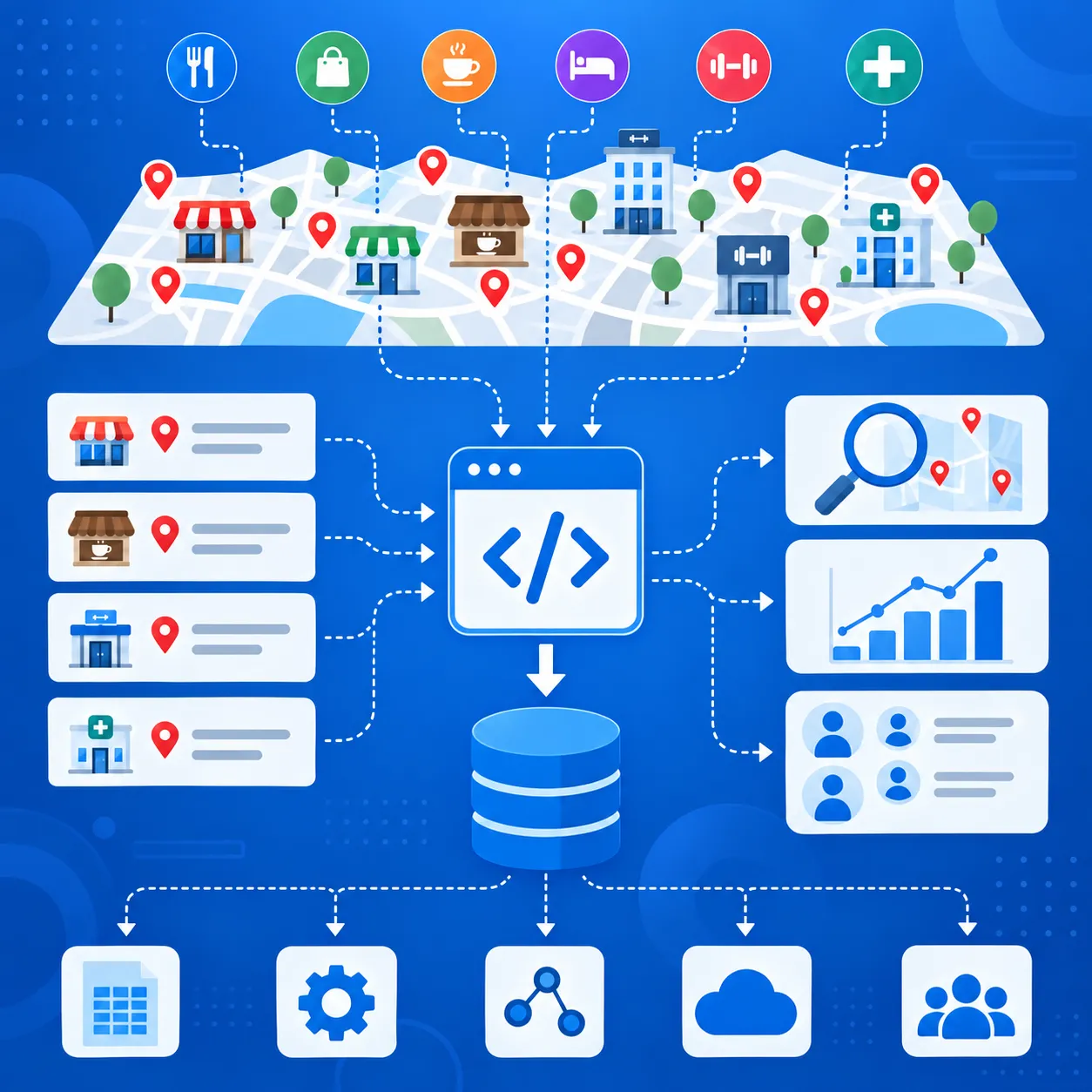
Verwende Outscraper Google Maps Orte API when you need business records across multiple categories or locations for research, sales, analysis, or another data workflow.
When You Need Additional Business or Contact Data
Google Places API can return addresses, phone numbers, websites, ratings, reviews, opening hours, business status, and other place fields.
For prospecting or market research, that may still leave gaps. Teams may also need email addresses, contact details, social profiles, or other company information before a record is ready to use.
If you need to add contact and company information after collecting place data, see the guide to Google Maps Places data enrichment.
A typical workflow is:
- Find businesses by category and location.
- Keep the fields needed for targeting.
- Add contact or company data.
- Export the records for sales, research, or another system.
Auskratzer supports business-data collection through both no-code and API workflows, with additional enrichment options for emails, contacts, and social profiles.
Google Places API fits place search and place details inside applications. Business-data workflows that need contact data, enrichment, or export usually require additional tools.
Google Places API Limits, Quotas, and Billing Risks
A Places API setup can work in testing and still run into cost, quota, or access problems once usage increases.
Google applies quotas by API method and project rather than through one shared daily limit. Usage, quotas, errors, and billing can be checked in Google Cloud Console.
Request Only the Fields You Need
Field masks affect both the response and the billing SKU.
If a request includes Pro-level fields, Google can bill the request at the Pro rate even when lower-cost fields are also included. Keep the field mask limited to data the application actually uses.
Use the Right Search Method
Text Search works from a written query. Nearby Search works from a defined geographic area and place-type criteria.
Zum Beispiel:
Cafés in Bostonfits Text Search.- restaurants within a set radius fit Nearby Search.
Choosing the right method reduces unnecessary requests and extra filtering.
For business searches by category and location, finding local businesses with Google Places API involves choosing between Text Search and Nearby Search, then requesting the required details through Place Details.
Manage Autocomplete Sessions Correctly
Autocomplete can generate several requests while a user types.
Use a new session token for each search session and complete the session with a compatible Place Details or Address Validation request. Abandoned or incorrectly configured sessions can be billed as separate requests.
Keep Legacy and New Requests Separate
Places API (Legacy) and Places API (New) use different request formats, field names, and response structures.
Do not mix Autocomplete session tokens between Legacy and New requests. Check older integrations before moving production traffic to Places API (New).
Restrict Your API Keys
Google recommends restricting API keys by application and API.
For server-side requests, IP restrictions can limit where the key is used. API restrictions can limit the same key to Places API (New) and other required services.
An incorrectly configured key can also cause ANFRAGE_ABGELEHNT errors, so restrictions should be tested before production use.
Set Quotas and Billing Alerts
Google Cloud Console can track traffic, errors, quotas, and spending.
Set quota limits and billing alerts before request volume grows. Billing alerts warn you when spending reaches selected thresholds, but they do not automatically stop API usage.
Final Checklist: Before You Use the Google Places API
- Choose the Places API method that matches the task.
- Use Places API (New) and request only the fields you need.
- Check the SKU, free usage cap, and expected monthly cost.
- Restrict the API key and set quotas or billing alerts.
- Decide whether you need app-based place lookup or bulk business-data collection.
Verwenden Outscraper Google Maps Orte API to collect business records across multiple locations or categories.
FAQ
Häufigste Fragen und Antworten
Die Google Places-API ist nicht vollständig kostenlos. Google wendet ein nutzungsabhängiges Preismodell mit monatlichen kostenlosen Nutzungslimits für einzelne SKUs an. So umfassen beispielsweise „Autocomplete Requests“ und „Place Details Essentials“ derzeit 10.000 kostenlose Ereignisse pro Monat, während für andere SKUs niedrigere Limits gelten.
Die Places-API dient dazu, nach Orten zu suchen und Informationen über Unternehmen, Sehenswürdigkeiten und andere Standorte abzurufen. Die Geocoding-API wird hauptsächlich dazu verwendet, Adressen in Koordinaten umzuwandeln oder Koordinaten wieder in Adressen umzuwandeln. Beide können mit Place-IDs arbeiten, lösen jedoch unterschiedliche Aufgaben im Zusammenhang mit Standortdaten.
Die Places-API stellt Ortsdaten über HTTP-Anfragen bereit. Die Maps JavaScript API wird verwendet, um interaktive Karten und browserbasierte Kartenfunktionen in Websites einzubinden. Ihre Places-Bibliothek ermöglicht zudem die Ortssuche und die automatische Vervollständigung innerhalb einer Webanwendung.
Ja. Für ein Produktionsprojekt der Places-API ist ein Google Cloud-Projekt erforderlich, das mit einem Abrechnungskonto verknüpft ist. Außerdem muss für das Projekt der erforderliche Places-API-Dienst aktiviert sein und es müssen gültige Authentifizierungsdaten vorliegen.
Eine Orts-ID ist eine textuelle Kennung für einen Ort in der Google Places-Datenbank und in Google Maps. Sie kann in verschiedenen Diensten der Google Maps Platform verwendet werden, darunter die Places-API, die Geocoding-API, die Maps JavaScript-API und die Routes-API. Google weist darauf hin, dass sich Orts-IDs im Laufe der Zeit ändern können, und empfiehlt, gespeicherte IDs, die älter als 12 Monate sind, zu aktualisieren.
Die Places-API (neu) ist die aktuelle Version für neue Entwicklungen. Einige Legacy-Methoden entsprechen direkt den neueren Methoden, während sich andere geändert haben. Beispielsweise ersetzt „Text Search“ (neu) die Methode „Find Place“ (Legacy). Bestehende Legacy-Projekte werden weiterhin unterstützt, bei neuen Cloud-Projekten können Legacy-Dienste jedoch nicht mehr aktiviert werden.
In der aktuellen Liste der „Place-Data“-Felder der Places-API (Neu) von Google erscheint kein Feld für geschäftliche E-Mail-Adressen. Die API kann Felder wie Telefonnummern und Website-URLs zurückgeben, geschäftliche E-Mail-Adressen sind jedoch nicht als unterstütztes „Place“-Feld aufgeführt.