目次を見る
NS Google Places API 場所の検索、オートコンプリート、周辺のスポット発見、店舗情報、その他の位置情報に基づく機能をサポートしています。真の課題は、どの「Places」サービスがそのタスクに適しているか、どのフィールドを取得する価値があるか、そしてそれらの選択がコストにどのような影響を与えるかを判断することです。
GoogleによるPlaces API(新)への移行に伴い、開発者がリクエスト、フィールドの選択、レスポンスデータ、および課金に対応する方法が変更されます。従来の実装パターンは、特にフィールドマスクやSKUベースの価格設定が関係してくる場合、必ずしもスムーズに引き継がれるとは限りません。
適切な設定は、何を作成するかによって異なります。アプリ内での位置情報検索では、ごく一部の場所の詳細情報だけで十分な場合もあります。 見込み客獲得のためのGoogle Places API 多くの都市にまたがる場合は、異なるワークフローが必要になる可能性があります。両方のユースケースを同じように扱うと、不必要なコストや余分なAPI作業が発生する恐れがあります。
エンドポイントを選択したり、月間使用量を推定したりする前に、Googleが「プレイス検索」、フィールドの選択、課金、およびクォータをどのように構成しているかを理解しておくと役立ちます。こうした理解があれば、公式のPlaces APIが適している場合と、別のビジネスデータワークフローを採用した方が理にかなっている場合を見極めやすくなります。
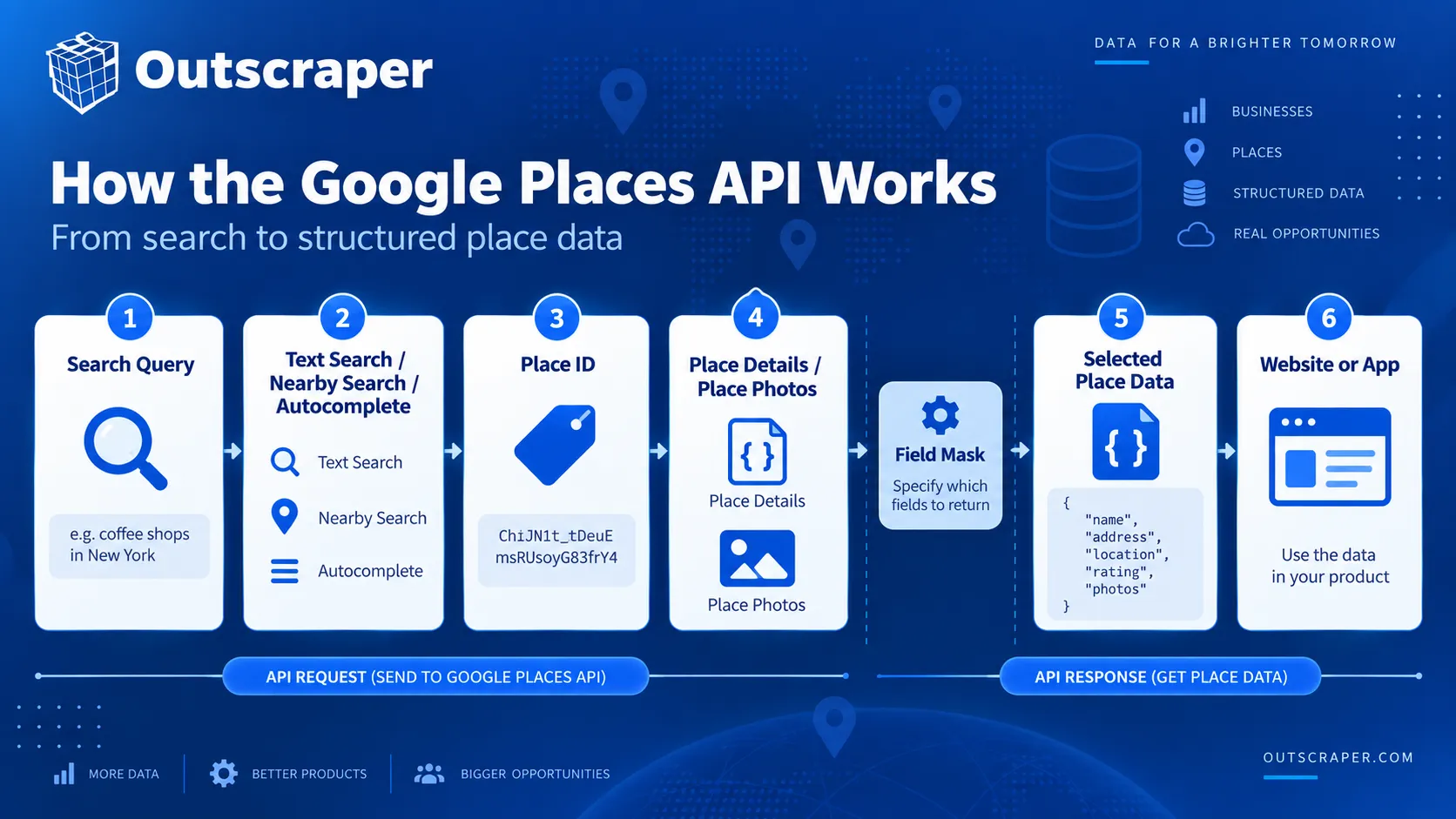
【簡単解説】Google Places APIの仕組み
- 「テキスト検索」または「周辺検索」を使って場所を検索しましょう。
- 特定の場所に関する詳細情報、写真、およびPlace IDを取得します。
- ユーザーが文字を入力している間に、オートコンプリート機能を使って場所を提案します。
- Google Cloud プロジェクト、請求設定、および制限付き API キーを設定します。
- フィールドマスクを使用して、返されるデータや請求内容を制御します。
- 費用は、サービス内容、必要な項目、および利用状況によって異なります。
- 大量のビジネスデータや追加の連絡先フィールドについては、別のデータワークフローの方が適している場合があります。
Google Places API とは何ですか?
Google Places API は Google Maps Platform の一部です。この API により、開発者は Google の場所データベースに登録されている企業、ランドマーク、住所、地理的位置、その他の場所に関する情報に、プログラムを通じてアクセスすることができます。
Googleは現在、次のように述べている Places API(新機能) 2億カ所以上の場所に関する位置情報を提供しています。開発者はこれを利用して、ウェブサイトやモバイルアプリ、その他のソフトウェアに、場所の検索、周辺スポットの発見、オートコンプリート、場所の詳細情報、写真などの機能を追加することができます。
一般的なリクエストは、検索クエリ、地域、または既知のPlace IDから始まります。Googleは、リクエストの種類と開発者が選択したフィールドに基づいて、構造化された場所情報を返します。
たとえば、レストラン検索アプリでは、「周辺検索」機能を使って、ユーザーの現在地周辺のレストランを検索することができます。ユーザーがレストランを選択すると、アプリはそのレストランの住所、評価、営業時間、電話番号、口コミなどの情報を取得するために、「場所の詳細」をリクエストすることができます。
Google Places API ではどのようなデータが取得できますか?
利用可能なフィールドは、リクエストの内容およびフィールドマスクに含まれるフィールドによって異なります。Places API(新)では、次のような情報を取得できます:
| データ型 | フィールドの例 | 内容について |
|---|---|---|
| アイデンティティ | 地名、場所ID、場所の種類 | その場所とその分類を特定します。 |
| 所在地 | 住所、地理座標 | その場所がどこにあるかを示しています。 |
| 事業概要 | 事業概要、電話番号、ウェブサイト、営業時間 | 運営情報および連絡先情報を掲載しています。 |
| お客様情報 | 評価、レビュー、価格情報 | 評価、レビュー、および価格に関するデータを提供します。 |
| メディア | 写真 | その場所に紐づく利用可能な画像を返します。 |
| アクセシビリティ | アクセシビリティに関する情報 | サポートされているアクセシビリティ機能について説明します。 |
| サービスオプション | 配達、店内飲食、カーブサイドピックアップ | 対応している場合は、利用可能なサービスオプションが表示されます。 |
Google はこれらの項目をさまざまな価格帯に分類しています。基本的な項目の中には低価格の SKU に該当するものもありますが、評価、営業時間、レビューなどの項目は、より高価格の SKU となる場合があります。Google は、項目と課金との関係について、その Places API のデータフィールドに関するドキュメント. フィールドの選択によって課金対象のSKUが変わる可能性があるため、アプリケーションに必要なフィールドのみをリクエストしてください。
Places API(新機能)では、Place Details、Text Search、およびNearby Searchのリクエストにおいても、フィールドマスクの指定が必要となります。少なくとも1つのフィールドを指定する必要があります。フィールドマスクが指定されていないリクエストはエラーとなります。
Places API が Google Maps Platform にどのように組み込まれているか
Places API は場所に関する情報を扱いますが、これは Google Maps Platform の一部に過ぎません。
開発者は、Places API を使用して事業所を検索した後、別のタスクのために Google Maps Platform の別のサービスを利用することができます。たとえば、Geocoding API を使用すると住所を座標に変換でき、ルート検索サービスを使用すると、場所間の経路や所要時間を計算することができます。
Places API 自体では、主要な各サービスが場所検索プロセスの異なる部分を担っています:
- テキスト検索 入力された検索条件に基づいて場所を検索します。
- 周辺検索 定義された地理的範囲内の場所を検索します。
- 場所の詳細 既知の場所に関する情報を取得します。
- オートコンプリート ユーザーが入力するにつれて、場所を提案します。
- 写真を配置する その場所に関連付けられている利用可能な画像を取得します。
Googleは、以下の使用を推奨しています 場所の詳細 その場所のIDがすでにわかっている場合、同じ場所に対して再度検索リクエストを実行する必要がないためです。
都市全体を対象としたビジネス検索、オートコンプリートボックス、および特定の場所1か所に関する詳細情報の取得には、それぞれ異なるPlaces APIメソッドが必要です。
Google Places API の仕組み
Google Places API では、すでに持っている入力データや、必要な場所データのタイプに応じて、異なるメソッドが使用されます。
書面によるクエリ、座標のセット、および既知のプレイスIDについては、それぞれ異なるメソッドが必要です。Places API(新)では現在、これらのタスクに対応するため、テキスト検索、近隣検索、プレイスの詳細、オートコンプリート、およびプレイスの写真を提供しています。
| 必要 | 使用する |
|---|---|
| 記述されたクエリからの検索 | テキスト検索 |
| 座標周辺を検索 | 周辺検索 |
| 特定の場所に関する詳細情報を確認する | 場所の詳細 |
| 入力中に候補を表示する | オートコンプリート |
| 場所の画像を取得する | 写真を配置する |
| 後で既知の場所を参照する | プレイスID |
テキスト検索
「テキスト検索」では、会社名、カテゴリ、住所、あるいは次のようなフレーズなど、入力された検索語句に基づいて場所を検索します。 pizza in New York.
「テキスト検索(新機能)」は HTTP POST リクエストを使用し、一致する「Place」オブジェクトを返します。オプションのパラメータを使用することで、場所、施設の種類、営業状況、評価、価格帯などで検索結果を絞り込むことができます。
Googleは現在、全ページを通じて最大60件の検索結果を表示しており、同じ検索クエリでも必ずしも同じ結果一覧が表示されるとは限らないと注意を促しています。
周辺検索
「周辺検索」は、指定された地理的範囲内にある場所を検索します。
このリクエストでは、緯度、経度、半径を指定し、1つ以上の場所の種類で結果を絞り込みます。たとえば、アプリでは、ホテルから設定された距離圏内にあるレストランを検索することができます。
「近隣検索(新機能)」もHTTP POSTを使用しており、返されるデータにはフィールドマスクが必要です。
場所の詳細
「場所の詳細」は、場所 ID を使用して、特定の場所に関する情報を取得します。
一般的な流れは次のとおりです:
- 「テキスト検索」、「周辺検索」、または「オートコンプリート」を使って場所を探しましょう。
- そのPlace IDを保持する。
- アプリケーションに必要な情報のみをリクエストしてください。
これにより、その場所がすでに特定されている場合に、再度検索を行う必要がなくなります。
オートコンプリート
オートコンプリート機能は、ユーザーが検索フィールドに入力している間に、場所を候補として表示します。
セッショントークンを使用すると、ユーザーのリクエストを1つの検索セッションとしてまとめ、課金処理を行うことができます。新しい検索を行うたびに新しいトークンを使用し、セッションは互換性のある「場所の詳細」または「住所の検証」リクエストで終了させる必要があります。
場所の写真と場所ID
「場所の写真」は、以下の場合にその場所に関連付けられた画像を取得します。 photos このフィールドは、「テキスト検索」、「周辺検索」、または「スポットの詳細」によって返されます。
場所 ID は特定の場所を識別するものであり、Google Maps Platform の対応サービス全体でその場所を再度参照できるようにします。
たとえば、アプリケーションはテキスト検索を通じてビジネスを検索し、そのPlace IDを保持しておき、後で元の検索を繰り返すことなく「Place Details」をリクエストすることができます。
Places API(新)と Places API(旧)の比較
Googleは2025年3月1日、従来のPlaces APIを「レガシー」ステータスに移行しました。既存のプロジェクトでは引き続き利用可能ですが、新しいCloudプロジェクトではレガシーサービスを有効にすることはできません。
Places API(新)は、新規開発においてGoogleが推奨するバージョンとなりました。この変更により、リクエストメソッド、フィールドの選択、レスポンスの構造、認証、および課金に影響が生じます。
| エリア | Places API(レガシー) | Places API(新機能) |
|---|---|---|
| 新しいプロジェクト | 有効にできません | Recommended for new development |
| Text Search and Nearby Search | HTTP GET | HTTP POST |
| Field selection | Older response model | Field masks required for key methods |
| Response fields | Many snake_case names | camelCase names |
| Authentication | API key | API key or OAuth |
| Find Place | Separate method | Use Text Search |
| Billing | Legacy SKU model | Current SKU model tied to methods and fields |
What Changed in Places API (New)?
Text Search and Nearby Search now use HTTP POST instead of the GET-based pattern used by Legacy.
Places API (New) also supports API keys and OAuth, returns JSON responses, and requires field masks for Place Details, Text Search, and Nearby Search.
Find Place does not have a direct New version. Google directs those searches to Text Search.
Field Masks and Response Changes
Field masks are one of the main differences between Places API (New) and the older API.
For Place Details, Text Search, and Nearby Search, the request must specify at least one field to return. Leaving out the field mask causes the request to fail.
Field selection also affects billing because Google assigns place-data fields to different SKUs. The pricing section later in this article explains that relationship in more detail.
Response objects have changed as well. Places API (New) uses camelCase field names instead of many of the snake_case names found in Legacy responses.
Examples include:
書式付き住所becomes書式設定済み住所business_statusbecomes事業状況書式設定済みの電話番号becomes国内の電話番号geometry.locationbecomes場所
Text Search and Nearby Search also return results in a 場所 array rather than the Legacy 成果 array. Status and error information now use standard HTTP response codes and messages instead of Legacy fields such as ステータス と エラーメッセージ.
These changes are important when existing applications parse Legacy responses or depend on older field names.
What Legacy API Users Need to Know About Migration
Migration usually requires more than changing the endpoint. Google provides a Places API migration guide covering the main differences between Legacy and Places API (New).
Check these areas first:
- Move Find Place searches to Text Search (New).
- Change Text Search and Nearby Search requests from GET to POST.
- Add the required field masks.
- Update code that reads Legacy response fields.
- Review the SKU used by each request.
Also check that Places API (New) is enabled in the project and allowed by the API key restrictions.
If Legacy and New requests need to run at the same time during testing, keep the two flows separate. Google recommends separate API keys during migration.
Existing Legacy integrations can continue running for now, but new projects should use Places API (New).
Google Places API Tutorial: Setup and Your First Request
Using Places API (New) starts with a Google Cloud project connected to a billing account. The project must have Places API (New) enabled before authenticated requests can be sent.
For a basic web service request, the setup follows five steps: choose a Cloud project, enable the API, create an API key, restrict the key, and send a request with the fields you want returned.
Create or Select a Google Cloud Project
Every Google Maps Platform request belongs to a Google Cloud project.
You can create a new project or use an existing one. The selected project also needs an active billing account. Google uses the project to track API access, usage, quotas, and charges.
Keeping separate projects can also make sense when development, testing, and production environments need different credentials or usage controls.
Once the correct project is selected, Places API (New) can be enabled from the Google Cloud Console.
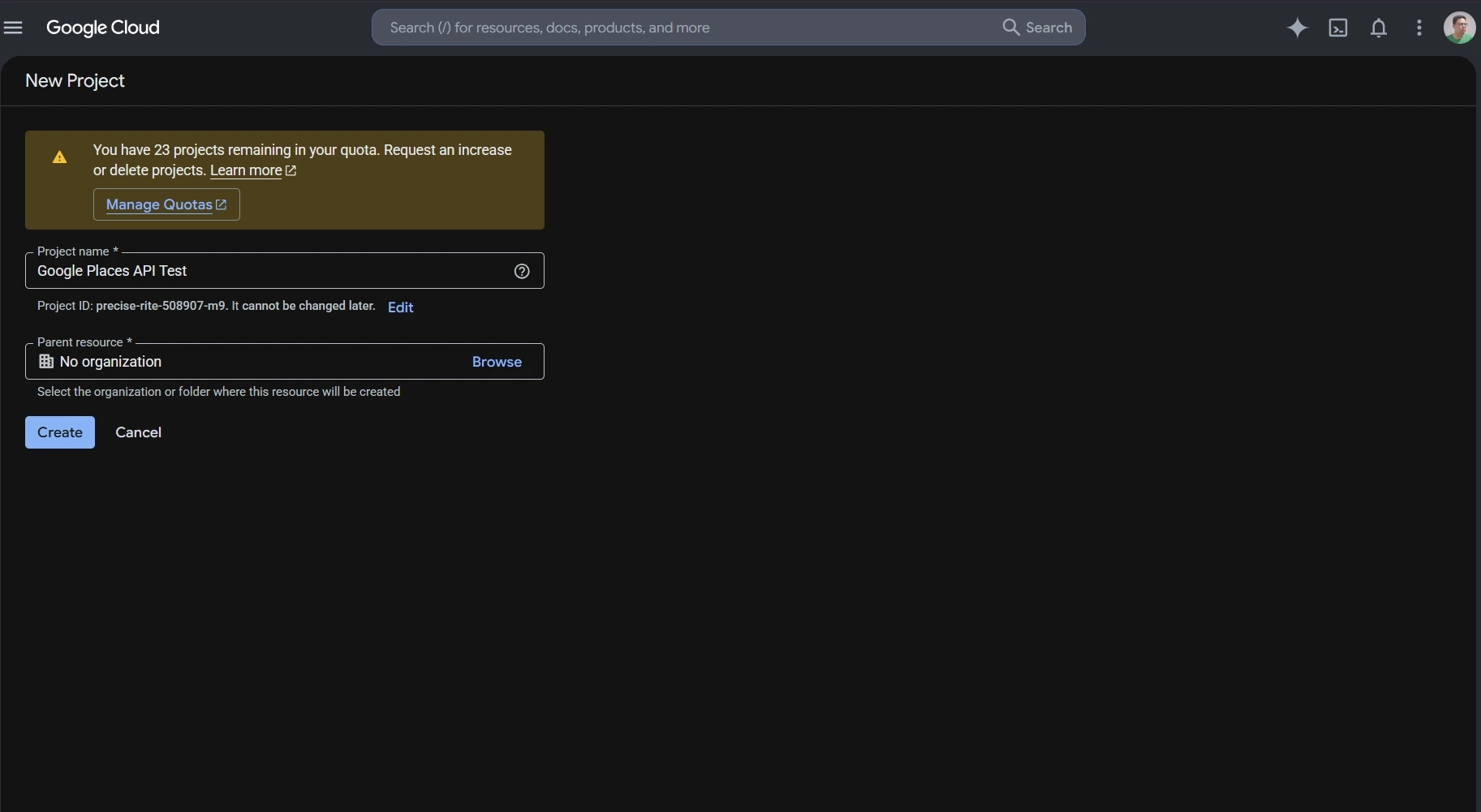
Enable Places API (New)
Places API (New) must be enabled for the project before the application can call its web service methods.
In Google Cloud Console:
- Select the project you want to use.
- オープン APIs & Services.
- 検索 Places API(新機能) in the API Library.
- Enable it for the project.
This distinction matters for older projects because Places API (Legacy) and Places API (New) are separate services. A project that previously used the Legacy API may still need Places API (New) enabled before newer endpoints work.

API Key Setup and Restrictions
An API key identifies the Google Cloud project making the request.
Google requires billing to be enabled before Places API (New) can be used for live requests. If you are only following the setup process and do not want to attach a billing account yet, you can stop before creating the key and return to this step later.
When billing is enabled, create an API key in Google Cloud Console and restrict it before using it in an application.
For server-side Places API requests, an IP address restriction can limit the key to approved servers. You can also restrict the key so it only works with Places API (New) and any other Google Maps Platform services the application actually needs.
Google also requires Places API web service requests to use HTTPS. A missing key, incorrect restriction, or unsupported configuration can return a REQUEST_DENIED response.
Google Places API Examples: Make Your First Text Search Request
Text Search is a simple Google Places API example for understanding the request format, API key header, and field mask.
Places API (New) sends Text Search requests to:
https://places.googleapis.com/v1/places:searchText
The request uses HTTP POST. The search text goes in the JSON body, while the API key and field mask can be sent through request headers.
A basic request can look like this:
					curl -X POST \
  -H "Content-Type: application/json" \
  -H "X-Goog-Api-Key: YOUR_API_KEY" \
  -H "X-Goog-FieldMask: places.id,places.displayName,places.formattedAddress" \
  -d '{ "textQuery": "dentists in Chicago" }' \
  "https://places.googleapis.com/v1/places:searchText"
This request searches for dentists in Chicago and asks Google to return only:
- プレイスID
- display name
- formatted address
A successful response returns matching Place objects inside a places array. The fields included in each result depend on the field mask used in the request.
Using a limited field mask keeps the response easier to read and avoids requesting data the application does not need.
For current request parameters, supported fields, quotas, and API changes, check the official Google Places API documentation.
Google Places API Example: Retrieve Place Details
A Text Search response can return a Place ID for each matching location. Once the application knows the Place ID, it can use Place Details to request information about that specific place without running another search.
The request follows this pattern:
https://places.googleapis.com/v1/places/PLACE_ID
例えば:
curl -X GET -H "Content-Type: application/json" -H "X-Goog-Api-Key: YOUR_API_KEY" -H "X-Goog-FieldMask: id,displayName,formattedAddress" "https://places.googleapis.com/v1/places/PLACE_ID"
Replace PLACE_ID with the ID returned by Text Search, Nearby Search, or another supported Places method.
Notice that the Place Details field mask uses id, displayNameそして formattedAddress rather than places.id, places.displayNameそして places.formattedAddress. Place Details returns one Place object, while Text Search returns Place objects inside a places array.
Choose the Fields You Need
Place Details, Text Search, and Nearby Search require a field mask in Places API (New). If no field is specified, the request returns an error.
For Text Search, a field mask might look like:
places.displayName,places.formattedAddress
If the application also needs a website and rating, the field mask can be expanded:
places.displayName,places.formattedAddress,places.websiteUri,places.rating
Google also supports * as a wildcard for all available fields, but it discourages using the wildcard in production. Requesting unnecessary fields can increase the amount of returned data and move the request into a higher billing SKU.
Keep the field mask limited to the data the application actually uses. Field selection affects both the response and the request cost.
The pricing section below explains how those field choices map to Google Places API SKUs.
Outscraperを使用してください グーグルマップスクレーパー to collect business data through a no-code workflow without setting up individual Places API requests.
Google Places API Pricing and Free Usage
Google Places API uses pay-as-you-go pricing. Each request is billed under a specific SKU, and the cost depends on the method used, the fields requested, and the number of monthly billable events.
Google no longer uses the old recurring $200 Maps Platform credit. The current model gives each SKU its own monthly free usage cap. Those caps reset at the start of each month.
How Google Places API SKUs Work
A SKU is the billing category attached to a Places API request.
Places API (New) divides many requests into pricing levels such as Essentials, Pro, and Enterprise. The fields requested can move a request into a higher-priced SKU.
For example, Place Details can be billed under different SKUs depending on the requested fields:
- Place Details Essentials includes a monthly free usage cap of 10,000 events.
- The monthly free usage cap for Place Details Pro is 5,000 events.
- ~について Place Details Enterprise, the monthly free usage cap is 1,000 events.
After the free usage cap, pricing is applied per 1,000 events and becomes lower at higher monthly volumes.
Text Search and Nearby Search follow a similar structure.
For the first paid usage tier, Google currently lists the following rates on the official Google Maps Platform pricing page:
| SKU | Monthly Free Usage | Price per 1,000 Events After Free Cap* |
|---|---|---|
| Place Details Essentials | 10,000 | $5.00 |
| Place Details Pro | 5,000 | $17.00 |
| Place Details Enterprise | 1,000 | $20.00 |
| Text Search Pro | 5,000 | $32.00 |
| Text Search Enterprise | 1,000 | $35.00 |
| Nearby Search Pro | 5,000 | $32.00 |
| Nearby Search Enterprise | 1,000 | $35.00 |
*These figures are for the first pricing tier shown on Google's global pricing page. Higher monthly volumes use lower per-1,000 rates.
Google also offers some IDs-only SKUs with unlimited free usage, including Place Details Essentials (IDs Only) and Text Search Essentials (IDs Only).
Current Free Usage Caps
Free usage is attached to individual SKUs rather than to one shared dollar credit.
例えば:
- Autocomplete Requests: 10,000 free monthly events
- Place Details Essentials: 10,000
- Place Details Pro: 5,000
- Text Search Pro: 5,000
- Nearby Search Pro: 5,000
- Place Details Enterprise: 1,000
- Text Search Enterprise: 1,000
- Nearby Search Enterprise: 1,000
Some IDs-only services have unlimited free usage.
This makes cost estimates more dependent on the exact request than under the older credit system. Two applications making the same number of Places API calls can have different bills if they request different fields or use different methods.
How Requested Fields Affect Billing
Field masks control more than the size of the response.
For Place Details, Text Search, and Nearby Search, Google bills the request according to the highest SKU represented by the requested fields. If the field mask includes fields from both Essentials and Pro, the request is billed at the Pro level.
For example, an application that only needs a Place ID and address may not need the same fields as one requesting ratings, opening hours, reviews, and additional place attributes.
This makes field selection part of the cost calculation.
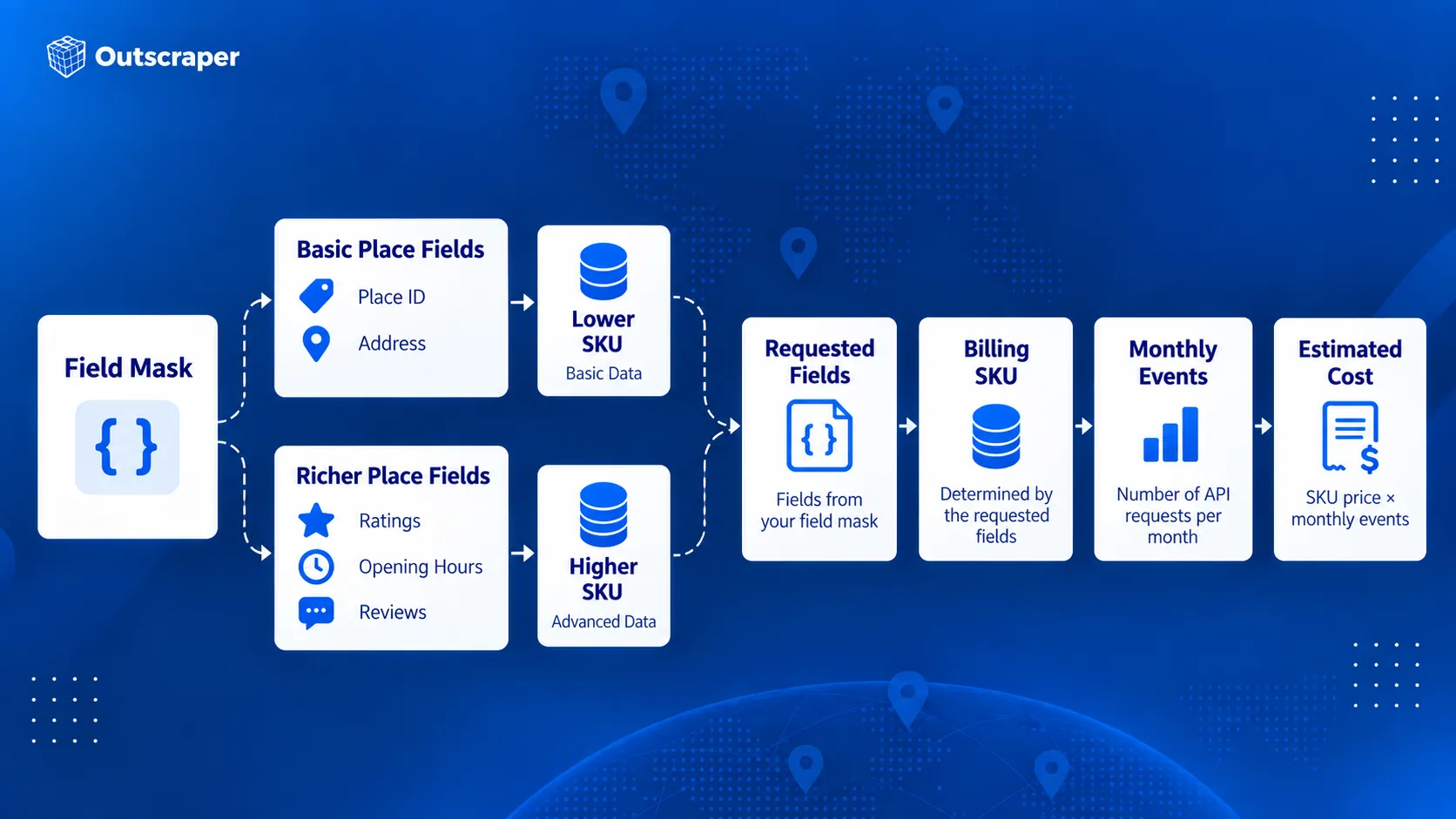
Avoid requesting every available field by default. Start with the fields required by the feature and add others only when they serve a clear purpose.
How Autocomplete Sessions Affect Billing
Autocomplete can be billed per request or as part of a session.
Without a session token, each Autocomplete request is billed separately under the Autocomplete Requests SKU.
A session groups a user’s Autocomplete requests with the request that completes the selection. A typical session begins with one or more Autocomplete calls and ends with Place Details (New) or Address Validation. Each new user search should use a new session token.
For sessions that end with Place Details Essentials, Google currently bills the first 12 Autocomplete requests individually. Requests after the 12th are billed under Autocomplete Session Usage, which has no charge. The terminating Place Details request is still billed under its own SKU.
Abandoned sessions do not receive that session treatment. If the user never completes the session with Place Details or Address Validation, the Autocomplete calls revert to per-request pricing.
How to Estimate Google Places API Costs
A useful cost estimate starts with the actual request flow rather than the total number of users.
確認:
- Which Places API method will be called.
- How many times the method is called during one user action.
- Which fields are included in the field mask.
- Which SKU those fields trigger.
- How many billable events are expected each month.
- How much of that usage falls inside the SKU’s free monthly cap.
- Whether Autocomplete requests are grouped into properly completed sessions.
For example, an application making 20,000 monthly Place Details Essentials requests would first use the 10,000-event monthly free cap. The remaining 10,000 events would fall into the paid pricing tier.
At the current first-tier rate of $5 per 1,000 events, those 10,000 paid requests would cost about $50 before taxes or any other Maps Platform usage is included.
The calculation changes if the field mask triggers a Pro or Enterprise SKU, so the expected fields should be part of the cost estimate from the beginning.
When Google Places API Is and Isn't the Right Tool
Google Places API works well when place information is part of an application feature. A search box, store locator, travel app, delivery interface, or nearby-business feature can request place information when the user needs it.
The requirements change when the main goal is building a business dataset. Collecting records across many categories, cities, or regions is a different workflow from looking up places inside an application.
For a deeper comparison of official API access and large-scale data extraction, see Google Maps API vs. web scraping.
When Google Places API Works Well
Google designed Places API (New) around location-aware application features.
It is a strong fit when an application needs to:
- search for places from user input
- find nearby businesses or points of interest
- suggest places while someone types
- retrieve details about a known place
- display place photos
- use Place IDs across supported Google Maps Platform services
For example, a hotel-booking app could show restaurants near a selected property. A delivery app could use Autocomplete to help a customer enter a destination. A store locator could retrieve details about a specific branch after the user selects it.
These requests usually happen as part of an interaction inside the application. The developer controls which method is called, which fields are returned, and how the results appear to the user.
Google’s documentation describes Places API (New) around these types of place search, lookup, autocomplete, and location-aware application features.
When You Need Business Data in Bulk
Some projects need a dataset rather than a place-search feature.
Instead of asking:
このユーザーの近くにはどんなレストランがありますか?
a research team may need:
これら50都市で営業しているレストランはどこですか?
The same pattern appears across different teams:
- 開発者 may need place search or details inside an application.
- Marketers may need businesses by category and location for market research.
- Sales teams may need business records that match geographic or company criteria.
- Data professionals may need structured records for analysis, dashboards, or internal systems.
When the work involves collecting hundreds or thousands of business records, the process shifts from individual place lookup to data collection.
For market research, see what Google Maps business data to collect for market analysis before deciding which fields belong in your dataset.
A No-Code Option for Business Data Collection
Teams that do not need to build a place-search feature can use Outscraper グーグルマップスクレーパー to collect business records without setting up Google Cloud requests or writing API code.
Users can search by category and location, run the collection through the web interface, and export the results for research, prospecting, or analysis.
For developers and data teams that need programmatic access, Outscraper Google Maps Places API is a separate service from Google’s Places API(新機能). It supports bulk business-data collection. See the Outscraper API Docs for request details.
| 要件 | Google Places API | アウトスクレーパー |
|---|---|---|
| Place search inside an application | Strong fit | 異なる主なユースケース |
| オートコンプリート | 対応済み | Not the main product purpose |
| Retrieve details about one known place | 対応済み | ビジネスデータワークフローを通じて利用可能 |
| 多くの業務記録を収集する | APIリクエストの計画が必要 | 一括収集に対応しています |
| ノーコードによるビジネスデータの収集 | 別のワークフローが必要です | Google Mapsスクラッパーが利用可能になりました |
| Programmatic business-data collection | Supported through Google's place methods | Google Maps Places API available |
| Export datasets | アプリケーションが保存とエクスポートを処理します | CSV, Excel, Parquet, and JSON |
| Add contact or enrichment data | Limited to supported Google fields | Enrichment options available |
An application that needs nearby place search has a different data requirement from a team building a reusable business dataset.
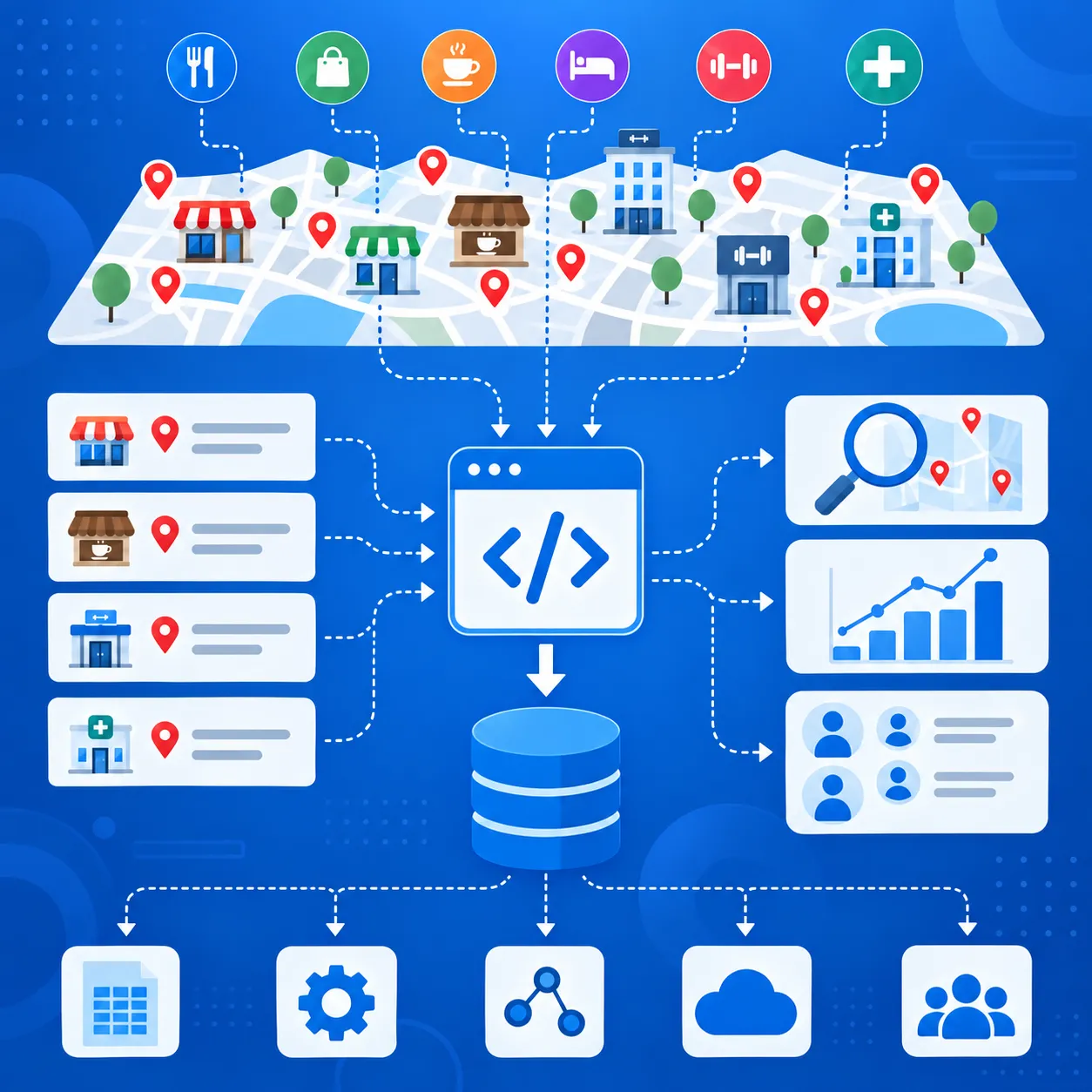
Outscraperを使用してください Google Maps Places API when you need business records across multiple categories or locations for research, sales, analysis, or another data workflow.
When You Need Additional Business or Contact Data
Google Places API can return addresses, phone numbers, websites, ratings, reviews, opening hours, business status, and other place fields.
For prospecting or market research, that may still leave gaps. Teams may also need email addresses, contact details, social profiles, or other company information before a record is ready to use.
If you need to add contact and company information after collecting place data, see the guide to Google マップの「場所」データの充実化.
A typical workflow is:
- Find businesses by category and location.
- Keep the fields needed for targeting.
- Add contact or company data.
- Export the records for sales, research, or another system.
アウトスクレーパー supports business-data collection through both no-code and API workflows, with additional enrichment options for emails, contacts, and social profiles.
Google Places API fits place search and place details inside applications. Business-data workflows that need contact data, enrichment, or export usually require additional tools.
Google Places API Limits, Quotas, and Billing Risks
A Places API setup can work in testing and still run into cost, quota, or access problems once usage increases.
Google applies quotas by API method and project rather than through one shared daily limit. Usage, quotas, errors, and billing can be checked in Google Cloud Console.
Request Only the Fields You Need
Field masks affect both the response and the billing SKU.
If a request includes Pro-level fields, Google can bill the request at the Pro rate even when lower-cost fields are also included. Keep the field mask limited to data the application actually uses.
Use the Right Search Method
Text Search works from a written query. Nearby Search works from a defined geographic area and place-type criteria.
例えば:
ボストンのコーヒーショップfits Text Search.- restaurants within a set radius fit Nearby Search.
Choosing the right method reduces unnecessary requests and extra filtering.
For business searches by category and location, finding local businesses with Google Places API involves choosing between Text Search and Nearby Search, then requesting the required details through Place Details.
Manage Autocomplete Sessions Correctly
Autocomplete can generate several requests while a user types.
Use a new session token for each search session and complete the session with a compatible Place Details or Address Validation request. Abandoned or incorrectly configured sessions can be billed as separate requests.
Keep Legacy and New Requests Separate
Places API (Legacy) and Places API (New) use different request formats, field names, and response structures.
Do not mix Autocomplete session tokens between Legacy and New requests. Check older integrations before moving production traffic to Places API (New).
Restrict Your API Keys
Google recommends restricting API keys by application and API.
For server-side requests, IP restrictions can limit where the key is used. API restrictions can limit the same key to Places API (New) and other required services.
An incorrectly configured key can also cause REQUEST_DENIED errors, so restrictions should be tested before production use.
Set Quotas and Billing Alerts
Google Cloud Console can track traffic, errors, quotas, and spending.
Set quota limits and billing alerts before request volume grows. Billing alerts warn you when spending reaches selected thresholds, but they do not automatically stop API usage.
Final Checklist: Before You Use the Google Places API
- Choose the Places API method that matches the task.
- Use Places API (New) and request only the fields you need.
- Check the SKU, free usage cap, and expected monthly cost.
- Restrict the API key and set quotas or billing alerts.
- Decide whether you need app-based place lookup or bulk business-data collection.
使用する Outscraper Google Maps Places API to collect business records across multiple locations or categories.
よくある質問
最も頻繁な質問と回答
Google Places API は完全に無料というわけではありません。Google では従量課金制を採用しており、個々の SKU ごとに月間の無料利用上限が設けられています。たとえば、「オートコンプリートリクエスト」および「プレイス詳細(Essentials)」では、現在、月間 10,000 件までが無料ですが、その他の SKU では上限がこれより低くなっています。.
Places API は、場所を検索し、企業、ランドマーク、その他の場所に関する情報を取得するために使用されます。Geocoding API は、主に住所を座標に変換したり、座標を住所に戻したりするために使用されます。どちらも Place ID に対応していますが、解決する位置情報のタスクは異なります。.
Places API は、HTTP リクエストを通じて場所のデータを提供します。Maps JavaScript API は、Web サイトにインタラクティブな地図やブラウザベースの地図機能を追加するために使用されます。また、その Places ライブラリを使用すると、Web アプリケーション内で場所の検索やオートコンプリート機能を提供することもできます。
はい。本番環境のPlaces APIプロジェクトには、請求アカウントに紐付けられたGoogle Cloudプロジェクトが必要です。また、そのプロジェクトでは、必要なPlaces APIサービスが有効化されており、有効な認証情報も用意されている必要があります。
Place ID は、Google Places データベースおよび Google マップ内の場所を表すテキスト形式の識別子です。Places API、Geocoding API、Maps JavaScript API、Routes API など、Google Maps Platform の複数のサービスで利用できます。Google によると、Place ID は時間の経過とともに変更される可能性があるため、保存済みの ID については、12 か月以上経過したものは更新することを推奨しています。
Places API(新)は、新規開発向けの最新バージョンです。レガシーメソッドの中には、新しいメソッドと直接対応するものもあれば、変更されたものもあります。たとえば、「Text Search(新)」は「Find Place(レガシー)」に取って代わります。既存のレガシープロジェクトは引き続きサポートされますが、新しいCloudプロジェクトではレガシーサービスを有効にすることはできません。
Googleの現在のPlaces API(新)のplace-dataフィールド一覧には、ビジネス用メールアドレスのフィールドは含まれていません。このAPIでは電話番号やウェブサイトのURLなどのフィールドを取得できますが、ビジネス用メールアドレスはサポートされているPlaceフィールドとして記載されていません。