Spis treści
Oto praktyczny poradnik pokazujący, jak przy użyciu ChatGPT Work i zbioru danych Outscraper stworzyć katalog chicagowskich klinik stomatologicznych z funkcją wyszukiwania. Tworzenie lokalny katalog firm staje się łatwiejsze do opanowania, gdy struktura strony internetowej i dane biznesowe są traktowane jako odrębne elementy tego samego procesu.
W tym samouczku wyjaśniam, jak sześć kroki Postanowiłem stworzyć katalog z funkcją wyszukiwania, korzystając z ChatGPT Work oraz eksportu JSON z serwisu Outscraper.
Jako przykład roboczy wykorzystałem kliniki stomatologiczne w Chicago. ChatGPT Work pomogło mi zaprojektować interfejs, wygenerować kod strony internetowej, zintegrować funkcję wyszukiwania oraz rozwiązać problemy związane z wdrożeniem. Firma Outscraper dostarczyła uporządkowane dane dotyczące lokalnych firm, które posłużyły do wypełnienia katalogu.
Pierwotny plik eksportowy Outscraper zawierał 500 wpisów dotyczących firm. Po sprawdzeniu adresów, statusu działalności i kategorii branżowych wykorzystałem 467 kwalifikujących się wpisów dotyczących gabinetów stomatologicznych w Chicago. Użytkownicy mogą przeszukiwać powstały katalog według nazwy kliniki, kategorii stomatologicznej, adresu lub kodu pocztowego.
Do tego projektu podszedłem jako strateg SEO i autor tekstów technicznych, który wciąż uczy się tworzenia stron internetowych. Nie napisałem ręcznie całej aplikacji. Moim zadaniem było zdefiniowanie wymagań, uporządkowanie danych, sprawdzenie interfejsu, przetestowanie wyników oraz udokumentowanie tego, co działało, a co nie.
Krótka odpowiedź: Jak stworzyć lokalny katalog firm
- Określ niszę, lokalizację i strukturę strony internetowej.
- Stwórz interfejs z funkcją wyszukiwania za pomocą ChatGPT Work.
- Zbieraj istotne dokumenty biznesowe za pomocą Outscraper.
- Eksportuj, oczyść i uporządkuj dane w formacie JSON.
- Powiąż rekordy z listami katalogowymi i filtrami.
- Testuj, publikuj i regularnie aktualizuj stronę internetową.
Chcesz zebrać dane o lokalnych firmach do swojego katalogu? Skorzystaj z Outscraper Skrobaczka map Google w celu wyszukania według kategorii i lokalizacji.

Co stworzyłem dzięki ChatGPT Work i Outscraper
W ramach tego projektu stworzyłem katalog z funkcją wyszukiwania dla osób poszukujących gabinetów stomatologicznych w Chicago. Wybrałem jedną kategorię branżową i jedno miasto, aby móc skupić się na całym procesie – od zebrania danych po opublikowanie strony internetowej.
Gotowy prototyp umożliwia zwiedzającym:
- Wyszukaj według nazwy kliniki lub kategorii usług stomatologicznych
- Wyszukiwanie według adresu lub kodu pocztowego w Chicago
- Przeglądaj wykazy gabinetów stomatologicznych: ogólnych, dziecięcych, kosmetycznych, ortodontycznych oraz specjalistycznych
- Porównaj oceny i liczbę recenzji
- Uzyskaj dostęp do stron internetowych klinik, numerów telefonów i stron z opiniami.
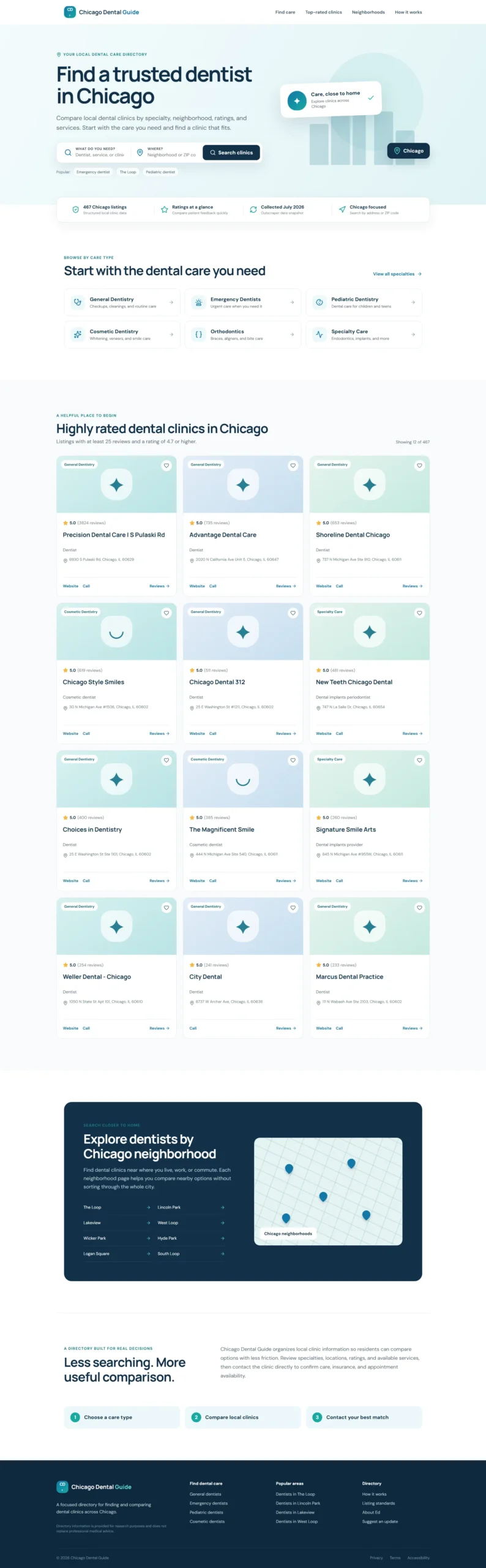
Poniżej znajduje się gotowy prototyp serwisu z katalogiem, który umożliwia odwiedzającym wyszukiwanie i porównywanie klinik stomatologicznych w Chicago.
W jaki sposób każde narzędzie przyczyniło się do powstania katalogu
ChatGPT Work, Outscraper, JSON oraz recenzja redakcyjna wspierały różne etapy procesu tworzenia treści na stronie internetowej.
Ten mniejszy, ukierunkowany projekt pozwolił mi w praktyczny sposób zrozumieć, w jaki sposób ustrukturyzowane dane dotyczące lokalnych firm mogą zostać przeniesione z wyeksportowanego pliku na stronę internetową z funkcją wyszukiwania. Pierwszym krokiem było dokładne określenie, co powinien obejmować ten katalog.
Jak stworzyłem lokalny katalog firm
Podzieliłem projekt na sześć praktycznych etapów, zaczynając od koncepcji katalogu, a kończąc na opublikowanej stronie internetowej zawierającej rzeczywiste dane biznesowe. Każdy etap dotyczył konkretnej części procesu, w tym planowania strony internetowej, tworzenia interfejsu, gromadzenia danych, przygotowywania plików JSON, integracji funkcji wyszukiwania oraz testowania.
Proces rozpoczął się od stworzenia niewielkiego prototypu z wykorzystaniem przykładowych wpisów. Gdy układ strony i sposób działania wyszukiwarki stały się jasne, zebrałem dane kliniki stomatologicznej z Chicago za pomocą Outscraper i zastąpiłem przykładową treść przefiltrowaną JSON dane. Takie podejście pozwoliło mi zapoznać się ze strukturą strony internetowej przed przystąpieniem do pracy z pełnym zbiorem danych.

Skorzystaj z narzędzia do pobierania danych z Google Maps, aby zebrać informacje o firmach według kategorii i lokalizacji, w tym dostępne dane kontaktowe, oceny, recenzje, strony internetowe oraz informacje o statusie działalności.
Krok 1: Określenie niszy katalogowej i wymagań
Przed rozpoczęciem tworzenia strony internetowej określiłem zakres działania katalogu:
- Kategoria: Kliniki stomatologiczne
- Lokalizacja: Chicago, Illinois
- Użytkownicy: Mieszkańcy Chicago poszukujący opieki stomatologicznej
- Cel: Pomóż odwiedzającym wyszukiwać i porównywać lokalne kliniki
Wybrałem również najbardziej przydatne pola w wykazie, w tym nazwę kliniki, kategorię, adres, kod pocztowy, ocenę, liczbę recenzji, numer telefonu, stronę internetową oraz status działalności. Pola te stanowiły podstawę zarówno dla gromadzenia danych w ramach projektu Outscraper, jak i dla układu strony internetowej.
Jeśli wciąż zastanawiasz się nad wyborem niszy katalogowej, lista Outscraper zawierająca Kategorie firm w Google Maps może pomóc w ustaleniu spójnych nazw kategorii na potrzeby zadania związanego z gromadzeniem danych.
W pierwszej wersji skupiłem się na stronie głównej z funkcją wyszukiwania, zawierającej kategorie specjalizacji, karty klinik, filtry lokalizacji, wskaźniki zaufania oraz stopkę dostosowaną do pozycjonowania (SEO). Funkcje takie jak indywidualne strony klinik, rezerwacja wizyt i konta użytkowników można rozważyć w późniejszym terminie.
Po określeniu zakresu i wymagań byłem gotowy do stworzenia prototypu strony internetowej za pomocą ChatGPT Work.
Krok 2: Stwórz prototyp strony internetowej przy pomocy ChatGPT
Przekazałem ChatGPT Work szczegółową specyfikację zawierającą informacje na temat celu katalogu, docelowych użytkowników, sekcji strony głównej, pól wyszukiwania, stylu wizualnego oraz wymagań dotyczących lokalnego SEO.
Oto polecenie, z którego skorzystałem:
Zobacz polecenie robocze ChatGPT wykorzystane w prototypie
Przeczytaj lub skopiuj poniższe pełne zadanie.
@Sites Act as an expert UX/UI designer and SEO content strategist.

I am building a high-performance directory website focused on Chicago dental clinics, and I need the content and layout strategy for the homepage.

Who I am:

I am Ed, a professional SEO strategist and technical writer. I am building this directory to provide value to Chicago residents by organizing local dental clinic data into an easy-to-use resource.

What I need:

Please provide a comprehensive layout and content plan for the homepage. Include:

1. Hero Section

Create an impactful headline and subheadline that clearly state the site's value. Include a prominent search bar design.

2. Key Value Proposition

Add a section briefly explaining why users should trust the directory, such as verified ratings, updated data, and a local focus.

3. Primary Navigation and Categories

Suggest four to six logical categories, such as General Dentistry, Pediatric Dentistry, Emergency Dentistry, and Cosmetic Dentistry, to help users navigate quickly.

4. Featured or Top-Rated Listings

Create a layout for displaying a small sample of top-rated clinics to establish immediate authority.

5. SEO Footer

Create a footer-link strategy that supports site navigation and local SEO authority.

What good looks like:

Visuals:

The design must be clean, professional, and clinical. Use a trustworthy color palette with shades of medical blue, slate gray, and crisp white.

UX and conversion:

The website should be fast and intuitive. A user should be able to start a search within three seconds of landing on the page.

Constraints:

Use clear, direct, and human-sounding language. Do not use em dashes anywhere in the copy. Avoid generic AI marketing language. Optimize the content and layout for local SEO.

Provide the output in a clean, organized format that I can hand off to developers or implement in the website structure.
ChatGPT Work wykorzystało te wytyczne do stworzenia pierwszego prototypu strony internetowej, w którym zastosowano:
- Sekcja „Hero” z opcją wyszukiwania placówek i usług
- Kategorie specjalizacji stomatologicznych
- Wskaźniki zaufania i jakości danych
- Karty kliniki cieszące się wysoką oceną
- Nawigacja po Chicago
- Stopka dotycząca lokalnego SEO
- Responsywne układy stron na komputery stacjonarne i urządzenia mobilne
W pierwszej wersji wykorzystałem przykładowe wpisy dotyczące klinik, aby zapoznać się ze strukturą przed zaimportowaniem rzeczywistych danych firmowych. Sprawdziłem sformułowania, kolory, odstępy, działanie na urządzeniach mobilnych oraz wygląd kart wpisu, zanim przeszedłem do etapu gromadzenia danych Outscraper.
Krok 3: Zbierz dane biznesowe za pomocą Outscraper
Gdy prototyp strony internetowej był już gotowy, skorzystałem z Outscraper Skrobaczka map Google w celu zebrania publicznie dostępnych informacji dotyczących działalności dentystów w Chicago.
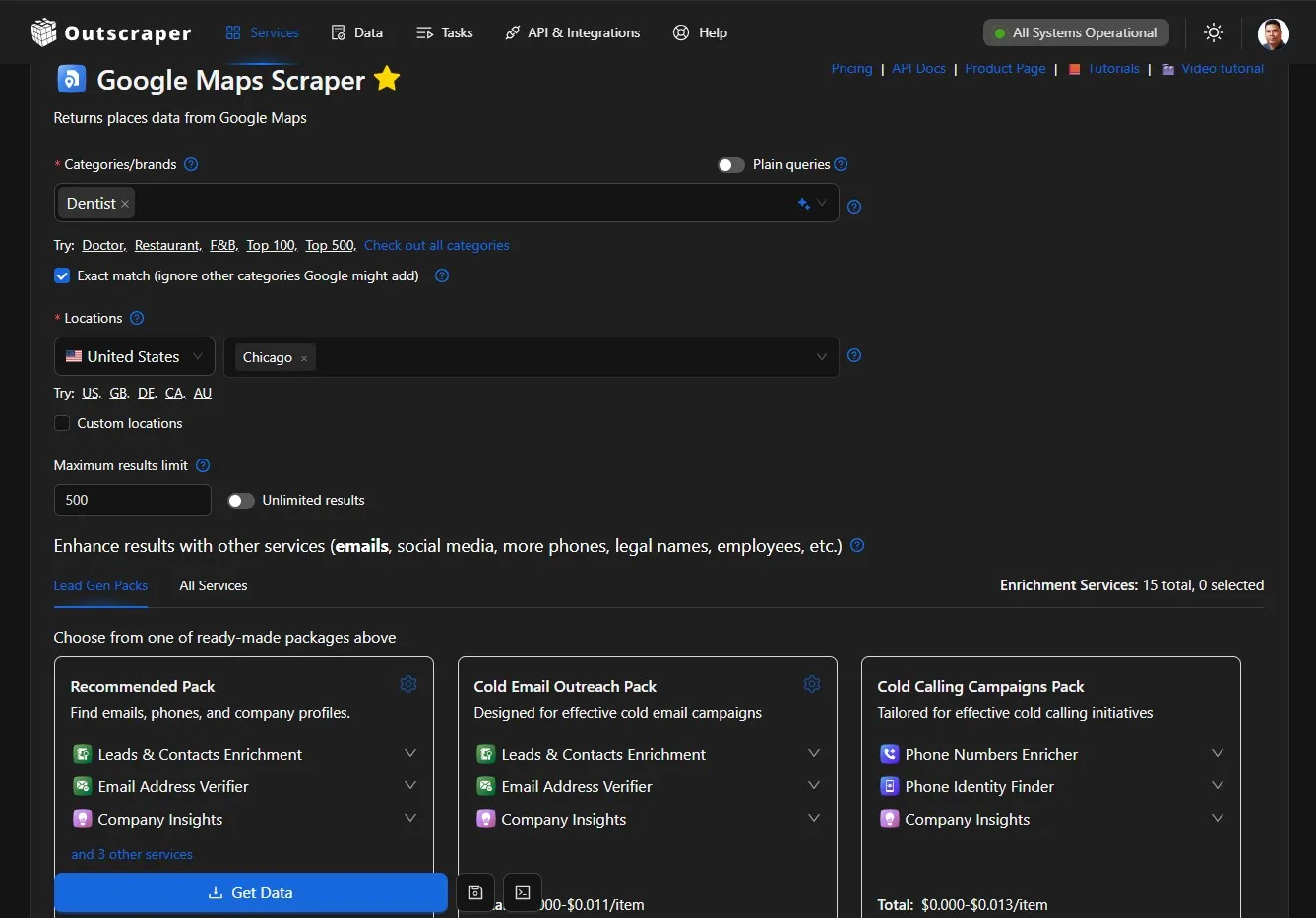
Skonfigurowałem wyszukiwanie w kategorii „stomatologia” i lokalizacji „Chicago”, a następnie pobrałem wyniki w postaci pliku JSON. Eksport zawierał 500 rekordów firmowych z takimi polami jak:
- Nazwa firmy i kategoria
- Adres
- Numer telefonu
- Strona internetowa
- Liczba ocen i recenzji
- Sytuacja biznesowa
- Link do recenzji
- Identyfikator miejsca w Google
Jeśli chcesz powtórzyć ten proces, to Przewodnik po rozpoczęciu pracy z pobieraniem danych z Google Maps wyjaśnia, jak skonfigurować zadanie, monitorować jego postęp oraz pobrać plik z wynikami.
Wyeksportowany plik zawierał surowe dane potrzebne do stworzenia katalogu. Zanim dodałem je do strony internetowej, musiałem jeszcze sprawdzić lokalizacje, usunąć niepowiązane kategorie, zająć się brakującymi wartościami oraz uporządkować rekordy w spójnym formacie.
Cały proces czyszczenia danych i obsługa formatu JSON zostaną omówione w osobnym samouczku poświęconym uzupełnianiu lokalnego katalogu firm danymi z serwisu Outscraper.
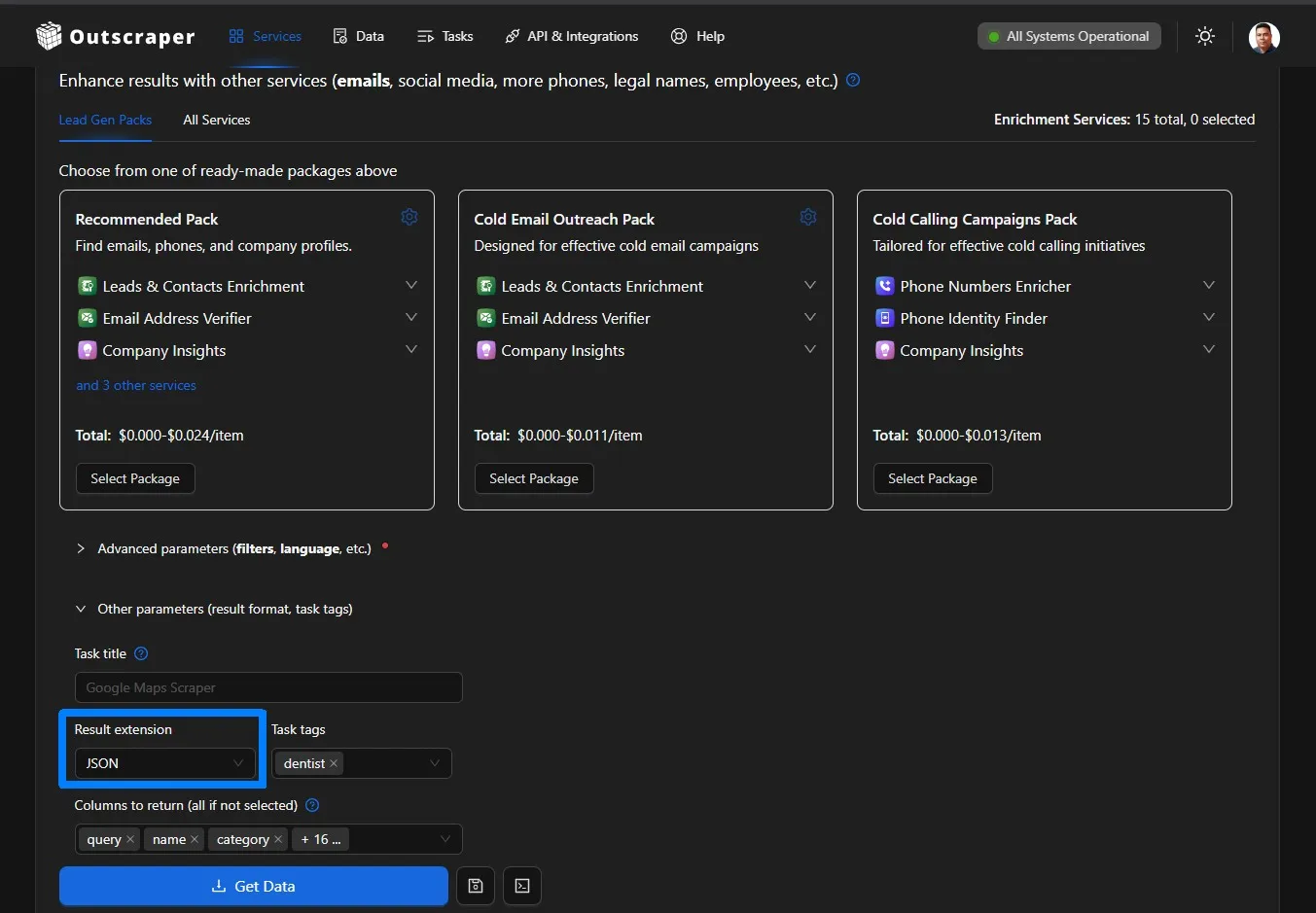
Outscraper oferuje również usługi w zakresie wyszukiwania danych kontaktowych, uzupełniania istniejących rekordów, eksportowania danych ustrukturyzowanych oraz łączenia procesów przetwarzania danych biznesowych za pośrednictwem interfejsu API.
Krok 4: Przeglądanie, filtrowanie i porządkowanie danych JSON
The Outscraper export contained 500 records, but I needed to review the data before using it on the website.
I kept listings that:
- Had a Chicago address
- Were marked as operational
- Belonged to a relevant dental category
- Had a unique Google Place ID
I removed records with unrelated or blank categories and organized the remaining fields into a consistent structure. I also grouped specific categories, such as pediatric dentists, cosmetic dentists, orthodontists, and oral surgeons, into broader directory sections.
For a detailed explanation of structuring business records, see the guide to building a local business database from Google Maps.
After filtering, 467 Chicago dental listings qualified for the prototype. The cleaned JSON file was then ready to replace the sample listings used in the original website design.

Step 5: Connect the Data and Test the Directory
I uploaded the cleaned JSON file to ChatGPT Work and asked it to replace the sample listings with the qualifying Chicago dental records.
The website connected the data to:
- Clinic listing cards
- Name and category search
- Address and ZIP code search
- Ratings and review counts
- Website, phone, and review links
- Dental specialty filters
I then tested different searches and checked how the cards handled missing websites, phone numbers, and ratings. I also reviewed the layout on desktop and mobile to confirm that the search fields, categories, and listing information remained easy to use.
Once the real records and search functions were working, the directory was ready for publishing.

Step 6: Publish, Verify, and Plan Data Updates
After testing the populated directory, I used ChatGPT Work to build and publish the website through ChatGPT Sites.
Publishing required more than confirming that the deployment had finished. I also checked:
- Whether the website was publicly accessible
- Whether the homepage returned a successful response
- Whether the interface rendered correctly
- Whether the search and listing links worked
- Whether the mobile layout remained usable
The first deployment had access and rendering problems, which I resolved by reviewing the site settings, production response, and deployment logs. I will explain these issues in the troubleshooting section.
The published directory uses a snapshot of the Outscraper data. Because ratings, websites, phone numbers, and business status can change, the project will also need a repeatable process for collecting fresh data, reviewing the changes, and updating the website.
For a more detailed directory, Outscraper’s enrichment services can help add available contact details and other business information to existing records.
What Broke and What the Prototype Still Needs
The website worked during the local build, but publishing revealed problems that were not visible in the prototype. The Outscraper export also lacked several fields that would be useful in a more complete directory.
Problems I Found During Publishing
The first published version had a restricted access setting connected to the Team workspace. After changing the site to public, the homepage returned an HTTP 404 error because the production environment could not locate the website files correctly.
The next version loaded but displayed part of the JavaScript as visible text. A final packaging change placed the page container, styles, and application script in the correct order.
I republished the website and confirmed that the homepage returned a successful 200 OK response. This showed me that a completed build still needs to be tested through the public URL.
Current Data Limitations
ten directory uses one Outscraper data export, and the file did not contain every field needed for a complete local directory.
The main limitations included:
- No latitude and longitude coordinates
- No consistent Chicago neighborhood field
- No opening hours
- No clinic photos
- No detailed list of dental services
- Missing websites, phone numbers, or ratings in some records
- No appointment or insurance information
Because reliable coordinates and neighborhood names were unavailable, the map remained decorative and location searches relied on addresses and ZIP codes.
Business information can also change after collection. Visitors should confirm services, opening hours, insurance acceptance, and appointment availability directly with each clinic.
A future Outscraper export with additional fields would support richer listings and more accurate location pages.
What I Learned and What I Will Improve Next
This project gave me a practical view of how website planning, structured data, search functionality, and publishing work together. It also showed me which parts of the prototype need further development.
What I Learned
My main lessons were:
- A focused scope makes the project manageable. Choosing one category and one city helped me prioritize the essential directory features.
- Structured data needs editorial review. I needed clear rules for location, business status, category relevance, duplicates, and missing fields.
- A prototype helps validate the interface. Sample listings allowed me to review the layout before connecting the complete JSON export.
- AI-assisted development still requires direction. Clear prompts, testing, and specific feedback improved the website.
- Publishing needs separate verification. A successful local build did not guarantee that the public website would work correctly.
- Directory data needs maintenance. Ratings, websites, phone numbers, and operating status can change over time.
I did not manually write every line of code, but I became more familiar with JSON, search filters, website components, deployment logs, and data-quality decisions.
What I Will Improve Next
My next priorities are:
- Collect coordinates, opening hours, photos, and additional clinic details
- Map listings to accurate Chicago neighborhoods
- Create individual pages for qualifying clinics
- Move the records from a static JSON file into a database
- Add pagination and more detailed search filters
- Create a process for comparing new and previous Outscraper exports
- Test page speed, accessibility, and mobile usability
I plan to approach these improvements in smaller stages and document what works, what needs revision, and what I learn from each update.
Final Checklist: How to Build a Local Business Directory
Use this workflow to move from a directory idea to a published website:
- Define the directory scope. Choose the business category, target location, intended users, and information each listing should contain.
- Plan and build the prototype. Create the search fields, categories, listing cards, navigation and responsive layout with ChatGPT Work.
- Collect the business data. Posługiwać się wysięgnik to gather relevant public business records by category and location.
- Review and organize the export. Check the addresses, operating status, categories, duplicates, and missing fields before importing the JSON data.
- Connect and test the listings. Add the cleaned records to the website and test the search, filters, contact links, and mobile layout.
- Publish and maintain the directory. Verify the public website and create a process for updating the business records.
You can use Google Maps Scraper to collect public business details by category and location. Export the results, organize the fields your directory needs, and use the data to populate searchable business listings.
FAQ
Najczęściej zadawane pytania i odpowiedzi
Należy podać co najmniej nazwę firmy, kategorię, adres, numer telefonu, stronę internetową, ocenę, liczbę recenzji oraz status firmy. Jeśli dostępne są wiarygodne dane, należy dodać godziny otwarcia, zakres usług, zdjęcia, współrzędne oraz szczegóły dotyczące umówionych wizyt.
Tak. Plik JSON może sprawdzić się w przypadku wczesnego prototypu zawierającego ograniczoną liczbę wpisów. W miarę rozrastania się katalogu baza danych jest zazwyczaj lepszym rozwiązaniem, jeśli chodzi o zarządzanie aktualizacjami, stronami poszczególnych wpisów, filtrowaniem oraz większymi zbiorami danych.
Skorzystaj z narzędzia do analizy danych biznesowych, takiego jak Outscraper Skrobaczka map Google w celu zebrania publicznych danych biznesowych według kategorii i lokalizacji. Przed opublikowaniem ich w katalogu należy sprawdzić wyeksportowane dane.
Przed zaimportowaniem danych należy ustalić jasne zasady kwalifikacji. W ramach tego projektu gromadziłem dane zawierające adres w Chicago, status operacyjny, odpowiednią kategorię stomatologiczną oraz unikalny identyfikator Google Place ID.
Harmonogram aktualizacji zależy od branży i wielkości katalogu. Przegląd co miesiąc lub co kwartał stanowi praktyczny punkt wyjścia, ponieważ strony internetowe firm, numery telefonów, oceny, godziny otwarcia i status działalności mogą ulegać zmianom.
Niekoniecznie. Narzędzia takie jak ChatGPT Work mogą pomóc w stworzeniu prototypu, ale nadal trzeba zdefiniować strukturę katalogów, przejrzeć dane, przetestować stronę internetową i zweryfikować opublikowany wynik. Bardziej zaawansowane funkcje, takie jak baza danych i automatyczne aktualizacje, mogą wymagać dodatkowego wsparcia technicznego.
Spis treści
Oto praktyczny poradnik pokazujący, jak przy użyciu ChatGPT Work i zbioru danych Outscraper stworzyć katalog chicagowskich klinik stomatologicznych z funkcją wyszukiwania. Tworzenie lokalny katalog firm staje się łatwiejsze do opanowania, gdy struktura strony internetowej i dane biznesowe są traktowane jako odrębne elementy tego samego procesu.
W tym samouczku wyjaśniam, jak sześć kroki Postanowiłem stworzyć katalog z funkcją wyszukiwania, korzystając z ChatGPT Work oraz eksportu JSON z serwisu Outscraper.
Jako przykład roboczy wykorzystałem kliniki stomatologiczne w Chicago. ChatGPT Work pomogło mi zaprojektować interfejs, wygenerować kod strony internetowej, zintegrować funkcję wyszukiwania oraz rozwiązać problemy związane z wdrożeniem. Firma Outscraper dostarczyła uporządkowane dane dotyczące lokalnych firm, które posłużyły do wypełnienia katalogu.
Pierwotny plik eksportowy Outscraper zawierał 500 wpisów dotyczących firm. Po sprawdzeniu adresów, statusu działalności i kategorii branżowych wykorzystałem 467 kwalifikujących się wpisów dotyczących gabinetów stomatologicznych w Chicago. Użytkownicy mogą przeszukiwać powstały katalog według nazwy kliniki, kategorii stomatologicznej, adresu lub kodu pocztowego.
Do tego projektu podszedłem jako strateg SEO i autor tekstów technicznych, który wciąż uczy się tworzenia stron internetowych. Nie napisałem ręcznie całej aplikacji. Moim zadaniem było zdefiniowanie wymagań, uporządkowanie danych, sprawdzenie interfejsu, przetestowanie wyników oraz udokumentowanie tego, co działało, a co nie.
Krótka odpowiedź: Jak stworzyć lokalny katalog firm
- Określ niszę, lokalizację i strukturę strony internetowej.
- Stwórz interfejs z funkcją wyszukiwania za pomocą ChatGPT Work.
- Zbieraj istotne dokumenty biznesowe za pomocą Outscraper.
- Eksportuj, oczyść i uporządkuj dane w formacie JSON.
- Powiąż rekordy z listami katalogowymi i filtrami.
- Testuj, publikuj i regularnie aktualizuj stronę internetową.
Chcesz zebrać dane o lokalnych firmach do swojego katalogu? Skorzystaj z Outscraper Skrobaczka map Google w celu wyszukania według kategorii i lokalizacji.
Co stworzyłem dzięki ChatGPT Work i Outscraper
W ramach tego projektu stworzyłem katalog z funkcją wyszukiwania dla osób poszukujących gabinetów stomatologicznych w Chicago. Wybrałem jedną kategorię branżową i jedno miasto, aby móc skupić się na całym procesie – od zebrania danych po opublikowanie strony internetowej.
Gotowy prototyp umożliwia zwiedzającym:
- Wyszukaj według nazwy kliniki lub kategorii usług stomatologicznych
- Wyszukiwanie według adresu lub kodu pocztowego w Chicago
- Przeglądaj wykazy gabinetów stomatologicznych: ogólnych, dziecięcych, kosmetycznych, ortodontycznych oraz specjalistycznych
- Porównaj oceny i liczbę recenzji
- Uzyskaj dostęp do stron internetowych klinik, numerów telefonów i stron z opiniami.
Poniżej znajduje się gotowy prototyp serwisu z katalogiem, który umożliwia odwiedzającym wyszukiwanie i porównywanie klinik stomatologicznych w Chicago.
W jaki sposób każde narzędzie przyczyniło się do powstania katalogu
ChatGPT Work, Outscraper, JSON oraz recenzja redakcyjna wspierały różne etapy procesu tworzenia treści na stronie internetowej.
Ten mniejszy, ukierunkowany projekt pozwolił mi w praktyczny sposób zrozumieć, w jaki sposób ustrukturyzowane dane dotyczące lokalnych firm mogą zostać przeniesione z wyeksportowanego pliku na stronę internetową z funkcją wyszukiwania. Pierwszym krokiem było dokładne określenie, co powinien obejmować ten katalog.
Jak stworzyłem lokalny katalog firm
Podzieliłem projekt na sześć praktycznych etapów, zaczynając od koncepcji katalogu, a kończąc na opublikowanej stronie internetowej zawierającej rzeczywiste dane biznesowe. Każdy etap dotyczył konkretnej części procesu, w tym planowania strony internetowej, tworzenia interfejsu, gromadzenia danych, przygotowywania plików JSON, integracji funkcji wyszukiwania oraz testowania.
Proces rozpoczął się od stworzenia niewielkiego prototypu z wykorzystaniem przykładowych wpisów. Gdy układ strony i sposób działania wyszukiwarki stały się jasne, zebrałem dane kliniki stomatologicznej z Chicago za pomocą Outscraper i zastąpiłem przykładową treść przefiltrowaną JSON dane. Takie podejście pozwoliło mi zapoznać się ze strukturą strony internetowej przed przystąpieniem do pracy z pełnym zbiorem danych.
Skorzystaj z narzędzia do pobierania danych z Google Maps, aby zebrać informacje o firmach według kategorii i lokalizacji, w tym dostępne dane kontaktowe, oceny, recenzje, strony internetowe oraz informacje o statusie działalności.
Krok 1: Określenie niszy katalogowej i wymagań
Przed rozpoczęciem tworzenia strony internetowej określiłem zakres działania katalogu:
- Kategoria: Kliniki stomatologiczne
- Lokalizacja: Chicago, Illinois
- Użytkownicy: Mieszkańcy Chicago poszukujący opieki stomatologicznej
- Cel: Pomóż odwiedzającym wyszukiwać i porównywać lokalne kliniki
Wybrałem również najbardziej przydatne pola w wykazie, w tym nazwę kliniki, kategorię, adres, kod pocztowy, ocenę, liczbę recenzji, numer telefonu, stronę internetową oraz status działalności. Pola te stanowiły podstawę zarówno dla gromadzenia danych w ramach projektu Outscraper, jak i dla układu strony internetowej.
Jeśli wciąż zastanawiasz się nad wyborem niszy katalogowej, lista Outscraper zawierająca Kategorie firm w Google Maps może pomóc w ustaleniu spójnych nazw kategorii na potrzeby zadania związanego z gromadzeniem danych.
W pierwszej wersji skupiłem się na stronie głównej z funkcją wyszukiwania, zawierającej kategorie specjalizacji, karty klinik, filtry lokalizacji, wskaźniki zaufania oraz stopkę dostosowaną do pozycjonowania (SEO). Funkcje takie jak indywidualne strony klinik, rezerwacja wizyt i konta użytkowników można rozważyć w późniejszym terminie.
Po określeniu zakresu i wymagań byłem gotowy do stworzenia prototypu strony internetowej za pomocą ChatGPT Work.
Krok 2: Stwórz prototyp strony internetowej przy pomocy ChatGPT
Przekazałem ChatGPT Work szczegółową specyfikację zawierającą informacje na temat celu katalogu, docelowych użytkowników, sekcji strony głównej, pól wyszukiwania, stylu wizualnego oraz wymagań dotyczących lokalnego SEO.
Oto polecenie, z którego skorzystałem:
Zobacz polecenie robocze ChatGPT wykorzystane w prototypie
Przeczytaj lub skopiuj poniższe pełne zadanie.
@Sites Act as an expert UX/UI designer and SEO content strategist.

I am building a high-performance directory website focused on Chicago dental clinics, and I need the content and layout strategy for the homepage.

Who I am:

I am Ed, a professional SEO strategist and technical writer. I am building this directory to provide value to Chicago residents by organizing local dental clinic data into an easy-to-use resource.

What I need:

Please provide a comprehensive layout and content plan for the homepage. Include:

1. Hero Section

Create an impactful headline and subheadline that clearly state the site's value. Include a prominent search bar design.

2. Key Value Proposition

Add a section briefly explaining why users should trust the directory, such as verified ratings, updated data, and a local focus.

3. Primary Navigation and Categories

Suggest four to six logical categories, such as General Dentistry, Pediatric Dentistry, Emergency Dentistry, and Cosmetic Dentistry, to help users navigate quickly.

4. Featured or Top-Rated Listings

Create a layout for displaying a small sample of top-rated clinics to establish immediate authority.

5. SEO Footer

Create a footer-link strategy that supports site navigation and local SEO authority.

What good looks like:

Visuals:

The design must be clean, professional, and clinical. Use a trustworthy color palette with shades of medical blue, slate gray, and crisp white.

UX and conversion:

The website should be fast and intuitive. A user should be able to start a search within three seconds of landing on the page.

Constraints:

Use clear, direct, and human-sounding language. Do not use em dashes anywhere in the copy. Avoid generic AI marketing language. Optimize the content and layout for local SEO.

Provide the output in a clean, organized format that I can hand off to developers or implement in the website structure.ChatGPT Work wykorzystało te wytyczne do stworzenia pierwszego prototypu strony internetowej, w którym zastosowano:
- Sekcja „Hero” z opcją wyszukiwania placówek i usług
- Kategorie specjalizacji stomatologicznych
- Wskaźniki zaufania i jakości danych
- Karty kliniki cieszące się wysoką oceną
- Nawigacja po Chicago
- Stopka dotycząca lokalnego SEO
- Responsywne układy stron na komputery stacjonarne i urządzenia mobilne
W pierwszej wersji wykorzystałem przykładowe wpisy dotyczące klinik, aby zapoznać się ze strukturą przed zaimportowaniem rzeczywistych danych firmowych. Sprawdziłem sformułowania, kolory, odstępy, działanie na urządzeniach mobilnych oraz wygląd kart wpisu, zanim przeszedłem do etapu gromadzenia danych Outscraper.
Krok 3: Zbierz dane biznesowe za pomocą Outscraper
Gdy prototyp strony internetowej był już gotowy, skorzystałem z Outscraper Skrobaczka map Google w celu zebrania publicznie dostępnych informacji dotyczących działalności dentystów w Chicago.
Skonfigurowałem wyszukiwanie w kategorii „stomatologia” i lokalizacji „Chicago”, a następnie pobrałem wyniki w postaci pliku JSON. Eksport zawierał 500 rekordów firmowych z takimi polami jak:
- Nazwa firmy i kategoria
- Adres
- Numer telefonu
- Strona internetowa
- Liczba ocen i recenzji
- Sytuacja biznesowa
- Link do recenzji
- Identyfikator miejsca w Google
Jeśli chcesz powtórzyć ten proces, to Przewodnik po rozpoczęciu pracy z pobieraniem danych z Google Maps wyjaśnia, jak skonfigurować zadanie, monitorować jego postęp oraz pobrać plik z wynikami.
Wyeksportowany plik zawierał surowe dane potrzebne do stworzenia katalogu. Zanim dodałem je do strony internetowej, musiałem jeszcze sprawdzić lokalizacje, usunąć niepowiązane kategorie, zająć się brakującymi wartościami oraz uporządkować rekordy w spójnym formacie.
Cały proces czyszczenia danych i obsługa formatu JSON zostaną omówione w osobnym samouczku poświęconym uzupełnianiu lokalnego katalogu firm danymi z serwisu Outscraper.
Outscraper oferuje również usługi w zakresie wyszukiwania danych kontaktowych, uzupełniania istniejących rekordów, eksportowania danych ustrukturyzowanych oraz łączenia procesów przetwarzania danych biznesowych za pośrednictwem interfejsu API.
Krok 4: Przeglądanie, filtrowanie i porządkowanie danych JSON
The Outscraper export contained 500 records, but I needed to review the data before using it on the website.
I kept listings that:
- Had a Chicago address
- Were marked as operational
- Belonged to a relevant dental category
- Had a unique Google Place ID
I removed records with unrelated or blank categories and organized the remaining fields into a consistent structure. I also grouped specific categories, such as pediatric dentists, cosmetic dentists, orthodontists, and oral surgeons, into broader directory sections.
For a detailed explanation of structuring business records, see the guide to building a local business database from Google Maps.
After filtering, 467 Chicago dental listings qualified for the prototype. The cleaned JSON file was then ready to replace the sample listings used in the original website design.
Step 5: Connect the Data and Test the Directory
I uploaded the cleaned JSON file to ChatGPT Work and asked it to replace the sample listings with the qualifying Chicago dental records.
The website connected the data to:
- Clinic listing cards
- Name and category search
- Address and ZIP code search
- Ratings and review counts
- Website, phone, and review links
- Dental specialty filters
I then tested different searches and checked how the cards handled missing websites, phone numbers, and ratings. I also reviewed the layout on desktop and mobile to confirm that the search fields, categories, and listing information remained easy to use.
Once the real records and search functions were working, the directory was ready for publishing.
Step 6: Publish, Verify, and Plan Data Updates
After testing the populated directory, I used ChatGPT Work to build and publish the website through ChatGPT Sites.
Publishing required more than confirming that the deployment had finished. I also checked:
- Whether the website was publicly accessible
- Whether the homepage returned a successful response
- Whether the interface rendered correctly
- Whether the search and listing links worked
- Whether the mobile layout remained usable
The first deployment had access and rendering problems, which I resolved by reviewing the site settings, production response, and deployment logs. I will explain these issues in the troubleshooting section.
The published directory uses a snapshot of the Outscraper data. Because ratings, websites, phone numbers, and business status can change, the project will also need a repeatable process for collecting fresh data, reviewing the changes, and updating the website.
For a more detailed directory, Outscraper’s enrichment services can help add available contact details and other business information to existing records.
What Broke and What the Prototype Still Needs
The website worked during the local build, but publishing revealed problems that were not visible in the prototype. The Outscraper export also lacked several fields that would be useful in a more complete directory.
Problems I Found During Publishing
The first published version had a restricted access setting connected to the Team workspace. After changing the site to public, the homepage returned an HTTP 404 error because the production environment could not locate the website files correctly.
The next version loaded but displayed part of the JavaScript as visible text. A final packaging change placed the page container, styles, and application script in the correct order.
I republished the website and confirmed that the homepage returned a successful 200 OK response. This showed me that a completed build still needs to be tested through the public URL.
Current Data Limitations
ten directory uses one Outscraper data export, and the file did not contain every field needed for a complete local directory.
The main limitations included:
- No latitude and longitude coordinates
- No consistent Chicago neighborhood field
- No opening hours
- No clinic photos
- No detailed list of dental services
- Missing websites, phone numbers, or ratings in some records
- No appointment or insurance information
Because reliable coordinates and neighborhood names were unavailable, the map remained decorative and location searches relied on addresses and ZIP codes.
Business information can also change after collection. Visitors should confirm services, opening hours, insurance acceptance, and appointment availability directly with each clinic.
A future Outscraper export with additional fields would support richer listings and more accurate location pages.
What I Learned and What I Will Improve Next
This project gave me a practical view of how website planning, structured data, search functionality, and publishing work together. It also showed me which parts of the prototype need further development.
What I Learned
My main lessons were:
- A focused scope makes the project manageable. Choosing one category and one city helped me prioritize the essential directory features.
- Structured data needs editorial review. I needed clear rules for location, business status, category relevance, duplicates, and missing fields.
- A prototype helps validate the interface. Sample listings allowed me to review the layout before connecting the complete JSON export.
- AI-assisted development still requires direction. Clear prompts, testing, and specific feedback improved the website.
- Publishing needs separate verification. A successful local build did not guarantee that the public website would work correctly.
- Directory data needs maintenance. Ratings, websites, phone numbers, and operating status can change over time.
I did not manually write every line of code, but I became more familiar with JSON, search filters, website components, deployment logs, and data-quality decisions.
What I Will Improve Next
My next priorities are:
- Collect coordinates, opening hours, photos, and additional clinic details
- Map listings to accurate Chicago neighborhoods
- Create individual pages for qualifying clinics
- Move the records from a static JSON file into a database
- Add pagination and more detailed search filters
- Create a process for comparing new and previous Outscraper exports
- Test page speed, accessibility, and mobile usability
I later revisited this project with a newer Outscraper export and added clinic pages, more filters, pagination, category groups, and map-based browsing. Read how I added advanced local business directory features to see the second stage of the project.
Final Checklist: How to Build a Local Business Directory
Use this workflow to move from a directory idea to a published website:
- Define the directory scope. Choose the business category, target location, intended users, and information each listing should contain.
- Plan and build the prototype. Create the search fields, categories, listing cards, navigation and responsive layout with ChatGPT Work.
- Collect the business data. Posługiwać się wysięgnik to gather relevant public business records by category and location.
- Review and organize the export. Check the addresses, operating status, categories, duplicates, and missing fields before importing the JSON data.
- Connect and test the listings. Add the cleaned records to the website and test the search, filters, contact links, and mobile layout.
- Publish and maintain the directory. Verify the public website and create a process for updating the business records.
You can use Google Maps Scraper to collect public business details by category and location. Export the results, organize the fields your directory needs, and use the data to populate searchable business listings.
FAQ
Najczęściej zadawane pytania i odpowiedzi
Należy podać co najmniej nazwę firmy, kategorię, adres, numer telefonu, stronę internetową, ocenę, liczbę recenzji oraz status firmy. Jeśli dostępne są wiarygodne dane, należy dodać godziny otwarcia, zakres usług, zdjęcia, współrzędne oraz szczegóły dotyczące umówionych wizyt.
Tak. Plik JSON może sprawdzić się w przypadku wczesnego prototypu zawierającego ograniczoną liczbę wpisów. W miarę rozrastania się katalogu baza danych jest zazwyczaj lepszym rozwiązaniem, jeśli chodzi o zarządzanie aktualizacjami, stronami poszczególnych wpisów, filtrowaniem oraz większymi zbiorami danych.
Skorzystaj z narzędzia do analizy danych biznesowych, takiego jak Outscraper Skrobaczka map Google w celu zebrania publicznych danych biznesowych według kategorii i lokalizacji. Przed opublikowaniem ich w katalogu należy sprawdzić wyeksportowane dane.
Przed zaimportowaniem danych należy ustalić jasne zasady kwalifikacji. W ramach tego projektu gromadziłem dane zawierające adres w Chicago, status operacyjny, odpowiednią kategorię stomatologiczną oraz unikalny identyfikator Google Place ID.
Harmonogram aktualizacji zależy od branży i wielkości katalogu. Przegląd co miesiąc lub co kwartał stanowi praktyczny punkt wyjścia, ponieważ strony internetowe firm, numery telefonów, oceny, godziny otwarcia i status działalności mogą ulegać zmianom.
Niekoniecznie. Narzędzia takie jak ChatGPT Work mogą pomóc w stworzeniu prototypu, ale nadal trzeba zdefiniować strukturę katalogów, przejrzeć dane, przetestować stronę internetową i zweryfikować opublikowany wynik. Bardziej zaawansowane funkcje, takie jak baza danych i automatyczne aktualizacje, mogą wymagać dodatkowego wsparcia technicznego.