جدول المحتويات
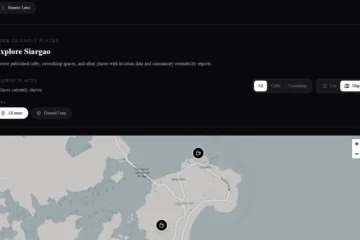
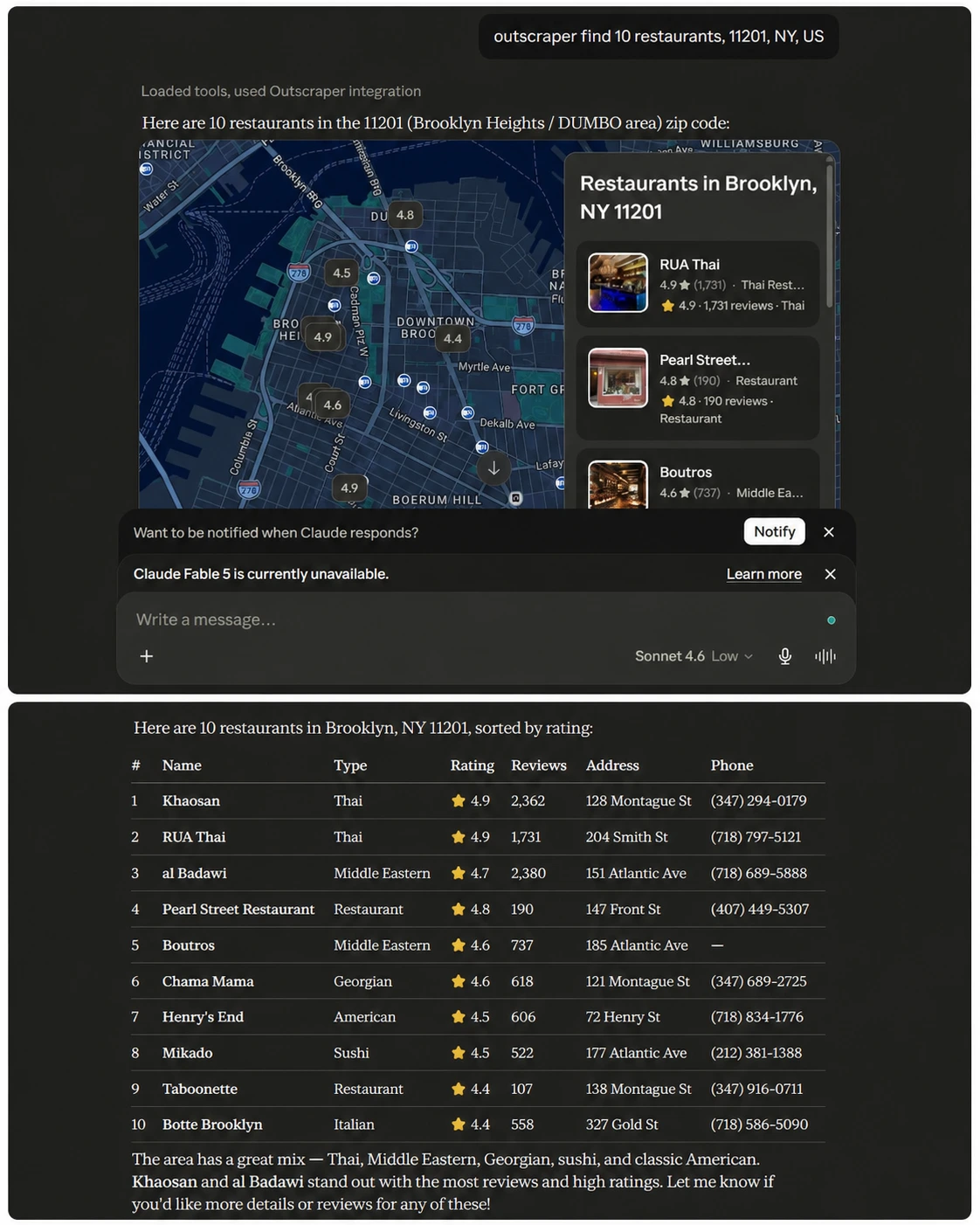
تقوم بإدخال عبارة بحث متعلقة بالأعمال في كلود, ، يقوم Outscraper بتنفيذ الطلب، ويُرجع كلود معاينة للخريطة بالإضافة إلى جدول بتفاصيل الأعمال.
هذه هي الفكرة الأساسية وراء استخدام Outscraper في كلود. بدلاً من التنقل بين «كلود» و«خرائط جوجل» وجداول البيانات وعمليات البحث اليدوية، يمكنك الربط Outscraper من خلال موصل مخصص وطلب البيانات التجارية مباشرةً داخل الدردشة.
قد يستغرق العثور على البيانات التجارية والتحقق منها وتنظيمها بعض الوقت قبل أن تبدأ عملية التواصل مع العملاء المحتملين. ويمكن لسلسلة عمليات «كلود» التي تطلب بيانات «Outscraper» وتنظم النتائج في مكان واحد أن تسرع عملية البحث المبكر عن العملاء المحتملين.
وهذا مفيد لفرق المبيعات والوكالات والباحثين وفرق البيانات التي تحتاج إلى إجراء أبحاث أسرع حول العملاء المحتملين دون الحاجة إلى نسخ تفاصيل الأعمال يدويًّا. في هذا الدليل، ستتعلم كيفية إضافة موصل Outscraper في Claude، ونسخ مفتاح API الخاص بـ Outscraper، وإضافة عنوان URL لخادم Remote MCP، وتشغيل موجه اختبار صغير للتأكد من أن الاتصال يعمل.
إجابة سريعة: كيفية توصيل Outscraper في لعبة Claude
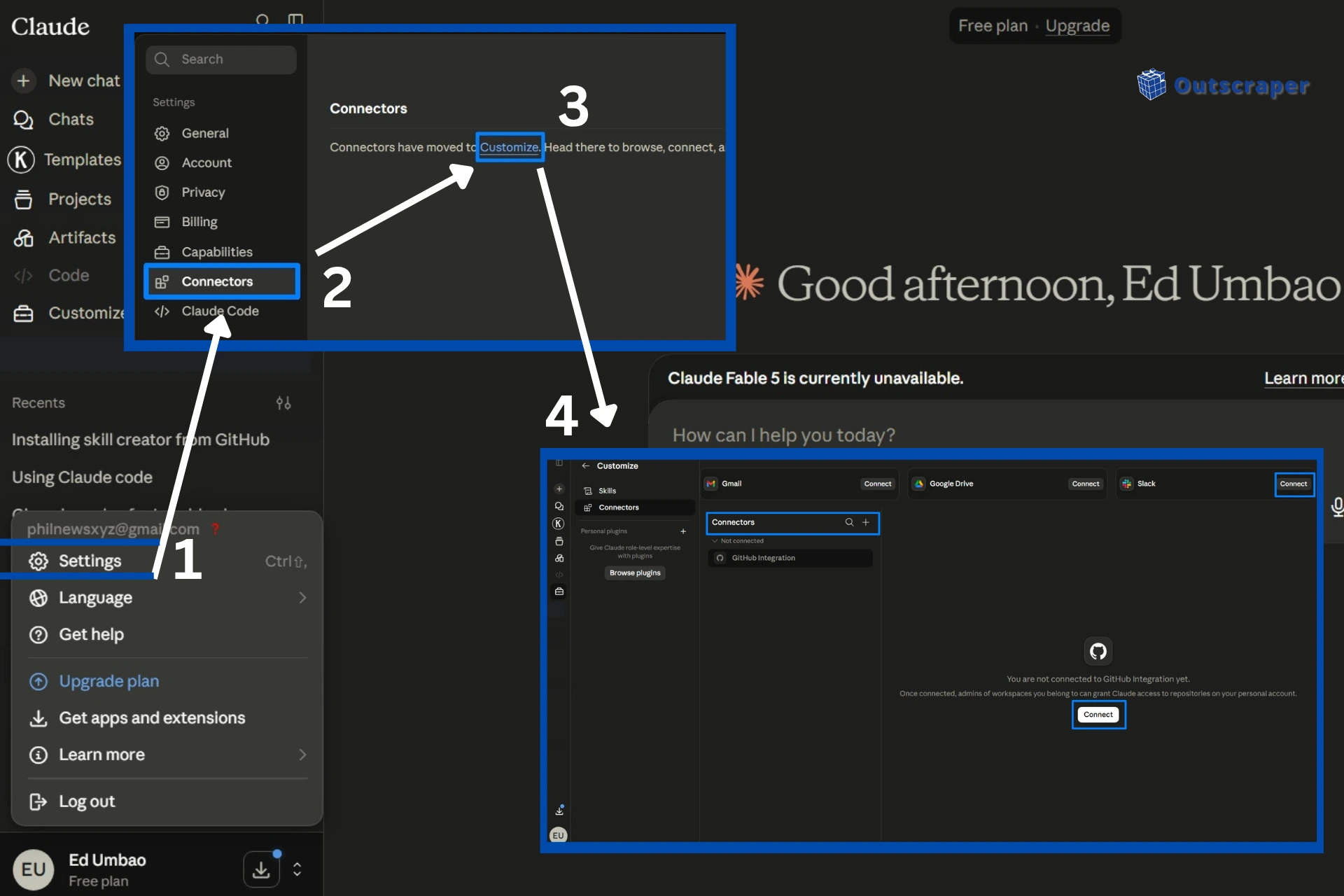
- افتح تطبيق «كلود» على الويب أو على سطح المكتب، ثم انتقل إلى الإعدادات > الموصلات > التخصيص.
- انقر على + الرمز ثم اختر إضافة موصل مخصص.
- حدد اسم الموصل Outscraper.
- انسخ رمز API الخاص بك من لوحة تحكم Outscraper > واجهة برمجة التطبيقات والتكاملات > مفتاح واجهة برمجة التطبيقات (API).
- أضفه إلى عنوان URL لخادم MCP البعيد:
https://mcp.outscraper.com/v1/mcp/YOUR_API_KEY. - انقر إضافة, ، انتظر حتى يتحقق كلود من الاتصال، ثم قم بإجراء اختبار بسيط بنظام Outscraper.
ما تحتاجه قبل استخدام Outscraper في لعبة «كلود»
قبل توصيل Outscraper في Claude، تأكد من أنك قد سجلت الدخول إلى Claude وأنه يمكنك الوصول إلى إعدادات «الموصلات» (Connectors). كما تحتاج أيضًا إلى حساب Outscraper لأن عملية الإعداد تستخدم رمز API الخاص بحسابك في Outscraper لإنشاء عنوان URL لخادم MCP البعيد.
قم بتحضير هذه الأشياء قبل أن تبدأ:
- الوصول إلى موصلات كلود
- حساب Outscraper
- رمز API الخاص بـ Outscraper
- تنسيق عنوان URL لخادم MCP البعيد:
https://mcp.outscraper.com/v1/mcp/YOUR_API_KEY - الرصيد أو الأموال المتاحة بنظام Outscraper لتلبية الطلبات
يمكنك أيضًا الاطلاع على وثائق واجهة برمجة التطبيقات (API) لـ Outscraper إذا كنت ترغب في الاطلاع على خيارات واجهة برمجة التطبيقات (API) المتاحة قبل ربط Outscraper في Claude.
لا تقم بمشاركة أو نشر رمز API الحقيقي الخاص بك. إذا أضفت لقطات شاشة إلى هذا الدليل التعليمي، فقم بإخفاء الرمز أو تعتيمه قبل تحميل الصورة.
قبل إضافة الموصل في Claude، افتح لوحة التحكم الخاصة بـ Outscraper وتأكد من أن رمز API الخاص بك جاهز. ستستخدم هذا الرمز لإنشاء عنوان URL لخادم Remote MCP في الخطوة التالية.
الخطوة 1: قم بإضافة موصل Outscraper
بعد التأكد من إمكانية الوصول إلى «Claude Connectors»، تتمثل الخطوة التالية في إضافة «Outscraper» كموصل مخصص.
في تطبيق «كلود»، افتح قائمة الملف الشخصي أو الإعدادات وانتقل إلى الإعدادات. من الشريط الجانبي للإعدادات، حدد الموصلات. ثم انقر فوق تخصيص لفتح لوحة إدارة الموصلات.
داخل الموصلات القسم، انقر فوق + icon near the search bar and select إضافة موصل مخصص.
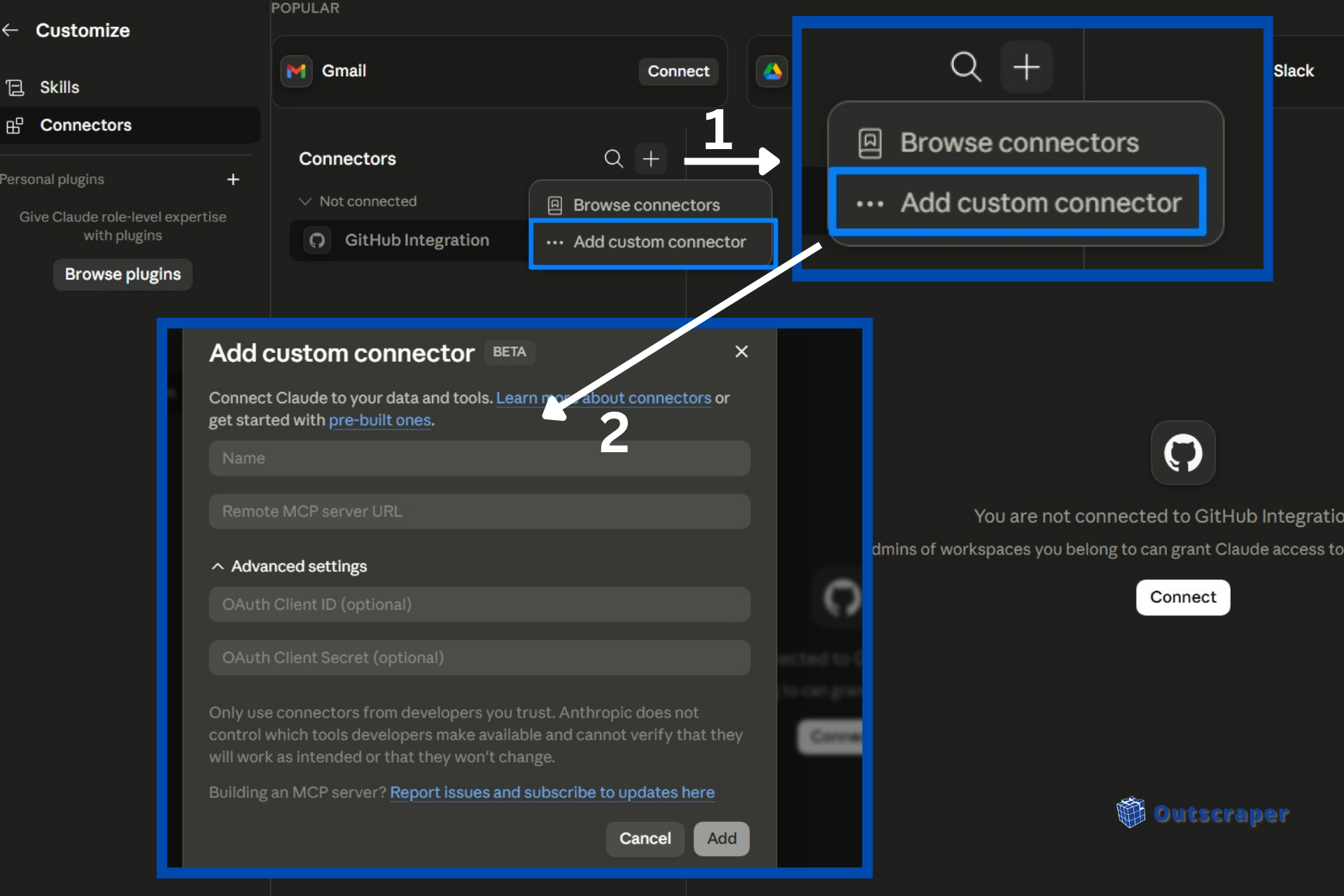
Claude will open a setup window where you can add the connector name and Remote MCP server URL. For the connector name, use:
Outscraper
Using a simple name makes it easier to find the connector later when you test it inside a Claude chat.
Step 2: Add Your Outscraper API Key
After opening the custom connector setup window in Claude, you need to add your Outscraper API key to the Remote MCP server URL.
Open your Outscraper dashboard in your browser. In the top navigation menu, click API & Integrations, then select مفتاح واجهة برمجة التطبيقات (API) from the dropdown menu.
Find your API token and click نسخ.
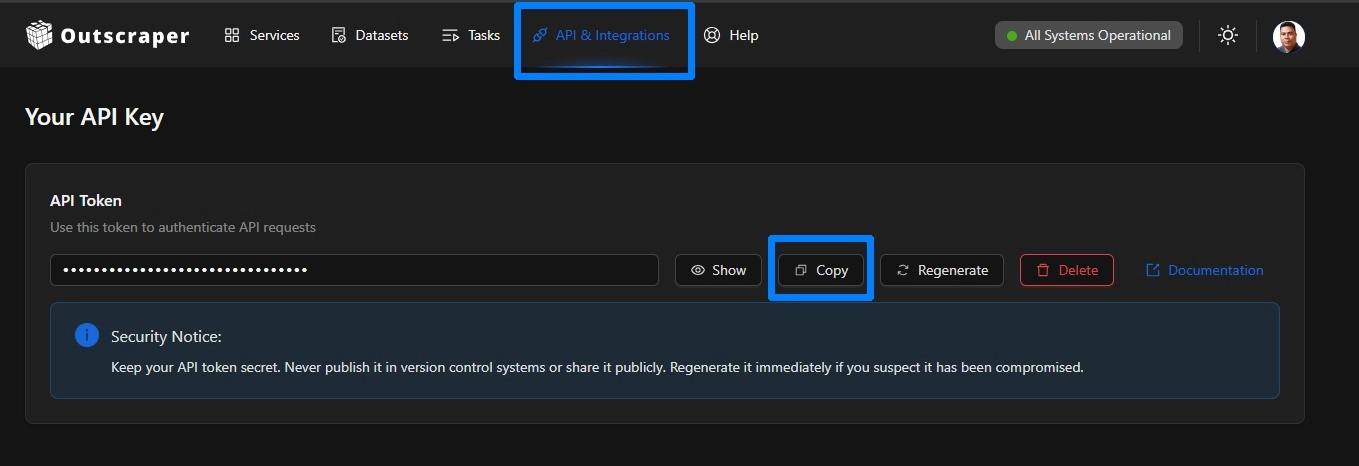
Go back to Claude and paste your API token at the end of this Remote MCP server URL.
https://mcp.outscraper.com/v1/mcp/YOUR_API_KEY
استبدال YOUR_API_KEY with the token you copied from your Outscraper dashboard.
In the custom connector window, use these settings:
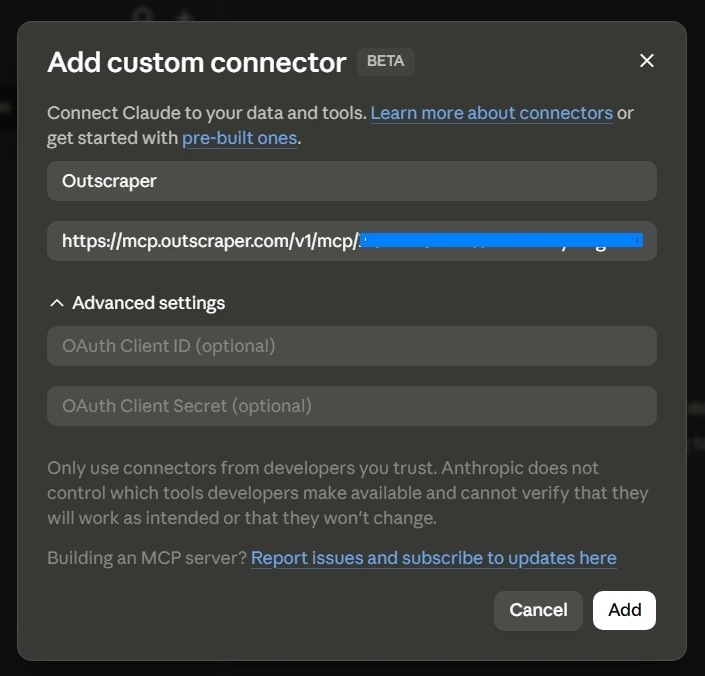
الاسم: Outscraper
عنوان URL لخادم MCP البعيد: https://mcp.outscraper.com/v1/mcp/YOUR_API_KEY
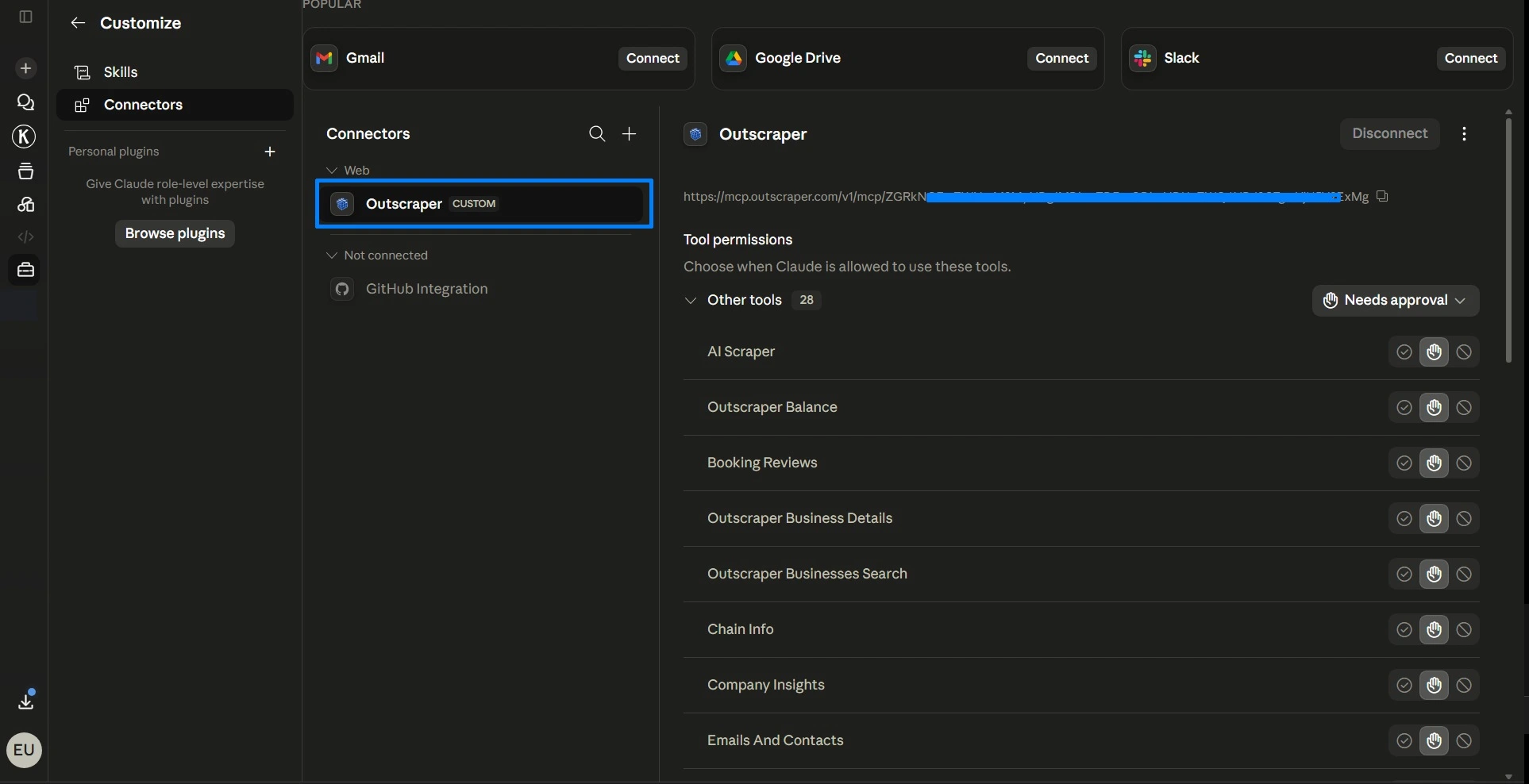
Then click إضافة. Claude will check the connection. If the connection works, Claude should show available tool permissions for the Outscraper connector.
Once verified you can see a list of available tool permission, confirming a successful connection. You can also select the settings for the tool permission (e.g., Always allow, Needs Approval, Blocked, و Custom).
Finally, proceed to the next step, testing Outscraper in Claude.
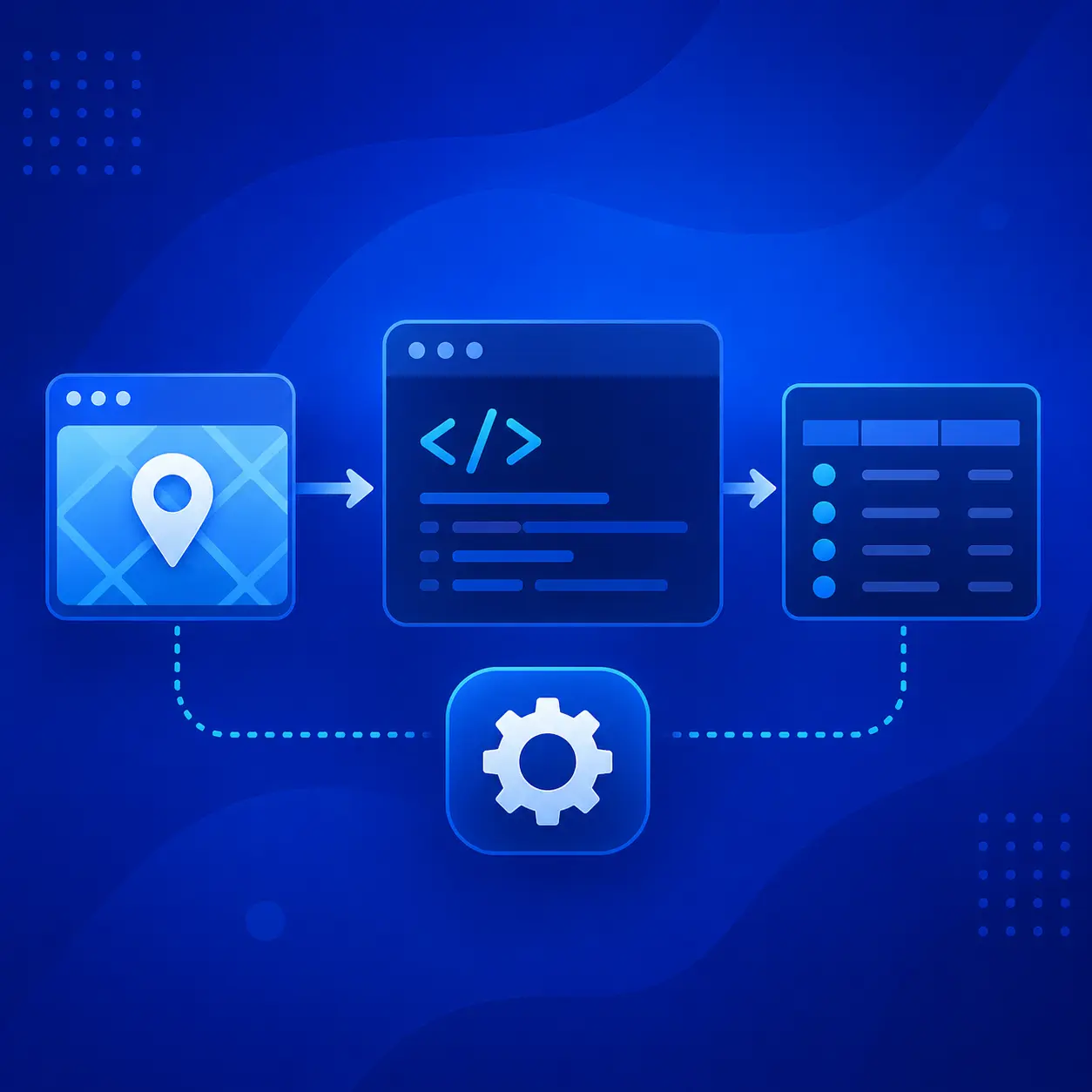
You can test a small Outscraper request in the API Playground before running the connector inside Claude. This helps you check the returned data before using a custom connector workflow.
Step 3: Test Outscraper in Claude
After Claude checks the connection, close the settings window and return to the main chat.
Start with a small test prompt so you can confirm that the connector works before running a larger search.
You can use the following example:
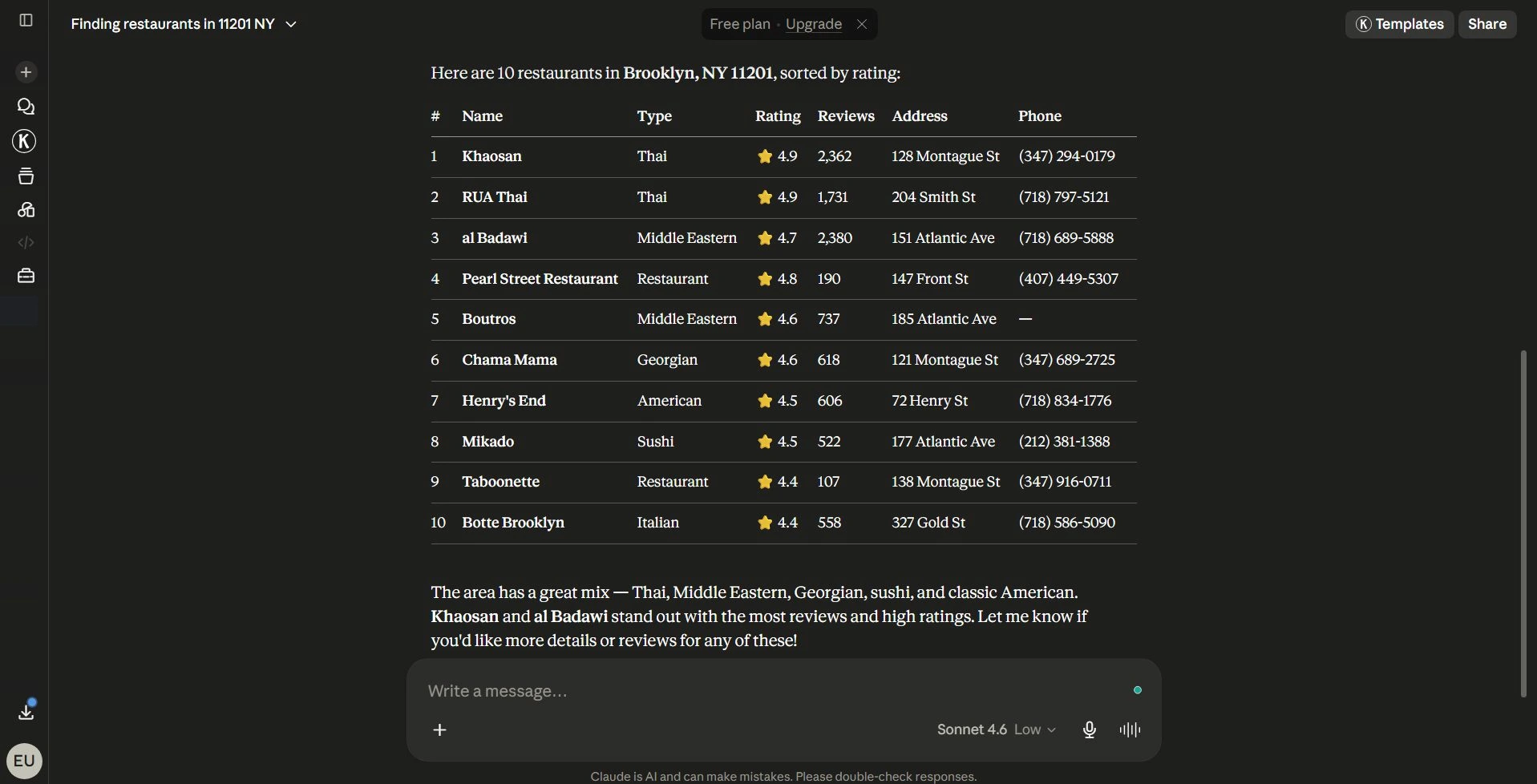
بحث في "Outscraper" عن 10 مطاعم، 11201، نيويورك، الولايات المتحدة
Outscraper: البحث عن 10 مقاهي، 90210، كاليفورنيا، الولايات المتحدة
Outscraper: تم العثور على 10 أطباء أسنان، ميامي، فلوريدا، الولايات المتحدة الأمريكية
Claude should activate the Outscraper connector and return business results from Google Maps. In the video walkthrough, the test returned a map preview and a table with restaurant details such as business names, ratings, reviews, prices, addresses, and phone numbers.
For your first test, keep the request simple. Use one business category, one location, and a small number of results. This makes it easier to check whether the connector, API key, and Remote MCP server URL are working correctly.
This test uses local business data similar to what you can collect with the مكشطة خرائط Google Maps.
If you also use ChatGPT, see the related guide on how to use the Outscraper custom connector in ChatGPT.
Troubleshooting and Setup Checklist
If Outscraper does not work in Claude right away, check the setup details before changing the whole workflow.
The custom connector option does not appear
Check that you are signed in to Claude and that your account has access to Connectors. If you are using a team or company account, your workspace settings may affect whether you can add custom connectors.
If the option does not appear, check Claude’s official custom connector documentation because connector access and workspace settings may vary by account.
Claude cannot check the connection
Make sure the Remote MCP server URL is correct and includes your Outscraper API key after the last slash:
https://mcp.outscraper.com/v1/mcp/YOUR_API_KEY
Also check that there are no extra spaces before or after the URL.
The connector appears, but the test prompt does not return results
Try a smaller prompt first. Use one business category, one location, and a small number of results. You should also check that your Outscraper account has available credits or funds for running the request.
You can also check the Outscraper pricing page to review credits, usage, and account options before running larger requests.
Outscraper in Claude Final Setup Checklist
- Claude Connectors is open and a custom connector named Outscraper is added.
- Your Outscraper API token is included in the Remote MCP server URL.
- Claude checks the connection and shows available Outscraper tools.
- A small test prompt runs successfully in Claude.
- Claude returns Outscraper business results in the chat
الاتصال Outscraper في كلود, run a small test search, and turn business data into organized results inside your chat.
التعليمات
الأسئلة والأجوبة الأكثر شيوعًا
نعم. أنت بحاجة إلى مفتاح API Outscraper لأن عملية الإعداد تستخدم الرمز الخاص بك ضمن عنوان URL لخادم Remote MCP.
استخدم هذا التنسيق:
https://mcp.outscraper.com/v1/mcp/YOUR_API_TOKEN
استبدال YOUR_API_KEY باستخدام رمز API الموجود في لوحة التحكم الخاصة بـ Outscraper.
نعم، إذا كان حسابك على Claude يتمتع بإمكانية الوصول إلى «الموصلات». في هذا الدليل التفصيلي، قمت باختبار الإعداد باستخدام تطبيق Claude على الويب. إذا كنت تستخدم تطبيق Claude Desktop، فقد تبدو إعدادات الموصلات مشابهة، لكن قد يختلف الموقع الدقيق للقائمة.
ابدأ بموضوع صغير، مثل:
بحث في "Outscraper" عن 10 مطاعم، 11201، نيويورك، الولايات المتحدة
يسهل إجراء اختبار بسيط التأكد من أن الموصل ومفتاح واجهة برمجة التطبيقات (API) وعنوان URL لخادم MCP البعيد تعمل بشكل صحيح.
تأكد من أن الموصل قد أُضيف بنجاح، وأن عنوان URL لخادم MCP البعيد صحيح، وأن حسابك على Outscraper يحتوي على رصيد أو أموال متاحة. جرب أيضًا استخدام موجه أصغر حجمًا يتضمن فئة عمل واحدة وموقعًا واحدًا.