Introduction to SaaS Pricing
The global SaaS market is forecasted to reach $1.25 billion by 2034 according to the study conducted by Hostinger. This data proves that services like Outscraper are in demand, and understanding the pricing model of a product is dein first step in enjoying its premium benefits.
You’ve probably been here before. You’re staring at our Preisseite, trying to understand our “Pay-As-You-Use” model, so we will make it easier for you and explain this pricing in the simplest possible way. You will not einfach understand Outscraper’s pricing, but you can master it and utilize your premium account.

In this guide, we will explain how Outscraper’s pay-as-you-go system works. Forget the confusion. We’re going to demystify every credit, every feature, and every tier so you can stop worrying about costs and focus only on what matters to you, which is your data.
By the time you’ve finished reading, you’ll discover:
- The simple truth behind flexible pricing
- Understanding Free, Medium, & Business Tiers
- Advanced tactics for utilizing Outscraper’s most powerful features without breaking the bank.
- Real-world strategies for leads, market research, and SEO.
Outscraper Pricing Explained: The "Pay-As-You-Go" Advantage
The Core Concept: Flexibility Without Commitment
Forget everything you think you know about SaaS pricing. Outscraper doesn’t lock you into monthly contracts or force you to pay for features you’re not using. Instead, it operates on a “pay-as-you-go” (PAYG) model. This pricing model is a more flexible, transparent system that puts customers and clients in complete control.
The core concept of this pricing model is simple: you only pay for the data you extract with Outscraper. There are no surprise fees, no hidden costs, and no commitments. Your usage is tracked clearly and straightforwardly, with all tiers resetting every 30 days.
This means when using Outscraper services, every month is a fresh start, giving you the freedom to scale up or down based on your project needs.
The PAYG system isn’t a new or unproven model. Based on statistics, 3 out of 5 SaaS companies are now offering or testing usage-based pricing, and it’s a win-win for both you and the service provider.
Free vs. Premium: What's the Difference?
The primary difference between a Free und Premium account lies in volume and Funktion access.
- A Free Account is your sandbox. It’s a risk-free playground with generous limits, perfect for testing, validation, and running small, one-off projects. It gives you a feel for the platform and its basic scraping capabilities without any financial commitment.
- A Premium Account (the Medium and Business Tiers) is where the real power is released. It provides the high-volume capacity needed for serious data projects, providing access to advanced features wie Datenanreicherung und API-Integrationund offering significant cost savings as your usage grows.

Why Having a Premium Account Is Needed
While the Free Tier is a fantastic way to start, a premium account is a key to turning Outscraper into a reliable business asset. The importance of having a premium account comes down to three core advantages:
- True Scalability: Serious data projects like lead generation, market research, or SEO require large volumes. A premium account removes the limits of the Free Tier. It will allow you to scrape tens or hundreds of thousands of records without interruptions.
- Economies of Scale: The pay-as-you-go model is designed to reward volume. As you move into the premium tiers, the price per record drops dramatically. This means that a large-scale project becomes far more cost-effective and financially viable than a series of smaller ones.
- Unlocking Advanced Tools: Most importantly, a premium account is your gateway to die powerful features wie zum Beispiel Erweiterte Filter, Datenanreicherungund API-Integration.
The Tier System Explained
Outscraper’s genius lies in its tiered pricing, which automatically adjust to reward higher usage. You don’t have to manually upgrade or downgrade a plan; the system handles it all for you, ensuring you’re always getting the best possible rate for our users.
- The Free Tier: Your Risk-Free Starting Point
- Before spending a single dime with Outscraper, you can test the waters with our generous Free Tier.
- This is your risk-free playground that is perfect for validation, small projects, and familiarization.
- Each scraper has different Free Tiers. For example, the Free Tier gives you your first 500 Google Maps business records and 25 Google Search queries, which is more than enough to prove the platform’s value before you even think about paying.
- The Medium Tier
- Once your usage exceeds the Free Tier, your account automatically transitions to the Medium Tier. This is the sweet spot for users with moderate, consistent needs who are scaling up their operations.
- Here, the pricing examples are specific and transparent:
- Google Maps Scraper: After the first 500 free records, the price is $3 per 1,000 for the next 99,500 businesses.
- Google Search API: After the first 25 free records, the price is $5 per 1,000 searches for the next 4,975 searches.
- The Business Tier
- For users with serious data needs, the Business Tier offers the most cost-effective rates. This tier is designed for large-scale generations, where you’re running campaigns that require tens of thousands, or even hundreds of thousands von records.
- This is where the economies of scale truly kick in:
- Google Maps Scraper: After you’ve scraped 100,000 businesses, the rate drops to just $1 per 1,000 records.
- Google Search API: After 5,000 searches, the rate drops to $3 per 1,000 searches.
Understanding "Records": What You're Actually Paying For
One of the most important concepts to grasp is the definition of a “record.” It’s the unit of measurement for your usage, but it’s not a one-size-fits-all term.
- For the Google Maps Scraper, a “record” is a single business or place.
- For the Google Search API, a “record” is a single search result page.
- For the Reviews Scraper, a “record” is a single review.
The key takeaway here is simple. Always check the specific service pricing on Outscraper’s website to know exactly what a “record” means for your project.
Managing Your Spending: Prepaid vs. Postpaid Plus Bonus
Outscraper gives you two flexible options for managing your billing, so you never have to worry about a surprise invoice.
- Prepaid: Simply add credits to your account balance. These credits never expire, giving you complete control over your budget.
- Postpaid: For those with higher, more consistent needs, you can connect a credit card and be billed automatically if your usage exceeds the Free Tier limits in a given month.
- Bonus Credit: If you want to earn some free credit, be sure to check out the Referral Program, which offers a generous 35% referral payment on the payments of people you refer, as well as a 25% discount for your referrals on their first payment.. It’s a great way to grow your account and your business at the same time.
Outscraper's AppSumo Pricing (LTD) Explained
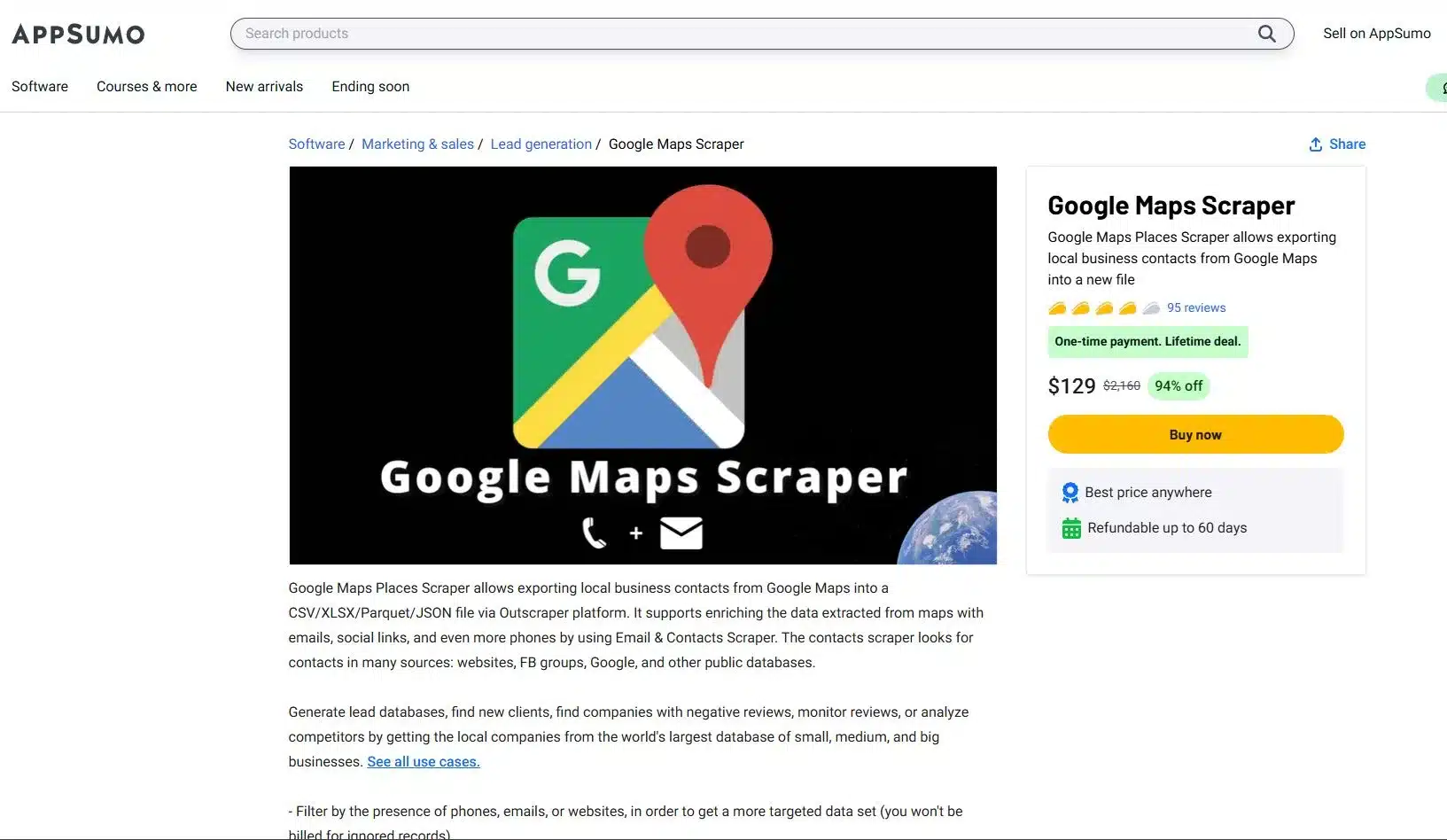
Die AppSumo lifetime deal (LTD) is one of the most frequently asked topics in Outscraper’s Reviews, so we are here to explain everything clearly. This is your powerful entry point to our web scraping tools. It will give you an advantage in data scraping.
To avail of the AppSumo deal, you need to sich einschreiben oder log in with your Outscraper account, visit your profile page und redeem your code. Once your deal code has been successfully added, you’ll see a phrase like “appsumo-[AMOUNT]credits/month” appear on your profile. This tells you the number of credits that will cover your usage.
This is a fantastic deal that will automatically renew every month. Just remember, this offer is tied to a single account, and Outscraper does not support stacking, du only need one code to get started.
Smart Credit Management for your AppSumo Deal
Your AppSumo lifetime deal credits are a monthly gift designed for consistent, high-value usage. The most important thing to know is that these credits do not accumulate. This is similar to a monthly data plan; all your unused credit expires at the end of the 30-day billing cycle when your new credits are issued.
To master your deal, you must track your remaining credits on your profile page. This way, you’ll avoid surprises. If your usage exceeds the deal limit in any given month, you will simply be invoiced for the outstanding usage at the standard pay-as-you-go rates.
Understanding Your AppSumo Credit Value
A common question among new users is why their profile zeigt a monetary value wie “$30 credits/month” instead of a simple number of records. The reason is that your credits are not tied to a single service but are a flexible monetary value you can spend across different Outscraper services.
Simple Breakdown:
- Granular Pricing: Outscraper calculates pricing at a granular level. For example, scraping 1 business on Google Maps costs $0.003, and scraping 1 email also costs $0.003.
- Flexible Spending: Your $30 in monthly credits can be spent on any combination of these services. You could spend the entire amount on the Google Maps Scraper, which would give you 10,000 records, or you could spend it on a mix of services.
- The Bottom Line: Your $30 in credit gives you the flexibility to scrape up to 5,000 businesses and 5,000 emails, or any other combination that fits within that monetary value.
Sample Computation (Outscraper's AppSumo Deals)
Your Deal: Du haben a $30 credit per month to spend on any Outscraper service.
Outscraper Pricing: Each record costs a granular $0.003
Scenario A: Flexible Spending and Staying Within the Limit
You run two campaigns in a single month; a Google Maps scrape to find businesses and a Bulk Email scrape to enrich the data you found.
- Google Maps Scraper: You scrape 5,000 business records.
- Cost: 5,000 records * $0.003 = $15
- Bulk Emails & Contacts Scraper: You scrape 5,000 emails
- Cost: 5,000 records * $0.003 = $15
In this scenario, your entire usage is perfectly covered by your $30 monatlich credit. You’ve used the full value of your deal without spending a single extra dollar.
Scenario B: Going OVer Your Deal Credits and How PAYG Works
You run a similar campaign, but your email scraping is more extensive, totaling 8,000 emails.
- Google Maps Scraper: You scrape 5,000 business records
- Cost: $15
- Bulk Emails & Contacts Scraper: You scrape 8,000 emails.
- Cost: 8,000 records * $0.003 $24.
- Total Cost: $15 (for maps) + $24 (for emails) = 39
Your total usage for the month is $39. The first $30 is covered by your AppSumo deal. The remaining overage is calculated as:
- Overage: $39 – $30 = $9
- Total Cost: $9
In this case, you would receive a small invoice for $9 overage, while your monthly $30 credit would reset for the next month. This is a perfect example of how the pay-as-you-go model gives you freedom to scale up without being locked into a higher-priced plan.
Tactical Guide to Your Premium Account: Beyond the Basics
Now that you understand the mechanics of Outscraper’s pricing, it’s time to shift your focus from simply collecting data to strategically generating an advantage.
The Power of Precision
The biggest mistake most users make is scraping without a plan. They grab every record in a broad category; this is where advanced filters become your most powerful tool. For Google Maps, the “Exact Match” (ignore other categories Google might add) feature ensures your results are perfectly aligned with your keywords, saving you time and money. The Exact Match feature is also available even if you’re using the free tier.
Pro-Tip: An expert user recommends using a combination of Exact match, Location via Postal Codes, and advanced parameters like “business status=operational” and “verified=true” to create the most restrictive and valuable search possible.
Datenanreicherung
Enrichment transforms basic data into valuable and actionable intelligence. While scraping primary sources like Google Maps has a fixed price per record, you can add more value to that data with other services like Email Scraper, WhatsApp Checker, or Company Insights.
These enrichments are completely optional and incur additional, service-specific costs, which you can see when selecting them. This powerful feature allows you to build a comprehensive dataset tailored to your needs.
Pro-Tip: Be selective with your enrichment. An expert Outscraper user avoids the more expensive features like Company Insight, Phone Identity Finder, and Email Address Verifier to manage costs, opting instead to only extract emails and social profiles.
API Integration: Automating Your Workflow
Die Outscraper API is your key to automation. Move beyond manual scraping by using an API to:
- Batch Requests: Send multiple search queries at once for efficiency.
- Run in Parallel: Get it faster by executing simultaneous requests.
- Use Webhooks: Receive data in real-time as soon as a job is finished.
Smart Scraping Strategies: Optimize Your Output
Finally, a truly powerful data operation is built on efficiency. These smart strategies help you erhalten. cleaner data, faster, with fewer headaches.
- Dropping Duplicates: Always use a unique identifier like “google_id” or “place_id” to prevent duplicate entries in your dataset. This simple step ensures you’re not paying for the same data twice.
- Handling Timeouts and Retries: When working with large datasets, be prepared for occasional network timeouts. Use retry logic in your scripts and leverage Outscraper’s webhooks to ensure that every job completes successfully.
- Custom Locations/Categories: The platform isn’t limited to a pre-defined list. Verwenden custom, long-tail categories like “SEO Services for Dentists” or specific geolocations to finden. niche opportunities that your competitors are completely missing.
Schlussfolgerung
We started with the confusion around web scraping pricing, but by now, you have a complete blueprint for Outscraper’s pricing. You’ve learned that the pay-as-you-go model isn’t just about flexibility but an advantage that will allow you to grow your business on your eigene terms.
You understand the clear path from a risk-free Kostenlose Stufe to the cost-effective, high-volume Business Tier, and you’ve seen why moving to a premium account is essential for true scalability and success.
More importantly, you now know that a premium account is dein key to unter Verwendung von the platform’s true power. You have a tactical guide to using advanced filters, performing Datenanreicherung, and leveraging API-Integration to transform your raw data into a powerful tool for lead generation, market research, and SEO, to name a few. The confusion is gone and he roadmap is clear.
Ready to Build a Data-Generating Powerhouse?
Your Outscraper account is waiting. Stop treating it as a simple tool and start using it as an asset it was designed to be. Log in now, apply the knowledge from this guide, and start building the precise, enriched, and automated datasets that will drive your business forward.
Preise für Produkte und Dienstleistungen
Kostenlose Stufe
Inanspruchnahme vor 500 Unternehmen- Kostenlos für die ersten 500 Unternehmen (Plätze)
- CSV/Excel/Parquet/JSON
- Anreicherungen
Mittlere Stufe
Verwendung nach 500 Unternehmen- Preis pro 1.000 Datensätze bei einer Nutzung von 501 bis 100.000 Unternehmen (Standorte)
- CSV/Excel/Parquet/JSON
- Erweiterte Filter
- Anreicherungen
- API-Zugang
Business Tier
Nutzung nach 100.000 Geschäften- Preis pro 1k Datensätze für die Nutzung ab 100k Unternehmen (Orte)
- CSV/Excel/Parquet/JSON
- Erweiterte Filter
- Anreicherungen
- API-Zugang
- Unbegrenzt
Kostenlose Stufe
Verwendung vor 500 Bewertungen- Kostenlos für die ersten 500 Bewertungen
- CSV/XLSX-Export
- Sortieroptionen
Mittlere Stufe
Verwendung nach 500 Bewertungen- Preis pro 1.000 Bewertungen bei einer Nutzung von 501 bis 100.000 Bewertungen
- CSV/XLSX-Export
- Sortieroptionen
- API-Zugang
Business Tier
Nutzung nach 100.000 Bewertungen- Preis pro 1.000 Bewertungen bei einer Nutzung ab 100.000 Bewertungen
- CSV/XLSX-Export
- Sortieroptionen
- API-Zugang
- Unbegrenzt
Kostenlose Stufe
Verwendung vor 500 Domains- Kostenlos für die ersten 500 Kontakte
- E-Mail-Adressen
- Telefonnummern
- Soziale Profile
Mittlere Stufe
Nutzung nach 500 Domains- Preis für Kontakte aus 1.000 Domains bei einer Nutzung von 501 bis 100.000 Domains
- E-Mail-Adressen
- Telefonnummern
- Soziale Profile
Business Tier
Nutzung nach 100.000 Domains- Preis für Kontakte aus 1.000 Domains nach 100.000 Domains
- E-Mail-Adressen
- Telefonnummern
- Soziale Profile
Kostenlose Stufe
Verwendung vor 25 Emails- Preis pro eine E-Mail für die Nutzung von 1 bis 25 E-Mails
Mittlere Stufe
Verwendung nach 25 E-Mails- Preis pro 1.000 E-Mails bei einem Versandvolumen von 26.000 bis 100.000 E-Mails
Business Tier
Nutzung nach 100.000 E-Mails- Preis pro 1.000 E-Mails bei einer Nutzung von mehr als 100.000 E-Mails
Kostenlose Stufe
Nutzung vor 25 Telefonen- Preis pro Telefon für die Nutzung von 1 bis 25 Telefonen
Mittlere Stufe
Nutzung nach 25 Telefonen- Preis pro 1.000 Telefone bei einer Nutzungszahl von 26.000 bis 50.000 Telefonen
Business Tier
Nutzung nach 50.000 Telefonaten- Preis pro 1.000 Handys bei einer Abnahme von mehr als 50.000 Handys
Kostenlose Stufe
Verwendung vor 500 Bildern- CSV/XLSX-Export
- Erweiterte Filter
- API-Zugang
Mittlere Stufe
Verwendung nach 500 Bildern- CSV/XLSX-Export
- Erweiterte Filter
- API-Zugang
Business Tier
Nutzung nach 50.000 Bildern- CSV/XLSX-Export
- Erweiterte Filter
- API-Zugang
Kostenlose Stufe
Verwendung vor 500 Anfragen- Preis pro Anfrage für die Nutzung von 1 bis 500 Anfragen
- Historische Daten von 2001
- CSV/XLSX-Export
- API-Zugang
Mittlere Stufe
Nutzung nach 500 Anfragen- Preis pro 1.000 Anfragen bei einer Nutzungsmenge von 501 bis 5.000 Anfragen
- Historische Daten von 2001
- CSV/XLSX-Export
- API-Zugang
Business Tier
Nutzung nach 5.000 Anfragen- Preis pro 1.000 Anfragen bei einer Nutzung ab 5.000 Anfragen
- Historische Daten von 2001
- CSV/XLSX-Export
- API-Zugang
Kostenlose Stufe
Verwendung vor 10 Suchvorgängen- Kostenlos für die ersten 10 Suchen (Seiten)
- CSV/Excel/Parquet/JSON
- Anreicherungen
Mittlere Stufe
Nutzung nach 10 Suchen- Preis pro 1k Suchanfragen für die Nutzung von 11 bis 100k Suchanfragen (Seiten)
- CSV/Excel/Parquet/JSON
- Anreicherungen
- API-Zugang
Business Tier
Nutzung nach 100.000 Suchen- Preis pro 1k Suchanfragen für die Nutzung nach 100k Suchanfragen (Seiten)
- CSV/Excel/Parquet/JSON
- Anreicherungen
- API-Zugang
- Unbegrenzt
Kostenlose Stufe
Verwendung vor 50 Suchvorgängen- CSV/XLSX-Export
- API-Zugang
Mittlere Stufe
Nutzung nach 50 Abfragen- CSV/XLSX-Export
- API-Zugang
Business Tier
Nutzung nach 5.000 Suchen- CSV/XLSX-Export
- API-Zugang
Kostenlose Stufe
Verwendung vor 500 Bewertungen- Preis pro eine Bewertung für die Nutzung von 1 bis 500 Bewertungen
- CSV/XLSX-Export
- Sortierung
- API-Zugang
Mittlere Stufe
Verwendung nach 500 Bewertungen- Preis pro 1.000 Bewertungen bei einer Nutzung von 501 bis 50.000 Bewertungen
- CSV/XLSX-Export
- Sortierung
- API-Zugang
Business Tier
Nutzung nach 50.000 Bewertungen- Preis pro 1.000 Bewertungen bei einer Nutzung ab 50.000 Bewertungen
- CSV/XLSX-Export
- Sortierung
- API-Zugang
Kostenlose Stufe
Verwendung vor 500 Produkten- Kostenlos für die ersten 500 Produkte.
- CSV/XLSX-Export
- Erweiterte Filter
- API-Zugang
Mittlere Stufe
Verwendung nach 500 Produkten- Preis pro 1.000 Datensätze bei einer Nutzung von 501 bis 5.000 Produkten.
- CSV/XLSX-Export
- Erweiterte Filter
- API-Zugang
Business Tier
Verwendung nach 5.000 Produkten- Preis pro 1.000 Datensätze bei einer Nutzung ab 5.000 Produkten.
- CSV/XLSX-Export
- Erweiterte Filter
- API-Zugang
Kostenlose Stufe
Verwendung vor 500 Bewertungen- Kostenlos für die ersten 500 Bewertungen.
- CSV/XLSX-Export
- Erweiterte Filter
- API-Zugang
Mittlere Stufe
Verwendung nach 500 Bewertungen- Preis pro 1.000 Datensätze bei einer Nutzung von 501 bis 5.000 Bewertungen.
- CSV/XLSX-Export
- Erweiterte Filter
- API-Zugang
Business Tier
Nutzung nach 5.000 Bewertungen- Preis pro 1.000 Datensätze bei einer Nutzung ab 5.000 Bewertungen.
- CSV/XLSX-Export
- Erweiterte Filter
- API-Zugang
Zahlungsmöglichkeiten


FAQ
Häufigste Fragen und Antworten
Mit Pay as You Go zahlen Sie nur für die Dienste, die Sie verbrauchen, ohne monatliche Abonnementgebühren. Es ist dasselbe wie die Bezahlung von Versorgungsleistungen wie Wasser und Strom.
Wenn Sie eine Aufgabe ohne aktiven Abrechnungszeitraum starten, wird ein neuer Abrechnungszeitraum angelegt. Sobald der fällige Betrag feststeht, Sie können den Vorgang manuell beenden, indem Sie auf “Rechnung erstellen” klicken; andernfalls wird er nach einem Monat automatisch abgeschlossen.. Sobald dies abgeschlossen ist, erhalten Sie eine Rechnung über die Inanspruchnahme der Dienstleistungen.
Zahlungen und Abonnements
Die Rechnung wird auf Grundlage der Nutzung von den Diensten während des Abrechnungszeitraums (30 Tage) erstellt. Die Preise sind auf der Seite aufgeführt.
Free Tier ist die Menge der Nutzung, die Sie jeden Monat kostenlos nutzen können. Für einige Produkte gibt es zum Beispiel ein Free Tier mit 500 Anfragen pro Monat. Das bedeutet, dass jede Nutzung des Produkts unter 500 Anfragen während eines Monats kostenlos ist.
Sobald ein Abonnement abgeschlossen ist, erhalten Sie eine Rechnung über die Nutzung der Dienste während der Laufzeit des Abonnements.
Sollten Sie nicht in der Lage sein, innerhalb von 3 Tagen eine Zahlung zu leisten, wird das System versuchen, Sie automatisch zu belasten.
- Bevor Sie Guthaben hinzufügen, stellen Sie bitte sicher, dass Sie Ihre Daten auf der Seite mit den Rechnungsdaten eingegeben haben (falls Sie diese für Rechnungen oder Bestellungen benötigen).
- Gehen Sie zu Ihrer Profilseite.
- Geben Sie die Anzahl der Credits ein, die Sie hinzufügen möchten.
- Wählen Sie die Zahlungsmethode aus, die Sie zum Hinzufügen von Guthaben verwenden möchten (Kreditkarte, PayPal usw.).
- Nachdem Sie auf die Schaltfläche mit Ihrer Zahlungsmethode geklickt haben, folgen Sie den Schritten des Anbieters der Zahlungsmethode.
Sobald Sie eine gewisse Nutzung vorweisen können, können Sie die anstehende Rechnung auf der Profilseite einsehen. Sobald der fällige Betrag feststeht, können Sie die Rechnung manuell erstellen, indem Sie auf “Rechnung erstellen” klicken, oder sie wird innerhalb von 30 Tagen automatisch generiert.
Sobald Sie Guthaben auf Ihr Konto geladen haben (Prepaid-Option), erhalten Sie die Quittung für die Transaktion per E-Mail.
Rechnungen über die Inanspruchnahme bestimmter Dienste werden nach jedem Abrechnungszeitraum (30 Tage) erstellt. Alternativ können Sie, sobald Ihnen der fällige Betrag vorliegt, die Rechnung manuell erstellen, indem Sie auf der Profilseite auf "Rechnung erstellen" klicken.
Ja. Outscraper wird Ihren Kontostand mit $10 belasten und eine zusätzliche Rechnung über den fälligen Betrag ausstellen.
Nein. Die Aufgabe wird abgeschlossen, und wenn die Nutzung der Aufgabe Ihr Guthaben übersteigt, erhalten Sie einfach eine Rechnung über die ausstehende Nutzung.
Sie können Limits verwenden, um die Menge der extrahierten Daten zu begrenzen.
- Öffnen Sie die Outscraper-Plattform.
- Navigieren Sie zum Seite mit Informationen zur Rechnungsstellung.
- Geben Sie die erforderlichen Rechnungsdaten ein, die Sie auf Ihren Rechnungen sehen möchten.
- Klicken Sie auf die Schaltfläche Speichern. Alle zukünftigen Rechnungen werden mit den von Ihnen eingegebenen Informationen erstellt.
Empfehlen Sie einen Freund und erhalten Sie ab sofort 35% Ihrer Empfehlungsprovisionen auf Ihr Kontoguthaben gutgeschrieben. Ihre Empfehlung erhält eine 25% Rabatt auf ihre erste Zahlung. Holen Sie sich jetzt Ihren Empfehlungslink.

Ed Umbao
Als Leiter der Abteilung für Inhalte und SEO-Stratege bei Outscraper hat sich Ed Umbao darauf spezialisiert, komplexe technische Themen – darunter auch Web-Scraping – für Nutzer verständlich, auffindbar und wirklich hilfreich zu gestalten. Nehmen Sie Kontakt mit mir auf über: Portfolio | LinkedIn | GitHub
Verwandte Beiträge

U.S. Gym Market Density Report 2026: Which Metro Areas Have the Most Gyms per Capita?
Compare gym supply across major U.S. metro areas using gyms per capita, chain concentration, ratings, reviews, and a consistent 2026 methodology.

So erstellen Sie einen signalbasierten Workflow zur Neukundenakquise in Outscraper
Erstellen Sie mit Outscraper einen signalbasierten Workflow zur Interessentenakquise, der auf Google Maps-Unternehmensdaten, der Auswertung von Kundenbewertungen und der manuellen Qualifizierung von Leads basiert, um potenzielle Kunden für die Kontaktaufnahme vorzubereiten.
B2B-Kaufsignale für die Akquise: So finden Sie die richtigen Unternehmen zum richtigen Zeitpunkt
Erfahren Sie, wie B2B-Kaufsignale Vertriebsteams dabei helfen können, potenzielle Kunden zu qualifizieren, Geschäftsaktivitäten zu vergleichen, Kunden zu priorisieren und ihre Akquise auf Unternehmen zu konzentrieren, die vorrangig geprüft werden sollten.