Introduction to SaaS Pricing
The global SaaS market is forecasted to reach $1.25 billion by 2034 according to the study conducted by Hostinger. This data proves that services like Outscraper are in demand, and understanding the pricing model of a product is 당신의 first step in enjoying its premium benefits.
You’ve probably been here before. You’re staring at our 가격 페이지, trying to understand our “Pay-As-You-Use” model, so we will make it easier for you and explain this pricing in the simplest possible way. You will not 그저 understand Outscraper’s pricing, but you can master it and utilize your premium account.

In this guide, we will explain how Outscraper’s pay-as-you-go system works. Forget the confusion. We’re going to demystify every credit, every feature, and every tier so you can stop worrying about costs and focus only on what matters to you, which is your data.
By the time you’ve finished reading, you’ll discover:
- The simple truth behind flexible pricing
- Understanding Free, Medium, & Business Tiers
- Advanced tactics for utilizing Outscraper’s most powerful features without breaking the bank.
- Real-world strategies for leads, market research, and SEO.
Outscraper Pricing Explained: The "Pay-As-You-Go" Advantage
The Core Concept: Flexibility Without Commitment
Forget everything you think you know about SaaS pricing. Outscraper doesn’t lock you into monthly contracts or force you to pay for features you’re not using. Instead, it operates on a “pay-as-you-go” (PAYG) model. This pricing model is a more flexible, transparent system that puts customers and clients in complete control.
The core concept of this pricing model is simple: you only pay for the data you extract with Outscraper. There are no surprise fees, no hidden costs, and no commitments. Your usage is tracked clearly and straightforwardly, with all tiers resetting every 30 days.
This means when using Outscraper services, every month is a fresh start, giving you the freedom to scale up or down based on your project needs.
The PAYG system isn’t a new or unproven model. Based on statistics, 3 out of 5 SaaS companies are now offering or testing usage-based pricing, and it’s a win-win for both you and the service provider.
Free vs. Premium: What's the Difference?
The primary difference between a Free 그리고 Premium account lies in volume and feature access.
- A Free Account is your sandbox. It’s a risk-free playground with generous limits, perfect for testing, validation, and running small, one-off projects. It gives you a feel for the platform and its basic scraping capabilities without any financial commitment.
- A Premium Account (the Medium and Business Tiers) is where the real power is released. It provides the high-volume capacity needed for serious data projects, 제공 access to advanced features ~처럼 데이터 보강 그리고 API integration및 offering significant cost savings as your usage grows.

Why Having a Premium Account Is Needed
While the Free Tier is a fantastic way to start, a premium account is a key to turning Outscraper into a reliable business asset. The importance of having a premium account comes down to three core advantages:
- True Scalability: Serious data projects like lead generation, market research, or SEO require large volumes. A premium account removes the limits of the Free Tier. It will allow you to scrape tens or hundreds of thousands of records without interruptions.
- Economies of Scale: The pay-as-you-go model is designed to reward volume. As you move into the premium tiers, the price per record drops dramatically. This means that a large-scale project becomes far more 비용 효율적 and financially viable than a series of smaller ones.
- Unlocking Advanced Tools: Most importantly, a premium account is your gateway to 그 powerful features 예를 들어 고급 필터, Data Enrichment및 API integration.
The Tier System Explained
Outscraper’s genius lies in its tiered pricing, which automatically adjust to reward higher usage. You don’t have to manually upgrade or downgrade a plan; the system handles it all for you, ensuring you’re always getting the best possible rate for our users.
- The Free Tier: Your Risk-Free Starting Point
- Before spending a single dime with Outscraper, you can test the waters with our generous Free Tier.
- This is your risk-free playground 즉 perfect for validation, small projects, and familiarization.
- Each scraper has different Free Tiers. For example, the Free Tier gives you your first 500 Google Maps business records and 25 Google Search queries, which is more than enough to prove the platform’s value before you even think about paying.
- The Medium Tier
- Once your usage exceeds the Free Tier, your account automatically transitions to the Medium Tier. This is the sweet spot for users with moderate, consistent needs who are scaling up their operations.
- Here, the pricing examples are specific and transparent:
- Google Maps Scraper: After the first 500 free records, the price is $3 per 1,000 for the next 99,500 businesses.
- Google Search API: After the first 25 free records, the price is $5 per 1,000 searches for the next 4,975 searches.
- The Business Tier
- For users with serious data needs, the Business Tier offers the most cost-effective rates. This tier is designed for large-scale generations, where you’re running campaigns that require tens of thousands, or even hundreds of thousands 의 records.
- This is where the economies of scale truly kick in:
- Google Maps Scraper: After you’ve scraped 100,000 businesses, the rate drops to just $1 per 1,000 records.
- Google Search API: After 5,000 searches, the rate drops to $3 per 1,000 searches.
Understanding "Records": What You're Actually Paying For
One of the most important concepts to grasp is the definition of a “record.” It’s the unit of measurement for your usage, but it’s not a one-size-fits-all term.
- For the Google Maps Scraper, a “record” is a single business or place.
- For the Google Search API, a “record” is a single search result page.
- For the Reviews Scraper, a “record” is a single review.
The key takeaway here is simple. Always check the specific service pricing on Outscraper’s website to know exactly what a “record” means for your project.
Managing Your Spending: Prepaid vs. Postpaid Plus Bonus
Outscraper gives you two flexible options for managing your billing, so you never have to worry about a surprise invoice.
- Prepaid: Simply add credits to your account balance. These credits never expire, giving you complete control over your budget.
- Postpaid: For those with higher, more consistent needs, you can connect a credit card and be billed automatically if your usage exceeds the Free Tier limits in a given month.
- Bonus Credit: If you want to earn some free credit, be sure to check out the Referral Program, which offers a generous 35% referral payment on the payments of people you refer, as well as a 25% discount for your referrals on their first payment.. It’s a great way to grow your account and your business at the same time.
Outscraper's AppSumo Pricing (LTD) Explained
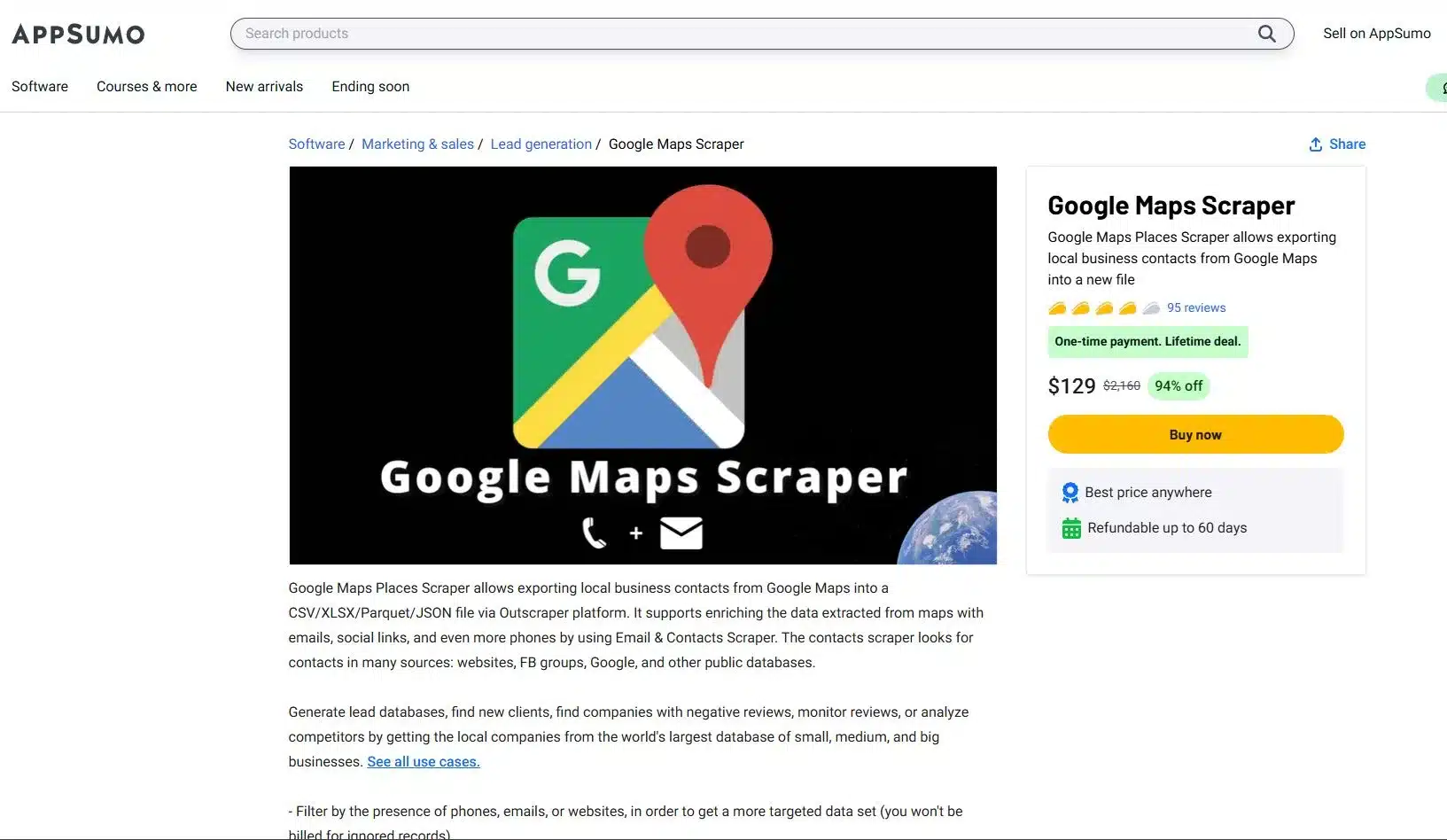
NS AppSumo lifetime deal (LTD) is one of the most frequently asked topics in Outscraper’s Reviews, so we are here to explain everything clearly. This is your powerful entry point to our web scraping tools. It will give you an advantage in data scraping.
To avail of the AppSumo deal, you need to 가입하기 또는 log in with your Outscraper account, visit your profile page 그리고 redeem your code. Once your deal code has been successfully added, you’ll see a phrase like “appsumo-[AMOUNT]credits/month” appear on your profile. This tells you the number of credits that will cover your usage.
This is a fantastic deal that will automatically renew every month. Just remember, this offer is tied to a single account, and Outscraper does not support stacking, 당신 only need one code to get started.
Smart Credit Management for your AppSumo Deal
Your AppSumo lifetime deal credits are a monthly gift designed for consistent, high-value usage. The most important thing to know is that these credits do not accumulate. This is similar to a monthly data plan; all your unused credit expires at the end of the 30-day billing cycle when your new credits are issued.
To master your deal, you must track your remaining credits on your profile page. This way, you’ll avoid surprises. If your usage exceeds the deal limit in any given month, you will simply be invoiced for the outstanding usage at the standard pay-as-you-go rates.
Understanding Your AppSumo Credit Value
A common question among new users is why their profile 보여준다 a monetary value ~처럼 “$30 credits/month” instead of a simple number of records. The reason is that your credits are not tied to a single service but are a flexible monetary value you can spend across different Outscraper services.
Simple Breakdown:
- Granular Pricing: Outscraper calculates pricing at a granular level. For example, scraping 1 business on Google Maps costs $0.003, and scraping 1 email also costs $0.003.
- Flexible Spending: Your $30 in monthly credits can be spent on any combination of these services. You could spend the entire amount on the Google Maps Scraper, which would give you 10,000 records, or you could spend it on a mix of services.
- The Bottom Line: Your $30 in credit gives you the flexibility to scrape up to 5,000 businesses and 5,000 emails, or any other combination that fits within that monetary value.
Sample Computation (Outscraper's AppSumo Deals)
Your Deal: 당신 가지고 a $30 credit per month to spend on any Outscraper service.
Outscraper Pricing: Each record costs a granular $0.003
Scenario A: Flexible Spending and Staying Within the Limit
You run two campaigns in a single month; a Google Maps scrape to find businesses and a Bulk Email scrape to enrich the data you found.
- Google Maps Scraper: You scrape 5,000 business records.
- Cost: 5,000 records * $0.003 = $15
- Bulk Emails & Contacts Scraper: You scrape 5,000 emails
- Cost: 5,000 records * $0.003 = $15
In this scenario, your entire usage is perfectly covered by your $30 매월 credit. You’ve used the full value of your deal without spending a single extra dollar.
Scenario B: Going OVer Your Deal Credits and How PAYG Works
You run a similar campaign, but your email scraping is more extensive, totaling 8,000 emails.
- Google Maps Scraper: You scrape 5,000 business records
- Cost: $15
- Bulk Emails & Contacts Scraper: You scrape 8,000 emails.
- Cost: 8,000 records * $0.003 $24.
- Total Cost: $15 (for maps) + $24 (for emails) = 39
Your total usage for the month is $39. The first $30 is covered by your AppSumo deal. The remaining overage is calculated as:
- Overage: $39 – $30 = $9
- Total Cost: $9
In this case, you would receive a small invoice for $9 overage, while your monthly $30 credit would reset for the next month. This is a perfect example of how the pay-as-you-go model gives you freedom to scale up without being locked into a higher-priced plan.
Tactical Guide to Your Premium Account: Beyond the Basics
Now that you understand the mechanics of Outscraper’s pricing, it’s time to shift your focus from simply collecting data to strategically generating an advantage.
The Power of Precision
The biggest mistake most users make is scraping without a plan. They grab every record in a broad category; this is where advanced filters become your most powerful tool. For Google Maps, the “Exact Match” (ignore other categories Google might add) feature ensures your results are perfectly aligned with your keywords, saving you time and money. The Exact Match feature is also available even if you’re using the free tier.
Pro-Tip: An expert user recommends using a combination of Exact match, Location via Postal Codes, and advanced parameters like “business status=operational” and “verified=true” to create the most restrictive and valuable search possible.
Data Enrichment
Enrichment transforms basic data into valuable and actionable intelligence. While scraping primary sources like Google Maps has a fixed price per record, you can add more value to that data with other services like Email Scraper, WhatsApp Checker, or Company Insights.
These enrichments are completely optional and incur additional, service-specific costs, which you can see when selecting them. This powerful feature allows you to build a comprehensive dataset tailored to your needs.
Pro-Tip: Be selective with your enrichment. An expert Outscraper user avoids the more expensive features like Company Insight, Phone Identity Finder, and Email Address Verifier to manage costs, opting instead to only extract emails and social profiles.
API Integration: Automating Your Workflow
NS Outscraper API is your key to automation. Move beyond manual scraping by using an API to:
- Batch Requests: Send multiple search queries at once for efficiency.
- Run in Parallel: Get it faster by executing simultaneous requests.
- Use Webhooks: Receive data in real-time as soon as a job is finished.
Smart Scraping Strategies: Optimize Your Output
Finally, a truly powerful data operation is built on efficiency. These smart strategies help you 받다 cleaner data, faster, with fewer headaches.
- Dropping Duplicates: Always use a unique identifier like “google_id” or “place_id” to prevent duplicate entries in your dataset. This simple step ensures you’re not paying for the same data twice.
- Handling Timeouts and Retries: When working with large datasets, be prepared for occasional network timeouts. Use retry logic in your scripts and leverage Outscraper’s webhooks to ensure that every job completes successfully.
- Custom Locations/Categories: The platform isn’t limited to a pre-defined list. 사용하다 custom, long-tail categories like “SEO Services for Dentists” or specific geolocations to 찾기 niche opportunities that your competitors are completely missing.
결론
We started with the confusion around web scraping pricing, but by now, you have a complete blueprint for Outscraper’s pricing. You’ve learned that the pay-as-you-go model isn’t just about flexibility but an advantage that will allow you to grow your business on your 자신의 terms.
You understand the clear path from a risk-free 프리 티어 to the cost-effective, high-volume 비즈니스 계층, and you’ve seen why moving to a premium account is essential for true scalability and success.
More importantly, you now know that a premium account is 당신의 key to utilizing the platform’s true power. You have a tactical guide to using advanced filters, performing 데이터 보강, and leveraging API integration to transform your raw data into a powerful tool for lead generation, market research, and SEO, to name a few. The confusion is gone and he roadmap is clear.
Ready to Build a Data-Generating Powerhouse?
Your Outscraper account is waiting. Stop treating it as a simple tool and start using it as an asset it was designed to be. Log in now, apply the knowledge from this guide, and 시작 building the precise, enriched, and automated datasets that will drive your business forward.
제품 및 서비스 가격
프리 티어
500개 기업 이전 사용량- 선착순 500개 업체(장소)에 한해 무료
- CSV/엑셀/파케트/JSON
- 보충 활동
중간 계층
500개 기업 이후 사용량- 501개에서 10만 개 기업(장소)까지의 이용량에 대한 1,000건당 가격
- CSV/엑셀/파케트/JSON
- 고급 필터
- 보충 활동
- API 액세스
비즈니스 계층
100,000개 기업 이후의 사용량- 10만 개 이상의 사업장(장소)을 초과하는 사용량에 대한 1,000건당 가격
- CSV/엑셀/파케트/JSON
- 고급 필터
- 보충 활동
- API 액세스
- 무제한
프리 티어
500 요청 이전 사용량- 1건에서 500건까지의 사용량에 대한 요청당 가격
- 2001년부터의 과거 데이터
- CSV/XLSX 내보내기
- API 액세스
중간 계층
500회 요청 후 사용량- 501건에서 5,000건까지의 요청에 대한 1,000건당 요금
- 2001년부터의 과거 데이터
- CSV/XLSX 내보내기
- API 액세스
비즈니스 계층
5,000회 요청 후 사용량- 5,000건의 요청을 초과한 사용량에 대한 1,000건당 요금
- 2001년부터의 과거 데이터
- CSV/XLSX 내보내기
- API 액세스
중간 계층
10회 검색 후 사용법- 검색 횟수 11~100k(페이지) 범위의 사용량에 대한 1k 검색당 가격
- CSV/엑셀/파케트/JSON
- 보충 활동
- API 액세스
비즈니스 계층
검색 횟수 10만 건 이후의 사용 현황- 5,000회 검색 후 사용량에 대한 1,000회 검색당 가격(페이지)
- CSV/엑셀/파케트/JSON
- 보충 활동
- API 액세스
- 무제한
중간 계층
500개 제품 이후 사용량- 501~5,000개 제품의 사용량에 대한 1,000개 레코드당 가격입니다.
- CSV/XLSX 내보내기
- 고급 필터
- API 액세스
비즈니스 계층
5,000개 제품 이후 사용량- 5천 개 제품 이후 사용량에 대한 1천 개 레코드당 가격입니다.
- CSV/XLSX 내보내기
- 고급 필터
- API 액세스
중간 계층
500개 리뷰 후 사용량- 리뷰 수가 501개에서 5,000개 사이인 경우, 레코드 1,000건당 요금.
- CSV/XLSX 내보내기
- 고급 필터
- API 액세스
비즈니스 계층
5,000건의 리뷰 후 사용- 5,000건의 검토 이후 사용량에 대한 1,000건당 가격.
- CSV/XLSX 내보내기
- 고급 필터
- API 액세스
지불 옵션

자주하는 질문
가장 자주 묻는 질문과 답변
종량제를 사용하면 월 구독료 없이 사용한 서비스에 대해서만 비용을 지불할 수 있습니다. 수도나 전기와 같은 공과금을 지불하는 것과 같은 방식입니다.
활성 청구 기간이 없는 상태에서 작업을 시작하면 새로운 청구 기간이 생성됩니다. 청구 금액이 확정되면, “청구서 생성”을 클릭하여 수동으로 중단할 수 있으며, 그렇지 않으면 한 달 후에 자동으로 완료됩니다.. 작업이 완료되면 서비스 이용에 대한 청구서를 받게 됩니다.
결제 및 구독
프리 티어는 매월 무료로 사용할 수 있는 사용량입니다. 예를 들어, 일부 제품 X에는 매월 500개의 요청이 있는 프리 티어가 있습니다. 즉, 한 달 동안 요청이 500건 미만이면 제품을 무료로 사용할 수 있습니다.
- 크레딧을 추가하기 전에, 청구 정보 페이지에 귀하의 세부 정보를 입력했는지 확인하십시오(청구서나 발주서에 필요할 경우를 대비하여).
- 프로필 페이지로 이동하세요.
- 추가하고자 하는 학점 수를 입력하세요.
- 크레딧을 충전하려면 사용하고자 하는 결제 수단(신용카드, PayPal 등)을 선택하세요.
- 결제 수단이 표시된 버튼을 클릭한 후, 해당 결제 서비스 제공업체의 안내에 따라 진행해 주세요.
일정 기간 서비스를 이용하시면, 프로필 페이지에서 다음 청구서를 확인하실 수 있습니다. 청구 금액이 확정되면 “청구서 생성”을 클릭하여 수동으로 청구서를 생성할 수 있으며, 그렇지 않을 경우 30일 이내에 자동으로 생성됩니다.
계정에 크레딧을 충전하면(선불 옵션), 해당 거래에 대한 영수증을 이메일로 받게 됩니다.
특정 서비스 이용 내역이 포함된 청구서는 각 청구 주기(30일)가 끝날 때마다 발행됩니다. 또는, 청구 금액이 확정되면 프로필 페이지에서 "청구서 생성"을 클릭하여 수동으로 청구서를 생성할 수도 있습니다.
네. Outscraper는 귀하의 계정 잔액에서 $10을 차감하고, 미납 금액에 대한 별도의 청구서를 발행할 것입니다.
아닙니다. 작업은 완료되며, 작업 사용량이 귀하의 계정 크레딧을 초과할 경우 미결제 사용량에 대한 청구서를 받게 됩니다.
한도 설정을 통해 추출되는 데이터의 양을 제한할 수 있습니다.
- Outscraper 플랫폼을 열어보세요.
- 다음으로 이동하세요: 결제 정보 페이지.
- 청구서에 표시되기를 원하는 필수 청구 정보를 입력하세요.
- ‘저장’ 버튼을 클릭하세요. 앞으로 발행될 모든 청구서는 입력하신 정보를 바탕으로 생성됩니다.
친구를 추천하고 혜택을 받아보세요 35% 귀하의 추천 수수료를 귀하의 계좌 잔액에 반영합니다. 귀하가 추천한 분은 25% 첫 번째 결제 시 할인 혜택을 제공합니다. 지금 바로 추천 링크를 받아보세요.

Related Posts

U.S. Gym Market Density Report 2026: Which Metro Areas Have the Most Gyms per Capita?
Compare gym supply across major U.S. metro areas using gyms per capita, chain concentration, ratings, reviews, and a consistent 2026 methodology.

Outscraper에서 신호 기반 잠재고객 발굴 워크플로를 구축하는 방법
Google Maps 비즈니스 데이터, 고객 리뷰 조사 및 수동 리드 선별을 활용하여 Outscraper를 통해 신호 기반의 잠재 고객 발굴 워크플로를 구축하고, 잠재 고객에게 연락할 준비를 하세요.
잠재 고객 발굴을 위한 B2B 구매 신호: 적절한 시기에 적합한 기업을 찾는 방법
B2B 구매 신호가 영업 팀이 잠재 고객을 선별하고, 비즈니스 활동을 비교하며, 주요 고객사를 우선순위화하고, 우선 검토할 가치가 있는 기업에 집중하여 영업 활동을 펼치는 데 어떻게 도움이 되는지 확인해 보세요.