Das Inhaltsverzeichnis
B2B-Lead-Generierung für digitale Marketing-Agenturen
Digital marketing agencies and professionals generate and create lists of potential B2B clients for their clients. The process starts with finding companies that might be interested in their product or service. Once they have identified the companies, they then reach out to them to arrange a meeting.
To create a list of B2B leads, digital marketing agencies research each industry to find potential clients for their clients. They do this by searching directories for contact information and websites for company information. They also conduct research outside of the internet to find potential leads for their list by speaking with industry professionals.
We understand how critical it is for Digital Marketing Agencies to offer quality leads to their customers. As Outscraper, we wanted to write a guide for digital marketing agencies on how to create effective B2B lead generation lists using Outscraper-Dienste.
Outscraper offers a variety of tools (online services) to help Digitale Marketing-Agenturen find leads for their clients. Google Maps-Schaber, E-Mail & Kontakt Scraperund Outscraper Business Lead Generation Hub sind nur einige von ihnen.
B2B Lead Generation Tools
Outscraper Google Maps Scraper

Die Google-Dienste sind für den Erfolg eines jeden Unternehmens unerlässlich - sie stehen oft an der Spitze der Technologietrends und es ist wichtig, bei ihnen registriert zu sein. Google Maps verfügt über eine Datenbank mit über 50 Millionen Unternehmen. Tausende dieser Unternehmen lassen sich jeden Tag bei Google Maps registrieren.
Businesses registered on Maps are an excellent resource for those looking to create a B2B lead list. All of the businesses’ full addresses, phone numbers, and web pages are easily accessible.
As an agency, you are well aware of the potential customers your clients are targeting. Based on this information, you guide your clients.
Es ist sehr gut möglich, über Google Maps neue Leads im Zielgebiet Ihres Kunden zu finden. Wenn Ihr Kunde im B2B-Geschäft tätig ist, ist die Zielgruppe definitiv bei Google Maps registriert.
Aus diesem Grund haben Sie vielleicht darüber nachgedacht, eine Lead-Liste für Ihre Kunden mit Google Maps-Daten zu erstellen. Und dabei haben Sie vielleicht festgestellt, dass die manuelle Erstellung unglaublich viel Zeit in Anspruch nehmen würde.
Outscraper automatisiert all diese Prozesse für Sie. Nachdem Sie also die Parameter festgelegt haben, beginnt der Dienst im Hintergrund mit dem Scraping für Sie.
How will it work for you?
Stellen Sie sich vor, Sie haben einen Kunden, der Toner und Tinte an Digitaldruckereien verkauft. Dieser Kunde teilt Ihnen mit, dass er alle Digitaldruckereien in den USA erreichen möchte und eine Marketingkampagne mit Ihnen durchführen will.
Wenn Sie eine solche Suche auf Google Maps durchführen, werden Ihnen die vom Kunden gewünschten Ergebnisse angezeigt.
"Digitaler Druckservice in der Nähe von Santa Barbara, CA, USA".
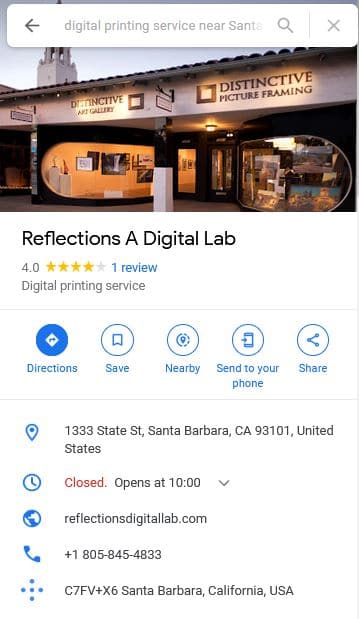
Sie wollen Leads generieren wie "Überlegungen zu einem digitalen Labor” for your client, but it seems almost impossible to list them by searching one by one on Google Maps.
The “How will it work for you?” question makes sense here. Outscraper Google Maps Scraper macht Ihnen die Arbeit des Scraping extrem leicht. Sie erhalten Ihre B2B-Lead-Liste in nur 3 Schritten.
Anmeldung
Sie können ein Konto erstellen, indem Sie https://app.outscraper.com/signup und aktivieren Sie Ihr Konto in nur 2 Minuten.
Parameter definieren und Aufgabe erstellen
Wir werden uns ansehen, wie man die Abfrage definiert "https://www.google.com/maps/search/Digital+Printing+Service+near+Santa+Barbara,+CA,+USA/@34.4335197,-119.8020989,13z/data=!3m1!4b1” into system parameters and create a task.
Öffnen Sie das Outscraper Dashboard und navigieren Sie zum Dienst Google Maps Scraper.
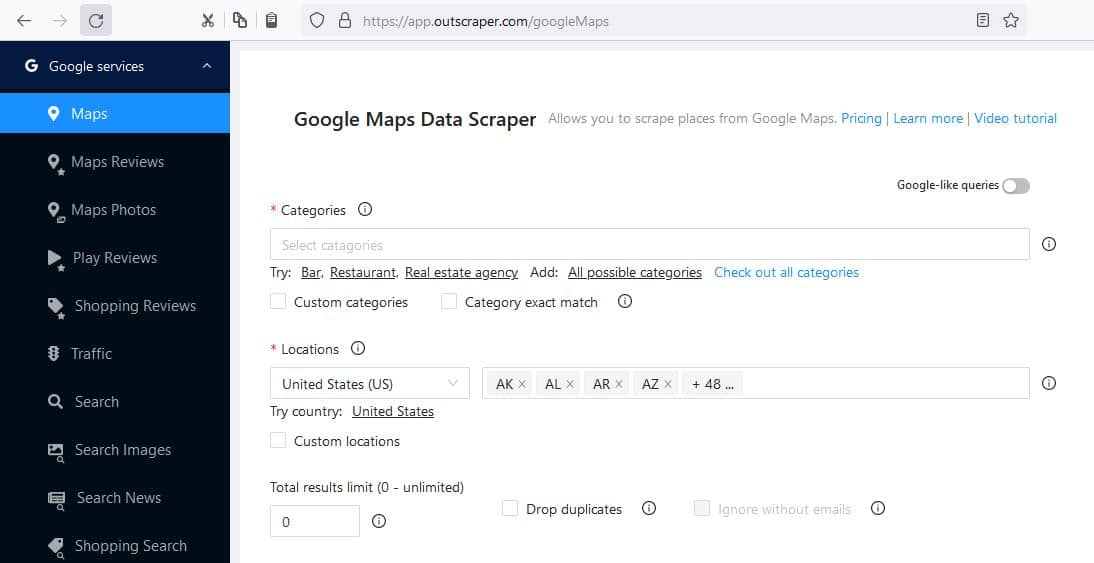
Wir werden hier alle Felder entsprechend unserer Anfrage ausfüllen.
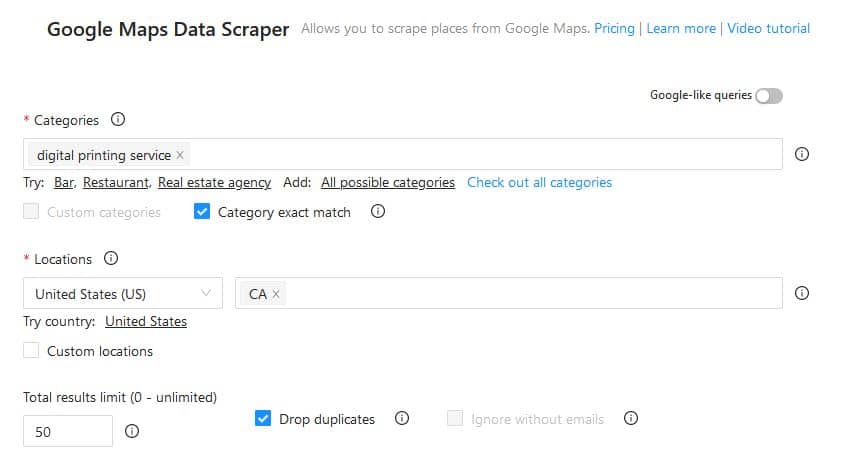
Kategorien: Digitaldruckservice
Exakte Übereinstimmung der Kategorie: Markiert (Scraper konzentriert sich nur auf diese Kategorie)
Standort: Kalifornien, USA
Gesamtergebnisgrenze: 50 (This is only to show a small example task; you can use much bigger limits).
Nachdem wir alle Parameter definiert haben, beginnen wir mit der Aufgabe und bestätigen sie. Wir nehmen uns einen Kaffee und kehren fröhlich zu unserem Marketinggeschäft zurück, während Outscraper für uns arbeitet.
Download the Results
Auf der Aufgaben page, you can track the tasks you have started. You can also download the completed tasks’ results from here.
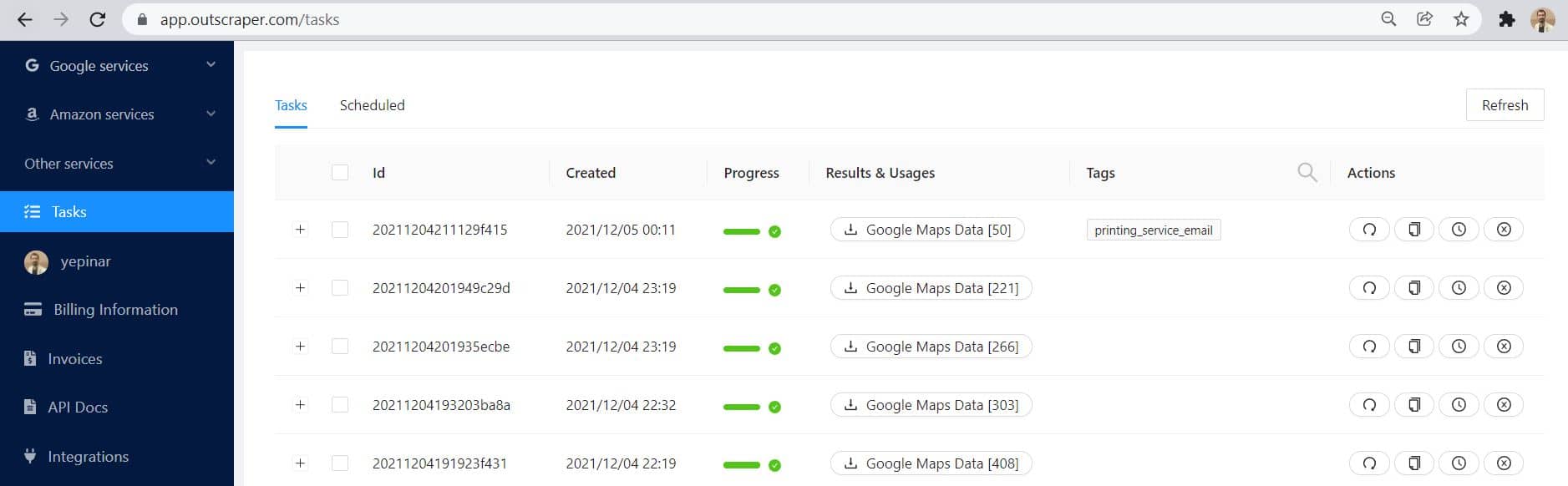
Taking a look at the outcome. The results are exactly what we wanted. There are full addresses, phone numbers, and web pages of Digital Printing Services.
You can download sample results here: Digitaldruck-Service B2B-Lead-Liste
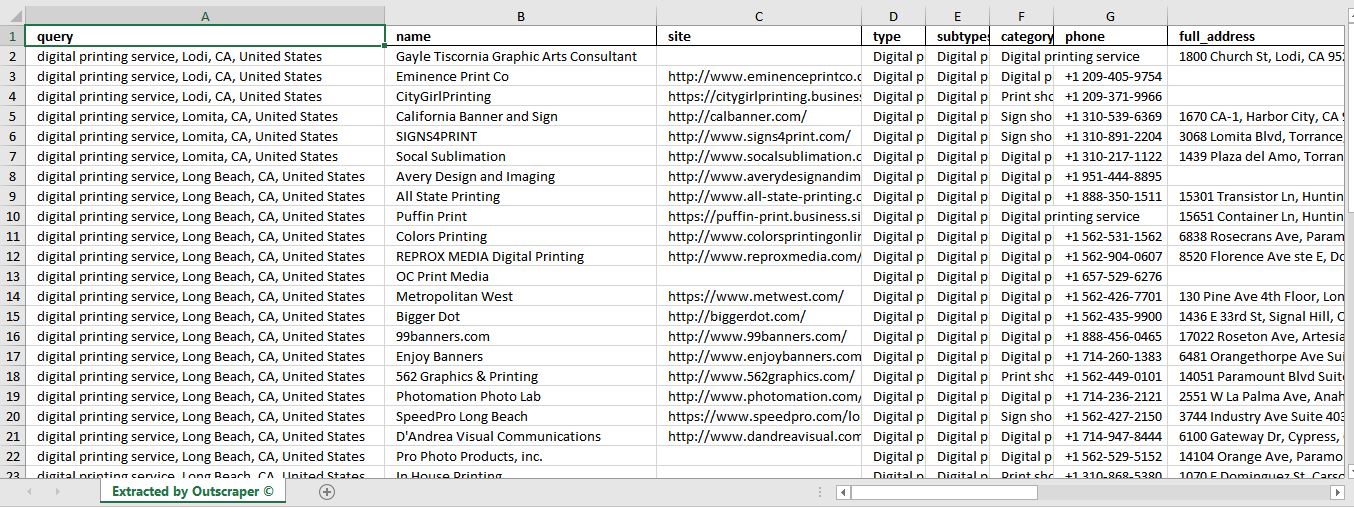
The results in this list are more than enough for Telemarketing und Direct Mail Marketing. But we do “Digital Marketing” and one more step is needed. Outscraper takes you this one step further. It is called Emails & Contacts Scraper
2 - Emails & Contacts Scraper
Emails & Kontakte Scraper allows you to find email addresses, social media accounts, and contacts in seconds.
Emails & Contacts Scraper can be used in 2 different ways.
- You can scrape any potential client webpage lists directly from the service.
- You can enrich the result list by combining this service with the Google Maps Scraper service.
How will it work for you?
1) If you already have a list of websites for your potential clients, simply copy the URLs on this list and paste them into the box.
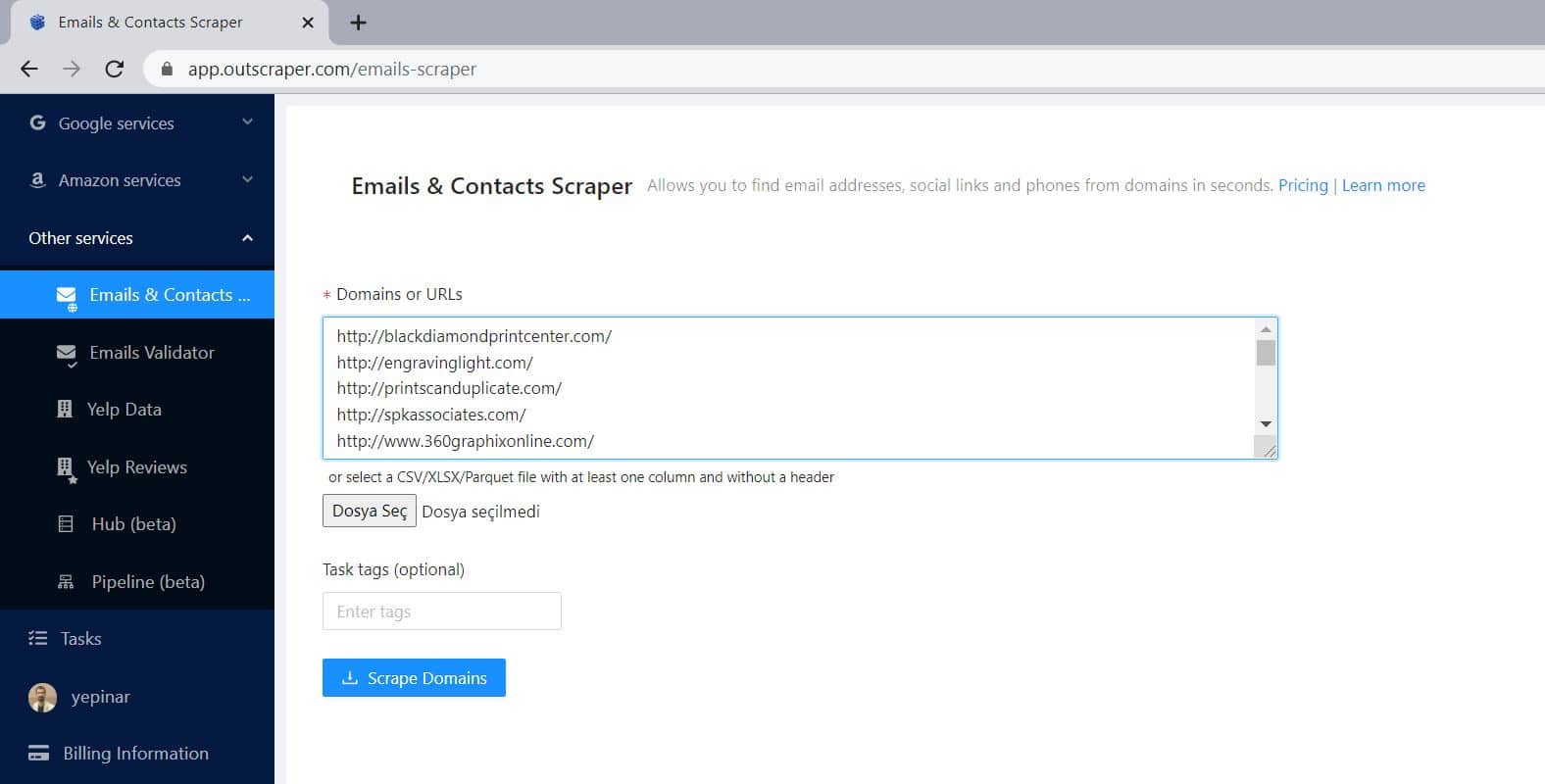
Hit the “Scrape Domains” button, sit back and enjoy the process. That’s it. Your results will also appear on the Tasks page in the same way.
2) As the second way, you can enrich the result list by combining this service with the Google Maps Scraper service.
On the Google Maps Scraper app page, if you select the ‘Emails & Contacts Scraper’ service from the ‘Enrich by other services’ section, Outscraper automatically starts scraping the websites of all businesses after scraping companies from Google Maps.
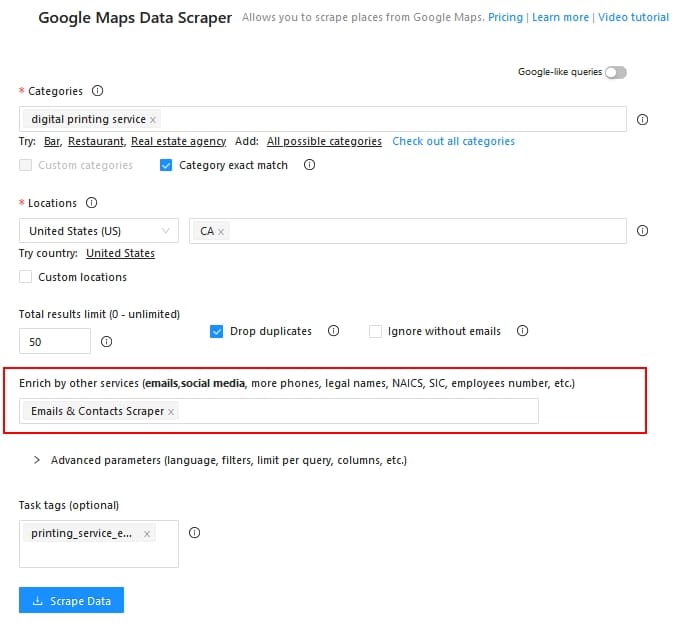
When you choose an enriching service, Outscraper will add the E-Mail-Adressen and the ‘Facebook, Instagram, LinkedIn, Medium, Reddit, Skype, Snapchat, Telegram, Whatsapp, Twitter, Vimeo, YouTube, GitHub, CrunchBase accounts to your results.
If you want to see what an enriched list looks like, you can download the sample here: Digitaldruck-Service B2B-Lead-Liste mit E-Mails
Preisgestaltung
One of the best things about Outscraper for your agency is its pricing policy. “Pay As You Go” billing applies to all Outscraper services. More details about billing can be found on our price page.
Using Outscraper Services on Digital Marketing Campaigns
E-Mail-Marketing
When you use the Emails & Contacts Scraper service, Outscraper completely crawls the business website and scrapes all emails.
If your sole purpose is to ‘Email Marketing’ while creating Lead Lists using Outscraper, you can list results containing only email by checking the ‘Ignore without emails’ box in the Google Maps Scraper service.

This way, you will get a result file containing only email, and you will be charged for results containing only email.
We recommend Gmass.co for cold email marketing campaigns. Here’s how you can transfer the B2B leads to generate with Outscraper to Gmass.
Facebook & Instagram
DMs and Following Strategy
Emails & Contacts Scraper provides you with links to businesses’ Facebook and Instagram accounts.

If you also manage your client’s social media accounts, these account links will be an opportunity for you. Following up on potential clients and sending DMs will provide your client with business opportunities.
If you have high-volume lists and want to automate this job, you can use Phantombuster’s Facebook Message Sender und Instagram Auto Follow automation.
Facebook Ads Custom Audience
When using the Outscraper Google Maps Scraper service, you can set the output format as XLSX, CSV, and Parquet.
If you specify the output format as CSV, you can use the downloaded file while creating a Facebook Customer List Custom Audience.
You can check out the Facebook Create a Customer List Custom Audience article here: https://www.facebook.com/business/help/170456843145568?id=2469097953376494
As an example, I created a 50-result limited task for the “Bakery” query in NJ.

I set the output format to CSV and it downloaded that way. Follow the Schritte on Facebook Ads Manager Audience dashboard for uploading the result file.
- Create Audience
- Benutzerdefiniertes Publikum
- Customer List
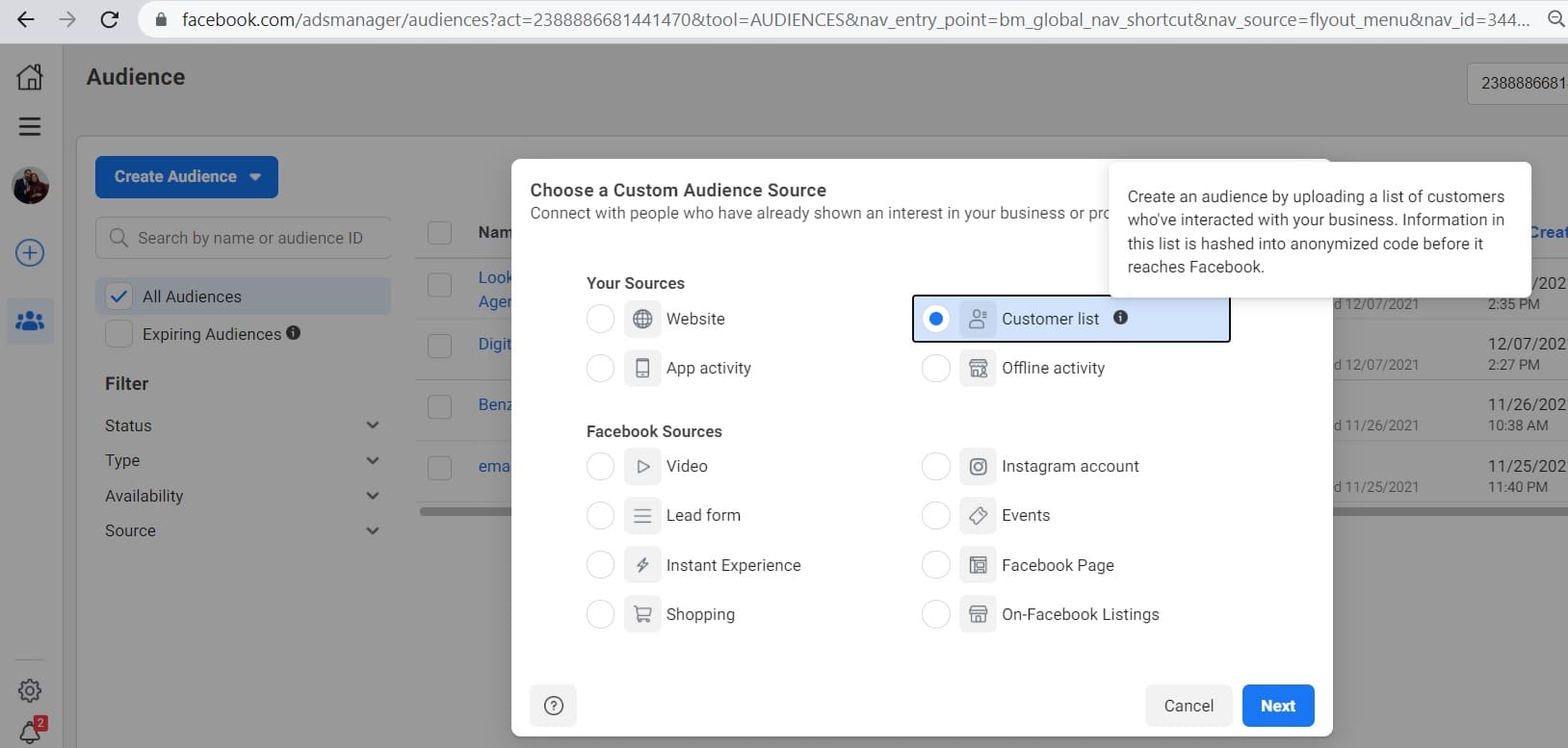
Upload your CSV file by following the steps. The values that Facebook will use will be automatically mapped. If there are other data in the list that you want Facebook to use, you can manually map them.
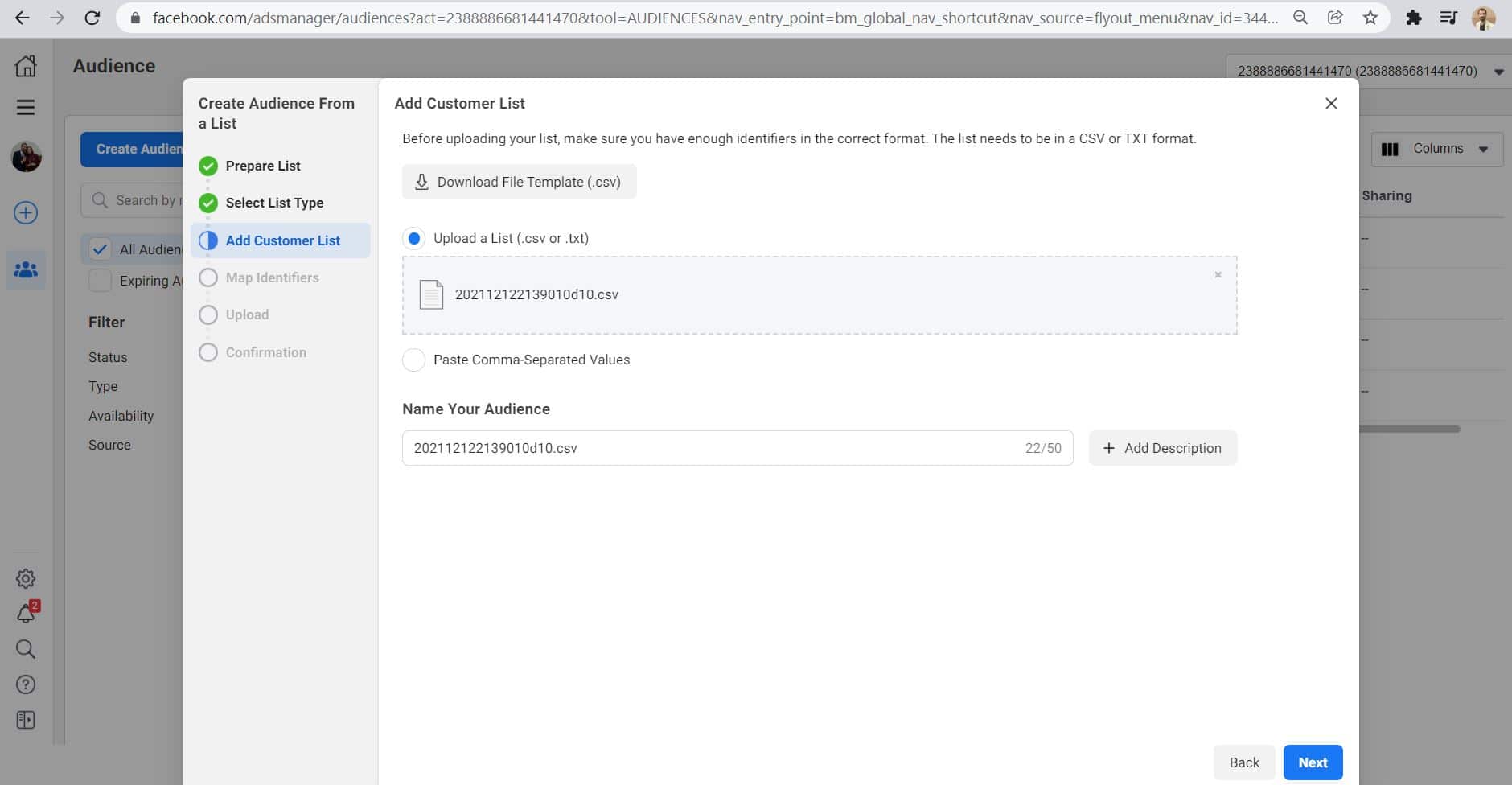

You can create your ‘Custom Audience’ by clicking the Import & Create button.

“Your Customer List is Hashed and Uploaded.”
Now your list is ready. Based on this list, you can ‘Create an Ad’ oder ‘Create a Lookalike Audience’.
With its cutting-edge technologies, Outscraper provides you with powerful web services to better serve your clients as a Digital Marketing Agency.
You can find new clients for your agency by using Outscraper-Dienste. And you can also offer outstanding service to all your existing clients.
Get Started Right Away
You can Anmeldung to use Outscraper right now and create tasks in only two minutes.
FAQ
Häufigste Fragen und Antworten
With Outscraper, you can find local businesses in the category you want, from your region or from any region of the world. Most of these businesses need digital marketing. All are potential leads.
Outscraper Google Maps Data Scraper service works together with Outscraper Emails & Contacts Scraper service to provide a quality lead generation service. These services can be used to create lead generation for digital marketing services.
Google Maps is a good idea for local lead generation. There are millions of local companies and leads on Google Maps. Outscraper Google Maps Data Scraper service allows you to extract leads from these companies.

0 Kommentare