目录
Copying a few rows from a website into a spreadsheet is easy. When the same job involves hundreds or thousands of pages, a 数据抓取工具 can collect the needed fields and turn them into structured records much faster.
That data might include product details, business listings, reviews, contact information, tables, or links. The challenge is that websites do not all present or load information in the same way, so an extraction method that works on one site may not work as well on another.
For teams that collect website data regularly, extraction also needs to produce consistent, usable records without creating unnecessary cleanup or maintenance.
Choosing the right approach starts with understanding what data you need, where it appears, and how the website delivers it. For a broader look at where extraction fits into business workflows, see our guide to data scraping tools and use cases.
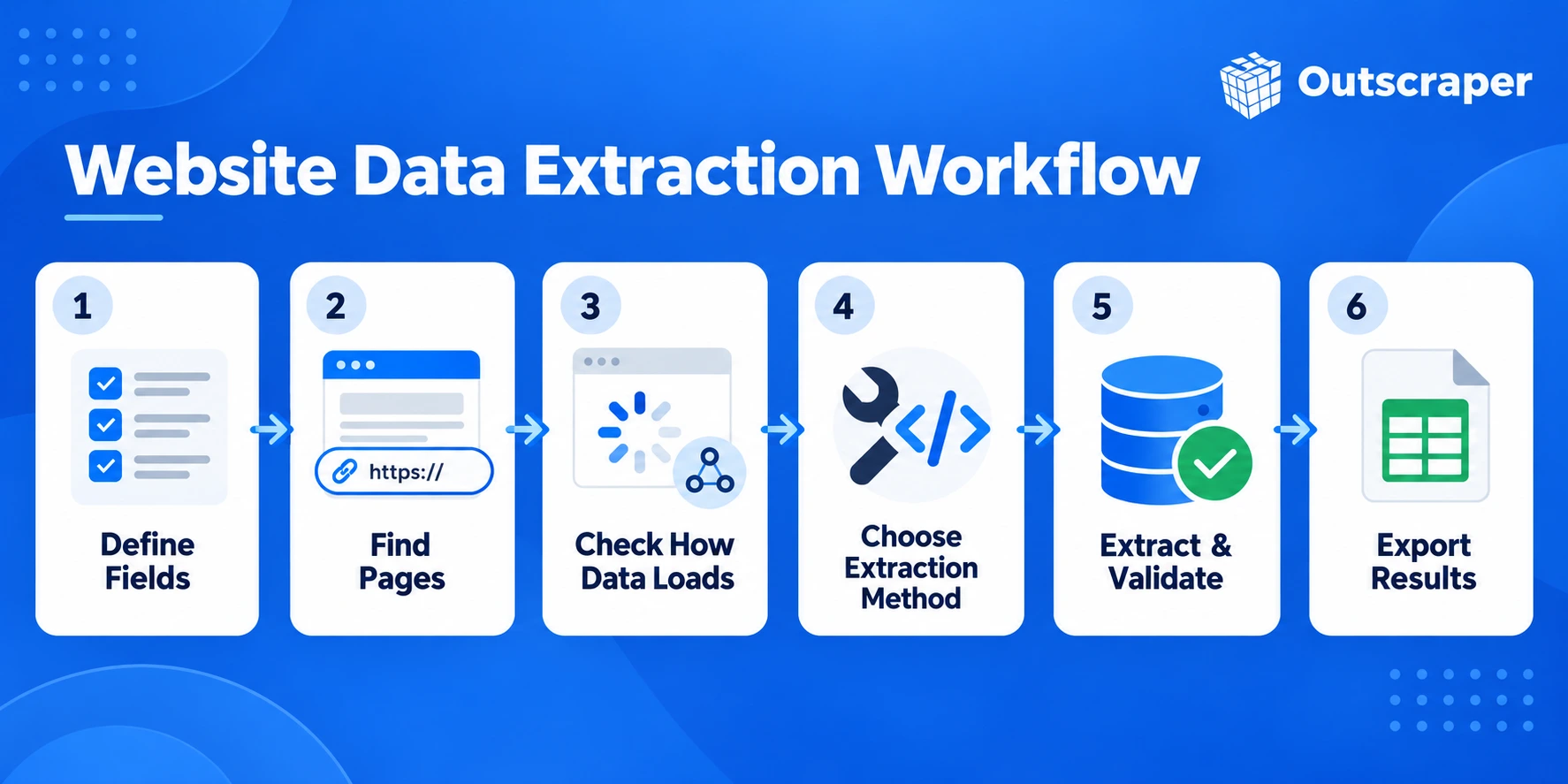
Quick Answer: How Do You Extract Data From a Website?
- Define the data you need.
- Find the pages that contain it.
- Check how the website loads the content.
- Choose an extraction method.
- Test a small sample.
- Extract and validate the data.
- Export the results in a usable format.
The best method depends on the website structure, the amount of data, how often it changes, and how much maintenance you want to handle.
Outscraper的 通用人工智能网络抓取器 extracts selected fields from website URLs without requiring you to maintain the scraping setup.
How to Extract Data From a Website Step by Step
Website extraction is easier to manage when you define the output first and choose the tool second. Focus on the fields you need, where they appear on the page, and whether the extraction method can collect them consistently.
Watch: Scrape Any Website into Clean Data
1. Define the Data Fields You Need
Start with the final dataset in mind.
For a product site, that might include:
- product name
- 价格
- rating
- 可用性
- product URL
For a business directory, you may need:
- 企业名称
- category
- 电话号码
- 网站
- 地址
Keeping the field list specific prevents unnecessary extraction and makes it easier to check whether the final output is complete.
2. Identify the Pages or URLs
Next, find the pages that contain the information.
Data may appear on:
- listing pages
- product pages
- profile pages
- category pages
- search results
- tables
- paginated sections
Some jobs only require data from one page type. Others need information from a listing page first, followed by individual detail pages.
3. Check How the Website Loads the Data
Look at whether the information appears immediately when the page loads or only after an action.
Some pages expose the content directly in the HTML. Others may load records through JavaScript and asynchronous network requests, as well as pagination, filters, or infinite scrolling.
This means some information can appear after the initial page has loaded, so a scraper that only reads the original HTML may miss it.
4. Choose and Test an Extraction Method
Choose a method based on the website structure and the amount of data you need.
Options can include:
- visual or no-code extraction
- HTML or CSS selector-based scraping
- custom scripts
- APIs
- AI-assisted extraction
Before running the process across hundreds or thousands of pages, test a small sample first. Check whether the expected fields appear correctly and whether the same method works across different pages.
5. Extract and Validate the Data
Once the test works, run the extraction across the required pages.
Do not assume the results are correct just because the process completed. Check for:
- missing values
- duplicate records
- incorrect fields
- inconsistent formats
- pages that returned no data
Validation is especially important when pages do not all follow the same layout.
6. Export and Prepare the Results
Save the records in a format that fits the next step.
Common options include CSV, Excel, and JSON. Depending on the workflow, the output may still need cleaning, deduplication, or formatting before it is ready for analysis or another system.
What Data Can a Data Scraper Extract From a Website?
The type of data you can collect depends on what the website makes available on its pages. In most cases, a scraper is set up to capture specific fields rather than copy the entire page.
Lists and Directories
Directories often contain repeated records with the same set of fields.
Platforms such as 谷歌地图 和 黄页 are common examples of directory-style sources where business names, categories, addresses, phone numbers, websites, and location details can be collected as structured records.
Typical examples include:
- business names
- 类别
- addresses
- 电话号码
- website links
- location details
These pages are usually easier to structure because the same fields appear across many listings.
Product and Listing Information
Product pages and marketplaces can contain fields such as:
- product name
- 价格
- description
- rating
- 可用性
- seller information
- product URL
Some of this information may appear on listing pages, while additional details are only available on the individual product page.
For a source-specific example, Outscraper’s 亚马逊产品抓取工具 can collect structured product and listing data from Amazon pages.
Tables and Structured Records
Websites often publish information in tables, comparison grids, schedules, or other repeated layouts.
A scraper can collect the values from each row or column and convert them into records that are easier to sort, filter, or analyze.
Reviews and Ratings
Review pages can include:
- review text
- rating
- review date
- reviewer name
- response text
- other visible review details
Outscraper的 谷歌地图评论抓取工具 can provide structured review data for reputation monitoring, customer feedback analysis, and competitor research.
The available fields vary by website, so the extraction setup needs to match the structure of the review page.

使用 Outscraper 的 谷歌地图评论抓取工具 to collect customer review data for the businesses you are researching.
Public Contact and Company Information
Company websites, directories, and profile pages may display:
- business names
- addresses
- 电话号码
- 电子邮箱地址
- website URLs
- social links
- other public company details
Not every page contains every field, so missing values should be expected when working with larger datasets.
When contact details are the main fields you need, Outscraper’s 电子邮件和通讯录抓取工具 can collect public emails, phone numbers, and social profiles from websites.

Outscraper offers scraping tools for business listings, reviews, products, directories, and public contact data.
Why Some Websites Are Harder to Scrape Than Others
Two websites can show similar information but require very different extraction methods. The difficulty usually comes from how the page loads content, how records are spread across the site, and how consistent the page structure is.
JavaScript-Rendered Content
Some websites do not place all visible information in the initial HTML. Instead, JavaScript loads part of the page after the first request.
A simple scraper may collect the page but still miss the fields a user can see in the browser. In these cases, the extraction method needs to account for content that appears after the page loads.
Pagination and Infinite Scrolling
A listing may contain hundreds of records, but only a small number appear on the first page.
Pagination divides those records across multiple URLs or page states. Infinite scrolling loads more results as the visitor moves down the page.
Both require the scraper to keep requesting or loading additional records instead of stopping after the first visible set.
Different Page Layouts
Not every page on the same website follows the same structure.
For example, some product pages may include a price, rating, and availability field, while others use a different layout or leave certain fields out entirely.
Extraction rules that work on one page may therefore need to handle several variations.
Missing or Inconsistent Fields
Website records are rarely complete across every page.
A business profile may show a phone number but no email address. One product may have a rating while another has no reviews yet.
The scraper needs to preserve the record even when some expected fields are missing.
Changing Website Structures
Websites are updated over time. A redesigned page, renamed element, or changed loading behavior can break an extraction setup that previously worked.
This is one reason recurring website extraction usually requires more maintenance than a one-time job. The more pages and page types involved, the more important it becomes to check whether the output remains consistent.
Ways to Extract Structured Data From a Website
There is no single extraction method that fits every website. The right approach depends on how the page is built, how much data you need, and whether the process will run once or repeatedly.
Visual and No-Code Extraction
Visual scrapers let users select the fields they want directly from a webpage without writing code.
This works well for simpler pages with repeated layouts, such as directories, product listings, or tables. It is also useful when the extraction job is small or when a non-technical user needs to set up the workflow.
HTML and CSS Selector Extraction
Many scrapers identify page elements through HTML structure, CSS selectors, or similar rules.
This approach gives more control over which fields are collected and works well when the target pages follow a consistent layout.
Its main weakness is maintenance. If the website changes its page structure, the selectors may need to be updated.
Custom Code
Developers can build their own extraction logic using languages such as Python or JavaScript.
Custom code is useful when the website has unusual behavior, the data needs special processing, or the extraction must connect closely with another system.
The tradeoff is that the team also takes responsibility for testing, maintenance, error handling, and changes to the website.
APIs
Some workflows can collect website data through an API instead of managing the extraction logic directly.
An API can be useful when the data needs to feed an application, database, or recurring workflow. Developers using Outscraper can refer to the Universal Scraper API documentation for the available parameters, responses, and request examples.
For location-based business data, Outscraper’s 谷歌地图地点API can be used to request structured place and business information for applications, databases, or recurring workflows.
The available fields, limits, and behavior depend on the API being used.
AI-Assisted Extraction
AI-assisted extraction can identify fields based on the information a user asks for rather than relying only on fixed selectors.
This can help when pages have less consistent layouts or when defining every extraction rule manually would take too much time.
这 Universal AI Scraper guide shows how Outscraper applies this approach to extracting selected fields from website URLs.
It still needs testing. AI-based extraction should be checked for missing fields, incorrect values, and inconsistent outputs before it is used at scale.
Examples of AI-Assisted Website Data Extraction
AI-assisted extraction can be used for different types of pages, depending on the information available on the website.
Business directory example
For a business directory, you might request fields such as business name, website, phone number, category, and address.
Product page example
For product pages, the requested fields could include product name, price, availability, rating, and product URL.
Article or listing example
For content or listing pages, you might extract fields such as title, author, publication date, category, and page URL.
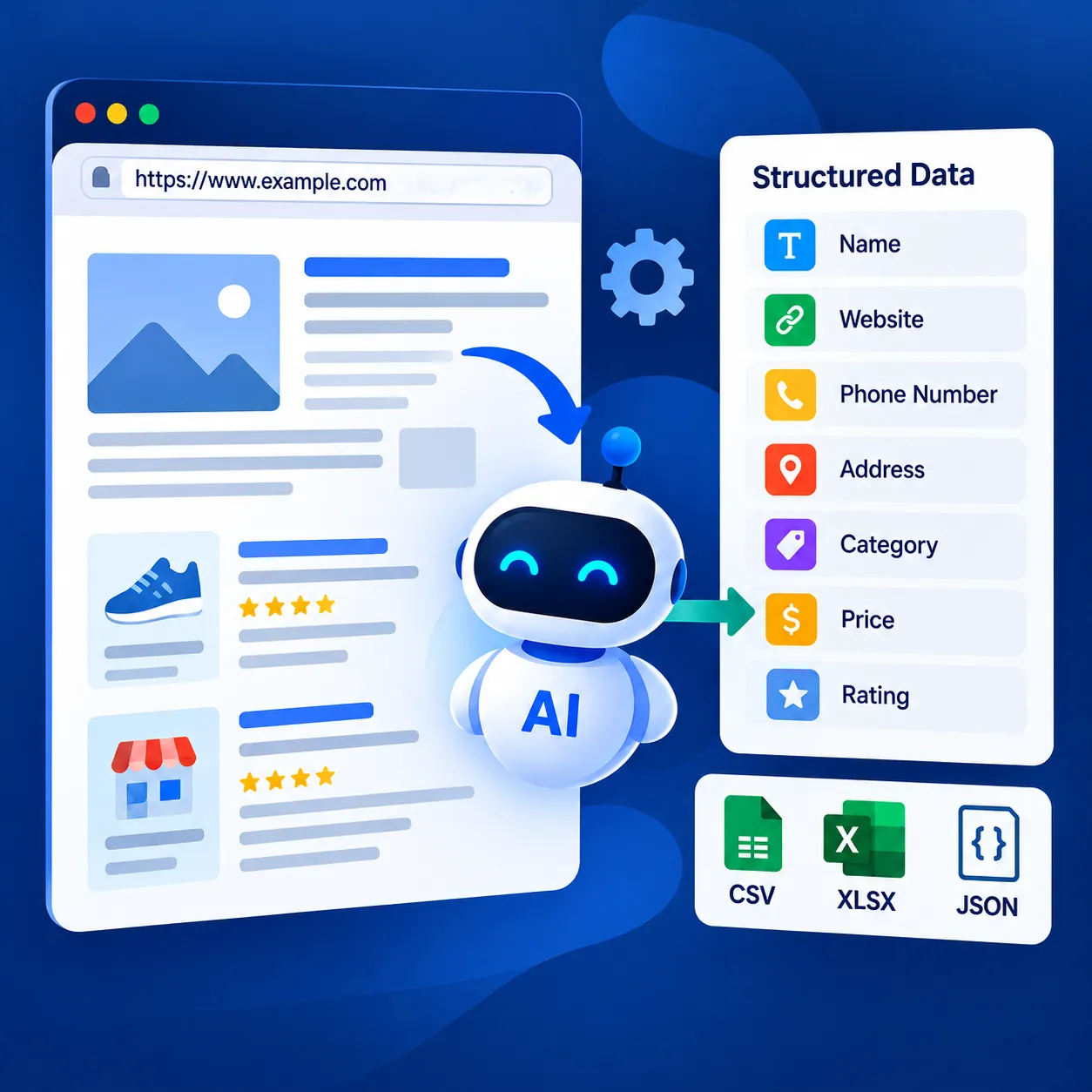
使用 Outscraper 的 通用人工智能网络抓取器 to collect the fields you need from website pages and return them as structured data.
How to Choose the Right Website Data Extraction Method
The best extraction method depends on the website, the amount of data involved, and how often the process needs to run. A simple page may only need a visual scraper, while a large or recurring job may require code, an API, or a managed extraction service.

Match the Method to the Website
Start with the way the website presents its data.
A page with a stable layout and repeated fields may work well with selectors or a no-code scraper. A site that relies heavily on JavaScript, dynamic loading, or changing layouts may need a more flexible approach.
The more complex the page behavior, the more important it is to test the method before scaling the extraction.
Consider Scale, Frequency, and Maintenance
A method that works for 20 pages may not be the best choice for 20,000.
For a one-time extraction, manual setup may be acceptable. For recurring collection, maintenance becomes a bigger part of the decision.
Consider:
- how many pages need to be processed
- how often the data needs to be refreshed
- whether the page structure changes often
- how much monitoring the workflow requires
- whether your team can maintain custom scraping logic
The larger and more frequent the job, the more valuable it becomes to reduce manual checks and repeated setup.
Check Output and Data-Use Requirements
The extraction method should also fit what happens after the data is collected.
If the results need to move into a spreadsheet, database, application, or automated workflow, check whether the method supports the required output and structure.
It is also important to review the website’s access rules, the type of information being collected, and the requirements that apply to how the data will be used.
When extracting website data, also check whether the information is publicly accessible, whether the site has terms or access restrictions that apply, and whether privacy or data-protection rules affect how the collected information can be stored or used. Requirements can vary by website, data type, intended use, and jurisdiction.
A good extraction method should fit both the website and the workflow that comes after it.
Where Outscraper Fits Into a Website Data Extraction Workflow
Building your own scraper gives you control, but it also means handling testing, maintenance, page changes, and failed extraction jobs yourself.
Teams comparing the best data scraper for a project should look at the data source, required fields, scale, refresh frequency, and how much scraping infrastructure they want to maintain.
Outscraper provides scraping tools and APIs for collecting structured public data from websites and online directories, including source-specific options for platforms such as Google Maps, Google Maps Reviews, Amazon, Trustpilot, and Yellow Pages.
For broader website extraction, Outscraper’s 通用人工智能网络抓取器 can be used when you need structured data without maintaining the full scraping setup internally.
If your website extraction project involves defined fields and multiple pages, Outscraper’s Universal AI-Powered Web Scraper can be one option to consider.
How a Data Scraper Extracts Data From a Website
A 数据抓取工具 works by reading a webpage, locating the information it has been told to collect, and turning those values into structured records.
Loading the Page
The scraper first needs access to the webpage content.
For simpler sites, the required information may already be present in the HTML returned by the server. Other sites load part of the content later through JavaScript or additional requests.
How the page loads affects what the scraper can see and when the data becomes available.
Finding the Right Page Elements
Once the page is available, the scraper needs to identify the elements that contain the required fields.
That might include:
- a product title
- a price
- a business name
- a review rating
- a phone number
- a link
- a table row
Depending on the method, those fields can be identified through selectors, page structure, extraction rules, or AI-assisted instructions.
Extracting the Values
The scraper then collects the values from those elements.
For example, a product page might return:
- product name: Example Product
- price: $49
- rating: 4.6
- availability: In stock
The same extraction rules can then be applied across similar pages if the structure remains consistent.
Turning the Results Into Structured Records
Raw webpage content is not very useful on its own. The extracted values need to be organized into consistent fields so each record follows the same structure.
For a product page, the output might look like this:
| Product Name | 价格 | 评价 | 可用性 | Product URL |
|---|---|---|---|---|
| Example Product A | $49 | 4.6 | In stock | example.com/product-a |
| Example Product B | $72 | 4.3 | Out of stock | example.com/product-b |
| Example Product C | $35 | 4.8 | In stock | example.com/product-c |
Once the fields are structured, the records can be exported, analyzed, stored in a database, or passed into another workflow.
The reliability of the final dataset depends on how consistently the scraper can find the same fields across all target pages.
Final Checklist Before You Extract Data From a Website
- Define the fields you need.
- Find the right pages or URLs.
- Check how the site loads the data.
- Choose the extraction method.
- Test a small sample.
- Validate the records.
- Confirm the output format and data-use requirements.
Need a 数据抓取工具 for your website extraction project? Outscraper helps you collect structured public data from websites, directories, listings, and reviews without managing the full scraping setup yourself.
常见问题
最常见的问题和答案
A website data scraper collects specific information from webpages and converts it into structured records. Depending on the page, that can include text, prices, links, reviews, contact details, tables, listings, or other visible fields.
Yes. No-code and visual scraping tools let users select fields from a webpage without writing a script. These methods work best when the target pages follow a clear and repeated structure.
Yes. A scraper can move through multiple URLs, listing pages, pagination, or linked detail pages. The setup needs to account for how the website organizes and loads those pages.
Web scraping collects information from webpages, while an API provides structured data through a defined interface. APIs are often easier to integrate into applications, but the available fields depend on what the provider exposes.
Yes, if the extraction tool supports those formats. CSV and Excel are common choices when the data needs to be reviewed, filtered, cleaned, or shared in a spreadsheet.
Missing data can happen when content loads through JavaScript, fields are absent from some pages, layouts vary, or the website changes its structure. Testing several pages before running a larger extraction can help identify these issues early.