Зміст
Скопіювати кілька рядків з веб-сайту в електронну таблицю — це просто. Але коли така робота стосується сотень або тисяч сторінок, то програма для збору даних може набагато швидше зібрати необхідні поля та перетворити їх на структуровані записи.
Ці дані можуть включати опис товарів, інформацію про компанії, відгуки, контактні дані, таблиці або посилання. Складність полягає в тому, що веб-сайти не завжди відображають або завантажують інформацію однаковим чином, тому метод вилучення даних, який працює на одному сайті, може не так ефективно працювати на іншому.
Для команд, які регулярно збирають дані з веб-сайтів, процес вилучення даних також повинен забезпечувати отримання узгоджених і придатних для використання записів, не вимагаючи при цьому зайвих зусиль з очищення чи обслуговування.
Вибір правильного підходу починається з розуміння того, які дані вам потрібні, де вони містяться та як веб-сайт їх надає. Щоб отримати більш широке уявлення про те, як вилучення даних вписується в бізнес-процеси, ознайомтеся з нашим посібником щодо інструменти для збору даних та приклади їхнього застосування.
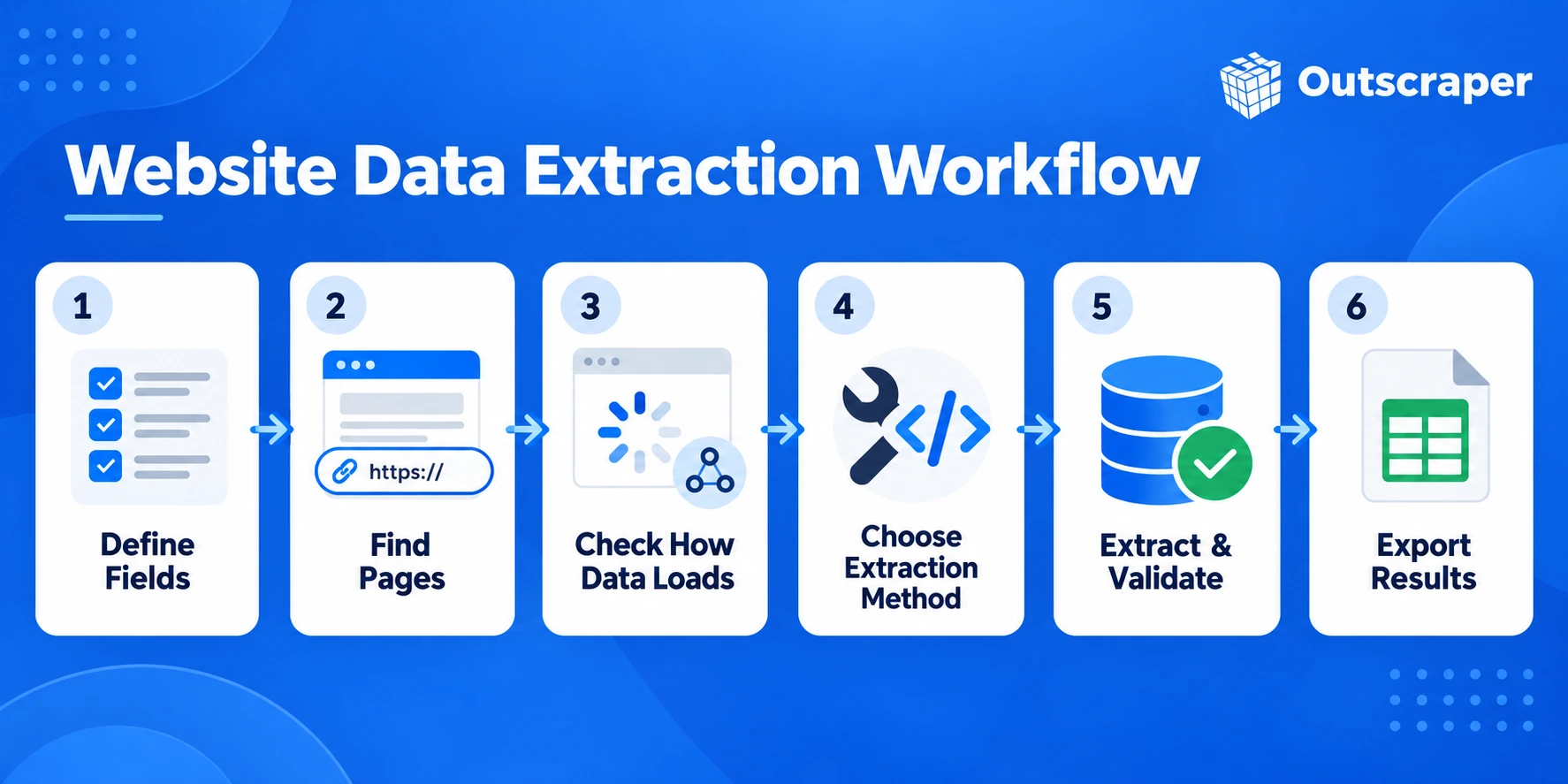
Коротка відповідь: Як витягти дані з веб-сайту?
- Визначте, які дані вам потрібні.
- Знайдіть сторінки, на яких це міститься.
- Перевірте, як веб-сайт завантажує вміст.
- Оберіть метод вилучення.
- Перевірте невелику пробу.
- Витягнути та перевірити дані.
- Експортуйте результати у зручному для використання форматі.
Вибір найкращого методу залежить від структури веб-сайту, обсягу даних, частоти їх оновлення та того, яку частину робіт з обслуговування ви бажаєте виконувати самостійно.
Відео: Як програма для збору даних перетворює сторінки веб-сайтів на структуровані дані
У цьому короткому посібнику показано процес вилучення даних із веб-сайту: від вибору полів і сторінок до тестування скрепера, перевірки записів та експорту результатів.
Вибір правильного методу вилучення даних залежить від веб-сайту, необхідних полів та того, як завантажуються сторінки. Почніть із визначення типу даних, які ви хочете зібрати, та того, як вони відображаються на сторінці.
Outscraper’s Універсальний веб-скребок зі штучним інтелектом витягує вибрані поля з URL-адрес веб-сайтів, не вимагаючи від вас налаштування процесу збору даних.
Як поетапно витягувати дані з веб-сайту
Витягувати дані з веб-сайтів простіше, якщо спочатку визначити, який результат потрібно отримати, а вже потім вибрати інструмент. Зверніть увагу на необхідні поля, на те, де вони розташовані на сторінці, та на те, чи дозволяє обраний метод витягування даних збирати їх послідовно.
Дивіться: перетворіть будь-який веб-сайт на чисті дані
1. Визначте необхідні поля даних
Почніть з того, щоб уявити собі кінцевий набір даних.
Для сайту, присвяченого продукту, це може включати:
- назва товару
- ціна
- рейтинг
- наявність
- URL-адреса товару
Для створення бізнес-каталогу вам можуть знадобитися:
- назва підприємства
- категорія
- номер телефону
- сайт
- адреса
Якщо список полів залишати конкретним, це запобігає непотрібному вилученню даних і полегшує перевірку повноти кінцевого результату.
2. Визначте сторінки або URL-адреси
Далі знайдіть сторінки, на яких міститься ця інформація.
Дані можуть з’являтися на:
- сторінки з переліком
- сторінки товарів
- сторінки профілів
- сторінки категорій
- результати пошуку
- таблиці
- розділи з нумерацією сторінок
Для деяких завдань потрібні дані лише з одного типу сторінки. Для інших спочатку потрібна інформація зі сторінки списку, а потім — з окремих сторінок з детальною інформацією.
3. Перевірте, як веб-сайт завантажує дані
Зверніть увагу, чи інформація з’являється одразу після завантаження сторінки, чи лише після виконання певної дії.
На деяких сторінках вміст відображається безпосередньо в HTML. На інших записи можуть завантажуватися за допомогою JavaScript і асинхронні мережеві запити, а також нумерацію сторінок, фільтри або нескінченну прокрутку.
Це означає, що деяка інформація може з’явитися вже після завантаження початкової сторінки, тому скрейпер, який зчитує лише вихідний HTML-код, може її пропустити.
4. Вибір та перевірка методу екстракції
Оберіть метод, виходячи зі структури веб-сайту та обсягу даних, які вам потрібні.
Серед варіантів можуть бути:
- візуальне вилучення або вилучення без кодування
- Витяг даних на основі селекторів HTML або CSS
- власні скрипти
- API
- Вилучення даних із використанням штучного інтелекту
Перш ніж запускати цей процес для сотень або тисяч сторінок, спочатку протестуйте невелику вибірку. Перевірте, чи очікувані поля відображаються правильно і чи однаковий метод працює на різних сторінках.
5. Витяг та перевірка даних
Як тільки тест запрацює, запустіть витяг даних із необхідних сторінок.
Не вважайте, що результати є правильними лише тому, що процес завершився. Перевірте:
- відсутні значення
- дублікати записів
- неправильні поля
- неуніфіковані формати
- сторінки, які не повернули жодних даних
Перевірка є особливо важливою, коли сторінки не мають однакового макету.
6. Експорт та підготовка результатів
Збережіть записи у форматі, який підходить для наступного кроку.
До поширених форматів належать CSV, Excel та JSON. Залежно від робочого процесу, отримані дані можуть потребувати очищення, видалення дублікатів або форматування, перш ніж вони будуть готові до аналізу або передачі в іншу систему.
Які дані може витягти програма для збору даних із веб-сайту?
Тип даних, які ви можете зібрати, залежить від того, яку інформацію веб-сайт надає на своїх сторінках. У більшості випадків скрейпер налаштовується на вилучення конкретних полів, а не на копіювання всієї сторінки.
Списки та каталоги
Каталоги часто містять повторювані записи з однаковим набором полів.
Такі платформи, як Google Maps і «Жовті сторінки» є типовими прикладами джерел у вигляді каталогів, з яких можна збирати назви підприємств, категорії, адреси, номери телефонів, веб-сайти та відомості про місцезнаходження у вигляді структурованих записів.
До типових прикладів належать:
- назви підприємств
- категорії
- адреси
- номери телефонів
- посилання на веб-сайти
- детальна інформація про місцезнаходження
Ці сторінки зазвичай простіше структурувати, оскільки в багатьох оголошеннях повторюються одні й ті самі поля.
Інформація про товар та його розміщення
Сторінки товарів та торгові майданчики можуть містити такі поля, як:
- назва товару
- ціна
- опис
- рейтинг
- наявність
- інформація про продавця
- URL-адреса товару
Частина цієї інформації може відображатися на сторінках з переліком товарів, тоді як додаткові відомості доступні лише на сторінці конкретного товару.
Як приклад, пов’язаний із конкретним джерелом, Outscraper’s Скребок для продуктів Amazon може збирати структуровані дані про товари та їхні описи зі сторінок Amazon.
Таблиці та структуровані записи
Веб-сайти часто публікують інформацію у вигляді таблиць, порівняльних таблиць, графіків або інших повторюваних макетів.
Скрейпер може збирати значення з кожного рядка або стовпця та перетворювати їх на записи, які легше сортувати, фільтрувати чи аналізувати.
Відгуки та оцінки
Сторінки з відгуками можуть містити:
- текст огляду
- рейтинг
- дата перегляду
- ім'я рецензента
- текст відповіді
- інші видимі деталі огляду
Outscraper Скребок відгуків на картах Google Maps може надавати структуровані дані аналізу для моніторингу репутації, аналізу відгуків клієнтів та дослідження конкурентів.
The available fields vary by website, so the extraction setup needs to match the structure of the review page.

Використовуйте Outscraper Скребок відгуків на картах Google Maps щоб зібрати дані про відгуки клієнтів щодо підприємств, які ви досліджуєте.
Public Contact and Company Information
Company websites, directories, and profile pages may display:
- назви підприємств
- адреси
- номери телефонів
- адреси електронної пошти
- website URLs
- social links
- other public company details
Not every page contains every field, so missing values should be expected when working with larger datasets.
When contact details are the main fields you need, Outscraper’s Скребок електронної пошти та контактів can collect public emails, phone numbers, and social profiles from websites.

Outscraper offers scraping tools for business listings, reviews, products, directories, and public contact data.
Why Some Websites Are Harder to Scrape Than Others
Two websites can show similar information but require very different extraction methods. The difficulty usually comes from how the page loads content, how records are spread across the site, and how consistent the page structure is.
JavaScript-Rendered Content
Some websites do not place all visible information in the initial HTML. Instead, JavaScript loads part of the page after the first request.
A simple scraper may collect the page but still miss the fields a user can see in the browser. In these cases, the extraction method needs to account for content that appears after the page loads.
Pagination and Infinite Scrolling
A listing may contain hundreds of records, but only a small number appear on the first page.
Pagination divides those records across multiple URLs or page states. Infinite scrolling loads more results as the visitor moves down the page.
Both require the scraper to keep requesting or loading additional records instead of stopping after the first visible set.
Different Page Layouts
Not every page on the same website follows the same structure.
For example, some product pages may include a price, rating, and availability field, while others use a different layout or leave certain fields out entirely.
Extraction rules that work on one page may therefore need to handle several variations.
Missing or Inconsistent Fields
Website records are rarely complete across every page.
A business profile may show a phone number but no email address. One product may have a rating while another has no reviews yet.
The scraper needs to preserve the record even when some expected fields are missing.
Changing Website Structures
Websites are updated over time. A redesigned page, renamed element, or changed loading behavior can break an extraction setup that previously worked.
This is one reason recurring website extraction usually requires more maintenance than a one-time job. The more pages and page types involved, the more important it becomes to check whether the output remains consistent.
Ways to Extract Structured Data From a Website
There is no single extraction method that fits every website. The right approach depends on how the page is built, how much data you need, and whether the process will run once or repeatedly.
Visual and No-Code Extraction
Visual scrapers let users select the fields they want directly from a webpage without writing code.
This works well for simpler pages with repeated layouts, such as directories, product listings, or tables. It is also useful when the extraction job is small or when a non-technical user needs to set up the workflow.
HTML and CSS Selector Extraction
Many scrapers identify page elements through HTML structure, CSS selectors, or similar rules.
This approach gives more control over which fields are collected and works well when the target pages follow a consistent layout.
Its main weakness is maintenance. If the website changes its page structure, the selectors may need to be updated.
Custom Code
Developers can build their own extraction logic using languages such as Python or JavaScript.
Custom code is useful when the website has unusual behavior, the data needs special processing, or the extraction must connect closely with another system.
The tradeoff is that the team also takes responsibility for testing, maintenance, error handling, and changes to the website.
API
Some workflows can collect website data through an API instead of managing the extraction logic directly.
An API can be useful when the data needs to feed an application, database, or recurring workflow. Developers using Outscraper can refer to the Universal Scraper API documentation for the available parameters, responses, and request examples.
For location-based business data, Outscraper’s Google Maps Places API can be used to request structured place and business information for applications, databases, or recurring workflows.
The available fields, limits, and behavior depend on the API being used.
AI-Assisted Extraction
AI-assisted extraction can identify fields based on the information a user asks for rather than relying only on fixed selectors.
This can help when pages have less consistent layouts or when defining every extraction rule manually would take too much time.
На сьогоднішній день, на жаль, це не так. Universal AI Scraper guide shows how Outscraper applies this approach to extracting selected fields from website URLs.
It still needs testing. AI-based extraction should be checked for missing fields, incorrect values, and inconsistent outputs before it is used at scale.
Examples of AI-Assisted Website Data Extraction
AI-assisted extraction can be used for different types of pages, depending on the information available on the website.
Business directory example
For a business directory, you might request fields such as business name, website, phone number, category, and address.
Product page example
For product pages, the requested fields could include product name, price, availability, rating, and product URL.
Article or listing example
For content or listing pages, you might extract fields such as title, author, publication date, category, and page URL.

Використовуйте Outscraper Універсальний веб-скребок зі штучним інтелектом to collect the fields you need from website pages and return them as structured data.
How to Choose the Right Website Data Extraction Method
The best extraction method depends on the website, the amount of data involved, and how often the process needs to run. A simple page may only need a visual scraper, while a large or recurring job may require code, an API, or a managed extraction service.

Match the Method to the Website
Start with the way the website presents its data.
A page with a stable layout and repeated fields may work well with selectors or a no-code scraper. A site that relies heavily on JavaScript, dynamic loading, or changing layouts may need a more flexible approach.
The more complex the page behavior, the more important it is to test the method before scaling the extraction.
Consider Scale, Frequency, and Maintenance
A method that works for 20 pages may not be the best choice for 20,000.
For a one-time extraction, manual setup may be acceptable. For recurring collection, maintenance becomes a bigger part of the decision.
Consider:
- how many pages need to be processed
- how often the data needs to be refreshed
- whether the page structure changes often
- how much monitoring the workflow requires
- whether your team can maintain custom scraping logic
The larger and more frequent the job, the more valuable it becomes to reduce manual checks and repeated setup.
Check Output and Data-Use Requirements
The extraction method should also fit what happens after the data is collected.
If the results need to move into a spreadsheet, database, application, or automated workflow, check whether the method supports the required output and structure.
It is also important to review the website’s access rules, the type of information being collected, and the requirements that apply to how the data will be used.
When extracting website data, also check whether the information is publicly accessible, whether the site has terms or access restrictions that apply, and whether privacy or data-protection rules affect how the collected information can be stored or used. Requirements can vary by website, data type, intended use, and jurisdiction.
A good extraction method should fit both the website and the workflow that comes after it.
Where Outscraper Fits Into a Website Data Extraction Workflow
Building your own scraper gives you control, but it also means handling testing, maintenance, page changes, and failed extraction jobs yourself.
Teams comparing the best data scraper for a project should look at the data source, required fields, scale, refresh frequency, and how much scraping infrastructure they want to maintain.
Outscraper provides scraping tools and APIs for collecting structured public data from websites and online directories, including source-specific options for platforms such as Google Maps, Google Maps Reviews, Amazon, Trustpilot, and Yellow Pages.
For broader website extraction, Outscraper’s Універсальний веб-скребок зі штучним інтелектом can be used when you need structured data without maintaining the full scraping setup internally.
If your website extraction project involves defined fields and multiple pages, Outscraper’s Universal AI-Powered Web Scraper can be one option to consider.
How a Data Scraper Extracts Data From a Website
A програма для збору даних works by reading a webpage, locating the information it has been told to collect, and turning those values into structured records.
Loading the Page
The scraper first needs access to the webpage content.
For simpler sites, the required information may already be present in the HTML returned by the server. Other sites load part of the content later through JavaScript or additional requests.
How the page loads affects what the scraper can see and when the data becomes available.
Finding the Right Page Elements
Once the page is available, the scraper needs to identify the elements that contain the required fields.
That might include:
- a product title
- a price
- a business name
- a review rating
- a phone number
- a link
- a table row
Depending on the method, those fields can be identified through selectors, page structure, extraction rules, or AI-assisted instructions.
Extracting the Values
The scraper then collects the values from those elements.
For example, a product page might return:
- product name: Example Product
- price: $49
- rating: 4.6
- availability: In stock
The same extraction rules can then be applied across similar pages if the structure remains consistent.
Turning the Results Into Structured Records
Raw webpage content is not very useful on its own. The extracted values need to be organized into consistent fields so each record follows the same structure.
For a product page, the output might look like this:
| Product Name | Ціна | Рейтинг | Наявність | Product URL |
|---|---|---|---|---|
| Example Product A | $49 | 4.6 | In stock | example.com/product-a |
| Example Product B | $72 | 4.3 | Out of stock | example.com/product-b |
| Example Product C | $35 | 4.8 | In stock | example.com/product-c |
Once the fields are structured, the records can be exported, analyzed, stored in a database, or passed into another workflow.
The reliability of the final dataset depends on how consistently the scraper can find the same fields across all target pages.
Final Checklist Before You Extract Data From a Website
- Define the fields you need.
- Find the right pages or URLs.
- Check how the site loads the data.
- Choose the extraction method.
- Перевірте невелику пробу.
- Validate the records.
- Confirm the output format and data-use requirements.
Need a програма для збору даних for your website extraction project? Outscraper helps you collect structured public data from websites, directories, listings, and reviews without managing the full scraping setup yourself.
ПОШИРЕНІ ЗАПИТАННЯ
Найпоширеніші запитання та відповіді
Програма для збору даних з веб-сайтів збирає певну інформацію з веб-сторінок і перетворює її на структуровані записи. Залежно від сторінки, це може бути текст, ціни, посилання, відгуки, контактні дані, таблиці, списки або інші видимі поля.
Так. Інструменти для вилучення даних без програмування та візуальні інструменти дозволяють користувачам вибирати поля з веб-сторінки без написання скрипту. Ці методи найефективніші, коли цільові сторінки мають чітку та повторювану структуру.
Так. Скрейпер може обробляти різні URL-адреси, списки сторінок, пагінацію або пов’язані сторінки з детальною інформацією. При налаштуванні потрібно враховувати, як веб-сайт організовує та завантажує ці сторінки.
Веб-скрейпінг дозволяє збирати інформацію з веб-сторінок, тоді як API надає структуровані дані через визначений інтерфейс. API часто простіше інтегрувати в додатки, але набір доступних полів залежить від того, що саме надає постачальник.
Так, якщо інструмент для вилучення даних підтримує ці формати. CSV та Excel — це найпоширеніші варіанти, коли дані потрібно переглянути, відфільтрувати, очистити або поділитися ними у таблиці.
Відсутність даних може виникати, коли вміст завантажується за допомогою JavaScript, на деяких сторінках відсутні поля, макети відрізняються або веб-сайт змінює свою структуру. Тестування кількох сторінок перед запуском масштабного вилучення даних може допомогти виявити ці проблеми на ранній стадії.