目次を見る
ウェブサイトから数行のデータをスプレッドシートにコピーするのは簡単です。しかし、同じ作業が数百ページや数千ページに及ぶ場合は、 データスクレイパー 必要なフィールドを収集し、それらを構造化されたレコードに変換する作業を、はるかに迅速に行うことができます。.
そのデータには、商品の詳細、ビジネス情報、レビュー、連絡先情報、表、リンクなどが含まれる場合があります。課題となるのは、ウェブサイトによって情報の表示方法や読み込み方法が異なるため、あるサイトで有効な抽出方法が、別のサイトでは同じように機能しない可能性があるという点です。.
ウェブサイトデータを定期的に収集しているチームにとっては、データ抽出の際にも、不必要な整理やメンテナンスを必要とせずに、一貫性があり、実用的な記録が生成されることが求められます。.
適切なアプローチを選ぶには、まず、どのようなデータが必要か、そのデータがどこにあるか、そしてウェブサイトがどのようにそのデータを提供しているかを理解することから始めます。データ抽出がビジネスワークフローのどの段階に位置づけられるかについて、より広く理解したい場合は、当社のガイドをご覧ください。 データスクレイピングツールとその活用事例.
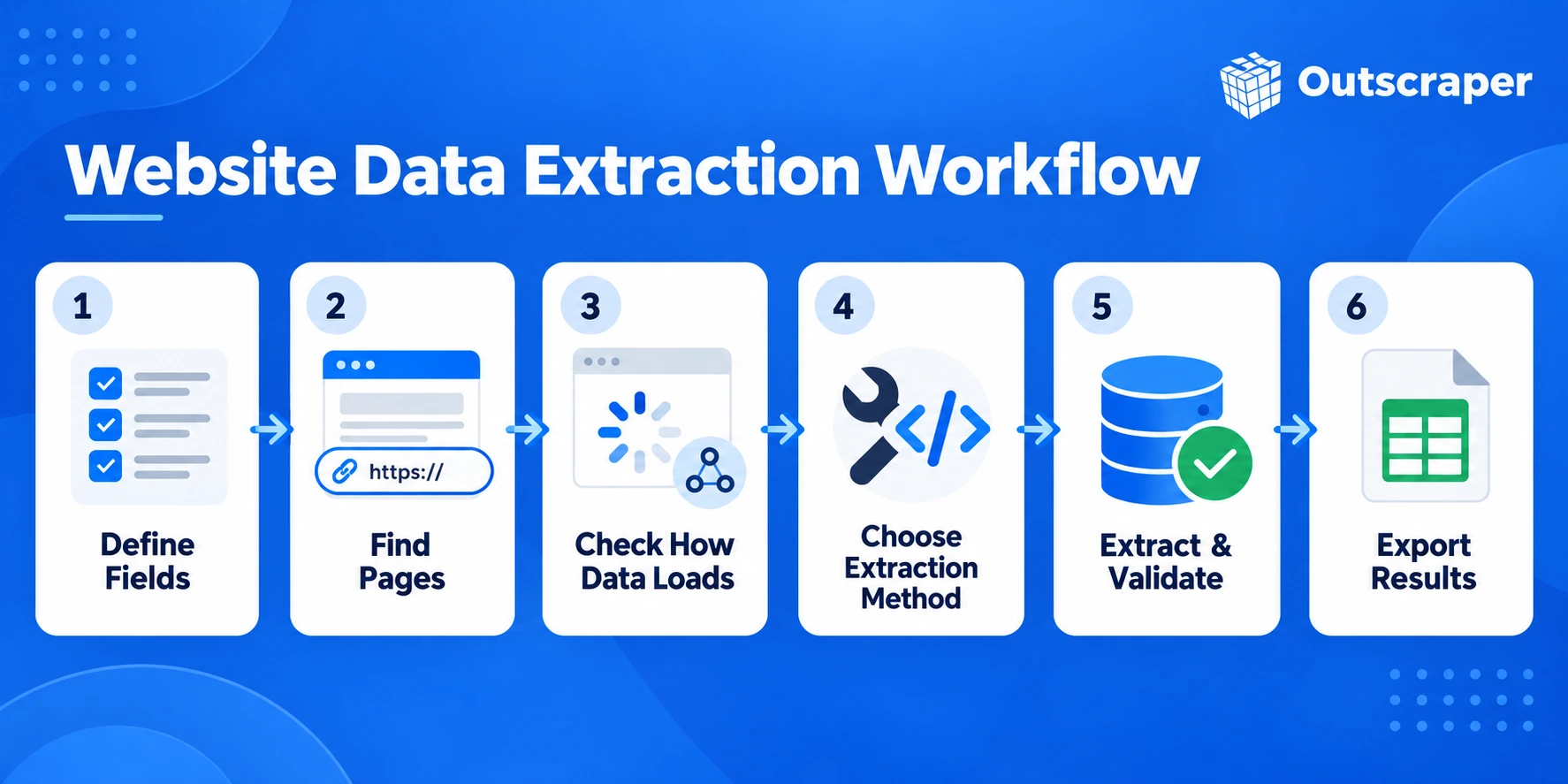
【簡単解説】ウェブサイトからデータを抽出するには?
- 必要なデータを定義してください。.
- それが含まれているページを探してください。.
- ウェブサイトがコンテンツをどのように読み込むかを確認してください。.
- 抽出方法を選択してください。.
- 少量のサンプルを試験してください。.
- データを抽出・検証する。.
- 結果を実用的な形式でエクスポートします。.
最適な方法は、ウェブサイトの構造、データ量、変更の頻度、そしてどの程度のメンテナンスを自社で行うかによって異なります。.
Watch: How a Data Scraper Turns Website Pages Into Structured Data
This short walkthrough shows the website data extraction process, from choosing the fields and pages to testing the scraper, checking the records, and exporting the results.
The right extraction method depends on the website, the fields you need, and how the pages load. Start by identifying the type of data you want to collect and how it appears on the page.
Outscraperの ユニバーサルAI搭載ウェブスクレーパー スクレイピングの設定を管理する必要なく、ウェブサイトのURLから指定したフィールドを抽出します。.
ウェブサイトからデータを抽出する手順
ウェブサイトのデータ抽出は、まず出力形式を定義してからツールを選ぶ方が管理しやすくなります。必要なフィールド、それらがページ上のどこに表示されているか、そしてその抽出方法によって一貫して収集できるかどうかに焦点を当ててください。.
動画:どんなウェブサイトでもクリーンなデータに変換
1. 必要なデータフィールドを定義する
最終的なデータセットを念頭に置いて始めましょう。.
製品サイトの場合、以下のようなものが含まれる可能性があります:
- 製品名
- 価格
- 評価
- 入手可能性
- 商品のURL
ビジネスディレクトリを作成するには、以下のものが必要になる場合があります:
- 商号
- カテゴリ
- 電話番号
- ウェブサイト
- 住所
フィールドリストを具体的に指定しておくことで、不要な抽出を防ぐことができ、最終的な出力が完全であるかどうかを簡単に確認できるようになります。.
2. ページまたはURLを特定する
次に、その情報が掲載されているページを探してください。.
データは以下の場所に表示される場合があります:
- 商品一覧ページ
- 商品ページ
- プロフィールページ
- カテゴリページ
- 検索結果
- 表
- ページ分けされたセクション
仕事によっては、ある特定のページタイプのデータのみが必要な場合もあります。また、まず一覧ページからの情報を必要とし、その後、個々の詳細ページからの情報が必要となる仕事もあります。.
3. ウェブサイトがデータをどのように読み込むかを確認する
ページが読み込まれた直後に情報が表示されるのか、それとも何らかの操作を行った後にのみ表示されるのかを確認してください。.
ページによっては、コンテンツをHTML内に直接記述しているものもあります。また、JavaScriptを使ってレコードを読み込むページもあり、 非同期ネットワークリクエスト, 、およびページネーション、フィルタ、無限スクロールなど。.
つまり、最初のページが読み込まれた後に一部の情報が表示される場合があるため、元のHTMLのみを読み取るスクレイパーでは、その情報を見逃してしまう可能性があります。.
4. 抽出方法の選定と検証
ウェブサイトの構造や必要なデータ量に応じて、適切な方法を選択してください。.
オプションには次のようなものがあります:
- ビジュアルまたはノーコードによる抽出
- HTMLまたはCSSセレクタを用いたスクレイピング
- カスタムスクリプト
- API
- AIを活用した抽出
数百ページや数千ページにわたって処理を実行する前に、まず少数のサンプルでテストを行ってください。期待通りのフィールドが正しく表示されるか、また同じ方法が異なるページでも機能するかを確認してください。.
5. データの抽出と検証
テストが正常に動作したら、必要なページすべてに対して抽出処理を実行してください。.
処理が完了したからといって、結果が正しいと決めつけないでください。以下の点を確認してください:
- 欠損値
- 重複レコード
- 不適切なフィールド
- 形式の不統一
- データが返されなかったページ
ページごとにレイアウトが異なる場合、検証は特に重要になります。.
6. 結果のエクスポートと準備
次のステップに適した形式で記録を保存してください。.
一般的な形式としては、CSV、Excel、JSONなどが挙げられます。ワークフローによっては、分析や他のシステムで利用できるようになる前に、出力データに対してクリーニング、重複排除、または書式調整が必要になる場合があります。.
データスクレイパーはウェブサイトからどのようなデータを抽出できるのでしょうか?
収集できるデータの種類は、そのウェブサイトがページ上でどのような情報を公開しているかによって異なります。ほとんどの場合、スクレイパーはページ全体をコピーするのではなく、特定のフィールドを抽出するように設定されます。.
リストとディレクトリ
商品および出品情報
商品ページやマーケットプレイスには、次のようなフィールドが含まれる場合があります:
- 製品名
- 価格
- 記述
- 評価
- 入手可能性
- 販売者情報
- 商品のURL
この情報の一部は商品一覧ページに表示される場合がありますが、詳細については各商品ページでのみ確認できます。.
ソース固有の例としては、Outscraperの アマゾン製品スクレーパー Amazonのページから、構造化された商品データや出品情報を収集することができます。.
テーブルと構造化レコード
ウェブサイトでは、表や比較表、スケジュール、その他の繰り返し使われるレイアウトで情報を掲載することがよくあります。.
スクレイパーは、各行または各列の値を収集し、それらを並べ替え、フィルタリング、または分析しやすいレコードに変換することができます。.
レビューと評価
レビューページには、以下の内容を含めることができます:
- レビュー本文
- 評価
- レビュー日
- レビュアー名
- 応答テキスト
- other visible review details
Outscraperの グーグルマップレビュースクレーパー can provide structured review data for reputation monitoring, customer feedback analysis, and competitor research.
The available fields vary by website, so the extraction setup needs to match the structure of the review page.

Outscraperを使用してください グーグルマップレビュースクレーパー to collect customer review data for the businesses you are researching.
Public Contact and Company Information
Company websites, directories, and profile pages may display:
- 商号
- 住所
- 電話番号
- email addresses
- website URLs
- social links
- other public company details
Not every page contains every field, so missing values should be expected when working with larger datasets.
When contact details are the main fields you need, Outscraper’s メール&コンタクトスクレイパー can collect public emails, phone numbers, and social profiles from websites.

アウトスクレーパー offers scraping tools for business listings, reviews, products, directories, and public contact data.
Why Some Websites Are Harder to Scrape Than Others
Two websites can show similar information but require very different extraction methods. The difficulty usually comes from how the page loads content, how records are spread across the site, and how consistent the page structure is.
JavaScript-Rendered Content
Some websites do not place all visible information in the initial HTML. Instead, JavaScript loads part of the page after the first request.
A simple scraper may collect the page but still miss the fields a user can see in the browser. In these cases, the extraction method needs to account for content that appears after the page loads.
Pagination and Infinite Scrolling
A listing may contain hundreds of records, but only a small number appear on the first page.
Pagination divides those records across multiple URLs or page states. Infinite scrolling loads more results as the visitor moves down the page.
Both require the scraper to keep requesting or loading additional records instead of stopping after the first visible set.
Different Page Layouts
Not every page on the same website follows the same structure.
For example, some product pages may include a price, rating, and availability field, while others use a different layout or leave certain fields out entirely.
Extraction rules that work on one page may therefore need to handle several variations.
Missing or Inconsistent Fields
Website records are rarely complete across every page.
A business profile may show a phone number but no email address. One product may have a rating while another has no reviews yet.
The scraper needs to preserve the record even when some expected fields are missing.
Changing Website Structures
Websites are updated over time. A redesigned page, renamed element, or changed loading behavior can break an extraction setup that previously worked.
This is one reason recurring website extraction usually requires more maintenance than a one-time job. The more pages and page types involved, the more important it becomes to check whether the output remains consistent.
Ways to Extract Structured Data From a Website
There is no single extraction method that fits every website. The right approach depends on how the page is built, how much data you need, and whether the process will run once or repeatedly.
Visual and No-Code Extraction
Visual scrapers let users select the fields they want directly from a webpage without writing code.
This works well for simpler pages with repeated layouts, such as directories, product listings, or tables. It is also useful when the extraction job is small or when a non-technical user needs to set up the workflow.
HTML and CSS Selector Extraction
Many scrapers identify page elements through HTML structure, CSS selectors, or similar rules.
This approach gives more control over which fields are collected and works well when the target pages follow a consistent layout.
Its main weakness is maintenance. If the website changes its page structure, the selectors may need to be updated.
Custom Code
Developers can build their own extraction logic using languages such as Python or JavaScript.
Custom code is useful when the website has unusual behavior, the data needs special processing, or the extraction must connect closely with another system.
The tradeoff is that the team also takes responsibility for testing, maintenance, error handling, and changes to the website.
API
Some workflows can collect website data through an API instead of managing the extraction logic directly.
An API can be useful when the data needs to feed an application, database, or recurring workflow. Developers using Outscraper can refer to the Universal Scraper API documentation for the available parameters, responses, and request examples.
For location-based business data, Outscraper’s Google Maps Places API can be used to request structured place and business information for applications, databases, or recurring workflows.
The available fields, limits, and behavior depend on the API being used.
AI-Assisted Extraction
AI-assisted extraction can identify fields based on the information a user asks for rather than relying only on fixed selectors.
This can help when pages have less consistent layouts or when defining every extraction rule manually would take too much time.
NS Universal AI Scraper guide shows how Outscraper applies this approach to extracting selected fields from website URLs.
It still needs testing. AI-based extraction should be checked for missing fields, incorrect values, and inconsistent outputs before it is used at scale.
Examples of AI-Assisted Website Data Extraction
AI-assisted extraction can be used for different types of pages, depending on the information available on the website.
Business directory example
For a business directory, you might request fields such as business name, website, phone number, category, and address.
Product page example
For product pages, the requested fields could include product name, price, availability, rating, and product URL.
Article or listing example
For content or listing pages, you might extract fields such as title, author, publication date, category, and page URL.
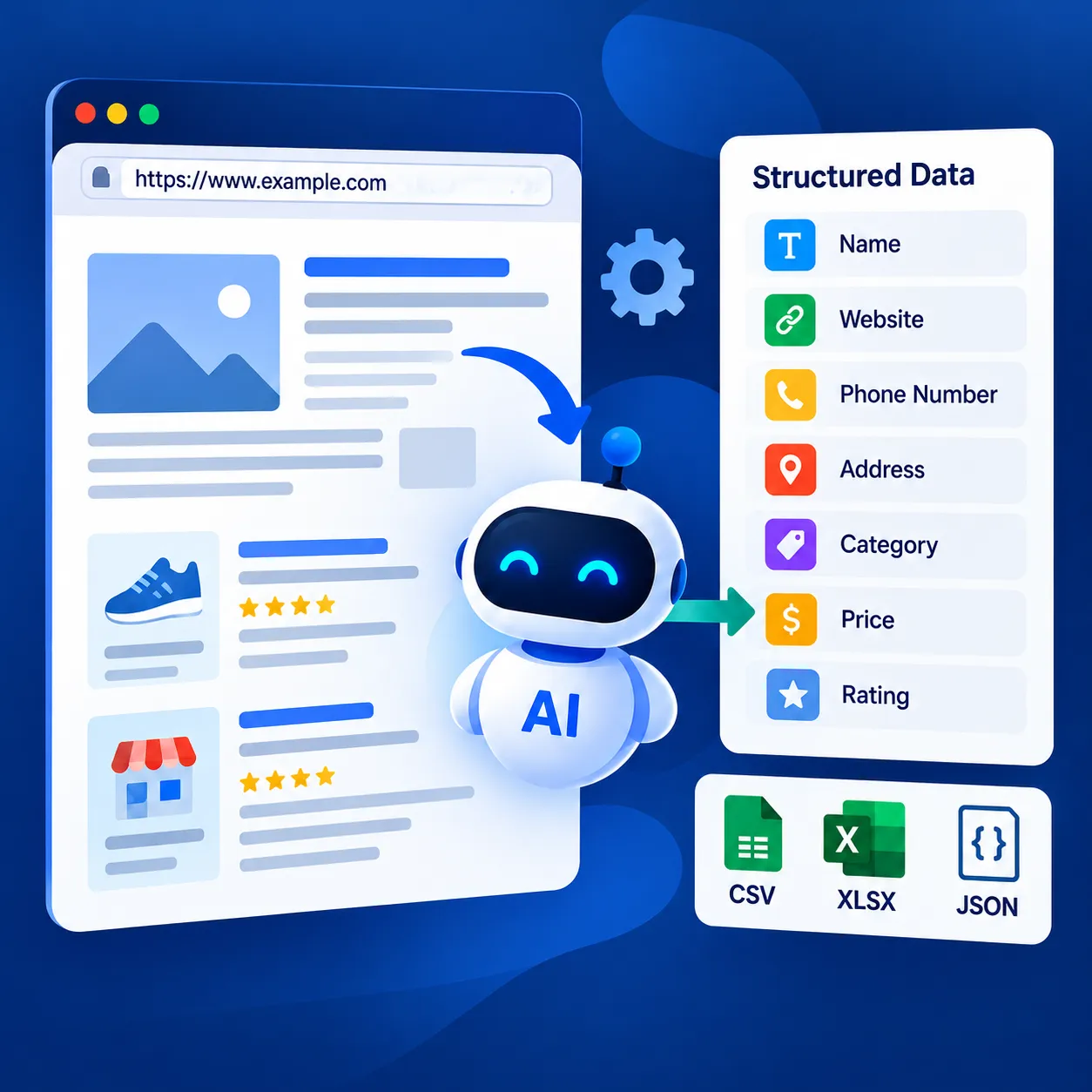
Outscraperを使用してください ユニバーサルAI搭載ウェブスクレーパー Webページの必要なフィールドを収集し、構造化データとして返すため。.
How to Choose the Right Website Data Extraction Method
The best extraction method depends on the website, the amount of data involved, and how often the process needs to run. A simple page may only need a visual scraper, while a large or recurring job may require code, an API, or a managed extraction service.

Match the Method to the Website
Start with the way the website presents its data.
A page with a stable layout and repeated fields may work well with selectors or a no-code scraper. A site that relies heavily on JavaScript, dynamic loading, or changing layouts may need a more flexible approach.
The more complex the page behavior, the more important it is to test the method before scaling the extraction.
Consider Scale, Frequency, and Maintenance
A method that works for 20 pages may not be the best choice for 20,000.
For a one-time extraction, manual setup may be acceptable. For recurring collection, maintenance becomes a bigger part of the decision.
Consider:
- how many pages need to be processed
- how often the data needs to be refreshed
- whether the page structure changes often
- how much monitoring the workflow requires
- whether your team can maintain custom scraping logic
The larger and more frequent the job, the more valuable it becomes to reduce manual checks and repeated setup.
Check Output and Data-Use Requirements
The extraction method should also fit what happens after the data is collected.
If the results need to move into a spreadsheet, database, application, or automated workflow, check whether the method supports the required output and structure.
It is also important to review the website’s access rules, the type of information being collected, and the requirements that apply to how the data will be used.
When extracting website data, also check whether the information is publicly accessible, whether the site has terms or access restrictions that apply, and whether privacy or data-protection rules affect how the collected information can be stored or used. Requirements can vary by website, data type, intended use, and jurisdiction.
A good extraction method should fit both the website and the workflow that comes after it.
Where Outscraper Fits Into a Website Data Extraction Workflow
Building your own scraper gives you control, but it also means handling testing, maintenance, page changes, and failed extraction jobs yourself.
Teams comparing the best data scraper for a project should look at the data source, required fields, scale, refresh frequency, and how much scraping infrastructure they want to maintain.
Outscraper provides scraping tools and APIs for collecting structured public data from websites and online directories, including source-specific options for platforms such as Google Maps, Google Maps Reviews, Amazon, Trustpilot, and Yellow Pages.
For broader website extraction, Outscraper’s ユニバーサルAI搭載ウェブスクレーパー can be used when you need structured data without maintaining the full scraping setup internally.
If your website extraction project involves defined fields and multiple pages, Outscraper’s Universal AI-Powered Web Scraper can be one option to consider.
How a Data Scraper Extracts Data From a Website
A データスクレイパー works by reading a webpage, locating the information it has been told to collect, and turning those values into structured records.
Loading the Page
The scraper first needs access to the webpage content.
For simpler sites, the required information may already be present in the HTML returned by the server. Other sites load part of the content later through JavaScript or additional requests.
How the page loads affects what the scraper can see and when the data becomes available.
Finding the Right Page Elements
Once the page is available, the scraper needs to identify the elements that contain the required fields.
That might include:
- a product title
- a price
- a business name
- a review rating
- a phone number
- a link
- a table row
Depending on the method, those fields can be identified through selectors, page structure, extraction rules, or AI-assisted instructions.
Extracting the Values
The scraper then collects the values from those elements.
For example, a product page might return:
- product name: Example Product
- price: $49
- rating: 4.6
- availability: In stock
The same extraction rules can then be applied across similar pages if the structure remains consistent.
Turning the Results Into Structured Records
Raw webpage content is not very useful on its own. The extracted values need to be organized into consistent fields so each record follows the same structure.
For a product page, the output might look like this:
| Product Name | Price | 評価 | 在庫状況 | Product URL |
|---|---|---|---|---|
| Example Product A | $49 | 4.6 | In stock | example.com/product-a |
| Example Product B | $72 | 4.3 | Out of stock | example.com/product-b |
| Example Product C | $35 | 4.8 | In stock | example.com/product-c |
Once the fields are structured, the records can be exported, analyzed, stored in a database, or passed into another workflow.
The reliability of the final dataset depends on how consistently the scraper can find the same fields across all target pages.
Final Checklist Before You Extract Data From a Website
- Define the fields you need.
- Find the right pages or URLs.
- Check how the site loads the data.
- Choose the extraction method.
- 少量のサンプルを試験してください。.
- Validate the records.
- Confirm the output format and data-use requirements.
Need a データスクレイパー for your website extraction project? Outscraper helps you collect structured public data from websites, directories, listings, and reviews without managing the full scraping setup yourself.
よくある質問
最も頻繁な質問と回答
ウェブサイトデータスクレイパーは、ウェブページから特定の情報を収集し、それを構造化されたレコードに変換します。ページによって異なりますが、その情報には、テキスト、価格、リンク、レビュー、連絡先情報、表、リスト、その他の表示されているフィールドなどが含まれる場合があります。.
はい。ノーコードやビジュアルスクレイピングツールを使えば、スクリプトを記述することなく、ウェブページから必要なフィールドを選択することができます。これらの方法は、対象となるページが明確で一貫した構造を持っている場合に最も効果的です。.
はい。スクレイパーは、複数のURL、一覧ページ、ページネーション、またはリンクされた詳細ページを順に巡回することができます。設定の際には、そのウェブサイトがこれらのページをどのように構成し、読み込んでいるかを考慮する必要があります。.
ウェブスクレイピングはウェブページから情報を収集するのに対し、APIは定義されたインターフェースを通じて構造化されたデータを提供します。APIはアプリケーションへの組み込みが容易な場合が多いですが、利用可能なフィールドはプロバイダーが公開している内容によって異なります。.
はい、抽出ツールがそれらの形式に対応していれば可能です。データをスプレッドシートで確認、フィルタリング、クリーニング、または共有する必要がある場合、CSVやExcelがよく使われます。.
JavaScript を通じてコンテンツが読み込まれる場合、一部のページにフィールドが存在しない場合、レイアウトが異なる場合、あるいはウェブサイトの構造が変更された場合などに、データが欠落することがあります。大規模なデータ抽出を実行する前に、いくつかのページでテストを行うことで、こうした問題を早期に特定することができます。.