Daftar Isi
A prospect list may look ready for outreach because it has hundreds or thousands of rows. But some businesses may have closed, changed websites, moved locations, or stopped matching your target market. Other records may contain duplicate companies, missing contact details, or emails that should not enter an active campaign.
That is why you should clean your prospect list before uploading it to a CRM or cold outreach tool. Cleaning goes beyond removing bad email addresses. You also need to check whether each business still fits your ideal customer profile, confirm the main company details, fix inconsistent fields, remove duplicates, and separate usable records from those that need more work.
This guide explains how to turn an existing prospect file into three clear groups: Ready for Outreach, Needs Review, and Remove. By the end, you will have a smaller and better-organized list that your sales or marketing team can use with more confidence.
If you still need to create the source file, start by learning how to build a high-quality B2B lead list before applying the cleanup process.
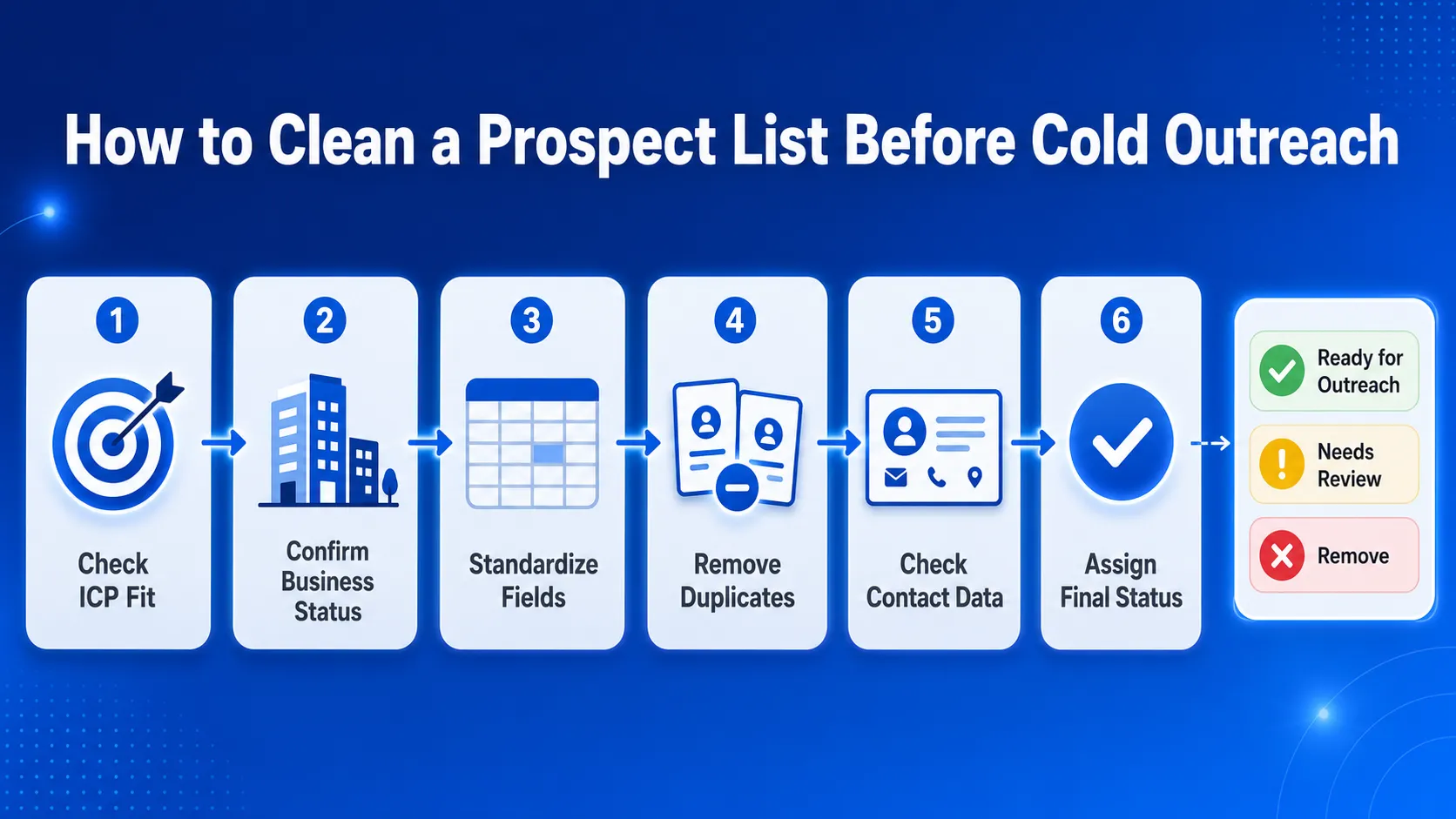
Quick Answer: How to Clean a Prospect List Before Cold Outreach
- Check each business against your current ICP.
- Confirm that the company is still active.
- Standardize the main business and contact fields.
- Remove duplicate companies and contacts.
- Fill missing data and check contact details.
- Mark each record as Ready for Outreach, Needs Review, or Remove.
Collect local business data before applying the cleaning steps in this guide.
Audit the Prospect List Against Your Current ICP
A prospect record should not stay on the list simply because the email address works. The business must still match the campaign you are preparing.
Start by reviewing the criteria your team already uses to describe a good-fit prospect. This may include industry, location, business type, company size, website status, rating, review count, or another signal connected to your offer.
Check Whether Each Business Still Fits the Campaign
Check details such as:
- business category or industry
- city, state, country, or service area
- company type or size
- website presence
- rating and review count
- business status
- reason the company belongs in the campaign
For example, a marketing agency targeting independent dental clinics in Texas should remove records for dental suppliers, clinics outside Texas, and businesses that are part of a large hospital group when those companies do not match the offer.
You can also use category, location, ratings, review count, and website status to qualify local business leads with Google Maps data.
This first check prevents your team from spending time finding contacts or checking emails for businesses that should not be contacted in the first place.
Review the Source and Last-Checked Date
Every record should show where the business data came from and when it was last checked.
Useful fields include:
- source name
- source URL
- date collected
- date last checked
- campaign or list name
Mark Each Record as Keep, Review, or Remove
Use a simple status column during the first audit.
| Status | When to Use It |
|---|---|
| Keep | The business matches the ICP and has enough information for the next cleaning step. |
| Review | The business may fit, but one or more details are missing, old, or unclear. |
| Remove | The business is outside the target market, belongs to the wrong category, is inactive, or does not fit the campaign. |
Keep is an initial audit status. Change it to Ready for Outreach only after checking the contact details and suppression rules.
Do not delete every incomplete record during this stage. A missing website or phone number does not always mean the business is a poor prospect. It may only mean the record needs fresh business data or contact enrichment.
The purpose of this first audit is to remove clear mismatches and separate uncertain records before your team spends more time cleaning the rest of the file.
Confirm Each Business Is Still Active and Reachable
Old prospect files often contain businesses that have changed websites, moved, updated phone numbers, or closed. Check the company record before spending time on contact enrichment or email checks.
Review the Main Business Details
Confirm:
- nama perusahaan
- business status
- kategori
- situs web
- nomor telepon
- alamat
- lokasi
- source or Google Maps URL
Update the row when the new details clearly belong to the same business. Mark it for review when the information is unclear or points to another company.
Separate Records by Condition
Use simple labels to show what each row needs:
- Outdated: The saved details no longer match the business.
- Incomplete: The business appears correct, but key fields are missing.
- Unconfirmed: There is not enough information to check the record.
Closed: The business is no longer operating.
Refresh the company record before looking for contacts. Remove closed, duplicate, or out-of-market businesses, and keep unclear records in a review group.
At the end of this step, the list should contain active and relevant businesses that are ready for the next cleanup stage.

Use Outscraper’s Pengikis Google Maps to collect current business names, categories, websites, phone numbers, addresses, ratings, and location details.
Standardize Fields and Remove Duplicate Records
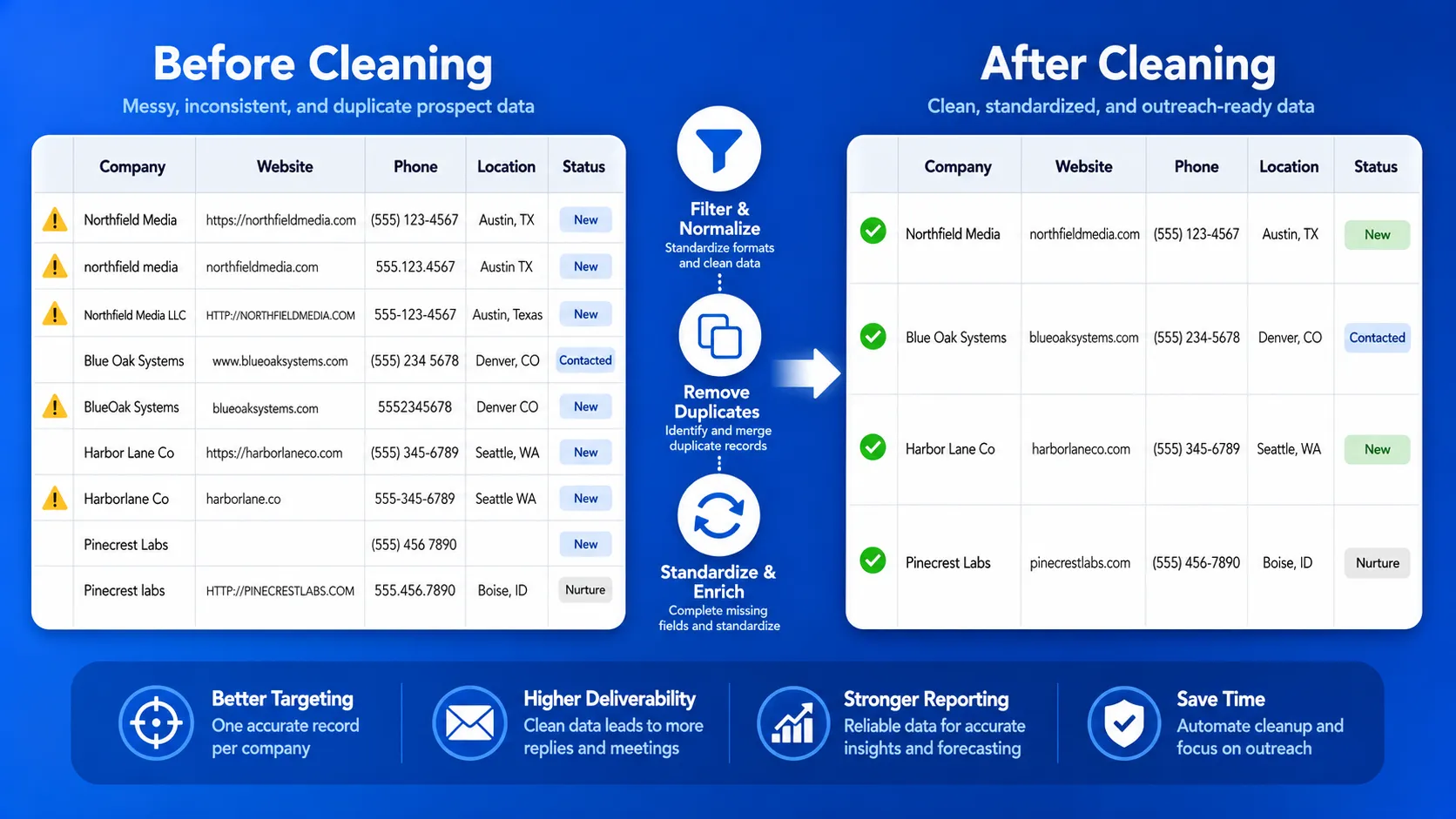
Inconsistent formatting makes duplicates harder to spot and can create errors during CRM or outreach-tool uploads. Clean the main fields before deciding which rows to keep.
Use One Format for Each Field
Apply the same format across the file for:
- company names
- website domains
- nomor telepon
- alamat email
- kategori
- cities, states, and countries
- dates
- status labels
For example, example.com, www.example.comdan https://example.com/ should be treated as the same domain when checking company records.
Keep the original source data when needed, but add a cleaned column for matching and export.
Check for Company-Level Duplicates
Do not rely only on the business name. Two companies may have similar names, while one company may appear under slightly different names.
Compare combinations such as:
- website domain
- nomor telepon
- business name and address
- business name and city
- source or Google Maps URL
Keep the record with the most current and complete information. Merge useful fields when two rows clearly belong to the same business.
Check for Contact-Level Duplicates
Several contacts from one company are not always duplicates. Keep them when they have different roles that fit the campaign.
Remove or merge records when:
- the same person appears more than once
- the same email is listed in several rows
- one contact record is clearly older
- duplicate company rows contain the same contact
After this step, each business and contact should appear only where it adds a clear reason for outreach.
Fill Data Gaps and Check Contact Details
Do not enrich every record in the file. First, keep only the businesses that match the campaign, appear active, and are not duplicates.
Then fill the missing fields needed for outreach, such as:
- situs web
- nomor telepon
- business email
- contact name
- job title
- contact page
- source URL
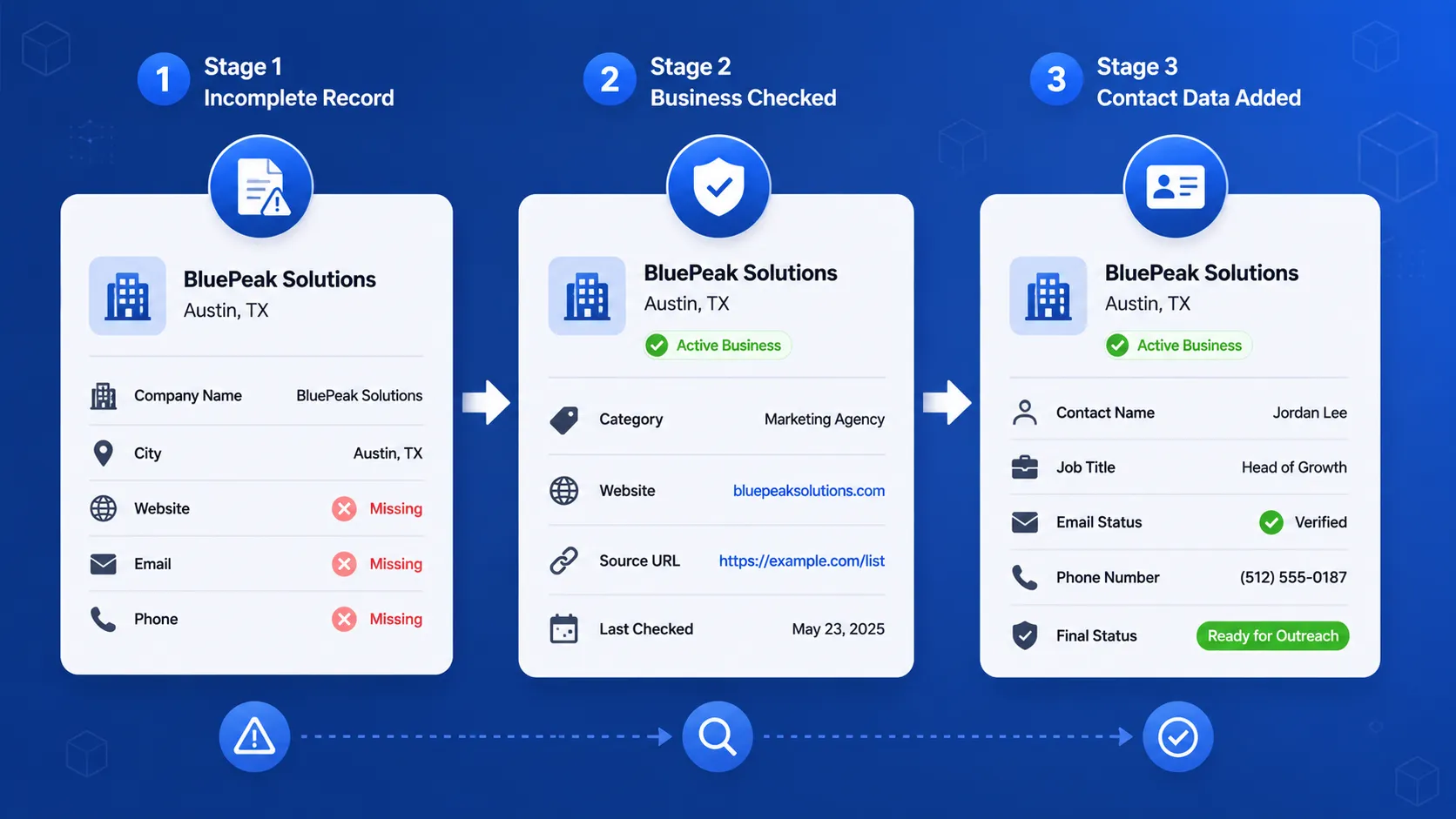
For a closer look at the data that can be added to qualified company records, read how Outscraper Leads & Contacts Enrichment works.
Keep Contacts Connected to the Business
Each contact should remain tied to the correct company record.
Include enough context to show:
- which company the person works for
- why the business fits the campaign
- where the contact data came from
- when the record was last checked
This prevents the list from becoming a group of email addresses with no clear business context.
Check Email Addresses Separately
A good-fit business can still have an unusable email address. Review each email and assign a clear status, such as:
- usable
- invalid
- risky or unclear
- role-based
- duplicate
- missing
Remove invalid and duplicate emails from the active list. Keep risky or unclear results in the review group until they can be checked again.
After collecting the contact details, use Pembersihan Daftar Email Massal to check which email addresses are suitable for the active outreach file.
Apply Suppression Rules
Before export, remove contacts that should not receive outreach, including:
- unsubscribed contacts
- existing customers
- active sales opportunities
- partners or suppliers
- employees
- contacts already active in another campaign
At the end of this step, each remaining business should have enough current company and contact data to move into final segmentation.
Use Outscraper’s Emails & Contacts Scraper to find available emails, phone numbers, and social profiles for the businesses that remain on your list.
Segment the Clean List and Assign a Final Status
A cleaned prospect list should show which records are ready to use and why each business belongs in a campaign.
Assign a Final Status
Use one final status column for every record:
| Final Status | When to Use It |
|---|---|
| Ready for Outreach | The business fits the ICP, appears active, and has enough checked contact data. |
| Needs Review | The business may fit, but one or more fields are missing, outdated, or unclear. |
| Remove | The record is closed, duplicated, suppressed, outside the target market, or unusable. |
This prevents uncertain records from entering an active campaign by mistake.
Segment the List by Outreach Reason
Group records based on the reason they fit the campaign.
Contohnya antara lain:
- perusahaan yang tidak memiliki situs web
- businesses with low ratings
- companies in a specific city or region
- businesses with checked email addresses
- companies with missing contact details
- businesses that fit a specific category
- records better suited for phone outreach
Each segment should connect to a clear offer, message, or outreach channel.
Keep Only the Fields Your Team Needs
A final outreach file may include:
- nama perusahaan
- situs web
- business category
- lokasi
- business status
- contact name
- job title
- email address
- email status
- nomor telepon
- source URL
- segment
- final status
- date last checked
- notes
Remove unused columns before export, but keep enough source and status data to review the record later.
Clean Prospect List Checklist Before Cold Outreach
- Confirm that each business matches the current ICP and target market.
- Remove closed, duplicate, suppressed, and poor-fit records.
- Standardize the main company and contact fields.
- Fill important data gaps and check contact details.
- Add the source, last-checked date, and campaign segment.
- Mark each record as Ready for Outreach, Needs Review, or Remove.
Menggunakan Outscraper tools to update business data, add contact details, and check emails before starting outreach.
FAQ
Pertanyaan dan jawaban paling sering
Prospect list cleaning is the process of verifying that each business still fits your target market, confirming key company details, removing duplicates, filling in missing fields, checking contact data, and excluding records that should not be included in an active campaign.
Prospect list cleaning covers the full company and contact record. Email list cleaning focuses only on the email address, such as whether it is usable, duplicated, risky, or invalid.
Yes. Cleaning the file before upload helps keep closed businesses, duplicate records, poor-fit prospects, and unusable contact details out of your CRM and outreach tools.
A clean prospect list should include the company name, website, category, location, business status, contact details, source URL, date last checked, campaign segment, and final record status.
Check the list before every new outreach campaign. Review it again when the data is several months old, comes from different sources, or contains records with no collection or last-checked date.