目录
一份潜在客户名单可能看起来已经准备好用于外联工作,因为其中包含数百甚至数千条记录。但其中一些企业可能已经倒闭、更换了网站、搬迁了地址,或者不再符合您的目标市场。其他记录中可能包含重复的公司信息、缺失的联系方式,或者不应纳入正在进行的营销活动的电子邮件地址。.
因此,在将潜在客户名单上传至 CRM 或冷门触达工具之前,您应先对其进行清理。清理工作不仅限于删除无效的电子邮件地址。您还需要核查每家企业是否仍符合您的理想客户画像,确认主要的公司信息,修正不一致的字段,删除重复记录,并将可用的记录与需要进一步处理的记录区分开来。.
本指南将介绍如何将现有的潜在客户文件划分为三个清晰的组别:“可立即跟进”、“需审核”和“移除”。完成后,您将获得一份规模更小、组织更合理的名单,销售或市场团队可以更有信心地使用它。.
如果您仍需创建源文件,请先了解如何 建立高质量的B2B潜在客户名单 在执行清理过程之前。.
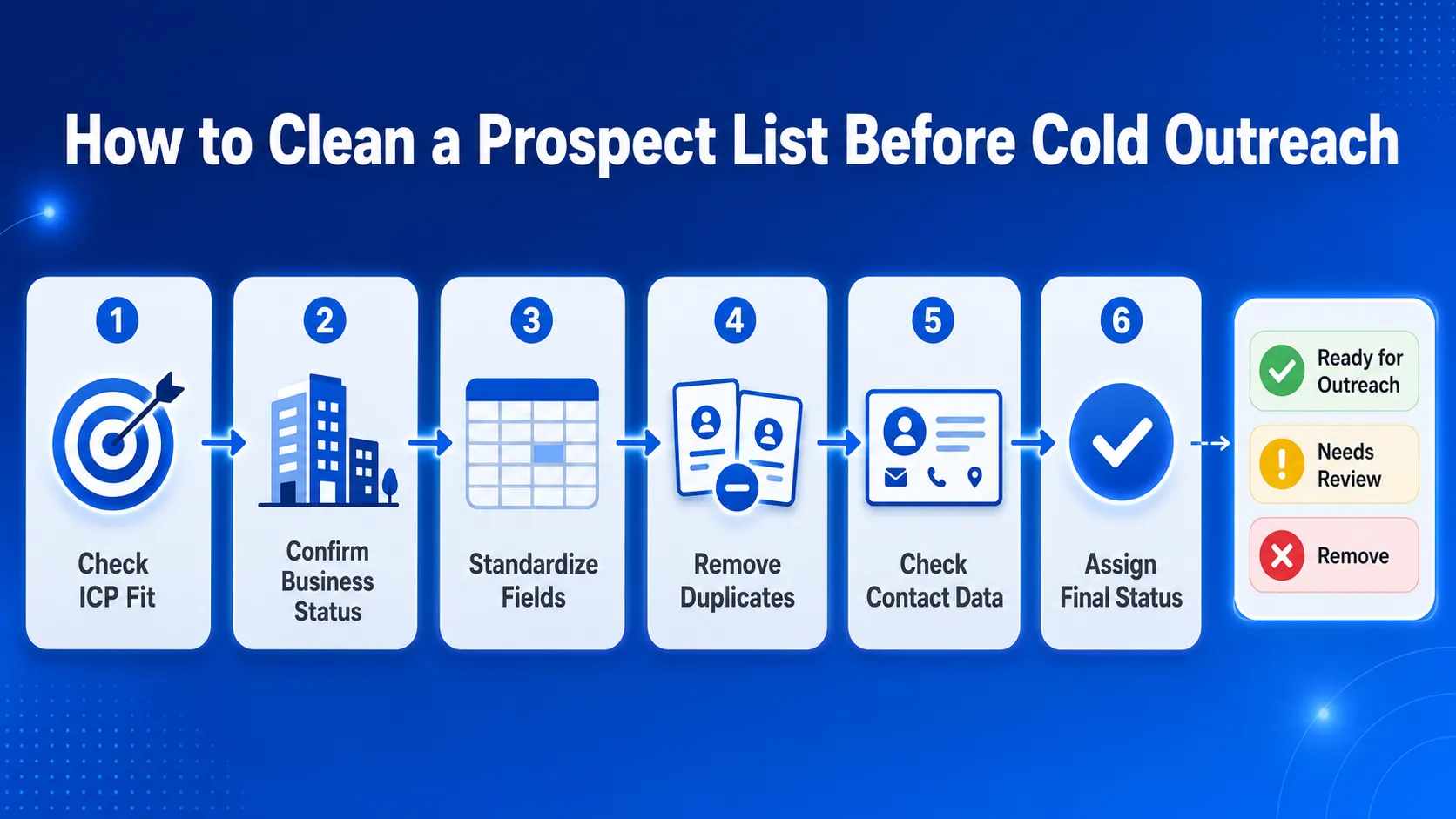
快速解答:如何在进行冷门拜访前清理潜在客户名单
- 对照您当前的ICP,逐一核对每家企业。.
- 确认该公司是否仍在运营。.
- 对主要业务和联系信息字段进行标准化处理。.
- 删除重复的公司和联系人。.
- 请补全缺失的数据并核对联系方式。.
- 将每条记录标记为“已准备好进行外展”、“需审核”或“删除”。.
在执行本指南中的清理步骤之前,请先收集本地企业数据。.
根据您当前的理想客户画像(ICP)对潜在客户名单进行审核
潜在客户记录不应仅仅因为电子邮箱地址有效就保留在列表中。该企业仍需与您正在筹备的营销活动相匹配。.
首先,回顾一下您的团队目前用来描述“合适”潜在客户的标准。这些标准可能包括行业、地理位置、业务类型、公司规模、网站状态、评分、评论数量,或者与您的服务相关的其他指标。.
检查每家企业是否仍符合该营销活动的要求
请检查以下详细信息:
- 业务类别或行业
- 城市、州、国家或服务区域
- 公司类型或规模
- 网站存在感
- 评分和评论数量
- 业务状态
- 该公司应参与该活动的原因
例如,一家以德克萨斯州的独立牙科诊所为目标客户的营销机构,应剔除牙科供应商、德克萨斯州以外的诊所以及隶属于大型医院集团的企业相关记录,因为这些公司不符合该优惠条件。.
您还可以根据类别、位置、评分、评论数量和网站状态来 利用谷歌地图数据筛选本地商机线索.
这一初步核查可以避免您的团队浪费时间去查找联系人或查看本就不应联系的企业的电子邮件。.
核对来源和最后检查日期
每条记录都应注明业务数据的来源以及最近一次核对的时间。.
有用的字段包括:
- 源名称
- 源网址
- 采集日期
- 最后检查日期
- 活动或列表名称
将每条记录标记为“保留”、“审核”或“删除”
在首次审计期间,请使用一个简单的状态列。.
| 状态 | 何时使用 |
|---|---|
| 保留 | 该业务符合ICP要求,且拥有足够的信息以进行下一步 清理工作。. |
| 评论 | 该业务可能符合要求,但其中一个或多个细节缺失、过时或 不明确。. |
| 删除 | 该企业不在目标市场范围内、所属类别不正确、 处于非活跃状态,或者不符合该营销活动的要求。. |
“保留”是一个初始审计状态。将其更改为 准备开展外展活动 只有在核对完联系信息和屏蔽规则之后。.
在此阶段,请勿删除所有信息不完整的记录。缺少网站或电话号码并不一定意味着该企业是劣质潜在客户。这可能仅仅意味着该记录需要更新业务数据或完善联系信息。.
进行首次审核的目的是,在您的团队花费更多时间清理文件其余部分之前,先剔除明显不匹配的记录,并筛选出存在疑问的记录。.
确认每家企业是否仍在运营且能够联系到
旧的潜在客户档案中往往包含一些已更换网站、搬迁、更新电话号码或已停业的企业。在花费时间进行联系人信息补充或电子邮件核查之前,请先核对公司记录。.
查看主要业务详情
确认:
- 企业名称
- 业务状态
- category
- 网站
- 电话号码
- 地址
- 地点
- 来源或谷歌地图网址
当新信息显然属于同一企业时,请更新该行。若信息不明确或指向另一家公司,请将其标记为待审核。.
按条件划分记录
使用简单的标签来标明每一行需要什么:
- 已过时: 保存的详细信息已与该企业不符。.
- 不完整: 业务信息看似正确,但缺少关键字段。.
- 未经证实: 信息不足,无法核查该记录。.
已关闭:该企业已停止营业。.
在查找联系人之前,请先更新公司记录。剔除已关闭、重复或已退出市场的企业,并将不明确的记录归入审核组。.
完成此步骤后,列表中应包含处于活跃状态且相关的企业,这些企业已准备好进入下一阶段的清理工作。.

规范字段并删除重复记录
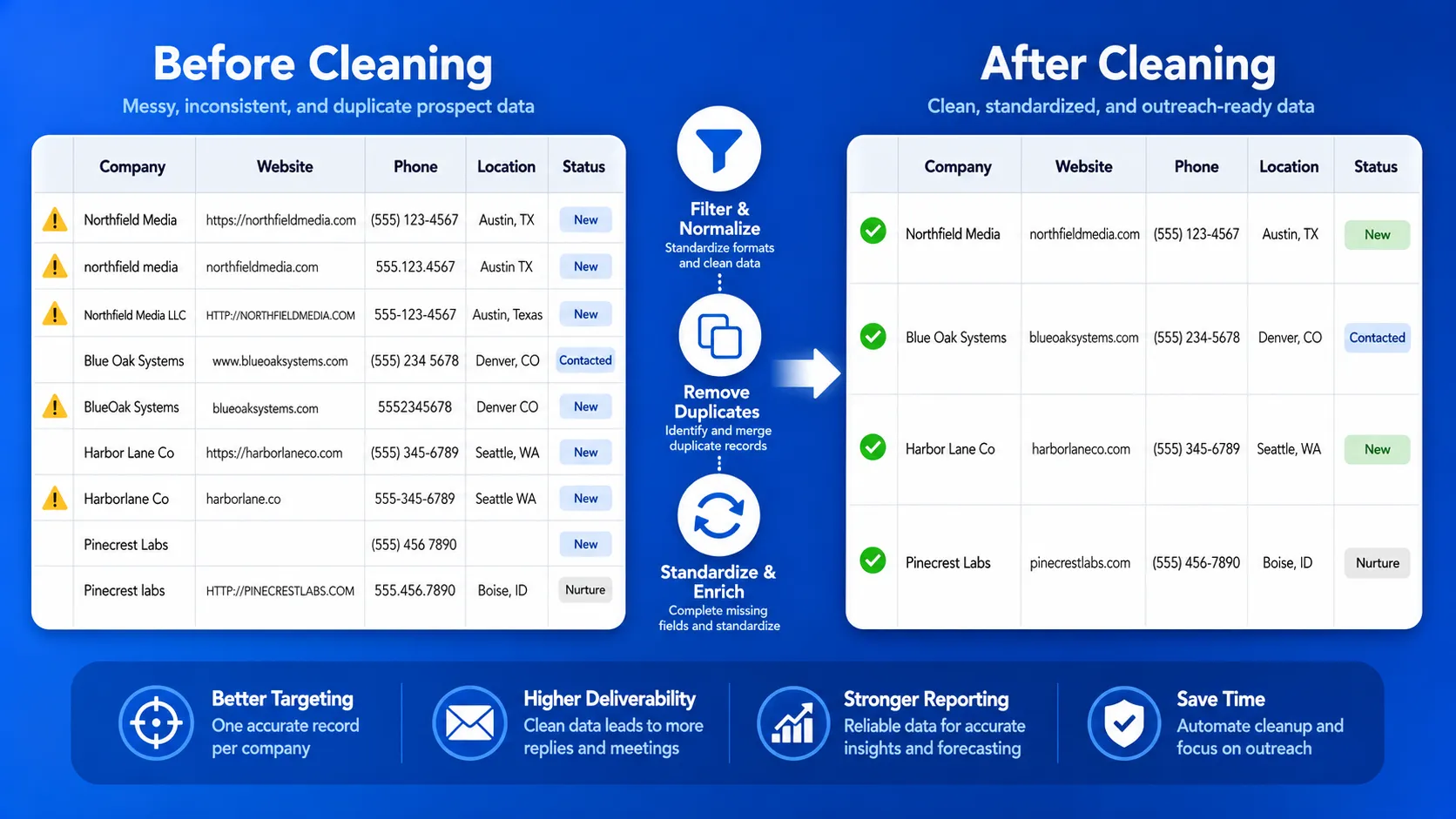
格式不统一会使重复数据更难被发现,并在将数据上传至CRM或外联工具时导致错误。在决定保留哪些行之前,请先清理主要字段。.
每个字段使用一种格式
在整个文件中,对以下内容应用相同的格式:
- 公司名称
- 网站域名
- 电话号码
- 电子邮箱地址
- 类别
- 城市、州和国家
- 日期
- 状态标签
例如,, example.com, www.example.com,以及 https://example.com/ 在核查公司记录时,应将其视为同一域名。.
在需要时保留原始源数据,但添加一个经过清理的列用于匹配和导出。.
检查公司层面的重复项
不要仅凭公司名称来判断。两家公司的名称可能相似,而同一家公司也可能以略有不同的名称出现。.
比较以下组合:
- 网站域名
- 电话号码
- 企业名称和地址
- 公司名称和城市
- 来源或谷歌地图网址
确保记录中的信息是最最新且最完整的。当两行数据显然属于同一家企业时,请合并相关字段。.
Check for Contact-Level Duplicates
Several contacts from one company are not always duplicates. Keep them when they have different roles that fit the campaign.
Remove or merge records when:
- the same person appears more than once
- the same email is listed in several rows
- one contact record is clearly older
- duplicate company rows contain the same contact
After this step, each business and contact should appear only where it adds a clear reason for outreach.
Fill Data Gaps and Check Contact Details
Do not enrich every record in the file. First, keep only the businesses that match the campaign, appear active, and are not duplicates.
Then fill the missing fields needed for outreach, such as:
- 网站
- 电话号码
- business email
- contact name
- job title
- contact page
- 源网址
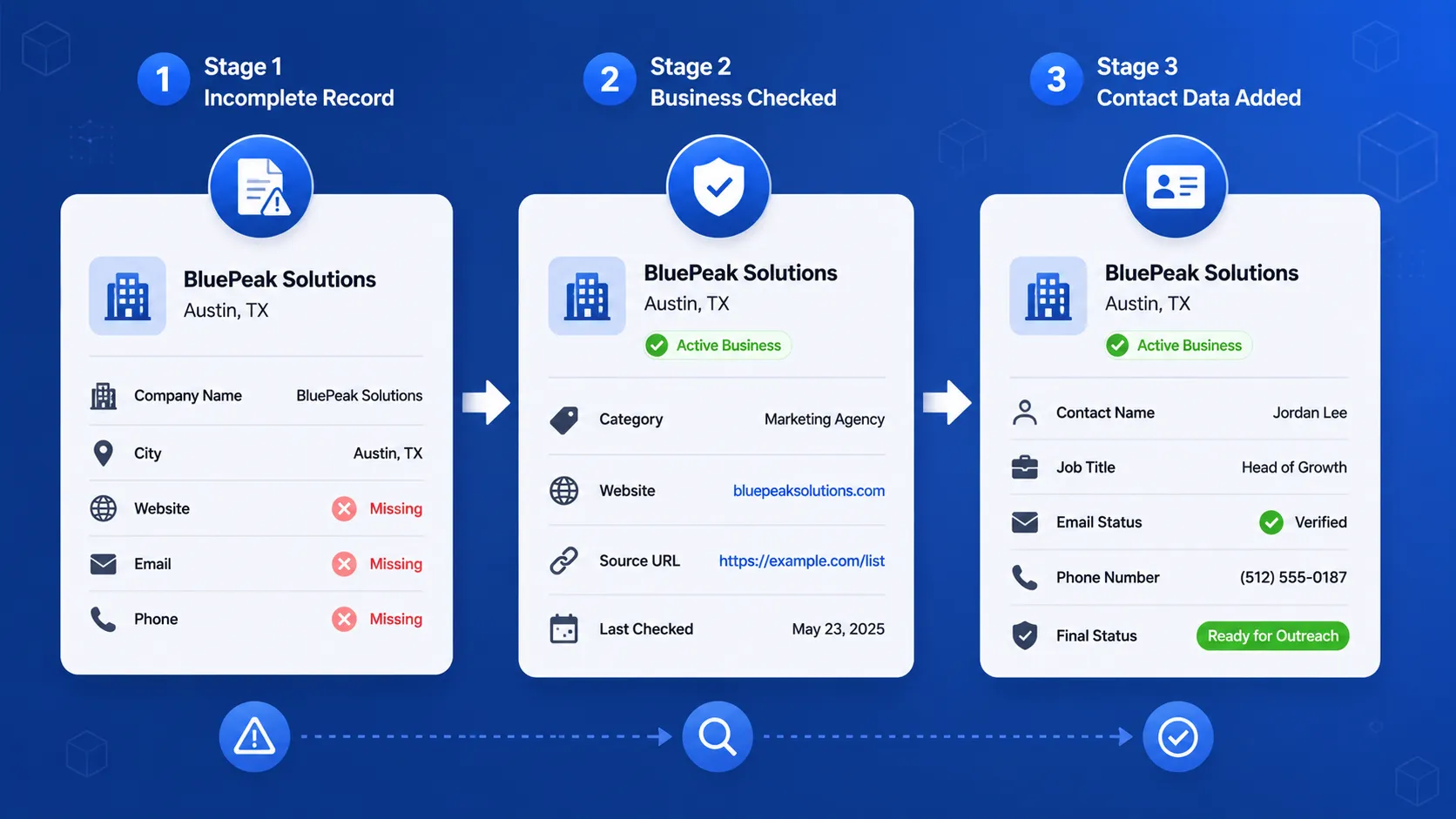
For a closer look at the data that can be added to qualified company records, read how Outscraper Leads & Contacts Enrichment works.
Keep Contacts Connected to the Business
Each contact should remain tied to the correct company record.
Include enough context to show:
- which company the person works for
- why the business fits the campaign
- where the contact data came from
- when the record was last checked
This prevents the list from becoming a group of email addresses with no clear business context.
Check Email Addresses Separately
A good-fit business can still have an unusable email address. Review each email and assign a clear status, such as:
- usable
- invalid
- risky or unclear
- role-based
- duplicate
- missing
Remove invalid and duplicate emails from the active list. Keep risky or unclear results in the review group until they can be checked again.
After collecting the contact details, use 群发邮件列表清理 to check which email addresses are suitable for the active outreach file.
Apply Suppression Rules
Before export, remove contacts that should not receive outreach, including:
- unsubscribed contacts
- existing customers
- active sales opportunities
- partners or suppliers
- employees
- contacts already active in another campaign
At the end of this step, each remaining business should have enough current company and contact data to move into final segmentation.
Use Outscraper’s Emails & Contacts Scraper to find available emails, phone numbers, and social profiles for the businesses that remain on your list.
Segment the Clean List and Assign a Final Status
A cleaned prospect list should show which records are ready to use and why each business belongs in a campaign.
Assign a Final Status
Use one final status column for every record:
| Final Status | 何时使用 |
|---|---|
| 准备开展外展活动 | The business fits the ICP, appears active, and has enough checked contact data. |
| Needs Review | The business may fit, but one or more fields are missing, outdated, or unclear. |
| 删除 | The record is closed, duplicated, suppressed, outside the target market, or unusable. |
This prevents uncertain records from entering an active campaign by mistake.
Segment the List by Outreach Reason
Group records based on the reason they fit the campaign.
例如:
- 没有网站的企业
- businesses with low ratings
- companies in a specific city or region
- businesses with checked email addresses
- companies with missing contact details
- businesses that fit a specific category
- records better suited for phone outreach
Each segment should connect to a clear offer, message, or outreach channel.
Keep Only the Fields Your Team Needs
A final outreach file may include:
- company name
- 网站
- business category
- 地点
- 业务状态
- contact name
- job title
- email address
- email status
- 电话号码
- 源网址
- segment
- final status
- 最后检查日期
- notes
Remove unused columns before export, but keep enough source and status data to review the record later.
Clean Prospect List Checklist Before Cold Outreach
- Confirm that each business matches the current ICP and target market.
- Remove closed, duplicate, suppressed, and poor-fit records.
- Standardize the main company and contact fields.
- Fill important data gaps and check contact details.
- Add the source, last-checked date, and campaign segment.
- Mark each record as Ready for Outreach, Needs Review, or Remove.
用 Outscraper tools to update business data, add contact details, and check emails before starting outreach.
常见问题
最常见的问题和答案
潜在客户名单清理是指核实每家企业是否仍符合您的目标市场、确认关键公司信息、删除重复记录、补充缺失字段、检查联系信息,并剔除不应纳入当前营销活动的记录。.
潜在客户名单清理涵盖整个公司及联系人记录。而电子邮件名单清理则仅针对电子邮件地址,例如检查其是否可用、是否重复、是否存在风险或是否无效。.
是的。在上传前对数据进行清理,有助于避免已关闭的企业、重复记录、不匹配的潜在客户以及无效的联系方式进入您的 CRM 和外联工具。.
一份完整的潜在客户列表应包含公司名称、网站、类别、所在地、企业状态、联系方式、来源网址、最后核查日期、营销活动分段以及最终记录状态。.
在每次开展新的外联活动之前,请检查该列表。当数据已过数月、来自不同来源,或包含没有采集日期或最后核查日期的记录时,请再次核对该列表。.