Índice
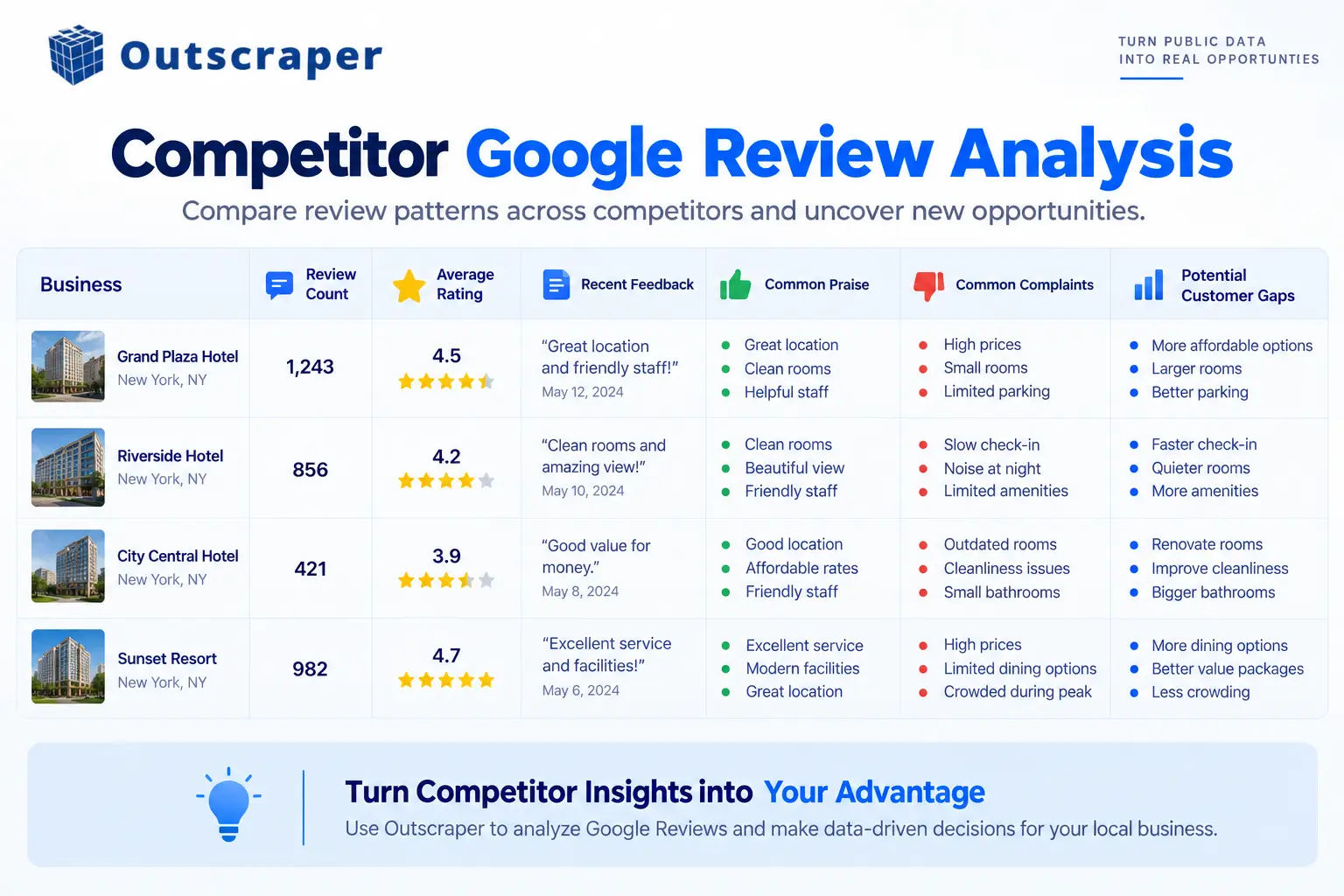
Google reviews can show more than whether customers gave a business four or five stars. When you compare competitor reviews at scale, you can see recurring complaints, customer priorities, service gaps, and language that appears repeatedly across a local market.
That makes reviews useful for competitor research and local SEO planning. The goal isn’t to copy what competitors are doing. It’s to understand what their customers are saying and turn those patterns into useful decisions.
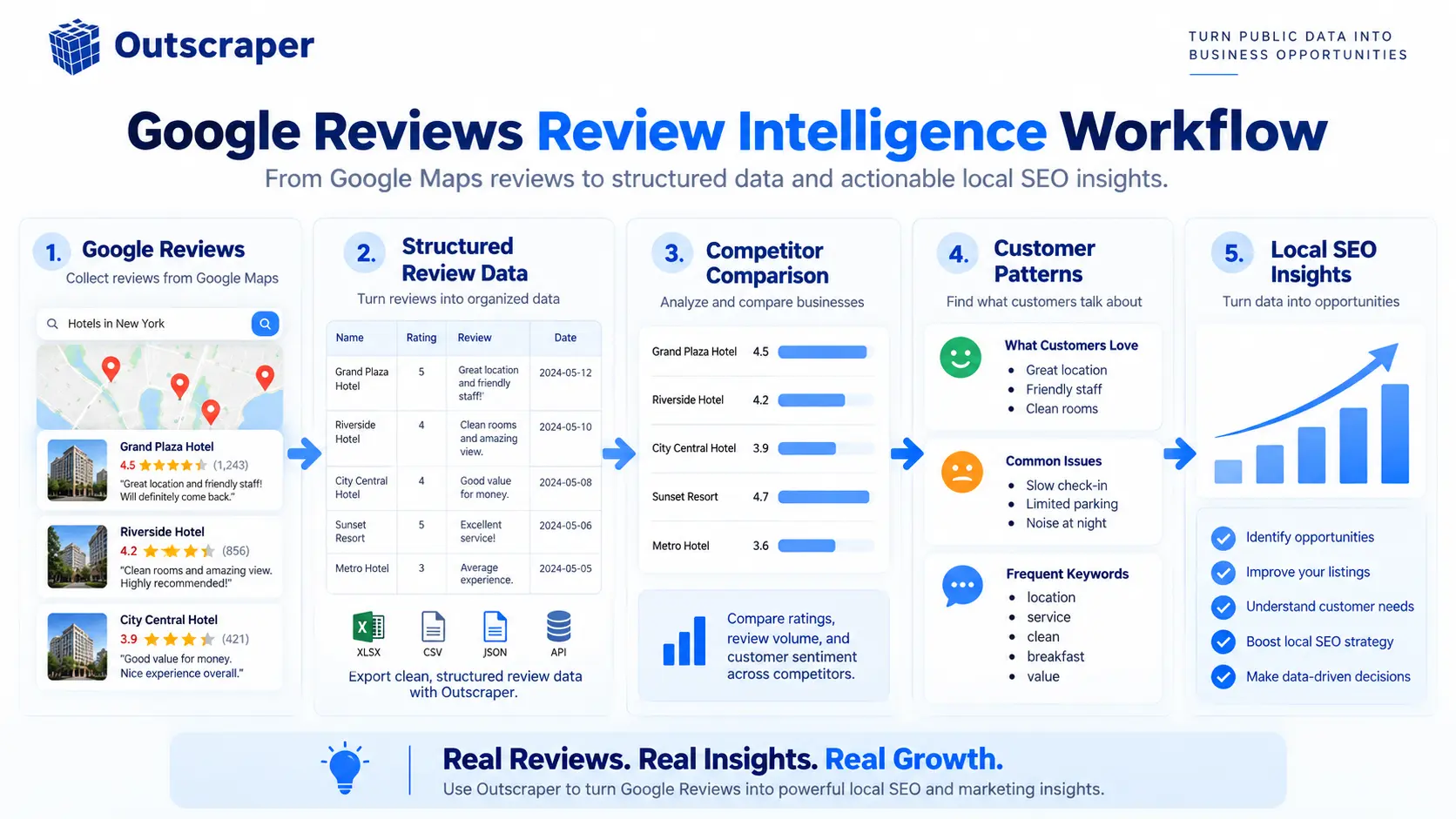
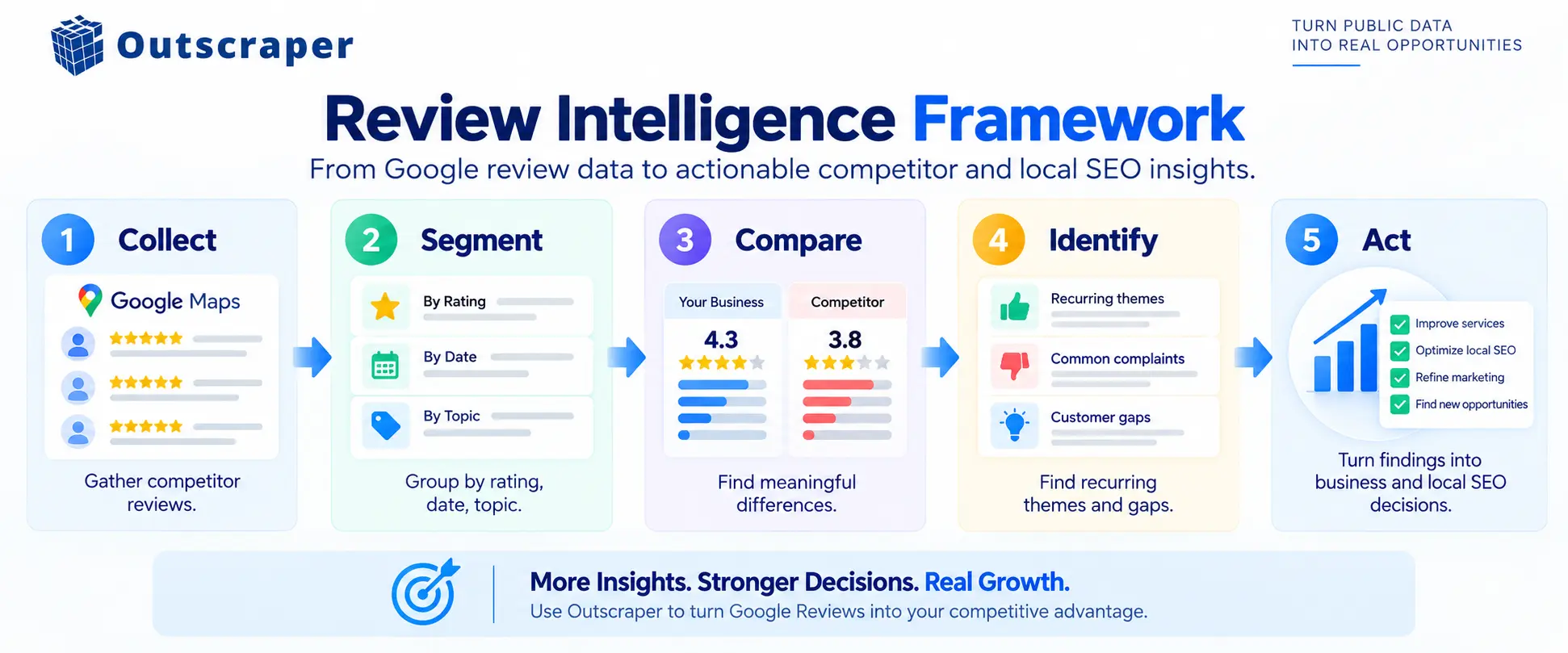
Review Intelligence is the process behind that work: collect the review data, organize it, compare competitors, identify meaningful patterns, and decide what those findings mean for your business.
Quick Answer: What Is Competitor Review Analysis?
Competitor review analysis is the process of collecting and comparing reviews from competing businesses to understand ratings, customer feedback, recurring complaints, common praise, and changes over time.
For local SEO, this information can help you understand what customers value in a market and where competitors may have gaps. Google says local results are mainly based on relevance, distance, and prominence, and that more reviews and positive ratings can contribute to local prominence. Reviews are therefore one useful source of competitive information, but they do not provide a guaranteed ranking formula. Google’s official local ranking guidance
What Can Google Reviews Tell You About Competitors?
A competitor’s star rating is useful as a starting point, but it doesn’t explain the customer experience behind the number.
Google displays review scores, top reviews, and total review counts for local businesses. Google’s review score documentation
For competitor research, the review text, rating, date, and other available fields provide more context.
Review volume
Compare the number of reviews across businesses competing in the same market.
A large difference in review volume can provide useful context when comparing businesses with similar services and locations. It can also help you identify which competitors have accumulated substantially more customer feedback.
Review volume is a benchmark, not proof that one business provides a better experience.
Ratings
Average ratings provide another quick comparison.
For example, if several competitors are between 4.4 and 4.8 stars while one is substantially lower, the difference deserves a closer look.
The rating alone doesn’t tell you what caused the difference. That’s where the review text becomes more useful.
Recurring customer themes
Look for topics that appear repeatedly across reviews.
Depending on the industry, customers may repeatedly mention:
- Staff and customer service
- Waiting times
- Precios
- Product or service quality
- Availability
- Cleanliness
- Communication
- Location or convenience
- Specific services
A recurring theme becomes more interesting when it appears across several businesses rather than in one isolated review.
Positive and negative patterns
Reviews can show what customers consistently praise as well as what frustrates them.
For example, customers might repeatedly praise one competitor’s staff while mentioning long waiting times at another.
Those observations can help marketers understand which parts of the customer experience appear important in that market.
The useful question isn’t: “How can we copy this competitor?”
It’s: “What does this feedback tell us about customer expectations?”
Go beyond star ratings. Collect review data at scale and look for recurring customer themes, complaints, and gaps across competing businesses.
Recent changes
Review dates add another layer to the comparison.
A business’s overall rating can hide what customers have been saying recently. Comparing recent reviews with older feedback can help you spot changes in customer experience or recurring issues that are becoming more common.
How to Collect Competitor Google Reviews at Scale
Reading reviews manually can work for three or four competitors. It becomes much harder when the research covers dozens of businesses or multiple locations.
The first step is to define the businesses you actually want to compare.
You might select competitors based on:
- The same local search results
- The same business category
- The same city or service area
- Similar services
- The same customer segment
- Multiple locations of competing brands
Once the competitor set is defined, collect comparable review data from each business.
Define your competitor set
Start with the research question.
If you’re analyzing dentists in one city, for example, decide whether you’re comparing the businesses ranking for specific searches, the largest practices in the market, or competitors offering a particular service.
That decision matters because the competitor list determines the quality of the comparison.
Collect the review data
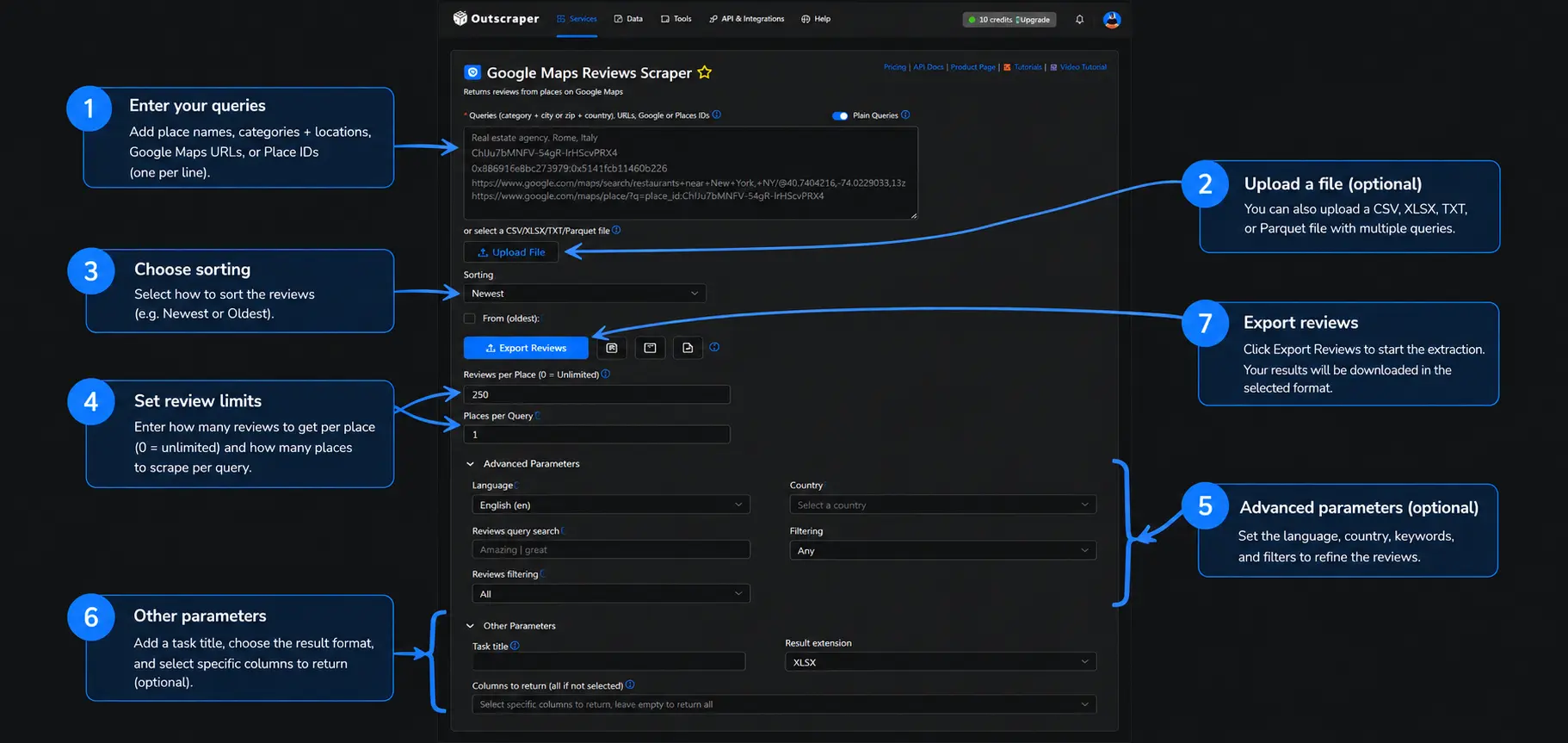
Outscraper's El Scraping de reseñas de Google Maps can collect Google Maps review data and return structured fields that can be exported for analysis.
For teams building automated workflows, the API de reseñas de Google Maps provides another way to retrieve review data programmatically.
The important point is to collect the same type of information across competitors so the results can be compared consistently.
Keep the data structured
Depending on the research goal, useful fields can include:
- Business name
- Ubicación
- Overall rating
- Número de reseñas
- Review rating
- Review text
- Review date
- Owner response
- Review link
- Business identifier
You don’t necessarily need every available field.
Collect the fields that answer the question you’re researching.
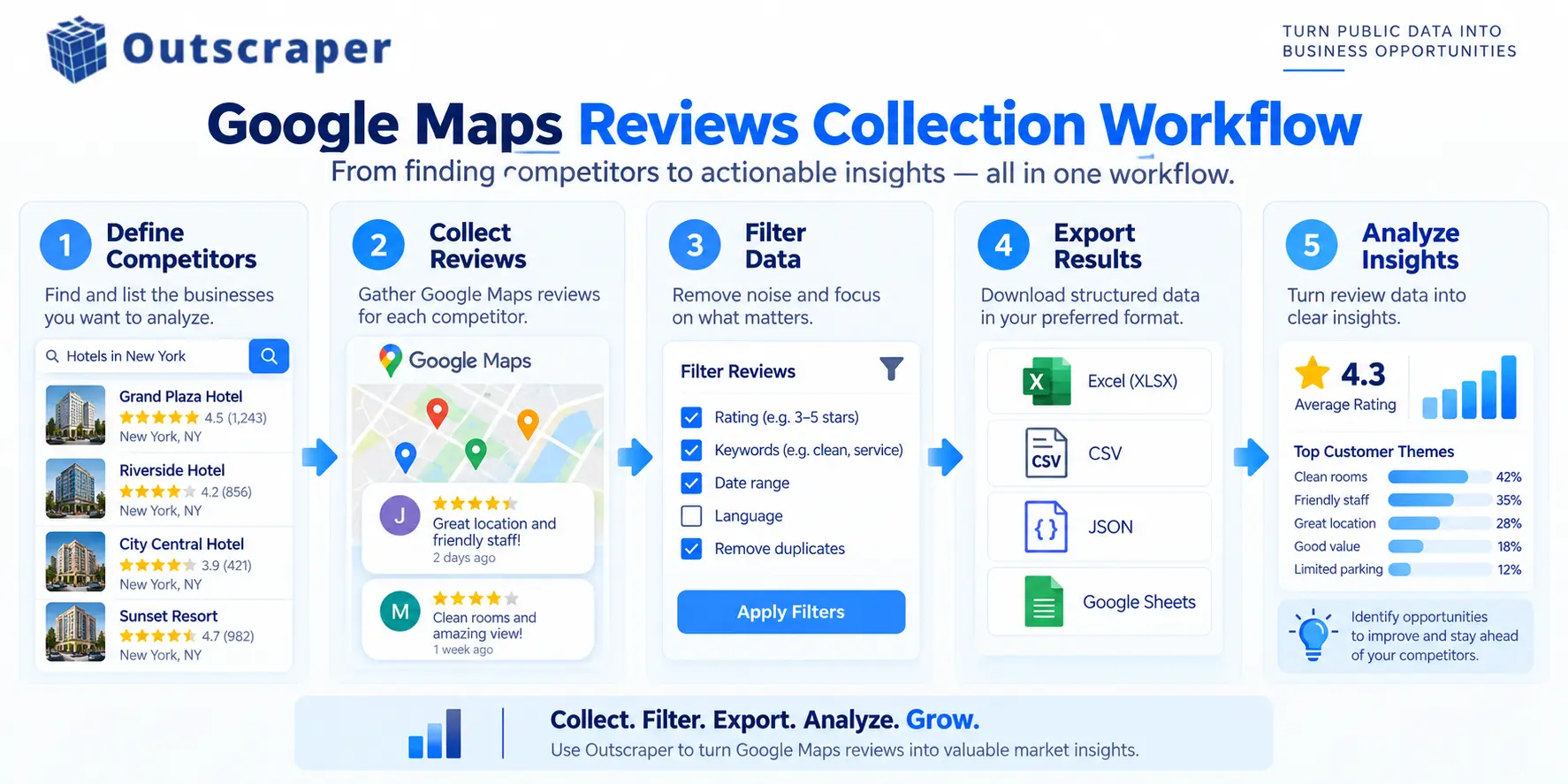
Filter before analyzing
A large review dataset becomes easier to work with when you narrow it to the information that matters.
For example, you could separate:
- Recent reviews
- One-star reviews
- Five-star reviews
- Reviews mentioning a specific service
- Reviews from a defined period
- Reviews from selected competitors
If you need the collection process itself, Outscraper’s How to Scrape Google Maps Reviews guide provides the deeper scraping workflow.
How to Turn Review Data Into Review Intelligence
Collecting reviews gives you the raw material. The next step is finding patterns that can answer a specific business question.
A practical Review Intelligence workflow is: Collect → Segment → Compare → Identify → Act
Compare Review Patterns
Start by organizing the reviews so each competitor can be evaluated using the same criteria.
You might group the data by rating, date, business, location, service, or recurring topic. This makes it easier to compare competitors without treating every review as an isolated comment.
Por ejemplo:
| Signal | Competitor A | Competitor B | Competitor C |
|---|---|---|---|
| Número de reseñas | 850 | 520 | 310 |
| Average rating | 4.7 | 4.5 | 4.3 |
| Common praise | Staff | Velocidad | Quality |
| Common complaint | Precios | Wait time | Availability |
| Recent trend | Positive | Mixed | Negative |
The numbers above are illustrative. A real comparison should use values from the dataset you’re analyzing.
Looking at these signals together gives you more context than comparing star ratings alone.
Identify Customer Gaps and Opportunities
The most useful findings usually come from patterns that appear more than once.
Look for recurring customer language, common complaints, frequently praised services, and issues that appear across several competitors.
For example, customers might repeatedly mention:
- Long waiting times
- Difficulty booking appointments
- Pricing concerns
- Helpful staff
- Fast service
- Limited availability
A single review may not mean much. When the same topic appears across many reviews or competitors, it becomes a stronger research signal.
Those patterns can help inform content topics, FAQs, service messaging, customer experience improvements, and further market research.
The goal isn’t to copy a competitor’s wording. It’s to understand what customers are consistently talking about and decide whether those findings matter to your business.
How to Turn Review Insights Into Local SEO Actions
Review analysis can give you evidence about what customers discuss in a local market. It should support your local SEO strategy, not replace it.
Google says local results are mainly based on relevance, distance, and prominence. It also says that more reviews and positive ratings can help a business’s local ranking through prominence. Google Business Profile: Tips to improve your local ranking on Google
That makes review data useful for competitive research, but it does not make reviews a shortcut to higher rankings.
Find Content and Messaging Opportunities
Suppose customers repeatedly ask competitors about parking, appointment availability, pricing, or a particular service.
Those questions can reveal topics worth addressing in your own content.
Review language can also show how customers describe a service in their own words. That can help inform FAQs, service-page messaging, content briefs, and other marketing research.
The important distinction is between using customer language as research and simply copying a competitor’s content.
Monitor Competitors Over Time
Competitor research becomes more useful when you can compare changes rather than relying on one snapshot.
A competitor may receive hundreds of new reviews, experience a change in rating, or begin receiving repeated feedback about a different service.
For ongoing monitoring, Outscraper’s Google Maps Reviews Tracker can track new reviews periodically. That makes it useful when the research requires repeated collection rather than a single review export.
If you’re comparing multiple businesses or locations, Outscraper can help you collect review data consistently so you can spend less time gathering rows manually and more time analyzing the patterns.
Define the Research Process
Before collecting reviews, decide what you want to learn.
Por ejemplo:
- Which customer complaints appear most often?
- What do customers consistently praise?
- Which services generate the most feedback?
- What has changed recently?
- Which problems appear across several competitors?
Then use the same competitor selection, review period, fields, and collection criteria across the dataset.
This makes the results easier to compare and reduces the risk of drawing conclusions from inconsistent data.
Common Mistakes to Avoid
Looking only at star ratings.
A rating gives you a quick benchmark, but the review text provides the context behind it.
Collecting reviews without a research question.
A larger dataset isn’t automatically a better dataset. Start with the decision you want the research to support.
Treating reviews as a ranking formula.
Google identifies relevance, distance, and prominence as the main local ranking factors. Reviews can contribute to prominence, but they don’t guarantee a particular ranking position. Google’s local ranking documentation
Copying competitor messaging.
Use review language to understand customer needs, not to reproduce another business’s content.
Ignoring recent reviews.
An overall rating can hide changes in recent customer feedback.
Trying to analyze everything manually.
Manual research becomes harder to maintain as the number of businesses and reviews increases.
Preguntas frecuentes
Preguntas y respuestas más frecuentes
Yes. Reviews can provide information about ratings, review volume, customer feedback, and recurring themes. Google also says that review count and positive ratings can contribute to local prominence, while local ranking depends on multiple factors. Google Business Profile: Tips to improve your local ranking on Google
Start with review volume, ratings, review dates, recurring positive and negative themes, customer language, and changes over time. Then compare those signals across competitors.
Yes. Outscraper’s El Scraping de reseñas de Google Maps is designed to collect Google Maps review data and provide structured results for further analysis.
Yes. Outscraper’s Google Maps Reviews Tracker is designed to track new reviews periodically, which can support ongoing competitor research.
No. Google says local rankings are mainly based on relevance, distance, and prominence. More reviews and positive ratings can help local ranking, but they do not guarantee a particular position. Google Business Profile: Tips to improve your local ranking on Google
Review Intelligence is a way to turn review data into useful market information. Instead of looking at individual reviews separately, you collect comparable data, group recurring themes, compare competitors, identify meaningful gaps, and use those findings to guide marketing, local SEO, or customer experience decisions.
If competitor reviews are part of your local SEO or market research process, start with a defined competitor set, collect comparable review data, and use the patterns you find to guide the next decision.