目录
Finding Businesses Without Websites for Cold Outreach
Most cold outreach fails before the first email is sent because it targets the wrong businesses without websites. The problem is not messaging or timing. The reason is simple. The list is wrong.
According to multiple Clutch surveys, roughly one in five to one in three small businesses still operate without a website, often relying on Google Maps listings or social profiles for visibility.
That gap matters for outreach.
If you are reaching out to businesses without websites, you are not running a branding campaign. You are building a lead list with clear intent. These businesses already show gaps in their online presence. That gap often points to missed revenue, weak visibility, or outdated processes.
This approach is about finding, qualifying, and contacting those businesses with precision.
You are not here to learn theory. You are here to build a list that supports outreach that gets replies.
Businesses without websites are easier to spot than most people think. They appear on Google Maps. They collect reviews. They show phone numbers and addresses. What they lack is a proper site, tracked traffic, or owned visibility. That combination makes them strong outreach targets for SEO, web design, lead generation, and local growth services.
The goal of this guide is to focus on:
- Locating businesses that do not list a website.
- Confirming they are active and reachable.
- Preparing the data for email or phone outreach.
This is not general marketing advice. It is a practical process for people doing cold outreach at scale.
使用每月可更新的免费套餐,免费试用Outscraper。
Why Businesses Without Websites Are Strong Cold Outreach Leads
Not every strong lead looks modern on the surface. Businesses without websites often appear outdated, but the assumption is incorrect.
Many of these companies represent traditional business leads that still generate revenue through referrals, walk-ins, and repeat customers.
They are still active but simply rely on offline channels or third-party platforms to do the work a website normally handles.
That gap is what makes them valuable for cold outreach. You are not pitching an abstract idea. You are pointing to a visible limitation that affects lead flow, visibility, and control.
Why Many Local Businesses Still Operate Without Websites
Many local businesses stay offline because their current setup still brings customers in. Referrals, repeat clients, and walk-in traffic cover daily needs, so a website feels optional.
Cost also plays a role. Owners often see a site as an expense rather than a revenue driver. This pattern shows up most often in long-standing businesses that never adjusted after local search became common.
These businesses are active and profitable, but are limited to offline demand, making them classic examples of offline businesses that have not fully transitioned to online visibility.
How a Missing Website Creates Outreach Opportunity
A missing website creates a clear and visible gap.
Without a website, businesses miss inbound leads from local searches and branded queries. They rely on Google Maps listings without having a place to explain services or capture inquiries.
For outreach, this gap is easy to confirm and easy to explain. You are pointing to something the business can see for itself, which makes the outreach message more relevant and grounded.
What Makes a Business Without Website Worth Contacting
Not every business without a website deserves outreach time. Some are active and reachable. Others look open on the surface but rarely respond. The difference shows up in the basic signals you can check before outreach begins.
Signals that indicate an Outreach-Ready Business
An active phone number is the first requirement. If calls connect and the listing details match how the business responds, the operation is likely active.
Recent reviews are another strong signal. Reviews from the past few months show ongoing demand and suggest the owner pay attention to the listing.
Updated information also matters. Accurate hours, current photos, and correct categories often point to owner-managed or small team businesses where outreach reaches a decision-maker.
Businesses That Usually Do Not Convert
Some businesses rarely respond to outreach.
Owners who intentionally avoid online exposure often keep listings bare or outdated. That choice is usually deliberate and hard to change.
Temporary, seasonal, or inactive listings also convert poorly. Old reviews, disconnected numbers, or long periods of inactivity usually signal limited interest or closed operations.
Filtering these out early keeps outreach focused on businesses that can respond.
How to Find Businesses Without Websites Using Google Maps and Search
Finding businesses without websites doesn’t have to be complicated. If you want to automate this process at scale, this guide on how to scrape businesses without websites from Google Maps shows how to identify listings missing website links efficiently.
You can also follow a few simple steps and checking basic signals. You can quickly build a list of outreach-ready leads.
How to Spot Businesses Without an Online Presence on Google Maps
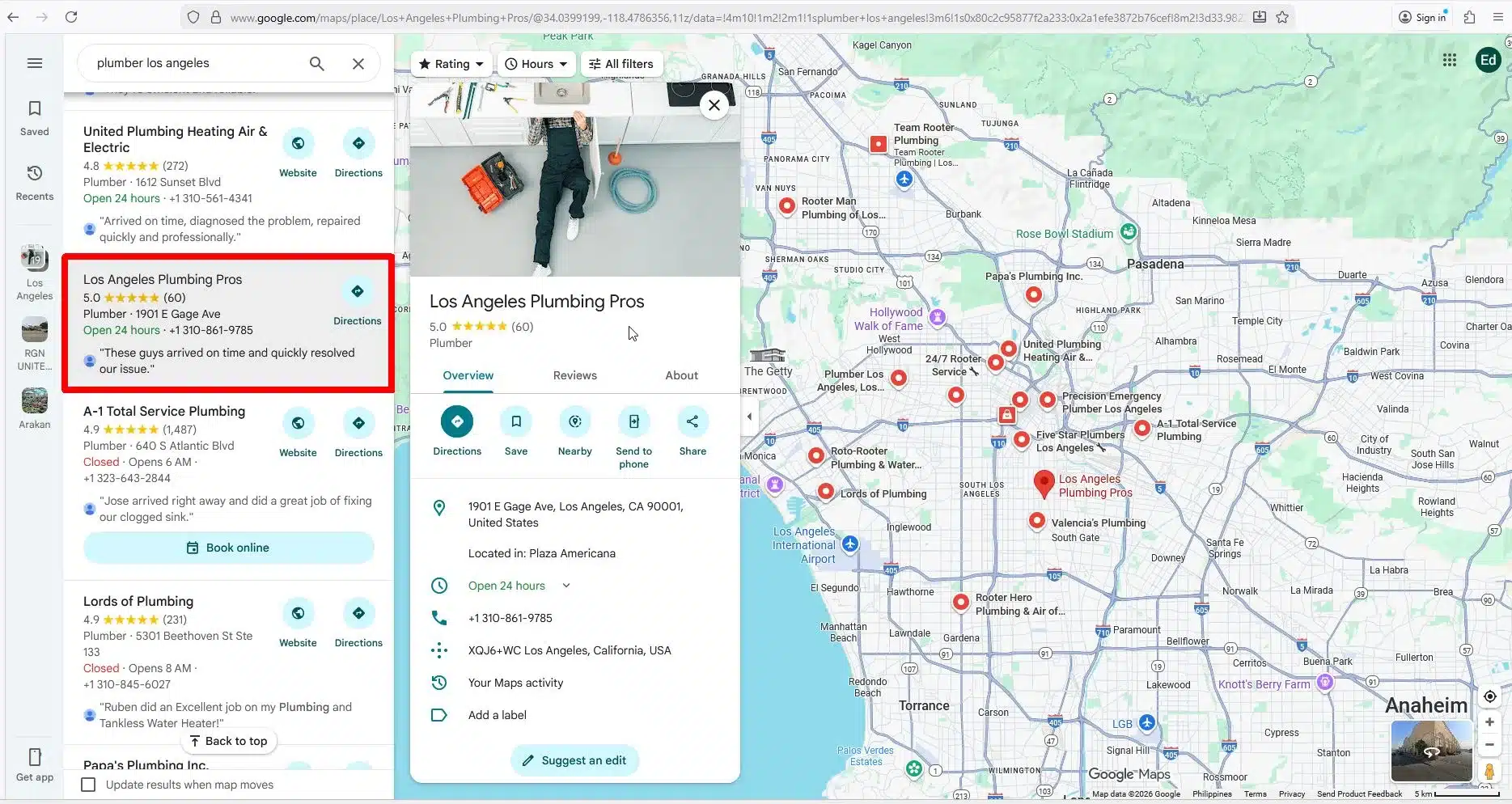
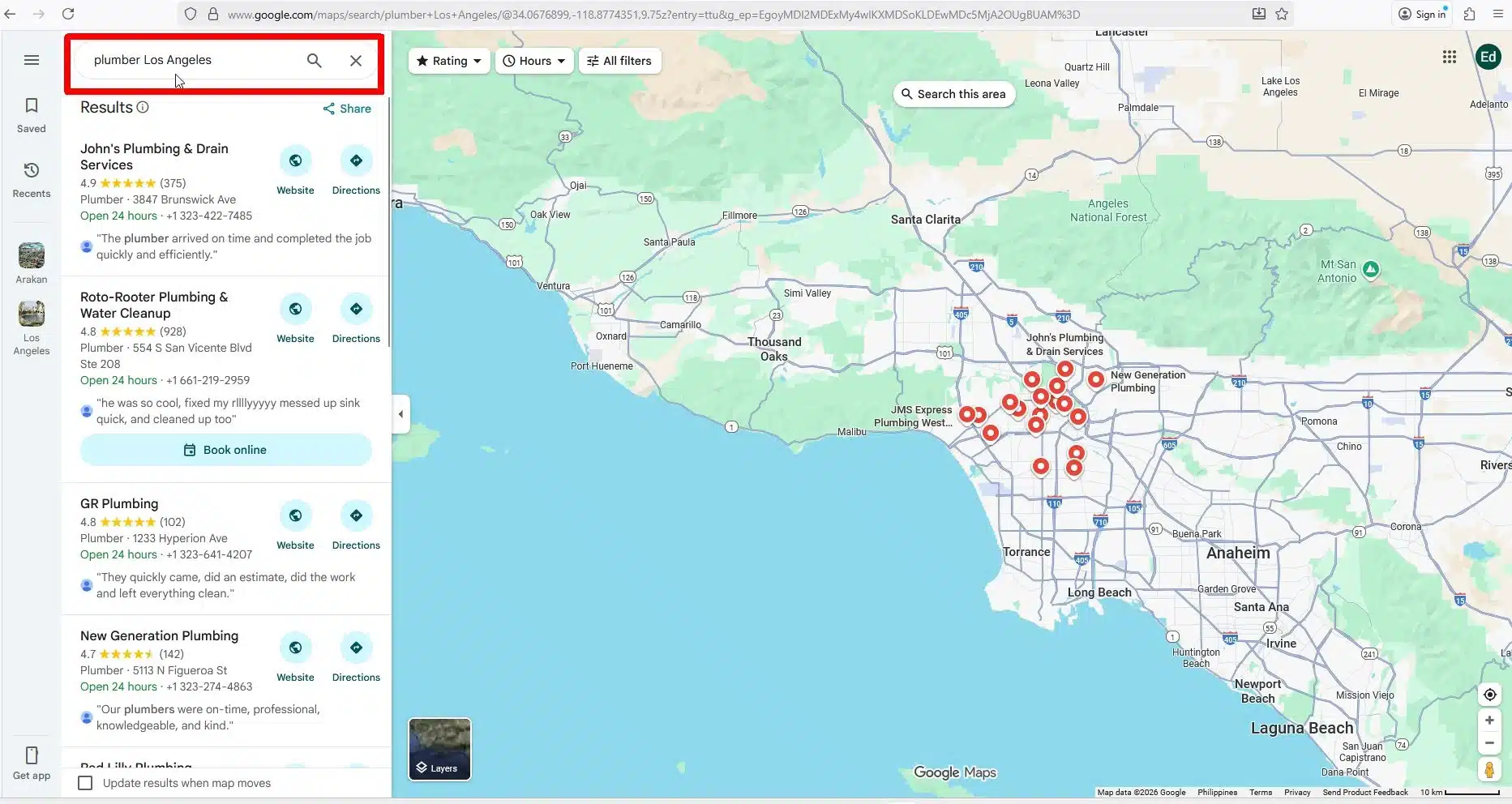
- Open Google Maps and search for a service in a city (e.g., “plumbers Los Angeles”).
- Look at individual listings. Check if the website field is empty. Listings that only show a phone number or directions are potential targets.
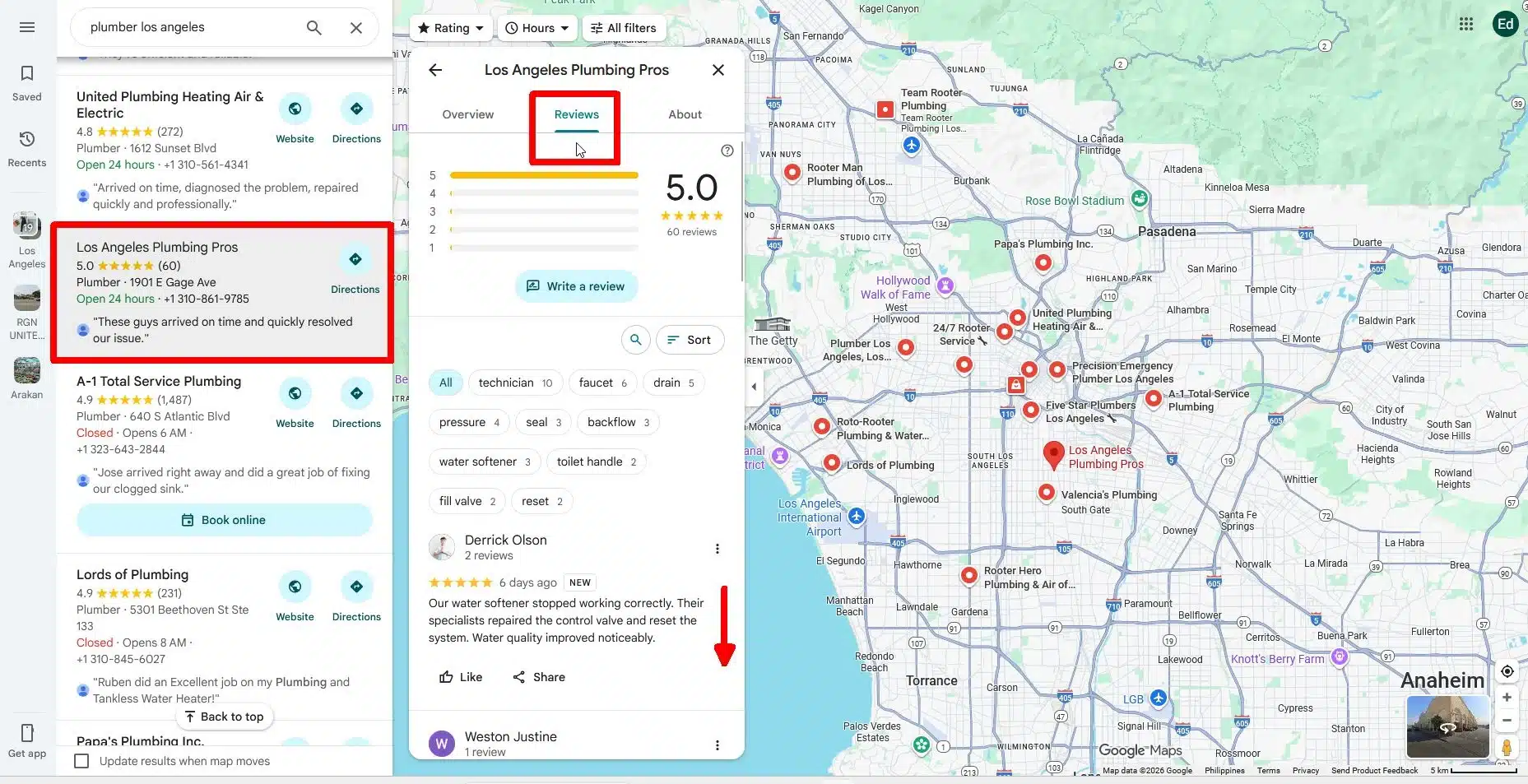
- Check reviews and activity. Recent reviews indicate an active business even if there’s no website.
- Confirm contact info. Ensure the phone number works and the address is correct. Active listings with these signals are ready for outreach.
Search Patterns that Surface Offline Businesses
- Service + city search: On Google Search or Google Maps, type the service and location (e.g., “plumbers Los Angeles”). You can also use 谷歌搜索抓取工具 if you don’t want to go through the manual process.
- Look for directories dominating results: Listings appearing on review sites, Thumbtack, or other directories instead of a company website often indicate businesses without a website.
- Focus on small operators: Owner-managed businesses and small teams are more likely to respond to outreach.
- Record the data: Save the business name, phone, address, and any other relevant info. Repeat for multiple searches to grow your database.
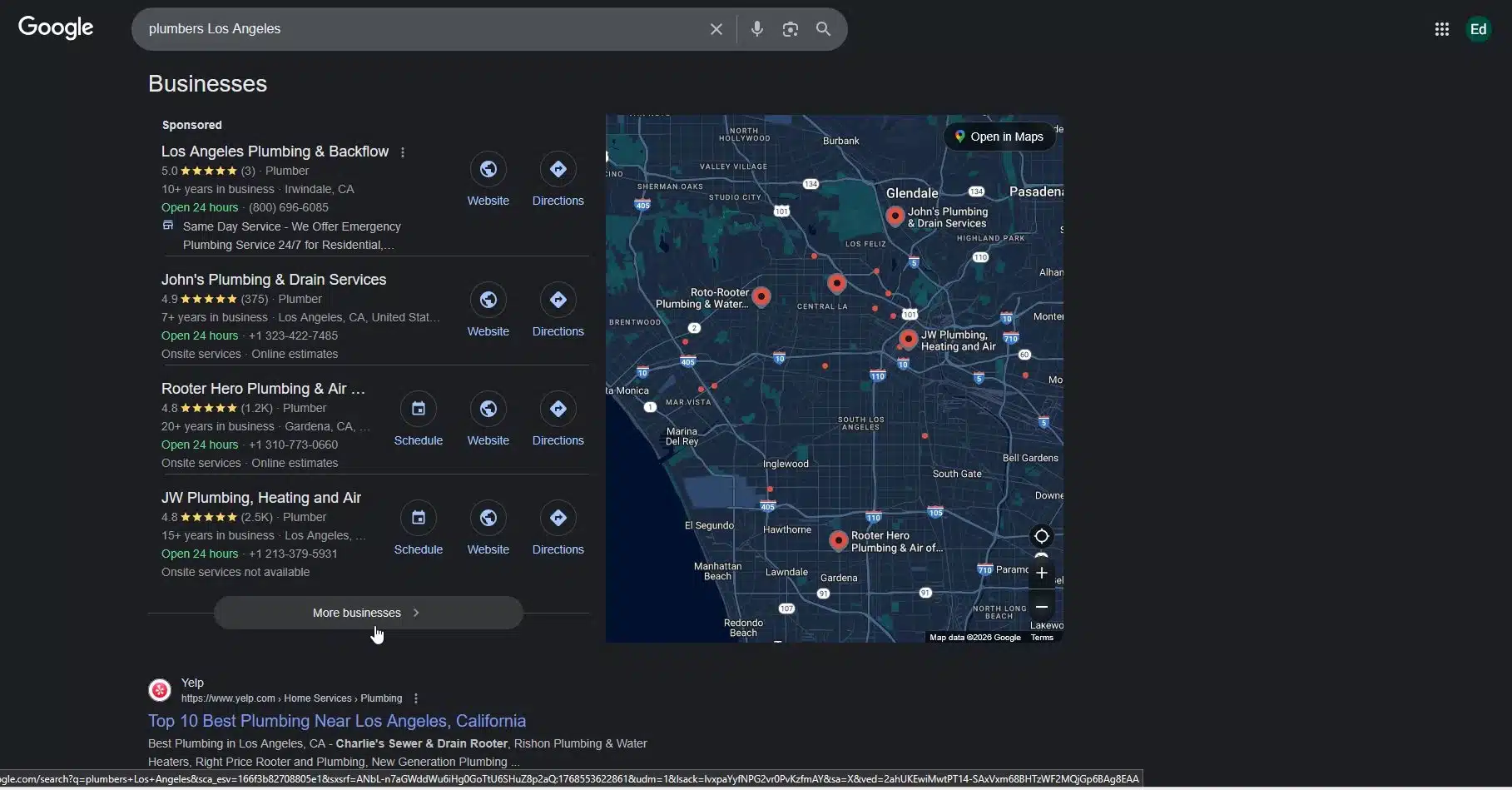
These strategies work in both Google Maps and Google Search as they will reveal listings without websites, but Maps often gives more detailed contact information and operational signals.
You can also combine both tools, so that you can efficiently find these brick-and-mortar businesses while confirming they are active and reachable.
Expanding Your Lead List with Directories and Social Platforms
If Google Maps and Search give you the first layer of businesses without websites, directories, and social platforms provide the next layer. Many small operators maintain an online presence through third-party platforms rather than a dedicated website, offering another rich source of outreach targets.
Finding Businesses Without an Online Presence Using Directories
Start with directories such as Yellow Pages, popular review platforms, and local business associations. Look for listings that provide a phone number, address, and services, but no website link.
A directory-only presence signals an opportunity. These businesses are visible enough to attract customers but lack a central site to capture leads or showcase offerings. They often respond well to outreach that offers measurable value, like setting up a simple website or improving local search presence.
Identifying Social-Only Business With No Website
Many small businesses rely solely on the world’s most popular social network or the popular photo-sharing app pages for visibility. Some never add a website field and handle all inquiries through messages or comments.
These social-only profiles are typically owner-managed, meaning outreach is more likely to reach a decision-maker. The lack of a website creates a clear gap that can be addressed with tailored services, from web design to local lead generation solutions.
By combining directory and social signals, you can expand your lead list beyond the businesses found in Maps and search results, ensuring a wider pool of reachable prospects.
Turning Raw Finds Into Cold-Outreach Ready Leads
Finding these offline businesses is just the beginning. The next step is preparing data so that outreach is effective. Raw listings become actionable leads when you know what to collect and how to verify it.
Validating emails before outreach improves deliverability and reduces bounce rates.
This is where structured lead generation matters, turning basic listings into verified contact data ready for outreach.
What Contact Details Matter for Cold Outreach
The most critical details are simple but essential:
- Phone numbers – Ensure they connect and reach a live person.
- Owner names – Knowing the decision-maker increases response rates.
- Email addresses – If available, they provide a direct, trackable channel for outreach.
Because outreach depends heavily on accurate contact data, you can use Outscraper’s Email scraper to extract emails and other contacts. Choosing the right channel depends on the business. Small, owner-managed businesses often respond faster to calls or messages. Businesses with email access may prefer a short, personalized email that highlights a clear gap.
Running a Quick Website Gap Analysis Before Outreach
Before sending messages, verify that the business truly lacks a website.
- Confirm no active site exists: Search for the business name with the city on Google and Maps.
- Note missing features: Forms, tracking, or local search visibility are signs that the business relies solely on offline or third-party channels.
This quick website gap analysis ensures your outreach is relevant, factual, and grounded in observable gaps, making your pitch stronger and more credible.
Using Outscraper to Find and Prepare Businesses Without Websites
Manual searching can be slow and inconsistent. Using Google Maps and Google search one-by-one takes time and efforts. Outscraper automates the process, helping you quickly locate, filter, and prepare businesses without websites for targeted cold outreach campaigns.
Step-by-Step Process
单击 “编辑” 按钮更改此文本。这是测试文本。
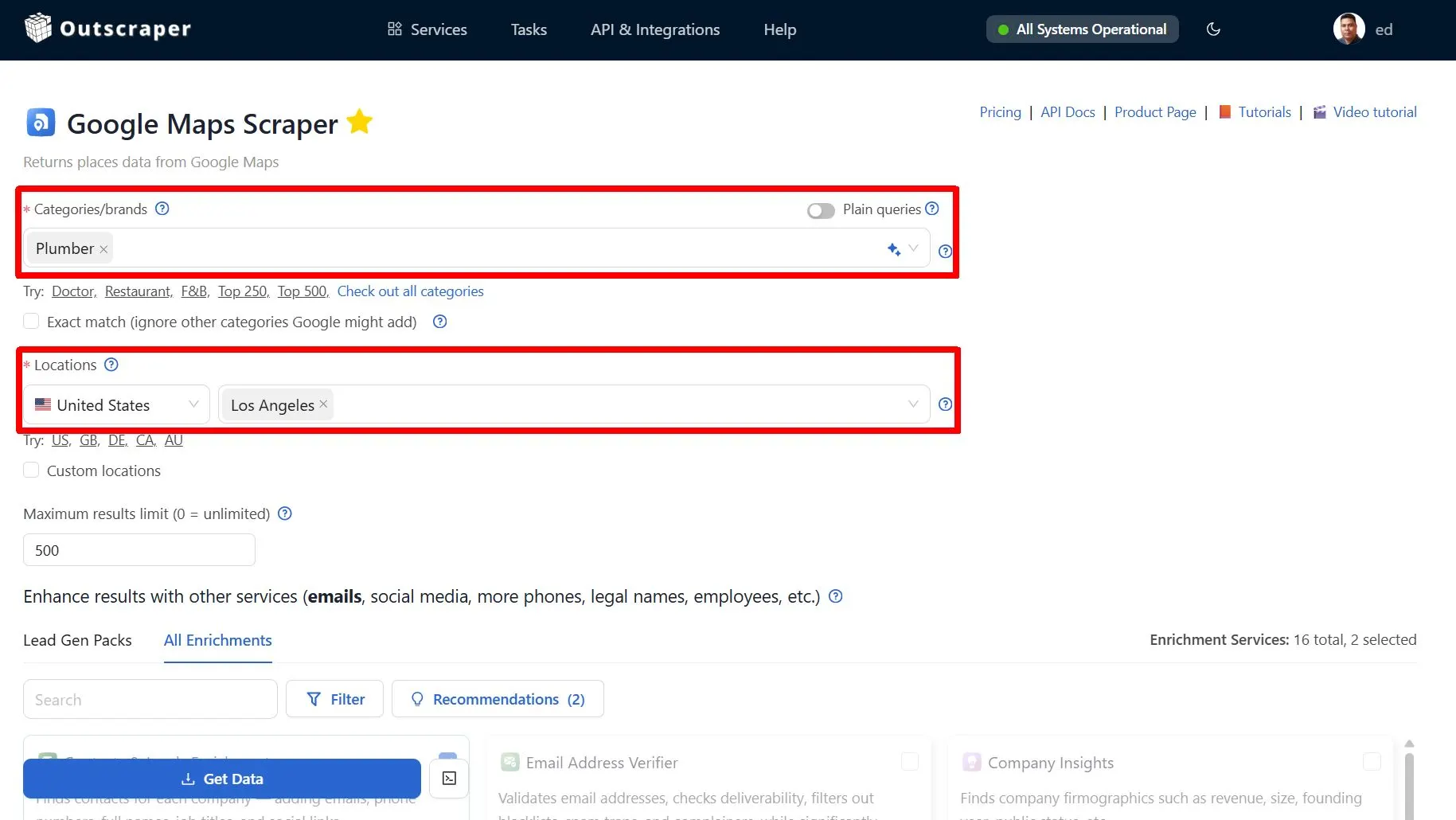
- 登录 或者 Sign-up with Outscraper. Select business category and location. (e.g., “plumbers Los Angeles”).
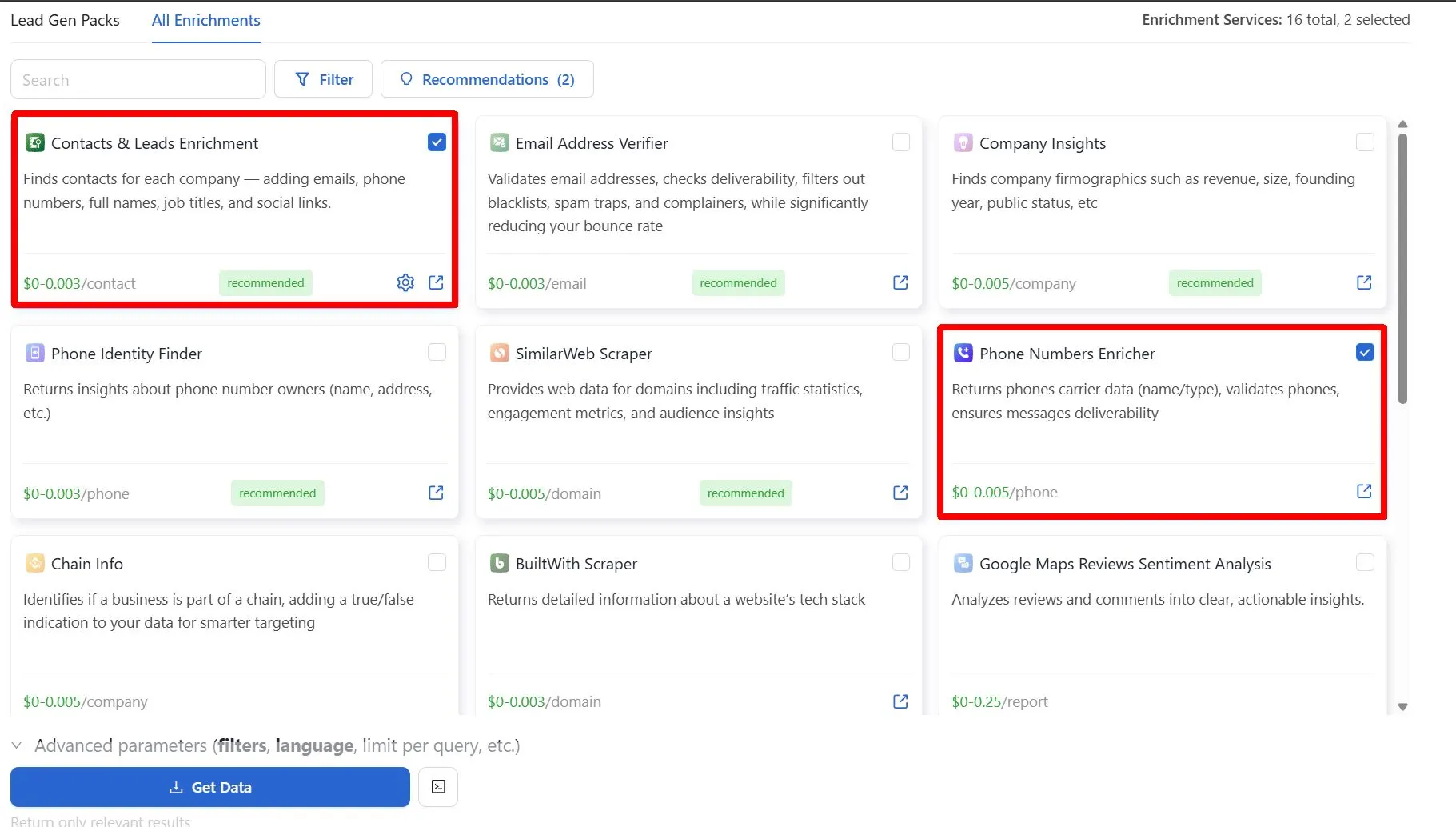
- Input the number of leads you want to download. Add enrichments depending on your needs.
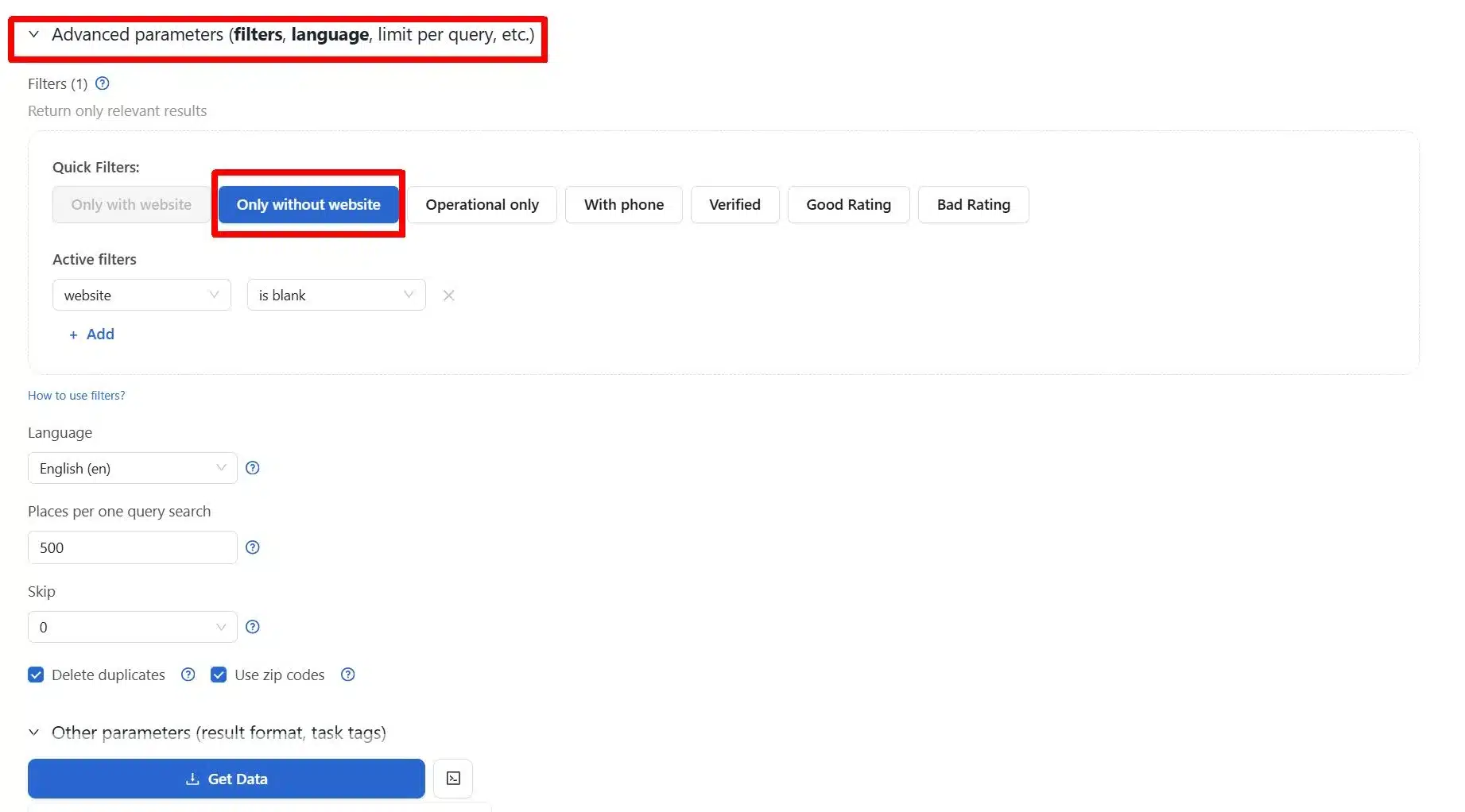
- Proceed to the Advanced Filters and select the “Businesses Without Websites Only” option. Outscraper’s 谷歌地图数据抓取工具 filters help isolate businesses without websites, so you only work with listings that show a clear outreach gap.
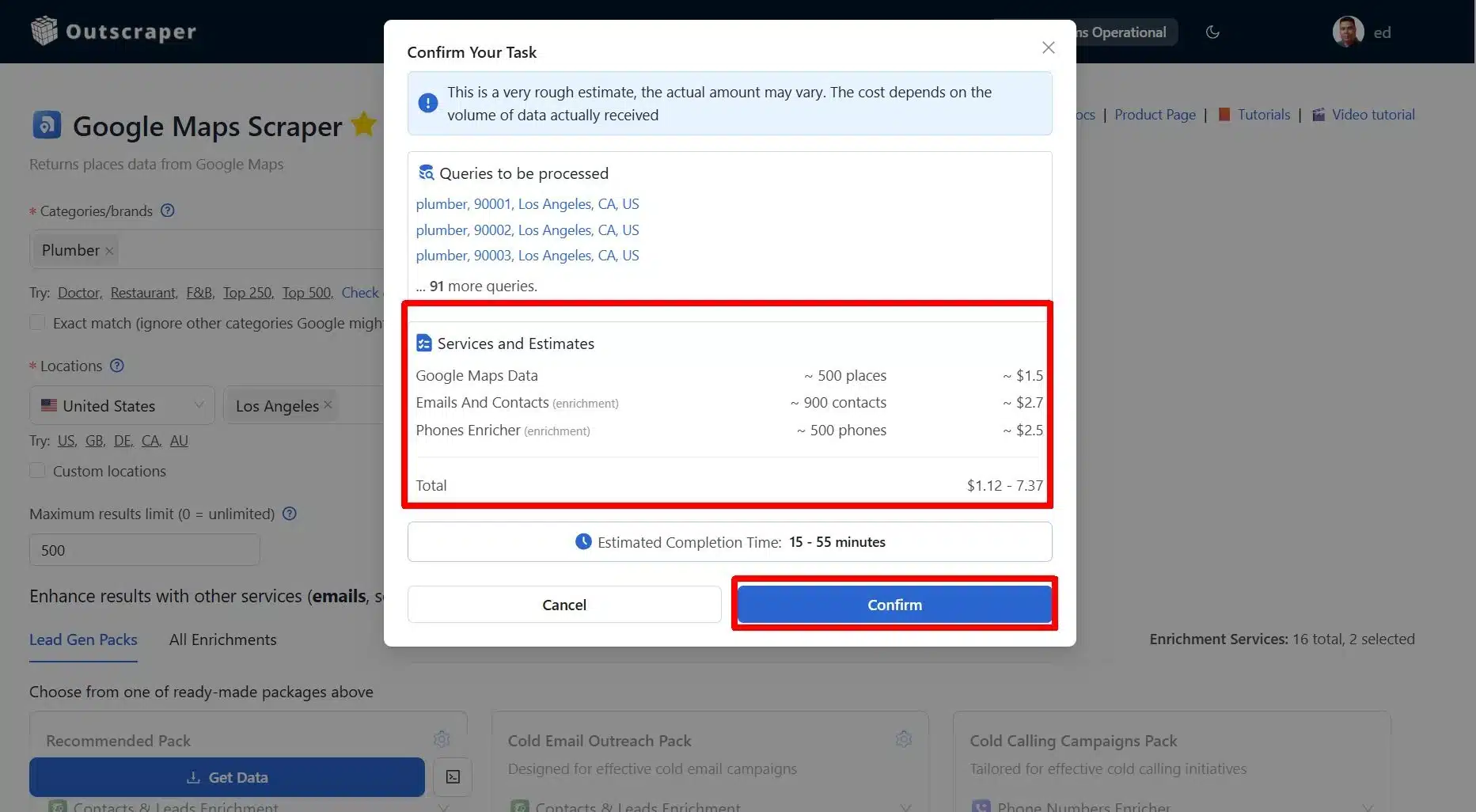
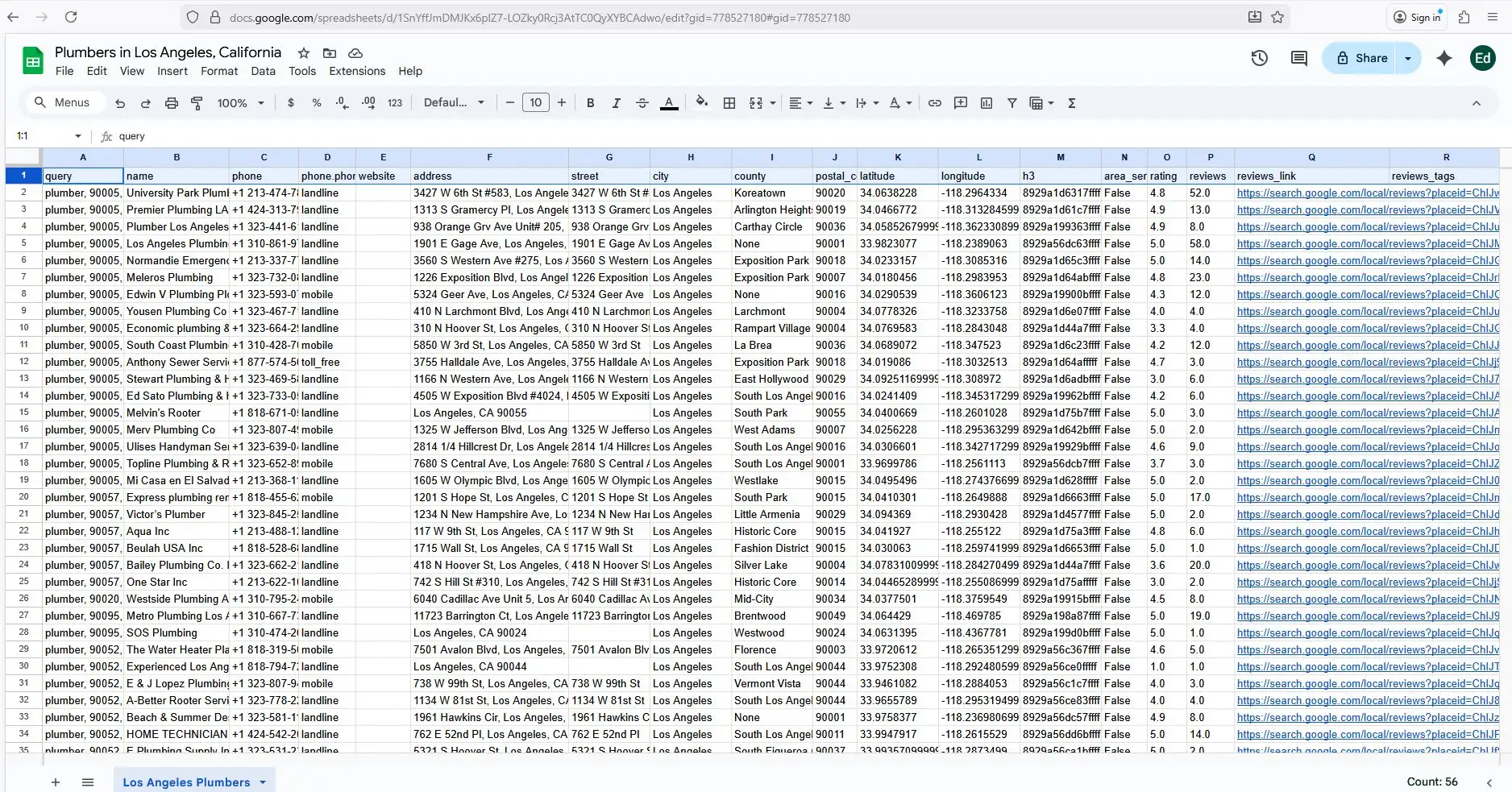
- Add additional details and the type of data you want to download. Review and confirm all the parameters and download your list of offline businesses in your chosen local area.
- Analyze the downloaded business data.
Watch the Full Video Tutorial:
使用每月可更新的免费套餐,免费试用Outscraper。
Conclusion: Reaching Underserved Businesses Without Websites
Businesses without websites remain one of the most overlooked but responsive lead segments representing underserved market leads that many competitors ignore.
Their missing online presence creates clear, observable gaps that make outreach relevant and actionable.
The key to success is accuracy and respect. Verifying contact details, confirming active operations, and approaching each business with a specific, helpful message increases the chance of a positive response.
Platforms like Outscraper support scaling this process. They help you filter listings, collect critical data, and organize leads efficiently. Using these tools does not replace thoughtful outreach, but it ensures you spend time on businesses that can respond and benefit from your solution.
By focusing on offline businesses with verified gaps, you reach underserved market leads more efficiently, making cold outreach targeted, relevant, and easier to scale.
常见问题
最常见的问题和答案
Businesses without websites have a clear and visible gap in their online presence. They are often active, already attracting customers, but lack a central place to capture leads or explain their services. This makes outreach more relevant and easier to justify.
Check the Google Maps listing for a missing website field, then search the business name with the city on Google. If no active site appears and the listing relies only on Maps, directories, or social profiles, it likely does not have a website.
Recent reviews, a working phone number, accurate hours, updated photos, and consistent address details all indicate an active business. These signals suggest the owner is reachable and more likely to respond to outreach.
Directories like Yellow Pages and review platforms often list businesses without website links. Social-only profiles on major social networks are another strong source, especially for owner-managed local businesses.
The most important details are a working phone number, the owner or decision-maker’s name, and an email address if available. Choosing the right channel depends on what contact information the business actively uses.
Outscraper speeds up the process by pulling Google Maps listings in bulk, filtering out businesses with websites, and exporting verified contact details. This reduces manual work and helps you focus outreach on qualified, outreach-ready leads.