How to Master Customer Insights Using Google Maps Review Scraping Guide

Mục lục

As a business owner, have you ever wondered how some businesses seem to know exactly what their customers want, even before they walk through any business or establishment? It’s intriguing indeed, but here’s a clue: They’re not guessing; they’re listening to what people are saying online. Where do they go to get this information? The answer is simple: Google Maps reviews.

Scrape all the reviews from Google Maps into a CSV/Excel/JSON file. Only 6 phút to get started.

Đánh giá trên Google Maps
Google Maps Reviews Scraper Tutorials

With Google Maps, every time someone leaves a review, they’re sharing firsthand insights about what works, what doesn’t, and what keeps them coming back to the business. For savvy business or business owners, these reviews aren’t just feedback-they’re a roadmap to growth. By tapping Google Maps review data, companies can track customer preferences, spot emerging trends, and fine-tune their services. But with these data, it will lead to the big question: how exactly can they access and analyze this data at scale?

In this Trình thu thập đánh giá trên Google Maps guide, we will dive deeper and explore whether it’s possible to gather this information efficiently, the legal and ethical considerations involved, and the best tools and techniques available.

Did you know that Google Maps accounts for 59% of all online reviews, surpassing dominant social media platforms and popular directory websites combined? Google Maps boasts over 1 billion active users, making it the primary source for local business information.

One of the biggest challenges businesses face with Google Maps reviews is accessing this wealth of data in a way that is both efficient and compliant with legal guidelines. Google Maps reviews are loaded with valuable insights and real opinions from customer’s experiences, but manually gathering, sorting, and analyzing this information is time-consuming and impractical.

Moreover, Google’s Strict Terms of Service create a barrier for automated data extraction methods, often limiting scraping and the risks of being banned or having legal repercussions. This is challenging for companies who want to expand and top into Google Maps reviews responsively and effectively. We will discuss how to solve this problem and the other challenges with Google Maps review scraping.

Updated Video Tutorials: How to Scrape Google Maps Reviews

Google Maps Reviews Statistics 2024

Scrape all the reviews from Google Maps into a CSV/Excel/JSON file. Only 6 phút to get started.

Can you Scrape Google Maps Reviews?

The answer is Đúng vậy, scraping Google Maps reviews is technically possible, but realistically speaking, it raises both curiosity and caution. For businesses, data analysts, and developers, these reviews are more than just feedback—they’re a strategic asset, offering a glimpse into customer sentiment, market trends, and competitive insights that traditional data sources often miss.

Having access đến thực sự, unfiltered opinions on everything from product quality to customer service is very important for all businesses and business owners. This can mean spotting gaps in service, understanding customer pain points, and adapting strategies based on authentic and real-time feedback. For data analysts and developers, Google Maps reviews provide a unique dataset that can power predictive models, sentiment analysis, and user behavior insights, transforming how a business understands and interacts with its customers.

Despite all the benefits of scraping Google Maps reviews, many wonder why scraping is worth the risk or effort. Gathering reviews manually and analyzing such vast amounts of data can be overwhelming and prone to error. This is where Google Maps scraping shines, there are many available service providers for this one, but Outscraper’s Google Maps Review scraper is one of the most recommended tools in the market today.

Google Maps reviews scraper by Outscraper allows you to collect, organize, and analyze review data at scale—faster and more precisely than ever. While legal and ethical considerations must guide the process, the benefits of efficiently gathered, richly detailed data are hard to ignore for those aiming to stay ahead of the competition.

Best Tools for Scraping Google Maps Reviews

There are many tools available online if you prefer scraping tools that simplify the process, these platforms specialize in Google Maps reviews but let us dig deeper into their capabilities.

  • Outscraper: Outscraper’s Google Maps Scraper tool is a user-friendly web scraper đó là specifically designed để estraxting review data from Google Maps and other popular review websites. It offers a streamlined way to gather information like review ratings, text, and timestamps, making it easy for non-technical users to access reviews. One of their strength is their capability to handle IP-blocking because their servers are hosted in the cloud. Outscraper also offers API for review scraping if you have some background in coding.
  • Apify: Apify offers flexible and customizable scraping options, allowing users to create tailored workflows for collecting reviews. With prebuilt Google Maps integrations, Apify is well-suited for users looking to integrate data collection seamlessly into other systems.
  • ParseHub: ParseHub is a no-code tool with a point-and-click setup, perfect for beginners. It allows you to select and extract review data from Google Maps về mặt hình ảnh, enabling non-coders to gather data efficiently.

Scraping Google Maps Reviews with Python

For those comfortable with coding, Python provides a versatile option to scrape Google Maps reviews. By using the API Google Địa điểm or libraries like BeautifulSoup và Selenium, developers can automate cái data collection process. You can read our comprehensive guide on how to Scrape Google Maps data using Selenium to understand the process better.

Tài liệu API

Sử dụng dữ liệu từ ứng dụng của bạn. Tham khảo Tài liệu API để xem các ví dụ mã.

Scrape all the reviews from Google Maps into a CSV/Excel/JSON file. Only 6 phút to get started.

How to Use Outscraper’s Google Maps Reviews Scraper

  1. Đăng ký hoặc đăng nhập with your Outscraper account to use one of Outscraper’s most popular scraping tools, Google Maps Review Scraper.
  2. Go to your Outscraper’s account dashboard, click the Services Tab, and next select “By Brand,” followed by “Google,” and “Google Maps Reviews Scraper.” You can also proceed by clicking this link directly.
    Google Maps Reviews App

    Outscraper’s Dashboard

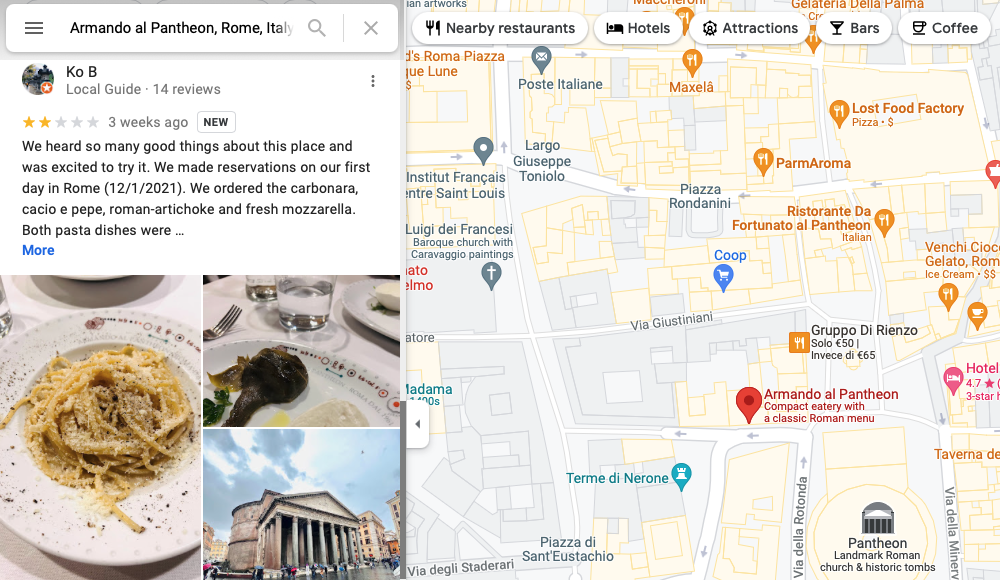
  3. If you select the Categories or brand search you need to specify the Locations by selecting the Country and State or City. For Plain queries search the location should be included in your search query (category + city or zip + country), URLs, Google or Places IDs. You can use anything that will work on Google Maps.
    Trình thu thập đánh giá trên Google Maps

    Google Maps Reviews Scraper (Searching for Categories) 

    Reviews Scraper

    Google Maps Reviews Scraper (Using Plain Queries)

  4. After selecting the location, you will proceed to Sorting, there are four different sorting parameters you can use to get the results you want. The sorting options include “Most relevant, Newest, Highest rating, and Lowest rating.”
    Trình thu thập đánh giá của Google

    Google Maps Reviews Scraper (Sorting Option)

  5. There is also an option in the Sorting section wherein you can tick the checkmark and the date option will appear. You can select the date of your choice from when the reviews were made and if you check the Relative option, the estimated number of days or months will appear. You will have an option also to tick the “To” option and select the latest or newest date when the reviews were taken.
    Đánh giá trên Google Maps

    Selecting the Date of the Reviews

  6. In checking the limits, there are parameters you should consider, Reviews Limit per place, and Places per one query search. The Reviews limit per one place specifies the limit of reviews to extract per one place. You should put a number because “0” means unlimited. In the Places per One query search option, you can use “1” to find a specific place (e.g. Central Park, NY, US). However, when you’re searching for `restaurants, NY, USA` you might want to extract all the places from your search and use `500`.
    Google Maps Reviews Scraping

    Selecting Review Limits

  7. For the Advanced Parameters, you can select the language to use. There’s an additional option for the Reviews query search for a specific keyword such as “Amazing or great.” An option to Ignore reviews without text can be selected as well. The other parameters include the result extension to use such as CSV, XLSX, JSON, or PARQUET. The task tags should be added also for your reference.
    Maps Review Scraping

    Advanced Parameters Options

  8. You can also select enrichment options or the columns to return if you want a specific column such as query, name, google id, place id, location link, reviews link, and other parameters. If you want to return all, leave it empty.
  9. Run the task by clicking the Export Reviews button and confirm your task and a pop-up will appear for the estimated number of hours for the task to be done and the rough estimate of usage as well as the rough cost of the task. Just click the Confirm button and let Outscraper do the rest. You can then proceed to the Task options and download the reviews once the task is completed.
    Google Maps Review Scraping

    Confirming the Task

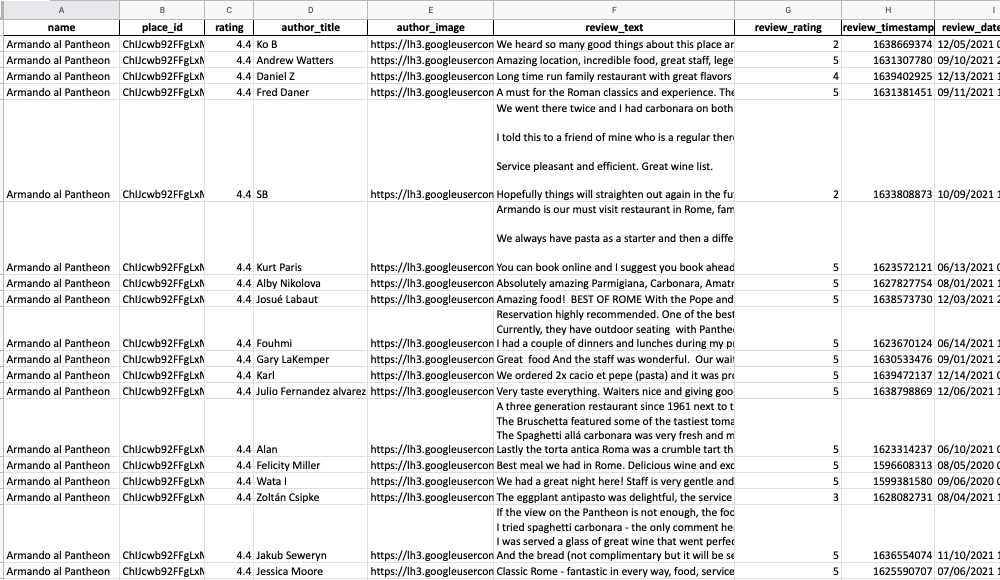
Từ điển dữ liệu đánh giá

Tên và mô tả các cột trong Google Reviews.

  • Tên – tên địa điểm trên Google Maps.
  • google_id – mã định danh duy nhất của địa điểm.
  • location_link – liên kết đến địa điểm đó.
  • reviews_link – liên kết đến các bài đánh giá về địa điểm.
  • reviews_per_score – Đối tượng JSON chứa các mức điểm và số lượng đánh giá tương ứng với từng mức điểm.
  • Xếp hạng – Đánh giá về bài đánh giá.
  • review_id – mã định danh duy nhất của bài đánh giá.
  • liên kết_tác_giả – liên kết đến hồ sơ của tác giả trên Google Maps.
  • tác giả_tiêu đề – Tiêu đề của trang hồ sơ tác giả.
  • mã_tác_giả – mã định danh duy nhất của tác giả.
  • hình ảnh tác giả – liên kết hình ảnh từ trang hồ sơ của tác giả.
  • số_lượng_đánh_giá_của_tác_giả – Tổng số đánh giá mà tác giả đã để lại.
  • số_lần_đánh_giá_của_tác_giả – Đánh giá của tác giả.
  • nội dung_đánh_giá – nội dung bài đánh giá (nếu có).
  • review_img_url – liên kết đến hình ảnh trong bài đánh giá (nếu có).
  • trả lời của chủ sở hữu – nội dung phản hồi của chủ sở hữu (nếu có).
  • thời gian trả lời của chủ sở hữu – giá trị dấu thời gian khi chủ sở hữu trả lời (nếu có).
  • thời_gian_trả_lời_của_chủ_sở_hữu_dạng_ngày_giờ_UTC – Giá trị ngày giờ khi chủ sở hữu trả lời (nếu có).
  • liên kết_đánh_giá – liên kết đến bài đánh giá.
  • điểm đánh giá – Đánh giá về bài đánh giá.
  • thời_gian_đánh_giá – giá trị dấu thời gian khi bản đánh giá được tạo.
  • thời_gian_xem_lại_theo_UTC – Giá trị ngày giờ khi bài đánh giá được tạo.
  • số lượt thích đánh giá – số lượt thích của bài đánh giá.
  • reviews_id – mã định danh duy nhất của các bài đánh giá về địa điểm này.

Kết luận

Google Maps reviews are valuable resources for businesses, offering insights into customer satisfaction and service quality. By analyzing these reviews, các doanh nghiệp can identify what’s working, spot areas for improvement, and adjust their business strategies to meet customer expectations and get real feedback. However, collecting this data manually is challenging, especially with Google’s restrictions on automated scraping.

Outscraper, with its advanced technology and cloud-based scraping methods, bypasses these limitations, making it one of the most reliable tools for gathering Google Maps review data at scale. Simply input the location’s URL, and Outscraper’s systems handle the rest, gathering data such as review text, star ratings, reviewer names, and response timestamps quickly and accurately. The cloud infrastructure also helps avoid IP blocks and maintains uninterrupted access to the reviews.

Additionally, Outscraper allows users to sort reviews by relevance, rating, or date and offers flexible formats like CSV and Excel for easy data analysis. With Outscraper’s capabilities, businesses can access crucial review insights efficiently and stay ahead of competitors by basing decisions on real customer feedback—all without worrying about Google’s scraping restrictions.

Video hướng dẫn

Hãy dùng thử Outscraper miễn phí với gói miễn phí có thể gia hạn hàng tháng.

Câu hỏi thường gặp

Các câu hỏi và câu trả lời thường gặp nhất

Việc thu thập, tổng hợp hoặc trích xuất các đánh giá trên Google Maps là quá trình lấy các đánh giá về doanh nghiệp từ trang web Google Maps. Quá trình này tự động hóa việc xuất các đánh giá vốn trước đây phải thực hiện thủ công.

Việc thu thập và trích xuất dữ liệu công khai được bảo vệ bởi Tu chính án đầu tiên của Hiến pháp Hoa Kỳ.

Đúng. Bạn có thể thu thập tất cả các bài đánh giá từ Google Maps bằng cách sử dụng Trình duyệt đánh giá Google Maps.

  1. Đăng nhập vào Trình duyệt đánh giá Google Maps.
  2. Chèn liên kết đến địa điểm Google Maps mà bạn muốn trích xuất các bài đánh giá.
  3. Chọn ngôn ngữ và kiểm tra các thông số nâng cao khác.
  4. Nhấp vào “Đánh giá cóp nhặt”.

Bạn có thể dùng google-services-api gói để loại bỏ các đánh giá trong mã python của bạn.

Không. Tất cả các hoạt động thu thập dữ liệu đều diễn ra trên các máy chủ Outscraper, đảm bảo rằng địa chỉ IP của bạn sẽ không được sử dụng để thu thập dữ liệu. Điều này cũng có nghĩa là bạn có thể tắt máy tính khi các tác vụ trích xuất dữ liệu đang chạy.


Ed Umbao

Với tư cách là Trưởng bộ phận Nội dung kiêm Chuyên gia Chiến lược SEO tại Outscraper, Ed Umbao chuyên biến các chủ đề kỹ thuật phức tạp, bao gồm cả việc thu thập dữ liệu web, thành những nội dung dễ hiểu, dễ tìm kiếm và thực sự hữu ích cho người dùng. Hãy kết nối với tôi qua: Danh mục đầu tư | LinkedIn | GitHub