Inhoudsopgave
Dit is een praktische handleiding waarin we ChatGPT Work en Outscraper-gegevens gebruiken om een doorzoekbare lijst van tandartspraktijken in Chicago samen te stellen. Het opzetten van een lokale bedrijvengids wordt beter beheersbaar wanneer de structuur van de website en de bedrijfsgegevens als afzonderlijke onderdelen van dezelfde workflow worden behandeld.
In deze tutorial leg ik uit hoe je de zes stappen Ik heb vervolgens een doorzoekbare lijst gemaakt met behulp van ChatGPT Work en een Outscraper JSON-export.
Ik heb tandartspraktijken in Chicago als praktijkvoorbeeld gebruikt. ChatGPT Work heeft me geholpen bij het ontwerpen van de interface, het genereren van de websitecode, het koppelen van de zoekfunctie en het oplossen van problemen bij de implementatie. Outscraper leverde de gestructureerde lokale bedrijfsgegevens die zijn gebruikt om de bedrijvengids te vullen.
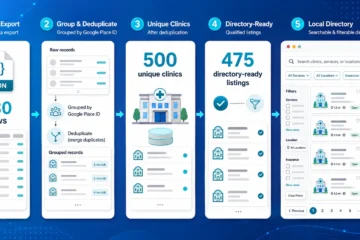
De oorspronkelijke Outscraper-export bevatte 500 bedrijfsvermeldingen. Na controle van de adressen, de operationele status en de bedrijfscategorieën heb ik 467 geschikte tandartspraktijken in Chicago geselecteerd. Bezoekers kunnen in de uiteindelijke lijst zoeken op naam van de praktijk, tandheelkundige categorie, adres of postcode.
Ik heb dit project aangepakt als SEO-strateeg en technisch schrijver die nog steeds bezig is met het leren van webontwikkeling. Ik heb niet de hele applicatie zelf geschreven. Mijn rol bestond uit het vaststellen van de vereisten, het ordenen van de gegevens, het beoordelen van de interface, het testen van de resultaten en het vastleggen van wat wel en niet werkte.
Kort antwoord: Hoe maak je een lokale bedrijvengids aan?
- Bepaal de niche, de locatie en de structuur van de website.
- Bouw de doorzoekbare interface met ChatGPT Work.
- Verzamel relevante bedrijfsdocumenten met Outscraper.
- De JSON-gegevens exporteren, opschonen en ordenen.
- Koppel de records aan de directoryoverzichten en filters.
- De website testen, publiceren en regelmatig bijwerken.
Wil je gegevens van lokale bedrijven verzamelen voor je bedrijvengids? Gebruik dan de Outscraper Google Maps-scraper om op categorie en locatie te zoeken.

Wat ik heb gemaakt met ChatGPT Work en Outscraper
Voor dit project heb ik een doorzoekbare lijst samengesteld voor mensen die op zoek zijn naar tandartspraktijken in Chicago. Ik heb één bedrijfscategorie en één stad gekozen, zodat ik me volledig kon concentreren op de volledige werkstroom, van het verzamelen van de gegevens tot het publiceren van de website.
Met het voltooide prototype kunnen bezoekers:
- Zoeken op naam van de praktijk of tandheelkundige categorie
- Zoeken op adres of postcode in Chicago
- Bekijk de lijst met tandartsen voor algemene tandheelkunde, kindertandheelkunde, cosmetische tandheelkunde, orthodontie en gespecialiseerde tandheelkunde
- Vergelijk beoordelingen en het aantal recensies
- Bekijk de websites, telefoonnummers en beoordelingspagina’s van beschikbare klinieken.
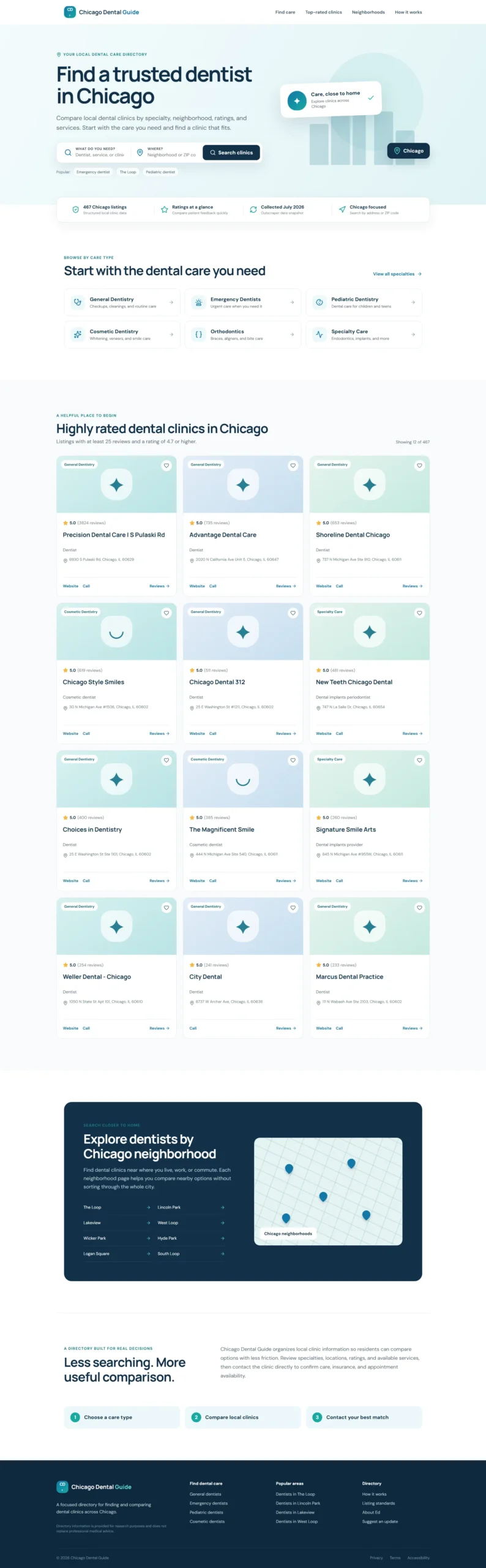
Bekijk hieronder het voltooide prototype van de gidswebsite, waarmee bezoekers tandartspraktijken in Chicago kunnen zoeken en vergelijken.
Hoe elk hulpmiddel heeft bijgedragen aan de lijst
ChatGPT Work, Outscraper, JSON en de redactionele beoordeling ondersteunden elk een ander onderdeel van de workflow van de website.
Dit kleinere, gerichte project bood me een praktische manier om te begrijpen hoe gestructureerde lokale bedrijfsgegevens vanuit een geëxporteerd bestand kunnen worden omgezet in een doorzoekbare website. De eerste stap was om precies vast te stellen wat er in de bedrijvengids moest worden opgenomen.
Hoe ik de lokale bedrijvengids heb opgezet
Ik heb het project opgedeeld in zes praktische stappen, beginnend bij het concept van de directory en eindigend met een gepubliceerde website die is gevuld met echte bedrijfsgegevens. Elke stap had betrekking op een specifiek onderdeel van de workflow, waaronder de planning van de website, de ontwikkeling van de interface, het verzamelen van gegevens, het voorbereiden van JSON-bestanden, de integratie van de zoekfunctie en het testen.
Het proces begon met een klein prototype op basis van voorbeeldvermeldingen. Toen de lay-out en de zoekervaring eenmaal duidelijk waren, heb ik met Outscraper de gegevens van de tandartspraktijken in Chicago verzameld en de voorbeeldinhoud vervangen door gefilterde JSON gegevens. Dankzij deze aanpak kon ik de structuur van de website eerst bekijken voordat ik met de volledige dataset aan de slag ging.

Gebruik de Google Maps-scraper om bedrijfsgegevens te verzamelen op categorie en locatie, inclusief beschikbare contactgegevens, beoordelingen, recensies, websites en velden met informatie over de bedrijfsstatus.
Stap 1: Bepaal de niche en de vereisten voor de directory
Voordat ik de website ging bouwen, heb ik de reikwijdte van de map vastgesteld:
- Categorie: Tandartspraktijken
- Locatie: Chicago, Illinois
- Gebruikers: Inwoners van Chicago die op zoek zijn naar tandheelkundige zorg
- Doel: Help bezoekers bij het zoeken naar en vergelijken van lokale klinieken
Ik heb ook de meest nuttige velden voor de vermeldingen geselecteerd, waaronder de naam van de kliniek, de categorie, het adres, de postcode, de beoordeling, het aantal recensies, het telefoonnummer, de website en de bedrijfsstatus. Deze velden vormden de leidraad voor zowel de gegevensverzameling door Outscraper als de lay-out van de website.
Als je nog bezig bent met het kiezen van een niche voor je directory, dan is de lijst van Outscraper met Bedrijfscategorieën in Google Maps kan je helpen bij het vaststellen van consistente categorienamen voor de gegevensverzamelingsopdracht.
Voor de eerste versie heb ik me gericht op een doorzoekbare startpagina met specialisatiecategorieën, kliniekprofielen, locatiefilters, vertrouwensindicatoren en een SEO-vriendelijke voettekst. Functies zoals afzonderlijke kliniekpagina’s, het boeken van afspraken en gebruikersaccounts kunnen later worden overwogen.
Nu de reikwijdte en vereisten waren vastgesteld, was ik klaar om het prototype van de website te maken met ChatGPT Work.
Stap 2: Maak het prototype van de website met ChatGPT Work
Ik heb ChatGPT Work een gestructureerde opdracht gegeven waarin het doel van de directory, de beoogde gebruikers, de onderdelen van de startpagina, de zoekvelden, de visuele stijl en de vereisten voor lokale SEO aan bod kwamen.
Dit is de opdracht die ik heb gebruikt:
Bekijk de ChatGPT-werkopdracht die voor het prototype is gebruikt
Lees of kopieer de volledige opdracht hieronder.
@Sites Act as an expert UX/UI designer and SEO content strategist.

I am building a high-performance directory website focused on Chicago dental clinics, and I need the content and layout strategy for the homepage.

Who I am:

I am Ed, a professional SEO strategist and technical writer. I am building this directory to provide value to Chicago residents by organizing local dental clinic data into an easy-to-use resource.

What I need:

Please provide a comprehensive layout and content plan for the homepage. Include:

1. Hero Section

Create an impactful headline and subheadline that clearly state the site's value. Include a prominent search bar design.

2. Key Value Proposition

Add a section briefly explaining why users should trust the directory, such as verified ratings, updated data, and a local focus.

3. Primary Navigation and Categories

Suggest four to six logical categories, such as General Dentistry, Pediatric Dentistry, Emergency Dentistry, and Cosmetic Dentistry, to help users navigate quickly.

4. Featured or Top-Rated Listings

Create a layout for displaying a small sample of top-rated clinics to establish immediate authority.

5. SEO Footer

Create a footer-link strategy that supports site navigation and local SEO authority.

What good looks like:

Visuals:

The design must be clean, professional, and clinical. Use a trustworthy color palette with shades of medical blue, slate gray, and crisp white.

UX and conversion:

The website should be fast and intuitive. A user should be able to start a search within three seconds of landing on the page.

Constraints:

Use clear, direct, and human-sounding language. Do not use em dashes anywhere in the copy. Avoid generic AI marketing language. Optimize the content and layout for local SEO.

Provide the output in a clean, organized format that I can hand off to developers or implement in the website structure.
ChatGPT Work heeft op basis van deze opdracht het eerste prototype van de website gemaakt met:
- Een ‘Hero’-sectie met zorg- en locatiezoekfunctie
- Specialismen binnen de tandheelkunde
- Indicatoren voor vertrouwen en gegevenskwaliteit
- Kliniekkaarten met hoge beoordelingen
- Navigatie in Chicago
- Een lokale SEO-voettekst
- Responsieve lay-outs voor desktop en mobiel
In de eerste versie heb ik voorbeeldvermeldingen van klinieken gebruikt, zodat ik de structuur kon controleren voordat ik echte bedrijfsgegevens importeerde. Ik heb de bewoordingen, kleuren, spatiëring, weergave op mobiele apparaten en het ontwerp van de vermeldingskaarten gecontroleerd voordat ik overging naar de Outscraper-gegevensverzamelingsfase.
Stap 3: Verzamel de bedrijfsgegevens met Outscraper
Toen het prototype van de website klaar was, heb ik de Outscraper Google Maps-scraper om openbare bedrijfsgegevens over tandartsen in Chicago te verzamelen.
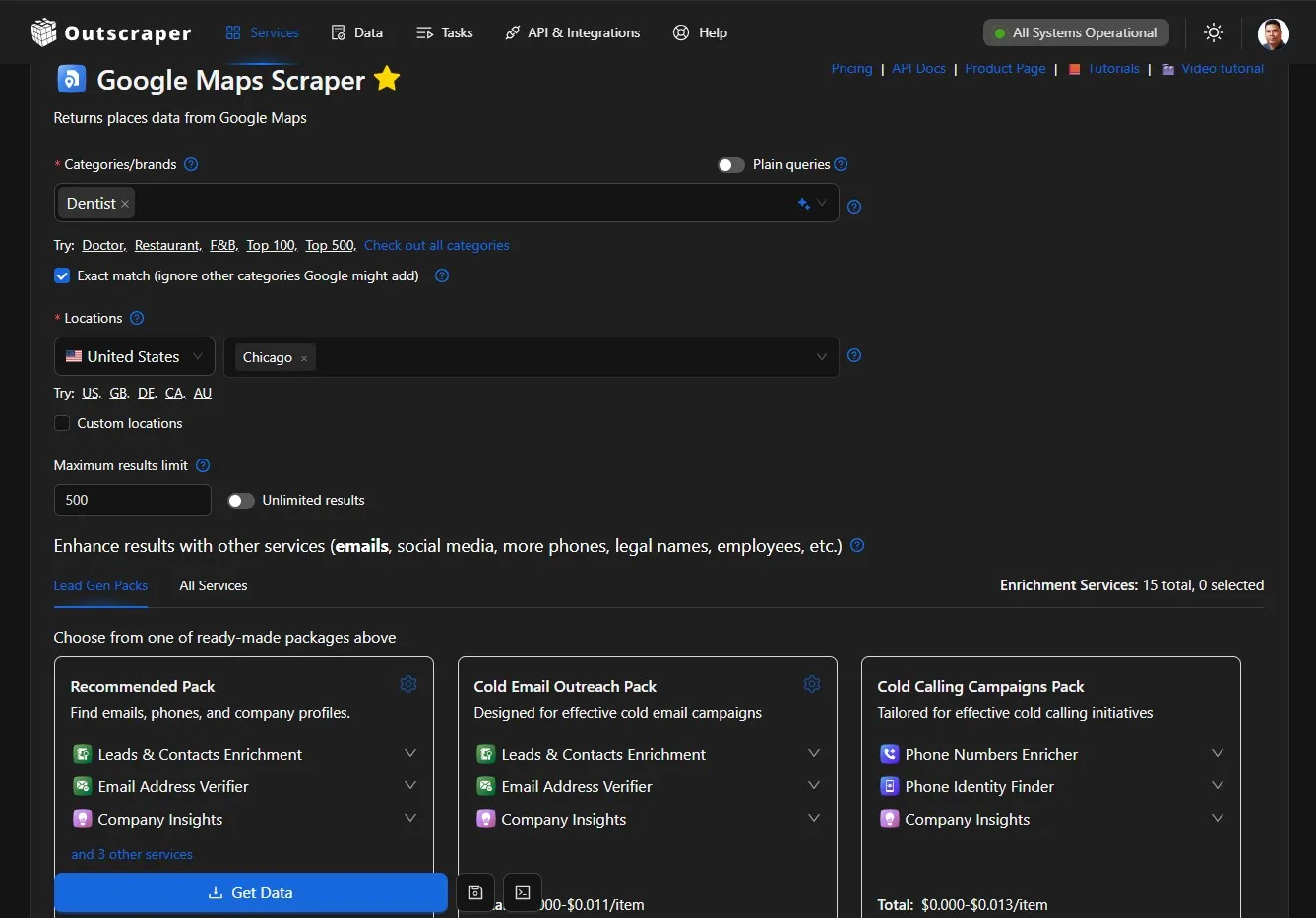
Ik heb de zoekopdracht ingesteld op de categorie ‘tandheelkunde’ en de locatie ‘Chicago’, en vervolgens de resultaten als JSON-bestand gedownload. De export bevatte 500 bedrijfsrecords met velden zoals:
- Bedrijfsnaam en categorie
- Adres
- Telefoonnummer
- Website
- Aantal beoordelingen en recensies
- Bedrijfsstatus
- Link naar recensie
- Google Place-ID
Als je dit proces wilt herhalen, dan is de Handleiding voor beginners: gegevens ophalen uit Google Maps legt uit hoe je een taak kunt instellen, de voortgang ervan kunt volgen en het resultatenbestand kunt downloaden.
Het geëxporteerde bestand bevatte de ruwe gegevens die nodig waren voor de lijst. Voordat ik deze aan de website kon toevoegen, moest ik nog de locaties controleren, niet-relevante categorieën verwijderen, ontbrekende waarden verwerken en de records in een consistent formaat ordenen.
De volledige workflow voor het opschonen van gegevens en het omzetten naar JSON komt aan bod in de aparte tutorial over het vullen van een lokale bedrijvengids met Outscraper-gegevens.
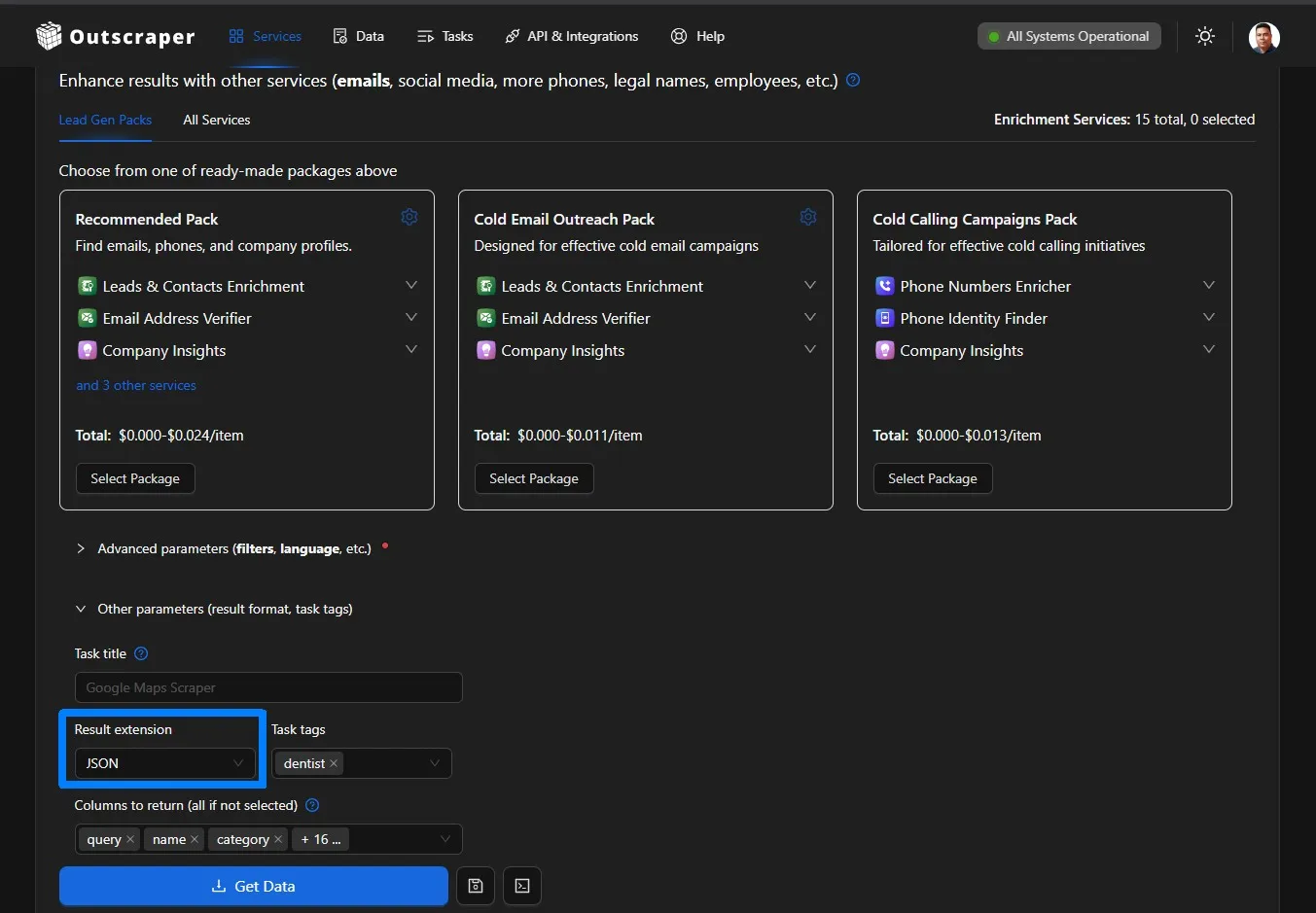
Outscraper also offers services for finding contact details, enriching existing records, exporting structured data, and connecting business-data workflows through the API.
Step 4: Review, Filter, and Organize the JSON Data
The Outscraper export contained 500 records, but I needed to review the data before using it on the website.
I kept listings that:
- Had a Chicago address
- Were marked as operational
- Belonged to a relevant dental category
- Had a unique Google Place ID
I removed records with unrelated or blank categories and organized the remaining fields into a consistent structure. I also grouped specific categories, such as pediatric dentists, cosmetic dentists, orthodontists, and oral surgeons, into broader directory sections.
For a detailed explanation of structuring business records, see the guide to building a local business database from Google Maps.
After filtering, 467 Chicago dental listings qualified for the prototype. The cleaned JSON file was then ready to replace the sample listings used in the original website design.

Step 5: Connect the Data and Test the Directory
I uploaded the cleaned JSON file to ChatGPT Work and asked it to replace the sample listings with the qualifying Chicago dental records.
The website connected the data to:
- Clinic listing cards
- Name and category search
- Address and ZIP code search
- Ratings and review counts
- Website, phone, and review links
- Dental specialty filters
I then tested different searches and checked how the cards handled missing websites, phone numbers, and ratings. I also reviewed the layout on desktop and mobile to confirm that the search fields, categories, and listing information remained easy to use.
Once the real records and search functions were working, the directory was ready for publishing.

Step 6: Publish, Verify, and Plan Data Updates
After testing the populated directory, I used ChatGPT Work to build and publish the website through ChatGPT Sites.
Publishing required more than confirming that the deployment had finished. I also checked:
- Whether the website was publicly accessible
- Whether the homepage returned a successful response
- Whether the interface rendered correctly
- Whether the search and listing links worked
- Whether the mobile layout remained usable
The first deployment had access and rendering problems, which I resolved by reviewing the site settings, production response, and deployment logs. I will explain these issues in the troubleshooting section.
The published directory uses a snapshot of the Outscraper data. Because ratings, websites, phone numbers, and business status can change, the project will also need a repeatable process for collecting fresh data, reviewing the changes, and updating the website.
For a more detailed directory, Outscraper’s enrichment services can help add available contact details and other business information to existing records.
What Broke and What the Prototype Still Needs
The website worked during the local build, but publishing revealed problems that were not visible in the prototype. The Outscraper export also lacked several fields that would be useful in a more complete directory.
Problems I Found During Publishing
The first published version had a restricted access setting connected to the Team workspace. After changing the site to public, the homepage returned an HTTP 404 error because the production environment could not locate the website files correctly.
The next version loaded but displayed part of the JavaScript as visible text. A final packaging change placed the page container, styles, and application script in the correct order.
I republished the website and confirmed that the homepage returned a successful 200 OK response. This showed me that a completed build still needs to be tested through the public URL.
Current Data Limitations
De directory uses one Outscraper data export, and the file did not contain every field needed for a complete local directory.
The main limitations included:
- No latitude and longitude coordinates
- No consistent Chicago neighborhood field
- No opening hours
- No clinic photos
- No detailed list of dental services
- Missing websites, phone numbers, or ratings in some records
- No appointment or insurance information
Because reliable coordinates and neighborhood names were unavailable, the map remained decorative and location searches relied on addresses and ZIP codes.
Business information can also change after collection. Visitors should confirm services, opening hours, insurance acceptance, and appointment availability directly with each clinic.
A future Outscraper export with additional fields would support richer listings and more accurate location pages.
What I Learned and What I Will Improve Next
This project gave me a practical view of how website planning, structured data, search functionality, and publishing work together. It also showed me which parts of the prototype need further development.
What I Learned
My main lessons were:
- A focused scope makes the project manageable. Choosing one category and one city helped me prioritize the essential directory features.
- Structured data needs editorial review. I needed clear rules for location, business status, category relevance, duplicates, and missing fields.
- A prototype helps validate the interface. Sample listings allowed me to review the layout before connecting the complete JSON export.
- AI-assisted development still requires direction. Clear prompts, testing, and specific feedback improved the website.
- Publishing needs separate verification. A successful local build did not guarantee that the public website would work correctly.
- Directory data needs maintenance. Ratings, websites, phone numbers, and operating status can change over time.
I did not manually write every line of code, but I became more familiar with JSON, search filters, website components, deployment logs, and data-quality decisions.
What I Will Improve Next
My next priorities are:
- Collect coordinates, opening hours, photos, and additional clinic details
- Map listings to accurate Chicago neighborhoods
- Create individual pages for qualifying clinics
- Move the records from a static JSON file into a database
- Add pagination and more detailed search filters
- Create a process for comparing new and previous Outscraper exports
- Test page speed, accessibility, and mobile usability
I plan to approach these improvements in smaller stages and document what works, what needs revision, and what I learn from each update.
Final Checklist: How to Build a Local Business Directory
Use this workflow to move from a directory idea to a published website:
- Define the directory scope. Choose the business category, target location, intended users, and information each listing should contain.
- Plan and build the prototype. Create the search fields, categories, listing cards, navigation and responsive layout with ChatGPT Work.
- Collect the business data. Gebruik Outscraper to gather relevant public business records by category and location.
- Review and organize the export. Check the addresses, operating status, categories, duplicates, and missing fields before importing the JSON data.
- Connect and test the listings. Add the cleaned records to the website and test the search, filters, contact links, and mobile layout.
- Publish and maintain the directory. Verify the public website and create a process for updating the business records.
You can use Google Maps Scraper to collect public business details by category and location. Export the results, organize the fields your directory needs, and use the data to populate searchable business listings.
FAQ
Meest voorkomende vragen en antwoorden
Vermeld in ieder geval de bedrijfsnaam, categorie, adres, telefoonnummer, website, beoordeling, aantal recensies en bedrijfsstatus. Voeg openingstijden, diensten, foto’s, coördinaten en afspraakinformatie toe wanneer daar betrouwbare gegevens over beschikbaar zijn.
Ja. Een JSON-bestand kan prima werken voor een vroeg prototype met een beperkt aantal vermeldingen. Naarmate de directory groeit, is een database meestal een betere optie voor het beheren van updates, afzonderlijke vermeldingspagina’s, filterfuncties en grotere datasets.
Gebruik een tool voor bedrijfsgegevens, zoals de Outscraper Google Maps-scraper om openbare bedrijfsgegevens per categorie en locatie te verzamelen. Controleer de geëxporteerde gegevens voordat u ze in uw gids publiceert.
Stel duidelijke selectiecriteria vast voordat je de gegevens importeert. In dit project heb ik gegevens bijgehouden met een adres in Chicago, de operationele status, een relevante tandheelkundige categorie en een unieke Google Place-ID.
Het updateschema hangt af van de branche en de omvang van de directory. Een maandelijkse of driemaandelijkse controle is een praktisch uitgangspunt, omdat bedrijfswebsites, telefoonnummers, beoordelingen, openingstijden en de bedrijfsstatus kunnen veranderen.
Niet per se. Tools zoals ChatGPT Work kunnen helpen bij het maken van een prototype, maar je moet nog steeds de mappenstructuur vastleggen, de gegevens controleren, de website testen en het gepubliceerde resultaat verifiëren. Voor geavanceerdere functies, zoals een database en geautomatiseerde updates, is mogelijk aanvullende technische ondersteuning nodig.
Inhoudsopgave
Dit is een praktische handleiding waarin we ChatGPT Work en Outscraper-gegevens gebruiken om een doorzoekbare lijst van tandartspraktijken in Chicago samen te stellen. Het opzetten van een lokale bedrijvengids wordt beter beheersbaar wanneer de structuur van de website en de bedrijfsgegevens als afzonderlijke onderdelen van dezelfde workflow worden behandeld.
In deze tutorial leg ik uit hoe je de zes stappen Ik heb vervolgens een doorzoekbare lijst gemaakt met behulp van ChatGPT Work en een Outscraper JSON-export.
Ik heb tandartspraktijken in Chicago als praktijkvoorbeeld gebruikt. ChatGPT Work heeft me geholpen bij het ontwerpen van de interface, het genereren van de websitecode, het koppelen van de zoekfunctie en het oplossen van problemen bij de implementatie. Outscraper leverde de gestructureerde lokale bedrijfsgegevens die zijn gebruikt om de bedrijvengids te vullen.
De oorspronkelijke Outscraper-export bevatte 500 bedrijfsvermeldingen. Na controle van de adressen, de operationele status en de bedrijfscategorieën heb ik 467 geschikte tandartspraktijken in Chicago geselecteerd. Bezoekers kunnen in de uiteindelijke lijst zoeken op naam van de praktijk, tandheelkundige categorie, adres of postcode.
Ik heb dit project aangepakt als SEO-strateeg en technisch schrijver die nog steeds bezig is met het leren van webontwikkeling. Ik heb niet de hele applicatie zelf geschreven. Mijn rol bestond uit het vaststellen van de vereisten, het ordenen van de gegevens, het beoordelen van de interface, het testen van de resultaten en het vastleggen van wat wel en niet werkte.
Kort antwoord: Hoe maak je een lokale bedrijvengids aan?
- Bepaal de niche, de locatie en de structuur van de website.
- Bouw de doorzoekbare interface met ChatGPT Work.
- Verzamel relevante bedrijfsdocumenten met Outscraper.
- De JSON-gegevens exporteren, opschonen en ordenen.
- Koppel de records aan de directoryoverzichten en filters.
- De website testen, publiceren en regelmatig bijwerken.
Wil je gegevens van lokale bedrijven verzamelen voor je bedrijvengids? Gebruik dan de Outscraper Google Maps-scraper om op categorie en locatie te zoeken.
Wat ik heb gemaakt met ChatGPT Work en Outscraper
Voor dit project heb ik een doorzoekbare lijst samengesteld voor mensen die op zoek zijn naar tandartspraktijken in Chicago. Ik heb één bedrijfscategorie en één stad gekozen, zodat ik me volledig kon concentreren op de volledige werkstroom, van het verzamelen van de gegevens tot het publiceren van de website.
Met het voltooide prototype kunnen bezoekers:
- Zoeken op naam van de praktijk of tandheelkundige categorie
- Zoeken op adres of postcode in Chicago
- Bekijk de lijst met tandartsen voor algemene tandheelkunde, kindertandheelkunde, cosmetische tandheelkunde, orthodontie en gespecialiseerde tandheelkunde
- Vergelijk beoordelingen en het aantal recensies
- Bekijk de websites, telefoonnummers en beoordelingspagina’s van beschikbare klinieken.
Bekijk hieronder het voltooide prototype van de gidswebsite, waarmee bezoekers tandartspraktijken in Chicago kunnen zoeken en vergelijken.
Hoe elk hulpmiddel heeft bijgedragen aan de lijst
ChatGPT Work, Outscraper, JSON en de redactionele beoordeling ondersteunden elk een ander onderdeel van de workflow van de website.
Dit kleinere, gerichte project bood me een praktische manier om te begrijpen hoe gestructureerde lokale bedrijfsgegevens vanuit een geëxporteerd bestand kunnen worden omgezet in een doorzoekbare website. De eerste stap was om precies vast te stellen wat er in de bedrijvengids moest worden opgenomen.
Hoe ik de lokale bedrijvengids heb opgezet
Ik heb het project opgedeeld in zes praktische stappen, beginnend bij het concept van de directory en eindigend met een gepubliceerde website die is gevuld met echte bedrijfsgegevens. Elke stap had betrekking op een specifiek onderdeel van de workflow, waaronder de planning van de website, de ontwikkeling van de interface, het verzamelen van gegevens, het voorbereiden van JSON-bestanden, de integratie van de zoekfunctie en het testen.
Het proces begon met een klein prototype op basis van voorbeeldvermeldingen. Toen de lay-out en de zoekervaring eenmaal duidelijk waren, heb ik met Outscraper de gegevens van de tandartspraktijken in Chicago verzameld en de voorbeeldinhoud vervangen door gefilterde JSON gegevens. Dankzij deze aanpak kon ik de structuur van de website eerst bekijken voordat ik met de volledige dataset aan de slag ging.
Gebruik de Google Maps-scraper om bedrijfsgegevens te verzamelen op categorie en locatie, inclusief beschikbare contactgegevens, beoordelingen, recensies, websites en velden met informatie over de bedrijfsstatus.
Stap 1: Bepaal de niche en de vereisten voor de directory
Voordat ik de website ging bouwen, heb ik de reikwijdte van de map vastgesteld:
- Categorie: Tandartspraktijken
- Locatie: Chicago, Illinois
- Gebruikers: Inwoners van Chicago die op zoek zijn naar tandheelkundige zorg
- Doel: Help bezoekers bij het zoeken naar en vergelijken van lokale klinieken
Ik heb ook de meest nuttige velden voor de vermeldingen geselecteerd, waaronder de naam van de kliniek, de categorie, het adres, de postcode, de beoordeling, het aantal recensies, het telefoonnummer, de website en de bedrijfsstatus. Deze velden vormden de leidraad voor zowel de gegevensverzameling door Outscraper als de lay-out van de website.
Als je nog bezig bent met het kiezen van een niche voor je directory, dan is de lijst van Outscraper met Bedrijfscategorieën in Google Maps kan je helpen bij het vaststellen van consistente categorienamen voor de gegevensverzamelingsopdracht.
Voor de eerste versie heb ik me gericht op een doorzoekbare startpagina met specialisatiecategorieën, kliniekprofielen, locatiefilters, vertrouwensindicatoren en een SEO-vriendelijke voettekst. Functies zoals afzonderlijke kliniekpagina’s, het boeken van afspraken en gebruikersaccounts kunnen later worden overwogen.
Nu de reikwijdte en vereisten waren vastgesteld, was ik klaar om het prototype van de website te maken met ChatGPT Work.
Stap 2: Maak het prototype van de website met ChatGPT Work
Ik heb ChatGPT Work een gestructureerde opdracht gegeven waarin het doel van de directory, de beoogde gebruikers, de onderdelen van de startpagina, de zoekvelden, de visuele stijl en de vereisten voor lokale SEO aan bod kwamen.
Dit is de opdracht die ik heb gebruikt:
Bekijk de ChatGPT-werkopdracht die voor het prototype is gebruikt
Lees of kopieer de volledige opdracht hieronder.
@Sites Act as an expert UX/UI designer and SEO content strategist.

I am building a high-performance directory website focused on Chicago dental clinics, and I need the content and layout strategy for the homepage.

Who I am:

I am Ed, a professional SEO strategist and technical writer. I am building this directory to provide value to Chicago residents by organizing local dental clinic data into an easy-to-use resource.

What I need:

Please provide a comprehensive layout and content plan for the homepage. Include:

1. Hero Section

Create an impactful headline and subheadline that clearly state the site's value. Include a prominent search bar design.

2. Key Value Proposition

Add a section briefly explaining why users should trust the directory, such as verified ratings, updated data, and a local focus.

3. Primary Navigation and Categories

Suggest four to six logical categories, such as General Dentistry, Pediatric Dentistry, Emergency Dentistry, and Cosmetic Dentistry, to help users navigate quickly.

4. Featured or Top-Rated Listings

Create a layout for displaying a small sample of top-rated clinics to establish immediate authority.

5. SEO Footer

Create a footer-link strategy that supports site navigation and local SEO authority.

What good looks like:

Visuals:

The design must be clean, professional, and clinical. Use a trustworthy color palette with shades of medical blue, slate gray, and crisp white.

UX and conversion:

The website should be fast and intuitive. A user should be able to start a search within three seconds of landing on the page.

Constraints:

Use clear, direct, and human-sounding language. Do not use em dashes anywhere in the copy. Avoid generic AI marketing language. Optimize the content and layout for local SEO.

Provide the output in a clean, organized format that I can hand off to developers or implement in the website structure.ChatGPT Work heeft op basis van deze opdracht het eerste prototype van de website gemaakt met:
- Een ‘Hero’-sectie met zorg- en locatiezoekfunctie
- Specialismen binnen de tandheelkunde
- Indicatoren voor vertrouwen en gegevenskwaliteit
- Kliniekkaarten met hoge beoordelingen
- Navigatie in Chicago
- Een lokale SEO-voettekst
- Responsieve lay-outs voor desktop en mobiel
In de eerste versie heb ik voorbeeldvermeldingen van klinieken gebruikt, zodat ik de structuur kon controleren voordat ik echte bedrijfsgegevens importeerde. Ik heb de bewoordingen, kleuren, spatiëring, weergave op mobiele apparaten en het ontwerp van de vermeldingskaarten gecontroleerd voordat ik overging naar de Outscraper-gegevensverzamelingsfase.
Stap 3: Verzamel de bedrijfsgegevens met Outscraper
Toen het prototype van de website klaar was, heb ik de Outscraper Google Maps-scraper om openbare bedrijfsgegevens over tandartsen in Chicago te verzamelen.
Ik heb de zoekopdracht ingesteld op de categorie ‘tandheelkunde’ en de locatie ‘Chicago’, en vervolgens de resultaten als JSON-bestand gedownload. De export bevatte 500 bedrijfsrecords met velden zoals:
- Bedrijfsnaam en categorie
- Adres
- Telefoonnummer
- Website
- Aantal beoordelingen en recensies
- Bedrijfsstatus
- Link naar recensie
- Google Place-ID
Als je dit proces wilt herhalen, dan is de Handleiding voor beginners: gegevens ophalen uit Google Maps legt uit hoe je een taak kunt instellen, de voortgang ervan kunt volgen en het resultatenbestand kunt downloaden.
Het geëxporteerde bestand bevatte de ruwe gegevens die nodig waren voor de lijst. Voordat ik deze aan de website kon toevoegen, moest ik nog de locaties controleren, niet-relevante categorieën verwijderen, ontbrekende waarden verwerken en de records in een consistent formaat ordenen.
De volledige workflow voor het opschonen van gegevens en het omzetten naar JSON komt aan bod in de aparte tutorial over het vullen van een lokale bedrijvengids met Outscraper-gegevens.
Outscraper also offers services for finding contact details, enriching existing records, exporting structured data, and connecting business-data workflows through the API.
Step 4: Review, Filter, and Organize the JSON Data
The Outscraper export contained 500 records, but I needed to review the data before using it on the website.
I kept listings that:
- Had a Chicago address
- Were marked as operational
- Belonged to a relevant dental category
- Had a unique Google Place ID
I removed records with unrelated or blank categories and organized the remaining fields into a consistent structure. I also grouped specific categories, such as pediatric dentists, cosmetic dentists, orthodontists, and oral surgeons, into broader directory sections.
For a detailed explanation of structuring business records, see the guide to building a local business database from Google Maps.
After filtering, 467 Chicago dental listings qualified for the prototype. The cleaned JSON file was then ready to replace the sample listings used in the original website design.
Step 5: Connect the Data and Test the Directory
I uploaded the cleaned JSON file to ChatGPT Work and asked it to replace the sample listings with the qualifying Chicago dental records.
The website connected the data to:
- Clinic listing cards
- Name and category search
- Address and ZIP code search
- Ratings and review counts
- Website, phone, and review links
- Dental specialty filters
I then tested different searches and checked how the cards handled missing websites, phone numbers, and ratings. I also reviewed the layout on desktop and mobile to confirm that the search fields, categories, and listing information remained easy to use.
Once the real records and search functions were working, the directory was ready for publishing.
Step 6: Publish, Verify, and Plan Data Updates
After testing the populated directory, I used ChatGPT Work to build and publish the website through ChatGPT Sites.
Publishing required more than confirming that the deployment had finished. I also checked:
- Whether the website was publicly accessible
- Whether the homepage returned a successful response
- Whether the interface rendered correctly
- Whether the search and listing links worked
- Whether the mobile layout remained usable
The first deployment had access and rendering problems, which I resolved by reviewing the site settings, production response, and deployment logs. I will explain these issues in the troubleshooting section.
The published directory uses a snapshot of the Outscraper data. Because ratings, websites, phone numbers, and business status can change, the project will also need a repeatable process for collecting fresh data, reviewing the changes, and updating the website.
For a more detailed directory, Outscraper’s enrichment services can help add available contact details and other business information to existing records.
What Broke and What the Prototype Still Needs
The website worked during the local build, but publishing revealed problems that were not visible in the prototype. The Outscraper export also lacked several fields that would be useful in a more complete directory.
Problems I Found During Publishing
The first published version had a restricted access setting connected to the Team workspace. After changing the site to public, the homepage returned an HTTP 404 error because the production environment could not locate the website files correctly.
The next version loaded but displayed part of the JavaScript as visible text. A final packaging change placed the page container, styles, and application script in the correct order.
I republished the website and confirmed that the homepage returned a successful 200 OK response. This showed me that a completed build still needs to be tested through the public URL.
Current Data Limitations
De directory uses one Outscraper data export, and the file did not contain every field needed for a complete local directory.
The main limitations included:
- No latitude and longitude coordinates
- No consistent Chicago neighborhood field
- No opening hours
- No clinic photos
- No detailed list of dental services
- Missing websites, phone numbers, or ratings in some records
- No appointment or insurance information
Because reliable coordinates and neighborhood names were unavailable, the map remained decorative and location searches relied on addresses and ZIP codes.
Business information can also change after collection. Visitors should confirm services, opening hours, insurance acceptance, and appointment availability directly with each clinic.
A future Outscraper export with additional fields would support richer listings and more accurate location pages.
What I Learned and What I Will Improve Next
This project gave me a practical view of how website planning, structured data, search functionality, and publishing work together. It also showed me which parts of the prototype need further development.
What I Learned
My main lessons were:
- A focused scope makes the project manageable. Choosing one category and one city helped me prioritize the essential directory features.
- Structured data needs editorial review. I needed clear rules for location, business status, category relevance, duplicates, and missing fields.
- A prototype helps validate the interface. Sample listings allowed me to review the layout before connecting the complete JSON export.
- AI-assisted development still requires direction. Clear prompts, testing, and specific feedback improved the website.
- Publishing needs separate verification. A successful local build did not guarantee that the public website would work correctly.
- Directory data needs maintenance. Ratings, websites, phone numbers, and operating status can change over time.
I did not manually write every line of code, but I became more familiar with JSON, search filters, website components, deployment logs, and data-quality decisions.
What I Will Improve Next
My next priorities are:
- Collect coordinates, opening hours, photos, and additional clinic details
- Map listings to accurate Chicago neighborhoods
- Create individual pages for qualifying clinics
- Move the records from a static JSON file into a database
- Add pagination and more detailed search filters
- Create a process for comparing new and previous Outscraper exports
- Test page speed, accessibility, and mobile usability
I later revisited this project with a newer Outscraper export and added clinic pages, more filters, pagination, category groups, and map-based browsing. Read how I added advanced local business directory features to see the second stage of the project.
Final Checklist: How to Build a Local Business Directory
Use this workflow to move from a directory idea to a published website:
- Define the directory scope. Choose the business category, target location, intended users, and information each listing should contain.
- Plan and build the prototype. Create the search fields, categories, listing cards, navigation and responsive layout with ChatGPT Work.
- Collect the business data. Gebruik Outscraper to gather relevant public business records by category and location.
- Review and organize the export. Check the addresses, operating status, categories, duplicates, and missing fields before importing the JSON data.
- Connect and test the listings. Add the cleaned records to the website and test the search, filters, contact links, and mobile layout.
- Publish and maintain the directory. Verify the public website and create a process for updating the business records.
You can use Google Maps Scraper to collect public business details by category and location. Export the results, organize the fields your directory needs, and use the data to populate searchable business listings.
FAQ
Meest voorkomende vragen en antwoorden
Vermeld in ieder geval de bedrijfsnaam, categorie, adres, telefoonnummer, website, beoordeling, aantal recensies en bedrijfsstatus. Voeg openingstijden, diensten, foto’s, coördinaten en afspraakinformatie toe wanneer daar betrouwbare gegevens over beschikbaar zijn.
Ja. Een JSON-bestand kan prima werken voor een vroeg prototype met een beperkt aantal vermeldingen. Naarmate de directory groeit, is een database meestal een betere optie voor het beheren van updates, afzonderlijke vermeldingspagina’s, filterfuncties en grotere datasets.
Gebruik een tool voor bedrijfsgegevens, zoals de Outscraper Google Maps-scraper om openbare bedrijfsgegevens per categorie en locatie te verzamelen. Controleer de geëxporteerde gegevens voordat u ze in uw gids publiceert.
Stel duidelijke selectiecriteria vast voordat je de gegevens importeert. In dit project heb ik gegevens bijgehouden met een adres in Chicago, de operationele status, een relevante tandheelkundige categorie en een unieke Google Place-ID.
Het updateschema hangt af van de branche en de omvang van de directory. Een maandelijkse of driemaandelijkse controle is een praktisch uitgangspunt, omdat bedrijfswebsites, telefoonnummers, beoordelingen, openingstijden en de bedrijfsstatus kunnen veranderen.
Niet per se. Tools zoals ChatGPT Work kunnen helpen bij het maken van een prototype, maar je moet nog steeds de mappenstructuur vastleggen, de gegevens controleren, de website testen en het gepubliceerde resultaat verifiëren. Voor geavanceerdere functies, zoals een database en geautomatiseerde updates, is mogelijk aanvullende technische ondersteuning nodig.