目次を見る
A グーグルマップスクレイパー 抽出プロセスの一部が変更されたため、今日は数千件のレコードを返せたとしても、後で同じジョブを実行すると失敗する可能性があります。.
リクエストのブロック、プロキシの問題、CAPTCHA、バッチ処理の失敗、解析方法の変更などは、すべてメンテナンス作業の原因となります。スクレイパーが定期的なワークフローの一部になると、誰かがジョブの監視、障害の修正、インフラの管理、そしてデータ抽出ロジックの正常な動作の維持を行わなければなりません。.
最初のビルドの段階では、こうした継続的な作業を見落としがちです。抽出要件が特殊な場合や、スクレイピングがすでにエンジニアが担当する業務の一部となっている場合、チームはそれを担当することに抵抗を感じないかもしれません。.
Google マップのデータが、見込み客の開拓、調査、データベース、あるいは社内アプリケーションのための単なる入力要素の一つに過ぎない場合、その判断はより難しくなります。そのような場合、データ抽出レイヤーを稼働させ続けるために費やす時間は、データ自体のコストの一部となります。.
【クイックアンサー】Googleマップのスクレイパーを自作すべきか?
- 作ってみよう カスタマイズされた抽出と完全な制御を実現するため。.
- 管理型スクレイパーを使用する 保守作業を軽減するため。.
- マネージドAPIを使用する スクレイパーのメンテナンスをせずに、独自のワークフローを維持するため。.
- 管理、保守、作業量、およびエンジニアリングに要する時間を比較する 決定する前に。.
DIYのGoogleマップスクレイパーを維持管理するには何が必要か
スクレイパーの最初のバージョンを作成するのは、作業の一部に過ぎません。それが繰り返し実行されるようになると、メンテナンスの対象はデータ抽出プロセスを取り巻くあらゆる要素へと移っていきます。.
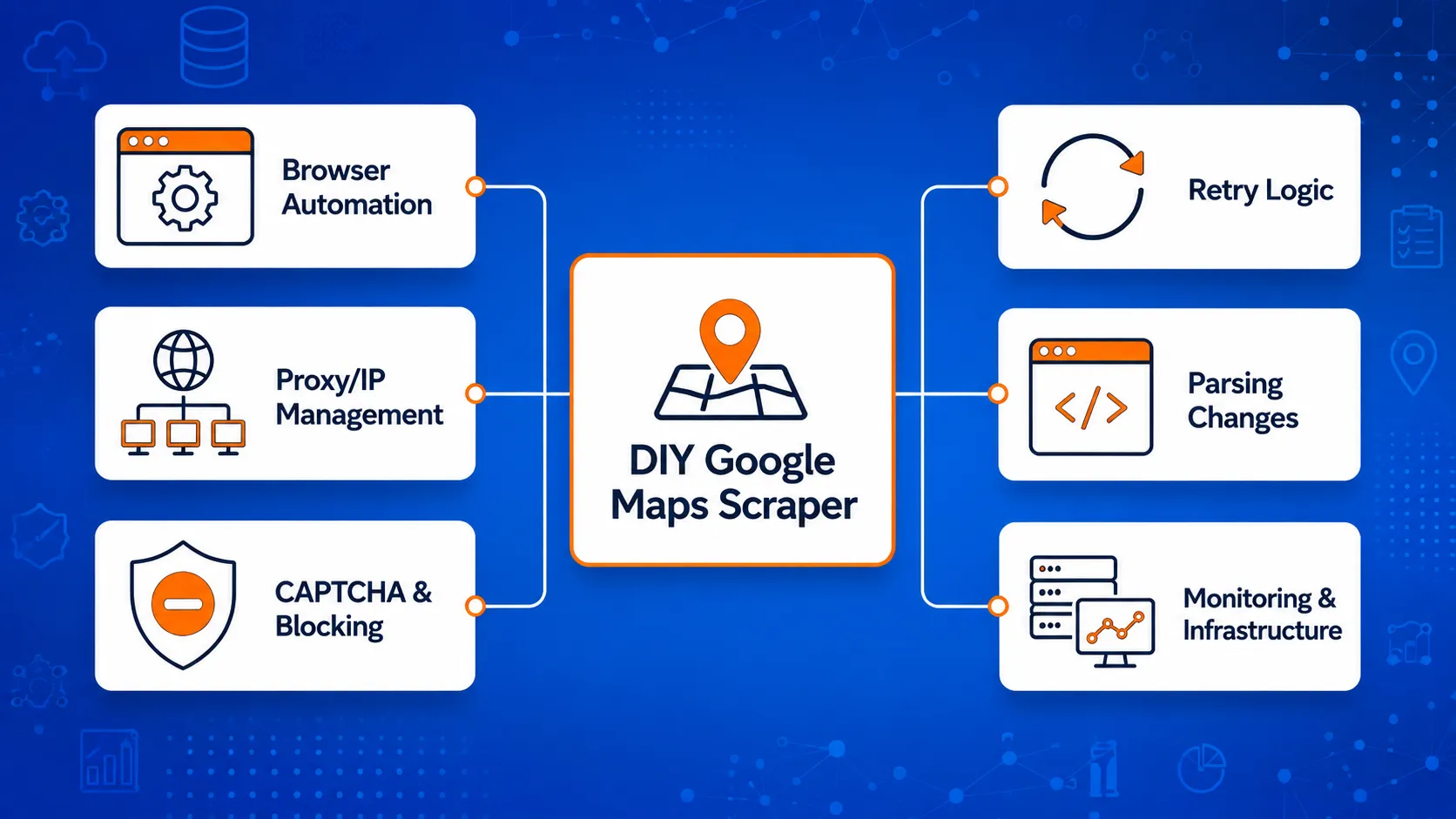
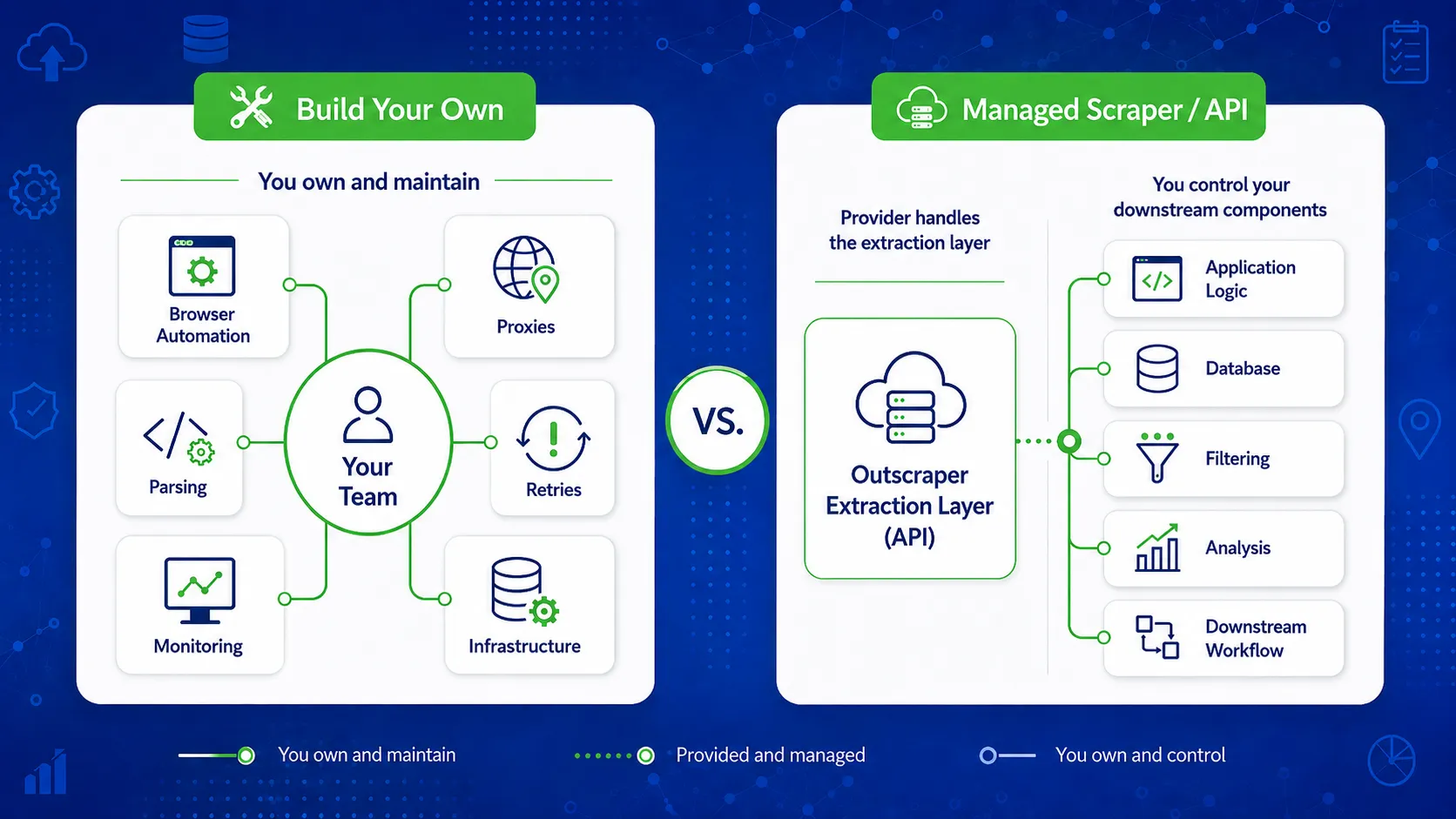
自社で構築する場合、ブラウザの自動化、プロキシ管理、再試行ロジック、モニタリング、およびページの動作が変更された際の定期的な修正が必要になる場合があります。これらの作業は、スクレイパーを定期的なリード生成、市場調査、または社内のデータワークフローに活用する場合、より顕著になります。.
ブラウザの自動化とデータ抽出ロジック
Google マップは動的なページコンテンツに大きく依存しているため、多くの自作スクレイパーは、データを読み込んで収集するために、ブラウザの自動化や類似の手法に頼っています。.
また、抽出ロジックでは、適切な要素を特定し、スクロールや繰り返し読み込みに対応し、ワークフローで期待されるフィールドを返す必要があります。ページの構造が変更された場合、そのロジックの一部を更新する必要が生じる可能性があります。.
技術的な設定についてさらに詳しく知りたい場合は、当社のガイドをご覧ください。 Pythonを使ったGoogle Mapsのデータ抽出 ブラウザベースのデータ抽出およびそれに付随する作業について解説します。.
プロキシおよびIP管理
繰り返し行われる依頼は、IP管理に関してさらなる作業負担を生み出す可能性があります。.
独自のスクレイパーを運用するチームは、プロキシプールの管理、正常に動作しないプロキシの削除、ブロックされたリクエストの追跡、およびリクエストの割り当て方法の決定が必要になる場合があります。また、プロキシの品質も、ジョブの完了の信頼性に影響を与える可能性があります。.
小規模であれば、これは何とか対処できるかもしれません。しかし、スクレイパーが多数の検索や場所を網羅するようになると、これを無視するのは難しくなります。.
CAPTCHAとブロック機能
CAPTCHA やリクエストのブロックにより、抽出ジョブが完了する前に中断されることがあります。.
したがって、本番環境のワークフローでは、こうした障害を検出し、その後の対応を決定する仕組みが必要となります。リクエストによっては、再試行したり、遅延させたり、あるいは別のIP経由で処理したりする必要がある場合があります。.
そのような処理を行わないと、スクレイパーは一見成功しているように見えても、実際には不完全なデータセットを返してしまうことがあります。.
再試行と失敗したジョブ
リクエストが失敗した場合、通常は、一部のみ完了したジョブよりも処理が容易です。.
たとえば、スクレイパーが大量のバッチ処理の80%を完了した時点で、プロセスの一部が停止することがあります。その場合、システムは、何が成功し、何が失敗し、何を再実行すべきかを把握する必要がありますが、その際、不必要な重複処理が発生しないようにする必要があります。.
そのためには、抽出コードそのものに加え、ジョブの追跡機能や再試行ルールが必要となります。.
変更点の解析
スクレイパーは、検出されることを想定している構造にも依存します。.
ラベルやページ要素の変更、あるいはデータの読み込み方法の変更は、パーサーによって返されるフィールドに影響を与える可能性があります。スクレイパーは引き続き実行されるものの、欠落した値や誤ってマッピングされた値を黙って生成してしまう可能性があります。.
したがって、出力が下流のシステムが期待する内容と依然として一致していることを確認するために、定期的なチェックが必要です。.
インフラと監視
スクレイパーが定期的な作業を処理するようになると、それが正常に動作し続けているかどうかを誰かが確認し続けなければならない。.
これには、サーバー、ログ、ストレージ、ジョブのステータス、アラート、バッチ処理の失敗、および出力のチェックなどが含まれます。データが別のシステムに供給されている場合、抽出処理の失敗がすぐには気づかれない可能性があるため、監視は特に重要になります。.
これは、DIYのGoogleマップスクレイパーにおいて、見過ごされがちな部分です。データを収集するコードは、その一部に過ぎません。チームは、収集プロセスを継続的に稼働させるために必要なシステムも管理しています。.
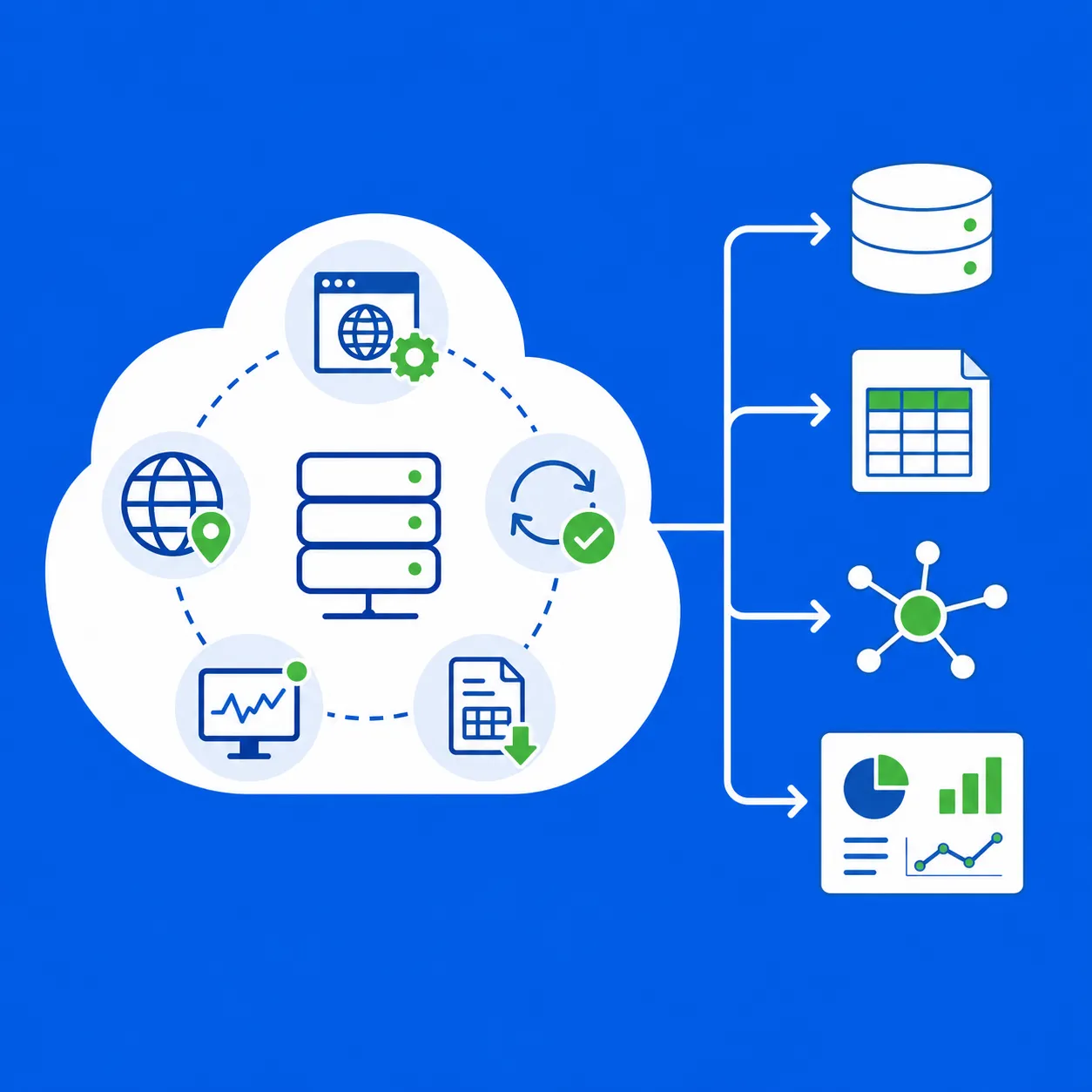
OutscraperがGoogle Mapsのデータ抽出レイヤーを処理するため、貴社のチームはスクレイピングインフラの維持管理に時間を割くことなく、抽出されたビジネスデータの活用に専念できます。.
独自のGoogleマップスクレイパーを構築するには、どれくらいの費用がかかるのでしょうか?
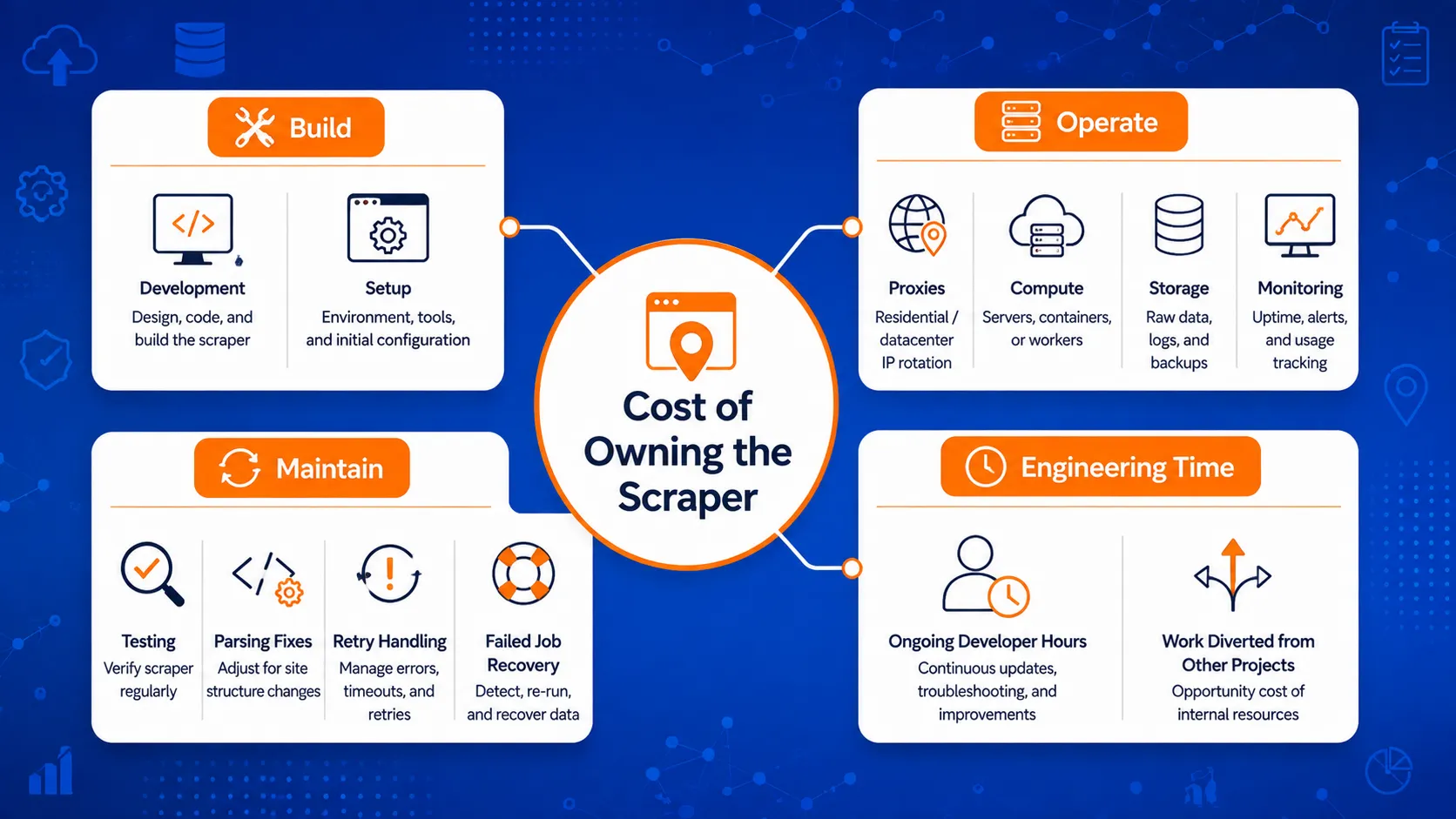
DIYのスクレイパーにかかるコストは、コードの最初のバージョンを作成するだけにとどまりません。スクレイパーが定期的なジョブに対応するようになると、チームはその運用を維持するために必要なシステムやエンジニアリングの工数に対してもコストを負担することになります。.
スクレーパーの製造コストと、その稼働を維持するためのコストを比較してください。.
初期設計期間
最初のビルドには、抽出スクリプト本体のほか、その他のものが含まれる場合があります。.
また、エンジニアは、ブラウザの自動化、リクエスト処理、プロキシルーティング、データ保存、再試行ルール、ロギング、出力チェックなどの設定を行う必要がある場合もあります。作業量は、スクレイパーが収集する必要のあるデータ量や、ワークフローに求められる信頼性の程度によって異なります。.
小規模な内部テストと、毎週本番データベースにデータを投入するスクレイパーとでは、要件が大きく異なります。.
プロキシおよびインフラストラクチャのコスト
定期的なスクレイピングを行うには、プロキシ、サーバー、ストレージ、監視システムなどの有料インフラが必要になる場合があります。.
これらのコストは、検索回数、対象地域、収集するレコード数が増えるにつれて増加する可能性があります。また、より大規模なジョブを処理するため、あるいはリクエストの失敗に対処するためにスクレイパーが追加のリソースを必要とする場合にも、コストは変動する可能性があります。.
重要な点は、インフラは通常、開発が完了した後も運営コストの一部として残ることである。.
メンテナンス時間
抽出の挙動に変化が見られたり、出力が期待どおりにならなくなったりした場合は、スクレイパーに注意を払う必要があります。.
その業務には、以下のようなものが含まれる場合があります:
- セレクタの修正または構文解析ルール
- 故障したプロキシの交換
- 未完了のジョブの確認
- ブラウザの自動化機能の更新
- ログの確認
- 次のバッチを実行する前に変更内容をテストする
スクレイパーが定期的なデータ処理の一環となると、たとえ些細な修正であっても、それが積み重なっていくものです。.
障害および復旧にかかるコスト
失敗したジョブも時間を消費します。.
誰かが、何が失敗したのかを特定し、どのレコードがすでに収集済みかを確認し、欠落している処理を再実行し、最終出力に欠落や重複がないかを確認する必要があります。.
これは、バッチ処理の失敗によって、見込み客リストの作成、市場調査、あるいはそのデータに依存する社内アプリケーションなど、他のプロセスが遅延する場合に、より重要になります。.
工学における機会費用
開発時間には、もうひとつコストがあります。それは、開発者がスクレイパーのメンテナンスを行っている間に手が回らなくなる作業です。.
チームによっては、その時間をレポートツールの構築、データベースの改善、データエンリッチメント工程の追加、あるいは収集したデータを活用した機能の開発に充てることを選ぶかもしれません。.
そのため、スクレーパーのメンテナンスは、技術的な課題であると同時に、経営上の判断も求められるものとなります。.
| コスト領域 | 初期構築中 | 継続的な使用中 |
|---|---|---|
| 工学 | 抽出のロジックと設定 | 修正、テスト、および更新 |
| プロキシ | セットアップとテスト | 繰り返し使用 |
| インフラ | サーバー、ストレージ、ロギング | ホスティングと監視 |
| 雇用の回復 | 再試行ロジック | 失敗したジョブおよび一部完了したジョブ |
| データの確認 | 出力設定 | 入力漏れや誤った入力がある項目 |
| エンジニアリング時間 | スクレイパーの製作 | 抽出プロセスの維持 |
これらの内部コストを「マネージド・オプション」と比較するには、以下の点についても確認することができます。 Google Maps Scraperの価格設定 どのような仕組みで動作するか、またどの設定がタスクのコストに影響を与えるか。.
当初最もコストの低い選択肢であっても、メンテナンス費用、ジョブの失敗、およびエンジニアリングにかかる時間を考慮すると、必ずしも最もコストの低い選択肢とは限らない。.
DIYが理にかなう場合
データ抽出作業そのものが製品にとって重要である場合や、チームがセットアップ全体を管理すべき明確な理由がある場合には、独自のスクレイパーを構築することが依然としてより良い選択肢となり得ます。.
高度にカスタマイズされた抽出ロジックが必要です
管理型スクレイパーでは、ほとんどのチームが必要とするフィールドやワークフローを網羅できるかもしれませんが、プロジェクトによっては、特定のアプリケーションに特化したデータ抽出ルールが必要になる場合もあります。.
これには、通常とは異なる解析ロジック、カスタムページの動作、特別な検証手順、あるいは標準のプロバイダーが返さないデータに基づいて構築されたワークフローなどが含まれます。.
そのような場合、スクレイパーを自社で保有することで、エンジニアリングチームはデータ抽出の仕組みを変更する際により大きな自由度を得ることができます。.
社内にスクレイピングエンジニアはすでにいます
企業にすでにスクレイピングシステムを担当するエンジニアがいる場合、メンテナンスの負担は様相が異なります。.
すでにプロキシインフラ、監視システム、再試行ロジック、ストレージ、そしてジョブ失敗を処理するための社内ツールを備えている可能性があります。そのような環境にGoogle Mapsスクレイパーを追加する方が、別の外部サービスを導入するよりも合理的である場合があります。.
主な問題は、優先度の高い業務から注意をそらすことなく、それを維持するための余力チームにあるかどうかです。.
ワークフローの範囲が限定的であるか、あるいは実験的なものである
小規模なテストには、必ずしも本番環境レベルのインフラが必要とは限りません。.
短期の研究プロジェクト、概念実証(PoC)、あるいは限定的な社内実験においては、チームが検証しようとしている疑問に答えるには、基本的なスクレイパーで十分である場合もある。.
その一時的なスクリプトが定期的なデータソースになり始めた場合、判断は変わります。その時点で、前述のメンテナンス作業の重要度が高まってきます。.
インフラの完全な管理が重要である
チームによっては、リクエストの送信方法、データの処理場所、ログの保存方法、あるいはジョブが失敗した際のシステムの動作について、直接的な制御を必要とする場合があります。.
こうした要件は、社内の技術基準、セキュリティポリシー、あるいは製品アーキテクチャに由来する場合があります。.
その程度の制御が必要であるならば、たとえメンテナンス作業が増えるとしても、自社内で構築することの正当性を説明しやすくなる。.
スクレイピングは製品の一部です
一部の企業にとって、スクレイピングは単なる入力データの収集手段にとどまりません。データ抽出システムそのものが、同社が構築・維持管理しているものの一部となっているのです。.
独自のデータ製品、クローラー、またはデータ抽出プラットフォームを開発しているチームは、その基盤となる技術を自社で保有すべきより強い理由があるかもしれない。.
そのような状況では、エンジニアリングの取り組みは、チームの主な業務とは別に進められるのではなく、製品そのものを直接支えるものとなります。.
追加の制御に明確な目的がある場合、DIY(自作)のアプローチが最も理にかなっています。もしスクレイパーが、単に別のワークフローにデータを供給するためだけに存在するのであれば、抽出レイヤーを独自に構築することの価値を正当化するのは難しくなります。.
「マネージド Google マップ・スクレイパー」の方が理にかなっている場合
チームが定期的にデータを必要とする一方で、データ抽出プロセスを稼働させ続けるためのシステムを自社で運用したくない場合、マネージド・スクレイパーはより実用的な選択肢となります。.
定期ジョブを実行する
1回限りのデータ取得は、毎週や毎日実行されるワークフローよりも管理が容易です。.
定期的なジョブでは、リクエストのブロック、部分的な結果、バッチの失敗、および構文解析の変更によってプロセスが中断される可能性が高まります。マネージドスクレイパーを利用すれば、こうしたジョブを稼働させ続けるために必要な内部作業の負担を軽減できます。.
繰り返し使用できるデータセットや、より大規模なデータセットが必要です
同じワークフローで、より多くの検索、場所、またはレコードを処理しなければならない場合、保守の負担は増大します。.
その段階になると、課題はもはや抽出ロジックだけにとどまりません。チームは、より大規模な作業量にわたって、再試行、ジョブの追跡、インフラストラクチャ、および出力のチェックも管理しなければなりません。.
チームが社内でスクレイピング環境を拡充することなく、ビジネスデータに繰り返しアクセスする必要がある場合、マネージドサービスの導入を正当化しやすいと言えます。.
チームに必要なのはデータであり、スクレイパーではない
多くのチームが、Google マップのビジネスデータを別のタスクの入力情報として活用しています。.
これには、見込み客の開拓、市場調査、地域ビジネスの分析、社内データベース、あるいはアプリケーションの機能などが含まれる可能性があります。こうしたワークフローにおいて、スクレイパーのメンテナンスを行っても、データの最終的な活用には直接的な改善にはつながりません。.
Outscraperの Google マップのデータ抽出代行サービス ユーザーが生成されたビジネスデータを扱う間、抽出側の処理を担当することで、この種のセットアップに適しています。.
API ベースのデータアクセスが必要です
時折行う調査であれば手動でのエクスポートで事足りるかもしれませんが、定期的なワークフローでは、データを別のシステムへ自動的に移行させる必要がある場合がしばしばあります。.
API を使用すると、アプリケーションや内部プロセスがプログラム的にデータを要求し、抽出後の結果を用いて処理を継続することができます。.
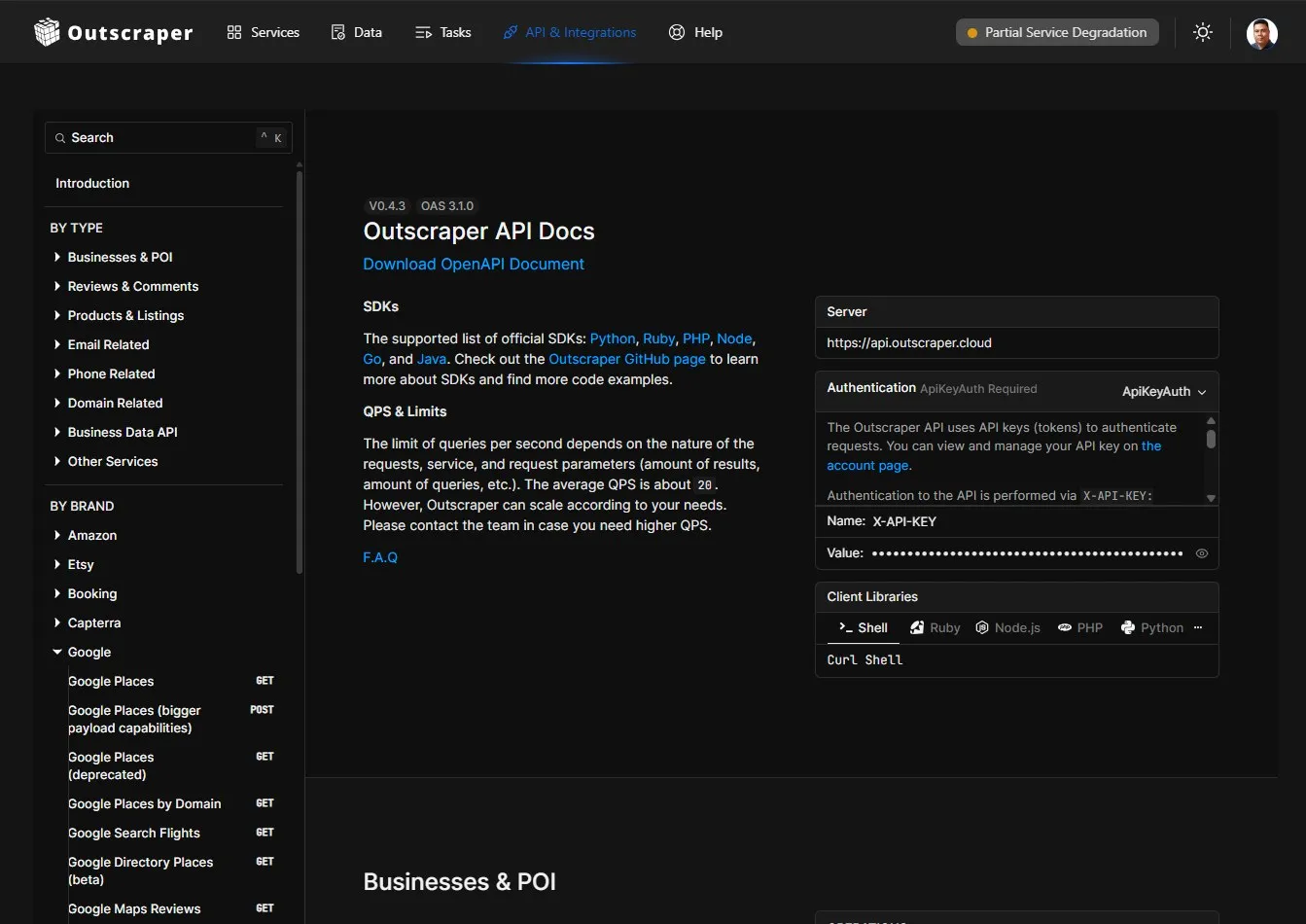
開発者は、以下の内容を確認できます。 Outscraper API ドキュメント 最新のエンドポイント、パラメータ、レスポンス、およびコード例については、こちらをご覧ください。.
これにより、開発者は、基盤となるGoogle Mapsスクレイパーのメンテナンスを行う必要なく、自身のシステム内で重要な部分を自由に制御できるようになります。.
エンジニアリングの時間は、下流工程で活用したほうがよい
スクレイパーの維持管理コストには、開発者が他の業務に充てることができない労力も含まれています。.
チームは、収集したデータに基づいて、データベース設計、社内ツール、レポート作成、データ充実化、分析、あるいは製品機能の開発にエンジニアリングリソースを割くことで、より大きなメリットを得られる可能性があります。.
管理されたスクレイパーは、データ抽出の層が必要ではあるものの、チームが構築しようとしているものの中核ではない場合に、その真価が最も発揮されます。.
リード生成、調査、データベース、またはアプリケーションのワークフローを維持しつつ、Google マップのデータを定期的に収集するには、Outscraper をご利用ください。.
Googleマップのスクレイパーを自作すべきか、それともマネージドサービスを利用すべきか?
ワークフローの各部分を誰が担当しているかを比較すれば、選択はより容易になります。.
| 因子 | 自分だけのものを作ろう | マネージド・スクレイパー/API |
|---|---|---|
| 抽出制御 | 完全な制御 | プロバイダーの機能に制限される |
| 初期の設計作業 | より高い | 下へ |
| ブラウザのメンテナンス | あなたのチーム | プロバイダー |
| プロキシ管理 | あなたのチーム | プロバイダー |
| 変更点の解析 | あなたのチーム | プロバイダー |
| 再試行の処理 | あなたのチーム | 通常はプロバイダーが対応します |
| モニタリング | あなたのチーム | プロバイダーが抽出層を処理する |
| ワークフローのカスタマイズ | 最高 | APIおよび出力の値が高い |
| スケーリング | さらなる技術的な検討が必要 | 通常、拡張しやすい |
| 最適なサイズ | 特定の技術的要件を持つチーム | データの活用に注力しているチーム |
どちらの選択肢も、自動的に優れているわけではありません。適切な選択は、チームにどの程度の制御が必要か、またどの程度の保守作業を社内で担当したいかによって異なります。.
第3の選択肢:スクレイパーではなく、ワークフローを構築する
この決定は、すべてを自社で構築することや、ワークフロー全体をプロバイダーに委託することに限定される必要はありません。.
チームは、抽出ステップでマネージド・スクレイパーAPIを利用しつつ、アプリケーション、クエリロジック、ストレージ、フィルタリング、データエンリッチメント、および下流処理に対する制御を維持することができます。.
この設定の技術的な詳細については、以下の手順を参照してください。 Outscraper API 内部で使用できます カスタムデータワークフロー.
設定は次のようなものになる場合があります:
お客様のアプリケーションまたは自動化
→ マネージド・スクレイパーAPI
→ Google マップのビジネス情報
→ お客様のデータベース、CRM、レポート作成ツール、または社内システム。.
このアプローチは、ブラウザやプロキシ、解析ロジック、データ抽出インフラを管理することなく、プログラムによるアクセスを希望する開発者やデータチームに適しています。.
データ収集後も、そのデータの利用方法については引き続きチームが管理します。データ収集そのものについては、プロバイダーが担当します。.
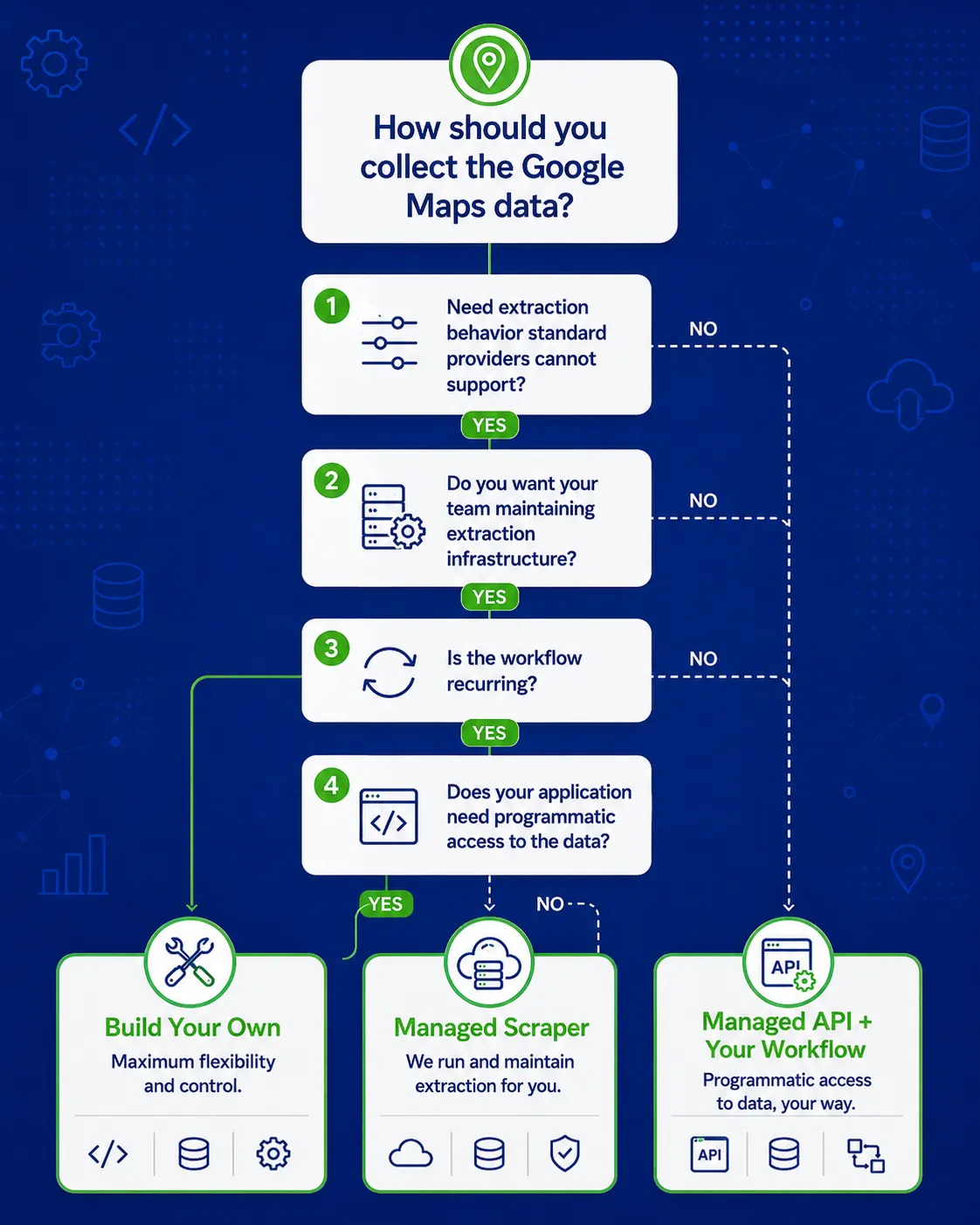
OutscraperがGoogle Mapsのデータ抽出を処理する間、アプリケーションロジック、ストレージ、フィルタリング、および下流処理は引き続きご自身で管理してください。.
選ぶ前に確認すべきこと
スクレイパーをどのように使用するのか、誰がメンテナンスを行うのか、そしてワークフローが期待通りに動作しなくなった場合にどう対応するのかを明確にしておけば、技術的な選択はより容易になります。.
どのくらいの頻度で実行しますか?
1回限りの研究作業に使用されるスクレイパーと、毎日または毎週稼働するスクレイパーでは、求められる要件が異なります。.
定期ジョブは、障害や構文解析の変更、インフラストラクチャの問題などによってプロセスが中断される可能性が高まるため、メンテナンス作業の負担が増大します。.
どれくらいのデータ量が必要ですか?
社内テストのための数回の検索は、数百もの拠点やカテゴリにわたる業務データを収集するよりも管理しやすい。.
処理量が増えるにつれて、ジョブの追跡、再試行、プロキシの使用、ストレージ、および監視が、ワークロードの中で占める割合が大きくなります。.
お客様の抽出要件は、どの程度カスタマイズされていますか?
ビルドを実行する前に、必要なフィールドと抽出ルールを一覧表示してください。.
要件が、通常とは異なるページの動作や、マネージドプロバイダーがサポートしていないフィールドに依存している場合は、カスタムスクレイパーの導入がより妥当な選択肢となる可能性があります。.
必要な業務データがすでにマネージドサービスを通じて入手可能な場合、抽出ロジックを自社で保有することは、大きなメリットをもたらさないまま作業負担を増やすだけになる可能性があります。.
何かが壊れたときは、誰が修理するのですか?
仕事が途絶えたり、分野が消滅したり、生産物が変化したりしたときは、誰かが責任を負わなければならない。.
DIYのスクレーパーを完成品として扱う前に、その担当者やチームを特定しておきましょう。他の生産システムと同様、このメンテナンス作業にも責任者が必要です。.
APIは必要ですか?
APIが重要になるのは、別のアプリケーション、データベース、または自動化システムが、人が手動で各ジョブを起動してダウンロードすることなく、データを要求する必要がある場合です。.
また、この段階でビルドの決定が変更されることもあります。チームは、抽出ステップでマネージドAPIを利用しつつ、独自のアプリケーションを開発し続けることも可能です。.
エンジニアリングの工数はどれくらいの費用がかかるのでしょうか?
プロキシの利用料やサーバー費用は目に見える経費ですが、エンジニアリングにかかる工数は見落としがちです。.
監視、デバッグ、テスト、復旧、および将来の変更に必要な時間を見積もります。その後、その作業を、同じエンジニアが担当している他のタスクと比較します。.
仕事がうまくいかなかったらどうなるのか?
完全な失敗だけでなく、部分的な成果も想定しておくこと。.
システムが、欠落しているレコードをどのように特定し、未完了の作業を再実行し、データの重複を防止し、また、対応が必要な作業がある場合にチームに通知するのかを尋ねてください。.
すべてが順調に進んでいるときに機能するスクレイパーは、生産ワークフローの一部に過ぎません。.
どのような法的要件、契約上の要件、またはデータ利用に関する要件が適用されるのでしょうか?
スクレイピングのルールは、情報源、その利用規約、収集されるデータの種類、管轄区域、およびデータの用途によって異なる場合があります。.
Googleも独自のものを公開しています Google Maps Platform 利用規約 および関連するポリシーガイダンス。ワークフローがGoogle Maps Platformのサービスに依存する場合は、これらを確認する必要があります。.
データの収集や処理方法を決定する前に、ご自身の具体的なワークフローに適用される要件を確認してください。本セクションは法的助言ではありません。.
Google マップ・スクレイパーに関する判断チェックリスト
- データが必要となる頻度を指定してください。.
- 必要なフィールドと抽出ルールを列挙してください。.
- 保守およびエンジニアリング作業の見積もりを作成してください。.
- 失敗やその対応について、誰が責任を持つかを決定する。.
- プログラムによるAPIアクセスが必要かどうかを確認してください。.
- スクレーパーを完全に制御することの価値と、それを維持するために必要な労力を比較してください。.
- データワークフローに適用されるルールを確認してください。.
OutscraperがGoogleマップのデータ抽出作業を担当するため、御社のチームは、そのデータをリード創出、調査、データベース構築、あるいはアプリケーション開発に活用することに集中できます。.
よくある質問
最も頻繁な質問と回答
基本的なスクレイパーなら、プロトタイプを作成するのは比較的簡単です。難しいのは、繰り返しの処理、リクエストのブロック、ページの変更、再試行、そして大規模なワークロードといった状況下でも、その信頼性を維持し続けることです。.
その難易度は、実行頻度、収集するデータ量、およびワークフローに必要なメンテナンスの量によって異なります。.
すべてのプロジェクトに一律に適用される費用というものはありません。.
総費用は、開発工数、プロキシ、サーバー、ストレージ、監視、保守、およびジョブ障害時の復旧作業によって異なります。短期間の社内テストにかかる費用は、本番システムの一部として継続的に稼働するスクレイパーに比べて、はるかに安くなる場合があります。.
それは作業量次第です。.
プロジェクトの規模が小さく、すでにエンジニアリングリソースが確保されている場合、DIY型のスクレイパーの方が初期コストが低く抑えられる可能性があります。一方、定期的なメンテナンス、プロキシ費用、ジョブの失敗、開発者の工数などを比較対象に含めると、マネージド型のスクレイパーの方が現実的な選択肢となる場合があります。.
はい。開発者は、データ抽出にはマネージド・スクレイパーAPIを利用しつつ、アプリケーション、データベース、フィルター、ビジネスルール、および下流処理を構築することができます。. アウトスクレーパー データ抽出およびAPIサービスを通じて、この種の設定に対応しています。.
このアプローチにより、チームがスクレイピング層の保守を行う必要がなく、アプリケーションロジックを自社の管理下に置くことができます。.
“「安全」という言葉は、いくつかの異なる事柄を指す場合があります。.
プロバイダーを選ぶ前に、ジョブがどのように実行されるか、自身のIPアドレスやGoogleアカウントが公開されるかどうか、API認証情報や収集されたデータがどのように扱われるか、ジョブが失敗した場合はどうなるか、そして利用ケースにどのような法的または契約上の要件が適用されるかを確認してください。.
サードパーティのサービスは、単に管理されているという理由だけで安全だと見なすのではなく、これらの点に基づいて評価すべきである。.
はい、必要なデータやワークフローによって異なります。.
Google Maps Platform API とウェブスクレイピングは、場所に関する情報にアクセスするための異なる方法であり、対象となるフィールド、制限、費用、利用規約も異なります。もしそれが主な判断基準であるならば、専用の Google Maps APIとウェブスクレイピングの比較 それらの違いについて検討するには、そちらの方が適しています。.