目次を見る
A グーグルマップスクレイパー can return thousands of records today and fail on the same job later because part of the extraction process changed.
Blocked requests, proxy issues, CAPTCHAs, failed batches, and parsing changes all create maintenance work. Once the scraper becomes part of a recurring workflow, someone has to monitor jobs, fix failures, manage infrastructure, and keep the extraction logic working.
That ongoing work is easy to overlook during the first build. A team may be comfortable owning it when the extraction requirements are unusual or scraping is already part of what its engineers maintain.
The decision gets harder when Google Maps data is only one input for lead generation, research, databases, or internal applications. In those cases, the time spent keeping the extraction layer running becomes part of the cost of the data itself.
Quick Answer: Should You Build Your Own Google Maps Scraper?
- Build it for custom extraction and full control.
- Use a managed scraper to reduce maintenance work.
- Use a managed API to keep your own workflow without maintaining the scraper.
- Compare control, maintenance, volume, and engineering time before deciding.
What Maintaining a DIY Google Maps Scraper Involves
Writing the first version of a scraper is only part of the work. Once it runs repeatedly, the maintenance shifts to everything around the extraction process.
A DIY setup may need browser automation, proxy management, retry logic, monitoring, and regular fixes when page behavior changes. These tasks become more noticeable when the scraper is used for recurring lead generation, market research, or internal data workflows.
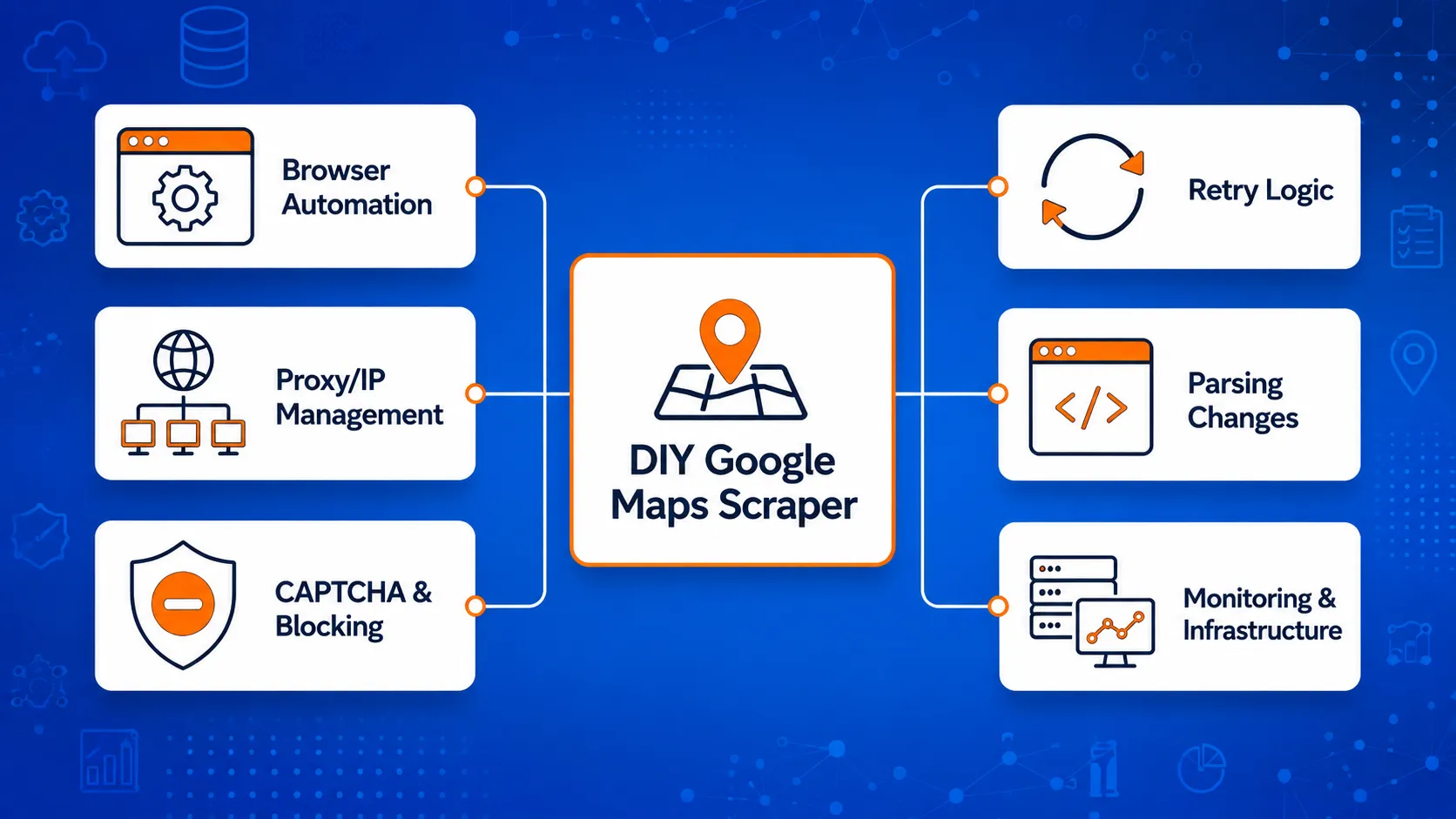
Browser Automation and Extraction Logic
Google Maps relies heavily on dynamic page content, so many DIY scrapers depend on browser automation or similar methods to load and collect data.
The extraction logic also has to identify the right elements, handle scrolling or repeated loading, and return the fields your workflow expects. If the page structure changes, parts of that logic may need to be updated.
If you want to see the technical setup in more detail, our guide to Google Maps scraping with Python covers browser-based extraction and the supporting work around it.
Proxy and IP Management
Repeated requests can create another layer of work around IP management.
A team running its own scraper may need to manage proxy pools, remove failing proxies, track blocked requests, and decide how requests are distributed. Proxy quality can also affect how reliably jobs complete.
At small scale, this may be manageable. It becomes harder to ignore when the scraper runs across many searches or locations.
CAPTCHAs and Blocking
CAPTCHAs and blocked requests can interrupt an extraction job before it finishes.
A production workflow therefore needs a way to detect these failures and decide what happens next. Some requests may need to be retried, delayed, or moved through a different IP.
Without that handling, a scraper can appear successful while still returning incomplete datasets.
Retries and Failed Jobs
A failed request is usually easier to handle than a partially completed job.
For example, a scraper may finish 80 percent of a large batch before part of the process stops. The system then needs to know what succeeded, what failed, and what should be rerun without creating unnecessary duplicates.
That requires job tracking and retry rules in addition to the extraction code itself.
Parsing Changes
The scraper also depends on the structure it expects to find.
A change in labels, page elements, or how data is loaded can affect the fields returned by the parser. The scraper may still run while quietly producing missing or incorrectly mapped values.
Regular checks are therefore needed to confirm that the output still matches what downstream systems expect.
Infrastructure and Monitoring
Once a scraper supports recurring work, someone has to keep track of whether it is still working.
That can include servers, logs, storage, job status, alerts, failed batches, and output checks. Monitoring becomes especially important when the data feeds another system and a failed extraction may not be noticed immediately.
This is the part of a DIY Google Maps scraper that is easy to underestimate. The code that collects the data is only one piece. The team also owns the systems needed to keep the collection process running.
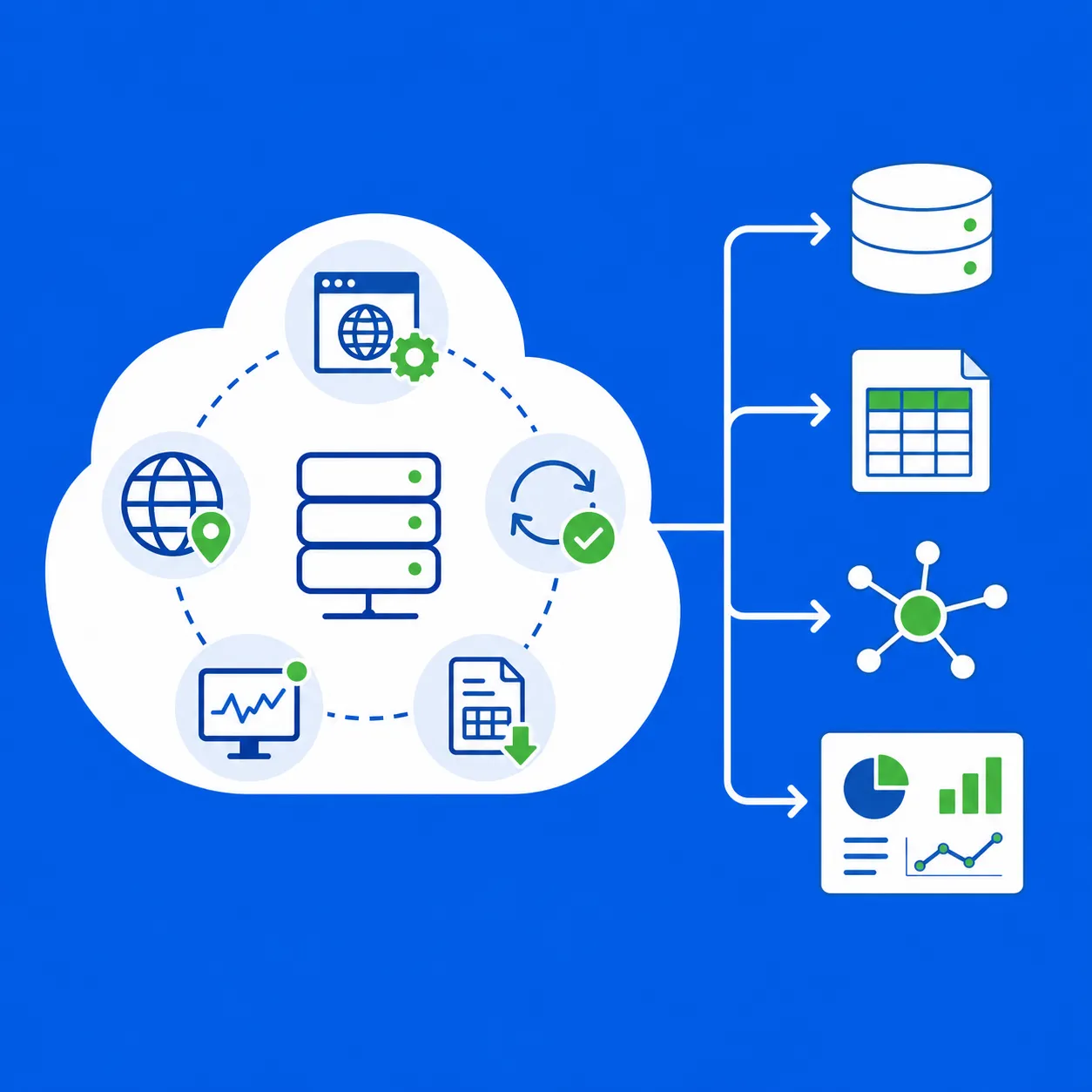
Outscraper handles the Google Maps extraction layer so your team can work with the resulting business data instead of maintaining the scraping infrastructure.
What Does Building Your Own Google Maps Scraper Cost?
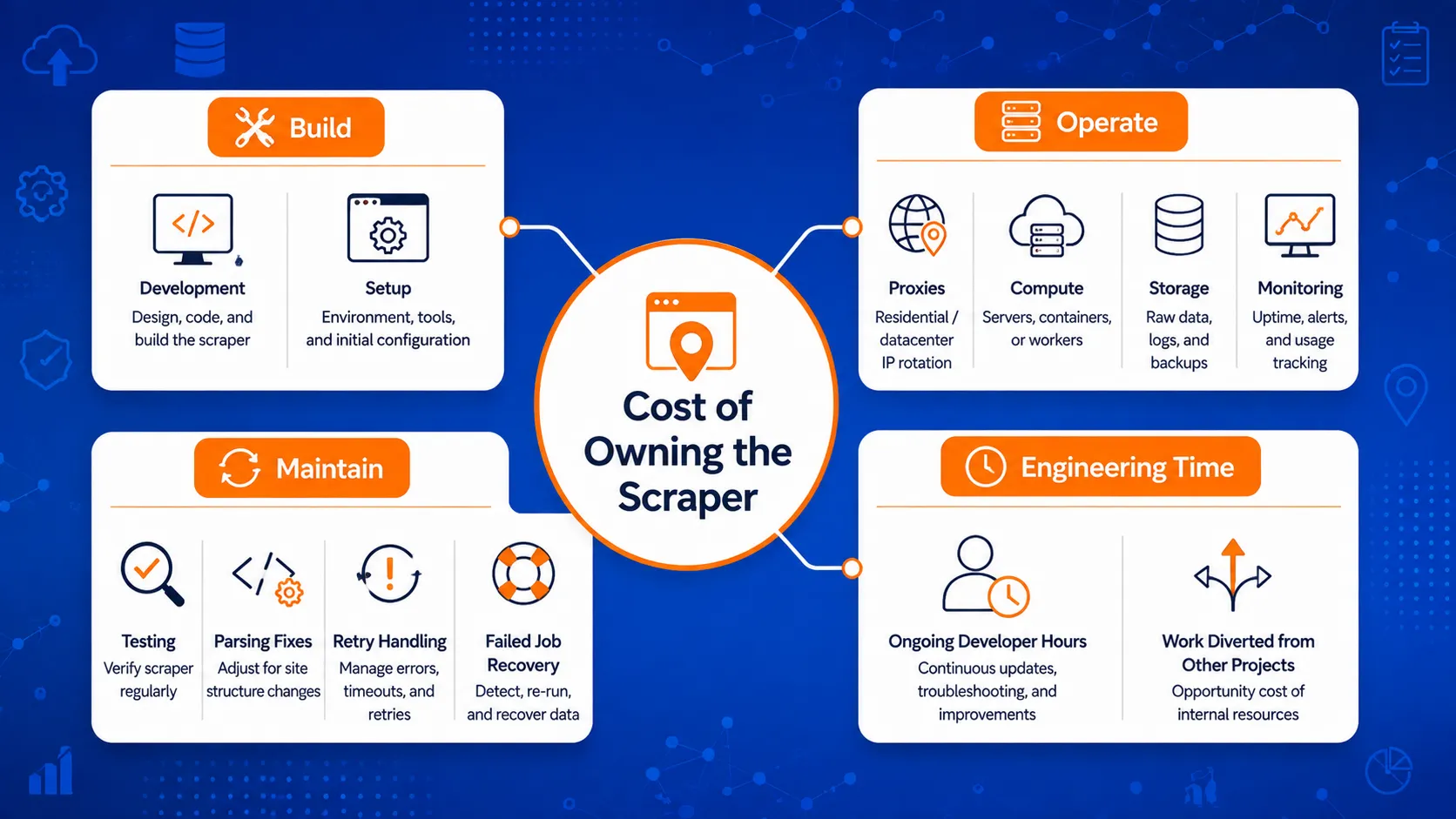
The cost of a DIY scraper goes beyond writing the first version of the code. Once the scraper supports recurring jobs, the team also pays for the systems and engineering time needed to keep it running.
Compare the cost of building the scraper with the cost of keeping it running.
Initial Engineering Time
The first build may include more than the extraction script itself.
Engineers may also need to set up browser automation, request handling, proxy routing, data storage, retry rules, logging, and output checks. The amount of work depends on how much data the scraper needs to collect and how reliable the workflow needs to be.
A small internal test has very different requirements from a scraper feeding a production database every week.
Proxy and Infrastructure Costs
Recurring scraping may require paid infrastructure such as proxies, servers, storage, and monitoring.
These costs can grow with the number of searches, locations, and records being collected. They can also change when the scraper needs additional resources to handle larger jobs or failed requests.
The important point is that infrastructure usually remains part of the operating cost after development is finished.
Maintenance Time
A scraper needs attention when extraction behavior changes or output stops matching expectations.
That work may include:
- fixing selectors or parsing rules
- replacing failing proxies
- checking incomplete jobs
- updating browser automation
- reviewing logs
- testing changes before running the next batch
Even short fixes add up when the scraper becomes part of a recurring data process.
Failure and Recovery Costs
Failed jobs also consume time.
Someone needs to identify what failed, determine which records were already collected, rerun the missing work, and check the final output for gaps or duplicates.
This matters more when a failed batch delays another process, such as lead-list preparation, market research, or an internal application that depends on the data.
Engineering Opportunity Cost
Engineering time has another cost: the work that does not get done while developers maintain the scraper.
A team may prefer to spend those hours building reporting tools, improving its database, adding enrichment steps, or developing features around the collected data.
That makes scraper maintenance a business decision as well as a technical one.
| Cost Area | During the Initial Build | During Ongoing Use |
|---|---|---|
| Engineering | Extraction logic and setup | Fixes, testing, and updates |
| Proxies | Setup and testing | Recurring usage |
| Infrastructure | Servers, storage, logging | Hosting and monitoring |
| Job Recovery | Retry logic | Failed and partial jobs |
| Data Checks | Output setup | Missing or incorrect fields |
| Engineering Time | Building the scraper | Maintaining the extraction process |
To compare these internal costs with the managed option, you can also review how Google Maps Scraper pricing works and which settings can affect task cost.
The lowest-cost option at the start may not remain the lowest-cost option once maintenance, failed jobs, and engineering time are included.
When the DIY Route Makes Sense
Building your own scraper can still be the better choice when the extraction work itself matters to the product or the team has a clear reason to control the full setup.
You Need Highly Custom Extraction Logic
A managed scraper may cover the fields and workflow most teams need, but some projects require extraction rules that are specific to one application.
That can include unusual parsing logic, custom page behavior, special validation steps, or a workflow built around data that standard providers do not return.
In those cases, owning the scraper gives the engineering team more freedom to change how the extraction works.
You Already Have Internal Scraping Engineers
The maintenance burden looks different when a company already has engineers responsible for scraping systems.
They may already have proxy infrastructure, monitoring, retry logic, storage, and internal tools for handling failed jobs. Adding a Google Maps scraper to that setup can be more reasonable than introducing another external service.
The main question is whether the team has spare capacity to maintain it without pulling attention away from higher-priority work.
The Workflow Is Narrow or Experimental
A small test does not always need production-grade infrastructure.
For a short research project, proof of concept, or limited internal experiment, a basic scraper may be enough to answer the question the team is testing.
The decision changes if that temporary script starts becoming a recurring data source. At that point, the maintenance work covered earlier begins to matter more.
Full Infrastructure Control Matters
Some teams need direct control over how requests are made, where data is processed, how logs are stored, or how the system behaves when a job fails.
Those requirements may come from internal engineering standards, security policies, or product architecture.
If that level of control is required, building in-house can be easier to justify even when it creates more maintenance work.
Scraping Is Part of the Product
For some companies, scraping is not just a way to collect input data. The extraction system itself is part of what the company builds and maintains.
A team developing its own data product, crawler, or extraction platform may have stronger reasons to own the underlying technology.
In that situation, the engineering effort supports the product directly rather than sitting beside the team’s main work.
The DIY route makes the most sense when the extra control has a clear purpose. If the scraper only exists to supply data to another workflow, the value of owning the extraction layer becomes harder to justify.
When a Managed Google Maps Scraper Makes More Sense
A managed scraper becomes more practical when the team needs the data regularly but does not want to own the systems that keep the extraction process running.
You Run Recurring Jobs
A one-time data pull is easier to manage than a workflow that runs every week or every day.
Recurring jobs create more chances for blocked requests, partial results, failed batches, and parsing changes to interrupt the process. A managed scraper can reduce the amount of internal work needed to keep those jobs running.
You Need Repeated or Larger Datasets
The maintenance burden grows when the same workflow has to cover more searches, locations, or records.
At that point, the challenge is no longer limited to extraction logic. The team also has to manage retries, job tracking, infrastructure, and output checks across a larger volume of work.
A managed service can be easier to justify when the team needs repeatable access to business data without expanding the scraping setup internally.
Your Team Needs the Data, Not the Scraper
Many teams use Google Maps business data as an input for another task.
That may include lead generation, market research, local business analysis, internal databases, or application features. In those workflows, maintaining the scraper does not directly improve the final use of the data.
Outscraperの managed Google Maps data extraction service fits this type of setup by handling the extraction side while the user works with the resulting business data.
You Need API-Based Data Access
Manual exports may be enough for occasional research, but recurring workflows often need data to move into another system automatically.
An API can let an application or internal process request data programmatically and continue working with the results after extraction.
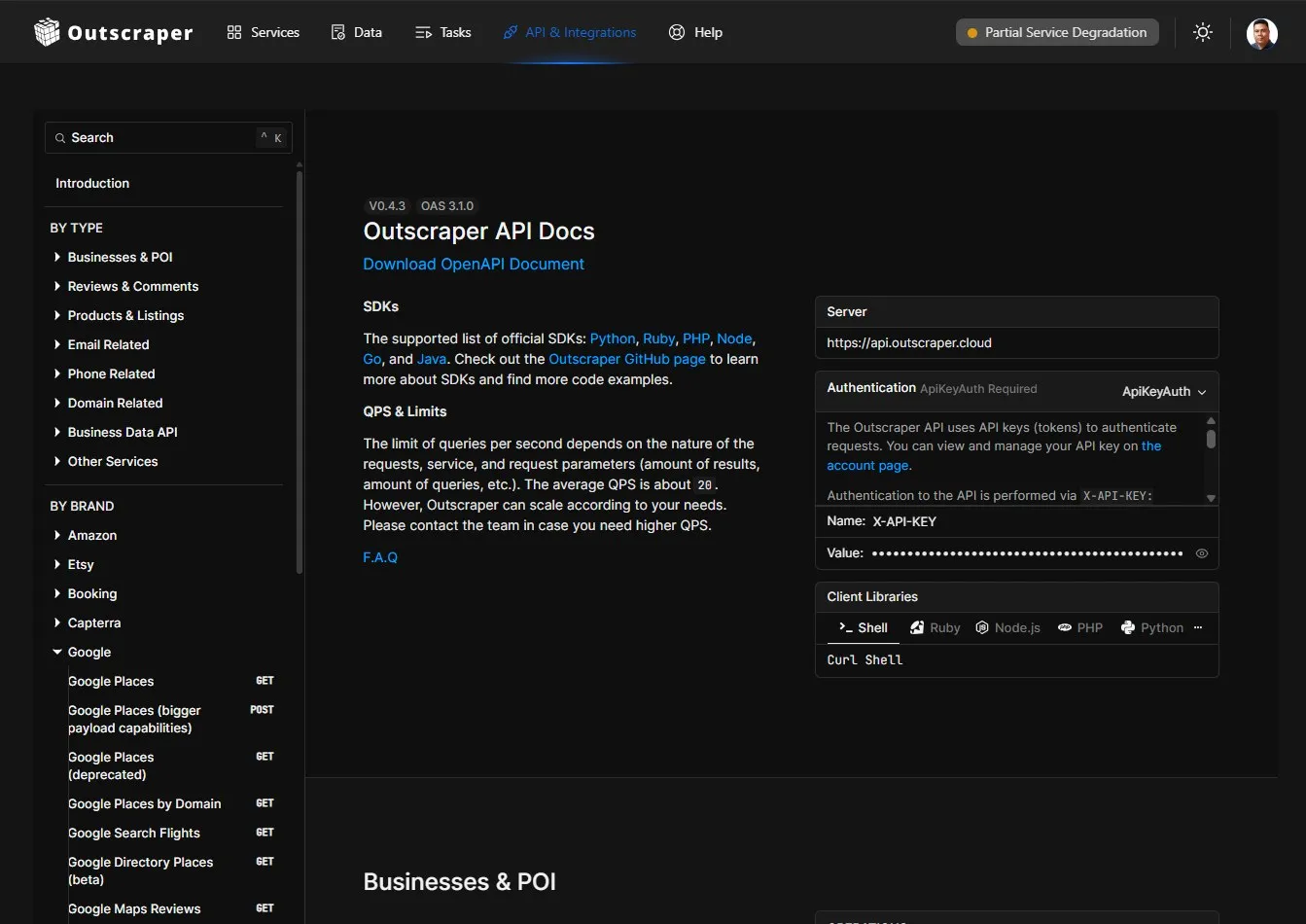
Developers can review the Outscraper API documentation for current endpoints, parameters, responses, and code examples.
This gives developers control over the parts that matter inside their own system without requiring them to maintain the underlying Google Maps scraper.
Engineering Time Is Better Used Downstream
The cost of maintaining a scraper also includes the work developers are not doing elsewhere.
A team may get more benefit from using engineering time on database design, internal tools, reporting, enrichment, analysis, or product features built around the collected data.
A managed scraper makes the strongest case when the extraction layer is necessary but not central to what the team is trying to build.
Use Outscraper for recurring Google Maps data collection while keeping your lead generation, research, database, or application workflow on your side.
Should You Build a Google Maps Scraper or Use a Managed Service?
The choice becomes easier when you compare who owns each part of the workflow.
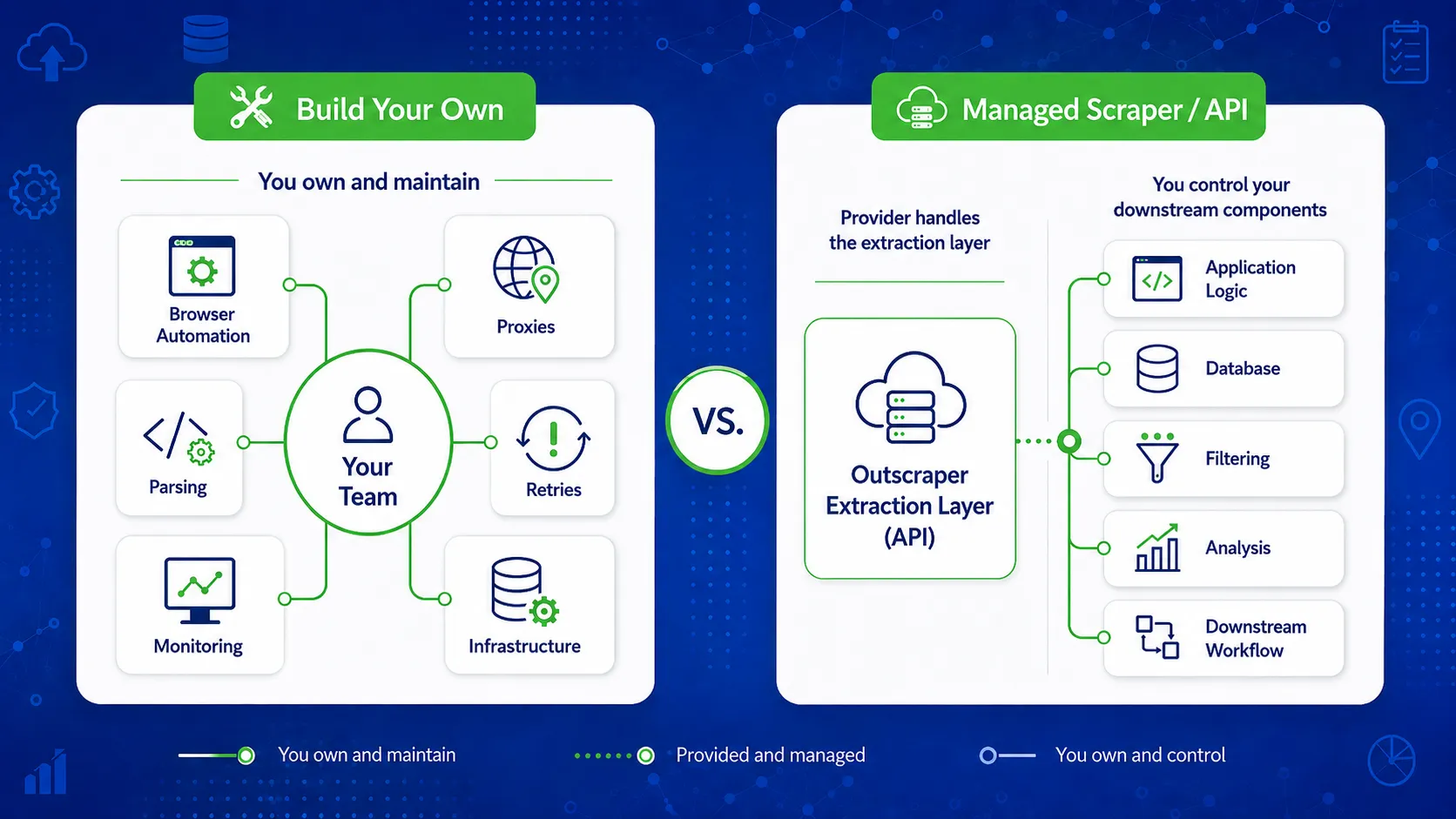
| Factor | Build Your Own | Managed Scraper / API |
|---|---|---|
| Extraction Control | Full control | Limited to provider capabilities |
| Initial Engineering Work | Higher | Lower |
| Browser Maintenance | Your team | Provider |
| Proxy Management | Your team | Provider |
| Parsing Changes | Your team | Provider |
| Retry Handling | Your team | Usually handled by provider |
| Monitoring | Your team | Provider handles the extraction layer |
| Workflow Customization | Highest | High around API and output |
| Scaling | Requires more engineering | Usually easier to expand |
| Best Fit | Teams with specific technical requirements | Teams focused on using the data |
Neither option is automatically better. The right choice depends on how much control your team needs and how much maintenance it wants to keep in-house.
A Third Option: Build the Workflow, Not the Scraper
The decision does not have to stop at building everything yourself or handing the whole workflow to a provider.
A team can keep control over its application, query logic, storage, filtering, enrichment, and downstream processing while using a managed scraper API for the extraction step.
For the technical side of this setup, see how Outscraper APIs can be used inside custom data workflows.
A setup may look like this:
Your application or automation
→ Managed scraper API
→ Google Maps business data
→ Your database, CRM, reporting tool, or internal system.
This approach can fit developers and data teams that want programmatic access without maintaining browsers, proxies, parsing logic, and extraction infrastructure.
The team still controls how the data is used after collection. The provider handles the part responsible for collecting it.
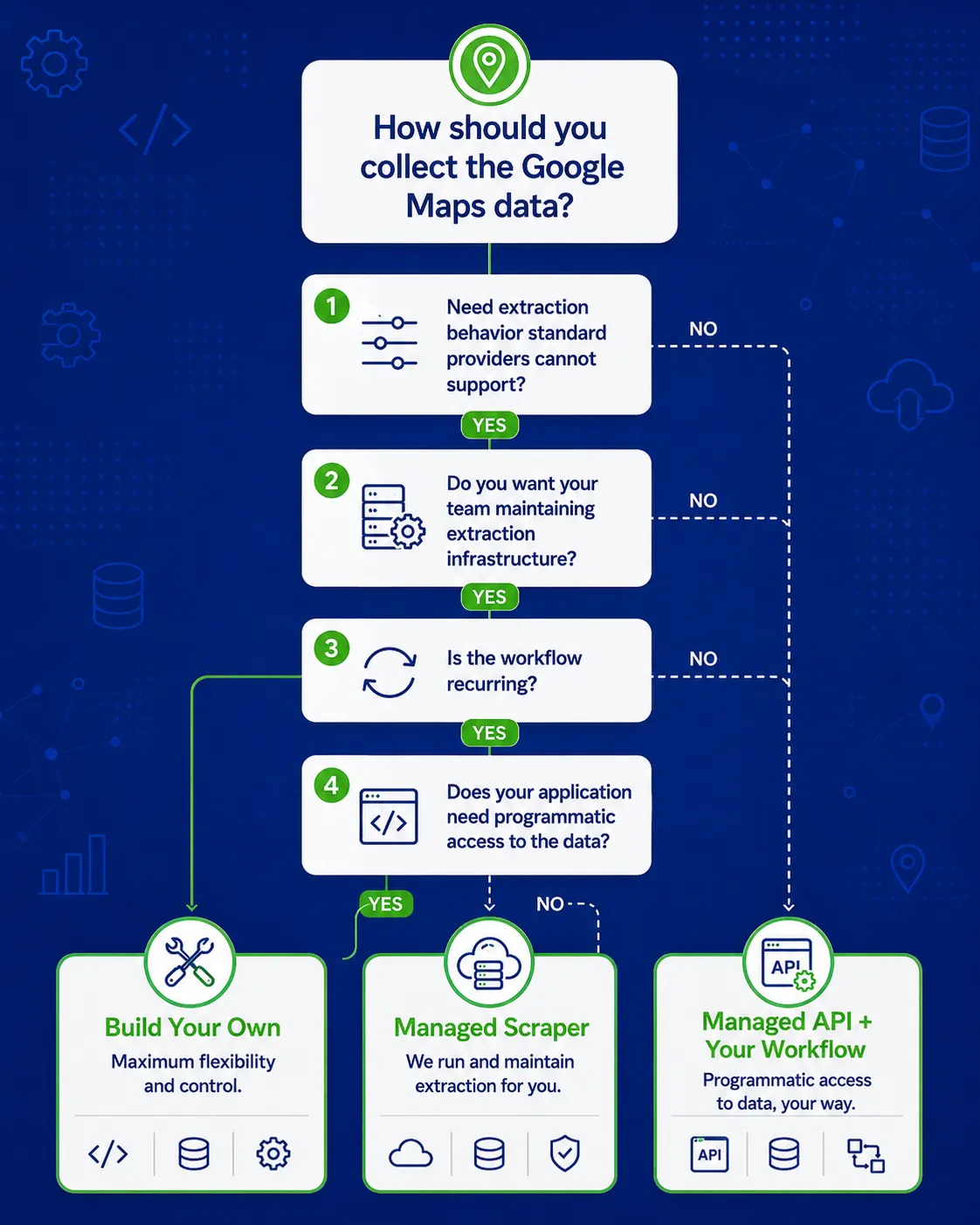
Keep control of your application logic, storage, filtering, and downstream processing while Outscraper handles Google Maps data extraction.
Questions to Ask Before You Choose
The technical choice becomes easier when you define how the scraper will be used, who will maintain it, and what happens when the workflow stops working as expected.
How Often Will You Run It?
A scraper used for a one-time research job has different requirements from one that runs every day or every week.
Recurring jobs create more maintenance work because failures, parsing changes, and infrastructure issues have more opportunities to interrupt the process.
How Much Data Do You Need?
A few searches for an internal test are easier to manage than collecting business data across hundreds of locations or categories.
As volume increases, job tracking, retries, proxy usage, storage, and monitoring become a larger part of the workload.
How Custom Are Your Extraction Requirements?
List the fields and extraction rules you need before deciding to build.
If your requirements depend on unusual page behavior or fields that managed providers do not support, a custom scraper may be easier to justify.
If the required business data is already available through a managed service, owning the extraction logic may add work without adding much benefit.
Who Maintains It When Something Breaks?
Someone needs to take responsibility when a job stops, a field disappears, or the output changes.
Identify that person or team before treating a DIY scraper as a finished project. The maintenance work needs an owner just like any other production system.
Do You Need an API?
An API matters when another application, database, or automation needs to request data without someone manually starting and downloading each job.
This is also where the build decision can change. A team may still write its own application while using a managed API for the extraction step.
How Much Does Engineering Time Cost?
Proxy fees and servers are visible expenses. Engineering time is easier to overlook.
Estimate the time needed for monitoring, debugging, testing, recovery, and future changes. Then compare that work with other tasks the same engineers are responsible for.
What Happens When Jobs Fail?
Plan for partial results as well as complete failures.
Ask how the system will identify missing records, retry unfinished work, prevent duplicate data, and alert the team when a job needs attention.
A scraper that works when everything goes well is only part of a production workflow.
What Legal, Contractual, or Data-Use Requirements Apply?
Scraping rules can depend on the source, its terms, the type of data collected, the jurisdiction, and how the data will be used.
Google also publishes its own Google Maps Platform Terms of Service and related policy guidance, which should be reviewed when a workflow depends on Google Maps Platform services.
Review the requirements that apply to your specific workflow before deciding how data will be collected or processed. This section is not legal advice.
Google Maps Scraper Decision Checklist
- Define how often you need the data.
- List the fields and extraction rules you require.
- Estimate the maintenance and engineering work.
- Decide who will own failures and fixes.
- Check whether programmatic API access is needed.
- Compare the value of full scraper control with the work required to maintain it.
- Review the rules that apply to your data workflow.
Outscraper can handle the Google Maps extraction layer while your team focuses on using the data for lead generation, research, databases, or applications.
よくある質問
最も頻繁な質問と回答
A basic scraper can be relatively simple to prototype. The harder part is keeping it reliable across repeated jobs, blocked requests, page changes, retries, and larger workloads.
The difficulty depends on how often it runs, how much data it collects, and how much maintenance the workflow requires.
There is no single cost that applies to every project.
The total depends on engineering time, proxies, servers, storage, monitoring, maintenance, and failed-job recovery. A short internal test can cost far less than a scraper that runs continuously as part of a production system.
It depends on the workload.
A DIY scraper may have a lower starting cost when the project is small and engineering resources are already available. A managed scraper may become more practical when recurring maintenance, proxy costs, failed jobs, and developer time are included in the comparison.
Yes. A developer can build the application, database, filters, business rules, and downstream processing while using a managed scraper API for data extraction. アウトスクレーパー supports this type of setup through its data extraction and API services.
This approach keeps the application logic under your control without requiring your team to maintain the scraping layer.
“Safe” can refer to several different issues.
Before choosing a provider, check how jobs are run, whether your own IP or Google account is exposed, how API credentials and collected data are handled, what happens when jobs fail, and what legal or contractual requirements apply to your use case.
A third-party service should be assessed on those points rather than treated as safe simply because it is managed.
Yes, depending on the data and workflow you need.
Google Maps Platform APIs and web scraping are different ways of accessing place-related information, with different fields, limits, costs, and usage rules. If that is the main decision you are making, the dedicated Google Maps API vs. web scraping comparison is the better place to review those differences.