Das Inhaltsverzeichnis
SDR teams can find thousands of local businesses through Google Maps, but a raw business list is not yet a prospecting workflow. The real work is deciding which accounts fit the ICP, removing duplicate or irrelevant records, enriching only the businesses worth pursuing, verifying contact data, and preparing clean fields for CRM handoff. This guide follows that full process from Google Maps discovery to an SDR-ready prospect list. It also shows where Outscraper fits as the collection and enrichment layer, while the SDR or RevOps team keeps control of qualification, routing, ownership, and outreach decisions.
Start with a scoped Maps export
Pull one city of accounting-firm queries on the Free Tier (first 500 businesses; tiers reset every 30 days) and inspect columns before you enrich.
Kurze Antwort
A practical Google Maps prospecting workflow starts with a defined ICP, then collects a focused business list, qualifies the accounts, removes duplicate locations, enriches only the records worth pursuing, verifies contact data, and maps the final fields into the CRM. Keep source and verification metadata attached so SDRs know what was collected, enriched, checked, and still needs review.
Start With the ICP Before Searching Google Maps
Current Google Maps lead-generation content consistently points to the same problem: finding businesses is easy; deciding which ones are worth contacting is harder.
That means SDR prospecting should begin before the first search.
Imagine a regional payroll-software company wants to prospect accounting firms across five U.S. cities.
Before collecting records, the team defines:
| Campaign field | Example |
|---|---|
| Target industry | Accounting firms |
| Geography | Five selected U.S. cities |
| Account type | Independent and multi-location firms |
| Geschäftsstatus | Operational |
| Required fields | Name, address, website, phone, category |
| Useful context | Rating, review count, location count |
| Optional enrichment | Public contacts, company insights |
| Final destination | CRM + SDR review queue |
This is an illustrative workflow, not a customer case study.
The important distinction is:
ICP fit is not the same as buying intent.
A company may fit the campaign because it is in the right industry, location, and business category.
A high rating, many reviews, an active phone, or a complete Google Maps profile can provide useful business context.
None of those signals proves that the company currently intends to purchase payroll software.
The SDR team still needs to define what makes an account worth investigating.

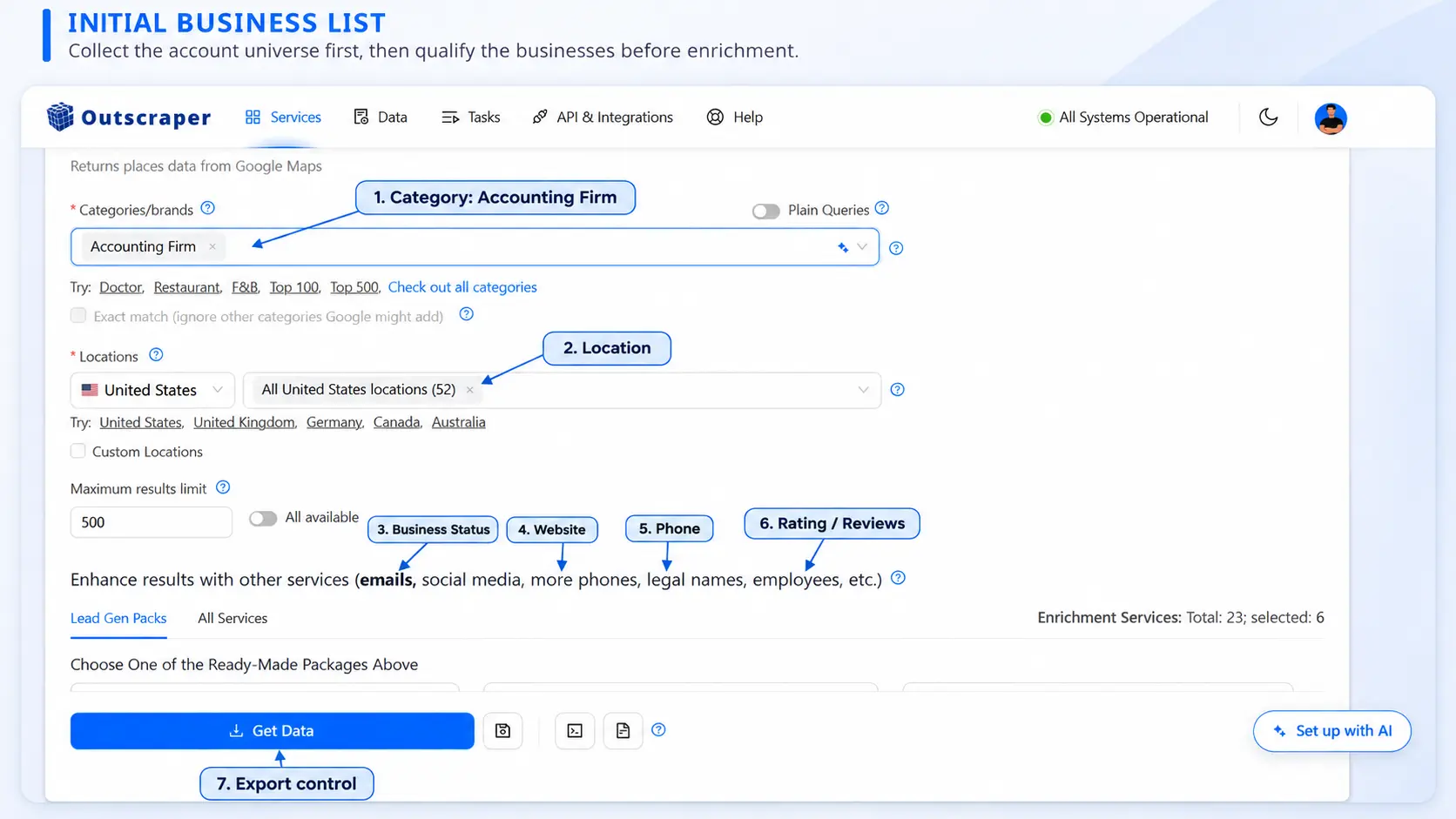
Build a Focused Google Maps Business List
Once the ICP is clear, build the initial account universe.
For the accounting-firm example, the search structure could include:
accounting firms in City A;
accounting firms in City B;
accounting firms in City C;
accounting firms in City D;
accounting firms in City E.
Outscraper can collect structured Google Maps business information including business identity, location, category, website, phone, ratings, reviews, identifiers, and other public business fields.
Useful starting fields include:
| Feld | Why keep it |
|---|---|
| Firmenname | Account identity |
| Place ID / Google ID | Location-level identification |
| Kategorie | ICP check |
| Geschäftsstatus | Helps remove inactive records |
| Adresse | Location context |
| City / ZIP | Territory assignment |
| Webseite | Account research |
| Telefon | Contact path |
| Bewertung | Public reputation context |
| Anzahl der Bewertungen | Public activity context |
| Google Maps URL | Source traceability |
| Collection date | Data freshness |
At this stage, call these Geschäftsunterlagen, not qualified leads.
Dieser Unterschied ist von Bedeutung.
A company appearing in the search only proves that it matched the collection criteria closely enough to be returned.
Qualification happens next.

Narrow the Account Universe Early
Use category, geography, business status, and other basic criteria to remove obvious non-fits before spending time on enrichment.
Qualify and Deduplicate Before Enrichment
This is where a raw business list starts becoming a prospect list.
Review each account against the campaign criteria.
Zum Beispiel:
| Signal | Question |
|---|---|
| Kategorie | Is this actually an accounting firm? |
| Geography | Is it inside the target territory? |
| Geschäftsstatus | Is the business operational? |
| Webseite | Is there enough information to research the account? |
| Telefon | Is there a public contact path? |
| Unternehmensinformationen | Is the profile credible enough to investigate? |
| Account structure | Is this an independent business or one branch of a larger organization? |
A high rating, missing website, or large review count can help prioritize research, but no single field proves that an account is worth contacting.
Use a simple review status
A practical workflow might use:
| Status | Meaning |
|---|---|
| Priority | Strong ICP fit; continue research/enrichment |
| Rezension | Possible fit; manual check needed |
| Remove | Outside the campaign criteria |
These are team-defined workflow labels, not automatic Outscraper scores.
Deduplicate true repeated locations
Consider:
| Unternehmen | Adresse | Ortskennung | Action |
|---|---|---|---|
| Sample Accounting | 10 Main St | ID-A | Behalten |
| Sample Accounting | 10 Main St | ID-A | Remove repeated row |
| Sample Accounting | 85 Market Rd | ID-B | Keep separate location |
Do not delete records simply because they share:
a company name;
website domain;
brand;
phone.
A chain or multi-location company can have multiple legitimate locations.
Use location-level identifiers and addresses to distinguish repeated records from valid branches.

Enrich Only the Accounts Worth Pursuing
After qualification, enrich the accounts the SDR team actually wants to investigate.
This order matters.
If you enrich the entire raw list first, you may spend time and budget researching:
irrelevant businesses;
duplicate locations;
inactive companies;
accounts outside the territory.
Outscraper provides optional enrichment capabilities that can add information such as:
public contact data;
additional phones;
social profiles;
company insights;
website information;
chain information;
email validation where selected.
The SDR team should decide which fields support the actual campaign.
Zum Beispiel:
| Bereicherung | SDR purpose |
|---|---|
| Public email | Additional contact path |
| Named contact where available | Account research |
| Additional phone | Calling research |
| Social profile | Company/contact context |
| Company insights | Account segmentation |
| Informationen zur Kette | Understand multi-location structure |
Keep discovery and verification separate
Finding an email is not the same as verifying it.
Likewise, finding a named public contact does not prove that person is:
the final decision-maker;
currently responsible for the problem you sell;
interested in your offer.
Use precise labels.
Good:
Public contact found
Email discovered
Email validated
Avoid:
Verified decision-maker
unless you have actually established that fact.

Add Contact Data After Qualification
Use enrichment after the account list has been narrowed to companies the SDR team actually wants to research.
Verify Contact Data and Preserve the Source
Before the enriched records reach the CRM, preserve where the data came from and what has actually been checked.
A practical SDR file should keep fields such as:
| Feld | Example |
|---|---|
| Business source | Google Maps |
| Collection date | 2026-11-05 |
| Enrichment date | 2026-11-05 |
| finance@example.com | |
| Email source | Company website |
| Email verification status | Valid / Invalid / other status |
| Verification date | 2026-11-05 |
| Qualification status | Priority |
| Review notes | Strong ICP fit |
Why keep these fields?
Because SDR data changes.
Without source and date information, a rep cannot easily tell whether:
a phone came from Google Maps;
an email came from a company website;
the address was checked later;
the contact data was enriched months after the original scrape.
Verification is a data-quality step
Email validation helps assess whether an address appears usable.
It does not guarantee:
delivery to the inbox;
a reply;
engagement;
buying intent;
compliance with outreach requirements.
Those are separate issues.
Verify Emails Before CRM Handoff
If email outreach is part of the SDR workflow, validate enriched email addresses rather than treating every discovered address as campaign-ready.
Prepare the CRM-Ready Prospect List
This is the point where the article’s title promise becomes concrete.
What “CRM-ready” means
A prospect is CRM-ready when:
the account matches the campaign’s qualification rules;
true duplicate place records have been removed;
legitimate branch locations are preserved where needed;
required company fields are consistently formatted;
useful contact data has been enriched;
outreach contact fields have been verified where appropriate;
data source and collection dates are preserved;
qualification and review statuses are included;
the CRM knows whether the record should be created, updated, reviewed, or excluded.
A large spreadsheet is not CRM-ready simply because it contains many columns.
The goal is to make each record understandable and actionable once it reaches the sales system.
Separate the fields into three groups
Company fields
Beispiele:
business name;
domain;
category;
address;
Place ID;
company insight;
chain status.
Contact fields
Beispiele:
contact name;
title;
email;
phone;
verification status.
Workflow fields
Beispiele:
lead source;
collection date;
enrichment date;
qualification status;
territory;
owner;
create/update action;
review notes.
A CRM-ready row might look like:
| Account | Domain | Ortskennung | Email status | Quelle | SDR status | CRM action |
|---|---|---|---|---|---|---|
| Sample Accounting | sample.example | ID-A | Valid | Google Maps | Priority | Create |
| Example CPAs | example.example | ID-B | — | Google Maps | Rezension | Hold |
| Existing Account | existing.example | ID-C | Valid | Google Maps refresh | Existing | Update |
Illustrative example only.
What an SDR should receive
When the account reaches the SDR queue, the rep should not need to decode the enrichment process.
A useful SDR view should contain:
| Feld | Why the SDR needs it |
|---|---|
| Company name | Identify the account immediately |
| Website/domain | Research the business |
| Standort | Understand territory and market context |
| Telefon | Calling path |
| Contact | Know who may be relevant to research |
| Email verification status | Understand whether the email was checked |
| Qualification status | See why the account was prioritized |
| Lead source | Know where the record originated |
| Collection/enrichment date | Judge data freshness |
| Review notes | See unresolved issues or research context |
| Owner | Know who is responsible for the account |
| CRM action/status | Understand whether the account is new, existing, or under review |
The SDR should see the result of the process, not every technical field produced during collection and enrichment.
Check for existing accounts before creating new ones
Do not assume every scraped business belongs in the CRM as a new company.
A business may already exist under:
a different spelling;
another branch;
an existing domain;
a previous prospect record;
a current customer account.
Define the CRM’s create/update rules before the import.
Place ID can help preserve the location relationship, but the CRM should still use its own unique identifiers and account model for existing records.
Run a small test import
Before importing thousands of records:
Select 20–50 approved accounts.
Map the fields.
Import the test batch.
Check account creation.
Check contact mapping.
Check duplicates.
Check source fields.
Check owner/routing rules.
Let SDRs review several records.
Fix the workflow before scaling.
That small QA step is often more useful than adding another enrichment field.

A Practical 14-Day SDR Rollout
The two-week structure is not a product-processing promise.
It is a sample implementation plan for an SDR or RevOps team building the workflow for the first time.
| Days | Focus |
|---|---|
| 1–2 | Define ICP, exclusion rules, and required fields |
| 3–4 | Collect the initial Google Maps account universe |
| 5 | Qualify records and remove true duplicates |
| 6–7 | Enrich Priority accounts |
| 8 | Verify contact data |
| 9–10 | Build CRM field mapping and create/update rules |
| 11 | Import a small test batch |
| 12 | SDR review and exception handling |
| 13 | Run a limited outbound test |
| 14 | Fix issues, document QA rules, and establish the repeatable process |
The timeline can be shorter or longer depending on:
CRM complexity;
account volume;
data-governance requirements;
team size;
enrichment depth.
The useful part is the sequence.
Collect first.
Qualify before enriching.
Verify before handoff.
Test before scaling.

A useful SDR prospecting workflow is not measured by how many businesses were scraped.
It is measured by whether the rep can understand:
why the account is in the list;
why it fits the campaign;
where the data came from;
what was enriched;
what was verified;
what still needs research.
Google Maps can provide the starting business universe. Outscraper can support collection and enrichment. The SDR and RevOps teams still own the qualification criteria, CRM logic, routing, and outreach decisions.
Häufig gestellte Fragen
Häufigste Fragen und Antworten
Start with a defined ICP, business category, and geography. Collect the matching business records, then qualify them using the campaign’s actual account criteria. Do not treat every Google Maps result as a sales-ready lead.
A qualified prospect should fit the target industry, geography, account type, and other campaign requirements. Public business signals can help prioritize research, but no single rating, review count, website field, or contact value proves buying intent.
No. Remove obvious non-fits and duplicate records first. Enrich the accounts that already meet the basic qualification criteria so enrichment spend and research time are focused on useful records.
Use location identifiers such as Place ID or Google ID first, then review address and company information. Do not remove businesses simply because two locations share the same brand name or domain.
Validate the contact data that will be used operationally, particularly email addresses intended for outreach. Keep discovery source and verification status as separate fields.
Normalize company and contact fields, preserve source and collection dates, add qualification and verification statuses, check existing accounts, define create/update rules, and test a small import before scaling.
Choose one industry and one market, collect a manageable business sample, and prove the qualification, enrichment, verification, and CRM handoff before scaling.