Inhoudsopgave

To enrich POI data with Google Maps, you need more than a business name, address, or location pin. Basic point of interest data can show where a place is, but it often does not give enough context to qualify, compare, or use that location for business decisions.

That missing context matters. According to BrightLocal’s 2026 Local Consumer Review Survey, 97% of consumers read reviews for local businesses, and the average consumer uses six different review sites when choosing a business.

For teams working with POI data, this shows why details like ratings, reviews, websites, and business profiles are not just extra fields. They are decision-making signals.

For lead generation, market research, local SEO, competitor analysis, and location intelligence, richer data helps turn a simple POI list into a more useful business dataset.

In this guide, you’ll learn what POI data is, what Google Maps data can add, and how Outscraper’s 2026 app workflow helps you enrich, clean, and export POI data for research, outreach, and business planning.

Quick Answer

To enrich POI data with Google Maps, start with basic location records such as business name, address, category, or coordinates. Then add useful Google Maps details like phone numbers, websites, ratings, reviews, business hours, photos, and location signals.

  1. Prepare your POI list or search for places by category and location.
  2. Use Outscraper Google Maps Scraper to collect and enrich business details.
  3. Export a cleaner dataset for research, outreach, local SEO, or location intelligence.

What is POI Data?

POI data can be obtained from various sources, including public records, business listings, and crowdsourced information. Public records can provide POI data from government databases, municipal directories, or public registers of businesses, landmarks, or other points of interest.

This information is typically free and available to the public. Business listings such as yellow pages, online directories, or social media platforms can also provide POI data.

These include more detailed information about businesses, such as their hours of operation, website, or ratings and reviews. Crowdsourced information can be collected from user-generated content or crowdsourcing platforms such as Foursquare or Google Maps.

These sources rely on user contributions to update and maintain the accuracy and relevance of the data, and may include user reviews, photos, or other relevant information.

It’s worth noting that different sources of POI data may have varying levels of accuracy, completeness, and timeliness. For this reason, POI enrichment is an important process. The more sources used to enrich POI data, the higher the accuracy, completeness, and timeliness will be.

Common POI Data Sources

POI data can come from several sources, and each source has a different level of freshness, accuracy, and detail.

Public records may include government databases, municipal directories, business registries, and public lists of landmarks, facilities, or licensed businesses. These sources can be useful for basic verification, but they may not always reflect recent changes such as new opening hours, updated websites, customer reviews, or business closures.

Online directories and map platforms are often more useful for active business research because they combine location data with public-facing business signals. For example, Google Maps can show whether a location has recent reviews, photos, ratings, profile updates, and other details that help users understand the business beyond its address.

Crowdsourced information can also improve POI records through user-submitted reviews, photos, edits, and local updates. However, the quality can vary depending on how often the information is reviewed, corrected, or refreshed.

Because no single source is perfect, POI enrichment helps fill the gaps. By combining basic location data with Google Maps details and other enrichment fields, teams can create a cleaner dataset that is easier to verify, filter, and use.

Want to Check Your Own POI Data?

Use Outscraper Google Maps Scraper to collect Google Maps details by category, location, or uploaded POI file.

Why Basic POI Data is Not Enough

A basic POI record can help you identify a place, but it often does not provide enough context to use that record for real business decisions. A business name, address, and category may tell you where a location exists, but they do not show whether the business is active, trusted by customers, easy to contact, or relevant to your target market.

For example, two restaurants in the same city may look similar in a basic dataset. But once you add ratings, review volume, business hours, website availability, phone numbers, photos, and profile activity, the difference becomes much clearer. One business may be active, well-reviewed, and easy to contact. Another may have outdated details, weak reviews, or missing contact information.

This is why enrichment matters. It helps turn basic POI records into useful business profiles that can be filtered, compared, and exported for lead generation, market research, local SEO, competitor analysis, and location planning.

What Google Maps Data Can Add to a POI Dataset

Google Maps can make a basic POI dataset more useful by adding business details that are not always available in public records or simple location lists. Instead of only working with a name, address, or coordinates, teams can use Google Maps data to understand how each business appears to customers and how useful that record may be for research, outreach, or analysis.

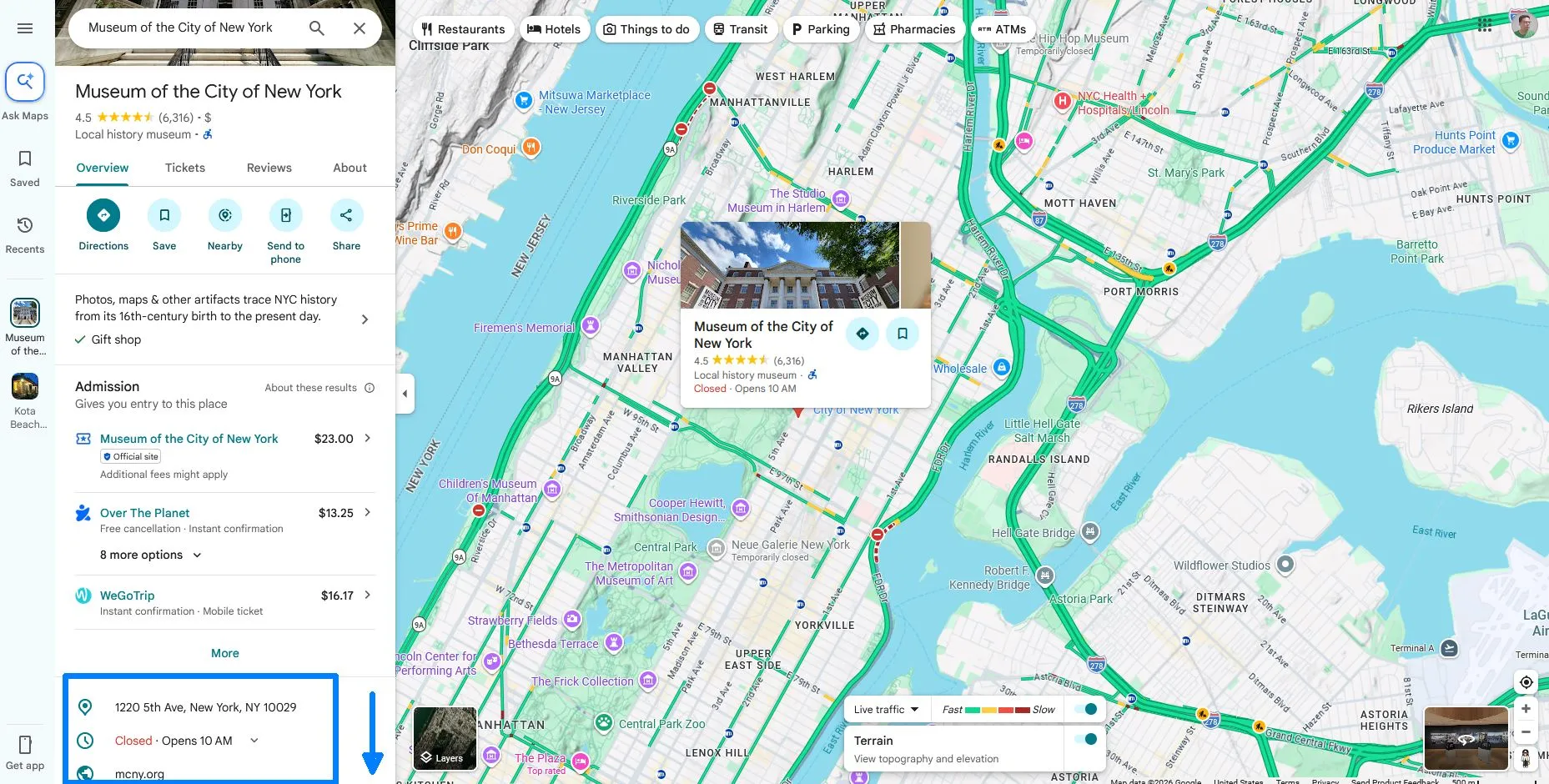
Google Maps business profile for the Museum of the City of New York showing POI data such as ratings, reviews, address, hours, photos, and website details.
A Google Maps business profile can show useful POI details such as ratings, reviews, address, hours, photos, website details, and other location signals.

A Google Maps-enriched POI record may include details such as:

  • Business name and full address
  • Business category and location type
  • Phone number and website
  • Opening hours
  • Ratings and review count
  • Customer reviews
  • Photos and profile details
  • Price range, amenities, and business attributes
  • Location coordinates and map links

Outscraper can collect standard Google Maps POI fields and organize them into a structured export. For teams that need more contact details, Outscraper’s Leads & Contacts Enrichment can add extra fields such as domain, email addresses, social profile links, additional phone numbers, website title, website description, and website metadata.

You can view the Google Maps Scraper data dictionary to see the available fields and enrichment options. 

These fields help turn raw POI records into more practical business profiles. For example, ratings and reviews can help compare customer trust. Websites and phone numbers can help with outreach. Categories and attributes can help segment businesses by market, service type, or location relevance.

This is especially useful when a team needs to filter a large dataset. A plain list of 1,000 locations may look useful at first, but without enrichment, it can be difficult to know which records are active, contactable, relevant, or worth prioritizing. Google Maps data adds the context needed to clean, compare, and qualify those records before exporting them into a spreadsheet, CRM, or research workflow.

How to Enrich POI Data with Google Maps Using Outscraper

Outscraper helps you enrich POI data with Google Maps by turning basic location records into structured business data. Instead of manually checking each place, copying details, and cleaning spreadsheets, you can use Outscraper to collect Google Maps details, add enrichment fields, and export the results in a cleaner format.

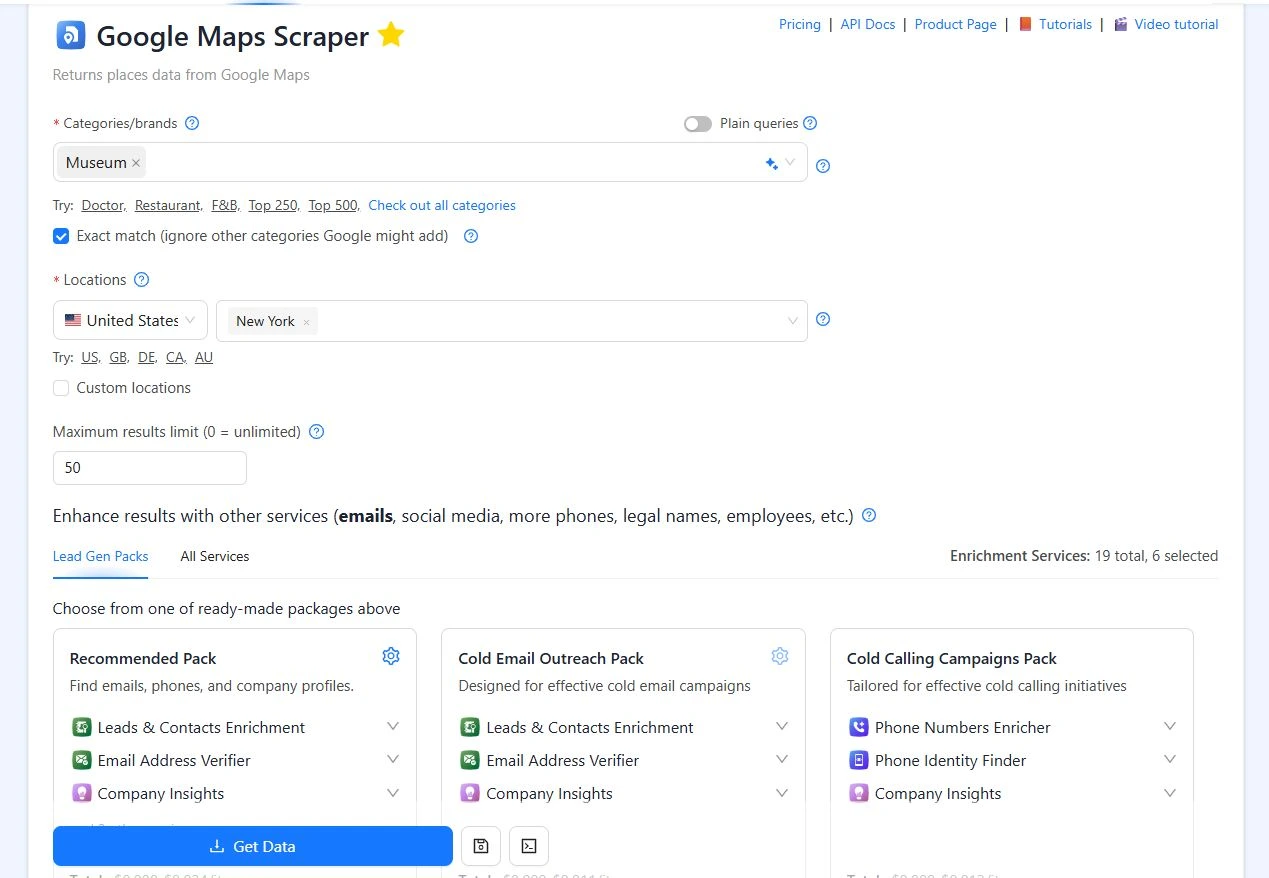
Outscraper Google Maps Scraper setup screen showing category, location, result limit, enrichment packs, and Get Data button for POI enrichment.
Outscraper’s Google Maps Scraper lets users choose a POI category, location, result limit, and enrichment pack before collecting data.

Some Google Maps details are visible when you open a business profile in a browser, such as the business name, address, rating, reviews, phone number, website, hours, and photos. Other useful fields are easier to collect at scale when they are extracted into a structured file. This is where Outscraper helps: it turns Google Maps business profiles into rows and columns that can be filtered, reviewed, and exported.

To enrich a POI dataset with Outscraper, follow this workflow:

  1. Start with your POI list or search criteria
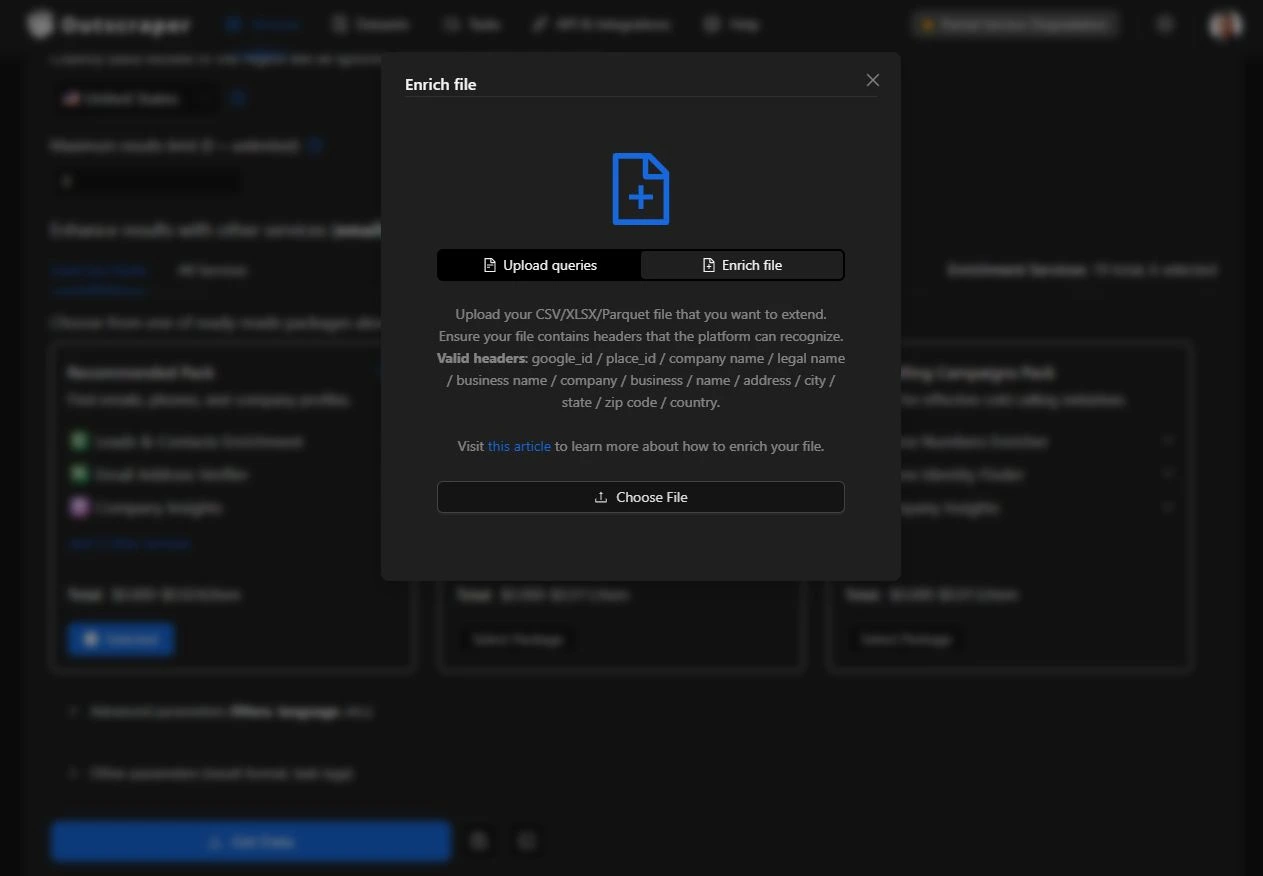
    You can search for places by category and location, or use Plain queries to enter Google Maps URLs, Google IDs, Place IDs, or location-based search queries. If you already have a POI list, click the upload file option and choose Enrich file.

    The Enrich file option supports CSV, XLSX, TXT, or Parquet files. To help Outscraper match your records with Google Maps data, make sure your file includes recognizable headers such as google_id, plaatsnaam, company name, business name, naam, address, stad, staat, zip codeof land.

    Outscraper then uses those fields as references to find and enrich the matching POI records. Check our tutorial on how to enrich companies data with Google Maps see the entire process of POI enrichment step-by-step.

    Outscraper Enrich file modal showing supported headers for uploading and enriching POI data with Google Maps.

    The Enrich file option lets users upload an existing POI list and match records using supported headers.

  2. Choose the Google Maps data you need
    Select the details that matter for your project, such as business names, addresses, phone numbers, websites, ratings, reviews, opening hours, categories, photos, coordinates, and map links.
  3. Add enrichment options when needed
    If your goal is outreach, research, or lead qualification, you can enrich the records further with additional business data such as websites, emails, contact details, company information, or other signals that help you understand each business better.
  4. Run the task and review the results
    Outscraper processes the data and returns structured results that are easier to filter, compare, and clean than a manual spreadsheet.
  5. Export the enriched POI dataset
    Once the task is complete, export the results and use them for lead generation, market research, local SEO, competitor analysis, territory planning, or business intelligence workflows.
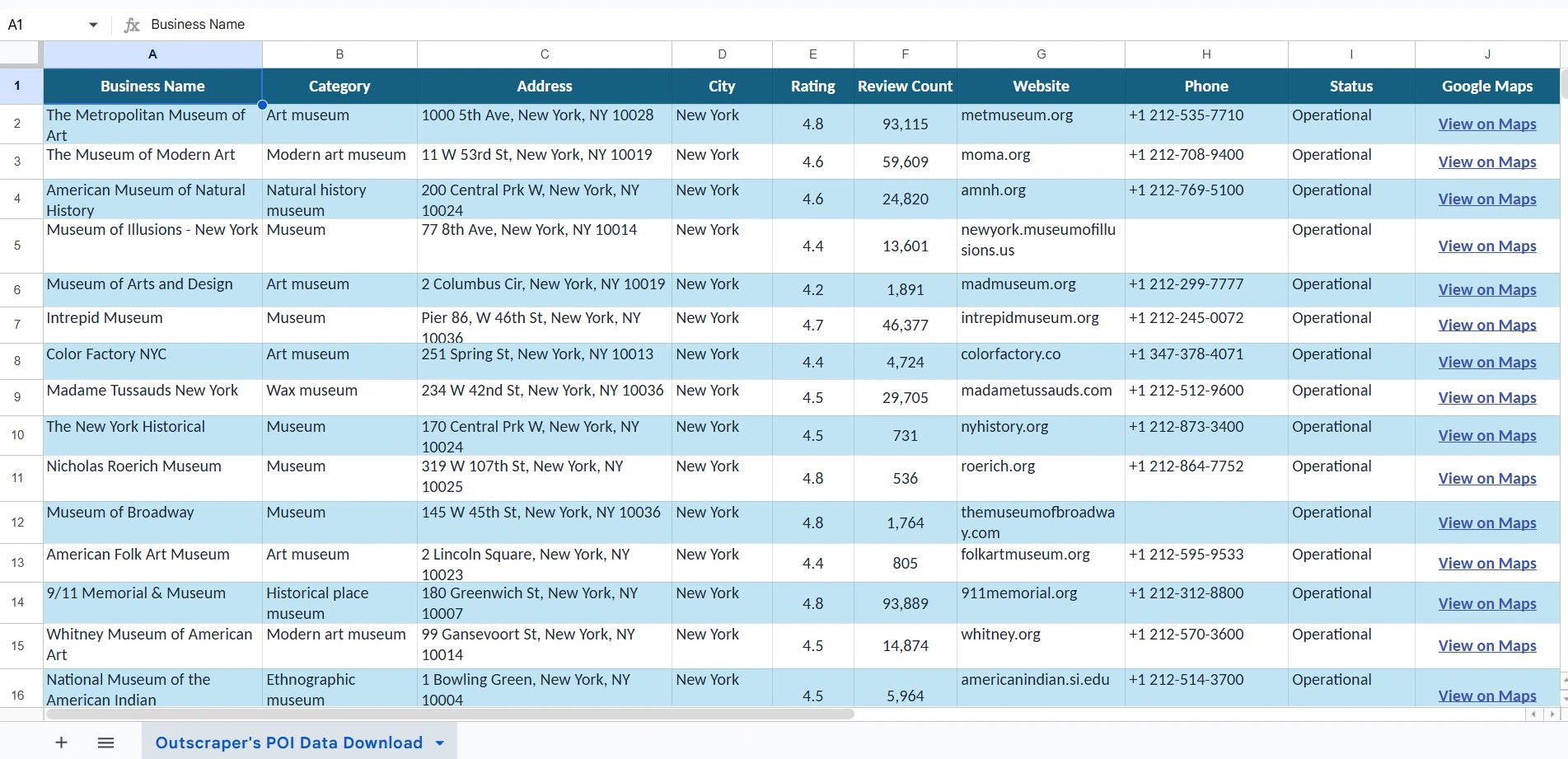
Sample XLSX export from Outscraper showing enriched POI data with business name, category, address, rating, reviews, website, phone, status, and Google Maps link.
Outscraper exports enriched POI data into a structured spreadsheet that can be filtered, reviewed, and used for research, outreach, or analysis.

This workflow helps teams move from basic POI records to a more useful dataset. Instead of only knowing where a business is located, you can understand whether it is active, relevant, contactable, and worth prioritizing for your next research or outreach process.

Use Cases for Enriched POI Data

Enriched POI data can support a wide range of business workflows. Once a dataset includes details like business categories, contact information, ratings, reviews, websites, and location signals, it becomes more useful for filtering, analysis, and decision-making.

  • Lead generation: identify relevant businesses, qualify records, and export cleaner prospect lists.
  • Market research: compare locations, categories, reviews, and business activity across markets.
  • Local SEO: analyze business visibility, profile completeness, and customer feedback.
  • Competitor analysis: review how similar businesses appear on Google Maps and compare public-facing signals.
  • Location intelligence: evaluate geographic coverage, business density, and territory opportunities.

Final Checklist: How to Enrich POI Data with Google Maps

Before exporting your dataset, make sure you have:

  1. A clear category, location, or existing POI file
  2. Fields that help you filter records, such as category, rating, reviews, website, phone number, business status, and Google Maps link
  3. Contact enrichment selected if you need emails, domains, social profiles, or extra phone numbers
  4. A clean export format such as XLSX or CSV
  5. A use case for the data, such as lead generation, local SEO, market research, competitor analysis, or location intelligence
Ready to Enrich POI Data with Google Maps?

Outscraper helps you turn basic location records into structured business data your team can filter, review, and export. Start with a category, location, or existing POI file, then collect Google Maps details and enrichment fields in one workflow.

FAQ

Meest voorkomende vragen en antwoorden

A point of interest, or POI, in Google Maps is a specific place that people may search for, visit, review, or use for directions. Examples include restaurants, hotels, clinics, stores, schools, museums, offices, and local service businesses.

Google Maps POI profiles can include details such as business name, address, category, phone number, website, ratings, reviews, photos, opening hours, and map location. Outscraper can help collect this data from Google Maps and export it into a structured file for research, outreach, analysis, or business planning.

POI data can come from business directories, public records, company websites, review platforms, local datasets, and Google Maps. The challenge is that many sources are incomplete, outdated, or difficult to use at scale.

A simple way to collect POI data is to start with a category and location, such as “restaurants in New York” or “dentists in Austin,” then use Outscraper to collect Google Maps business details and export the results into a spreadsheet. From there, you can filter the data by category, rating, review count, website, phone number, business status, or Google Maps link.

A POI dataset is a collection of records about real-world places. Each record usually represents one location, such as a business, landmark, branch, store, office, or public place.

A basic POI dataset may include names, addresses, categories, and coordinates. An enriched POI dataset can also include ratings, reviews, websites, phone numbers, business hours, photos, status, and Google Maps URLs. These added fields make the dataset more useful for lead generation, local SEO, competitor research, market research, directory building, and location intelligence.

You should enrich POI data with Google Maps when basic location records are not enough for your business goal. A name and address may show where a business is, but it does not show whether the business is active, well-reviewed, easy to contact, or useful for outreach or analysis.

Google Maps enrichment can add details such as ratings, review counts, websites, phone numbers, business hours, categories, and profile links. These fields help teams qualify businesses, compare local markets, find gaps, and work with cleaner data.

The best way to enrich POI data with Google Maps and Outscraper is to start with a clear search target. Choose the business category, location, and result limit first. Then collect the Google Maps fields you need, review the results, remove irrelevant records, and export the data into XLSX or CSV.

This gives your team a cleaner POI dataset that can be filtered, shared, uploaded to a CRM, used in reports, or reviewed for lead generation, market research, local SEO, competitor analysis, and location intelligence.


Yunus

Marketeer, Content Writer, Customer Experience Developer -... Facebook | Linkedin | Twitter

0 Opmerkingen

Een reactie achterlaten

Avatar plaatshouder